Abusing XSS Filter: One ^ leads to XSS(CVE-2016-3212)
 Published on mksben.l0.cm
The original lives on mksben.l0.cm
We do not hold its text, so we link to it rather than copy it. The other two tabs are our own rewrites, checked against it.
Context
This write-up is about CVE-2016-3212, a cross-site scripting issue that arises from the way Internet Explorer's XSS Filter handles a particular character. The researcher, Masato Kinugawa, shows how a single caret (^) in a URL can defeat the filter and let script execute.
The concrete target in the report is the javadoc frameset page that the Java documentation generator emits. That page is a static HTML document with a <script> block that reads window.location.search, validates it with a validURL function, and then loads the result into a frame. The page is designed to be viewed with frames and shows a "Frame Alert" message to clients that cannot render frames.
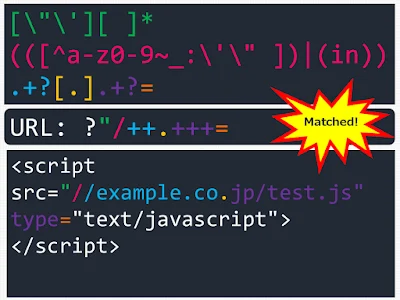
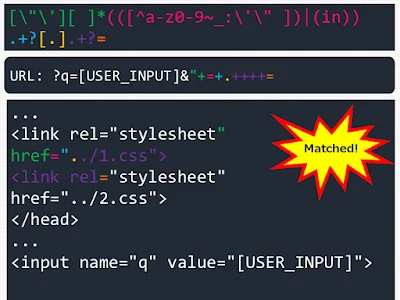
The relevant part of the page is the script that processes the query string:
<!DOCTYPE HTML PUBLIC "-//W3C//DTD HTML 4.01 Frameset//EN" "http://www.w3.org/TR/html4/frameset.dtd">
 <!-- NewPage -->
 <html lang="en">
 <head>
 <title>javadoc</title>
 <script type="text/javascript">
    targetPage = "" + window.location.search;
    if (targetPage != "" && targetPage != "undefined")
 targetPage = targetPage.substring(1);
 if (targetPage.indexOf(":") != -1 || (targetPage != "" && !validURL(targetPage)))
        targetPage = "undefined";
    function validURL(url) {
        try {
            url = decodeURIComponent(url);
        }
        catch (error) {
            return false;
        }
        var pos = url.indexOf(".html");
        if (pos == -1 || pos != url.length - 5)
            return false;
        var allowNumber = false;
        var allowSep = false;
        var seenDot = false;
        for (var i = 0; i < url.length - 5; i++) {
            var ch = url.charAt(i);
            if ('a' <= ch && ch <= 'z' ||
                    'A' <= ch && ch <= 'Z' ||
                    ch == '$' ||
                    ch == '_' ||
                    ch.charCodeAt(0) > 127) {
                allowNumber = true;
                allowSep = true;
            } else if ('0' <= ch && ch <= '9'
                    || ch == '-') {
                if (!allowNumber)
                     return false;
            } else if (ch == '/' || ch == '.') {
                if (!allowSep)
                    return false;
                allowNumber = false;
                allowSep = false;
                if (ch == '.')
                     seenDot = true;
                if (ch == '/' && seenDot)
                     return false;
            } else {
                return false;
            }
        }
        return true;
    }
    function loadFrames() {
        if (targetPage != "" && targetPage != "undefined")
             top.classFrame.location = top.targetPage;
    }
 </script>
 </head>
 <frameset cols="20%,80%" title="Documentation frame" onload="top.loadFrames()">
 <frameset rows="30%,70%" title="Left frames" onload="top.loadFrames()">
 <frame src="/" name="packageListFrame" title="All Packages">
 <frame src="/" name="packageFrame" title="All classes and interfaces (except non-static nested types)">
 </frameset>
 <frame src="/" name="classFrame" title="Package, class and interface descriptions" scrolling="yes">
 <noframes>
 <noscript>
 <div>JavaScript is disabled on your browser.</div>
 </noscript>
 <h2>Frame Alert</h2>
 <p>This document is designed to be viewed using the frames feature. If you see this message, you are using a non-frame-capable web client. Link to <a href="overview-summary.html">Non-frame version</a>.</p>
 </noframes>
 </frameset>
 </html>
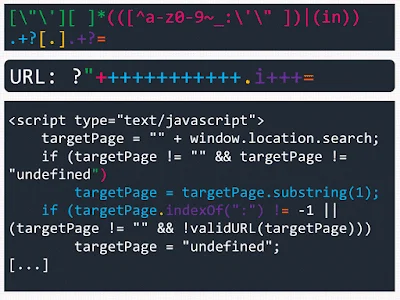
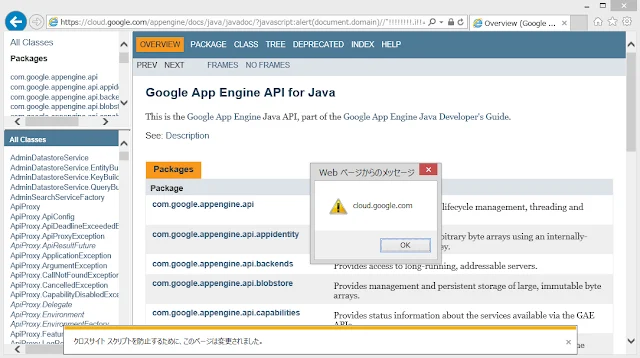
In short, the page takes the query string, strips the leading ?, rejects it if it contains a colon or fails validURL, and otherwise assigns it to top.classFrame.location. validURL decodes the value with decodeURIComponent, requires it to end in .html, and then walks every character before that suffix, allowing only letters, digits, $, _, characters above code point 127, -, / and ., with some ordering rules on numbers and separators.
Setup
The report does not describe any accounts, roles or tooling beyond the browser and the page itself. The precondition is a victim running Internet Explorer with the XSS Filter enabled who opens a crafted link to the javadoc frameset page.
Finding it
The researcher's starting point is the XSS Filter itself. The filter inspects requests and responses and neutralises reflected script. The question posed here is whether a character that the filter treats specially can be used to make the filter's own rewriting produce executable script.
The caret is the character of interest. In the URL, a ^ is a legal character that the filter may handle in a particular way, and the javadoc page's validURL check is strict about what it accepts. The gap between the two is what the write-up exploits.
Exploitation
Step 1: Understand what the page does with the query string
The page assigns window.location.search to targetPage, removes the first character (the ?), and then either rejects the value or passes it to top.classFrame.location. Because the value ends up as a frame location, any script that can be made to run in that frame's context is script execution in the origin of the javadoc page.
Step 2: Note the filter's treatment of the caret
The XSS Filter rewrites suspicious input. The researcher's observation is that a ^ in the URL interacts with the filter in a way that leads to script execution. The report's title, "One ^ leads to XSS", captures this: a single caret is enough.
Step 3: Deliver the crafted URL
The attacker sends the victim a link to the javadoc page with a query string containing the caret and the payload. When Internet Explorer requests the page, the XSS Filter processes the request and response, and the result is script execution in the page.
What it does establish is the chain: caret in the URL, filter rewrites it, validURL passes, top.classFrame.location is set, script runs.
Root cause
The root cause is that the XSS Filter's handling of the caret can be abused to produce script execution on this page. The page's validation is character-by-character and assumes the string it sees is the string the attacker sent; the filter sits in between and changes that string. Because the page trusts the post-filter value and assigns it to a frame location, the rewritten value becomes executable.
The existing defence, the XSS Filter, is the component being abused: it is designed to neutralise reflected script, yet the caret can be used against it. The report frames this as abusing the filter rather than bypassing a server-side check.
Impact
An attacker who can get a victim using Internet Explorer with the XSS Filter enabled to open a crafted link can execute script in the origin of the javadoc page. That allows script to run in the origin of the javadoc page. The attack requires user interaction (the victim must follow the link) and depends on the filter being active, since the filter's rewriting is what makes the payload work.
Fix
The report does not describe a patch.
Variants to test
- A positive result is a value that passes validation and reaches a script sink.
- A positive result is a page where a filter-rewritten query string becomes a frame URL.
- A positive result is a decoded payload that passes the check.
- A positive result is script execution triggered by the frame load rather than by the query string directly.
What happened, in plain words
A security researcher named Masato Kinugawa found a bug in Internet Explorer, Microsoft's old web browser. The bug has an official tracking number, CVE-2016-3212. The problem is a type of flaw called cross-site scripting, usually shortened to XSS. In an XSS attack, someone manages to make their own JavaScript code run inside a page that belongs to another website, as if the website itself had written that code.
The strange part of this story is where the flaw lives. Internet Explorer has a built-in safety feature called the XSS Filter. Its job is to spot script that a website is echoing back to the browser and to neutralise it. The researcher found that a single caret character, ^, in a web address could lead to script execution despite the filter. The title of the write-up says it plainly: one ^ leads to XSS.
The page used to demonstrate the bug is a javadoc frameset page. javadoc is a tool that comes with Java, a programming language. It reads comments in Java source code and generates a set of HTML pages that document the code. The generated pages use frames, an old HTML technique that splits the browser window into separate panes, each loading its own page. The page in question has a small script that reads part of the web address and loads it into one of those panes. That is the behaviour the researcher abuses.
The page and its script
Before looking at the attack, it helps to understand what the page does. The whole page is a static HTML file: it contains no server-side logic, just markup and a block of JavaScript that the browser runs. The relevant part is the script that processes the query string. The query string is the part of a web address after the ? sign, used to pass extra information to a page.
<!DOCTYPE HTML PUBLIC "-//W3C//DTD HTML 4.01 Frameset//EN" "http://www.w3.org/TR/html4/frameset.dtd">
 <!-- NewPage -->
 <html lang="en">
 <head>
 <title>javadoc</title>
 <script type="text/javascript">
    targetPage = "" + window.location.search;
    if (targetPage != "" && targetPage != "undefined")
 targetPage = targetPage.substring(1);
 if (targetPage.indexOf(":") != -1 || (targetPage != "" && !validURL(targetPage)))
        targetPage = "undefined";
    function validURL(url) {
        try {
            url = decodeURIComponent(url);
        }
        catch (error) {
            return false;
        }
        var pos = url.indexOf(".html");
        if (pos == -1 || pos != url.length - 5)
            return false;
        var allowNumber = false;
        var allowSep = false;
        var seenDot = false;
        for (var i = 0; i < url.length - 5; i++) {
            var ch = url.charAt(i);
            if ('a' <= ch && ch <= 'z' ||
                    'A' <= ch && ch <= 'Z' ||
                    ch == '$' ||
                    ch == '_' ||
                    ch.charCodeAt(0) > 127) {
                allowNumber = true;
                allowSep = true;
            } else if ('0' <= ch && ch <= '9'
                    || ch == '-') {
                if (!allowNumber)
                     return false;
            } else if (ch == '/' || ch == '.') {
                if (!allowSep)
                    return false;
                allowNumber = false;
                allowSep = false;
                if (ch == '.')
                     seenDot = true;
                if (ch == '/' && seenDot)
                     return false;
            } else {
                return false;
            }
        }
        return true;
    }
    function loadFrames() {
        if (targetPage != "" && targetPage != "undefined")
             top.classFrame.location = top.targetPage;
    }
 </script>
 </head>
 <frameset cols="20%,80%" title="Documentation frame" onload="top.loadFrames()">
 <frameset rows="30%,70%" title="Left frames" onload="top.loadFrames()">
 <frame src="/" name="packageListFrame" title="All Packages">
 <frame src="/" name="packageFrame" title="All classes and interfaces (except non-static nested types)">
 </frameset>
 <frame src="/" name="classFrame" title="Package, class and interface descriptions" scrolling="yes">
 <noframes>
 <noscript>
 <div>JavaScript is disabled on your browser.</div>
 </noscript>
 <h2>Frame Alert</h2>
 <p>This document is designed to be viewed using the frames feature. If you see this message, you are using a non-frame-capable web client. Link to <a href="overview-summary.html">Non-frame version</a>.</p>
 </noframes>
 </frameset>
 </html>
Here is what each part does, in plain words:
targetPage = "" + window.location.search;reads the query string from the address bar.window.location.searchis a built-in browser value that holds everything from the?onwards. Adding""in front turns it into a text string.if (targetPage != "" && targetPage != "undefined") targetPage = targetPage.substring(1);removes the first character, which is the?.substring(1)means "take the text from position 1 onwards", and positions start at 0.if (targetPage.indexOf(":") != -1 || (targetPage != "" && !validURL(targetPage))) targetPage = "undefined";is the safety check. If the value contains a colon (which could form part of a scheme likejavascript:) or fails thevalidURLtest, the value is replaced with the harmless wordundefined.function validURL(url) { ... }is the validator. It first tries to decode the value withdecodeURIComponent, which turns encoded sequences such as%41back into ordinary characters. If decoding fails, it returnsfalse.var pos = url.indexOf(".html"); if (pos == -1 || pos != url.length - 5) return false;requires the value to end in.html.indexOffinds where.htmlfirst appears, andurl.length - 5is the position where a five-character suffix would start.- The
forloop walks every character before the.htmlsuffix and checks it against an allowlist: letters, digits,$,_, characters above code point 127,-,/and.. The three flagsallowNumber,allowSepandseenDotenforce ordering rules, for example a digit may not come first and a/may not come after a.. function loadFrames() { ... }runs when a frame finishes loading. IftargetPageis set, it assigns it totop.classFrame.location, which tells the frame namedclassFrameto navigate to that address.- The
<frameset>elements split the window into panes and calltop.loadFrames()through theironloadhandlers. The<noframes>block is the fallback message shown to browsers that cannot display frames.
In short: the page takes the query string, strips the leading ?, rejects it if it contains a colon or fails validURL, and otherwise loads it into the classFrame pane.
Setup
The write-up does not describe any accounts, roles or special tools. The only precondition is that a victim uses Internet Explorer with the XSS Filter turned on and opens a crafted link to the javadoc frameset page. The XSS Filter is a browser feature, so it is present on the victim's machine, not on the server.
Finding it
The researcher started from the XSS Filter itself. The filter inspects the requests the browser sends and the responses it receives, and it tries to neutralise script that a site reflects back. The question the researcher asked was: can a character that the filter treats specially be used to make the filter's own rewriting produce executable script?
The caret, ^, is that character. In a URL it is a legal character, and the filter handles it in a particular way. The javadoc page's validURL check is strict about what it accepts. The gap between how the filter treats the caret and how the page validates its input is what the write-up exploits.
Exploitation
Step 1: Understand what the page does with the query string
The page assigns window.location.search to targetPage, removes the first character (the ?), and then either rejects the value or passes it to top.classFrame.location. Because the value ends up as a frame location, any script that can be made to run in that frame's context runs in the origin of the javadoc page. The origin is the combination of scheme, host and port that the browser uses to decide which pages may touch each other's data.
Step 2: Note the filter's treatment of the caret
The XSS Filter rewrites suspicious input. The researcher's observation is that a ^ in the URL interacts with the filter in a way that leads to script execution. The title, "One ^ leads to XSS", captures this: a single caret is enough.
Step 3: Deliver the crafted URL
The attacker sends the victim a link to the javadoc page with a query string containing the caret and the payload. When Internet Explorer requests the page, the XSS Filter processes the request and the response, and the result is script execution in the page.
What it does establish is the chain: caret in the URL, filter rewrites it, validURL passes, top.classFrame.location is set, script runs.
Root cause
The root cause is that the XSS Filter's handling of the caret can be abused to produce script execution on this page. The page's validation is character-by-character and assumes the string it sees is the string the attacker sent. The filter sits in between and changes that string. Because the page trusts the post-filter value and assigns it to a frame location, the rewritten value becomes executable.
The existing defence, the XSS Filter, is the component being abused. It is designed to neutralise reflected script, yet the caret can be used against it. The write-up frames this as abusing the filter rather than bypassing a server-side check.
Impact
An attacker who can get a victim using Internet Explorer with the XSS Filter enabled to open a crafted link can execute script in the origin of the javadoc page. That allows script to run in the origin of the javadoc page. A cookie is a small piece of data a site stores in the browser, often to remember who is logged in; the HttpOnly flag stops script from reading it. The DOM is the browser's in-memory model of the page, which script can read and change. The attack requires user interaction, because the victim must follow the link, and it depends on the filter being active, since the filter's rewriting is what makes the payload work.
Fix
The write-up does not describe a patch. Output encoding means converting characters that have special meaning in HTML into harmless equivalents before sending them to the browser. A Content Security Policy is a header a site sends to tell the browser which sources of script it may run.
Variants to test
- A positive result is a value that passes validation and reaches a script sink. A sink is any place where a value is used in a way that can execute code.
- A positive result is a page where a filter-rewritten query string becomes a frame URL.
- A positive result is a decoded payload that passes the check.
- A positive result is script execution triggered by the frame load rather than by the query string directly.
Glossary
- XSS (cross-site scripting): a flaw where an attacker's JavaScript runs inside another site's page, as if the site had written it.
- XSS Filter: an Internet Explorer feature that inspects requests and responses and tries to neutralise reflected script.
- CVE-2016-3212: the public tracking number assigned to this particular vulnerability.
- Caret (
^): the^character, the one whose handling by the filter is central to this bug. - javadoc: a Java tool that generates HTML documentation pages from source code comments.
- Frameset / frame: an old HTML technique that splits the browser window into panes, each loading its own page.
- Query string: the part of a URL after the
?, used to pass extra information to a page. window.location.search: a browser value holding the query string of the current page.substring(1): a string operation that returns the text from position 1 onwards, dropping the first character.decodeURIComponent: a JavaScript function that turns percent-encoded sequences such as%41back into ordinary characters.- Allowlist: a list of characters or values that are permitted, with everything else rejected.
onload: an event that fires when a page or frame has finished loading.- Origin: the combination of scheme, host and port that decides which pages may access each other's data.
- Cookie: a small piece of data a site stores in the browser, often to remember a logged-in user.
- HttpOnly: a cookie flag that stops JavaScript from reading the cookie.
- DOM: the browser's in-memory model of a page, which script can read and change.
- Sink: a place in code where a value is used in a way that can execute code.
- Output encoding: converting characters with special meaning in HTML into harmless equivalents before sending them to the browser.
- Content Security Policy: a header a site sends to tell the browser which sources of script it may run.
- Parser: a piece of software that reads text and decides what it means; two parsers can read the same text differently.





