Account Takeover via Access Token Leakage
The application used a static access token in a custom header for authenticated actions, and this token leaked in the Referer header when a user added an image from a third-party URL to an email template. An attacker who controlled such a third-party site could read the token from their logs and take over the victim's account.
 Published on tuhin1729.medium.com
Hello guys! My name is Tuhin Bose (@tuhin1729).
The full write-up lives on its author's site
It belongs to its author, so we link to it rather than copy it. The other two tabs are our own rewrites, checked against it.
My name is Tuhin Bose (@tuhin1729). I am a cyber security researcher and bug bounty hunter. In this write-up, I am going to share one of my interesting findings. So without wasting time, let's start:
Context
The target was a marketing automation website where you can automate your marketing stuffs efficiently. Let's call it target.com. The researcher had already found more than 10 bugs on the target and earned $$$$ from there.
The feature involved in the finding is the profile update feature, which lets an authenticated user change their account's general information. The request that performs this update is sent to a services host and carries the account's details in a JSON body.
Setup
The researcher tested the profile update feature using a second account of their own. A Burp Collaborator link was used later to observe an outbound request. The access token value in the captured request is non-guessable, and the researcher notes that it stays the same even after logout.
Finding it
While testing the profile update feature, the researcher came across this request:
PUT /api/account/general-info/ HTTP/1.1Host: services.target.comUser-Agent: Mozilla/5.0 (Windows NT 10.0; Win64; x64; rv:91.0) Gecko/20100101 Firefox/91.0Accept: application/json, text/plain, */*Accept-Language: en-US,en;q=0.5Accept-Encoding: gzip, deflateReferer: https://bo.target.com/Content-Type: application/jsonaccessToken: [redacted]-Length: 213Origin: https://bo.target.comDNT: 1Connection: closeSec-Fetch-Dest: emptySec-Fetch-Mode: corsSec-Fetch-Site: cross-site{"company":"DSPH","domain":"https://darksocietypenetration.com","cellphone":"+91-83xxxxxx36","companySize":"2","businessSector":20,"logo":{"height":0,"base64":"","square":true,"width":0}}
The request is a PUT to /api/account/general-info/ on services.target.com, with a JSON content type and a body holding company, domain, cellphone, company size, business sector and logo fields. What stood out is the accessToken header: the application uses this header for changing the profile details, while for other authenticated actions there is no such header.
Exploitation
Step 1: Swap the token for a second account
The researcher quickly changed the value of the accessToken header to that of their 2nd account, and the 2nd account's details were changed. This showed that changing the accessToken header value changed the 2nd account's details.
Step 2: Add the header to other authenticated requests
The researcher then tried to add the accessToken header to other authenticated requests. It got successful and the 2nd account's details were changed there as well.
Step 3: Check whether the token survives logout
While doing more research on this, the researcher discovered that the value of accessToken is static, that is, the accessToken is the same even after logout. That means, if somehow the researcher could get the accessToken of a victim, they would be able to take over the victim's complete account. But the value of the accessToken header is non-guessable, so the next problem was to find a way to get a victim's accessToken. At that time the researcher was unable to do so, and after 3 to 4 days of hunting they forgot about it and started hunting on other functionalities.
Step 4: Look at the email template image feature
In the website, under email marketing, there is a section where users can make their own email templates. While testing that feature, the researcher tried to upload an image file in the email. There are 2 ways to do so: either from the device or via an image URL. The researcher tried some DoS, SSRF, XSS and file upload tricks, but it seems that they have a strong file type validation. Also they are fetching the image from the client side, so SSRF is not possible. Then the researcher tried using a Burp Collaborator link to see the request, and noticed an interesting thing:
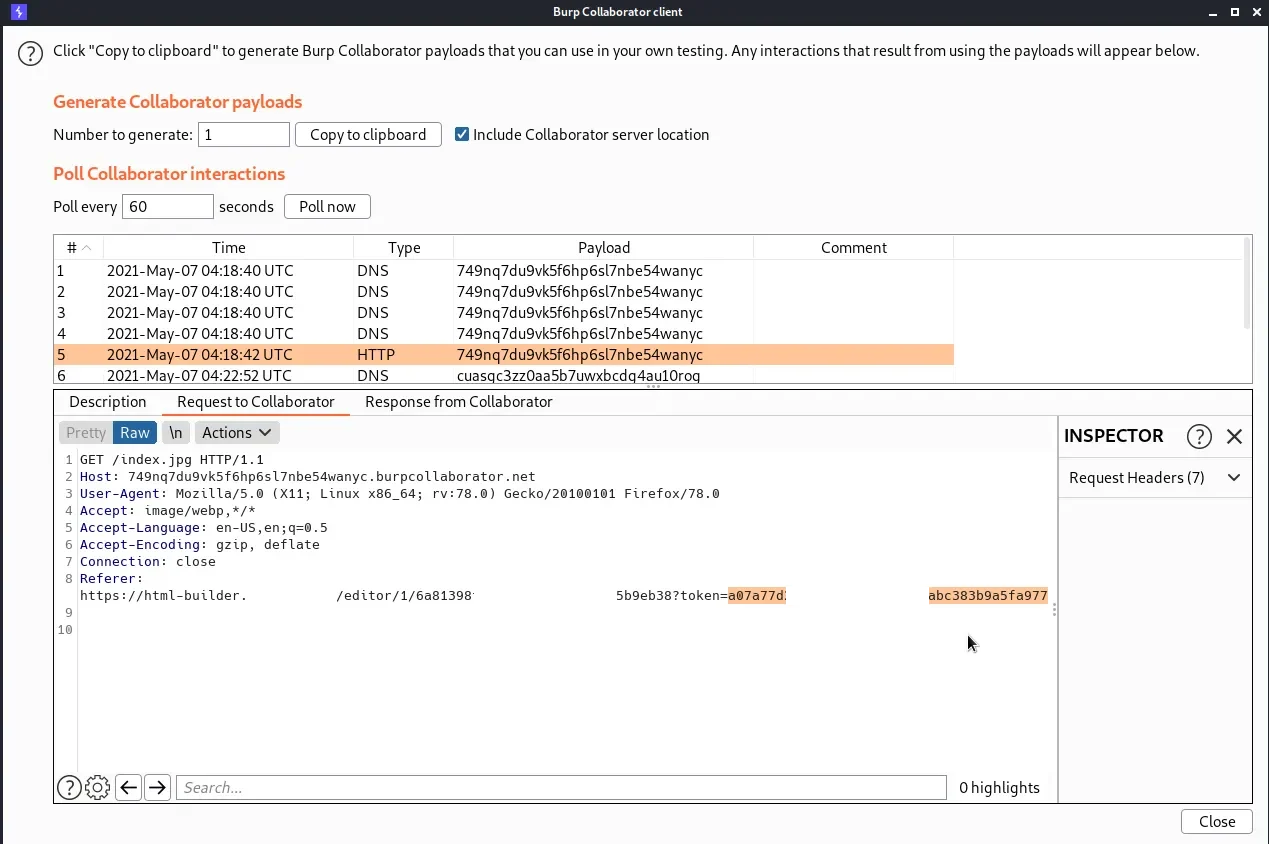
Then the accessToken is getting leaked in the Referrer header via the token parameter.
Step 5: Work out the attacking scenario
So what would be the attacking scenario?
- Victim is creating a manual template.
- Victim adds an image to his template from a 3rd party website.
- The 3rd party website owner (or employees) gets the victim's access token (from their logs) and can able to takeover their complete account.
Step 6: Report with a POC
The researcher quickly made a POC and sent it to the vendor. After one week, they replied:
Timeline
06/05/21: Reported Vulnerability
14/05/21: Replied with the bounty email
Root cause
The profile update endpoint trusts an accessToken header as the identity of the account being modified, instead of binding the change to the authenticated session. Because the token is static and is the same even after logout, anyone who obtains it can act on the account. The leak comes from the email template image feature: when an image is added via an image URL, the browser fetches it and the accessToken ends up in the Referrer header via the token parameter, so the third-party site serving the image receives it in its logs. The file type validation and the client-side fetching blocked the SSRF and upload tricks the researcher tried, but they did not stop the token from travelling in the referrer.
Impact
If a victim adds an image to a manual template from a third-party website, the owner of that website (or its employees) gets the victim's access token from their logs and can take over the victim's complete account. The token is non-guessable, so the attack depends on the victim loading an image from a site the attacker controls or can read logs from. The researcher's own testing showed that the token can be used to change another account's details, including through other authenticated requests.
Fix
The report does not say what the vendor changed.
Variants to test
- Look for custom auth headers (such as
accessToken) on profile or settings endpoints and swap the value for a second account's value. A positive result is the second account's details changing. - Add the same header to other authenticated requests and check whether the second account's data changes there too.
- Log out and replay the token. A positive result is the token still working after logout.
- Use the email template image-by-URL feature with a Collaborator or attacker-controlled host and inspect the incoming request for tokens in the
Referrerheader ortokenparameter. A positive result is the token appearing in the request to the third-party host. - Try the same image-by-URL flow in other places where users can embed remote content (signatures, landing pages, previews) and check the referrer for secrets.
What happened, in plain words
A security researcher was testing a website that helps companies run marketing campaigns automatically. Think of it as a tool where you build emails, manage contacts and send campaigns, all from one dashboard. The researcher had already found more than ten bugs on this site and been paid for them, so they knew it well.
While changing their own profile details, they noticed something odd. The request that saves profile changes carried a special value in a header called accessToken. A header is a small piece of extra information sent alongside a request or response. This particular header acted like a key: whoever held it could change the account it belonged to.
The researcher swapped that key for the key of a second account they owned, and the second account's details changed. Worse, the key never changed, even after logging out. So anyone who got hold of it could use it, even after logout.
The key was long and random, so guessing it was hopeless. The researcher needed a way to make a victim's key travel somewhere the researcher could read it. Days later, while testing a different feature, they found it: when you add an image to an email template by pasting an image URL, your browser fetches that image, and the key ends up in a header called Referrer that the browser sends to the image's host. The owner of that host sees the key in their server logs.
That is the whole story: a key that stays the same after logout, trusted from a header, and leaked to a third-party website a victim loads an image from. The researcher built a proof of concept and reported it.
The target and the feature
The target was a marketing automation website, which the researcher calls target.com throughout. Marketing automation means software that handles repetitive marketing tasks for you: sending welcome emails, scheduling campaigns, tracking who opened what. Users log in and work inside a dashboard.
The feature involved is the profile update feature. Every account has general information attached to it: company name, website domain, phone number, company size, business sector and a logo. The profile update feature is the screen where a logged-in user edits those details and saves them.
When you press save on a screen like that, your browser does not reload the page. It sends a request in the background to the website's programming interface, usually called an API. An API is the part of a website that accepts instructions and data rather than returning a web page: think of a restaurant. The web page is the dining room you sit in, and the API is the kitchen door where orders go in and dishes come out. The request carries your new details in a format called JSON, which is just a way of writing data as labelled pairs, like a very tidy shopping list.
The request that started it
While testing the profile update feature, the researcher captured the request the browser sends when saving profile details. Capturing means watching the traffic between browser and server, usually with a tool called Burp Suite, which sits between the two like a recording device on a phone line. Here is the request:
PUT /api/account/general-info/ HTTP/1.1Host: services.target.comUser-Agent: Mozilla/5.0 (Windows NT 10.0; Win64; x64; rv:91.0) Gecko/20100101 Firefox/91.0Accept: application/json, text/plain, */*Accept-Language: en-US,en;q=0.5Accept-Encoding: gzip, deflateReferer: https://bo.target.com/Content-Type: application/jsonaccessToken: [redacted]-Length: 213Origin: https://bo.target.comDNT: 1Connection: closeSec-Fetch-Dest: emptySec-Fetch-Mode: corsSec-Fetch-Site: cross-site{"company":"DSPH","domain":"https://darksocietypenetration.com","cellphone":"+91-83xxxxxx36","companySize":"2","businessSector":20,"logo":{"height":0,"base64":"","square":true,"width":0}}
Line by line, in plain words:
PUT /api/account/general-info/ HTTP/1.1is the first line of the request.PUTis the method, the verb that tells the server what kind of action this is;PUTgenerally means "replace or update this thing"./api/account/general-info/is the address of the API endpoint, the specific door in the kitchen that handles general account information.HTTP/1.1is the version of the language being spoken.Host: services.target.comsays which server the request is for. Notice it is aservicessubdomain, a separate machine from the main site, which is common: the main site serves pages, the services host runs the API.User-Agent: Mozilla/5.0 ... Firefox/91.0identifies the browser and operating system that sent the request. Servers use it for statistics and compatibility.Accept: application/json, text/plain, */*tells the server which response formats the browser can handle, preferring JSON.Accept-Language: en-US,en;q=0.5says the browser prefers English, with a weighting value of 0.5 for plainen.Accept-Encoding: gzip, deflatesays the browser can accept compressed responses to save bandwidth.Referer: https://bo.target.com/tells the server which page the request came from. Thebosubdomain is the dashboard the user was on. Browsers add this automatically, and it becomes important later.Content-Type: application/jsonsays the body of the request is JSON.accessToken: [redacted]is the interesting one. This is a custom header carrying a token. A token is a long random string that acts as proof of identity, like a cloakroom ticket: show the ticket, get the coat, no need to explain who you are. The value here is partly masked with Xs in the write-up, but the researcher notes it is non-guessable, meaning it is long and random enough that trying values one by one would take far too long.Content-Length: 213says the body is 213 bytes long.Origin: https://bo.target.comtells the server which site the request originated from, used by browsers for cross-site security checks.DNT: 1is the Do Not Track preference.Connection: closeasks the server to close the connection after this response.Sec-Fetch-Dest: empty,Sec-Fetch-Mode: cors,Sec-Fetch-Site: cross-siteare modern browser hints describing the context of the request: it is a background API call, subject to cross-origin rules, and considered cross-site.- The final line is the body:
{"company":"DSPH","domain":"https://darksocietypenetration.com","cellphone":"+91-83xxxxxx36","companySize":"2","businessSector":20,"logo":{"height":0,"base64":"","square":true,"width":0}}. This is the JSON with the new profile values: company name, website, phone number, company size, business sector number, and a logo object with height, an empty base64 image string, a square flag and width. Base64 is a way of writing binary data such as an image as plain text.
What stood out to the researcher is the accessToken header. The application uses this header specifically for changing profile details, while for other authenticated actions there is no such header. Authenticated means "you must be logged in"; most actions on a dashboard are authenticated, and normally the proof of login travels in a cookie or a standard header. Here, the profile update had its own private key in a custom header.
Testing with a second account
To test safely, the researcher used a second account of their own. This is standard practice in bug bounty work, which is the arrangement where companies invite researchers to test their systems and pay for confirmed problems. Testing on your own accounts means no real user is affected.
Step 1: Swap the token for the second account
The researcher changed the value of the accessToken header to that of their second account. The second account's details were changed. This is the key observation: changing the accessToken header value changed the second account's details.
This kind of flaw, where the server accepts an identifier from the client and acts on it without checking that the client is allowed to use it, is often called an IDOR, short for Insecure Direct Object Reference. The everyday comparison: a hotel receptionist who hands over any room key to anyone who reads out a room number, without checking whether that person is the guest.
Step 2: Add the header to other authenticated requests
The researcher then tried adding the accessToken header to other authenticated requests. It worked there too, and the second account's details were changed through those requests as well. So the problem was not limited to the profile endpoint: the header worked on other authenticated requests too.
Step 3: Check whether the token survives logout
While doing more research, the researcher discovered that the value of accessToken is static: it is the same even after logout. Normally, logging out should invalidate your proof of identity, like handing back the cloakroom ticket so it cannot be reused. Here the ticket kept working. That means if the researcher could get a victim's accessToken, they would be able to take over the victim's complete account.
But the value is non-guessable, so the next problem was finding a way to get a victim's accessToken. At that time the researcher could not, and after three or four days of hunting they forgot about it and moved on to other features. This is worth noting for anyone learning: a finding can sit half-finished for days until a second, unrelated observation completes it.
Finding the leak
In the website, under email marketing, there is a section where users can make their own email templates. A template is a reusable design for an email: header, text, images, buttons, which you fill with content and send to many people. While testing that feature, the researcher tried to upload an image file into the email. There are two ways to add an image: from your own device, or by pasting an image URL so the site fetches the picture from elsewhere on the internet.
The researcher tried several common attacks on that image feature:
- DoS, denial of service, attempts to make the server do so much work it becomes unavailable.
- SSRF, server-side request forgery, where you trick the server into making requests on your behalf, for example to internal systems you cannot reach directly.
- XSS, cross-site scripting, where you get your own code to run in another user's browser.
- File upload tricks, attempts to sneak a harmful file past the checks that decide what kind of file is allowed.
None of these worked. The site had strong file type validation, meaning it checked carefully what kind of file was being uploaded. And it fetched the image from the client side, meaning the user's own browser made the request to the image URL rather than the server doing it, so SSRF was not possible.
Then the researcher tried a Burp Collaborator link. Burp Collaborator is a service that gives you a unique web address you control, and it records every request that arrives at it. It is like putting a marked envelope in the post and watching your own letterbox to see who delivers what. By using a Collaborator link as the image URL, the researcher could see exactly what request the browser made when fetching the image. And there was something interesting:
The accessToken was leaking in the Referrer header via the token parameter. In plain words: when the browser fetched the image from the third-party address, it automatically attached a Referer header saying which page the request came from. That page address contained the token as a parameter, a value appended to a URL after a question mark, like ?token=.... So the token travelled, inside a URL, to whatever website hosted the image. The owner of that website sees it in their logs, the records servers keep of every request they receive.
This is why the earlier Referer: https://bo.target.com/ line in the profile request matters: browsers routinely tell servers where a request came from, and anything secret placed in a URL can ride along in that header.
The attacking scenario
The researcher then set out the scenario in which a real attacker would use this:
- Victim is creating a manual template.
- Victim adds an image to his template from a 3rd party website.
- The 3rd party website owner (or employees) gets the victim's access token (from their logs) and can able to takeover their complete account.
In other words, the attacker does not need to break any encryption or guess anything. They only need the victim to load an image from a site the attacker controls or can read logs from. The victim does something completely ordinary, adding a picture to an email, and the key to their account arrives in the attacker's server logs. Because the token survives logout, the attacker can use it whenever they like.
Reporting and response
The researcher quickly made a POC, a proof of concept: a small, repeatable demonstration that the problem is real, usually with screenshots or a short recording. They sent it to the vendor, the company that runs the website. After one week, the vendor replied:
Timeline
06/05/21: Reported Vulnerability
14/05/21: Replied with the bounty email
So the report went in on 6 May 2021 and the vendor replied with the bounty email on 14 May 2021. A bounty is the payment a company makes for a valid security report.
Why it worked
Three separate weaknesses combined into one serious problem:
- The profile update endpoint trusted an
accessTokenheader as the identity of the account being modified, instead of binding the change to the authenticated session. The server should have asked "is the logged-in user allowed to edit this account?", not "which token was supplied?". - The token was static and was the same even after logout, so a stolen token stayed valid.
- The email template image feature put the token into a URL, and the browser then sent that URL to a third-party host in the
Refererheader. The file type validation and the client-side fetching blocked the SSRF and upload tricks the researcher tried, but they did nothing to stop the token travelling in the referrer.
What the impact was
If a victim adds an image to a manual template from a third-party website, the owner of that website, or its employees, gets the victim's access token from their logs and can take over the victim's complete account. The token is non-guessable, so the attack depends on the victim loading an image from a site the attacker controls or can read logs from. The researcher's own testing showed the token can be used to change another account's details, including through other authenticated requests.
What the report says about the fix
The report does not say what the vendor changed.
Things to try on other sites
These are the checks the researcher's work suggests, written so a beginner can follow them with a browser and a traffic capture tool:
- Look for custom auth headers, such as
accessToken, on profile or settings endpoints, and swap the value for a second account's value. A positive result is the second account's details changing. - Add the same header to other authenticated requests and check whether the second account's data changes there too.
- Log out and replay the token. A positive result is the token still working after logout.
- Use the email template image-by-URL feature with a Collaborator or attacker-controlled host, and inspect the incoming request for tokens in the
Refererheader ortokenparameter. A positive result is the token appearing in the request to the third-party host. - Try the same image-by-URL flow in other places where users can embed remote content, such as signatures, landing pages and previews, and check the referrer for secrets.
Glossary
- API: the part of a website that accepts instructions and data from programs, rather than returning web pages to people.
- Authenticated: requiring proof that you are logged in before an action is allowed.
- Base64: a way of writing binary data such as images as plain text characters.
- Body: the part of a request that carries the actual data, here the JSON with profile details.
- Bounty: a payment a company makes to a researcher for a valid security report.
- Burp Collaborator: a service that gives you a unique address and records every request that reaches it, used to observe outbound requests.
- Burp Suite: a tool that sits between browser and server so you can capture, inspect and modify requests.
- Cookie: a small piece of data a browser stores for a site and sends back automatically, often used to keep you logged in.
- DoS (denial of service): an attack that tries to make a service unavailable by overwhelming it.
- Endpoint: a specific address on a server that performs a specific action, such as
/api/account/general-info/. - Header: extra information sent alongside a request or response, such as the browser type or a token.
- HTTP: the language browsers and servers use to exchange requests and responses.
- IDOR (Insecure Direct Object Reference): a flaw where a server accepts an identifier from the client and acts on it without checking the client is allowed to use it.
- JSON: a text format for writing data as labelled pairs, widely used between browsers and APIs.
- Method: the verb in an HTTP request, such as
PUTfor update orGETfor retrieve. - Non-guessable: random and long enough that trying values one by one is impractical.
- POC (proof of concept): a small, repeatable demonstration that a security problem is real.
- Referer header: a header browsers add automatically saying which page a request came from.
- Rotate: replace a token with a new value and invalidate the old one.
- Session: the server's memory of which user a browser is logged in as, usually kept alive by a cookie.
- SSRF (server-side request forgery): tricking a server into making requests on your behalf, for example to internal systems.
- Static token: a token whose value never changes, even across logins and logouts.
- Template: a reusable email design that you fill with content and send to many recipients.
- Token: a long random string that acts as proof of identity, like a cloakroom ticket.
- URL parameter: a value appended to a web address after a question mark, such as
?token=.... - Vendor: the company that runs the website being tested.
- XSS (cross-site scripting): getting your own code to run in another user's browser.