Again? Subdomain takeover via ideanote.io
A subdomain of a redacted domain pointed via CNAME to a custom domain service (ideanote.io) that no longer had the corresponding custom domain configured, allowing an attacker to claim it. The attacker could then serve content on the subdomain, as demonstrated by a successful takeover.

Exploiting subdomain takeover Ideanote, Ideanote is a new way to work with ideas. It’s faster, more efficient, and lets you build a fully customizable idea management flow from start to finish.
The full write-up lives on its author's site
It belongs to its author, so we link to it rather than copy it. The other two tabs are our own rewrites, checked against it.
Context
Ideanote is a product for working with ideas: the author describes it as a faster, more efficient way to build a fully customisable idea management flow from start to finish. Like many SaaS products, it lets customers attach their own domain to a workspace, and it does this by asking the customer to point a DNS record at a hostname owned by the service. In Ideanote's case that hostname is custom-domain.ideanote.io.
That arrangement is the classic precondition for subdomain takeover. When a customer stops using the custom domain, or never finishes setting it up, the DNS record pointing at custom-domain.ideanote.io can be left behind. The report shows that a domain name can be entered through the workspace menu, and that the service accepts a domain the customer does not control.

The author had covered the general mechanism before, in a post about a large-scale subdomain takeover hunt, and refers readers there for the background on why CNAME-based integrations are prone to this.
Setup
The only tool named in the report is httpx, used to probe a prepared list of targets. No versions are given. The researcher worked from a target list of subdomains and used httpx output to spot which of them resolved to the Ideanote custom-domain hostname.
On the Ideanote side, the precondition is an account: the custom domain feature is reached from the workspace menu after signing up, and the report walks through that flow to show how a domain is attached.
Finding it
The researcher prepared a list of subdomains and looked for any whose CNAME was custom-domain.ideanote.io. The httpx run returned several hosts that matched, each with a 200 status and a page title of interest:
root@kresec:~https://ideas.redacted.com [200] [9950] [Ideas] [custom-domain.ideanote.io]https://ideas.redacted.co [200] [9330] [Ideanote] [custom-domain.ideanote.io]https://ideate.redacted.to [200] [10296] [Redacted ****] [custom-domain.ideanote.io]
Each line carries the URL, the status code, the content length, the page title and the CNAME httpx observed. The titles differ, which matters: a host can point at the Ideanote hostname and still be serving something else, so the CNAME alone is not proof of a takeover.
A direct DNS lookup confirmed the record shape for one of the candidates:
root@kresec:~vuln.redacted.com. 0 IN CNAME custom-domain.ideanote.io.
Vulnerable identification
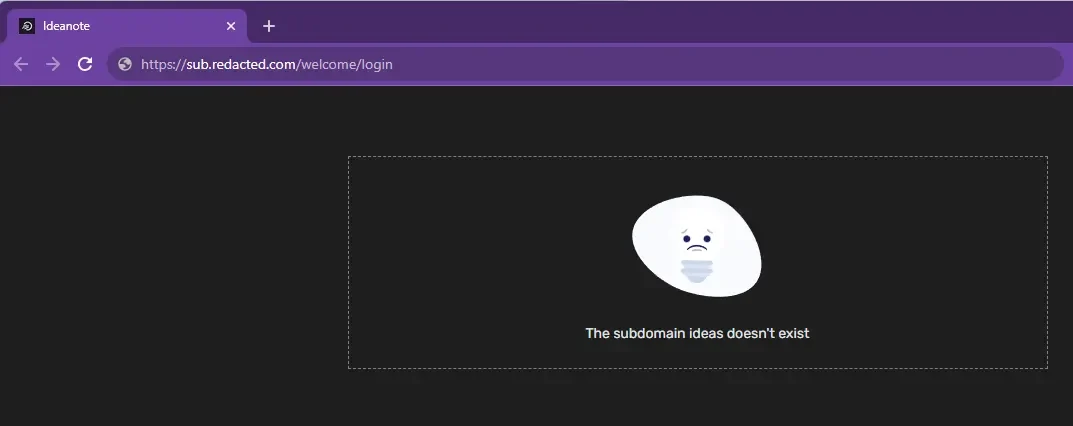
To separate real candidates from false positives, the researcher compared what each host actually returned and settled on a set of conditions that identify a genuinely vulnerable one:
- Title:
Ideanote - Body: the subdomain
ideasdoes not exist - Status code:
200 - Connected to this CNAME:
custom-domain.ideanote.io
The researcher settled on these conditions to identify a genuinely vulnerable host. The DNS record is dangling, and the 200 response is the service's own "not found" page rather than a working site. A host whose title is something else, as in the other two lines of the httpx output, is not in that state.
Exploitation
Step 1: Create an account and reach the workspace
After signing up, the user is directed to a subdomain under the root domain of ideanote. From there, the workspace menu holds the section for entering a custom domain.
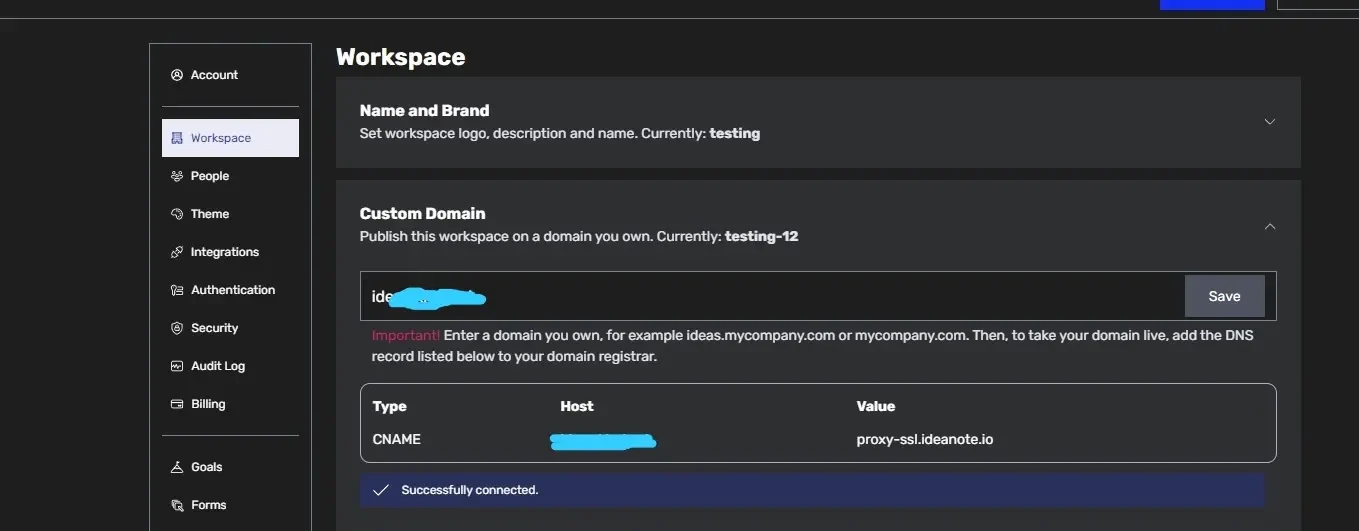
Step 2: Enter the dangling domain
The same menu also allows changing the title, description and similar workspace settings.
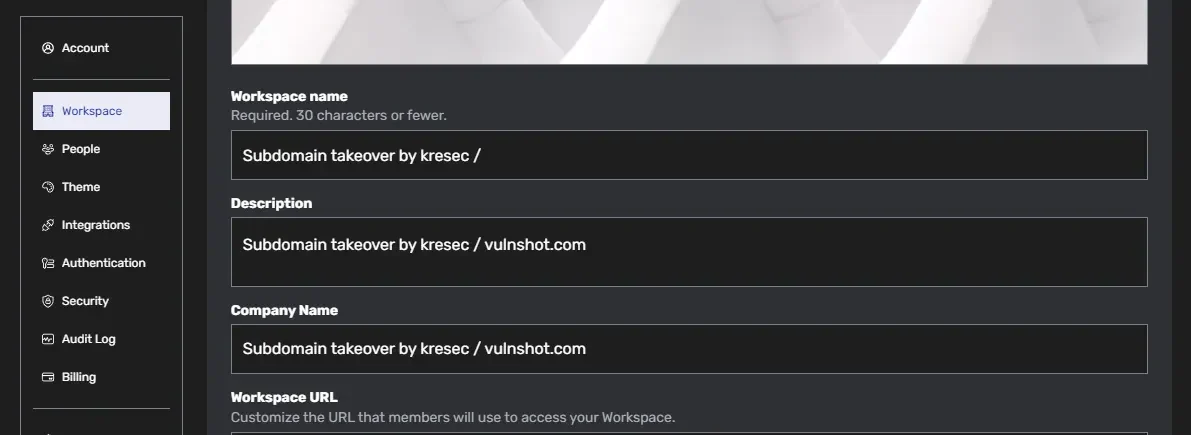
The report does not show the exact form fields or the request the browser sends when the domain is submitted. What it shows is that the domain name is supplied by the customer through this menu.
Step 3: Confirm the takeover
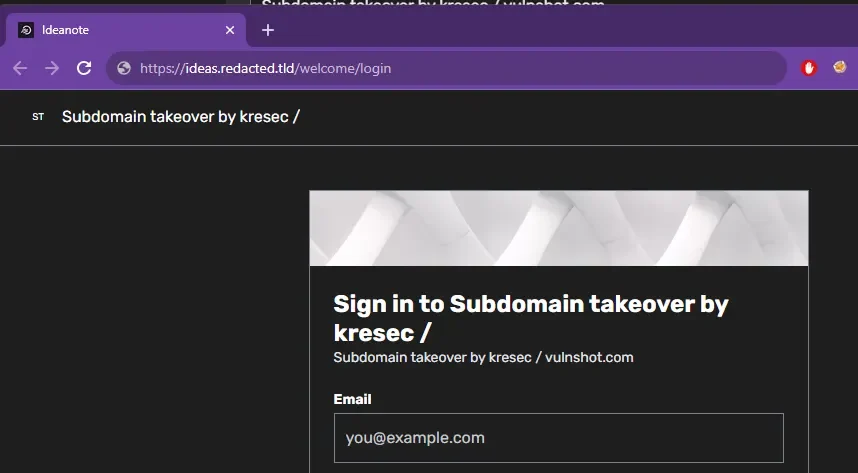
The report presents an image of the subdomain after a successful takeover. The report presents the result as the final state of a successful takeover.
Root cause
The design flaw is that the custom domain is bound to a workspace on the strength of the customer typing the name into the workspace menu, without verifying that the person adding it controls the domain. The DNS record still points at custom-domain.ideanote.io, and the domain can be claimed from a new workspace. The previous owner's dangling CNAME does the rest.
The report does not describe any server-side check that was bypassed, so the exact validation logic is not documented here.
Impact
The subdomain is taken over, as shown in the report's final image. The report does not enumerate further consequences, and the practical reach depends on who still uses the affected hostname and what the hostname is trusted for.
Fix
The measure that addresses the root cause is ownership verification before a custom domain is activated: require a DNS TXT record containing a value issued by the service, or a file at a known path on the domain, and refuse to bind the hostname until that check passes. Alongside that, the service should reject a domain that is already claimed by another workspace, and should release the binding when a workspace is deleted so that stale records cannot be re-claimed silently.
Variants to test
- Sweep a target list for CNAMEs pointing at a SaaS custom-domain hostname, as here, and keep only hosts whose response matches the service's own "not found" page. A positive result is a 200 with the service's error content and the expected title.
- Check the other hosts in the same httpx output that share the CNAME but show a different title. A positive result is one of them later flipping to the service's not-found page, which means the record has become dangling.
- Try claiming a hostname that is already bound to another workspace. A positive result is the service accepting the claim without an ownership check, or returning an error that reveals the existing binding.
- After a workspace is deleted, re-add its custom domain from a fresh account. A positive result is the domain being accepted and serving the new workspace.
- Test whether verification, if present, can be skipped by adding the domain and never completing the check. A positive result is the hostname serving the new workspace before verification succeeds.
What happened, in plain words
A security researcher found that a feature in a product called Ideanote could be abused to take over web addresses that belonged to other people. Ideanote is a service for collecting and managing ideas: the author describes it as a faster, more efficient way to build a fully customisable idea management flow from start to finish. Like many online services, Ideanote lets a customer attach their own domain name to their workspace, so that visitors reach the customer's space through an address the customer owns.
To make that work, the customer has to change a setting in the internet's address book (DNS) so that their domain name points at a hostname owned by Ideanote. In Ideanote's case that hostname is custom-domain.ideanote.io. The problem is what happens when a customer later stops using the service, or never finishes setting it up: the pointer in the address book can be left behind, still aimed at Ideanote. The researcher showed that a domain name can be entered through the workspace menu and the subdomain taken over.
The author had written about this general mechanism before, in a post about a large-scale hunt for the same kind of flaw, and points readers there for the background on why these pointer-based integrations are prone to it.
The idea you need first: what a subdomain takeover is
Every website lives at an address, and addresses are made of parts separated by dots. In www.example.com, the com part is the top-level domain, example.com is the domain, and www.example.com is a subdomain of it. A company can create as many subdomains as it likes: shop.example.com, blog.example.com, help.example.com.
A CNAME record is a line in DNS that says "this name is really just another name for that name". Think of it like a mail forwarding note on your door: letters addressed to you get sent on to a new address. The CNAME is the forwarding note; the name it points at is where the letters actually go.
Now the dangerous case. Suppose a company points help.example.com at a service it uses, then later cancels that service but forgets to remove the forwarding note. The note still sends visitors to the service, but the service no longer has anything set up for that name. If the service lets anyone create a new space and claim that name, the newcomer receives all the visitors who follow the old link. That is a subdomain takeover: someone else takes control of a name that other people still trust because it used to belong to the original owner.
Setting up
The only tool named in the report is httpx, used to probe a prepared list of targets. No versions are given. The researcher worked from a list of subdomains and used the httpx output to spot which of them pointed at the Ideanote custom-domain hostname.
httpx is a command-line program that takes a list of web addresses and fetches each one, then prints a short summary line for every address: whether it answered, with what status code, how large the page was, what the page title is, and which CNAME the address resolved through. It is like sending a postcard to every address on a list and writing down what comes back.
On the Ideanote side, the precondition is an account: the custom domain feature is reached from the workspace menu after signing up, and the report walks through that flow to show how a domain is attached.
Finding it
The researcher prepared a list of subdomains and looked for any whose CNAME was custom-domain.ideanote.io. The httpx run returned several hosts that matched, each with a 200 status and a page title of interest:
root@kresec:~https://ideas.redacted.com [200] [9950] [Ideas] [custom-domain.ideanote.io]https://ideas.redacted.co [200] [9330] [Ideanote] [custom-domain.ideanote.io]https://ideate.redacted.to [200] [10296] [Redacted ****] [custom-domain.ideanote.io]
Line by line, in plain words:
root@kresec:~is the command prompt: the userrooton a machine calledkresec, sitting in the home directory. It is not part of the result; it just shows where the command was typed.https://ideas.redacted.com [200] [9950] [Ideas] [custom-domain.ideanote.io]is one result line. The address ishttps://ideas.redacted.com.[200]is the status code, the number a web server sends back to say "here is the page, all fine".[9950]is the size of the page in bytes.[Ideas]is the page title, the text shown in the browser tab.[custom-domain.ideanote.io]is the CNAME, the forwarding note this address resolves through.- The second line is the same shape for
https://ideas.redacted.co, with status200, size9330, titleIdeanote, and the same CNAME. - The third line is the same shape for
https://ideate.redacted.to, with status200, size10296, a title the report masks asRedacted ****, and the same CNAME.
The titles differ, and that matters. A host can point at the Ideanote hostname and still be serving something else, so the CNAME alone is not proof of a takeover. The researcher needed a second signal.
A direct DNS lookup confirmed the record shape for one of the candidates:
root@kresec:~vuln.redacted.com. 0 IN CNAME custom-domain.ideanote.io.
Reading this line: vuln.redacted.com. is the name being looked up. 0 is a field in the lookup output. IN means the record belongs to the internet class of records. CNAME is the record type, the forwarding note. custom-domain.ideanote.io. is the name the note forwards to. In everyday terms: "anything asking for vuln.redacted.com should be sent to custom-domain.ideanote.io".
Vulnerable identification
To separate real candidates from false positives, the researcher compared what each host actually returned and settled on a set of conditions that identify a genuinely vulnerable one:
- Title:
Ideanote - Body: the subdomain
ideasdoes not exist - Status code:
200 - Connected to this CNAME:
custom-domain.ideanote.io
The reasoning is that a host which still resolves to the service but whose content says the requested subdomain does not exist is a host the service no longer has a workspace for. The DNS record is dangling, and the 200 response is the service's own "not found" page rather than a working site. A host whose title is something else, as in the other two lines of the httpx output, is not in that state.
Why does a "not found" page come back with status 200? Status 200 normally means success. Some services return their error page with a success code anyway, so the page content, not the number, tells you what really happened. The title Ideanote plus the message that the subdomain does not exist is the fingerprint of a name the service has forgotten about.
Exploitation
Step 1: Create an account and reach the workspace
After signing up, the user is directed to a subdomain under the root domain of ideanote. From there, the workspace menu holds the section for entering a custom domain.
A workspace is the private area inside the service where a customer's ideas and settings live. The custom domain setting is the part of that area where you tell the service "my visitors will arrive through this address of mine".
Step 2: Enter the dangling domain
The same menu also allows changing the title, description and similar workspace settings.
The report does not show the exact form fields or the request the browser sends when the domain is submitted. What it shows is that the domain name is supplied by the customer through this menu. In other words, the service takes the customer's word for it: type in a name, and the service starts treating incoming visitors for that name as yours.
Step 3: Confirm the takeover
The report presents an image of the subdomain after a successful takeover. The report presents the result as the final state of a successful takeover.
Root cause
The design flaw is that the custom domain is bound to a workspace on the strength of the customer typing the name into the workspace menu, without verifying that the person adding it controls the domain. The DNS record still points at custom-domain.ideanote.io, and the domain can be claimed from a new workspace. The previous owner's dangling CNAME does the rest.
A DNS TXT record is a free-text note in the address book that a service can ask you to add; if the note appears, the service knows you control the domain. A file check works the same way: the service asks you to place a file at a known address on your site, then fetches it. Neither check is described as present here. The report does not describe any server-side check that was bypassed, so the exact validation logic is not documented.
Impact
The subdomain is taken over, as shown in the report's final image. The report does not enumerate further consequences, and the practical reach depends on who still uses the affected hostname and what the hostname is trusted for.
Fix
The measure that addresses the root cause is ownership verification before a custom domain is activated: require a DNS TXT record containing a value issued by the service, or a file at a known path on the domain, and refuse to bind the hostname until that check passes. Alongside that, the service should reject a domain that is already claimed by another workspace, and should release the binding when a workspace is deleted so that stale records cannot be re-claimed silently.
Variants to test
- Sweep a target list for CNAMEs pointing at a SaaS custom-domain hostname, as here, and keep only hosts whose response matches the service's own "not found" page. A positive result is a 200 with the service's error content and the expected title.
- Check the other hosts in the same httpx output that share the CNAME but show a different title. A positive result is one of them later flipping to the service's not-found page, which means the record has become dangling.
- Try claiming a hostname that is already bound to another workspace. A positive result is the service accepting the claim without an ownership check, or returning an error that reveals the existing binding.
- After a workspace is deleted, re-add its custom domain from a fresh account. A positive result is the domain being accepted and serving the new workspace.
- Test whether verification, if present, can be skipped by adding the domain and never completing the check. A positive result is the hostname serving the new workspace before verification succeeds.
Glossary
- CNAME record: a line in DNS saying one name is an alias for another; like a mail forwarding note.
- Custom domain: a customer's own domain name attached to a service's workspace, so visitors reach the workspace through the customer's address.
- DNS: the internet's address book, which maps names people type to the servers that answer for them.
- DNS TXT record: a free-text note stored in DNS, often used by services to prove that whoever added it controls the domain.
- Domain: the main part of a web address, such as
example.com. - Dangling record: a DNS record that still points at a service which no longer has anything set up for that name.
- httpx: a command-line tool that fetches a list of web addresses and prints a summary line for each, including status code, page size, title and CNAME.
- SaaS: software as a service; a product run by a company and used over the internet rather than installed locally.
- Status code: the number a web server returns with a response; 200 usually means success.
- Subdomain: a name built under a domain, such as
help.example.comunderexample.com. - Subdomain takeover: taking control of a subdomain whose DNS record still points at a service that no longer serves it, by claiming that name inside the service.
- Workspace: the private area inside a service where a customer's content and settings live.
- Ownership verification: a check that the person claiming a domain really controls it, usually via a DNS TXT record or a file on the domain.



