An attempt to escalate a low-impact hidden input XSS
A GET parameter was reflected into the value attribute of a hidden input without quotes, allowing an attacker to inject extra HTML attributes. The author could only trigger the resulting XSS in Firefox by adding an accesskey and onclick attribute, which required the victim to press a specific key combination.
 Published on officialaimm.medium.com
A few months ago when I was hacking on one of the websites, I came across a page where one of the get parameters was reflected into the value-attribute without quotes enclosing it(any angle brackets in the payload was sanitized though).
The full write-up lives on its author's site
It belongs to its author, so we link to it rather than copy it. The other two tabs are our own rewrites, checked against it.
Context
While testing one of the websites he was working on, Ayush Ojha (@officialaimm) found a page where a GET parameter was reflected into the value attribute of an input tag without quotes around it. Angle brackets in the payload were sanitised, but nothing else was. That makes the page open to arbitrary HTML attribute injection, because adding whitespace is enough to start a new attribute. The catch was that the input tag receiving the injection was hidden, which turns a straightforward reflected XSS into a much weaker bug. The report is an account of how far that low-impact bug could be pushed. The researcher received only thanks for the original finding, which he calls understandable given the low impact.
Because of disclosure policies, the vulnerability was recreated on a new website for the write-up rather than shown on the original target:
- Vulnerable site:
https://hiddeninputxss.bunch777.repl.co - Exploit/attacker's site:
https://hiddeninputxssattacker.bunch777.repl.co
Setup
No accounts, roles or special tooling are described. The preconditions that matter are properties of the vulnerable page and the browser:
- A GET parameter is reflected unquoted into a
valueattribute of a hidden input. - Angle brackets are stripped or encoded, so no new tags can be introduced, only new attributes.
- The user-interaction step relies on the
accesskeyfeature, which the report describes as leading to XSS in Firefox. - The vulnerable site's response carries no
X-Frame-Optionsheader, which later allows the page to be framed.
Finding it
On the page in question, a GET parameter landed inside the value attribute with no quotes around it. Any angle brackets in the payload were sanitised, so the reflection could not break out of the tag, but whitespace was untouched. Injecting a space therefore let the attacker add arbitrary attributes to the input element.
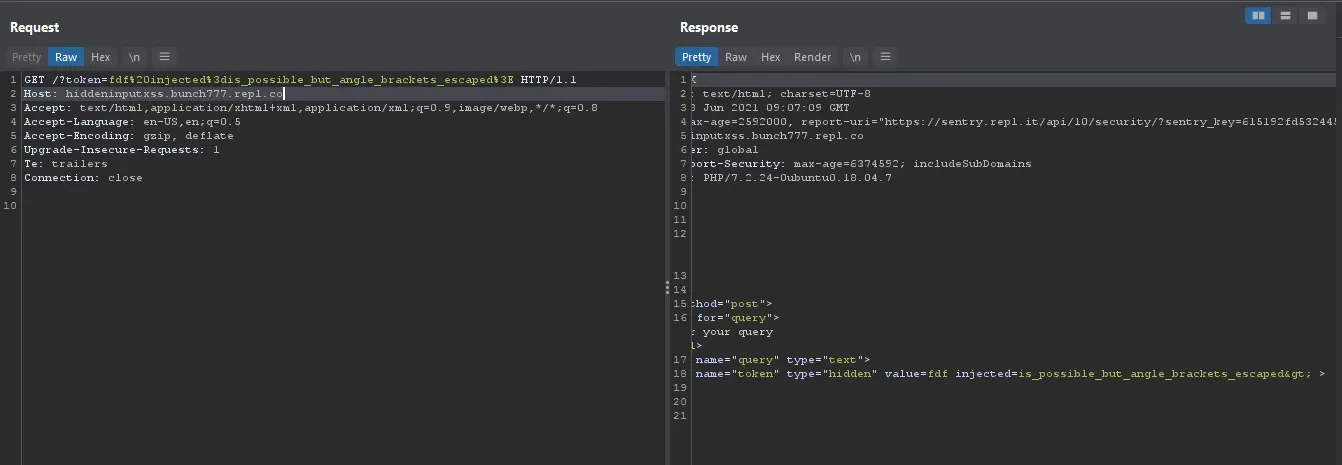
The screenshot shows the attribute injection on the hidden input, with angle brackets sanitised.
The obstacle is that the input is type="hidden". The usual way to trigger XSS through attribute injection is to use JavaScript event handlers such as onload or onfocus, but a hidden input gives the user almost no way to fire those events. The researcher points to Gareth Heyes' PortSwigger article on XSS in hidden input fields for background on this class of bug.
Exploitation
Step 1: fire the XSS with an accesskey in Firefox
Gareth's article describes how the accesskey feature can lead to XSS in Firefox, at the cost of requiring user interaction. The malicious URL used here was:
https://hiddeninputxss.bunch777.repl.co/?[redacted]
The token parameter carries fdf, then a URL-encoded space (%20), then accesskey=a and onclick=alert(document.domain), both URL-encoded. Because the value is reflected without quotes, the space ends the value attribute and the remaining text becomes two new attributes on the input. The corresponding reflection was:
<input name="token" type="hidden" value="fdf" accesskey="a" onclick="alert(document.domain)">
The XSS fires when the user presses ALT+SHIFT+A, which activates the access key bound to the hidden input and runs the onclick handler.
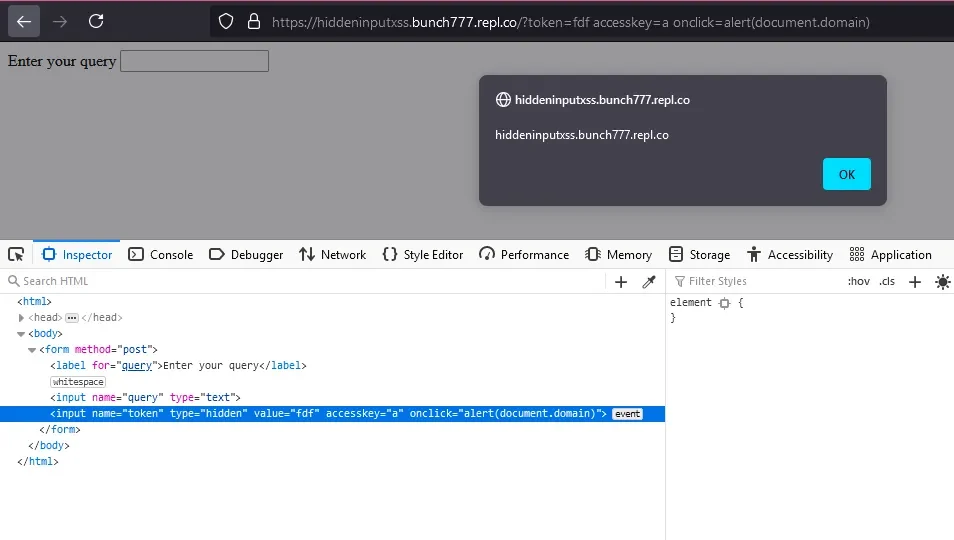
The screenshot shows the XSS firing when the victim presses ALT+SHIFT+A.
This works, but the researcher rates its exploitability as close to zero: the victim would first have to visit the malicious link and then press ALT+SHIFT+A for no reason.
Step 2: look for a no-interaction variant
Searching for a way to get XSS without user interaction in this situation led to Masato Kinugawa's article on exactly that topic. That no-interaction technique, however, only worked in IE10 and IE11, which the researcher does not consider modern browsers. Masato hinted that he had a Firefox variant and would cover it in upcoming articles, but the researcher could not find that article.
Step 3: escalate by framing the vulnerable page
With no-interaction XSS apparently out of reach, the researcher noticed that the vulnerable site's response contained no X-Frame-Options directives at all. That raised the question of whether the vulnerable page could be framed on another website and whether the XSS would still fire there.
The exploit scenario was planned as follows:
- The victim is made to visit the attacker's site, which frames the vulnerable site with the user-interaction XSS payload, hidden from the user's sight.
- The site asks the victim to press ALT+SHIFT+A.
- An XSS fires, but at the vulnerable site's domain.
It worked: the XSS fired. The attacker's page looked like this:
<iframe width="1" height="1" src="https://hiddeninputxss.bunch777.repl.co/?token=fdf accesskey=a onclick=alert(document.domain)"></iframe>You have been selected for a prize of $10000. Press alt+shift+a to start the receival process
The iframe is one pixel by one pixel, and the report describes the framed page as hidden from the user's sight. Its src carries the same injected attributes as before. The surrounding text is the social-engineering lure that gives the victim a reason to press ALT+SHIFT+A. Because the framed document is the vulnerable site, the script runs in that site's origin, not the attacker's.
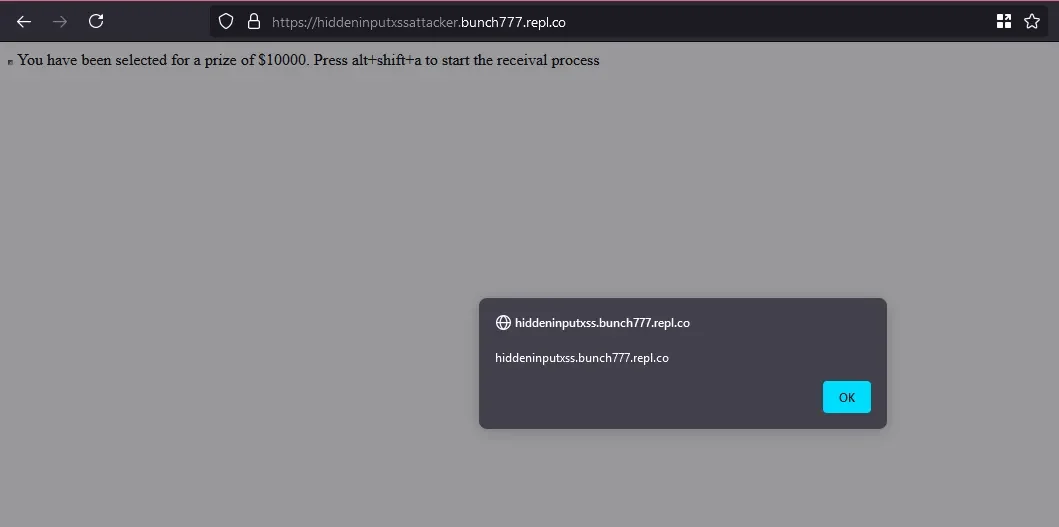
The screenshot shows the XSS firing on the other domain when the victim interacts with the attacker's site.
The researcher considers this attack fairly realistic, because the user is interacting with the attacker's site rather than the target website. In that sense the low-impact bug was escalated.
Root cause
The underlying mistake is that the GET parameter is written into the value attribute without surrounding quotes. Sanitising angle brackets prevents new tags but does nothing about whitespace, so an attacker can terminate the attribute and add new ones. The hidden input type limits which events can be triggered, but it does not remove the injection itself. The escalation then depends on a second weakness: the absence of X-Frame-Options on the vulnerable response, which lets a third-party page embed the vulnerable page and supply the user interaction that the payload needs.
Impact
The direct impact of the original bug is low. The XSS only fires after the victim presses ALT+SHIFT+A, and the researcher judged the chance of a victim visiting the link and then pressing that combination unprompted to be negligible. Framing the page does not remove the interaction requirement, but it moves the interaction to the attacker's site, where a lure can ask for the keypress and the vulnerable page stays hidden in a 1x1 iframe. Under those conditions the script executes in the vulnerable site's origin. The report does not describe any further actions taken from the executed script beyond alert(document.domain).
Fix
The report does not say what the original site changed.
Variants to test
- Unquoted attribute reflections generally. Inject a space followed by an event handler or
accesskeyinto any parameter reflected into an attribute without quotes. A positive result is a response where the injected text appears as separate attributes on the element. - Hidden inputs with
accesskey. On any hidden input you can inject into, tryaccesskey=a onclick=...and press ALT+SHIFT+A in Firefox. A positive result is the handler running when the key combination is pressed. - Missing
X-Frame-Options. Check whether a page with a user-interaction XSS can be framed. A positive result is the payload firing inside a 1x1 iframe on an attacker-controlled page after the victim performs the requested interaction. - Other interaction-gated handlers. Where
accesskeyis filtered, look for other handlers that a hidden element can still receive through a lure, and test whether framing plus a plausible instruction to the victim is enough to trigger them.
What happened, in plain words
A security researcher was testing a website and found a page that took a piece of text from the address bar and pasted it back into the page. That is very common: many pages put something from the URL into the HTML they send back, for example a search term or a token. The problem here was where the text landed and how it was placed there.
The text ended up inside an HTML attribute called value, and it was placed there without quotation marks around it. In HTML, attributes are the extra pieces of information attached to a tag, like name="token" or type="hidden". When an attribute value is wrapped in quotes, everything inside the quotes is treated as one piece of text. When it is not wrapped in quotes, the browser stops reading the value at the first space. Anything after that space is read as a new attribute. So if you can put a space into the reflected text, you can add attributes of your own choosing to the tag.
The researcher could do exactly that. The site did remove angle brackets (< and >), which stops an attacker from creating brand new HTML tags, but it left spaces alone. That is enough to add attributes.
Adding attributes to a tag is a real security problem because some attributes are event handlers: small pieces of JavaScript that the browser runs when something happens, such as onclick (when the element is clicked) or onload (when it finishes loading). If an attacker can add an event handler, they can make the browser run their JavaScript on the victim's page. That class of bug is called Cross-Site Scripting, or XSS. The script runs as if it came from the website itself, so it can do anything the site's own scripts could do.
There was one big catch. The tag the researcher could inject into was a hidden input. A hidden input is a form field that the browser keeps but does not show on screen. It is used to carry data, not to be clicked. Because the user never sees it and never clicks it, the usual event handlers are very hard to trigger. So the bug was real but weak: the researcher calls it low impact, and says the only reward from the original report was thanks, which he found understandable.
Because of disclosure policies, the researcher did not show the original target. Instead he rebuilt the same vulnerability on a new website so he could write about it:
- Vulnerable site:
https://hiddeninputxss.bunch777.repl.co - Exploit/attacker's site:
https://hiddeninputxssattacker.bunch777.repl.co
The rest of this article follows his attempt to turn that weak bug into something more serious.
Setup
The report does not describe any accounts, user roles or special tools. What matters are a few properties of the page and of the browser:
- A GET parameter is reflected into a
valueattribute of a hidden input, without quotes around it. A GET parameter is the part of a URL after the?, made ofname=valuepairs. When you search on a website and the address bar becomes something like?q=cats,qis the parameter andcatsis its value. "Reflected" means the server copies that value straight into the page it sends back. - Angle brackets are stripped or encoded, so no new tags can be introduced, only new attributes.
- The user-interaction step relies on the
accesskeyfeature, which the report describes as leading to XSS in Firefox. An accesskey is an HTML attribute that assigns a keyboard shortcut to an element: the browser activates that element when the user presses a particular key combination. - The vulnerable site's response carries no
X-Frame-Optionsheader. A response header is a small line of metadata the server sends alongside the page.X-Frame-Optionsis a header that tells the browser whether the page is allowed to be embedded inside another page. Without it, other sites can put the page in a frame.
Finding it
On the page in question, a GET parameter landed inside the value attribute with no quotes around it. Any angle brackets in the payload were sanitised, so the reflection could not break out of the tag, but whitespace was untouched. Injecting a space therefore let the attacker add arbitrary attributes to the input element.
The screenshot shows the attribute injection on the hidden input, with angle brackets sanitised.
The obstacle is that the input is type="hidden". The usual way to trigger XSS through attribute injection is to use JavaScript event handlers such as onload or onfocus, but a hidden input gives the user almost no way to fire those events. The researcher points to Gareth Heyes' PortSwigger article on XSS in hidden input fields for background on this class of bug.
Exploitation
Step 1: fire the XSS with an accesskey in Firefox
Gareth's article describes how the accesskey feature can lead to XSS in Firefox, at the cost of requiring user interaction. The malicious URL used here was:
https://hiddeninputxss.bunch777.repl.co/?[redacted]
Line by line, in plain words:
https://hiddeninputxss.bunch777.repl.co/is the address of the rebuilt vulnerable page.?starts the list of GET parameters.token=fdfsets the parameter namedtokento the valuefdf. This is the parameter the page reflects.%20is the URL-encoded form of a space. URLs cannot contain raw spaces, so spaces are written as%20. This is the character that ends the unquotedvalueattribute and starts a new attribute.accesskey%3daisaccesskey=awith the=written as%3D(here lower-case%3d). It gives the element the keyboard shortcut ALT+SHIFT+A.onclick%3dalert(document.domain)isonclick=alert(document.domain)with the=encoded the same way. It tells the browser: when this element is activated, run the JavaScriptalert(document.domain).alertopens a pop-up box, anddocument.domainis the current site's domain name, so the pop-up proves which site the script is running on.
Because the value is reflected without quotes, the space ends the value attribute and the remaining text becomes two new attributes on the input. The corresponding reflection was:
<input name="token" type="hidden" value="fdf" accesskey="a" onclick="alert(document.domain)">
Line by line:
<inputstarts an input element.name="token"is the field's name, used when the form is submitted.type="hidden"makes it a hidden field, invisible on the page.value="fdf"is the field's value. Notice the closing quote right afterfdf: the space that followed in the URL ended the value, so the rest of the attacker's text is no longer inside it.accesskey="a"is the injected shortcut, binding ALT+SHIFT+A to this element.onclick="alert(document.domain)"is the injected event handler, the JavaScript that runs when the element is activated.>closes the tag.
The XSS fires when the user presses ALT+SHIFT+A, which activates the access key bound to the hidden input and runs the onclick handler.
The screenshot shows the XSS firing when the victim presses ALT+SHIFT+A.
This works, but the researcher rates its exploitability as close to zero: the victim would first have to visit the malicious link and then press ALT+SHIFT+A for no reason. Think of it like a door that only opens if a stranger happens to knock in a very specific rhythm: technically openable, practically never opened.
Step 2: look for a no-interaction variant
Searching for a way to get XSS without user interaction in this situation led to Masato Kinugawa's article on exactly that topic. That no-interaction technique, however, only worked in IE10 and IE11, which the researcher does not consider modern browsers. Masato hinted that he had a Firefox variant and would cover it in upcoming articles, but the researcher could not find that article.
Step 3: escalate by framing the vulnerable page
With no-interaction XSS apparently out of reach, the researcher noticed that the vulnerable site's response contained no X-Frame-Options directives at all. That raised the question of whether the vulnerable page could be framed on another website and whether the XSS would still fire there.
A frame (here an iframe, short for inline frame) is a way to place one web page inside another, like a picture-in-picture window. The embedded page keeps its own address and its own security origin. An origin is the combination of scheme, host and port, for example https://hiddeninputxss.bunch777.repl.co; browsers use it to decide which page is allowed to touch which data. If a page from one origin is framed by a page from another origin, the two are still separate as far as the browser is concerned.
The exploit scenario was planned as follows:
- The victim is made to visit the attacker's site, which frames the vulnerable site with the user-interaction XSS payload, hidden from the user's sight.
- The site asks the victim to press ALT+SHIFT+A.
- An XSS fires, but at the vulnerable site's domain.
It worked: the XSS fired. The attacker's page looked like this:
<iframe width="1" height="1" src="https://hiddeninputxss.bunch777.repl.co/?token=fdf accesskey=a onclick=alert(document.domain)"></iframe>You have been selected for a prize of $10000. Press alt+shift+a to start the receival process
Line by line:
<iframestarts an inline frame.width="1" height="1"makes it one pixel by one pixel, so the victim cannot see it.src="..."is the address of the page to load inside the frame. It is the same malicious URL as before, with the same injectedaccesskeyandonclickattributes. Here the spaces are written as raw spaces inside the quotedsrc, which the browser accepts.></iframe>closes the frame tag.You have been selected for a prize of $10000. Press alt+shift+a to start the receival processis ordinary text on the attacker's page. It is the lure: a made-up reason for the victim to press the key combination.
The iframe is one pixel by one pixel, and the report describes the framed page as hidden from the user's sight. Its src carries the same injected attributes as before. The surrounding text is the social-engineering lure that gives the victim a reason to press ALT+SHIFT+A. Because the framed document is the vulnerable site, the script runs in that site's origin, not the attacker's. In everyday terms: the attacker cannot get into the building, so they hide a doorbell from the target building inside their own shop and ask visitors to press it.
The screenshot shows the XSS firing on the other domain when the victim interacts with the attacker's site.
The researcher considers this attack fairly realistic, because the user is interacting with the attacker's site rather than the target website. In that sense the low-impact bug was escalated.
Root cause
The underlying mistake is that the GET parameter is written into the value attribute without surrounding quotes. Sanitising angle brackets prevents new tags but does nothing about whitespace, so an attacker can terminate the attribute and add new ones. The hidden input type limits which events can be triggered, but it does not remove the injection itself. The escalation then depends on a second weakness: the absence of X-Frame-Options on the vulnerable response, which lets a third-party page embed the vulnerable page and supply the user interaction that the payload needs.
Impact
The direct impact of the original bug is low. The XSS only fires after the victim presses ALT+SHIFT+A, and the researcher judged the chance of a victim visiting the link and then pressing that combination unprompted to be negligible. Framing the page does not remove the interaction requirement, but it moves the interaction to the attacker's site, where a lure can ask for the keypress and the vulnerable page stays hidden in a 1x1 iframe. Under those conditions the script executes in the vulnerable site's origin.
Fix
Variants to test
- Unquoted attribute reflections generally. Inject a space followed by an event handler or
accesskeyinto any parameter reflected into an attribute without quotes. A positive result is a response where the injected text appears as separate attributes on the element. - Hidden inputs with
accesskey. On any hidden input you can inject into, tryaccesskey=a onclick=...and press ALT+SHIFT+A in Firefox. A positive result is the handler running when the key combination is pressed. - Missing
X-Frame-Options. Check whether a page with a user-interaction XSS can be framed. A positive result is the payload firing inside a 1x1 iframe on an attacker-controlled page after the victim performs the requested interaction. - Other interaction-gated handlers. Where
accesskeyis filtered, look for other handlers that a hidden element can still receive through a lure, and test whether framing plus a plausible instruction to the victim is enough to trigger them.
Glossary
- Attribute: an extra piece of information attached to an HTML tag, written as
name="value", such astype="hidden". - Accesskey: an HTML attribute that gives an element a keyboard shortcut, so the browser activates it when the user presses that combination.
- Cross-Site Scripting (XSS): a bug where an attacker gets their own JavaScript to run inside a victim website's page, so the script is treated as part of that site.
- Event handler: an attribute whose value is JavaScript that the browser runs when something happens to the element, such as
onclickoronload. - Frame / iframe: a way to embed one web page inside another; the embedded page keeps its own address and security origin.
- GET parameter: a
name=valuepair in the part of a URL after the?, used to pass data to the server. - Hidden input: a form field of
type="hidden"that the browser keeps but does not display, used to carry data rather than to be clicked. - HTML tag: the building block of a web page, written between angle brackets, such as
<input>. - Origin: the combination of scheme, host and port of a page, used by the browser to decide which pages may access which data.
- Reflection: when a server copies a value from the request straight into the page it sends back.
- Response header: a line of metadata the server sends with a page, such as
X-Frame-Options. - Sanitise: to clean or filter input so that dangerous characters cannot do harm.
- Social engineering: tricking a person into doing something, here pressing a key combination, by giving them a believable reason.
- URL encoding: writing characters that are not allowed in a URL in a safe form, for example a space as
%20and=as%3D. - X-Frame-Options: a response header that tells the browser whether the page may be embedded in a frame on another site.




