Android Deep Link Hijacking to Account Takeover via OAuth Code Interception
The Android app used an unverified custom URI scheme for OAuth callbacks, so a malicious app registering the same scheme could intercept the authorization code. The attacker could then exchange that code for an access token and access the victim's account.
 Published on bugbountywizard.app
Bug Boun
The full write-up lives on its author's site
It belongs to its author, so we link to it rather than copy it. The other two tabs are our own rewrites, checked against it.
Context
This write-up covers an Android application whose authentication flow relied on a custom URI scheme to deliver an OAuth authorization code back to the app. The flow in question was the email verification path: a user creates an account, receives a verification email, and taps an Open in App button that hands control back to the installed application through a deep link.
The callback carried the email address and an authorization code in its query string:
app-login://m.example.com/ ?email=... &auth_code=...
The application then exchanged that code at an OAuth token endpoint and used the resulting access token to call the authenticated API. The researcher found that a second application on the same device could register the same scheme and host, receive the callback instead of the legitimate app, and redeem the code for a session. The report was triaged and a bounty was paid.

Setup
The work was an Android security assessment of a publicly distributed APK. The researcher used:
- The legitimate application, installed on a test device.
- A purpose-built PoC Android application, installed alongside it.
- JADX for decompiling the APK and tracing the authentication logic.
- A controlled test account, created specifically for the exercise.
No special privileges on the server side were needed. The precondition for the attack is that the victim installs the malicious application and then follows the normal email verification flow; the victim never types credentials into a phishing page.
Finding it
The starting point was static analysis of the APK. The researcher inspected the manifest looking for activities that handle deep links, exported components, custom URI schemes and hosts, and intent filters containing VIEW and BROWSABLE. The aim was to find externally reachable entry points that accepted authentication-related URIs.
With JADX, the decompiled source was searched for the custom scheme, the callback parameters and the OAuth-related methods, tracing the authorization code from the incoming intent through to the token exchange request.
The same search also turned up static client credentials embedded in the APK, found by looking for these strings:
client_id
client_secret
/oauth2/token
authorization_code
Because anyone who obtains the package can inspect its contents, values embedded in an APK cannot be treated as confidential. The researcher is explicit that a hardcoded credential on its own does not establish account takeover: its significance depends on the server's validation rules and on the rest of the authentication flow. The deep link was the entry point; the credential handling determined how far the interception could be pushed.
Exploitation
The PoC application registered the same custom URI scheme and host as the legitimate app. The manifest below shows the matching handler:
<activity android:name=".MainActivity" android:exported="true"><intent-filter> <action android:name="android.intent.action.VIEW" /> <category android:name="android.intent.category.DEFAULT" /> <category android:name="android.intent.category.BROWSABLE" /> <data android:scheme="app-login" android:host="m.example.com" /> </intent-filter></activity>
The VIEW action plus the BROWSABLE category is what makes the activity reachable from a link, and the <data> element matches the scheme and host of the legitimate callback. When two applications match the same URI, Android may show an application chooser or route the callback to a previously selected default handler. Either way, the callback can land in the wrong app.
Step 1: Install both applications
The legitimate application and the PoC application were installed on the same device.
Step 2: Create a test account and start verification
A controlled test account was created and the email verification flow was triggered.
Step 3: Open the verification email
The verification email was opened and the Open in App button was tapped.
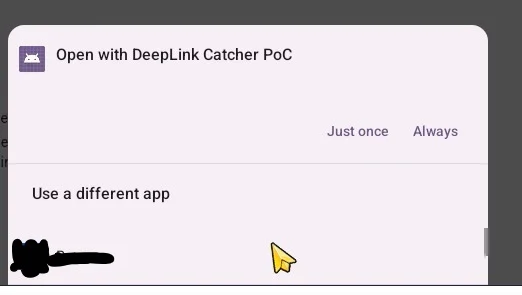
Step 4: Choose the PoC application
When Android presented the application chooser, the PoC application was selected.
Step 5: Extract the authorization code
The PoC received the callback and read the auth_code query parameter. In the PoC code, handleIntent() checks that the intent action is ACTION_VIEW and that data is present, logs the full intercepted URL, and pulls the code out with data.getQueryParameter("auth_code"). If a non-empty code is found, it starts a background thread to exchange it.
Step 6: Exchange the code at the token endpoint
The exchange is a form-encoded POST carrying the code, the grant type, and the embedded client credentials:
String body = "code=" + encode(code) + "&grant_type=authorization_code" + "&client_id=" + encode(CLIENT_ID) + "&client_secret=" + encode(CLIENT_SECRET); HttpURLConnection conn = (HttpURLConnection) new URL( "https://api.example.com/oauth2/token" ).openConnection(); conn.setRequestMethod("POST"); conn.setRequestProperty( "Content-Type", "application/x-www-form-urlencoded" ); conn.setDoOutput(true); conn.setConnectTimeout(5000); conn.setReadTimeout(5000);
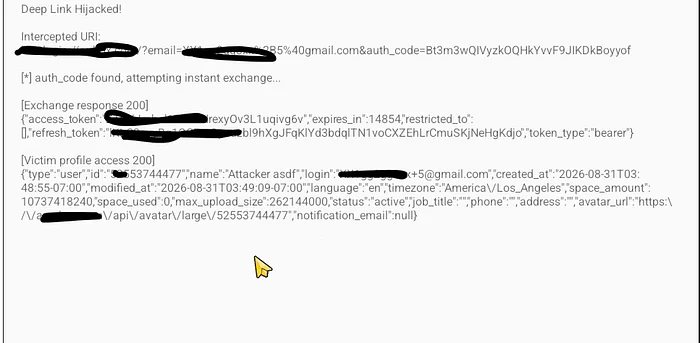
The request goes to the token endpoint with Content-Type: application/x-www-form-urlencoded. On a 200 response the PoC extracts access_token from the JSON body with a regex and moves on to the profile request. The token exchange succeeded.
Step 7: Request the authenticated profile
With the access token in hand, the PoC calls the authenticated API:
HttpURLConnection conn = (HttpURLConnection) new URL( "https://api.example.com/2.0/users/me" ).openConnection(); conn.setRequestMethod("GET"); conn.setRequestProperty( "Authorization", "Bearer " + accessToken );
The authenticated request returned the test account's profile. That result is what turns a deep link interception into a demonstrated account takeover: the intercepted code was accepted by the backend and produced a working session.
The published PoC is a trimmed version of the original. CLIENT_ID and CLIENT_SECRET are redacted, and the API hostname is illustrative rather than the real endpoint. The original PoC also sent device metadata and an application-specific User-Agent, which mattered for reproducing the observed behaviour in the tested environment.
Root cause
The application used an unverified custom URI scheme for its authentication callback. Custom URI schemes are not exclusively owned by any Android application: any other app can register a matching intent filter and receive the same callback. When that callback contains a sensitive authorization code, an unintended application can receive it and redeem it.
The report's closing lesson is that a deep link issue becomes far more significant when the backend accepts the exposed credential without sufficient proof that the redemption belongs to the original session. The embedded client credentials in the APK were available to anyone who downloaded the package, and the researcher treats that as a separate weakness from the deep link hijack. The two weaknesses compound each other, but the researcher treats them as separate issues, each needing its own analysis and impact assessment.
Impact
The demonstrated chain had these consequences:
- Account takeover: the intercepted authorization code could be exchanged for an authenticated session.
- Personal information disclosure: the callback exposed the email address included in the URI.
- Session compromise: the token response contained access and refresh tokens.
- Potential downstream exposure: other data reachable through the resulting session could be at risk, depending on the account's permissions.
The attack required the PoC application to be installed and the victim to follow the normal verification flow. It did not require the victim to enter credentials into a phishing page.
Fix
The report recommends:
- Verified App Links: use HTTPS callbacks, configure
assetlinks.json, and verify domain ownership. - OAuth PKCE: enforce
code_verifiervalidation to prevent unauthorised code redemption. - Authorization code validation: use short-lived, single-use codes bound to the original
client_idandredirect_uri. - Public OAuth clients: never rely on embedded APK secrets for client authentication.
Variants to test
- Other custom-scheme callbacks. Look for any
scheme://hostdeep link that carries a token, code or session identifier. A positive result is a second app registering the same scheme and host and receiving the parameter when the chooser appears or a default handler is already set. - Unverified App Links. Check whether an
httpscallback is actually verified: ifassetlinks.jsonis missing or misconfigured, another app can claim the host. A positive result is your app receiving the link without the domain association being in place. - Code redemption without PKCE. Take an intercepted code and try to exchange it without a
code_verifier. A200with tokens means the server is not binding the redemption to the original client session. - Code reuse and lifetime. Try redeeming the same code twice, and try it after a delay. A second success, or a success well after issuance, shows the code is neither single-use nor short-lived.
- Client binding. Exchange an intercepted code using a different
client_idorredirect_urithan the one that started the flow. Acceptance indicates the code is not bound to its origin. - Embedded secrets. Search the decompiled APK for
client_secret, API keys and tokens, then test whether the backend accepts them. A positive result is a token endpoint that authenticates a public client using a value shipped in the APK.
What happened, in plain words
A security researcher tested an Android app that people install on their phones. The app lets you create an account, and to finish creating it you have to click a link in an email. That link opens the app again and hands it a short piece of text called an authorization code. The app then swaps that code for a token, which is like a temporary key that proves who you are, and uses the key to fetch your profile from the company's servers.
The researcher found that another app on the same phone could claim that same link. If the victim had that second app installed and clicked the link in the email, the phone could hand the link, and the code inside it, to the wrong app. In the demonstration, the wrong app swapped the code for a token and read the test account's profile. In other words, another app could obtain a working session for the account whose code it intercepted. The report calls this account takeover under the tested conditions.
The researcher built that second app on purpose, as a demonstration, and called it a PoC (proof of concept). The report was triaged, meaning the company confirmed it was a real problem, and a bounty (a reward payment) was paid.
The pieces you need to know first
Before the steps make sense, here are the ideas the whole story rests on. Each one is explained from zero.
- An app on a phone. Android apps are packages with a
.apkfile extension. Anyone can download an APK and look inside it, a bit like anyone can open a delivered parcel and see what is in the box. That matters later. - A deep link. A deep link is a web-style address that opens a specific app instead of a website. You have seen these: a link that opens a video app rather than a browser page. On Android, an app declares which addresses it wants to handle in a file called the manifest (its
AndroidManifest.xml). - A custom URI scheme. Normal web addresses start with
https://. A custom scheme is a made-up prefix, hereapp-login://, that an app invents for itself. The catch: no central authority owns a made-up prefix. Any app can declare that it handlesapp-login://too, like two neighbours both putting the same name on their letterbox. - OAuth. OAuth is the standard way apps let you sign in without handling your password directly. The company's server gives the app a short code, the app trades the code for a token, and the token is what it shows on later requests. Think of a cloakroom: you hand in your coat, get a ticket (the code), and trade the ticket for your coat (the token).
- An authorization code. The ticket in that comparison. It is a short-lived string that stands for "this person just proved who they are".
- A token (access token). A temporary key, usually a long string of characters, that the server accepts on later requests in place of a password. A refresh token is a second, longer-lived key used to get a new access token when the first one expires.
- An API. The set of addresses a company's servers expose so programs can ask for data, for example "give me the profile of the logged-in user". It is the serving hatch between an app and the company's database.
- An endpoint. One specific address on that API, such as the token endpoint or the profile endpoint.
- A client ID and client secret. In OAuth, the app itself has to identify to the server. The client ID is its public name; the client secret is meant to be its password. If the secret ships inside the APK, anyone who opens the parcel can read it.
- Static analysis. Examining a program without running it, the way you might read a recipe rather than cook the dish. Here it means unpacking the APK and reading its code.
- Decompiling. Turning the compiled app back into readable source code. The researcher used a tool called JADX for this.
- The vulnerability class. The overall problem is called deep link hijacking: a link meant for one app is captured by another. When the captured link carries an OAuth code, the hijack can grow into account takeover.
The setup
The work was an Android security assessment of a publicly distributed APK, meaning the app anyone can download from the store. The researcher used:
- The legitimate application, installed on a test device.
- A purpose-built PoC Android application, installed alongside it.
- JADX for decompiling the APK and tracing the authentication logic.
- A controlled test account, created specifically for the exercise.
No special privileges on the server side were needed. The precondition for the attack is that the victim installs the malicious application and then follows the normal email verification flow; the victim never types credentials into a phishing page.
That last point is worth pausing on. In the classic scam, a victim is tricked into typing a password on a fake website. Here nothing is typed anywhere unusual. The victim creates an account, clicks the button in the real email, and the phone quietly hands the code to the wrong app.
Finding it
The starting point was static analysis of the APK. The researcher inspected the manifest looking for activities that handle deep links, exported components, custom URI schemes and hosts, and intent filters containing VIEW and BROWSABLE. The aim was to find externally reachable entry points that accepted authentication-related URIs.
A few of those words need unpacking:
- An activity is one screen of an Android app.
- An exported component is one that other apps on the phone are allowed to reach. If a screen is exported and handles links, any app can send it a link.
- An intent filter is the declaration inside the manifest that says "this screen wants to receive links of this shape".
VIEWis the Android action meaning "show this thing to the user", andBROWSABLEis the category that allows the link to be opened from a browser or an email client. Together they are what makes a link clickable into an app.
With JADX, the decompiled source was searched for the custom scheme, the callback parameters and the OAuth-related methods, tracing the authorization code from the incoming intent through to the token exchange request. In plain terms: the researcher followed the ticket from the letterbox, through the app's front desk, to the cloakroom counter.
The same search also turned up static client credentials embedded in the APK, found by looking for these strings:
client_id
client_secret
/oauth2/token
authorization_code
This block is a list of search terms, not code to run. The researcher typed each of these words into the decompiled source and looked at what came back. client_id and client_secret are the app's own name and password for talking to the server. /oauth2/token is the address of the cloakroom counter where codes are traded for tokens. authorization_code is the ticket itself. Finding all four together told the researcher the whole flow was visible from inside the downloaded package.
Because anyone who obtains the package can inspect its contents, values embedded in an APK cannot be treated as confidential. The researcher is explicit that a hardcoded credential on its own does not establish account takeover: its significance depends on the server's validation rules and on the rest of the authentication flow. The deep link was the entry point; the credential handling determined how far the interception could be pushed.
Exploitation
The PoC application registered the same custom URI scheme and host as the legitimate app. The manifest below shows the matching handler:
<activity android:name=".MainActivity" android:exported="true"><intent-filter> <action android:name="android.intent.action.VIEW" /> <category android:name="android.intent.category.DEFAULT" /> <category android:name="android.intent.category.BROWSABLE" /> <data android:scheme="app-login" android:host="m.example.com" /> </intent-filter></activity>
Line by line, in plain words:
<activity android:name=".MainActivity" android:exported="true">opens the declaration of one screen, calledMainActivity, and marks it exported, so other apps and links can reach it.<intent-filter>starts the list of link shapes this screen wants.<action android:name="android.intent.action.VIEW" />says the screen reacts to the action "show this to the user".<category android:name="android.intent.category.DEFAULT" />is the standard category needed for the filter to be considered at all.<category android:name="android.intent.category.BROWSABLE" />allows the link to arrive from a browser or email client.<data android:scheme="app-login" android:host="m.example.com" />is the important line: it claims the exact scheme and host of the legitimate callback. This is the second neighbour putting the same name on the letterbox.- The closing tags end the filter and the activity.
The VIEW action plus the BROWSABLE category is what makes the activity reachable from a link, and the <data> element matches the scheme and host of the legitimate callback. When two applications match the same URI, Android may show an application chooser or route the callback to a previously selected default handler. Either way, the callback can land in the wrong app.
Step 1: Install both applications
The legitimate application and the PoC application were installed on the same device. This mirrors the real-world condition: the victim has the real app, and has also installed something else.
Step 2: Create a test account and start verification
A controlled test account was created and the email verification flow was triggered. Using a test account means the researcher is breaking into their own account, not a stranger's, which is how responsible testing is done.
Step 3: Open the verification email
The verification email was opened and the Open in App button was tapped. This is the ordinary path a real user follows; nothing unusual happens yet.
Step 4: Choose the PoC application
When Android presented the application chooser, the PoC application was selected.
The chooser is the phone's own dialog asking which app should open the link, because two apps now claim it.
Step 5: Extract the authorization code
The PoC received the callback and read the auth_code query parameter. In the PoC code, handleIntent() checks that the intent action is ACTION_VIEW and that data is present, logs the full intercepted URL, and pulls the code out with data.getQueryParameter("auth_code"). If a non-empty code is found, it starts a background thread to exchange it.
In plain words: the PoC's screen wakes up when the link arrives, confirms the link is the kind it expected, writes the whole address into its log, and picks out the piece labelled auth_code. A background thread is simply a second worker so the screen does not freeze while the network call happens.
Step 6: Exchange the code at the token endpoint
The exchange is a form-encoded POST carrying the code, the grant type, and the embedded client credentials:
String body = "code=" + encode(code) + "&grant_type=authorization_code" + "&client_id=" + encode(CLIENT_ID) + "&client_secret=" + encode(CLIENT_SECRET); HttpURLConnection conn = (HttpURLConnection) new URL( "https://api.example.com/oauth2/token" ).openConnection(); conn.setRequestMethod("POST"); conn.setRequestProperty( "Content-Type", "application/x-www-form-urlencoded" ); conn.setDoOutput(true); conn.setConnectTimeout(5000); conn.setReadTimeout(5000);
Line by line:
String body = ...builds the text that will be sent to the server. It is a series ofname=valuepairs joined by&, the same shape you see in a web address after a question mark."code=" + encode(code)puts the stolen ticket into the request.encodemakes sure special characters do not break the format.+ "&grant_type=authorization_code"tells the server which kind of trade this is: a code being exchanged for a token.+ "&client_id=" + encode(CLIENT_ID)and+ "&client_secret=" + encode(CLIENT_SECRET)identify the app itself, using the values lifted from the real APK.HttpURLConnection conn = (HttpURLConnection) new URL("https://api.example.com/oauth2/token").openConnection();opens a connection to the token endpoint. The hostname here is illustrative, not the real one.conn.setRequestMethod("POST");sends the request as a POST, the method used when you are submitting data rather than just asking for a page.conn.setRequestProperty("Content-Type", "application/x-www-form-urlencoded");announces the format of the body, so the server knows to read it asname=valuepairs.conn.setDoOutput(true);says the request will carry a body.conn.setConnectTimeout(5000);andconn.setReadTimeout(5000);give up after five seconds rather than hanging forever.
The request goes to the token endpoint with Content-Type: application/x-www-form-urlencoded. On a 200 response the PoC extracts access_token from the JSON body with a regex and moves on to the profile request. The token exchange succeeded.
A 200 is the standard HTTP status meaning "OK". JSON is a common text format for structured data, and a regex is a pattern-matching tool for pulling one value out of a longer string.
Step 7: Request the authenticated profile
With the access token in hand, the PoC calls the authenticated API:
HttpURLConnection conn = (HttpURLConnection) new URL( "https://api.example.com/2.0/users/me" ).openConnection(); conn.setRequestMethod("GET"); conn.setRequestProperty( "Authorization", "Bearer " + accessToken );
Line by line:
HttpURLConnection conn = (HttpURLConnection) new URL("https://api.example.com/2.0/users/me").openConnection();opens a connection to the profile endpoint. The path/2.0/users/mereads as "the profile of whoever is logged in".conn.setRequestMethod("GET");asks for data rather than submitting it.conn.setRequestProperty("Authorization", "Bearer " + accessToken);is the key line: it presents the token as proof of identity.Bearermeans "whoever holds this token is treated as the user", like showing the cloakroom ticket at the counter.
The authenticated request returned the test account's profile. That result is what turns a deep link interception into a demonstrated account takeover: the intercepted code was accepted by the backend and produced a working session.
This step is the end of the chain: the PoC holds a token and the server answers with the account's profile. Without this step, the researcher would only have shown that a link could be captured. With it, the capture is shown to be worth something.
The published PoC is a trimmed version of the original. CLIENT_ID and CLIENT_SECRET are redacted, and the API hostname is illustrative rather than the real endpoint. The original PoC also sent device metadata and an application-specific User-Agent, which mattered for reproducing the observed behaviour in the tested environment.
Device metadata means details about the phone, and a User-Agent is a label the app sends to say what it is. Some servers behave differently depending on those, so the original PoC included them to match what the real app sends.
Root cause
The application used an unverified custom URI scheme for its authentication callback. Custom URI schemes are not exclusively owned by any Android application: any other app can register a matching intent filter and receive the same callback. When that callback contains a sensitive authorization code, an unintended application can receive it and redeem it.
The report's closing lesson is that a deep link issue becomes far more significant when the backend accepts the exposed credential without sufficient proof that the redemption belongs to the original session. The embedded client credentials in the APK were available to anyone who downloaded the package, and the researcher treats that as a separate weakness from the deep link hijack. The two weaknesses compound each other, but the researcher treats them as separate issues, each needing its own analysis and impact assessment.
In everyday terms: the letterbox had no lock (the scheme was unverified), and the cloakroom counter did not check that the person holding the ticket was the person who handed in the coat (the code was not bound to the original session). Either one alone is a problem; together they let a stranger walk off with the coat.
Impact
The demonstrated chain had these consequences:
- Account takeover: the intercepted authorization code could be exchanged for an authenticated session.
- Personal information disclosure: the callback exposed the email address included in the URI.
- Session compromise: the token response contained access and refresh tokens.
- Potential downstream exposure: other data reachable through the resulting session could be at risk, depending on the account's permissions.
The attack required the PoC application to be installed and the victim to follow the normal verification flow. It did not require the victim to enter credentials into a phishing page.
Fix
The report recommends:
- Verified App Links: use HTTPS callbacks, configure
assetlinks.json, and verify domain ownership. - OAuth PKCE: enforce
code_verifiervalidation to prevent unauthorised code redemption. - Authorization code validation: use short-lived, single-use codes bound to the original
client_idandredirect_uri. - Public OAuth clients: never rely on embedded APK secrets for client authentication.
A few of these need a plain explanation. Verified App Links are the locked letterbox: the app proves to Android that it really owns the website domain, using a file called assetlinks.json published on that domain, so no other app can claim the same address. PKCE (Proof Key for Code Exchange) is a second secret that the app invents at the start of the flow and must present again when trading the code, so a stolen ticket is useless without it. Single-use, short-lived codes mean the ticket is torn up the moment it is used and expires quickly. redirect_uri is the address the code was meant to be delivered to; binding the code to it means a code issued for one destination cannot be redeemed from another.
Variants to test
- Other custom-scheme callbacks. Look for any
scheme://hostdeep link that carries a token, code or session identifier. A positive result is a second app registering the same scheme and host and receiving the parameter when the chooser appears or a default handler is already set. - Unverified App Links. Check whether an
httpscallback is actually verified: ifassetlinks.jsonis missing or misconfigured, another app can claim the host. A positive result is your app receiving the link without the domain association being in place. - Code redemption without PKCE. Take an intercepted code and try to exchange it without a
code_verifier. A200with tokens means the server is not binding the redemption to the original client session. - Code reuse and lifetime. Try redeeming the same code twice, and try it after a delay. A second success, or a success well after issuance, shows the code is neither single-use nor short-lived.
- Client binding. Exchange an intercepted code using a different
client_idorredirect_urithan the one that started the flow. Acceptance indicates the code is not bound to its origin. - Embedded secrets. Search the decompiled APK for
client_secret, API keys and tokens, then test whether the backend accepts them. A positive result is a token endpoint that authenticates a public client using a value shipped in the APK.
Glossary
- Account takeover: when someone else gains control of, or access to, another person's account.
- Activity: one screen of an Android app.
- AndroidManifest.xml: the file inside an Android app that declares its screens, permissions and the links it handles.
- API: the set of addresses a company's servers expose so programs can ask for data.
- APK: the package file format for an Android app; anyone who downloads it can inspect its contents.
- assetlinks.json: a file published on a website domain that proves to Android which app really owns that domain.
- Authorization code: a short-lived string issued after a user proves who they are, traded for a token.
- Bounty: a reward payment made for a valid security report.
- BROWSABLE: an Android category that allows a link to be opened from a browser or email client into an app.
- Client ID: the public name an app uses to identify itself to an OAuth server.
- Client secret: the password an app uses to identify itself; if shipped in an APK it is not secret.
- Code verifier (PKCE): a secret the app invents at the start of the flow and must present again when trading the code.
- Content-Type: a header that tells the server the format of the data being sent.
- Deep link: an address that opens a specific app rather than a website.
- Decompiling: turning a compiled app back into readable source code.
- Endpoint: one specific address on an API.
- Exported component: an Android screen or service that other apps are allowed to reach.
- GET: the HTTP method used to ask for data.
- HTTP status 200: the standard response meaning "OK".
- Intent filter: the manifest declaration saying which links or actions a screen wants to receive.
- JADX: a tool for decompiling Android APKs.
- JSON: a common text format for structured data.
- OAuth: the standard way apps let users sign in without handling their password directly.
- PKCE: Proof Key for Code Exchange, a protection that ties a code to the app that requested it.
- PoC (proof of concept): a demonstration built to show that a vulnerability is real.
- POST: the HTTP method used to submit data to a server.
- Query parameter: a
name=valuepair after the?in a web address. - Redirect URI: the address an authorization code was meant to be delivered to.
- Refresh token: a longer-lived key used to obtain a new access token.
- Regex: a pattern-matching tool for pulling one value out of a longer string.
- Static analysis: examining a program without running it.
- Token (access token): a temporary key that a server accepts in place of a password.
- Triaged: reviewed and confirmed as a real issue by the receiving company.
- URI scheme: the prefix of an address, such as
https://or a made-up one likeapp-login://. - User-Agent: a label an app or browser sends to say what it is.
- VIEW: the Android action meaning "show this thing to the user".
- Vulnerability class: the general category a security problem belongs to, here deep link hijacking.

