Automating SQL Injection On Encrypted Request
The application encrypted both request and response bodies, and the encryption key was exposed in client-side JavaScript. The author found a boolean-based SQL injection in a ticket-filtering feature and built a SQLmap tamper script to encrypt payloads automatically, though the middleware prevented reliable automated exploitation.
 Published on medium.com
Hi, Guys hope you all are doing well. I’m back with an adventure of exploiting an SQL Injection on an encrypted request and response.
The full write-up lives on its author's site
It belongs to its author, so we link to it rather than copy it. The other two tabs are our own rewrites, checked against it.
Context
The target was a portal for suppliers and vendors, with different functionality depending on the user's role. One feature let users fetch tickets they had raised about an issue. The ticket list held more than 10,000 tickets, and the interface offered filters to narrow the results down.
That filter is where the story starts: the ticket-fetching request carried an encrypted body, and the response came back encrypted too.
Setup
The write-up does not describe the accounts or roles used beyond the fact that the portal served suppliers and vendors with role-specific functionality. The tools involved were:
- A browser and the site's own JavaScript, to read
main.js. - An online AES encryption/decryption tool (devglan) to encrypt and decrypt request and response bodies.
- Burp Suite's decoder to turn base64 output into readable text.
- SQLmap, extended with a custom Python tamper script.
- Burp Suite's Match & Replace feature as a middleware between SQLmap and the server.
Finding it
To understand the feature, the researcher narrowed the ticket list with the filters. During injection testing, a single quote (') was injected and the application returned no response. Balancing the query with a comment (' — ) then worked, which confirmed the injection point and allowed the work to continue.
Exploitation
Step 1: Notice the encrypted body
On closer inspection, the request body was encrypted, and so was the response. That adds a layer to any injection attempt: the payload has to survive encryption on the way out, and the result has to be decrypted on the way back.
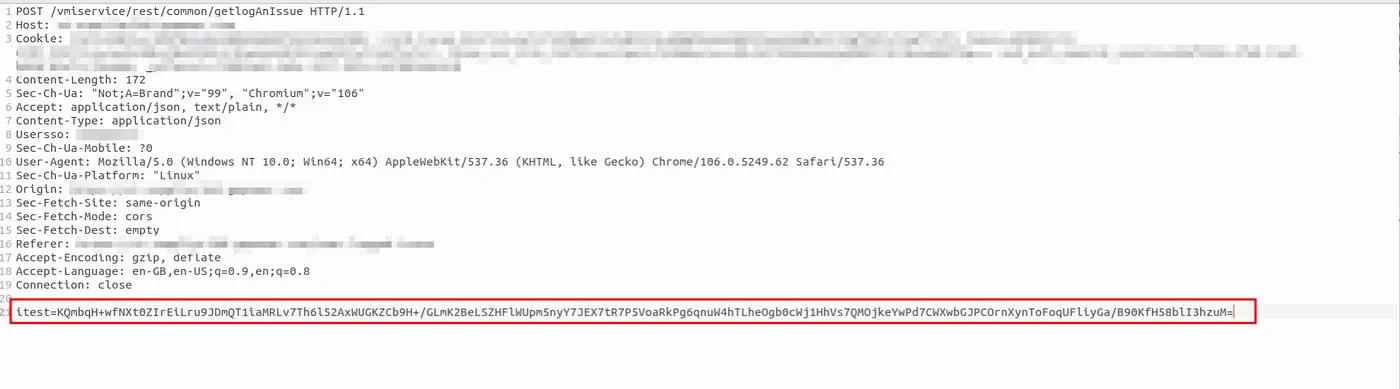
The screenshot shows the encrypted request as captured in Burp. The researcher notes to ignore the itest= parameter for now; it becomes relevant later.
Step 2: Find the key and algorithm in client-side JavaScript
Since encryption happens on the client, the key and algorithm have to be somewhere in the site's JavaScript. Analysing main.js revealed the key, in a form like:
x=atob("<base64 encoded>")
Further reading of the JavaScript showed the application was using AES 128 in ECB (Electronic Codebook) mode. That is enough to reproduce the encryption outside the browser.
Step 3: Encrypt and decrypt manually
With the algorithm and key known, the researcher used an online AES tool to encrypt and decrypt request and response bodies.
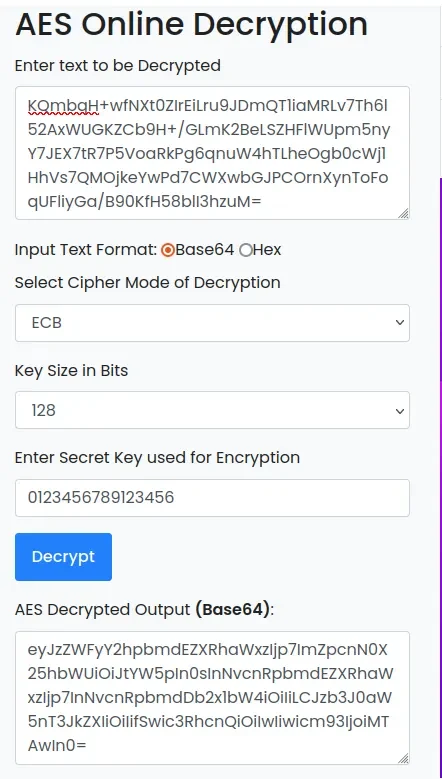
The screenshot shows the decryption of a ciphertext in the online tool. The output was base64 encoded, so Burp's decoder was used to make it readable.

The screenshot shows the base64 output converted to plain text in Burp's decoder.
Repeating this encrypt/decrypt cycle by hand was enough to exploit the SQL injection manually. The blocker was that the vulnerability was boolean-based, which made manual exploitation nearly impossible: every guess needs a fresh encryption and a fresh decryption of the answer.
Step 4: Decide on automation
Running SQLmap directly against the request would not work, because the backend tries to decrypt the request body; a plaintext payload from SQLmap would never be decrypted successfully. A search for existing tools or scripts for SQL injection on encrypted requests turned up nothing, so the researcher wrote a solution from scratch.
The design goal was to keep the encryption and decryption mechanism separate: supply plaintext to SQLmap and let SQLmap do the rest. SQLmap's tamper script feature was the hook. The script takes an already decrypted request and lets SQLmap dynamically craft the encrypted request with the desired payload, so the application can be interacted with without manual encryption and decryption steps.
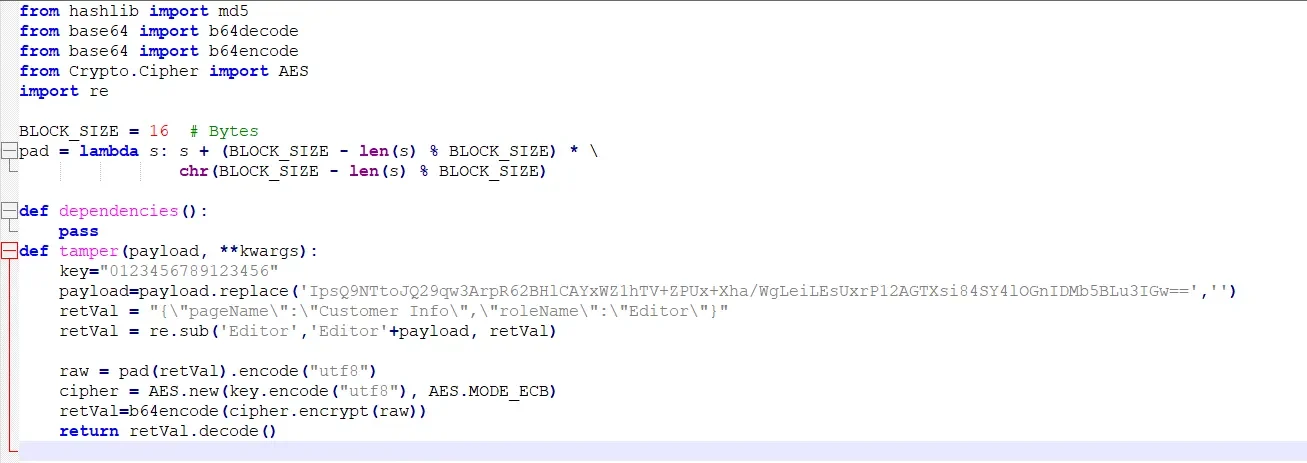
The screenshot shows the tamper script in place.
Step 5: Write the tamper script
SQLmap calls the tamper function, so the main logic lives there. The encryption and decryption code came from an existing AES example. The write-up walks through the pieces:
- A) Key: the encryption key is entered in the script.
- B) payload: the input SQLmap provides, for example
xyz' AND 'a'='a. In this case the payload arrives as the encrypted request with the SQL injection payload appended, for example<encrypted-request>' AND 'a'='a. To make the modified request look legitimate, the encrypted text has to be removed, leaving only the payload, for example' AND 'a'='a. Thereplacefunction in the tamper script does this. - C) retVal: the decrypted request. Since the script is going to craft the encrypted request, the original value is replaced with the malicious payload. After the replace, the request looks like:
{"roleName":"Editor' AND 'a'='a"}
This modified request carries the injected SQL payload for testing.
- D)
.encode("utf8"): the crypto library does not accept strings, so the string is converted to bytes. - E) raw: used to add padding to the plaintext.
- F) cipher: creates an object for encryption.
- G)
cipher.encrypt("plaintext"): encrypts the plaintext with the defined algorithm. - H)
.b64encode: converts the encrypted text to base64, which is how the algorithm works. - I)
.decode(): converts the bytes to a string, because SQLmap does not accept bytes.
That is the whole mechanism of the tamper script.
Step 6: Make the request acceptable to SQLmap
SQLmap needs the request in a format it understands, typically key-value pairs such as file=test.txt. Because the real request is encrypted, a parameter was explicitly added to it, itest=<encrypted-request>, so SQLmap can recognise and process the encrypted request and run its injection tests.
The screenshot shows the request with itest= added.
Step 7: Make the request acceptable to the server
The server did not accept the request with the added itest=<encrypted-request> parameter. After consulting colleagues, the solution was to use Burp Suite as middleware to intercept and modify the request. A Match & Replace rule removes the itest= parameter before the request reaches the server, so the modified request no longer contains the unwanted parameter and is processed correctly.
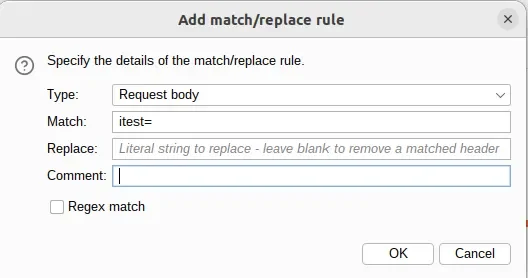
The screenshot shows the Match & Replace rule that strips itest= from the request.
Step 8: Run it, and hit the limits
With that, the mechanism was fully operational. One limitation is built in: the script contains no decryption function, so it can only be used for boolean-based and time-based SQL injection scenarios.
In practice the middleware for encryption and decryption defeated both of those. A time-based attack made the database sleep, but SQLmap could not definitively determine whether the payload had executed. Boolean-based attacks were not viable either, because the response length varied as the injected payload was included in the response.
Root cause
The injection itself comes from user input reaching a SQL statement through the ticket filters, with a single quote breaking the query and a comment balancing it. The encryption was a client-side control: the key and the AES 128 ECB algorithm were recoverable from main.js, so anyone with a browser could reproduce the encryption and decryption. Encryption of the body therefore did not protect the query from injected input; it only made the payload harder to type by hand. The report does not describe any server-side defence that stopped the injection.
Impact
The researcher exploited the SQL injection manually and then built an automated tamper script, though the middleware defeated the automated techniques. The practical ceiling described is the middleware: time-based and boolean-based techniques could not be confirmed through it, so the automated path was limited to those two scenarios and neither gave a reliable signal in this deployment.
Fix
The design lesson it supports is that a key shipped in client-side JavaScript cannot protect a request body, so the injection has to be fixed server-side with parameterised queries rather than relying on transport or body encryption.
Variants to test
- Client-side encryption with the key in JavaScript: search bundled files such as
main.jsforatob(, key material and cipher names. A positive result is a key you can use to encrypt and decrypt captured bodies outside the browser. - ECB mode: if the algorithm is ECB, identical plaintext blocks produce identical ciphertext blocks. A positive result is repeated ciphertext blocks in a body you control, which confirms ECB and tells you the block size.
- SQLmap tamper for encrypted bodies: write a
tamperfunction that strips the encrypted value, injects the payload, then re-encrypts and base64-encodes it. A positive result is SQLmap producing payloads the server decrypts and executes. - Placeholder parameter plus Match & Replace: add a parameter such as
itest=<encrypted-request>so SQLmap parses the request, then strip it in Burp before it reaches the server. A positive result is the server processing the request normally while SQLmap sees a parameter it can target. - Boolean-based blind through encryption: check whether the injected payload is reflected in the response, which changes the response length. If it is, length-based comparison will be unreliable and you need another signal.
- Time-based blind through middleware: measure whether the delay survives the encryption/decryption layer. A positive result is a consistent, reproducible delay tied to the payload rather than to normal processing variance.
What happened, in plain words
A security researcher found a way to break into the database behind a website that suppliers and vendors use to manage support tickets. The website tried to protect itself by scrambling (encrypting) the data that travels between your browser and its server, so that anyone watching the traffic would see only gibberish. The researcher worked out how the scrambling was done by reading the website's own code, which is delivered to every visitor's browser. With that knowledge they could scramble and unscramble the traffic themselves, and then slip malicious database commands inside the scrambled data. Because doing that by hand was painfully slow, they wrote a small program to do it automatically, and used two well-known security tools (SQLmap and Burp Suite) to drive the attack.
A website's database speaks a language called SQL (Structured Query Language), and the website builds SQL sentences out of things users type or select. If the website pastes user input straight into a SQL sentence without checking it, a user can type extra SQL of their own and change what the sentence means. It is like a form where you write your name, and the clerk reads your name out loud to a colleague; if you write "Alice, and also please open the safe", a careless clerk might do both.
This article walks through the same steps the researcher took, explaining each idea from scratch. You only need to be able to use a browser and a computer to follow along.
The target: a supplier portal
The website was a portal for suppliers and vendors. A portal is a website where a specific group of people (here, companies that supply goods or services) log in and do business. Different users had different roles, and each role saw different features. One feature let a user fetch the support tickets they had raised about an issue. A ticket is a message like "my order is late" or "I cannot log in", stored in the website's database so support staff can track it.
The ticket list held more than 10,000 tickets, and the interface offered filters so users could narrow the list down (for example, by status or by date). A filter is just a set of choices that the website turns into a database query, which is a question asked of the database, such as "give me the tickets where the status is open".
That filter is where the story starts. The request that fetches tickets carried an encrypted body, and the response came back encrypted too. A request is the message your browser sends to a server asking for something; a response is the server's reply. The body is the main content of that message, as opposed to the headers, which are the labels and instructions around it.
The tools involved
The write-up does not describe the accounts or roles used beyond the fact that the portal served suppliers and vendors with role-specific functionality. The tools were:
- A browser and the site's own JavaScript, to read
main.js. JavaScript is the programming language that runs inside web pages;main.jsis a file of it that the site sends to every visitor. - An online AES encryption/decryption tool (devglan) to encrypt and decrypt request and response bodies. AES is a widely used encryption standard; think of it as a very strong lockbox with a key.
- Burp Suite's decoder to turn base64 output into readable text. Burp Suite is a tool that sits between your browser and a website so you can inspect and change the traffic. Base64 is a way of writing any data using only letters, digits and a couple of symbols, so it can travel safely through systems that expect text.
- SQLmap, extended with a custom Python tamper script. SQLmap is a free tool that automates SQL injection testing. Python is a programming language often used for small scripts. A tamper script is a small add-on that changes SQLmap's payloads before they are sent.
- Burp Suite's Match & Replace feature as a middleware between SQLmap and the server. Middleware here means a piece of software sitting in the middle of a conversation, able to edit messages as they pass.
Finding the injection point
To understand the feature, the researcher narrowed the ticket list with the filters. This is normal exploration: use the feature as a user would, and watch what the browser sends.
During injection testing, a single quote (') was injected and the application returned no response. A single quote is special in SQL because it marks the beginning and end of a piece of text (a string). If the website builds a query like WHERE status = 'open' and you sneak a quote into the value, the database may see a broken sentence and refuse to answer, which is exactly what happened here: no response.
Balancing the query with a comment (' — ) then worked, which confirmed the injection point and allowed the work to continue. A comment in SQL is text the database ignores. By adding a quote and then a comment, the researcher closed the string early and told the database to ignore whatever came after, so the sentence became valid again. The fact that this produced a normal response is the signal that user input is being pasted into the query.
Step 1: Notice the encrypted body
On closer inspection, the request body was encrypted, and so was the response. That adds a layer to any injection attempt: the payload has to survive encryption on the way out, and the result has to be decrypted on the way back. A payload is the piece of malicious input you send, here the SQL you want the database to run.
The screenshot shows the encrypted request as captured in Burp. The researcher notes to ignore the itest= parameter for now; it becomes relevant later.
Step 2: Find the key and algorithm in client-side JavaScript
Since encryption happens on the client, the key and algorithm have to be somewhere in the site's JavaScript. The client is your browser; the server is the computer that runs the website. If the browser is doing the scrambling, the browser must have been given the recipe and the secret. That is a bit like a shop that hands every customer a padlock and its key so they can lock their own parcel: anyone who looks at the key can also unlock it.
Analysing main.js revealed the key, in a form like:
x=atob("<base64 encoded>")
Line by line: x= stores the result in a variable named x. atob(...) is a built-in browser function that decodes a base64 string back into ordinary text. The string inside the quotes, <base64 encoded>, is the encoded key. So this line takes an encoded key and turns it into the real key the encryption uses. The write-up shows the key in an encoded form rather than the literal value.
Further reading of the JavaScript showed the application was using AES 128 in ECB (Electronic Codebook) mode. AES 128 means the AES encryption standard with a 128-bit key. ECB mode is a way of using AES where each block of data is encrypted independently, so identical blocks of plaintext produce identical blocks of ciphertext. That is like a codebook that maps each word to a fixed codeword: it works, but patterns leak. Knowing the algorithm and the key is enough to reproduce the encryption outside the browser.
Step 3: Encrypt and decrypt manually
With the algorithm and key known, the researcher used an online AES tool to encrypt and decrypt request and response bodies. This is the moment the encryption stops being a wall and becomes a step you can repeat yourself.
The screenshot shows the decryption of a ciphertext in the online tool. The output was base64 encoded, so Burp's decoder was used to make it readable.
The screenshot shows the base64 output converted to plain text in Burp's decoder.
Repeating this encrypt/decrypt cycle by hand was enough to exploit the SQL injection manually. The blocker was that the vulnerability was boolean-based, which made manual exploitation nearly impossible. A boolean-based (or blind) injection is one where the database does not show you any data directly; it only answers yes or no, for example by returning a page or not. To read a single character of data you have to ask many yes/no questions, and each question needs a fresh encryption and a fresh decryption of the answer. Doing that by hand for thousands of questions is not realistic.
Step 4: Decide on automation
Running SQLmap directly against the request would not work, because the backend tries to decrypt the request body; a plaintext payload from SQLmap would never be decrypted successfully. The backend is the part of the website that runs on the server and talks to the database. If you send it plain text where it expects ciphertext, it will fail to decrypt and reject the request.
A search for existing tools or scripts for SQL injection on encrypted requests turned up nothing, so the researcher wrote a solution from scratch.
The design goal was to keep the encryption and decryption mechanism separate: supply plaintext to SQLmap and let SQLmap do the rest. SQLmap's tamper script feature was the hook. The script takes an already decrypted request and lets SQLmap dynamically craft the encrypted request with the desired payload, so the application can be interacted with without manual encryption and decryption steps. In other words, SQLmap thinks it is talking to a normal website, and the script quietly does the scrambling on its behalf.
The screenshot shows the tamper script in place.
Step 5: Write the tamper script
SQLmap calls the tamper function, so the main logic lives there. The encryption and decryption code came from an existing AES example. The write-up walks through the pieces:
- A) Key: the encryption key is entered in the script.
- B) payload: the input SQLmap provides, for example
xyz' AND 'a'='a. In this case the payload arrives as the encrypted request with the SQL injection payload appended, for example<encrypted-request>' AND 'a'='a. To make the modified request look legitimate, the encrypted text has to be removed, leaving only the payload, for example' AND 'a'='a. Thereplacefunction in the tamper script does this.replaceis a standard text operation: it finds one piece of text and swaps it for another. - C) retVal: the decrypted request. Since the script is going to craft the encrypted request, the original value is replaced with the malicious payload. After the replace, the request looks like:
{"roleName":"Editor' AND 'a'='a"}
This is a small JSON object. JSON is a text format for structured data: curly braces hold a set of name/value pairs, roleName is the name, and "Editor' AND 'a'='a" is the value. The value now contains the injected SQL payload, so the modified request carries it for testing.
- D)
.encode("utf8"): the crypto library does not accept strings, so the string is converted to bytes. A string is text; bytes are the raw numbers a computer actually stores. UTF-8 is a common way of turning text into bytes. - E) raw: used to add padding to the plaintext. Padding is extra filler added so the data is exactly the size the encryption algorithm expects, like adding packing material so a parcel fits a fixed box.
- F) cipher: creates an object for encryption. An object here is a bundle of code and data that does a job.
- G)
cipher.encrypt("plaintext"): encrypts the plaintext with the defined algorithm. Plaintext is the readable data before encryption. - H)
.b64encode: converts the encrypted text to base64, which is how the algorithm works. Encryption produces raw bytes, and base64 turns them into text that can travel in a request. - I)
.decode(): converts the bytes to a string, because SQLmap does not accept bytes.
That is the whole mechanism of the tamper script: take SQLmap's payload, strip the old encrypted value, put the payload in its place, encrypt the result, base64-encode it, and hand it back to SQLmap.
Step 6: Make the request acceptable to SQLmap
SQLmap needs the request in a format it understands, typically key-value pairs such as file=test.txt. A key-value pair is just a name and a value joined by an equals sign, like a label on a jar. Because the real request is encrypted, a parameter was explicitly added to it, itest=<encrypted-request>, so SQLmap can recognise and process the encrypted request and run its injection tests. A parameter is a named value sent with a request, for example ?page=2 in a URL.
The screenshot shows the request with itest= added.
Step 7: Make the request acceptable to the server
The server did not accept the request with the added itest=<encrypted-request> parameter. After consulting colleagues, the solution was to use Burp Suite as middleware to intercept and modify the request. A Match & Replace rule removes the itest= parameter before the request reaches the server, so the modified request no longer contains the unwanted parameter and is processed correctly. Match & Replace is a Burp feature that watches traffic and rewrites parts of it according to rules you set.
The screenshot shows the Match & Replace rule that strips itest= from the request.
Step 8: Run it, and hit the limits
With that, the mechanism was fully operational. One limitation is built in: the script contains no decryption function, so it can only be used for boolean-based and time-based SQL injection scenarios. A time-based injection is one where you ask the database to pause for a few seconds if a condition is true; you then measure how long the reply takes to learn the answer.
In practice the middleware for encryption and decryption defeated both of those. A time-based attack made the database sleep, but SQLmap could not definitively determine whether the payload had executed. Boolean-based attacks were not viable either, because the response length varied as the injected payload was included in the response. In other words, the yes/no signal was drowned out: the reply changed size for reasons unrelated to the database's answer.
Root cause
The injection itself comes from user input reaching a SQL statement through the ticket filters, with a single quote breaking the query and a comment balancing it. The encryption was a client-side control: the key and the AES 128 ECB algorithm were recoverable from main.js, so anyone with a browser could reproduce the encryption and decryption. Encryption of the body therefore did not protect the query from injected input; it only made the payload harder to type by hand. The report does not describe any server-side defence that stopped the injection.
Impact
The researcher exploited the SQL injection manually and then built an automated tamper script, though the middleware defeated the automated techniques. The practical ceiling described is the middleware: time-based and boolean-based techniques could not be confirmed through it, so the automated path was limited to those two scenarios and neither gave a reliable signal in this deployment.
Fix
The design lesson it supports is that a key shipped in client-side JavaScript cannot protect a request body, so the injection has to be fixed server-side with parameterised queries rather than relying on transport or body encryption. A parameterised query is a way of building SQL where the user's input is passed as a separate value, never pasted into the sentence, so it cannot change the sentence's meaning.
Variants to test
- Client-side encryption with the key in JavaScript: search bundled files such as
main.jsforatob(, key material and cipher names. A positive result is a key you can use to encrypt and decrypt captured bodies outside the browser. - ECB mode: if the algorithm is ECB, identical plaintext blocks produce identical ciphertext blocks. A positive result is repeated ciphertext blocks in a body you control, which confirms ECB and tells you the block size.
- SQLmap tamper for encrypted bodies: write a
tamperfunction that strips the encrypted value, injects the payload, then re-encrypts and base64-encodes it. A positive result is SQLmap producing payloads the server decrypts and executes. - Placeholder parameter plus Match & Replace: add a parameter such as
itest=<encrypted-request>so SQLmap parses the request, then strip it in Burp before it reaches the server. A positive result is the server processing the request normally while SQLmap sees a parameter it can target. - Boolean-based blind through encryption: check whether the injected payload is reflected in the response, which changes the response length. If it is, length-based comparison will be unreliable and you need another signal.
- Time-based blind through middleware: measure whether the delay survives the encryption/decryption layer. A positive result is a consistent, reproducible delay tied to the payload rather than to normal processing variance.
Glossary
- AES: a widely used encryption standard; AES 128 uses a 128-bit key.
- API: a defined way for one piece of software to talk to another; here, the website's own requests to its server.
- Backend: the part of a website that runs on the server and talks to the database.
- Base64: a way of writing any data using only letters, digits and a couple of symbols, so it can travel as text.
- Boolean-based (blind) injection: an injection where the database only answers yes or no, so you must ask many questions to learn anything.
- Burp Suite: a tool that sits between your browser and a website so you can inspect and change traffic.
- Bytes: the raw numbers a computer stores; text is turned into bytes before encryption.
- Ciphertext: data after encryption, unreadable without the key.
- Client: your browser, as opposed to the server.
- Comment (SQL): text the database ignores, used to balance a broken query.
- ECB (Electronic Codebook): an AES mode where each block is encrypted independently, so identical plaintext blocks produce identical ciphertext blocks.
- Encryption: scrambling data with a key so only someone with the key can read it.
- Filter: a set of choices that narrows down a list, turned into a database query.
- JavaScript: the programming language that runs inside web pages.
- JSON: a text format for structured data using name/value pairs in curly braces.
- Key: the secret value that locks and unlocks encryption.
- Match & Replace: a Burp feature that rewrites parts of traffic according to rules.
- Middleware: software sitting in the middle of a conversation, able to edit messages as they pass.
- Padding: extra filler added so data is exactly the size the encryption algorithm expects.
- Parameter: a named value sent with a request, such as
?page=2. - Parameterised query: a way of building SQL where user input is passed as a separate value, never pasted into the sentence.
- Payload: the piece of malicious input you send.
- Plaintext: readable data before encryption.
- Portal: a website where a specific group of people log in and do business.
- Python: a programming language often used for small scripts.
- Request: the message your browser sends to a server asking for something.
- Response: the server's reply to a request.
- Server: the computer that runs the website.
- SQL: Structured Query Language, the language databases use to store and retrieve data.
- SQL injection: inserting SQL into user input so the database runs commands the website did not intend.
- SQLmap: a free tool that automates SQL injection testing.
- String: text, as opposed to raw bytes.
- Tamper script: a small add-on that changes SQLmap's payloads before they are sent.
- Ticket: a stored support message about an issue.
- Time-based injection: an injection where you ask the database to pause, then measure the reply time to learn the answer.
- UTF-8: a common way of turning text into bytes.



