Bagaimana “Hal yang Tidak Terlihat” Membawa Saya Mendapatkan $1.000 dari Bug Bounty
A file-upload workflow trusted a client-supplied status field, so a user could change their own file from pending to approved and skip internal review. The developers fixed it only by removing the field from the client request, and the server still accepted the same field when it was added back by hand.

Bug Bounty
The full write-up lives on its author's site
It belongs to its author, so we link to it rather than copy it. The other two tabs are our own rewrites, checked against it.
Context
The target is a file submission feature on a web application. Users can edit their own files and send an edit request. That request carries a status parameter, and the file is supposed to be reviewed by an internal team before it is approved. The normal flow is that a user's file sits in a pending state until the internal team checks it.
The researcher had previously reported a parameter injection issue in this feature: a user could manipulate the status of a file from pending to approved, so the file that should have been examined by the internal team could skip that review. The report does not name the programme or the application.
Setup
The report does not describe accounts, roles, tools or versions. The only precondition is that the researcher had already reported the first vulnerability, received a reward, and was then asked by the programme to check the fix.
Finding it
After the first report, the programme paid $500 and closed the issue by removing the problematic parameter from the request. When the researcher was asked to verify the fix, the request no longer contained the parameter, so on the surface the problem looked solved.
The researcher's reasoning was that removing a parameter on the client side does not prove the server has stopped trusting it. The questions that drove the next step were whether removing the parameter actually made the request safer, what the server would do, and whether the server would still accept the parameter if it were added back manually.
That gap between what is visible in the request and what the server accepts is the "invisible" part the title refers to: the client-side change hides the parameter, but the server-side handling is unchanged.
Exploitation
Step 1: Inspect the request after the fix
The researcher observed the behaviour of the request after the development team had removed the parameter. The request looked safe, but the researcher judged it still vulnerable.
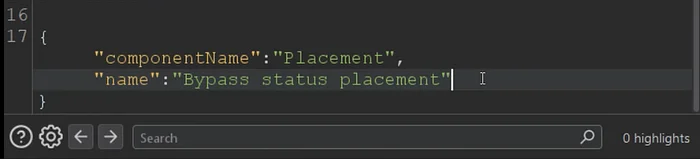
The image is captioned Original Request and shows the request as it appeared after the fix.
Step 2: Add the parameter back manually
The researcher manually inserted the parameter "status":"active" into the request.
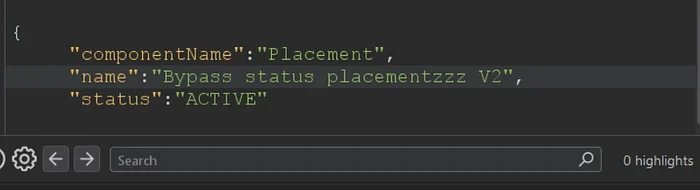
The image is captioned Manipulasi Request and shows the manipulated request with the parameter added by hand.
Step 3: Observe the server response
The server accepted the request and changed the file back to the active status.
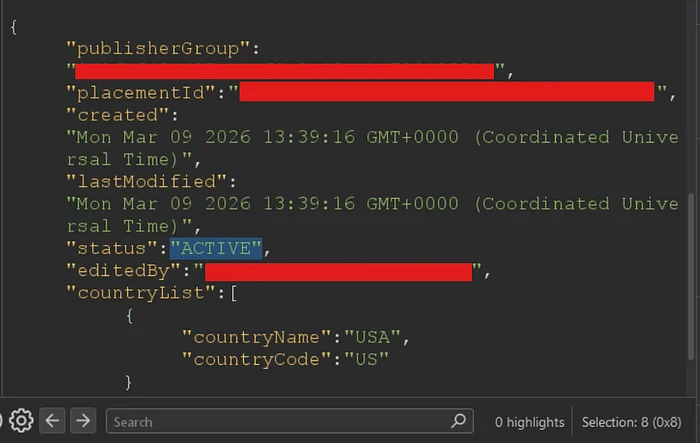
The image is captioned Response Dari Server and shows the server's response confirming the status change.
So although the developer had removed the parameter, that approach was not fully effective: the server was neither protected nor validating the input, which left the feature vulnerable.
Step 4: Report again and get paid
The researcher reported the vulnerability again, in detail and with everything needed, explaining how the server still responded to the request without any validation having been fixed.
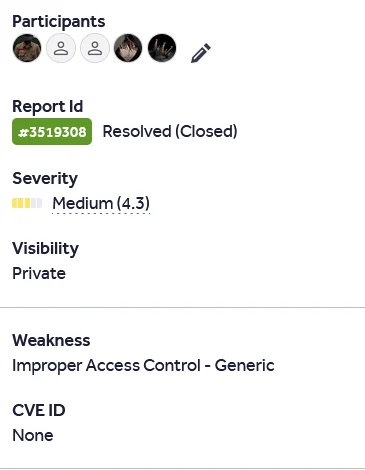
The image is captioned Reward.
The programme validated the report, acknowledged the mistake, and paid the same reward as before, because the root cause and impact were the same as in the previous vulnerability.
Root cause
The developer assumed that removing the problematic parameter from the request was enough to close the vulnerability. It was not: the server still accepted the parameter when it was supplied manually, because no server-side validation was added to reject or ignore it. The fix was applied only on the client side, while the server continued to trust user input.
Impact
An attacker who can edit their own file can set the status parameter, so a file that should wait for internal review can be moved to an active state and skip that review. The report describes the impact as the same as the original parameter injection issue.
Fix
Its lesson for developers is explicit: do not rely on the client side even when the parameter has been removed there, and apply the fix all the way through to the server, thoroughly.
Variants to test
- Re-add a removed parameter by hand. Take a request from a feature that was "fixed" by deleting a parameter, insert the old parameter with a privileged value, and send it. A positive result is a server response that accepts the value and changes the object's state.
- Try alternative names and placements for the same field. If the server ignores one spelling, test whether the same value is accepted under a different key or location in the request. A positive result is the same state change through the alternate route.
- Compare the response before and after the fix. If the server's response to the original request is unchanged apart from the missing parameter, the server-side handling is likely unchanged too.
- Test state transitions directly. Send requests that move an object from a review state to an approved state without going through the review step, and check whether the server enforces the allowed transitions. A positive result is a state change the workflow should not permit.
- Re-test after every fix notice. When a programme asks you to verify a fix, check the server's behaviour rather than only the request, since a client-side removal can leave the server-side trust intact.
What happened, in plain words
A security researcher found a way to skip a review step on a website that lets people upload and edit files. He reported it, the company paid him $500, and the developers "fixed" it by deleting a field from the request. When they asked him to check the fix, he did not just look at the request. He put the deleted field back by hand and sent it anyway. The server accepted it, so the file could still be pushed past the review. He reported it a second time and was paid the same amount again, because the underlying problem had never actually been fixed.
This article walks through that story slowly, explaining every piece as it comes up, so that someone who has never done security testing can follow it.
Some words you will need first
Before the story makes sense, here are the basic ideas. Each one is explained again where it first appears in the story, but a quick overview helps.
- A web application is a website that does things rather than just showing pages: you log in, you upload a file, you edit it. Your browser shows you buttons and forms, but the real work happens on a computer somewhere else, called the server.
- An API (application programming interface) is the set of addresses and rules the browser uses to talk to the server. Think of a restaurant: the menu and the waiter are the API. You do not walk into the kitchen yourself; you tell the waiter what you want, and the waiter carries it back and forth. When you click "Save" on a website, your browser is the customer, the server is the kitchen, and the request it sends is the order.
- A request is the message your browser sends to the server. It says what you want to do (for example, "edit this file") and carries the details, such as the file's name and contents. Those details are called parameters: named values, like
statusorfilename, that the server reads to know what you mean. - A response is the message the server sends back: whether it worked, and any data you asked for.
- A parameter injection is when a user slips a parameter, or a value for a parameter, into a request that the server should not have accepted. The server trusts what the user sent and acts on it. The everyday comparison: a hotel clerk who accepts any room number you write on a form without checking whether that room is yours.
- Client side means the part running on your own computer, in your browser. Server side means the part running on the company's computer. A rule enforced only on the client side is like a sign on your own front door: you can take the sign down whenever you like. A rule enforced on the server side is like a lock on the building's main door, which you cannot change from home.
- Validation means the server checking the input it receives: is this value allowed, is this user permitted to set it, does this change make sense? Without validation, the server simply believes whatever it is told.
- A bug bounty programme is a scheme where a company invites outside people to look for security problems in its systems and pays them for reporting the ones that are real. The payment is called a reward or bounty.
- Root cause is the underlying reason a problem exists, as opposed to the surface symptom. If your roof leaks because a tile is missing, the missing tile is the root cause; mopping the floor is not a fix.
- Impact is what harm the problem could actually cause.
The feature that was being tested
The target is a file submission feature on a web application. Users can edit their own files and send an edit request. That request carries a status parameter, and the file is supposed to be reviewed by an internal team before it is approved. The normal flow is that a user's file sits in a pending state until the internal team checks it.
In plain terms: imagine a noticeboard where anyone can pin a poster, but a moderator is supposed to look at each poster before it goes up publicly. Each poster has a label on it saying whether it is waiting for the moderator (pending) or has been let through (approved). The label is the status parameter. The website's edit form is supposed to set that label for you, and only the moderator is supposed to change it to approved.
The researcher had previously reported a parameter injection issue in this feature: a user could manipulate the status of a file from pending to approved, so the file that should have been examined by the internal team could skip that review. In the noticeboard comparison, the person pinning the poster writes "approved" on the label themselves, and nobody checks.
The report does not name the programme or the application.
What was needed to start
The report does not describe accounts, roles, tools or versions. The only precondition is that the researcher had already reported the first vulnerability, received a reward, and was then asked by the programme to check the fix.
That last point matters for a beginner: you do not need special access or expensive software to do this kind of testing. You need an account on the site, a way to see and change the requests your browser sends, and patience.
How the first problem was found and "fixed"
After the first report, the programme paid $500 and closed the issue by removing the problematic parameter from the request. When the researcher was asked to verify the fix, the request no longer contained the parameter, so on the surface the problem looked solved.
Think about what "removing the parameter from the request" means. The website's own pages build the request for you. If the developers change those pages so they no longer include the status field, then when you click Save in your browser, the message sent to the server simply has no status in it. Looking at that message, everything seems fine: there is no field for anyone to tamper with.
But here is the catch. The browser is under the user's control, not the company's. Anyone can open the developer tools built into every modern browser, find the request, and add a line back before it is sent. Removing a field from the page the browser builds is like removing a question from a paper form: you can still write the answer in the margin.
The researcher's reasoning was that removing a parameter on the client side does not prove the server has stopped trusting it. The questions that drove the next step were whether removing the parameter actually made the request safer, what the server would do, and whether the server would still accept the parameter if it were added back manually.
That gap between what is visible in the request and what the server accepts is the "invisible" part the title refers to: the client-side change hides the parameter, but the server-side handling is unchanged. The visible part of a website is what you see on screen. The invisible part is what the server does with what it receives, and that is where the real security decision is made.
Testing the fix, step by step
Step 1: Look at the request after the fix
The researcher observed the behaviour of the request after the development team had removed the parameter. The request looked safe, but the researcher judged it still vulnerable.
The image is captioned Original Request and shows the request as it appeared after the fix. In the article it sits right after the sentence saying the request looks safe but is in fact still vulnerable. What you are looking at is the message the browser sends when a user edits a file: the address it goes to, the details of the file, and the fields the server will read. The point of looking at it is to learn the shape of a normal, legitimate request, so that you can tell exactly what has changed when you alter it.
Why do this at all? Because you cannot judge a fix without knowing what normal traffic looks like. If you do not know which fields a request normally carries, you cannot notice which one has quietly disappeared, and you cannot guess which one the server might still be listening for.
Step 2: Put the parameter back by hand
The researcher manually inserted the parameter "status":"active" into the request.
The image is captioned Manipulasi Request and shows the manipulated request with the parameter added by hand. "Manipulasi" simply means manipulation: the request has been edited before it was sent. The researcher took the safe-looking request from the previous step and typed the status field back in, giving it the value active.
Why active rather than approved? The lesson is general: if the server still reads a field, the exact spelling of the privileged value is just a detail to work out.
Why do this at all? Because the fix only changed what the browser sends by default. The question the researcher was asking is whether the server still accepts the field when it arrives from somewhere other than the official form. If the server has been taught to ignore or reject that field, the request will fail. If it has not, the request will succeed, and the "fix" was cosmetic.
Step 3: Watch what the server does
The server accepted the request and changed the file back to the active status.
The image is captioned Response Dari Server, meaning the response from the server, and shows the server's response confirming the status change. This is the moment the researcher describes as "BOOMM": the server replied as if the request were perfectly normal and moved the file to the status he had asked for.
Why is this the important step? Because the response is the evidence. Anyone can edit a request; that proves nothing on its own. What proves the vulnerability is the server acting on the edited request. The server is the kitchen, and it cooked the order even though the dish was not on the menu.
So although the developer had removed the parameter, that approach was not fully effective: the server was neither protected nor validating the input, which left the feature vulnerable.
Step 4: Report it again and get paid
The researcher reported the vulnerability again, in detail and with everything needed, explaining how the server still responded to the request without any validation having been fixed.
The image is captioned Reward.
Why report it again instead of moving on? Because the problem was never fixed. The first report described a symptom, the developers treated the symptom, and the cause remained. A second report with clear evidence, the request, the response and an explanation of why the earlier fix did not work, is what lets a programme see that.
The programme validated the report, acknowledged the mistake, and paid the same reward as before, because the root cause and impact were the same as in the previous vulnerability.
Why it worked: the root cause
The developer assumed that removing the problematic parameter from the request was enough to close the vulnerability. It was not: the server still accepted the parameter when it was supplied manually, because no server-side validation was added to reject or ignore it. The fix was applied only on the client side, while the server continued to trust user input.
A useful comparison is a nightclub with a bouncer. The client-side fix is like printing new invitations that no longer mention the VIP entrance. The server-side fix would be telling the bouncer to check IDs. If the bouncer still waves through anyone who says the word "VIP", the new invitations changed nothing that matters.
What harm it could do
An attacker who can edit their own file can set the status parameter, so a file that should wait for internal review can be moved to an active state and skip that review. The report describes the impact as the same as the original parameter injection issue.
In the noticeboard comparison: a poster that should have waited for the moderator goes straight up in public, with the poster's own label claiming it was approved.
What the real fix would look like
Its lesson for developers is explicit: do not rely on the client side even when the parameter has been removed there, and apply the fix all the way through to the server, thoroughly.
In practice that means the server itself must decide which fields a user is allowed to set, and refuse or ignore anything else, no matter what the browser sends. The browser's form is a convenience for honest users, not a security control.
Other places to try the same idea
The report's lesson can be tried in other features. These are starting points, not instructions to attack anything you do not have permission to test.
- Re-add a removed parameter by hand. Take a request from a feature that was "fixed" by deleting a parameter, insert the old parameter with a privileged value, and send it. A positive result is a server response that accepts the value and changes the object's state.
- Try alternative names and placements for the same field. If the server ignores one spelling, test whether the same value is accepted under a different key or location in the request. A positive result is the same state change through the alternate route.
- Compare the response before and after the fix. If the server's response to the original request is unchanged apart from the missing parameter, the server-side handling is likely unchanged too.
- Test state transitions directly. Send requests that move an object from a review state to an approved state without going through the review step, and check whether the server enforces the allowed transitions. A positive result is a state change the workflow should not permit.
- Re-test after every fix notice. When a programme asks you to verify a fix, check the server's behaviour rather than only the request, since a client-side removal can leave the server-side trust intact.
What to take away
The researcher's own summary of the lessons is short. For bug hunters: do not only watch what is visible. Watch how the server behaves, because that tells you what to do next. When you find a vulnerability that has supposedly been fixed, look at how the server responds and how it handles the problem; that gives you a good picture of how the fix might be bypassed. For developers: do not rely on the client side even when the parameter has been removed there, and carry the fix all the way through to the server, thoroughly.
Glossary
- API: the set of addresses and rules a browser uses to talk to a server, like a menu and waiter in a restaurant.
- Bug bounty programme: a scheme where a company invites outside people to find security problems and pays them for valid reports.
- Bounty / reward: the payment a programme makes for a valid report.
- Client side: the part of a web application that runs on the user's own computer, in the browser.
- Developer tools: the built-in panel in a browser that lets you see and change the requests it sends.
- Impact: the harm a vulnerability could actually cause.
- Parameter: a named value inside a request, such as
status, that tells the server what the user wants. - Parameter injection: slipping a parameter, or a value for one, into a request that the server should not accept, because the server trusts user input.
- Pending: the state of a file that is waiting for internal review.
- Request: the message a browser sends to a server describing what the user wants to do.
- Response: the message a server sends back, saying whether the request worked and returning any data.
- Root cause: the underlying reason a problem exists, as opposed to its visible symptom.
- Server: the computer that runs the web application and does the real work behind the scenes.
- Server side: the part of a web application that runs on the company's computer.
- State: the current condition of an object, such as whether a file is pending or approved.
- Validation: the server checking that the input it receives is allowed and makes sense.
- Vulnerability: a weakness in a system that someone can use to make it behave in a way it should not.




