Base64-encoded Reflected XSS in Indeed’s Email Marketing | Bug Bounty WriteUp
 Published on medium.com
When doing bug bounty, you come across a lot of false positives. I like to focus on XSS vulnerability’s, because these almost (always) can be escalated to high-servity chained attacks in web-application.
The full write-up lives on its author's site
It belongs to its author, so we link to it rather than copy it. The other two tabs are our own rewrites, checked against it.
Context
Indeed runs a bug bounty program, and this write-up covers a reflected XSS found in one of its subdomains. The affected feature is an unsubscribe page on preferences.jm.indeed.com. The page takes an email address, base64-encoded, in a query parameter and reflects it back into the page.
The researcher's general interest is XSS, on the grounds that it can often be escalated into higher-severity chained attacks in a web application. The report describes the finding as a base64-encoded reflected XSS.
Setup
No accounts, roles or specific tool versions are described. The tools mentioned are:
- https://subdomainfinder.c99.nl/ for subdomain enumeration. The researcher uses it because it shows which subdomains are Cloudflare protected and, at the bottom of the page, an overview of the IP addresses bound to a subdomain.
- web.archive.com, used to look for interesting inputs on the subdomain, on the argument that fuzzing sometimes will not reveal them and that internet archiving is more interesting.
- A browser, to confirm that the payload fires.
The target scope is a wildcard domain such as *.indeed.com.
Finding it
When doing recon on a wildcard domain, the researcher filters out non-protected subdomains. On a large program like Indeed this still leaves hundreds to thousands of subdomains, so the next filter is the IP overview at the bottom of subdomainfinder: IP addresses that have three or four subdomains bound to them. The reasoning is that this sometimes means a small service served on one subdomain, which could have more interesting vulnerabilities and attack surface.
preferences.jm.indeed.com stood out this way. Looking it up in the web archive turned up a URL that returned the following:
https://preferences.jm.indeed.com/unsubscribe-page?&ence=<base64-encoded-email>
The ence parameter carries a base64-encoded email address. That reflection point is what made the subdomain worth pursuing.
Exploitation
Step 1: try the obvious payload
The email is reflected, decoded, into an input. The first idea was therefore to base64-encode <script>alert();</script> and put it into the ?ence= parameter. Nothing happened. The researcher then spent about 30 minutes trying payloads without success.
Step 2: understand the sink
The root cause turned out to be an innerHTML sink in the JavaScript. The payload was being triggered, but no alert popped because the <b> element had to be closed before an inline XSS payload could fire. The reflected value lands inside a <b> element, so a payload that does not first close that tag stays inert markup.
Step 3: weaponise the payload
The payload was rewritten to close the <b>, inject an image with an error handler, and reopen the <b>:
</b><img src=x onerror="alert(document.cookie);"><b>Base64 (Encoded):[redacted]==
The base64 string [redacted]== is the encoded form of </b><img src=x onerror="alert(document.cookie);"><b>, which is what gets placed in the ence parameter.
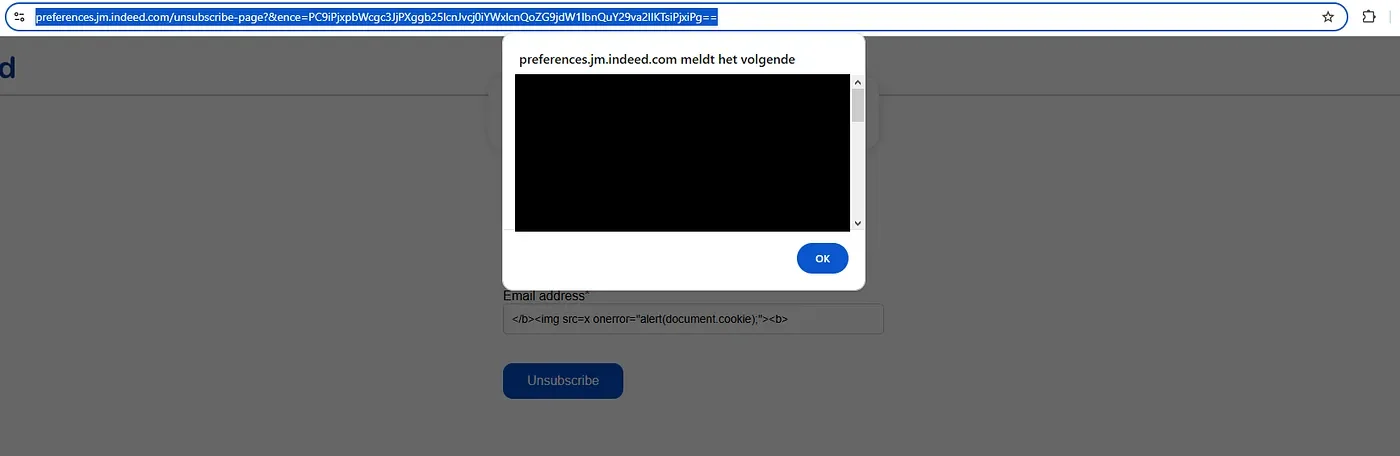
With that payload the XSS fired:
Escalating the vulnerability
A reflected XSS on its own, without a demonstrated impact, would be a simple low or maybe a medium, so the researcher wanted to secure the full medium. The search began for another attack vector on the same subdomain.
- The first idea was to combine the XSS with an OAuth redirect misconfiguration. That did not work.
- The next observation was that the XSS fired on a third-level subdomain. Looking at
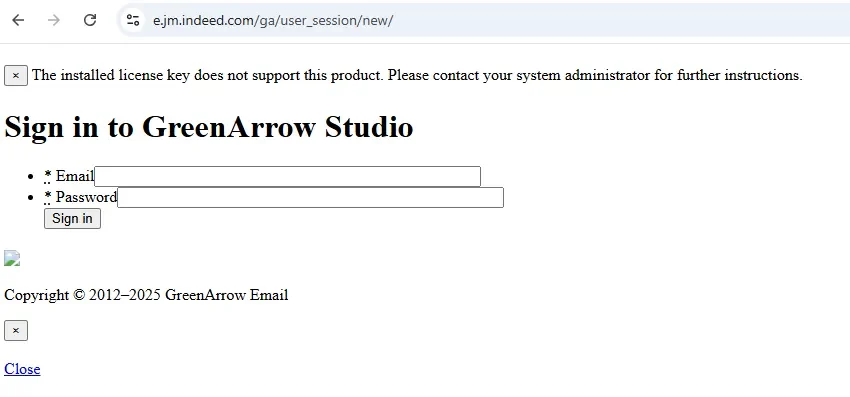
*.jm.indeed.com, there was ane.jm.indeed.comhosting an email marketing CMS:
- Looking at CORS, the researcher reasoned that a forged HTTP request via a
fetch()JavaScript script could be executed on that page.
The report is explicit that this escalation was a technical theory and was not verified, because it was at the beginning of the researcher's bug bounty hunting. It was the only escalation vector available at the time.
Submission
The researcher likes the way Bugcrowd triagers handle submissions, given the volume of false positives they receive. The vulnerability was submitted in November 2025, as far as the researcher recalls. There was a lot of back and forth about showing impact, weaponising a <script> into the payload, and then the verifying time loop.
On the Friday, while at a bar with friends, the researcher got a message that the submission had been accepted and rewarded with a bounty:
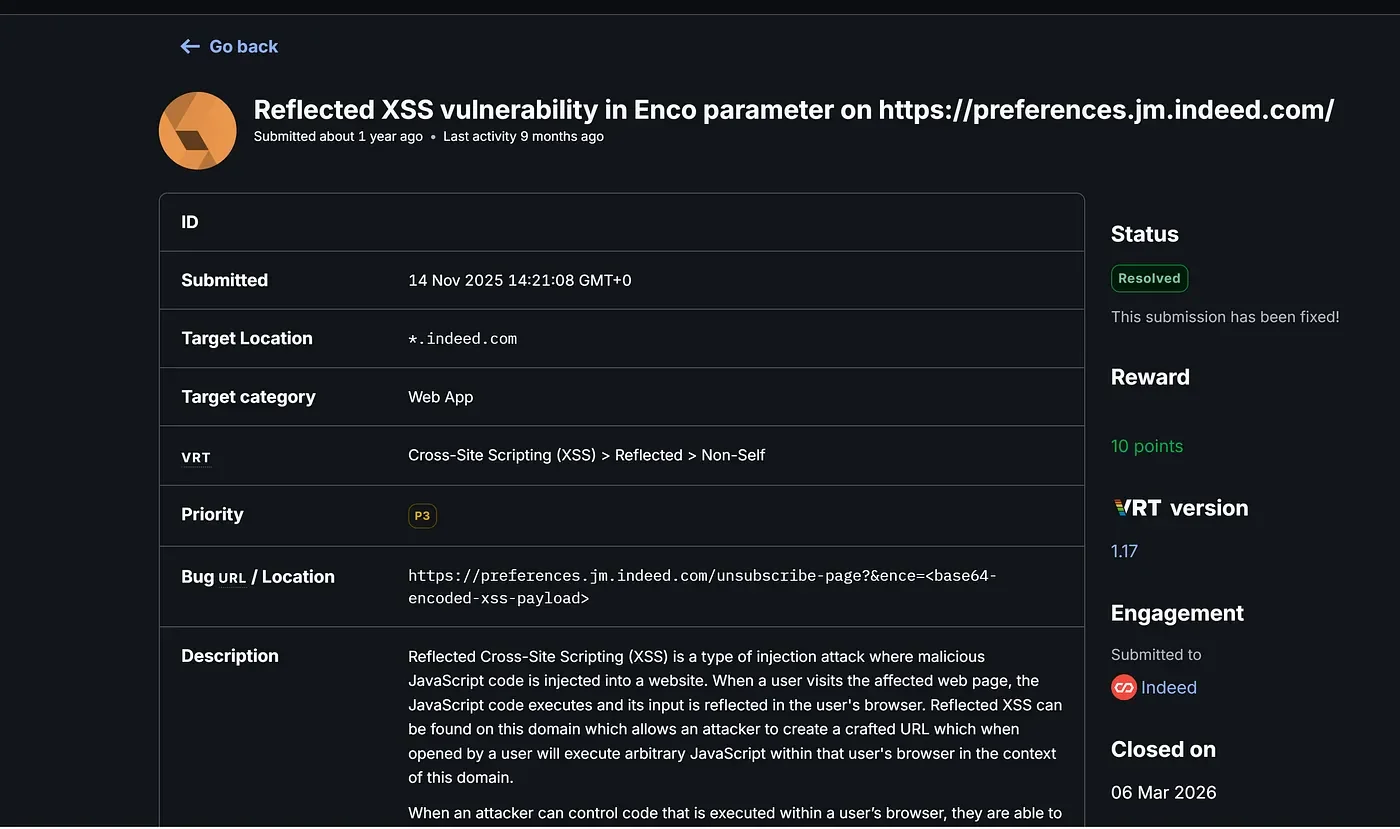
The researcher notes that the money is not really the point, although it makes bug bounty more fun; it is more about the knowledge developed when there is time to do so.
Root cause
The reflected value from the ence parameter is written into the page through an innerHTML sink in the JavaScript. Because the decoded email is inserted as HTML rather than as text, markup in the value is parsed and executed. The existing context is a <b> element, so a payload has to close that tag first; once it does, an inline handler such as onerror runs. The report identifies the innerHTML sink as the root cause.
Impact
The payload ran JavaScript in the page on preferences.jm.indeed.com, reading document.cookie. The report does not state which cookies are exposed or whether they are HttpOnly. The claimed escalation to e.jm.indeed.com through CORS and fetch() is presented as a theory only and was not verified.
Fix
The report does not say what was changed. The natural fix, given the described sink, is to stop inserting the decoded value through innerHTML and use a text-safe insertion instead, so that markup in the parameter is rendered as text rather than parsed.
Variants to test
- Enumerate subdomains with subdomainfinder and sort by IP addresses that have three or four subdomains bound to them, then look at each of those subdomains. A positive result is a small service with an unusual parameter or page that the main application does not expose.
- Query the web archive for a subdomain before fuzzing it. A positive result is an archived URL with a parameter that reflects a value, such as the
enceparameter here. - For any parameter that carries base64, decode it, inject markup, re-encode it and send it. A positive result is the decoded value appearing as parsed HTML in the response or in the DOM.
- When a payload does not fire, inspect the surrounding markup for an element that has to be closed first, as with the
<b>here, and prepend the matching closing tag. A positive result is the handler executing. - Look for sibling subdomains of the one where the XSS fires, such as
e.jm.indeed.comnext topreferences.jm.indeed.com, and check their CORS configuration. A positive result is a permissive policy that would let a page on the XSS-affected origin make cross-origin requests to the sibling.
What happened, in plain words
A security researcher found a bug on a website owned by Indeed, the job search company. The bug let an attacker run their own JavaScript code inside a page on Indeed's site, in the browser of anyone who clicked a specially crafted link. This kind of bug is called cross-site scripting, or XSS for short.
The page involved is an unsubscribe page that takes a base64-encoded email address in the ence parameter. The decoded email was reflected into an input, and the root cause was an innerHTML sink in the JavaScript. If an attacker puts code in that value, the browser runs it.
The researcher found the page by looking at lists of subdomains, tried a simple attack first, worked out why it failed, adjusted the attack, and got it to fire. Then they considered how the bug could be made more serious, and submitted the report to Indeed's bug bounty programme, where it was accepted and rewarded with a bounty.
This article walks through the whole thing from the beginning, explaining each idea as it comes up. You only need to know how to use a browser.
Some background ideas first
Before the steps, here are the concepts the rest of the article relies on.
A website and a web page. When you type an address into your browser, the browser asks a server for a page. The server sends back HTML, which is the language that describes what is on the page: headings, paragraphs, images, links. The browser reads the HTML and draws the page.
JavaScript. HTML describes what is on a page; JavaScript is code that runs inside the page and makes it do things, like react to a click or fetch new data. Every page you use that feels interactive is running JavaScript. Crucially, JavaScript that runs on a page can read and change everything on that page, including things the site stored in your browser.
A cookie. A cookie is a small piece of text that a website asks your browser to keep and to send back on every later request to that site. It is how a site remembers who you are between page loads. The most important cookie on most sites is the session cookie: it is like a wristband at an event, proving you already showed your ticket at the door. If someone else gets a copy of your wristband, they can walk around as you. That is why stealing cookies is a serious outcome of an XSS bug.
A subdomain. A domain is the main name of a site, like indeed.com. A subdomain is a name in front of it, like preferences.jm.indeed.com, used to point at a separate service. Think of a large company building: the main address is the domain, and each department has its own room number in front of it. Companies often have hundreds or thousands of subdomains, and each one is a separate piece of software that might have its own bugs.
A wildcard domain. When a bug bounty programme says its scope is *.indeed.com, the asterisk means "any subdomain". So any service under that name is fair game to test. This is why the researcher had thousands of subdomains to look at.
A query parameter. Web addresses can carry extra information after a question mark, in the form name=value. In https://example.com/page?colour=blue, the parameter is colour and its value is blue. The server, or the JavaScript on the page, reads these values to decide what to show. A parameter is like a note handed to a clerk along with your form: the clerk reads it and acts on it.
Base64 encoding. Base64 is a way of writing any data using only ordinary letters, digits and a couple of symbols. It does not hide or encrypt anything; it just changes the representation, the way you might write a phone number in words instead of digits. It is often used to carry values in web addresses safely, because some characters are awkward in a URL. Anyone can decode base64 back to the original in a second.
Reflected XSS. Cross-site scripting comes in a few shapes. In reflected XSS, the attacker's value goes into the request (usually the web address), the server or page sends it straight back in the response, and the browser treats it as code. The malicious value is not stored on the site; it travels in the link. The attacker's job is to get a victim to open that link. The name "reflected" comes from the value bouncing straight back, like a shout off a wall.
A sink. In web security, a sink is the place in the code where a value finally gets used in a way that matters. If the value is put into the page as text, it is harmless. If it is put into the page as HTML, it can become code. The sink is the point of no return, and finding it is the key to understanding an XSS bug.
innerHTML. This is a property in JavaScript that lets code set the contents of an element on the page. The important detail: whatever you assign to innerHTML is parsed as HTML, not as plain text. If you assign the string <b>hello</b>, the browser makes bold text. If you assign a string containing a script or an event handler, the browser may run it. Assigning to innerHTML is like telling a builder "here are the blueprints" rather than "here is a word to paint on the wall".
An event handler. HTML elements can carry attributes that say "when something happens to me, run this code". A common one is onerror, which fires when an image fails to load. If an attacker can get an onerror attribute into the page, they get their code run without needing a full <script> tag.
CORS. Cross-origin resource sharing is a rule set that decides whether a page from one site is allowed to read responses from another site using JavaScript. By default browsers block this, because otherwise any site could quietly read your data from another site you are logged into. A permissive CORS configuration is like a building that lets any courier walk in and read the files.
fetch(). This is the modern JavaScript function for making a request to a server from inside a page. Combined with a permissive CORS policy, it is how a page on one site can talk to another.
A bug bounty programme. A company invites outside researchers to look for bugs in its systems and pays for good reports. Bugcrowd is a platform that runs such programmes for many companies, with staff called triagers who read submissions and decide whether they are real.
Recon. Short for reconnaissance: the information-gathering phase before attacking anything. In bug bounty it means mapping out what exists, which subdomains, which pages, which parameters, before trying anything.
Fuzzing. Sending lots of semi-random inputs to a page to see if anything breaks or behaves oddly. It is fast but blunt; it finds what is easy to reach, not what is hidden.
The web archive. A service that keeps old copies of web pages. Because it stores pages as they were, it can reveal URLs and parameters that are no longer linked from anywhere but still work.
OAuth. A system that lets you log in to one site using your account on another, by bouncing you through a redirect. A misconfiguration in the redirect can sometimes be abused, which is why the researcher considered it.
A CMS. A content management system is software for building and managing website content, often used for marketing emails and landing pages. It is a separate product with its own behaviour and its own bugs.
The target and how it was found
The researcher's stated interest is XSS, on the grounds that it can often be escalated into higher-severity chained attacks in a web application. In plain terms: an XSS bug on its own might look small, but if the code it runs can reach other parts of the company's systems, the impact grows.
When doing recon on a wildcard domain such as *.indeed.com, the researcher filters out subdomains that are not protected. A large programme like Indeed's yields hundreds to thousands of subdomains, which is too many to look at one by one, so the next step is a smarter filter.
The tool used for enumeration is https://subdomainfinder.c99.nl/. Two things make it useful here: it shows which subdomains sit behind Cloudflare (a widely used protection service), and at the bottom of the page it lists the IP addresses that subdomains are bound to.
An IP address is the numeric address of a server on the internet, the way a street address identifies a building. Several subdomains can point at the same IP address, meaning they are served by the same machine.
The filter the researcher applied: look at IP addresses that have three or four subdomains bound to them. The reasoning is that this sometimes means a small service served on one subdomain, and a small service can have more interesting vulnerabilities and more attack surface than the big, well-tested main site. It is like ignoring the busy shopping centre and looking at the small back offices, where fewer people have checked the locks.
preferences.jm.indeed.com stood out this way. To learn more about it, the researcher used web.archive.com to look for interesting inputs. The argument given is that fuzzing sometimes will not reveal them, and that the internet archive is more interesting. In other words: rather than throwing random input at the page, look at what the page used to be asked to do, because old links preserve the real parameter names.
That turned up a URL that returned the following:
https://preferences.jm.indeed.com/unsubscribe-page?&ence=<base64-encoded-email>
Line by line:
https://is the scheme, meaning the connection is encrypted.preferences.jm.indeed.comis the subdomain, the small service that stood out./unsubscribe-pageis the path, the specific page on that service.?starts the query string, the part of the address that carries parameters.&ence=is a parameter namedence. The stray&before it is harmless; it just means the query string starts with an empty separator.<base64-encoded-email>is a placeholder for an email address written in base64. The real value would be a string of letters and digits that decodes to something like an email address.
So the page takes an email address, encoded in base64, in a parameter called ence. That is the reflection point: the page needs to show the user which address is being unsubscribed, so it takes the value from the address and puts it on the page. The researcher's reaction, in the report's words, was "bingo".
Exploiting the endpoint
Step 1: try the obvious payload
At first, the email was reflected, decoded, into an input. In other words, the page decoded the base64 and reflected the result into an input. The first idea followed naturally: what if the value placed there is not an email but code?
The payload tried was <script>alert();</script>, base64-encoded and put into the ?ence= parameter. alert() is the simplest possible proof: it makes the browser pop up a dialog box. If the box appears, code ran.
Nothing happened. The researcher then spent about 30 minutes trying payloads without success, in the report's own words, without using their brain. That is a useful admission: throwing payloads at a page without understanding where the value lands rarely works.
Step 2: understand the sink
The root cause turned out to be an innerHTML sink in the JavaScript. Recall what that means: the page was taking the decoded value and assigning it to innerHTML, so the browser parsed it as HTML. That is why the value could become code at all.
But the payload was being triggered and still no alert popped. The reason: the <b> element had to be closed before an inline XSS payload could fire. The reflected value lands inside a <b> element, which is the HTML tag for bold text. If the page's HTML looks like <b> followed by the attacker's value, then a payload that does not first close that tag stays inert markup. It is like being handed a sentence that starts mid-quote: until you close the quote, nothing after it is read the way you intend.
Step 3: weaponise the payload
The payload was rewritten to close the <b>, inject an image with an error handler, and reopen the <b>:
</b><img src=x onerror="alert(document.cookie);"><b>Base64 (Encoded):[redacted]==
Line by line:
</b>closes the bold element that the page had opened, so what follows is no longer trapped inside it.<img ...>starts an image element.src=xtells the browser to load the image from a location calledx. No such resource exists, so the load will fail.onerror="alert(document.cookie);"is the event handler: when the image fails to load, run this code.document.cookieis the JavaScript way to read the cookies the site has stored for the current page.alert(...)shows them in a dialog box, which is a simple way to prove the code can read them.<b>reopens the bold element, so the rest of the page's markup still makes sense after the injected part.Base64 (Encoded):is a label in the report, not part of the payload.[redacted]==is the base64 form of</b><img src=x onerror="alert(document.cookie);"><b>. This is the string that actually goes into theenceparameter, because the page expects base64 and will decode it before use.
An event handler on an element that is inserted does run. The failing image is a reliable way to trigger the handler immediately, without waiting for the user to click anything.
With that payload the XSS fired:
The screenshot shows the payload finally triggering.
Escalating the vulnerability
A reflected XSS on its own, without a demonstrated impact, would be a simple low or maybe a medium, so the researcher wanted to secure the full medium. Severity ratings are how bug bounty programmes decide how much a bug is worth; a bug that only pops an alert box is worth less than one that can steal a session or reach other systems. The search began for another attack vector on the same subdomain, something that would turn the XSS into a bigger story.
- The first idea was to combine the XSS with an OAuth redirect misconfiguration. OAuth, as described above, bounces you through a redirect when you log in with another service; if that redirect can be pointed somewhere else, it can sometimes be abused. That did not work.
- The next observation was that the XSS fired on a third-level subdomain. Counting the parts of
preferences.jm.indeed.com:indeed.comis the domain,jmis one level in front of it, andpreferencesis another level in front of that. Sopreferencesis the third level. Looking at the sibling names under*.jm.indeed.com, there was ane.jm.indeed.comhosting an email marketing CMS:
The significance is proximity: the XSS runs on preferences.jm.indeed.com, and e.jm.indeed.com is a close relative, a separate service for marketing emails.
3. Looking at CORS, the researcher reasoned that a forged HTTP request via a fetch() JavaScript script could be executed on that page. In plain terms: if the marketing CMS at e.jm.indeed.com had a permissive CORS policy, then code running on the XSS-affected page could use fetch() to make requests to the CMS and read the responses, as if the request came from a trusted place.
The report is explicit that this escalation was a technical theory and was not verified, because it was at the beginning of the researcher's bug bounty hunting. It was the only escalation vector available at the time. That honesty matters: a theory is not a finding, and a good report says which is which.
Submission
The researcher likes the way Bugcrowd triagers handle submissions, given the volume of false positives they receive. A false positive is a report that looks like a bug but is not one; triagers see many, so a clear report with proof stands out.
The vulnerability was submitted in November 2025, as far as the researcher recalls. There was a lot of back and forth about showing impact, weaponising a <script> into the payload, and then the verifying time loop. In other words: there was back and forth about showing impact, the payload was adjusted, and then came the verifying time loop.
On the Friday, while at a bar with friends, the researcher got a message that the submission had been accepted and rewarded with a bounty:
The researcher notes that the money is not really the point, although it makes bug bounty more fun; it is more about the knowledge developed when there is time to do so.
Root cause
The reflected value from the ence parameter is written into the page through an innerHTML sink in the JavaScript. Because the decoded email is inserted as HTML rather than as text, markup in the value is parsed and executed. The existing context is a <b> element, so a payload has to close that tag first; once it does, an inline handler such as onerror runs. The report identifies the innerHTML sink as the root cause.
In everyday terms: the page was handed a note and told to treat it as instructions rather than as a name to read out. Once you can write instructions, you can make the page do things.
Impact
The payload ran JavaScript in the page on preferences.jm.indeed.com, reading document.cookie. The report does not state which cookies are exposed or whether they are HttpOnly. (HttpOnly is a setting that stops JavaScript from reading a cookie; if the important cookies had it, the theft would be limited.)
The claimed escalation to e.jm.indeed.com through CORS and fetch() is presented as a theory only and was not verified.
Fix
The report does not say what was changed. The natural fix, given the described sink, is to stop inserting the decoded value through innerHTML and use a text-safe insertion instead, so that markup in the parameter is rendered as text rather than parsed. In plain terms: show the email address as a label, not as part of the page's structure.
Variants to test
These are the techniques from the report, written so you can try them yourself on a programme you are authorised to test.
- Enumerate subdomains with subdomainfinder and sort by IP addresses that have three or four subdomains bound to them, then look at each of those subdomains. A positive result is a small service with an unusual parameter or page that the main application does not expose.
- Query the web archive for a subdomain before fuzzing it. A positive result is an archived URL with a parameter that reflects a value, such as the
enceparameter here. - For any parameter that carries base64, decode it, inject markup, re-encode it and send it. A positive result is the decoded value appearing as parsed HTML in the response or in the DOM. (The DOM is the browser's live model of the page, which is what JavaScript actually reads and changes.)
- When a payload does not fire, inspect the surrounding markup for an element that has to be closed first, as with the
<b>here, and prepend the matching closing tag. A positive result is the handler executing. - Look for sibling subdomains of the one where the XSS fires, such as
e.jm.indeed.comnext topreferences.jm.indeed.com, and check their CORS configuration. A positive result is a permissive policy that would let a page on the XSS-affected origin make cross-origin requests to the sibling.
Glossary
- XSS (cross-site scripting): a bug where an attacker's value ends up being treated as code by a victim's browser, letting the attacker run JavaScript on the site's page.
- Reflected XSS: XSS where the malicious value travels in the request (usually the web address) and is sent straight back in the response, rather than being stored on the site.
- HTML: the language that describes the structure and content of a web page.
- JavaScript: code that runs inside a web page and makes it interactive; it can read and change everything on the page.
- Cookie: a small piece of text a site asks the browser to keep and send back on later requests, used to remember who you are.
- Session cookie: the cookie that proves you are logged in; stealing it lets someone act as you.
- HttpOnly: a cookie setting that stops JavaScript from reading that cookie.
- Domain: the main name of a site, such as
indeed.com. - Subdomain: a name in front of a domain, such as
preferences.jm.indeed.com, pointing at a separate service. - Wildcard domain: a scope written with
*, meaning any subdomain of the named domain. - Query parameter: a
name=valuepair after the?in a web address, carrying extra information to the page. - Base64: an encoding that rewrites any data using ordinary letters, digits and a couple of symbols; it hides nothing and anyone can decode it.
- Sink: the place in code where a value is finally used in a way that matters, such as being inserted as HTML.
innerHTML: a JavaScript property that sets an element's contents and parses the value as HTML, so markup in the value can become code.- Event handler: an HTML attribute that runs code when something happens to an element, such as
onerrorwhen an image fails to load. onerror: the event handler that fires when a resource such as an image fails to load.alert(): a JavaScript function that shows a dialog box, commonly used as simple proof that code ran.document.cookie: the JavaScript way to read the cookies available to the current page.- CORS (cross-origin resource sharing): the rules that decide whether a page from one site may read responses from another site using JavaScript.
fetch(): the JavaScript function for making a request to a server from inside a page.- OAuth: a system for logging in to one site using an account on another, by bouncing through a redirect.
- CMS (content management system): software for building and managing website content, often used for marketing pages and emails.
- Bug bounty programme: a scheme where a company invites outside researchers to find bugs and pays for good reports.
- Bugcrowd: a platform that runs bug bounty programmes and employs triagers to assess submissions.
- Triager: a person who reads a bug report and decides whether it is real and how serious it is.
- False positive: a report that looks like a bug but is not one.
- Recon (reconnaissance): the information-gathering phase before testing, mapping out what exists.
- Fuzzing: sending many semi-random inputs to a page to see if anything breaks or behaves oddly.
- Web archive: a service that keeps old copies of web pages, useful for finding URLs and parameters that are no longer linked.
- IP address: the numeric address of a server on the internet.
- Cloudflare: a widely used service that sits in front of websites to protect and speed them up.
- DOM: the browser's live model of the page, which JavaScript reads and changes.
- Severity: a rating of how serious a bug is, used to decide its value.
- Bounty: the payment a programme gives for an accepted report.




