Bigbasket Bug Bounty Writeup
The Android app had the allowBackup flag enabled, so anyone with physical access to an unlocked device could use ADB backup to extract the app's private data. The extracted data included internal dashboard IPs, a secret token, and hardcoded user details.
 Published on infosecwriteups.com
InfoSec Write-ups
The full write-up lives on its author's site
It belongs to its author, so we link to it rather than copy it. The other two tabs are our own rewrites, checked against it.
Context
Bigbasket runs a bug bounty programme, and this write-up describes an insecure data storage issue found in one of its Android apps. The researcher, Lohith Gowda M, a security engineer who started doing bug bounty part time in June 2020, found that the app was built with the android:allowBackup attribute set to true.

That attribute controls whether application data can be backed up and restored by a user who has enabled USB debugging. When it is true, an attacker with access to an unlocked device can pull the application's data through ADB even if the device is not rooted. The data of interest lives in the app sandbox, specifically Android shared preferences and databases, and can be extracted easily if it is not encrypted. Apps that handle sensitive information such as card details or passwords should set the flag explicitly to false, because the default is true:
<application
android:allowBackup=”false”
</application>
The researcher notes that most bug bounty programmes will not accept this class of bug on its own, because it requires physical access to the device. The exception is when the extracted data contains sensitive material relating to internal infrastructure, in which case it should be reported immediately. The extracted data did contain internal infrastructure details.
Setup
The exploitation used a Genymotion emulator and Kali Linux for ADB debugging. The steps were:
- Install Genymotion on the machine (available for Windows, Linux and Mac OS).
- Install an Android device on the emulator, Android v 8.1.
- Complete the setup and install one of the Bigbasket apps on the device.
- Use ADB from Kali Linux to debug the application.
Finding it
Inspecting the app's manifest showed the backup flag enabled:

With android:allowBackup set to true, the ADB backup feature can copy the app's data out of the sandbox.
Exploitation
Step 1: connect ADB to the emulator
The default port for a Genymotion device is 5555:

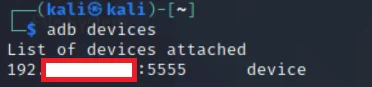
Step 2: verify the device is connected
The device list confirms the emulator is attached:
Step 3: run the backup for the target package
The backup command was entered together with the package name of the Bigbasket app:

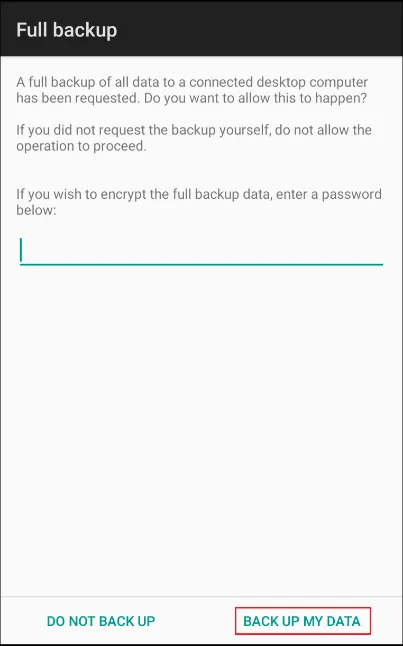
The device then shows a backup confirmation screen, where the user has to approve the operation by tapping to back up the data:
Once confirmed, an Android backup file with a .ab extension is created. Its first 24 bytes are a header, so the dd tool is used to strip those bytes and turn the remainder into a tar file. The researcher notes that other dd commands exist but sometimes do not work, and that this one can be used for any backup file:

The command skips the first block of the input file, which is the header of the Android backup. The screenshot uses an example file rather than the real one; the researcher points out that a real backup usually contains a large number of records, whereas the example shows only 23 bytes.
Step 4: create a .list file
A .list file is generated from the tar file produced in the previous step. Its purpose is to ensure the correct order when the backup is repacked:

At this point three files exist, and the backup file can carry any name as long as the package name stays the same:
| File | Origin |
|---|---|
bountybackup.ab |
The actual Android backup taken from the device |
bountybackup.tar |
File generated using dd |
bountybackup.list |
File generated using the tar file |
Step 5: extract the tar file
The tar file is extracted with the following command:

After the backup procedure completes, a new folder named apps appears. Navigating into it leads to the app-specific information: the package name folder, and inside it the SP folder.
Step 6: read the shared preferences
Android shared preferences are a common component of Android applications: a set of APIs that manages developer data of every type and provides a clean way to store and retrieve it permanently from the device. They are used in almost every Android app. The SP folder contains the XML file that stores the target app's data, and in that file the researcher found an internal dashboard IP address and a secret token.
Proof of concept
The findings were documented with screenshots:

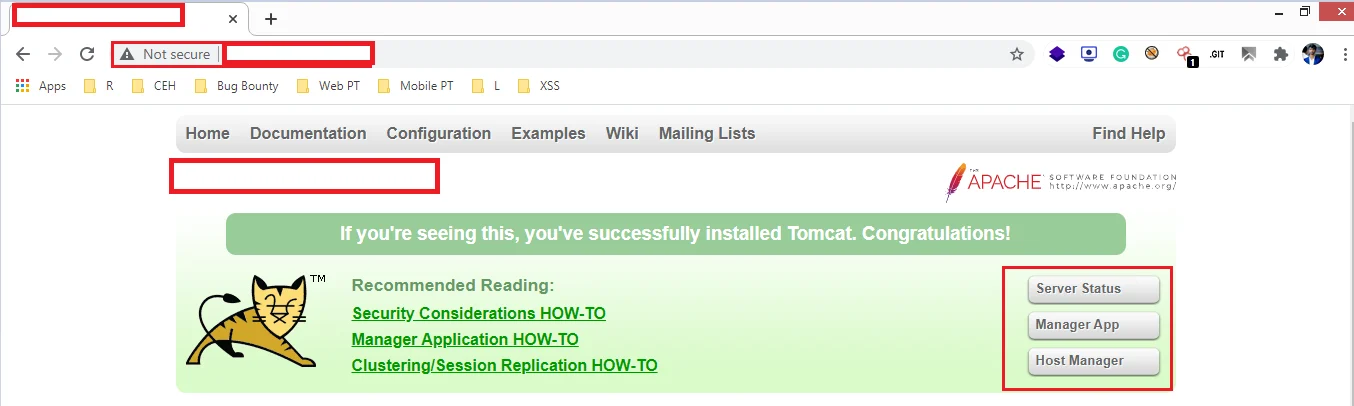
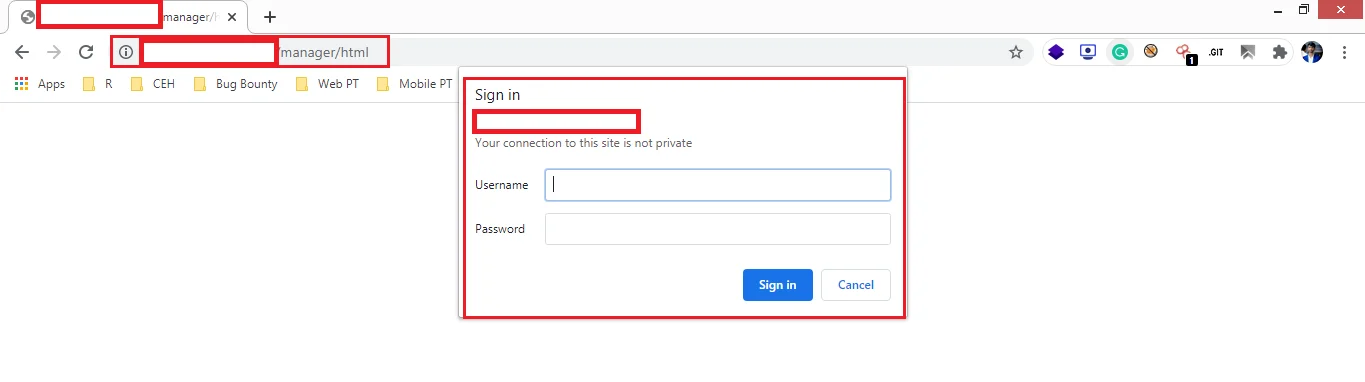
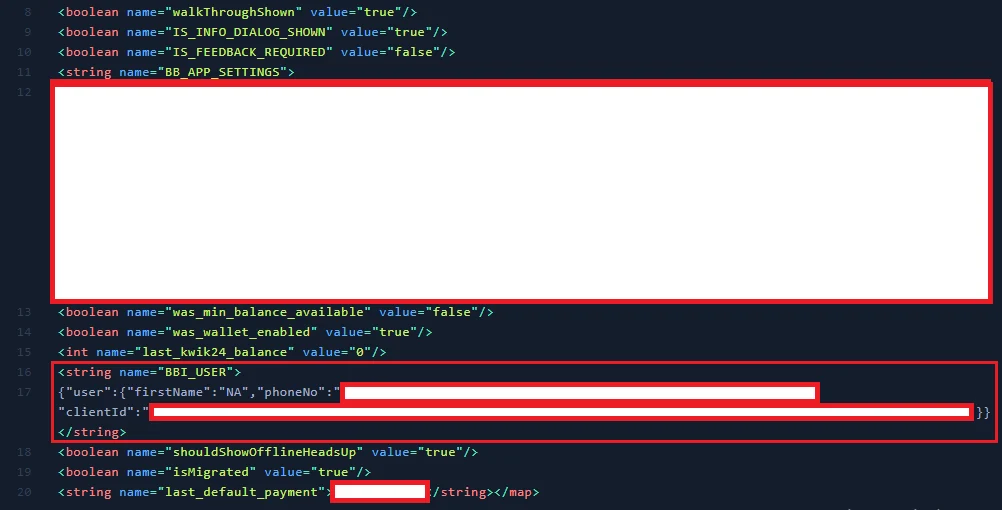
The extracted preferences exposed a client secret token, access to an Apache host manager, an admin panel, and hardcoded user details together with a token.
Timeline and outcome
The report was handled by the Bigbasket security team:
| Date | Event |
|---|---|
| Mon, 5 Oct 2020, 01:04 | Bug reported to the Bigbasket security team |
| Tue, 6 Oct 2020, 10:00 | First response from the team |
| Mon, 12 Oct 2020, 18:25 | Accepted |
| Tue, 8 Dec 2020, 11:26 | Bug marked fixed |
| Tue, 8 Dec 2020, 07:38 | Re-tested and confirmed the fix |
| Fri, 8 Jan 2021, 10:27 | Rewarded with bounty and Hall of Fame |
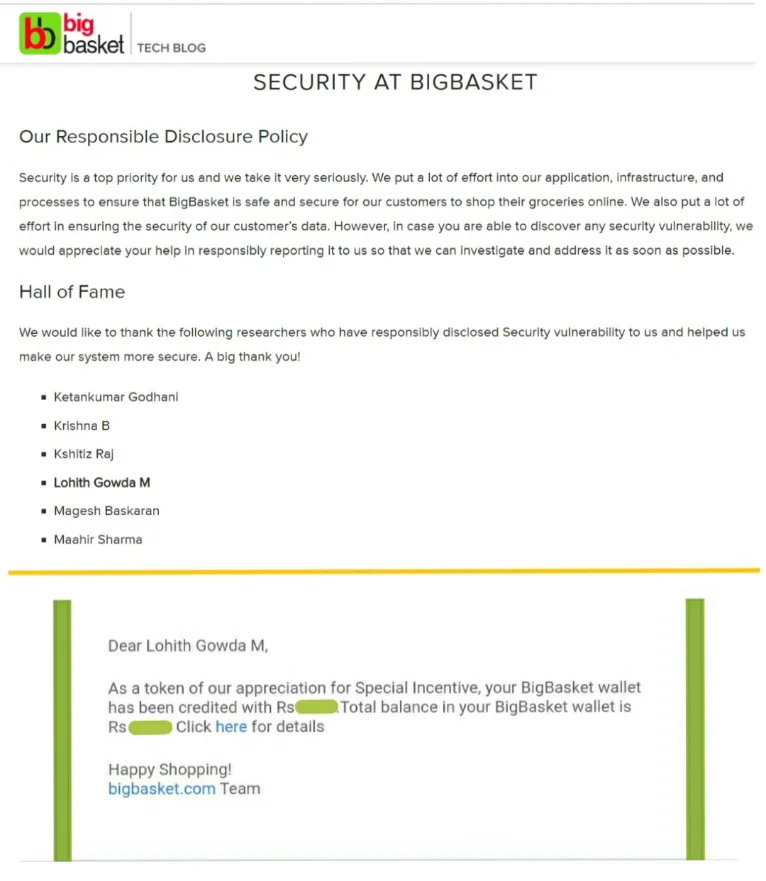
The researcher was rewarded by the security team and acknowledged in their Hall of Fame:
Root cause
The app had android:allowBackup set to true, so the ADB backup mechanism was permitted to copy the app's private data out of the sandbox without root. The extracted shared preferences contained readable secrets. The two conditions together, backup enabled and plaintext storage of secrets, are what turned a configuration default into a disclosure of internal infrastructure credentials. The report does not describe any additional defence that would have stopped the extraction.
Impact
An attacker with physical access to an unlocked device could take a backup of the app's data through ADB and read everything stored in shared preferences. In this case that included an internal dashboard IP address, a secret token, access to an Apache host manager, an admin panel, and hardcoded user details with a token. The researcher is explicit that this class of bug is usually rejected by bounty programmes because it needs physical access to the device; the extracted data did relate to internal infrastructure.
Fix
The report does not state what change the vendor made. The guidance it gives is to set the flag explicitly to false in the manifest, as shown above, as shown above.
Variants to test
- Check
android:allowBackupin the manifest of other Android apps from the same or similar vendors. A positive result istrueon an app that stores session tokens, API keys or internal hostnames. - Take an ADB backup of an app and inspect the
SPfolder and databases for plaintext secrets. A positive result is a token or credential that authenticates against a live internal service. - Look for internal IP addresses or hostnames in shared preferences. A positive result is a reachable dashboard, host manager or admin panel.
- Look for hardcoded user details alongside tokens. A positive result is a credential pair that works on an exposed administrative interface.
- Repeat the extraction on a non-rooted device to confirm the backup path works without root, which is the condition that makes the finding reportable.
What happened, in plain words
Bigbasket is an online grocery service, and like many companies it runs a bug bounty programme. A bug bounty programme is a public invitation: if you find a security problem in the company's products and report it responsibly, the company may thank you, pay you a reward (called a bounty) and list your name on a page called a Hall of Fame. This write-up is the story of one such report, written by Lohith Gowda M, a security engineer who started doing bug bounty work part time in June 2020.
The problem he found was in one of Bigbasket's Android apps. Android is the operating system that runs on most phones that are not iPhones. Every Android app has a small settings file, called the manifest, that tells the phone how the app should behave. One of the settings in that file is called android:allowBackup. It decides whether the phone is allowed to make a copy (a backup) of the app's private data.
In this app, that setting was left at true, which means yes, backups are allowed. That sounds harmless, but it is not, because the app was also keeping sensitive information in its private storage. Encryption is the process of scrambling data with a key so that only someone with the key can read it; unencrypted data is readable by anyone who can get at it. Put the two together, backups allowed and secrets stored in plain text, and a person holding the phone can copy the app's private files out and read them.
The researcher did exactly that, using free tools on a computer, and found things inside the app's storage that should never have been there: an internal dashboard address, a secret token, access details for an Apache host manager, an admin panel, and hardcoded user details with a token. He reported it, the bug was marked fixed and re-tested, and he was rewarded and added to their Hall of Fame.
Before going further, a few words on the terms that will keep coming back.
- App sandbox: each Android app runs in its own private area of the phone's storage. Other apps cannot normally read it. Think of it as each app having its own locked drawer inside the phone.
- ADB: the Android Debug Bridge. It is a command-line tool that lets a computer talk to an Android device over a cable or a network connection. Developers use it to install apps and read logs. It can also ask the phone to make a backup of an app's data, and that is the door this report walks through.
- Root: on a normal phone, the user is not allowed to touch the system's most protected parts. Rooting a phone means removing that restriction. The interesting part of this bug is that it works on a phone that is not rooted.
- USB debugging: a developer setting on Android that lets a computer send commands to the phone over USB. It is off by default and has to be switched on deliberately.
- Shared preferences: Android's simple built-in storage for small pieces of data, such as settings and saved values. Each app has its own, and they are kept as small XML files (XML is a text format that uses tags, like
<name>value</name>, to label data). - Token: a short string of characters that acts like a temporary password. A server hands one out after you log in, and the app sends it back with each request to prove who it is. If someone else copies the token, they can often act as that user or service.
- Package name: the unique identifier of an Android app, for example something like
com.company.appname. It is how the phone and ADB tell one app apart from another. - Emulator: a program that pretends to be a phone. It runs an Android system inside a window on your computer, so you can experiment without a real handset.
The setting that caused it
The researcher found that one of the Bigbasket apps had the backup flag switched on in its manifest:
The screenshot shows the manifest line android:allowBackup=" true" inside the app's configuration.
What does that flag actually do? The android:allowBackup attribute defines whether application data can be backed up and restored by a user who has enabled USB debugging. If the flag is set to true, it allows an attacker to take a backup of the application data through ADB even if the device is not rooted. Applications that handle and store sensitive information, such as card details or passwords, should therefore set this explicitly to false, because the default value is true. The report shows the safe form like this:
<application
android:allowBackup=”false”
</application>
Line by line:
<applicationopens the section of the manifest that describes the app as a whole. Everything about the app's global behaviour sits inside this block.android:allowBackup=”false”is the setting itself. The name before the equals sign is the attribute, and the value after it is what the phone obeys. Setting it tofalsetells Android not to include this app's private data in ADB backups.</application>closes the block.
So the fix is a one-word change, from true to false. The reason it matters is that the default is the unsafe value: an app developer who never thinks about backups gets true without asking for it.
The ADB backup feature is a good tool for backing up all of your files. But if it is enabled, a malicious person who has your phone can copy all of the sensitive data for this app. The report puts it plainly: if an attacker had access to an unlocked phone, they could take any data from the application's sandbox through ADB's backup feature. If android:allowBackup=” true”, any data can be extracted from the root storage, meaning Android shared preferences and databases, as long as the data is not encrypted.
The researcher adds an important caveat for anyone thinking of reporting this kind of issue:
Most bug bounty programmes will not accept this bug because it requires physical access to the device. But if you got any sensitive data related to the internal infrastructure, report it immediately.
On its own, "someone with your unlocked phone can read your app's data" is a weak finding, because the attacker already has the phone. It becomes serious when the data inside relates to the company's internal infrastructure.
Setting up the experiment
To exploit the issue, the researcher used a Genymotion emulator and Kali Linux for ADB debugging. Kali Linux is a Linux distribution that comes with security tools preinstalled; Genymotion is an Android emulator. The steps were:
- Install Genymotion on the machine. It is available for Windows, Linux and Mac OS.
- Install an Android device on the emulator, Android v 8.1.
- Complete the setup and install one of the Bigbasket apps on the device.
- Use ADB from Kali Linux to debug the application.
Why an emulator rather than a real phone? Because it is disposable. You can install an app, pull its data apart, and throw the whole virtual phone away without affecting anything real. It also makes the network side simple: the emulator behaves like a device attached to your computer, so ADB can reach it directly.
Finding it
Inspecting the app's manifest showed the backup flag enabled, as in the screenshot above. With android:allowBackup set to true, the ADB backup feature can copy the app's data out of the sandbox. That is the right order of work: confirm the door is unlocked, then check whether there is anything worth stealing behind it.
Exploitation
Step 1: connect ADB to the emulator
The default port for a Genymotion device is 5555. A port is a numbered channel on a computer; when two programs talk over a network, they agree on a port number so the messages arrive at the right place. Genymotion listens for ADB connections on 5555 by default.
The screenshot shows the connection being made from Kali Linux to the emulator.
Step 2: verify the device is connected
The device list confirms the emulator is attached:
This check matters because every later command depends on ADB knowing which device to talk to. If the list is empty, the backup command has nothing to act on, and you would waste time debugging the wrong thing.
Step 3: run the backup for the target package
The backup command was entered together with the package name of the Bigbasket app:
The package name is the part that tells ADB which app's data to include. Without it, you would get a backup of everything, which is larger and noisier than needed.
The device then shows a backup confirmation screen, where the user has to approve the operation by tapping to back up the data:
This prompt is Android asking a human to confirm. In a real attack, the person holding the phone would have to tap it, which is another reason the bug needs physical access. In the researcher's test, he simply tapped it himself.
Once confirmed, an Android backup file with a .ab extension is created. Its first 24 bytes are a header, so the dd tool is used to strip those bytes and turn the remainder into a tar file. A header is a small block of information at the start of a file that describes the file itself; it is not part of the data you want. dd is a low-level Linux command for copying bytes from one place to another, and tar is a format that packs many files into one archive, like a box containing folders. The researcher notes that other dd commands exist but sometimes do not work, and that this one can be used for any backup file:
The command skips the first block of the input file, which is the header of the Android backup. The screenshot uses an example file rather than the real one; the researcher points out that a real backup usually contains a large number of records, whereas the example shows only 23 bytes. In plain words: take the backup file, throw away the first chunk that Android added for its own bookkeeping, and keep the rest, which is a normal tar archive you can open.
Step 4: create a .list file
A .list file is generated from the tar file produced in the previous step. Its purpose is to ensure the correct order when the backup is repacked:
Why does order matter? Because the archive has to be rebuilt in the same sequence it was taken apart, or the result will not match what Android expects. The list file is a record of that sequence, a bit like keeping the numbered labels when you take apart a piece of furniture so you can put it back together.
At this point three files exist, and the backup file can carry any name as long as the package name stays the same:
| File | Origin |
|---|---|
bountybackup.ab |
The actual Android backup taken from the device |
bountybackup.tar |
File generated using dd |
bountybackup.list |
File generated using the tar file |
Step 5: extract the tar file
The tar file is extracted with the following command:
Extracting means unpacking the archive back into ordinary files and folders. After the backup procedure completes, a new folder named apps appears. Navigating into it leads to the app-specific information: the package name folder, and inside it the SP folder. The apps folder is the top of the tree, the package name folder is the app you targeted, and SP is where the shared preferences live.
Step 6: read the shared preferences
Android shared preferences are a common component of Android applications: a set of APIs that manages developer data of every type and provides a clean way to store and retrieve it permanently from the device. They are used in almost every Android app. An API, in this context, is simply the set of functions the operating system offers to programmers so they can save and load values without writing the file handling themselves.
The SP folder contains the XML file that stores the target app's data, and in that file the researcher found an internal dashboard IP address and a secret token. An IP address is the numeric address of a machine on a network, like a street address for computers; an internal one is not reachable from the public internet, which is exactly why finding it in an app's storage is interesting. The token, as explained earlier, is a credential that can be replayed against a service.
Proof of concept
A proof of concept is evidence that the finding is real, usually a screenshot or a recording showing the data or the access. The findings were documented with screenshots:
The extracted preferences exposed a client secret token, access to an Apache host manager, an admin panel, and hardcoded user details together with a token. Apache is a widely used web server, and a host manager is an administrative interface for it; an admin panel is a web page for managing a system. Hardcoded means the values were written directly into the app rather than fetched from a server, so anyone who has the app has the values too.
Timeline and outcome
The report was handled by the Bigbasket security team:
| Date | Event |
|---|---|
| Mon, 5 Oct 2020, 01:04 | Bug reported to the Bigbasket security team |
| Tue, 6 Oct 2020, 10:00 | First response from the team |
| Mon, 12 Oct 2020, 18:25 | Accepted |
| Tue, 8 Dec 2020, 11:26 | Bug marked fixed |
| Tue, 8 Dec 2020, 07:38 | Re-tested and confirmed the fix |
| Fri, 8 Jan 2021, 10:27 | Rewarded with bounty and Hall of Fame |
The researcher was rewarded by the security team and acknowledged in their Hall of Fame:
Two details in that table are worth noticing for anyone new to this. First, the gap between reporting and acceptance was a week, and the gap between acceptance and a fix was nearly two months; security work on the vendor side takes time. Second, the researcher re-tested after the fix was announced. Confirming that a fix actually works is part of the job, not an optional extra.
Root cause
The app had android:allowBackup set to true, so the ADB backup mechanism was permitted to copy the app's private data out of the sandbox without root. The extracted shared preferences contained readable secrets. The two conditions together, backup enabled and plaintext storage of secrets, are what turned a configuration default into a disclosure of internal infrastructure credentials. The report does not describe any additional defence that would have stopped the extraction.
Impact
An attacker with physical access to an unlocked device could take a backup of the app's data through ADB and read everything stored in shared preferences. In this case that included an internal dashboard IP address, a secret token, access to an Apache host manager, an admin panel, and hardcoded user details with a token. The researcher is explicit that this class of bug is usually rejected by bounty programmes because it needs physical access to the device; the extracted data did relate to internal infrastructure.
Fix
The report does not state what change the vendor made. The guidance it gives is to set the flag explicitly to false in the manifest, as shown above, as shown above.
Variants to test
If you want to look for the same pattern yourself, these are the checks the report points towards:
- Check
android:allowBackupin the manifest of other Android apps from the same or similar vendors. A positive result istrueon an app that stores session tokens, API keys or internal hostnames. - Take an ADB backup of an app and inspect the
SPfolder and databases for plaintext secrets. A positive result is a token or credential that authenticates against a live internal service. - Look for internal IP addresses or hostnames in shared preferences. A positive result is a reachable dashboard, host manager or admin panel.
- Look for hardcoded user details alongside tokens. A positive result is a credential pair that works on an exposed administrative interface.
- Repeat the extraction on a non-rooted device to confirm the backup path works without root, which is the condition that makes the finding reportable.
Glossary
- ADB (Android Debug Bridge): a command-line tool that lets a computer send commands to an Android device, including asking it to make a backup of an app's data.
- Admin panel: a web page used to manage and configure a system.
- Android: the operating system that runs on most non-Apple phones and tablets.
- API: a set of functions that one piece of software offers to another so it can use its features without handling the details itself.
- Apache: a widely used web server program.
- App sandbox: the private storage area that Android gives each app, which other apps cannot normally read.
- Backup flag (
android:allowBackup): the manifest setting that decides whether Android will include an app's private data in ADB backups. Its default istrue. - Bounty: a reward, often money, paid by a company for a responsibly reported security problem.
- Bug bounty programme: a company's public scheme for receiving and rewarding security reports from outside researchers.
- Byte: a unit of digital information, roughly one character of text.
dd: a low-level Linux command for copying a chosen number of bytes from one file to another.- Emulator: software that imitates a phone so you can run Android on a computer.
- Encryption: scrambling data with a key so that only someone holding the key can read it.
- Genymotion: an Android emulator used in this report.
- Hall of Fame: a public page where a company lists researchers who have reported valid security issues.
- Hardcoded: a value written directly into the app's code or configuration instead of being fetched from a server.
- Header: a small block of descriptive information at the start of a file, separate from the data itself.
- Host manager: an administrative interface for managing a web server such as Apache.
- IP address: the numeric address of a machine on a network. An internal IP address is not reachable from the public internet.
- Kali Linux: a Linux distribution that ships with security tools preinstalled.
- Manifest: the settings file inside an Android app that declares how the app behaves, including its backup setting.
- Package name: the unique identifier of an Android app, used to tell apps apart.
- Port: a numbered channel on a computer that programs use to send and receive network messages. Genymotion's default ADB port is 5555.
- Proof of concept: evidence, such as a screenshot, that a reported vulnerability is real.
- Root: the highest level of permission on an Android device. Rooting a phone removes the normal restrictions on what the user can access.
- Shared preferences: Android's built-in storage for small pieces of app data, kept as XML files in the app's private area.
- Tar: a file format that packs many files and folders into a single archive.
- Token: a string of characters that acts like a temporary password, proving an app's or user's identity to a server.
- USB debugging: an Android developer setting that allows a computer to send commands to the phone over USB.
- XML: a text format that labels data with tags, such as
<name>value</name>.




