Blind SQL injection with a little WAF
The login page's id parameter was vulnerable to blind SQL injection on a Microsoft SQL Server backend, and a custom WAF blocked common SQL keywords and functions. By using hex-escaped parentheses and a CASE-based division-by-zero error, an attacker could infer true/false answers and enumerate database information.

My first ever security blog post, so pardon how I structure it haha. So here goes, for this story, I will be sharing about how I got rewarded my first ever bug using Blind SQL injection with a little bypass on a custom WAF.
The full write-up lives on its author's site
It belongs to its author, so we link to it rather than copy it. The other two tabs are our own rewrites, checked against it.
Context
This is a write-up of a first bug bounty finding, a blind SQL injection on a login endpoint that required a small bypass of a custom web application firewall (WAF). The target is referred to throughout as example.com to remove any references to the actual application.
The feature involved is an ordinary login page. A user submits an identifier and a password, and the application processes the request server-side. The password in the request was encrypted, so the researcher went straight for SQL injection on the identifier parameter, named id.

Setup
The only tool mentioned is Burp, used to intercept the authentication request. No accounts, roles or versions are described. The precondition for the whole exercise is simply the ability to reach the login page and capture the login request.
Finding it
A login was attempted and the request captured in Burp. Most of the non-relevant fields are redacted in the write-up; the request looked similar to this:
POST /login HTTP/2
Host: example.com
...
{
  "id":"TEST123456",
  "password":"<ENCRYPTED-PASSWORD>"
}
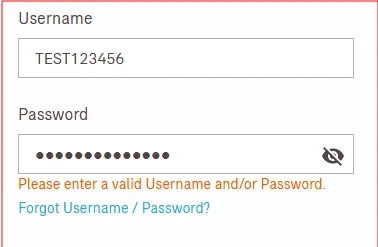
Because the password was encrypted, the researcher went straight for SQL injection on the id parameter. A first set of payloads was used to confirm the vulnerability and to identify the SQL dialect:
# Initial Payload
kair0s3' ==> Server Error Message

# Attempting to sanity check for SQL injection
kair0s3' # ==> Server Error Message
kair0s3' -- - ==> No Error message

# Narrowing down the SQL server used
kair0s3' || '123 ==> Server Error Message
kair0s3' + '123 ==> No Error Message
Two conclusions came out of this. First, the injection most likely exists: a single quote produces a server error, and adding a comment terminator removes it. Second, the backend is very likely a Microsoft SQL server, because it accepts -- as a comment and allows string concatenation with + (while || errors out).
The problem at this point is that the server only errors when the syntax is wrong. When the injected syntax is valid, it always returns no error message, regardless of the result of the expression. There is no visible difference between a true and a false condition, so a way had to be found to induce a condition that can be inferred.
Exploitation
Step 1: turning the injection into an error-based oracle
Since the result of the injected statement cannot be inferred visually, the researcher used a blind error-based SQL injection. After consulting online cheatsheets and Microsoft SQL documentation, the following payloads were built:
# This returns Server Error Message
# Because 'kair0s3' is not equals to 'h8d3s' and this results in 1/0
# And since division by zero is invalid, this errors out.
kair0s3' or (case when 'kair0s3'='h8d3s' then 1 else 1/0 end)=1 --

# This returns no errors at all!
kair0s3' or (case when 'kair0s3'='kair0s3' then 1 else 1/0 end)=1 --
The mechanism is a CASE expression: when the comparison is true it yields 1, and when it is false it evaluates 1/0. Division by zero is invalid in the database, so the false branch raises an error that surfaces as a server error message. The true branch returns normally. That gives a reliable true/false signal: error means false, no error means true.
With this oracle in place, the payload can be modified to demonstrate the bug, for example by dumping the database version.
Step 2: hitting the WAF
There was still one hurdle: a WAF, mentioned earlier in the write-up, blocked certain commands. Testing commands such as @@version and HOST_NAME(), it seemed that all of them were blocked, including len(). The next step was to try escaping certain characters, starting with URL encoding:
# URL encoding (failed to bypass)
kair0s3' or (case when len%28'kair0s3'%29=7 then 1 else 1/0 end)=1 --
URL encoding of the parentheses did not get past the filter. Hex escaping did:
# Using Hex Escaping (SUCCESS!!)
kair0s3' or (case when len\x28'kair0s3'\x29=7 then 1 else 1/0 end)=1 --
With the parentheses written as \x28 and \x29, the payload went through. From there, the remaining work was enumeration of the database's basic information as proof of concept of the bug.
Root cause
The id value from the login request is very likely concatenated into a SQL statement without parameterisation, so a single quote breaks out of the string literal and arbitrary SQL expressions are evaluated. The application does not suppress database errors, which is what makes the error-based oracle possible: a division by zero inside the injected CASE reaches the client as a server error.
The custom WAF blocked the more sensitive functions the researcher tried. It blocked keywords and functions such as @@version, HOST_NAME() and len(), but the hex-escaped parentheses \x28 and \x29 got through.
Impact
The write-up demonstrates the bug by dumping basic database information, using the error oracle to answer true/false questions. The researcher describes the enumeration as a PoC of the bug rather than a full data extraction exercise. In principle, an attacker who can ask arbitrary true/false questions of this kind can recover data the database account is allowed to read, but the report does not show any specific data being retrieved.
Fix
The report does not say what was changed. The measures that would address the root cause are parameterised queries (or prepared statements) for the id lookup, so that user input is never parsed as SQL, and generic error handling that does not return database error details to the client. A WAF rule set that decodes and normalises input before matching would close the specific bypass, but it is a secondary control, not a substitute for fixing the query.
Variants to test
- Login and search parameters on MSSQL backends. Send a single quote, then a quote with
-- -, and compare error behaviour. A positive result is an error on the quote that disappears with the comment, plus acceptance of+concatenation and rejection of||. - Error-based oracle with
CASEand division by zero. Use a true comparison and a false comparison in the sameCASEshape. A positive result is an error for the false branch and a normal response for the true branch. - WAF bypass by character escaping. Where parentheses or keywords are blocked, try URL encoding first, then hex escapes such as
\x28and\x29. A positive result is the payload reaching the database and the oracle responding as expected. - Blocked function enumeration. Probe functions such as
@@version,HOST_NAME()andlen()one at a time to map what the WAF filters, then look for an alternative encoding for each blocked token.
What happened, in plain words
A security researcher found a way to sneak commands into a website's login form and make the website's database answer yes/no questions. The website had a guard in front of it (a firewall) that was meant to block these commands, but the researcher found a small trick to get past it. The researcher reported the problem and it was their first ever rewarded bug.
To keep the real website private, the researcher calls it example.com throughout. Everything below is about that made-up name.
The image is a decorative picture the researcher used at the top of the post, captioned "Cool Injection image (?)".
Before diving in, a few ideas that come up again and again:
- A login page is the form where you type a username (or ID) and a password to get into a website. When you press the button, your browser sends what you typed to the website's server, which checks it against its records.
- A server is the computer somewhere in the world that runs the website. Your browser talks to it over the internet.
- A request is the message your browser sends to the server. It contains the address you are asking for, some headers (extra information about the request), and often a body (the data you are submitting, such as your login details).
- Burp (short for Burp Suite) is a tool that sits between your browser and the server. It lets you pause a request, look at exactly what your browser was about to send, change it, and send it on. Think of it as a post office clerk who lets you open and rewrite a letter before posting it.
- A database is the part of the website that stores information in an organised way, like a very large spreadsheet. The website asks the database questions such as "is there a user with this ID and this password?"
- SQL (Structured Query Language) is the language used to ask those questions. A typical question looks like
SELECT * FROM users WHERE id = 'TEST123456'. - SQL injection is when an attacker manages to slip their own SQL code into a place where the website expected only ordinary data. If the website builds its question by gluing your input straight into the SQL text, a carefully chosen input can change the meaning of the question.
- A WAF (Web Application Firewall) is a filter that sits in front of a website and inspects incoming requests. If a request looks like an attack, the WAF blocks it before it reaches the website. Think of it as a bouncer at a door who checks what is written on your invitation before letting you in.
Initial Testing
The researcher started at the login page of example.com. It looked like any other login page: a field for an identifier and a field for a password.
The image shows the ordinary login page of the target, with the fields a normal user would fill in.
The researcher typed in some values, pressed the login button, and used Burp to pause the request before it reached the server. That way they could see exactly what the browser was sending. The request looked similar to this (most of the fields that are not relevant to the test have been removed):
POST /login HTTP/2
Host: example.com
...
{
  "id":"TEST123456",
  "password":"<ENCRYPTED-PASSWORD>"
}
Line by line:
POST /login HTTP/2says the browser is sending data (POST) to the address/login, using version 2 of the HTTP protocol (the language browsers and servers use to talk).Host: example.comtells the server which website the request is for. One server can host many websites, so this line says which one is wanted....stands for the other headers the researcher removed, such as cookies and content type.- The block in curly braces is the body: the actual data being submitted. It is written in JSON, a simple text format for structured data, where each field has a name and a value.
"id":"TEST123456"is the identifier the user typed. This is the field the researcher will attack."password":"<ENCRYPTED-PASSWORD>"is the password, but it has been encrypted before being sent. The researcher cannot easily read or change it, so testing it is not practical.
Because the password was encrypted, the researcher ignored it and focused on the id field. The idea was simple: if the website glues the id value into a database question without cleaning it, then adding a special character might break the question and produce an error. A single quote (') is the classic test, because in SQL a single quote marks the beginning or end of a piece of text. If the website is not careful, an extra quote will confuse the database.
The researcher sent a series of small test inputs, one at a time, and watched what came back:
# Initial Payload
kair0s3' ==> Server Error Message

# Attempting to sanity check for SQL injection
kair0s3' # ==> Server Error Message
kair0s3' -- - ==> No Error message

# Narrowing down the SQL server used
kair0s3' || '123 ==> Server Error Message
kair0s3' + '123 ==> No Error Message
Line by line:
kair0s3'is the researcher's handle followed by a single quote. The server returned an error message. That is a strong hint: the quote broke something in the database question.kair0s3' #adds a#after the quote. In some databases#starts a comment, which tells the database to ignore the rest of the line. The server still returned an error, so#is not the comment marker this database uses.kair0s3' -- -adds-- -after the quote. In many databases--starts a comment. This time there was no error. That means the quote was closed off and the rest of the original question was ignored, which is exactly what an attacker wants.kair0s3' || '123uses||, which in some databases means "join these two pieces of text together". The server returned an error, so this database does not use||for joining text.kair0s3' + '123uses+to join text. This time there was no error, so this database does use+for joining text.
Two conclusions came out of this. First, the injection almost certainly exists: a single quote causes an error, and adding a comment marker makes the error go away. Second, the database is very likely a Microsoft SQL Server, because it accepts -- as a comment and uses + to join text, while || fails.
But there was a new problem. The server only shows an error when the SQL is malformed. When the SQL is valid, it always returns the same "no error" response, no matter what the injected code actually computed. So the researcher could not tell whether an injected condition was true or false just by looking at the page. A way had to be found to make the server reveal the answer.
Inducing Error in SQL injection
Since the result of the injected statement cannot be seen directly, the researcher used a technique called blind error-based SQL injection. "Blind" means you cannot see the data itself; you can only ask yes/no questions and watch for a side effect. "Error-based" means the side effect is an error message: you deliberately cause an error when the answer is one thing, and no error when it is the other.
Think of it like a locked room with a light switch you cannot see. You cannot look inside, but you can ask the person inside to flick the switch if the answer is yes. The flicker of the light is your signal.
After reading online cheat sheets and Microsoft SQL documentation, the researcher built these two payloads:
# This returns Server Error Message
# Because 'kair0s3' is not equals to 'h8d3s' and this results in 1/0
# And since division by zero is invalid, this errors out.
kair0s3' or (case when 'kair0s3'='h8d3s' then 1 else 1/0 end)=1 --

# This returns no errors at all!
kair0s3' or (case when 'kair0s3'='kair0s3' then 1 else 1/0 end)=1 --
Line by line:
kair0s3'closes the text value the website was building, so whatever comes next is treated as SQL code rather than as data.or (...)means "or the following condition is true". If the condition inside the brackets is true, the whole expression is true.case when 'kair0s3'='h8d3s' then 1 else 1/0 endis a conditional expression. It compares two pieces of text. If they are equal, it produces1. If they are not equal, it produces1/0.1/0is division by zero. In a database, dividing by zero is invalid and raises an error. That error bubbles up and appears to the user as a server error message.=1compares the result of thecaseexpression with1.--starts a comment, so the rest of the original SQL question is ignored.
In the first payload, 'kair0s3' is compared with 'h8d3s'. They are different, so the case takes the else branch and evaluates 1/0. That causes an error, and the server returns an error message. In the second payload, 'kair0s3' is compared with 'kair0s3'. They are the same, so the case takes the then branch and produces 1. No division by zero happens, and the server returns its normal response.
That gives a reliable true/false signal: error means false, no error means true. With this signal in place, the researcher could change the comparison to ask the database yes/no questions. The researcher planned to use this to dump the database version as a demonstration that the bug is real.
Bypassing the WAF
There was still one obstacle: the WAF mentioned at the start. When the researcher tried commands such as @@version (which asks the database for its version) and HOST_NAME() (which asks for the server's hostname), they were all blocked. Even len() (a function that returns the length of a piece of text) was blocked. The WAF was inspecting the request and refusing anything that looked like a database command.
The researcher then tried to disguise the characters the WAF was looking for, starting with URL encoding. URL encoding is a way of writing special characters using a percent sign and two hexadecimal digits, so that they can travel safely inside a web address. For example, ( becomes %28 and ) becomes %29.
# URL encoding (failed to bypass)
kair0s3' or (case when len%28'kair0s3'%29=7 then 1 else 1/0 end)=1 --
Line by line:
kair0s3'again closes the text value and starts the injected SQL.or (...)is the same "or the following condition is true" wrapper as before.case when len%28'kair0s3'%29=7 then 1 else 1/0 endis the conditional.len%28'kair0s3'%29islen('kair0s3')with the parentheses URL-encoded. The function returns the length of the textkair0s3, which is 7 characters. The condition asks whether that length equals 7.then 1 else 1/0 endproduces1if the condition is true, and division by zero (an error) if it is false.=1compares the result with1.--comments out the rest of the original SQL.
This attempt failed. The WAF still blocked it, so URL encoding was not enough.
The researcher then tried hex escaping. In this style, a character is written as a backslash, an x, and two hexadecimal digits. For example, ( becomes \x28 and ) becomes \x29. This is a different way of representing the same characters, and the WAF did not recognise it.
# Using Hex Escaping (SUCCESS!!)
kair0s3' or (case when len\x28'kair0s3'\x29=7 then 1 else 1/0 end)=1 --
Line by line:
- The structure is identical to the previous payload. The only change is that the parentheses around
'kair0s3'are written as\x28and\x29instead of%28and%29. len\x28'kair0s3'\x29is the samelen('kair0s3')call, just written in a way the WAF did not expect.- The rest of the payload,
=7 then 1 else 1/0 end)=1 --, works exactly as before: if the length is 7, the database returns1and there is no error; otherwise it tries to divide by zero and an error appears.
This time the payload went through, and the researcher went on to enumerate the database's basic information.
With the bypass working, the remaining work was to enumerate the database's basic information as a proof of concept. "Enumeration" means asking the database a series of questions to learn facts about it, such as its version and hostname, one yes/no answer at a time using the error oracle.
Headspace
The researcher admits they did not expect the bypass to work, but it did. They also say they learned how to properly induce a blind error-based SQL injection on a Microsoft SQL Server, which they found valuable.
The final image is a reaction picture the researcher included at the end of the post, after describing their surprise that the bypass worked.
Glossary
- Blind SQL injection: a SQL injection where the attacker cannot see the query results directly, and instead asks yes/no questions and watches for a side effect such as an error or a delay.
- Bug bounty: a programme where organisations reward people for finding and reporting security problems in their systems.
- Burp (Burp Suite): a tool that sits between a browser and a server, letting you pause, inspect and modify requests.
- CASE expression: a SQL construct that behaves like an if/else: it returns one value when a condition is true and another when it is false.
- Comment (SQL): a way to tell the database to ignore the rest of a line. In Microsoft SQL Server,
--starts a comment. - Database: an organised store of information that a website queries to look things up or save them.
- Encryption: scrambling data so that only someone with the right key can read it.
- Enumeration: systematically asking questions to learn facts about a system, one piece at a time.
- Error-based SQL injection: a SQL injection technique where the attacker deliberately causes a database error to learn whether a condition is true or false.
- Hex escaping: writing a character as a backslash, an
xand two hexadecimal digits, for example\x28for(. - HTTP: the protocol browsers and servers use to exchange requests and responses.
- JSON: a simple text format for structured data, made of names and values in curly braces.
- Microsoft SQL Server: a database product made by Microsoft. It uses
--for comments and+to join text. - Parameterised query (prepared statement): a way of building a database query where user input is passed separately from the query text, so it can never be interpreted as SQL code.
- Payload: the specific piece of input an attacker sends to try to trigger a vulnerability.
- Proof of concept (PoC): a small demonstration that a vulnerability is real, without going further than necessary.
- Request: the message a browser sends to a server, containing an address, headers and often a body of data.
- Server: the computer that runs a website and responds to requests.
- SQL (Structured Query Language): the language used to ask a database questions and give it instructions.
- SQL injection: slipping SQL code into input that a website expected to be ordinary data, so that the database runs the attacker's code.
- URL encoding: writing a special character as a percent sign and two hexadecimal digits, for example
%28for(. - WAF (Web Application Firewall): a filter in front of a website that inspects incoming requests and blocks ones that look like attacks.
@@version: a Microsoft SQL Server command that returns the database version.HOST_NAME(): a Microsoft SQL Server function that returns the name of the server.len(): a function that returns the number of characters in a piece of text.




