Bookstack CVE-2020–5256: RCE Through File Upload
BookStack allowed any registered user to become an admin, and the application logo upload accepted a PHP webshell disguised with a JPEG header, leading to remote code execution.

medium.com
Published on medium.com
Some days ago I was conducting a penetration test when I came across a web app called Bookstack (https://www.bookstackapp.com/)
The full write-up lives on its author's site
It belongs to its author, so we link to it rather than copy it. The other two tabs are our own rewrites, checked against it.
Context
During a penetration test I came across a web application called Bookstack (https://www.bookstackapp.com/). Bookstack is an open source application for organising information in the format of books and shelves. The feature that drew my attention was the Application Logo Upload.
Setup
The application I tested had the "Sign Up" function open to any user who wanted to register. New users were assigned the role of admin right after registration, so a freshly created account already had administrative access.

That gave me access to the Application Logo Upload functionality, which is where the interesting part started.
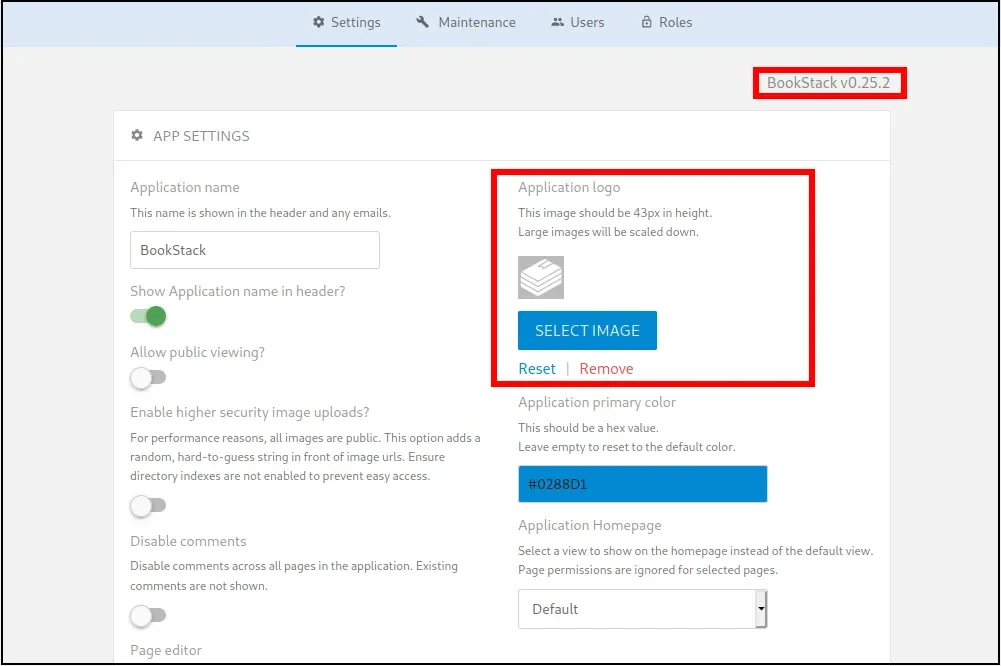
Bookstack Application Logo Upload, v0.25.2
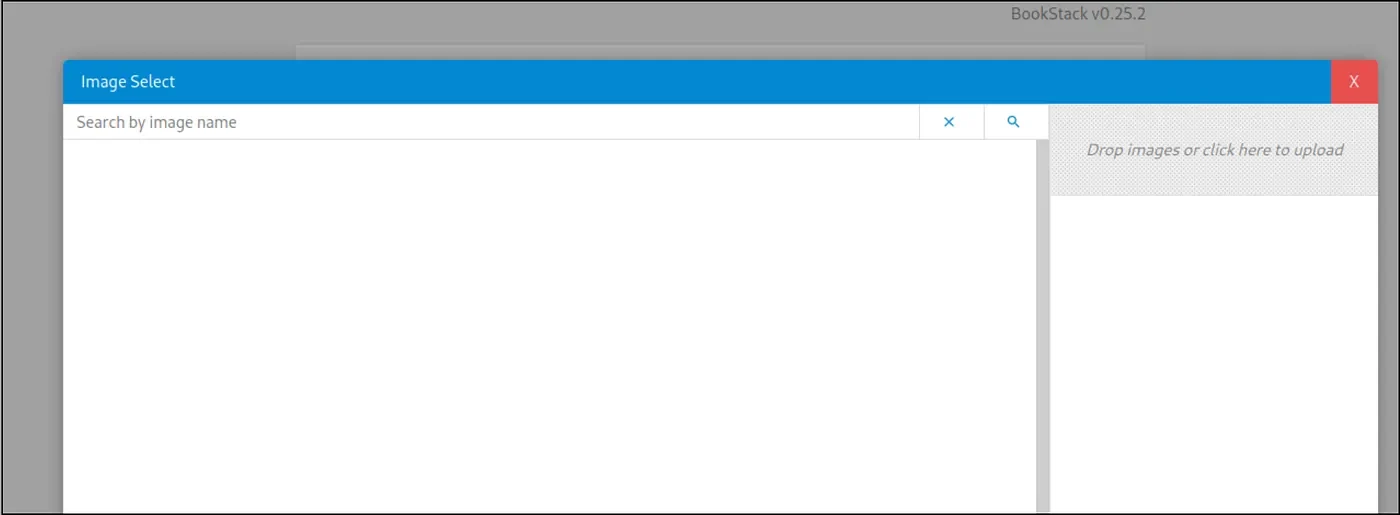
Upload Panel
Finding it
With admin access in hand, the upload panel was the obvious place to look. With admin access in hand, I tried to upload a webshell to the server through the Application Logo upload.
Exploitation
Step 1: try a plain webshell upload
I attempted to upload a webshell to the server through the Application Logo upload.
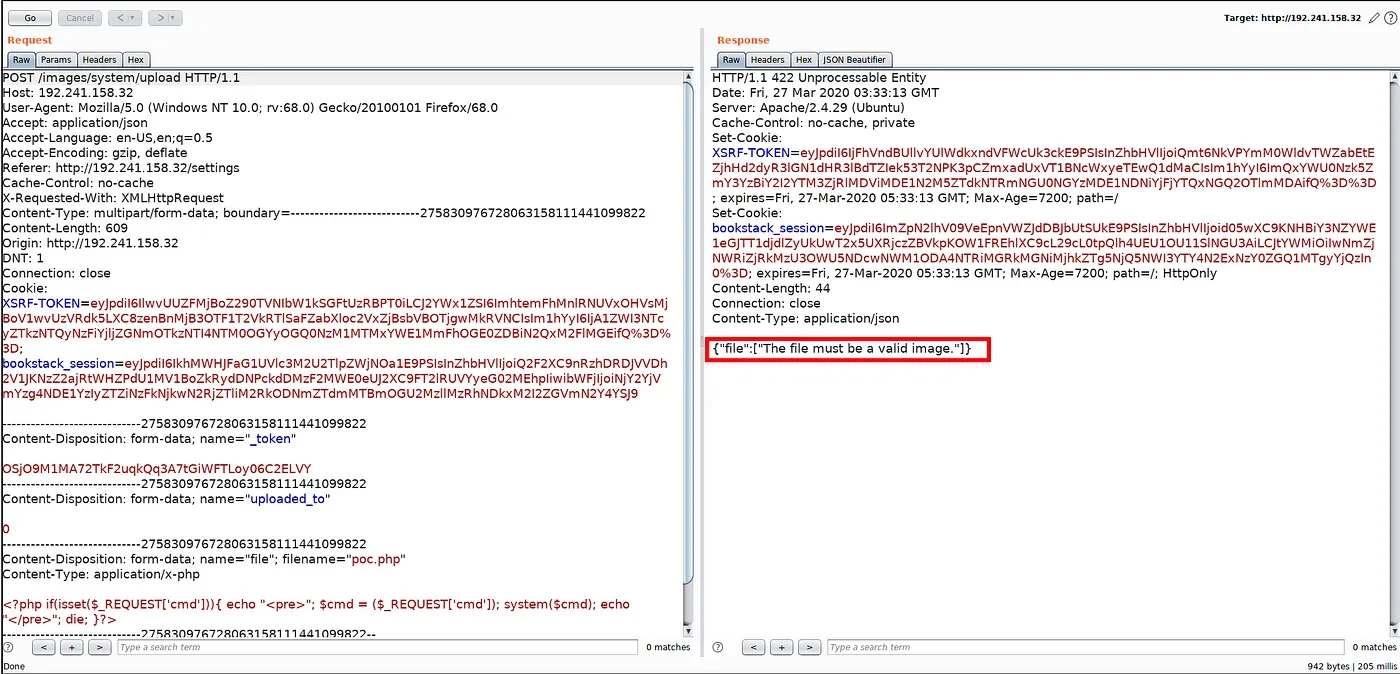
Upload Failed
The upload was rejected. There was a protection mechanism in place that refused the file.
Step 2: add a valid image header
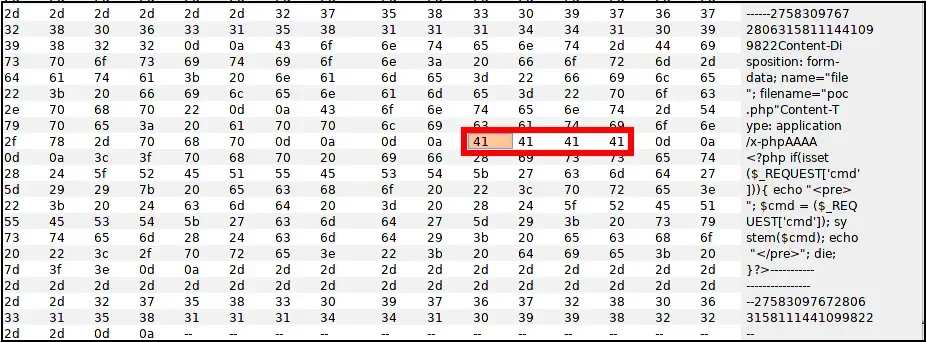
A common way to bypass this kind of protection is to add a valid header to the file, meaning the hex bytes of an image file. An easy way to do this is to type a sequence of A's and track the hex sequence of 41's (the hex equivalent of A), then replace those hex bytes with the valid sequence of an image file.
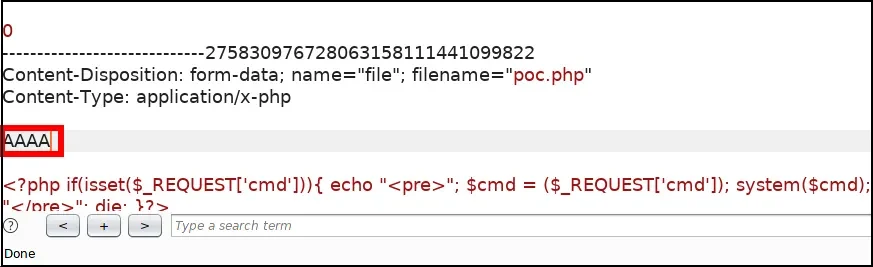
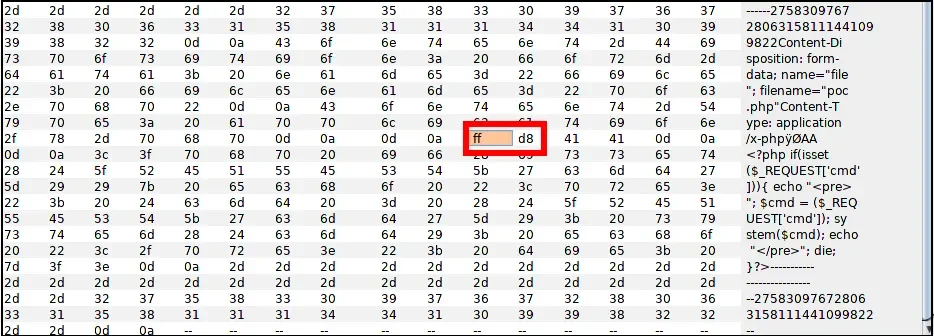
A possible valid header is the JPEG one: the hex sequence ff d8.
Step 3: upload the modified file
After changing the header of the file being uploaded, the application returned the message of a successful upload.
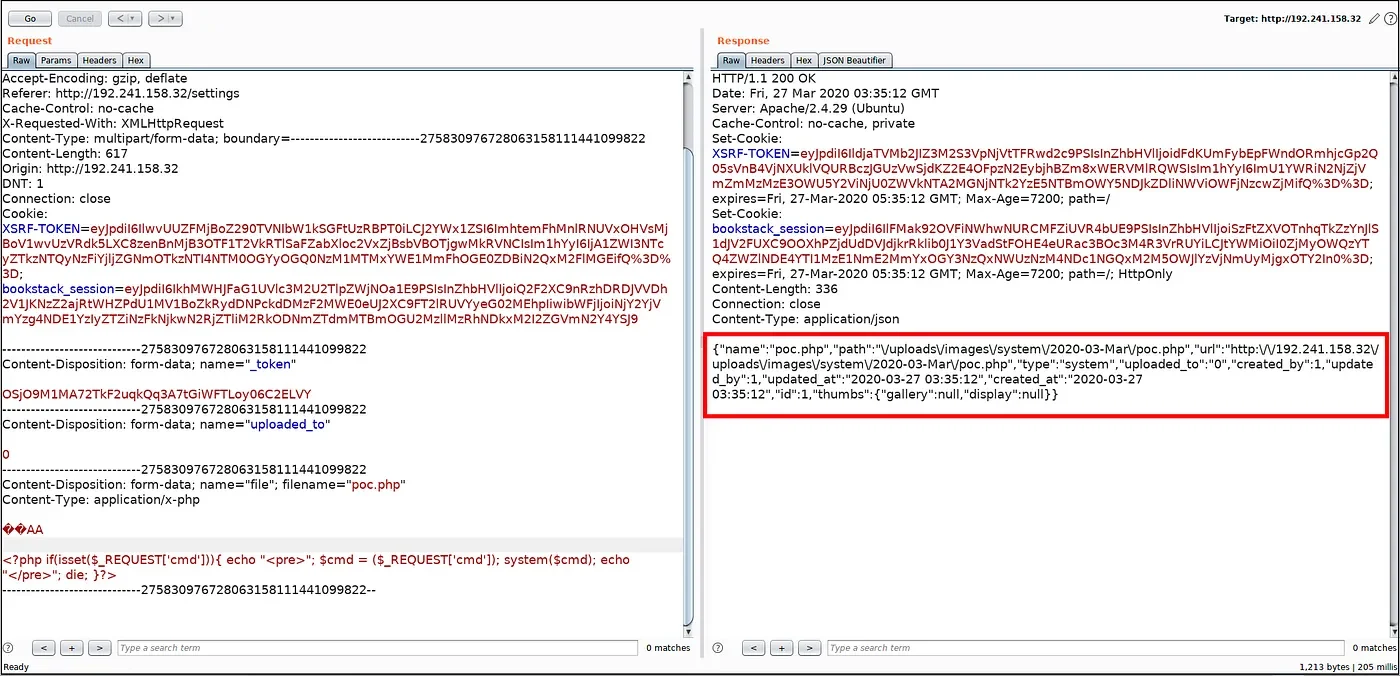
Successful Webshell Upload
Step 4: trigger the webshell
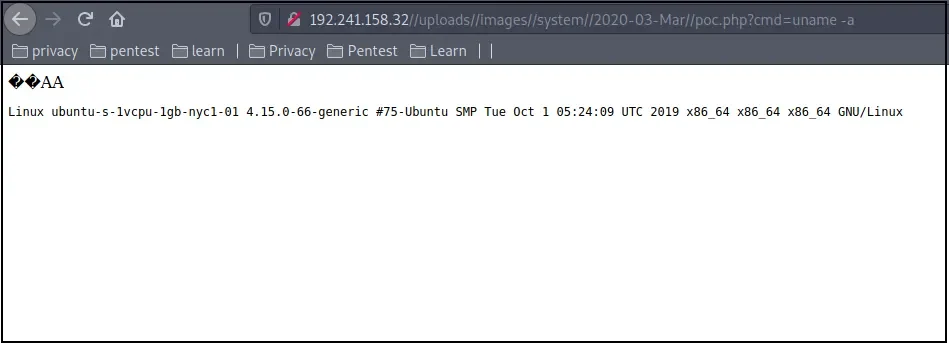
Navigating to the uploaded webshell and sending commands to the parameter set in the file gave remote code execution.

Root cause
Adding a valid image header to the file was enough to get past the protection, and the JPEG magic bytes ff d8 were one header that worked. Navigating to the uploaded webshell and sending commands to its parameter gave remote code execution. The report does not describe the validation code itself, so the exact check that was bypassed is not shown.
Impact
The application is vulnerable on any upload endpoint, not only the Application Logo functionality. Users with the Editor or Admin role can exploit this vulnerability by changing their Avatar Image, updating the Cover Image for shelves, and so on. The vulnerability affects only Bookstack applications under v0.25.3.
Fix
The issue was addressed in a series of patches: v0.25.3, v0.25.4 and v0.25.5. I reported the vulnerability to the maintainer of the project on March 6, 2020, and a CVE number was assigned on March 9, 2020.
References:
- GitHub security advisory GHSA-g9rq-x4fj-f5hx
- BookStack struck by RCE security bug (PortSwigger)
- NVD - CVE-2020-5256
Variants to test
- Other image upload endpoints. Try the same header-prefix technique on avatar images, shelf cover images and any other feature that accepts an image. A positive result is the upload succeeding and the stored file being reachable and executable.
- Different magic bytes. The report uses the JPEG header
ff d8; try headers for other image formats the application accepts. A positive result is the same: the upload passes validation and the payload still runs. - Role-based reach. Check which roles can reach each upload endpoint, since the report notes Editor and Admin users can exploit it. A positive result is a lower-privileged account reaching an upload that accepts the modified file.
- Version check. Confirm the Bookstack version before testing, as the report states only versions under v0.25.3 are affected. A positive result is a version in that range combined with a successful upload.
What happened, in plain words
A security researcher was hired to test a web application, which is a website that people use through their browser to do some job. The application was Bookstack (https://www.bookstackapp.com/), a piece of software that organisations install on their own servers to store and organise written information. Bookstack arranges that information into "books" and "shelves", much like a library arranges paper documents.
While testing, the researcher found that anyone could create an account on this installation, and that every new account was automatically given the highest level of permission, the administrator role. From there, the researcher found a feature that lets an administrator upload a picture to be used as the application logo. Uploading files is a classic weak spot, because the file ends up stored on the server, the computer that runs the website. The researcher managed to upload a small program instead of a picture, and then made the server run it. That is called remote code execution: the attacker gets the server to run commands of their choosing.
This article walks through the same steps the researcher took, explaining each idea from scratch along the way.
Some background first
What Bookstack is
Bookstack is an open source application for organising information in the format of books and shelves. "Open source" means the underlying code is published and anyone can read it, install it and modify it. An organisation that installs Bookstack runs it on its own server, and its staff use it through a browser, the same way they would use any website.
What a penetration test is
A penetration test is a hired, authorised attempt to break into a system, done so that the owner can find and fix weaknesses before a real attacker does. The researcher in this story was doing exactly that: testing with permission, then reporting what was found.
What a role is
Most web applications give each account a role, which is a bundle of permissions. A reader might only be able to view pages; an editor can change them; an administrator can change settings for the whole application. Think of it like keys in an office building: some people can open their own office, some can open the supply cupboard, and a few hold the master key.
What an upload feature is, and why it is risky
An upload feature lets a user send a file from their computer to the server, for example a profile picture. The server has to save that file somewhere and later send it back to browsers that ask for it. If the server is careless about what kind of file it accepts, or about how it later handles the saved file, an attacker can send something harmful instead of a picture. That is the heart of this story.
What a webshell is
A webshell is a small program written in a language the web server can run, such as PHP, whose only job is to take instructions from the attacker and carry them out on the server. It is like leaving a walkie-talkie hidden in a building: whoever holds the matching handset can give orders from outside. If an attacker can upload a webshell and then reach it through a browser, they effectively have a command line on the server.
The setup: an open door
The application I tested had the "Sign Up" function open to any user who wanted to register. New users were assigned the role of admin right after registration, so a freshly created account already had administrative access.
The image shows the Bookstack interface with its books and shelves. The important point is the sign-up behaviour described above: registration was open, and the account created through it arrived with administrator rights. In everyday terms, the front desk was handing out master keys to anyone who filled in a form.
That gave me access to the Application Logo Upload functionality, which is where the interesting part started. The Application Logo is a picture the application lets you upload.
Bookstack Application Logo Upload, v0.25.2
Upload Panel
The two screenshots show the logo upload feature and its upload panel. Version v0.25.2 is the version of Bookstack that was running during the test.
Finding it
With admin access in hand, the upload panel was the obvious place to look. An upload feature that accepts a file from the user and stores it on the server is a classic place to try a webshell, so I went straight for it. The reasoning is simple: the feature is designed to take a file from outside and put it inside, which is exactly the movement an attacker wants.
Exploitation
Step 1: try a plain webshell upload
I attempted to upload a webshell to the server through the Application Logo upload.
Upload Failed
The upload was rejected. There was a protection mechanism in place that refused the file. In other words, the application did not simply accept whatever it was given: something checked the file and said no. The screenshot shows the failure message returned by the application.
Step 2: add a valid image header
A common way to bypass this kind of protection is to add a valid header to the file, meaning the hex bytes of an image file. An easy way to do this is to type a sequence of A's and track the hex sequence of 41's (the hex equivalent of A), then replace those hex bytes with the valid sequence of an image file.
Two ideas need unpacking here.
Hex bytes. Every file on a computer is ultimately a long sequence of numbers between 0 and 255, called bytes. A byte can be written in decimal, or in hexadecimal ("hex"), which is base 16 and uses the digits 0 to 9 and the letters a to f. Hex is popular because every byte fits neatly into exactly two hex characters. The letter A, for example, is stored as the byte with value 65 in decimal, which is written 41 in hex.
File headers and magic bytes. Many file formats begin with a fixed sequence of bytes that identifies them. These opening bytes are often called magic bytes. Software that wants to guess what kind of file it is looking at can read the first few bytes and compare them with known signatures. It is like a passport: the first page tells the inspector which country issued it, before anyone reads the rest.
The bypass idea follows from those two facts. If the protection only looks at the beginning of the file, then putting a real image's opening bytes at the front of a webshell may be enough to get past it. The webshell code still sits behind those bytes, untouched.
The screenshots show the file being edited at the byte level: a run of A characters appears as a run of 41 bytes in the hex view, which makes it easy to see exactly where to make a change.
A possible valid header is the JPEG one: the hex sequence ff d8.
JPEG is a very common format for photographs, and files in that format begin with the two bytes ff d8. The screenshot shows those bytes being placed at the start of the file.
Step 3: upload the modified file
After changing the header of the file being uploaded, the application returned the message of a successful upload.
Successful Webshell Upload
The same file that was refused a moment earlier was now accepted after its header was changed. The check was satisfied by the header, and the rest of the file went through as it was.
Step 4: trigger the webshell
Navigating to the uploaded webshell and sending commands to the parameter set in the file gave remote code execution.
"Navigating to" means opening the file's address in a browser, the same way you would open any web page. The webshell was written to read a value from the address, called a parameter, and treat that value as a command to run on the server. The screenshots show the webshell being reached and commands being sent to it.
Root cause
Adding a valid image header to the file was enough to get past the protection, and the JPEG magic bytes ff d8 were one header that worked. Navigating to the uploaded webshell and sending commands to its parameter gave remote code execution. The report does not describe the validation code itself, so the exact check that was bypassed is not shown.
In plain terms, two mistakes lined up. First, the application's file check could be satisfied by adding a valid image header. Second, the uploaded webshell could be reached and its commands executed by the server. Either mistake alone would be less serious; together they allow code to run on the server.
Impact
The application is vulnerable on any upload endpoint, not only the Application Logo functionality. An endpoint is simply one of the addresses the application responds to, each tied to a particular feature. Users with the Editor or Admin role can exploit this vulnerability by changing their Avatar Image, updating the Cover Image for shelves, and so on. So the logo was just the door that was tried first; the same trick applies wherever the application accepts an image.
The vulnerability affects only Bookstack applications under v0.25.3. "Under" here means earlier than that version number.
Fix
The issue was addressed in a series of patches: v0.25.3, v0.25.4 and v0.25.5. A patch is an update that corrects a fault in software; installing the newer version replaces the faulty behaviour with corrected behaviour. I reported the vulnerability to the maintainer of the project on March 6, 2020, and a CVE number was assigned on March 9, 2020. A CVE number is a public identifier given to a known security flaw so that everyone, across different products and vendors, can refer to the same issue unambiguously.
References:
- GitHub security advisory GHSA-g9rq-x4fj-f5hx
- BookStack struck by RCE security bug (PortSwigger)
- NVD - CVE-2020-5256
Variants to test
If you are testing a similar application, these are the follow-ups worth trying. Each one is a variation on the same idea, and each has a clear sign of success.
- Other image upload endpoints. Try the same header-prefix technique on avatar images, shelf cover images and any other feature that accepts an image. A positive result is the upload succeeding and the stored file being reachable and executable.
- Different magic bytes. The report uses the JPEG header
ff d8; try headers for other image formats the application accepts. A positive result is the same: the upload passes validation and the payload still runs. - Role-based reach. Check which roles can reach each upload endpoint, since the report notes Editor and Admin users can exploit it. A positive result is a lower-privileged account reaching an upload that accepts the modified file.
- Version check. Confirm the Bookstack version before testing, as the report states only versions under v0.25.3 are affected. A positive result is a version in that range combined with a successful upload.
Glossary
- Web application: software that people use through a browser, running on a server rather than on their own computer.
- Server: the computer that stores a website's files and answers requests from browsers.
- Open source: software whose code is published and can be read, installed and modified by anyone.
- Penetration test: an authorised, hired attempt to break into a system so that weaknesses can be found and fixed.
- Role: a bundle of permissions assigned to an account, such as reader, editor or administrator.
- Administrator: the role with the highest permissions, able to change settings for the whole application.
- Endpoint: one of the addresses an application responds to, each tied to a particular feature.
- Upload feature: a part of an application that accepts a file from the user's computer and stores it on the server.
- Webshell: a small program placed on a server whose purpose is to receive and run an attacker's commands.
- Remote code execution (RCE): getting a server to run commands chosen by the attacker.
- Byte: one of the numbers between 0 and 255 that make up a file.
- Hexadecimal (hex): a way of writing numbers in base 16, using 0 to 9 and a to f, where every byte takes exactly two characters.
- Magic bytes / file header: the fixed sequence of bytes at the start of a file that identifies its format.
- JPEG: a common image format; its files begin with the bytes
ff d8. - Bypass: getting past a protection without removing it, by satisfying it in a way its author did not intend.
- Parameter: a value passed in a web address, which the page or program can read and act on.
- Payload: the part of an attack that does the actual work, here the webshell code.
- Patch: an update that corrects a fault in software.
- CVE number: a public identifier for a known security flaw, so the same issue can be referred to unambiguously.
- Version: a number identifying which release of a piece of software is installed.


