**🔍 Breaking Down a Healthcare Web Application: A Complete VAPT Walkthrough .**
The author describes a short VAPT of a healthcare web application and claims to have found a critical cross-site scripting flaw and an unrestricted file upload, but the text gives no technical detail on how either was triggered or what an attacker could actually achieve.
 Published on medium.com
Cybersecurity
The full write-up lives on its author's site
It belongs to its author, so we link to it rather than copy it. The other two tabs are our own rewrites, checked against it.
Context
This is a walkthrough of a Vulnerability Assessment and Penetration Test (VAPT) against a healthcare web application. The author frames the target as a live healthcare platform, the kind of system that holds patient records, medical histories and personally identifiable information (PII), and the stated objective was to find every weakness before a real attacker does.
The scope as written covers five areas:
- Web application security testing
- Input validation vulnerabilities
- File upload security
- Configuration security
- Information disclosure
The engagement was planned as roughly five hours in total: one hour of reconnaissance, three hours of active testing and one hour of documentation. The author says the assessment uncovered critical flaws, naming a Critical XSS and an unrestricted file upload as the headline findings.


Setup
The testing environment was Kali Linux running on VirtualBox, described as a complete penetration testing distribution. The methodology followed a fixed sequence:
VAPT METHODOLOGY
 ─────────────────────────────────────────
 1. Reconnaissance
 ↓
 2. Information Gathering
 ↓
 3. Vulnerability Identification
 ↓
 4. Exploitation / POC Testing
 ↓
 5. Documentation & Reporting
 ↓
 6. Recommendations
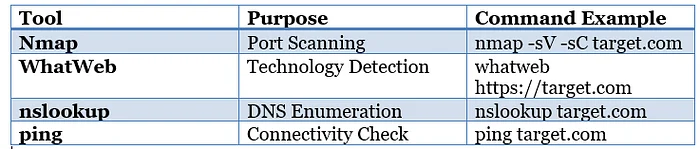
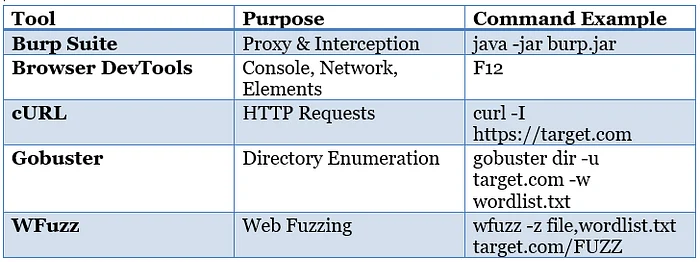
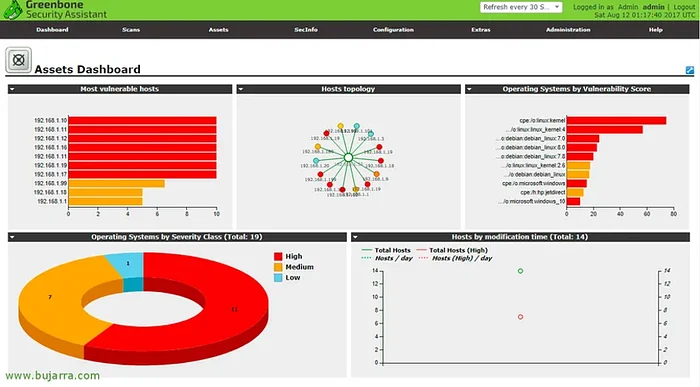
Three frameworks are referenced throughout: OWASP Top 10 (2021) as the primary vulnerability reference, the WSTG (Web Security Testing Guide) for testing procedures, and PTES (Penetration Testing Execution Standard) for methodology. The report groups its tooling into three phases, reconnaissance, web application testing and vulnerability assessment, but the tool names themselves are only shown inside the screenshots.

Finding it
The first phase was reconnaissance and information gathering, and it is the only phase for which the report shows commands and output. Three checks were run: a DNS lookup, technology detection and a connectivity test. The checks established where the application is hosted, what it is built with and what contact information the organisation exposes.
Exploitation
Step 1: DNS lookup
nslookup healthcare-..*****************.
The hostname is partially masked in the write-up.
Step 2: Technology detection
whatweb [https://healthc](https://healthcare-plus-vulnerable.vercel.app)…………………….
The URL in the report is written as a Markdown link whose destination is https://healthcare-plus-vulnerable.vercel.app, with the remainder of the argument masked.
Step 3: Connectivity test
ping -c 5 healthca.***************************.app
The hostname is masked and ends in .app.
The output of the reconnaissance is summarised as follows:
❯ Server: G………**..
 ❯ IP: 216.1*0.**.*
 ❯ Technology: HTML5, JavaScript
 ❯ Email: info@h***********.***
From this the author records three discoveries:
- The server is hosted on a provider whose name is masked in the output.
- The site uses HTML5 and JavaScript.
- A business email address is exposed,
info@h***********.***.
The report does not show the responses to the individual commands, only this consolidated output block, and it does not describe how the email address was obtained.
Root cause
The report does not analyse the cause of the XSS or the unrestricted file upload, and it does not show the requests, payloads or responses for either. The only evidence it shows is from reconnaissance: the technology stack (HTML5, JavaScript) and a business email address. Why existing defences did not prevent that disclosure is not discussed.
Impact
The author's framing is that a healthcare platform holds patient records, medical histories and PII, so weaknesses in it matter more than in an ordinary application. The named findings are a Critical XSS and an unrestricted file upload, and the report states that these were discovered during active testing. The disclosed reconnaissance data is limited to the hosting provider, the front-end technologies and a business contact address.
Fix
The report lists Recommendations as the final section of its table of contents but does not include their content. No remediation is described, and nothing is said about changes that were made to the platform.
Variants to test
These follow from the reconnaissance steps the report does show, and each can be repeated on other targets:
- Hosting fingerprint. Run
whatwebagainst the target and look for framework and server banners. A positive result is a specific product and version rather than a generic HTML5/JavaScript answer, since a version number is what makes later vulnerability matching possible. - Contact disclosure. Check the site and its DNS records for organisational email addresses. A positive result is a business address such as the
info@mailbox the author found. - Hosting platform identification. Resolve the hostname and compare the IP and server header against known hosting ranges. A positive result is a named provider.
- Input reflection. Given that the author reports a Critical XSS, submit a marker string in every parameter and search the response for it unencoded. A positive result is the marker returned inside an HTML or JavaScript context without escaping.
- Upload restrictions. Given the unrestricted file upload, submit files with unexpected extensions and content types and check whether they are stored and served back. A positive result is a stored file reachable at a predictable URL with its original content type.
What happened, in plain words
A security researcher spent about five hours testing a healthcare website, the kind of site that stores patient records, medical histories and personal information. The aim was simple: find the weak spots before a real attacker does. The write-up says the testing turned up serious problems, including a Critical XSS and an unrestricted file upload, but it only shows the evidence for the first stage, the reconnaissance. The rest of the findings are named, not demonstrated.
This article walks through the same steps in the same order, explaining every idea from scratch. If you can use a browser, you can follow along.
The image is the article's opening banner, captioned as a five-hour assessment that uncovered critical flaws in a live healthcare platform.
Why a healthcare site is a big deal
A healthcare platform holds some of the most sensitive data imaginable: patient records, medical histories and personally identifiable information, usually shortened to PII. PII is any data that can point to a specific person, such as a name, an address or an email address. If that data leaks, the harm is not just embarrassment; it can affect people's privacy, finances and safety.
That is why the researcher's stated goal was to find every weakness before a real attacker does. A VAPT, short for Vulnerability Assessment and Penetration Test, is a structured security check. The assessment part means looking for weaknesses; the penetration test part means actually trying to exploit them, in a controlled way, to prove they are real.
The diagram shows the threat model: hospitals, cloud storage, authentication and attackers all in one picture. Think of it as a map of everyone and everything that touches patient data.
The plan and the scope
The scope is the list of things the tester is allowed to look at. Here it covers five areas:
- Web application security testing: checking the website itself.
- Input validation vulnerabilities: checking what happens when someone types unexpected things into forms and fields.
- File upload security: checking whether the site lets people upload files it should not.
- Configuration security: checking whether the server and software are set up safely.
- Information disclosure: checking whether the site gives away details it should keep private.
The time budget was about five hours in total: one hour of reconnaissance, three hours of active testing and one hour of documentation. Reconnaissance means gathering information about the target before touching it, like studying a building from the street before trying the doors. Active testing means actually sending requests and trying things. Documentation means writing down what you found so it can be fixed.
The method
The researcher followed a fixed sequence, the same way a cook follows a recipe so nothing gets skipped:
VAPT METHODOLOGY
 ─────────────────────────────────────────
 1. Reconnaissance
 ↓
 2. Information Gathering
 ↓
 3. Vulnerability Identification
 ↓
 4. Exploitation / POC Testing
 ↓
 5. Documentation & Reporting
 ↓
 6. Recommendations
Line by line:
- VAPT METHODOLOGY: the title of the plan.
- 1. Reconnaissance: learn about the target from the outside.
- 2. Information Gathering: collect the details you found, such as hostnames and technologies.
- 3. Vulnerability Identification: look for weaknesses.
- 4. Exploitation / POC Testing: try to prove a weakness is real. POC stands for proof of concept, a small demonstration that shows the problem exists without doing real damage.
- 5. Documentation & Reporting: write it all down clearly.
- 6. Recommendations: tell the owners how to fix it.
The arrows simply mean "then".
Three public frameworks are referenced throughout. A framework here is a shared checklist or rulebook that testers use so their work is consistent and comparable:
- OWASP Top 10 (2021): a well-known list of the ten most common categories of web application security risk, updated in 2021. It is the primary vulnerability reference in this test.
- WSTG (Web Security Testing Guide): a detailed guide, also from OWASP, describing how to test each kind of weakness.
- PTES (Penetration Testing Execution Standard): a standard describing the overall phases of a penetration test.
The setup and the tools
The testing environment was Kali Linux running on VirtualBox. Kali Linux is a free operating system built for security testing; it comes with many testing tools pre-installed. VirtualBox is free software that lets you run a whole operating system inside a window on your normal computer, like a computer within a computer, so the testing stays separate from your everyday machine. The report describes Kali as a complete penetration testing distribution, meaning a ready-made package of tools.
The report groups its tools into three phases, reconnaissance, web application testing and vulnerability assessment, but the tool names themselves are only visible inside the screenshots.
This screenshot sits under the heading for reconnaissance tools.
This one sits under the heading for web application testing tools.
This one sits under the heading for vulnerability assessment tools.
The caption describes a typical vulnerability management dashboard, where findings are collected in one place. Centralised visibility, seeing everything in one view, is what keeps an assessment organised.
Step 1: Reconnaissance
Reconnaissance is the only phase for which the report shows commands and output. Three checks were run: a DNS lookup, technology detection and a connectivity test. The aim was to establish where the application is hosted, what it is built with and what contact information the organisation exposes.
Before the commands, two ideas help.
DNS is the internet's address book. Humans use names like example.com; computers use numeric addresses. DNS translates one into the other. A DNS lookup is simply asking the address book for an entry.
A hostname is the name of a machine on the network, the part before the path in a web address.
DNS lookup
nslookup healthcare-..*****************.
nslookup is a command-line tool that asks a DNS server what a name resolves to. The hostname in the report is partially masked with asterisks, which is common in public write-ups to avoid pointing readers at a live system.
Technology detection
whatweb [https://healthc](https://healthcare-plus-vulnerable.vercel.app)…………………….
WhatWeb is a tool that looks at a website and tries to guess what it is built with: the web server software, the programming language, the JavaScript libraries and so on. It works a bit like reading the labels on the outside of a parcel to guess what is inside. The URL in the report is written as a Markdown link whose destination is https://healthcare-plus-vulnerable.vercel.app, with the rest of the argument masked.
Connectivity test
ping -c 5 healthca.***************************.app
ping sends a tiny message to a machine and waits for a reply, like knocking on a door to see if anyone is home. The -c 5 part means send five of these messages and then stop. The hostname is masked and ends in .app.
What the output showed
The output of the reconnaissance is summarised in one block:
❯ Server: G………**..
 ❯ IP: 216.1*0.**.*
 ❯ Technology: HTML5, JavaScript
 ❯ Email: info@h***********.***
Line by line:
- Server: the name of the hosting provider, masked here.
- IP: the numeric address of the server, also masked. An IP address is the number a computer uses to find another computer on a network.
- Technology: HTML5 and JavaScript. HTML is the language that describes the structure of a web page; HTML5 is its current major version. JavaScript is the programming language that makes pages interactive in the browser.
- Email: a business contact address, masked here.
From this the researcher records three discoveries:
- The server is hosted on a provider whose name is masked in the output.
- The site uses HTML5 and JavaScript.
- A business email address is exposed.
The report does not show the responses to the individual commands, only this consolidated output block, and it does not describe how the email address was obtained.
The findings named but not shown
The write-up names two headline findings from the active testing phase: a Critical XSS and an unrestricted file upload. It does not show the requests, payloads or responses for either, and it does not analyse why they exist.
It is still worth knowing what those terms mean, because they are the reason the assessment mattered.
XSS, short for cross-site scripting, is a weakness where a site takes something a user typed and puts it into a page without cleaning it first, so that text is treated as code by the browser. Imagine a noticeboard where anyone can pin a note; if someone pins a note that says "copy this message onto every other note", and the board obeys, that is roughly the idea. The cleaning step is called escaping or encoding: turning characters that have special meaning into harmless text.
An unrestricted file upload is a weakness where a site accepts files of any type or content and stores them, instead of allowing only safe types such as images and checking them properly. Think of a mailroom that accepts any parcel, including one that turns out to be a person who then walks freely through the building.
Impact
The researcher's framing is that a healthcare platform holds patient records, medical histories and PII, so weaknesses in it matter more than in an ordinary application. The named findings are a Critical XSS and an unrestricted file upload, and the report states that these were discovered during active testing. The disclosed reconnaissance data is limited to the hosting provider, the front-end technologies and a business contact address.
Fix
The report lists Recommendations as the final section of its table of contents but does not include their content. No remediation is described, and nothing is said about changes that were made to the platform.
Variants to test
These follow from the reconnaissance steps the report does show, and each can be repeated on other targets:
- Hosting fingerprint. Run
whatwebagainst the target and look for framework and server banners. A positive result is a specific product and version rather than a generic HTML5/JavaScript answer, since a version number is what makes later vulnerability matching possible. - Contact disclosure. Check the site and its DNS records for organisational email addresses. A positive result is a business address such as the
info@mailbox the researcher found. - Hosting platform identification. Resolve the hostname and compare the IP and server header against known hosting ranges. A positive result is a named provider.
- Input reflection. Given that the researcher reports a Critical XSS, submit a marker string in every parameter and search the response for it unencoded. A positive result is the marker returned inside an HTML or JavaScript context without escaping.
- Upload restrictions. Given the unrestricted file upload, submit files with unexpected extensions and content types and check whether they are stored and served back. A positive result is a stored file reachable at a predictable URL with its original content type.
Glossary
- VAPT: Vulnerability Assessment and Penetration Test; a structured security check that both looks for weaknesses and tries to prove them.
- PII: personally identifiable information; any data that can point to a specific person.
- Reconnaissance: gathering information about a target before actively testing it.
- Active testing: sending requests and trying things against the target to find weaknesses.
- Scope: the list of systems and areas a tester is allowed to examine.
- DNS: the internet's address book, translating names into numeric addresses.
- DNS lookup: asking DNS what a name resolves to.
- Hostname: the name of a machine on a network.
- IP address: the numeric address a computer uses to find another computer.
- nslookup: a command-line tool for querying DNS.
- WhatWeb: a tool that guesses what software a website is built with.
- ping: a command that sends a small message to a machine and waits for a reply to check reachability.
- Technology stack: the combination of software a site runs on, such as server software, languages and libraries.
- HTML5: the current major version of HTML, the language describing the structure of a web page.
- JavaScript: the programming language that makes web pages interactive in the browser.
- Kali Linux: a free operating system built for security testing, with many tools pre-installed.
- VirtualBox: free software that runs a whole operating system inside a window on your normal computer.
- OWASP Top 10: a well-known list of the ten most common categories of web application security risk.
- WSTG: Web Security Testing Guide; a detailed guide on how to test for each kind of weakness.
- PTES: Penetration Testing Execution Standard; a standard describing the phases of a penetration test.
- POC: proof of concept; a small demonstration that a weakness is real.
- Escaping (encoding): turning characters with special meaning into harmless text.
- Unrestricted file upload: a weakness where a site accepts files of any type or content instead of allowing only safe types.
- Severity: a label describing how serious a finding is, such as Critical.
- Remediation: the fix applied to remove a weakness.
- Fingerprint: the identifying details of a system, such as product names and versions.
- Phishing: tricking someone into handing over information or clicking something harmful, often by email.
- Parameter: a named value passed to a website, often in a URL or a form.
- Content type: the label that says what kind of file something is, such as an image or a web page.




