#Bug Bounty — How I booked a rental house for just 1.00 INR — Price Manipulation in Citrus Pay
 Published on medium.com
During my recent bug bounty hunt, I came across a very critical and yet simple vulnerability. It was payment price manipulation through which I could book a furnished home with one of the famous home rental app in India at the minimal cost (Rs.1.00).
The full write-up lives on its author's site
It belongs to its author, so we link to it rather than copy it. The other two tabs are our own rewrites, checked against it.
Context
During a bug bounty hunt, the researcher found a price manipulation flaw in the payment flow of a well-known home rental app in India. The feature involved is the advance payment for booking a furnished or shared apartment: the user picks a house, proceeds to pay the advance, and the site hands the order over to the Citrus Pay payment gateway. The order amount travels from the client to the gateway, and the gateway is supposed to collect exactly that amount.
The researcher was in the middle of moving from a paying guest accommodation to a service apartment, so the target was also a real purchase: a house was selected and the advance was about to be paid. The report describes the flaw as simple but critical: the amount to be paid could be changed client-side, and the booking was completed for Rs.1.00 instead of the real price.
Setup
The only tool mentioned is a proxy tool used to intercept and modify HTTP requests. No accounts, roles, versions or other preconditions are described beyond a normal user going through the booking and payment flow on the rental site. The researcher had been hunting payment gateway vulnerabilities for the previous few weeks, which is why this flow was examined closely.
Finding it
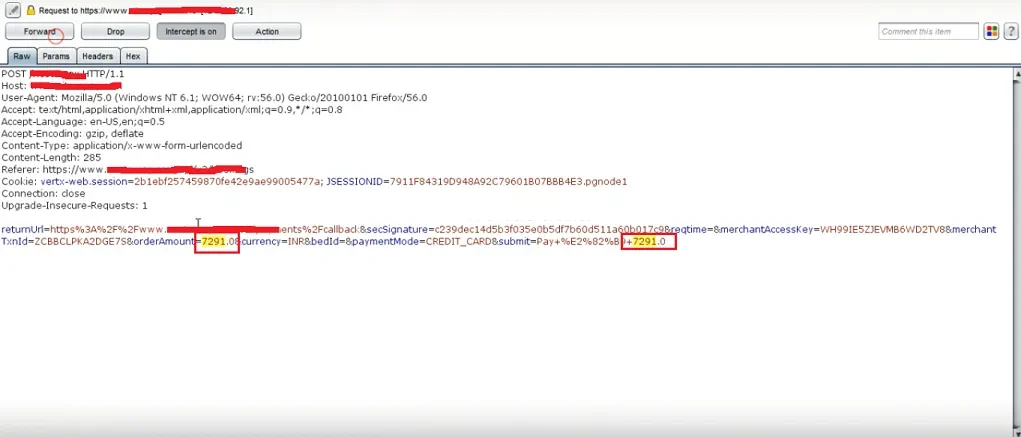
The request was captured with the proxy before it reached the payment gateway. In that request, the order amount parameter carried the amount to be paid, 7291.0 INR. The order amount parameter carried the amount to be paid, 7291.0 INR, and the researcher changed it to 1.0 INR.
Exploitation
Step 1: change the order amount
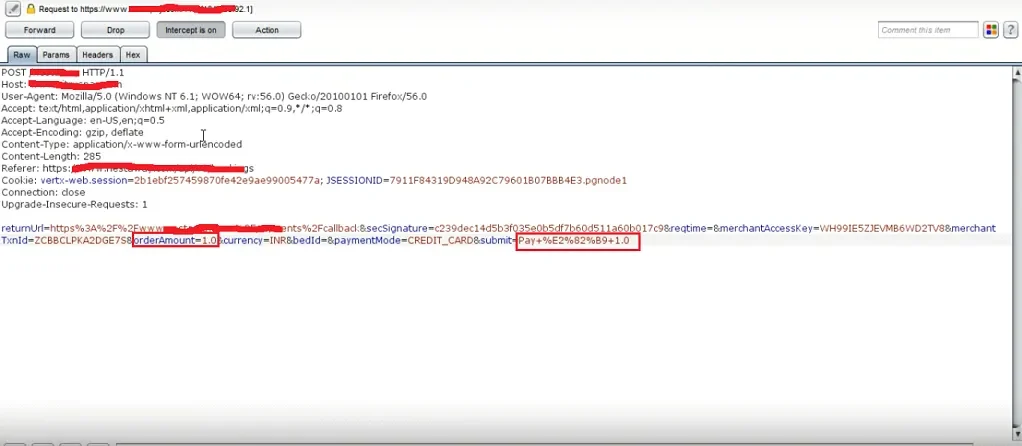
The captured request carried the order amount as 7291.0 INR. The researcher changed the value to 1.0 INR.
Step 2: forward the request to the gateway
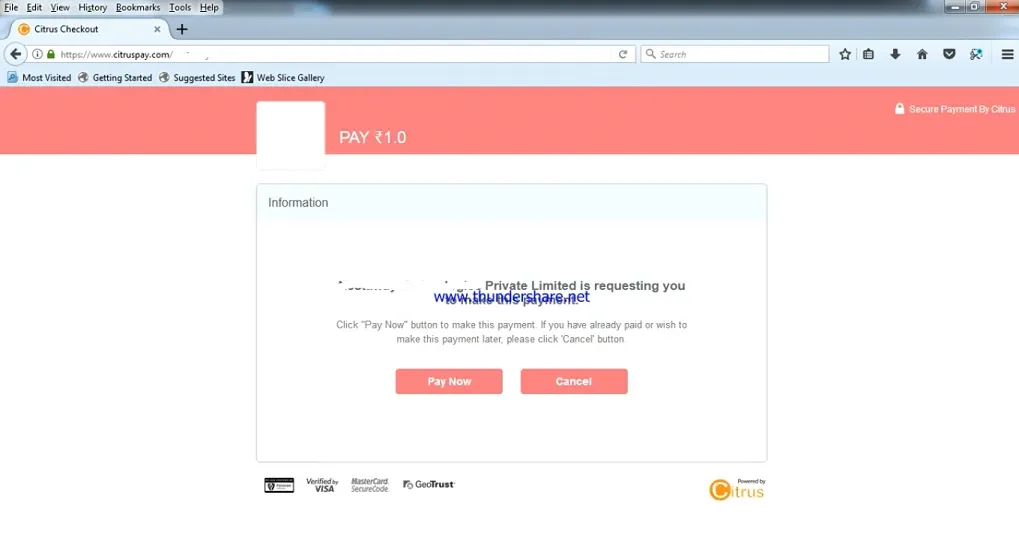
After manipulating the order amount, the modified HTTP request was forwarded. It redirected to the Citrus Pay payment gateway page.
Step 3: get past the gateway's checksum logic with the retry count
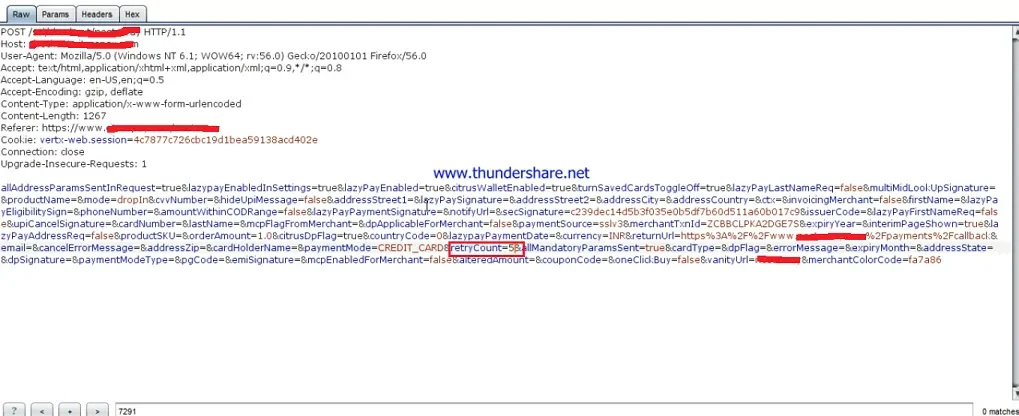
Clicking the Pay Now button produced another request, which was captured. The researcher then used trial and error on the parameters. Many values were changed from False to True, without success. The parameter that worked was the retry count: it was changed from 0 (zero) to a positive value.
That change took the flow to the next page successfully.
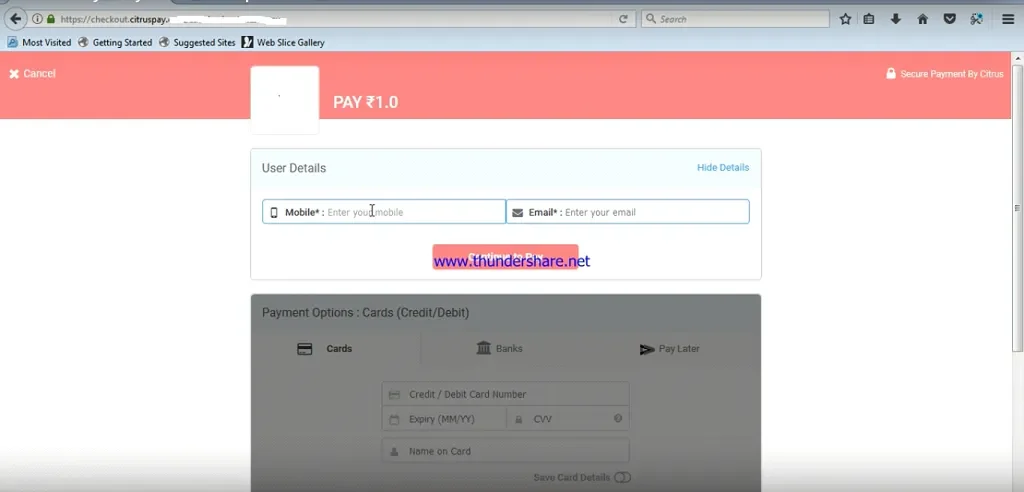
Step 4: pay 1.00 INR
The next page asked for contact details and credit card details (the payment method selected) to pay the amount of 1.00 INR. All details were entered and Pay was clicked. An OTP arrived for paying 1.00, and after entering it the success page appeared.
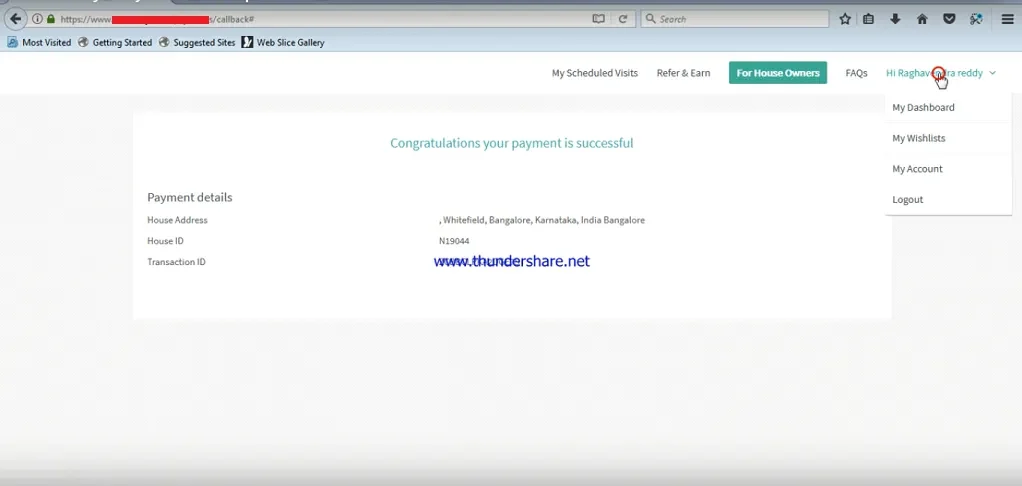
Result
Rent receipts for a payment of 7291.0 arrived by email. The house that had been booked was then cancelled, and the refund received was 7291.0 INR rather than the 1.0 INR actually paid.
Root cause
The report attributes the bypass to the retry count value manipulation, which got around the payment checksum validation logic of Citrus Pay. More generally, the flaw exists because the price and the checksum are not validated back by the server: the client-supplied order amount is trusted, and the gateway-side checksum check can be sidestepped by tampering with another parameter in the same request.
Impact
An attacker who can intercept and modify their own payment request can book a property while paying a minimal amount, as happened here with 1.0 INR. and in this case received receipts for the full price. Cancelling the booking then returned a refund of the full 7291.0 INR instead of the 1.0 INR paid, so the manipulation also turns into a payout of money that was never spent. The report presents this as a critical vulnerability of the rental site's payment flow, caused by the price and checksum not being validated back by the server.
Fix
The report gives three recommendations, all server-side:
- Always validate the amount back by the server.
- Pull the amount from the database and check whether it is the same value or not.
- Create a payment checksum and validate it at the server side.
The report does not say whether or how the site or Citrus Pay changed anything after disclosure.
Variants to test
- Tamper with the order amount parameter in the request sent to the payment gateway.
- Change boolean-style parameters from
FalsetoTruein the gateway request. - Change a retry count from
0to a positive value.
What happened, in plain words
A security researcher was moving house. He needed a serviced apartment and found a rental site he liked. While booking, he noticed something odd: the amount he was about to pay was being sent from his own browser to the payment gateway. He used a tool to pause that request, changed the amount from 7291.0 INR to 1.0 INR, and the site accepted it. He then had to get past one more check at the payment gateway (Citrus Pay) by changing a retry count from 0 to a positive number. He paid 1.00 INR, got receipts for 7291.0, then cancelled the booking and received a refund of 7291.0 INR. In short, he booked a house for one rupee and made money on the refund.
This is a beginner's walkthrough of that finding. It explains every term and step from scratch, so you only need to know how to use a browser and a computer.
Background: what is a payment gateway and why does the amount matter?
When you buy something online, the shop does not handle your card details itself. It hands the payment over to a payment gateway, a separate service that talks to your bank, checks your card, sends you a one-time password (OTP), and moves the money. In this report the gateway is Citrus Pay.
The shop's website creates an order: a record that says "this customer is buying this thing for this amount". The order amount is a number, here 7291.0 INR. That number has to travel from the shop's website to the gateway so the gateway knows how much to charge.
In a well-built system, the amount is decided and stored on the server (the shop's computer), and the gateway independently checks that the amount it is asked to charge matches the order. In this case, the amount was being sent from the customer's browser, and the server did not validate it back.
The setup: a proxy tool
To see and change what his browser sent, the researcher used a proxy tool. A proxy sits between your browser and the internet. Instead of your browser talking directly to the website, it talks to the proxy, and the proxy forwards the request. Because everything passes through the proxy, you can read each request and response, and you can edit a request before it continues on its way.
Think of it like a postal worker who opens your letter, lets you rewrite it, and then seals it and delivers it. The website receives the rewritten letter and has no idea it was changed.
The report does not name the proxy tool, and it does not describe any special account or setup beyond a normal user going through the booking and payment flow. The researcher had been looking for payment gateway vulnerabilities for a few weeks, which is why he was paying close attention to this flow.
Finding the amount in the request
The researcher captured the request that his browser sent just before it reached the payment gateway. In that request there was a parameter called the order amount, and it carried the value 7291.0 INR.
A parameter is simply a named value inside a request. If a request is like a form you fill in, each field on the form is a parameter: name, address, amount, and so on. The website reads those fields and acts on them.
The image shows the captured request with the order amount parameter visible. The key observation is that this value came from the client (the browser). If the server trusts whatever number the browser sends, then changing that number in the browser changes what the server thinks you owe.
Step 1: change the order amount
The researcher changed the order amount from 7291.0 INR to 1.0 INR.
In the image you can see the same request with the amount now set to 1.0. Nothing else was changed at this point. The reason for doing this is simple: if the server uses this value to decide what to charge, then a smaller value should mean a smaller charge. The risk is that the server might notice the change and reject it, but the next step shows what happened.
Step 2: forward the request to the gateway
After editing the amount, the researcher forwarded the request. The proxy sent it on to its destination, and the site redirected the browser to the Citrus Pay payment gateway page.
The image shows the Citrus Pay page that appeared. The important detail is that the flow continued normally: the site did not reject the modified amount. From the user's point of view, it looked like a normal payment page.
Step 3: get past the gateway's checksum with the retry count
On the Citrus Pay page, the researcher clicked the Pay Now button. That click produced another request, which he captured with the proxy. This request is the one the gateway uses to start the actual payment.
A checksum is a short value computed from the request data, like a tamper-evident seal. The sender and the receiver both compute it from the same data. If someone changes any part of the data, the checksum no longer matches, and the receiver should reject the request. The purpose is to stop exactly the kind of editing we are doing.
So the researcher tried to get past this check by trial and error. He changed many parameters whose values looked like False to True, hoping one of them would switch off a check or unlock the next step. None of those worked.
Eventually he found the parameter that mattered: the retry count. He changed it from 0 (zero) to a positive value.
The image shows the request with the retry count changed. A retry count is normally a number that says how many times an operation has been attempted. Changing it from zero to a positive number caused the checksum validation logic to be bypassed. The report states that this retry count manipulation is what bypassed the payment checksum validation logic of Citrus Pay.
After that change, the flow moved to the next page successfully.
The image shows the next page loading. This is the point where the gateway's protection was defeated, not by guessing a password or breaking encryption, but by changing a number the gateway did not expect to be changed.
Step 4: pay 1.00 INR
The next page asked for contact details and credit card details. The researcher selected the credit card payment method, entered his details, and clicked Pay. He received an OTP for paying 1.00, entered it, and saw the success page.
The image shows the success page. An OTP (one-time password) is a short code sent to your phone or email to prove it is really you making the payment. Notice that the OTP was for 1.00 INR, matching the manipulated amount. The OTP was for 1.00 INR, matching the manipulated amount.
The result
After the payment, rent receipts for 7291.0 arrived by email. That is the full original price, even though only 1.00 INR had been paid.
Then the researcher cancelled the booking. The refund he received was 7291.0 INR, not the 1.0 INR he had actually paid. So the manipulation did not just get him a cheap booking; it turned into a payout of money he never spent.
Why this works: the root cause
The report puts the bypass down to the retry count value manipulation, which got around the payment checksum validation logic of Citrus Pay. More broadly, the flaw exists because the price and the checksum are not validated back by the server. The client-supplied order amount is trusted, and the gateway-side checksum check can be sidestepped by tampering with another parameter in the same request.
In everyday terms: the shop asked the customer "how much are you paying?" and believed the answer. The gateway had a seal to detect tampering, but the seal could be avoided by changing a different field in the same envelope.
Impact
Anyone who can intercept and modify their own payment request can book a property while paying a minimal amount, as happened here with 1.0 INR. In this case the attacker also received receipts for the full price. Cancelling the booking then returned a refund of the full 7291.0 INR instead of the 1.0 INR paid, so the manipulation also turns into a payout of money that was never spent. The report presents this as a critical vulnerability of the rental site's payment flow. The report presents this as a critical vulnerability of the rental site's payment flow, caused by the price and checksum not being validated back by the server.
Fix
The report gives three recommendations, all server-side:
- Always validate the amount back by the server.
- Pull the amount from the database and check whether it is the same value or not.
- Create a payment checksum and validate it at the server side.
The report does not say whether or how the site or Citrus Pay changed anything after disclosure.
Variants to test
- Tamper with the order amount parameter in the request sent to the payment gateway.
- Change boolean-style parameters from
FalsetoTruein the gateway request. - Change a retry count from
0to a positive value.
Glossary
- API: a way for two programs to talk to each other, like a waiter taking your order to the kitchen and bringing back the food.
- Bug bounty: a programme where companies pay people for finding and reporting security problems in their systems.
- Checksum: a short value computed from data to detect changes, like a tamper-evident seal on an envelope.
- Citrus Pay: the payment gateway used in this report.
- Client: the program on your side, usually your browser, that sends requests to a server.
- Cookie: a small piece of data a website stores in your browser so it can recognise you on later requests, like a cloakroom ticket.
- HTTP request: the message your browser sends to a website asking for something or submitting data.
- OTP (one-time password): a short code sent to your phone or email to prove it is you making a payment or logging in.
- Parameter: a named value inside a request, like a field on a form.
- Payment gateway: a service that handles card payments between a shop and your bank.
- Price manipulation: changing the price in a request so the server charges a different amount than intended.
- Proxy tool: software that sits between your browser and the internet so you can read and edit requests.
- Retry count: a number that records how many times an operation has been attempted.
- Server: the computer that runs a website and decides what to do with your requests.
- Token: a piece of data, often a string, that proves who you are or that a request is legitimate, like a wristband at an event.
- Vulnerability: a weakness in a system that someone can use to make it behave in a way its owners did not intend.




