Bypassing Host Header to SQL injection to dumping Database — An unusual case of SQL injection
The application used the X-Forwarded-Host header value in a database lookup without proper sanitisation, allowing time-based SQL injection. An attacker could exploit this to dump the entire database, including user credentials and email addresses.
 Published on medium.com
Security
The full write-up lives on its author's site
It belongs to its author, so we link to it rather than copy it. The other two tabs are our own rewrites, checked against it.
Context
The target was a website belonging to what the author describes as India's popular sports company. The write-up does not name the company or the hostname. The author was checking the application for a bruteforce OTP vulnerability, which is where the trail started.
The vulnerability that followed is not in the OTP flow itself. It is a host header handling problem that turned into SQL injection through the X-Forwarded-Host header, and from there into a full database dump.
Setup
The author used Burp Suite, specifically Burp Intruder, to send repeated requests at the OTP flow. No accounts, roles or credentials are described in the report. The only precondition that matters is that the application sits behind AWS infrastructure, which the author established during the initial probing.
Finding it
Running Burp Intruder against the site got the author's IP blocked. From the error message returned at that point the author could figure out that the application was hosted on AWS. A second signal confirmed it: the HTTP responses carried an X-Amz-Cf-Id header, which CloudFront adds to the viewer request before forwarding it to the origin.
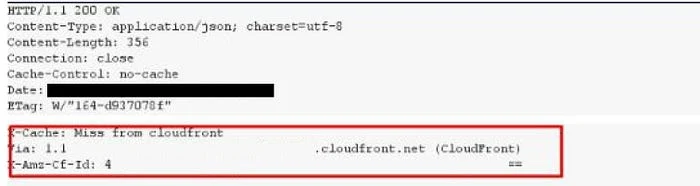
The screenshot shows that CloudFront header in a response. With the AWS hosting established, the author moved on to low-hanging fruit, starting with a host header attack. Changing the Host header value directly did not work. Because the application runs on AWS, the author reasoned it must sit behind an ELB (elastic load balancer), and tried the same idea through the X-Forwarded-Host header instead.
Exploitation
Step 1: Confirm the header is trusted
The author added an X-Forwarded-Host header to the request.
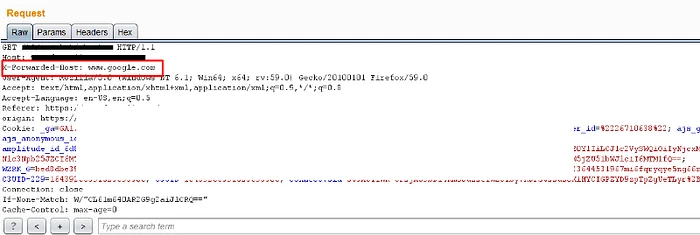
Setting the header to www.google.com produced a 302 redirect to google.com. Setting it to www.evil.com produced a different result: an HTTP 403 Forbidden.
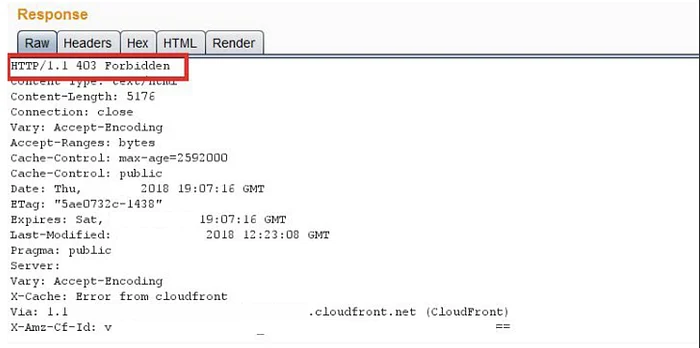
That asymmetry is the interesting part. The backend clearly validates the host value against something: google.com was allowed, evil.com was denied. The author considered two possibilities: a script checking the value against an array or list of allowed hosts, or a database lookup of stored host values.
Step 2: Test for SQL injection in the header value
To distinguish the two possibilities, the author sent SQL syntax in the X-Forwarded-Host value. A time-based payload with a sleep() of 10 seconds was used, and the HTTP response took 9.4 seconds to arrive.
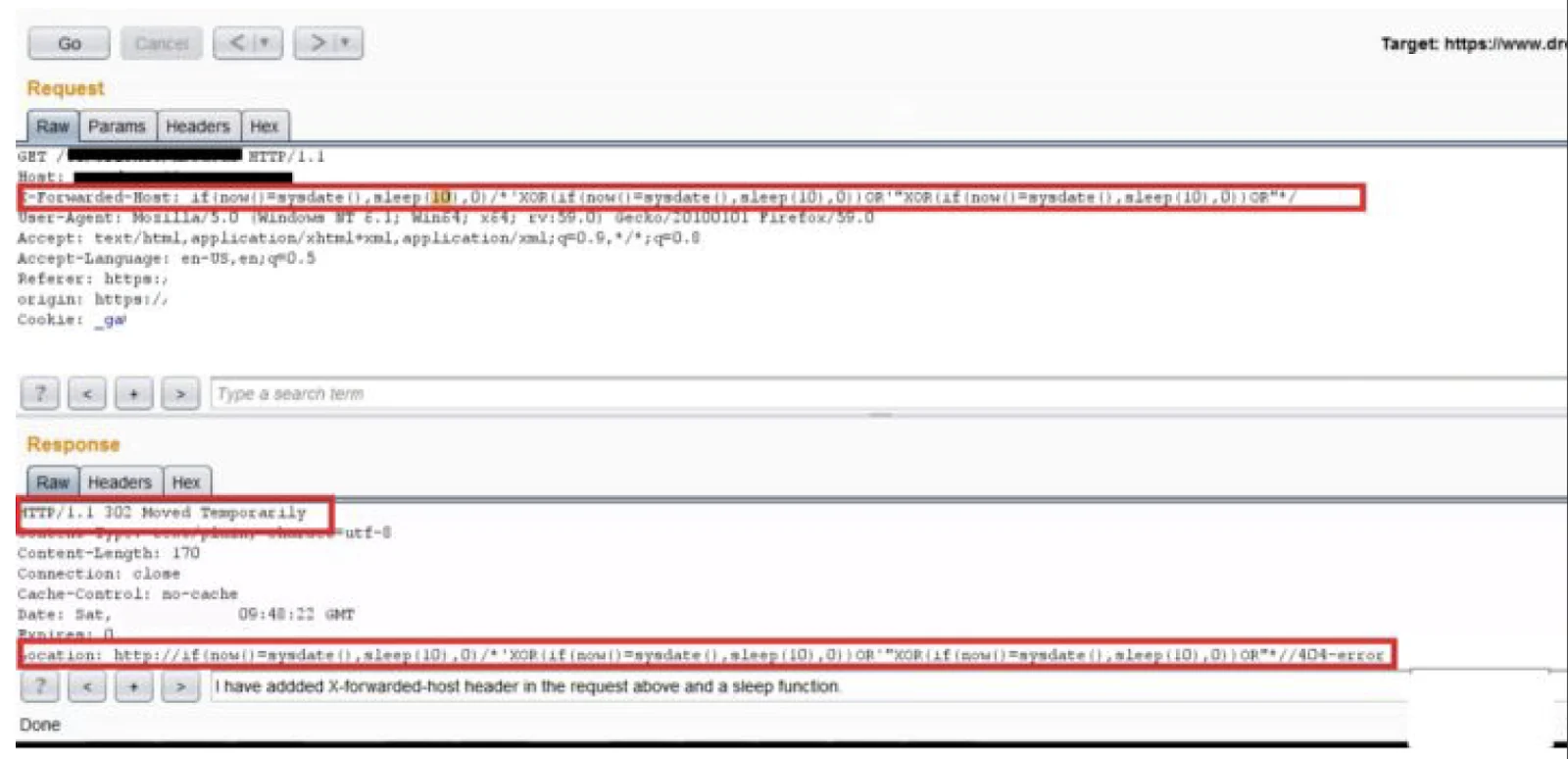
The screenshot shows the time-based injection in the header. That delay confirmed an unusual case of SQL injection in X-Forwarded-Host.
Step 3: Try sqlmap and hit a wall
With the injection confirmed, the next task was extracting database content. Running sqlmap against the vulnerable parameter resulted in the connection being refused. The author added a time delay to throttle HTTP requests and increased the connection timeout:
--delay=DELAY --timeout=TIMEOUT
After waiting, the same connection refusal persisted. The author suspected character blacklisting. To check quickly, the following value was placed in the X-Forwarded-Host header:
<script>alert(1)</script>
That request returned HTTP status 400, Bad Request. The conclusion was that script tags and the < and > characters were blacklisted.
Step 4: Bypass the filter with a tamper script
sqlmap ships a tamper script called between.py, which replaces the < and > symbols with NOT BETWEEN. The author included it in the sqlmap run. After some time, the run returned the complete database of the enterprise, containing sample-level user credentials, email-ids and more data, presented as proof of concept.
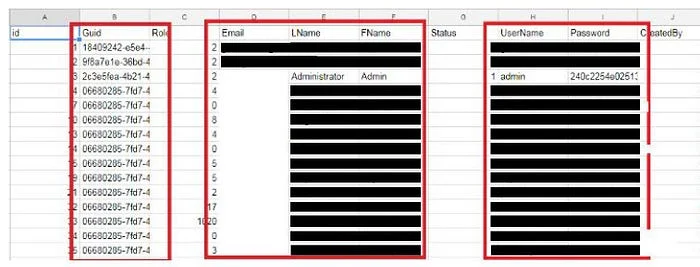
The screenshot shows the dumped database data. The author closes by describing the whole chain as an unusual case of SQL injection reached by bypassing host header handling through X-Forwarded-Host.
Root cause
The application appeared to use the X-Forwarded-Host value in a backend host check, since a time-based payload produced a delay. The 403 for www.evil.com against the 302 for www.google.com shows that validation existed, but the value was evidently passed into a database query rather than compared safely in application code. The report does not show the query itself, so the exact construction is not documented; the time-based delay is the evidence that the value reaches SQL.
The suspected character blacklist on < and > was an obstacle to automated exploitation, and it was worked around by rewriting the comparison operators. The direct Host header was not the vector; the proxy/load balancer path through X-Forwarded-Host was.
Impact
Under the conditions shown, an attacker who can set the X-Forwarded-Host header could inject SQL into the backend lookup and, using sqlmap with a tamper script, dump the enterprise database. The author reports that the dump contained sample-level user credentials, email-ids and further data. The report does not quantify the number of records or name the affected users.
Fix
The report states that the bug was marked fixed on 03-May-2018, the same day it was reported, and that the author re-tested and confirmed the fix that day.
Variants to test
- Send
X-Forwarded-Hostwith a value that is clearly not on any allow-list and compare the response with a known-good value. A different status (403 versus a redirect) shows the value is being checked somewhere. - Put a time-based payload in
X-Forwarded-Hostand measure response time against a baseline request. A consistent delay proportional to the sleep value indicates SQL injection. - Repeat with
X-Forwarded-For,X-Forwarded-ProtoandForwarded, since proxies and load balancers often trust several of these headers. - If a WAF blocks
<and>, retry withNOT BETWEENstyle rewrites, asbetween.pydoes, and watch for the same delay. - Try a harmless script tag in the header value. A 400 Bad Request confirms a character blacklist and tells you which tamper scripts are worth trying.
Timeline
| Date | Event |
|---|---|
| 03-May-2018 | Bug reported to the company |
| 03-May-2018 | Bug marked fixed |
| 03-May-2018 | Re-tested and fix confirmed |
| 05-May-2018 | Rewarded by the company |
What happened, in plain words
A security researcher was testing a website belonging to what he calls India's popular sports company. He was checking the application for a bruteforce OTP vulnerability. While doing that, his IP address got blocked, and the error message told him the site was hosted on Amazon Web Services (AWS). That clue led him down a different path: he found that the site trusted a special HTTP header called X-Forwarded-Host, and that a time-based payload in that header produced a delay, indicating SQL injection. By sending carefully crafted values, he could make the database wait (a sign of SQL injection), and eventually he used a tool called sqlmap to dump the entire database, including user credentials and email addresses. The report describes the whole chain: from spotting the AWS hosting, to confirming the header was trusted, to proving SQL injection with a time delay, to bypassing a character filter, and finally to extracting data. The bug was reported and fixed on 3 May 2018, and the researcher was rewarded on 5 May 2018.
Background: what you need to know
Before diving into the steps, let's explain a few basic ideas that come up in this story.
- HTTP headers: When your browser talks to a website, it sends a request. Along with the request, it can include extra pieces of information called headers. Think of them as labels on a package: they tell the server things like what browser you're using, what language you prefer, or, in this case, which hostname you're trying to reach. The server also sends back headers in its response.
- Host header: Every HTTP request includes a
Hostheader that says which website the browser wants. For example,Host: www.example.com. Servers use this to decide which site to serve if they host many sites on the same IP address. - Proxy and load balancer: Large websites often sit behind a proxy or load balancer. A load balancer distributes incoming traffic across multiple servers so no single server gets overwhelmed. When a request passes through a proxy, the original
Hostheader might be preserved, but proxies sometimes add extra headers to record the original host or client IP. One such header isX-Forwarded-Host. - X-Forwarded-Host: This is a non-standard header that some proxies add to tell the backend server what the original host was. If the backend trusts this header, it might use its value for various purposes, like generating links or validating redirects.
- SQL injection: SQL is the language used to talk to databases. When a website takes user input (like a search term or a header value) and puts it directly into a database query without cleaning it, an attacker can inject their own SQL commands. This can lead to reading, modifying, or deleting data. A common test is to make the database wait (using a
sleep()function) and see if the response is delayed, which proves the injection works. - Time-based SQL injection: A technique where the attacker measures how long the server takes to respond. If the attacker injects a command that tells the database to pause for, say, 10 seconds, and the response indeed takes about that long, it confirms the injection point.
- Burp Suite and Burp Intruder: Burp Suite is a toolkit for testing web security. Burp Intruder is a part of it that lets you send many automated requests, for example to try many passwords or OTP codes quickly.
- sqlmap: A popular open-source tool that automates the process of detecting and exploiting SQL injection vulnerabilities. It can also dump database contents.
- Tamper script: sqlmap has scripts that modify the payloads it sends to bypass filters. For example, if a filter blocks the
<and>characters, a tamper script can replace them with something equivalent that the filter doesn't catch. - Blacklisting: A security measure that blocks specific characters or patterns. It's often incomplete because attackers can find alternative ways to express the same thing.
- HTTP status codes: Numbers that indicate the result of a request. 200 means OK, 302 means redirect, 403 means forbidden, 400 means bad request.
The setup
The researcher was using Burp Suite, specifically Burp Intruder, to send many requests to the OTP verification endpoint. He doesn't mention any user accounts or credentials; the focus is on the OTP flow. The only precondition that matters is that the application is hosted on AWS, which he discovered during this initial probing.
Finding the trail
While running Burp Intruder against the site, his IP address got blocked. From the error message that came back he could figure out that the application was hosted on AWS. A second clue confirmed it: the HTTP responses contained an X-Amz-Cf-Id header. This header is added by CloudFront, Amazon's content delivery network (CDN), to every request it forwards to the origin server. CloudFront is a service that caches content and speeds up delivery; it sits between the user and the actual server.
The screenshot shows that CloudFront header in a response. With the AWS hosting established, the researcher moved on to low-hanging fruit, starting with a host header attack. He first tried changing the Host header value directly, but that didn't work. Because the application runs on AWS, he reasoned it must sit behind an Elastic Load Balancer (ELB), and tried the same idea through the X-Forwarded-Host header instead.
Exploitation
Step 1: Confirm the header is trusted
The researcher added an X-Forwarded-Host header to the request.
Setting the header to www.google.com produced a 302 redirect to google.com. Setting it to www.evil.com produced a different result: an HTTP 403 Forbidden.
That asymmetry is the interesting part. The backend clearly validates the host value against something: google.com was allowed, evil.com was denied. The researcher considered two possibilities: a script checking the value against an array or list of allowed hosts, or a database lookup of stored host values.
Step 2: Test for SQL injection in the header value
To distinguish the two possibilities, the researcher sent SQL syntax in the X-Forwarded-Host value. A time-based payload with a sleep() of 10 seconds was used, and the HTTP response took 9.4 seconds to arrive.
The screenshot shows the time-based injection in the header. That delay confirmed an unusual case of SQL injection in X-Forwarded-Host.
Step 3: Try sqlmap and hit a wall
With the injection confirmed, the next task was extracting database content. Running sqlmap against the vulnerable parameter resulted in the connection being refused. The researcher added a time delay to throttle HTTP requests and increased the connection timeout:
--delay=DELAY --timeout=TIMEOUT
This command-line option tells sqlmap to wait a bit between requests (--delay) and to wait longer for a response (--timeout). The idea is to avoid overwhelming the server or triggering rate limits. After waiting, the same connection refusal persisted. The researcher suspected character blacklisting. To check quickly, the following value was placed in the X-Forwarded-Host header:
<script>alert(1)</script>
That request returned HTTP status 400, Bad Request. The conclusion was that script tags and the < and > characters were blacklisted.
Step 4: Bypass the filter with a tamper script
sqlmap ships a tamper script called between.py, which replaces the < and > symbols with NOT BETWEEN. The researcher included it in the sqlmap run. After some time, the run returned the complete database of the enterprise, containing sample-level user credentials, email-ids and more data, presented as proof of concept.
The screenshot shows the dumped database data. The researcher closes by describing the whole chain as an unusual case of SQL injection reached by bypassing host header handling through X-Forwarded-Host.
Root cause
The application appeared to use the X-Forwarded-Host value in a backend host check, since a time-based payload produced a delay. The 403 for www.evil.com against the 302 for www.google.com shows that validation existed, but the value was evidently passed into a database query rather than compared safely in application code. The report does not show the query itself, so the exact construction is not documented; the time-based delay is the evidence that the value reaches SQL.
The suspected character blacklist on < and > was an obstacle to automated exploitation, and it was worked around by rewriting the comparison operators. The direct Host header was not the vector; the proxy/load balancer path through X-Forwarded-Host was.
Impact
Under the conditions shown, an attacker who can set the X-Forwarded-Host header could inject SQL into the backend lookup and, using sqlmap with a tamper script, dump the enterprise database. The researcher reports that the dump contained sample-level user credentials, email-ids and further data. The report does not quantify the number of records or name the affected users.
Fix
The report states that the bug was marked fixed on 03-May-2018, the same day it was reported, and that the researcher re-tested and confirmed the fix that day. It does not describe what the fix changed.
Variants to test
- Send
X-Forwarded-Hostwith a value that is clearly not on any allow-list and compare the response with a known-good value. A different status (403 versus a redirect) shows the value is being checked somewhere. - Put a time-based payload in
X-Forwarded-Hostand measure response time against a baseline request. A consistent delay proportional to the sleep value indicates SQL injection. - Repeat with
X-Forwarded-For,X-Forwarded-ProtoandForwarded, since proxies and load balancers often trust several of these headers. - If a WAF blocks
<and>, retry withNOT BETWEENstyle rewrites, asbetween.pydoes, and watch for the same delay. - Try a harmless script tag in the header value. A 400 Bad Request confirms a character blacklist and tells you which tamper scripts are worth trying.
Timeline
| Date | Event |
|---|---|
| 03-May-2018 | Bug reported to the company |
| 03-May-2018 | Bug marked fixed |
| 03-May-2018 | Re-tested and fix confirmed |
| 05-May-2018 | Rewarded by the company |
Glossary
- HTTP header: Extra information sent with an HTTP request or response, like a label on a package.
- Host header: The part of an HTTP request that tells the server which website the client wants.
- Proxy: A server that sits between a client and another server, forwarding requests.
- Load balancer: A device or software that distributes incoming traffic across multiple servers.
- X-Forwarded-Host: A non-standard HTTP header used by proxies to pass the original host requested by the client.
- SQL injection: A vulnerability where user input is inserted into a database query without proper sanitisation, allowing an attacker to execute arbitrary SQL commands.
- Time-based SQL injection: A technique to confirm SQL injection by measuring delays caused by injected sleep commands.
- Burp Suite: A toolkit for web security testing.
- Burp Intruder: A tool within Burp Suite for automating customised attacks, such as brute-forcing.
- sqlmap: An open-source tool that automates the detection and exploitation of SQL injection flaws.
- Tamper script: A script used with sqlmap to modify payloads to bypass filters.
- HTTP status code: A three-digit number indicating the outcome of an HTTP request (e.g. 200 OK, 302 Found, 403 Forbidden, 400 Bad Request).
- AWS: Amazon Web Services, a cloud computing platform.
- CloudFront: Amazon's content delivery network (CDN) service.
- ELB: Elastic Load Balancer, Amazon's load balancing service.
- OTP: One-time password, a code valid for a single login attempt.
- Brute-force: An attack that tries many combinations to guess a value, like a password or OTP.
- WAF: Web Application Firewall, a security layer that filters and monitors HTTP traffic.



