Business Logic Vulnerability via IDOR
The checkout request used a product ID parameter that could be swapped for another product's ID while keeping the original low price. An attacker could add a cheap item, replace its ID with an expensive item's ID, and pay the cheap price.
 Published on sagarsajeev.medium.com
In this writeup I would like to share how I was able to buy any product off an E-commerce website for $10. This was possible because of vulnerable parameter which made IDOR possible.
The full write-up lives on its author's site
It belongs to its author, so we link to it rather than copy it. The other two tabs are our own rewrites, checked against it.
Context
This write-up describes a business logic flaw on a start-up e-commerce website. The feature involved is the cart checkout flow: a shopper adds a product to the cart, the client sends a POST request containing the product identifier and the amount, and the server processes the purchase. The researcher's goal was to buy any product on the site for $10 by tampering with the request body.

The author is Sagar Sajeev. The report does not name the target domain.
Setup
No special accounts, roles, tools or versions are described. The only precondition is a normal shopping session: the ability to add products to a cart and to submit the checkout request, and the ability to intercept and modify that request before it reaches the server. The researcher had earlier reported a stored XSS on the same target, which the team said had already been identified in a recent pentest and was in line for a fix, so he moved on to the cart checkout option.
Finding it
The starting hypothesis was parameter tampering in the checkout request. Testing the cart checkout did not produce any tampering bug in the amount. What stood out instead was a <PID> parameter in the request body, which is the Product ID.

Several attempts to manipulate the amount parameter failed because server-side validation rejected them. The amount parameter was not vulnerable. The PID, however, was a separate value in the same body, and the researcher turned his attention to it.
Exploitation
Step 1: add a cheap product to the cart
Add a low-priced Product A to the cart. In the actual proof of concept the product cost around $10.
Step 2: obtain the PID of an expensive product
The researcher chose a Product B costing $400 and needed its PID. There are two ways to get it, both described in the report:
- Add Product B to the cart and read the PID from the resulting request.
- Use the "share this product" option, which leaks the PID, and copy it from there.
Step 3: swap the PID in the POST request
Replace the PID of Product A with the PID of Product B in the POST request body. The amount parameter is left untouched at $10.
Step 4: forward the request
Send the modified request. The total price is listed as $10.
Step 5: complete the purchase
Make the purchase for $10. The order is for the $400 product at the $10 price.
Root cause
The amount was validated on its own, so tampering with it directly failed, but swapping the PID while keeping the amount produced an order whose price did not match the product. The amount was validated on its own, so tampering with it directly failed, but nothing tied the amount to the product it was supposed to pay for. Swapping the PID while keeping the original amount therefore produced an order whose price did not match the product. The report does not show the server-side code, so the exact validation logic is not stated; the behaviour is consistent with the price being taken from the request rather than looked up from the product record identified by the PID.
Impact
In the demonstrated case a $400 product was purchased for $10 by first adding a product costing around $10 to the cart. In the demonstrated case a $400 product was purchased for $10. The technique requires only a normal shopping session and the ability to modify the checkout request.
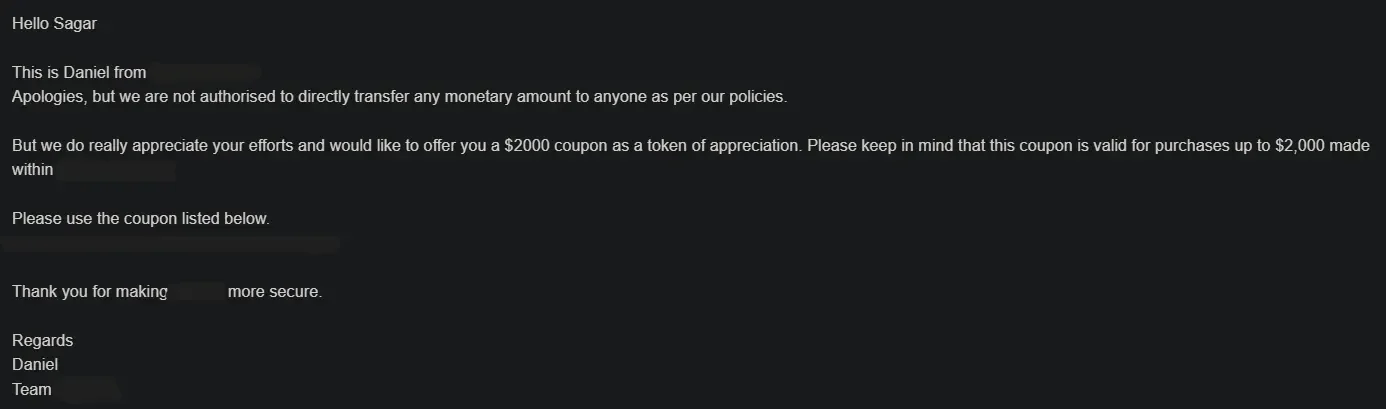
The bounty was a $2000 coupon redeemable only for purchases made within that website, and valid for US shipment only, with no international shipments.
Timeline as given in the report:
| Event | Date |
|---|---|
| Submitted | 29-07-2022 |
| Accepted | 06-08-2022 |
| Resolved | 10-08-2022 |
Fix
The change needed is for the server to derive the price from the product record identified by the PID, rather than accepting an amount supplied by the client, and to reject any request where the submitted amount does not match the server-side price for that PID.
Variants to test
- Swap the product identifier in any checkout or order-creation request while leaving the price field unchanged. A positive result is an order confirmation showing the new product at the old price.
- Change the quantity while keeping the unit price fixed, or change the unit price while keeping the quantity fixed, and check whether the server recomputes the total. A positive result is a total that does not match the server-side calculation.
- Look for product identifiers leaked by share links, wishlists, comparison pages or cart responses, then reuse them in a checkout request for a different product. A positive result is a valid PID obtained without adding the product to the cart.
- Apply a coupon or discount intended for one product to a different, more expensive product by changing the PID after the discount is applied. A positive result is the discount being honoured on the wrong product.
- Replay a checkout request with a PID from a different product category or price tier and observe whether the server validates the pairing. A positive result is an accepted order with a mismatched product and price.
What happened, in plain words
An online shop lets you put things in a shopping basket (a cart) and then pay for them. When you press the button to pay, your browser sends a message to the shop's computer (the server) saying, in effect, "I want product number X and I am paying amount Y". The server is supposed to check that Y is really the price of X.
On this particular shop, tampering with the amount directly failed because of server-side validation, but changing the product ID while keeping the amount worked. So the researcher put a cheap product (about $10) in the cart, then edited the message so it named a much more expensive product ($400) while still saying the price was $10. The shop accepted the order and sold the $400 product for $10.
This kind of mistake is called a business logic vulnerability: the software does exactly what it was programmed to do, but the rules of the business (you pay the price of the thing you buy) are not enforced. The specific trick used here is an IDOR, short for Insecure Direct Object Reference, which means the server accepts an identifier sent by the user (here, a product ID) and acts on it without checking that the user is allowed to use it in that way.
The author is Sagar Sajeev. The report does not name the shop's domain; it only calls it a start-up e-commerce website.
The ideas you need before the steps
A few terms come up again and again, so here they are from zero.
- Server and client. The server is the computer that runs the shop. The client is your browser. They talk by sending messages back and forth.
- HTTP request. A message your browser sends to the server. It has a method (GET to fetch something, POST to send data such as a form or an order), a URL, sometimes headers (extra information such as cookies), and sometimes a body (the data itself).
- Request body. The part of a POST request that carries the actual data, for example the product you want and the price. It is often formatted as a list of name/value pairs, like
PID=123&amount=10. - Parameter. One named value inside a request, such as
amountorPID. Think of it as one field on a paper order form. - Product ID (PID). A number or code that uniquely identifies one product in the shop's catalogue, the way a barcode identifies an item in a supermarket. The shop uses it to look up which product you mean.
- Intercepting a request. Catching the message between your browser and the server so you can read and change it before it is sent. People do this with a proxy tool, a program that sits in the middle. The report does not name any tool, but that is the idea.
- Parameter tampering. Editing a value in a request (for example the price) to something the shop did not intend.
- Server-side validation. Checks the server performs on the data it receives. If the server validates something properly, changing it in the request does not help, because the server rejects or corrects the bad value.
- Stored XSS. Cross-site scripting where an attacker's script is saved on the server (for example in a comment) and later runs in other visitors' browsers. It is mentioned here only as background: the researcher had reported one earlier.
- Pentest. A penetration test, an authorised security assessment a company pays for.
- PoC. Proof of concept: the concrete demonstration that a bug is real.
Setup
The report describes no special accounts, roles, tools or versions. The only thing needed is an ordinary shopping session: you can add products to a cart and submit the checkout request, and you can intercept and modify that request before it reaches the server.
Before this, the researcher had reported a stored XSS on the same site. The team replied that they had already found it in a recent pentest and it was already queued for a fix. Since that door was closed, he moved on to the cart checkout option.
Finding it
The starting idea was parameter tampering in the checkout request: change the price field and see whether the shop believes you. Testing the cart checkout did not produce any tampering bug in the amount.
What stood out instead was a <PID> parameter in the request body, which is the Product ID.
Several attempts to manipulate the amount parameter failed because server-side validation rejected them. In plain words: the server-side validation stopped the changed amount from being accepted. The amount parameter was not vulnerable.
The PID, however, was a separate value in the same body. The price was checked, but the product identifier sitting next to it was a different question, and the researcher turned his attention to it.
Exploitation
Step 1: add a cheap product to the cart
Add a low-priced Product A to the cart. In the actual proof of concept the product cost around $10.
Why: the cart now contains a legitimate, cheap order, and the checkout request that follows will carry that cheap product's ID and that cheap price. This is the baseline you will edit.
Step 2: obtain the PID of an expensive product
The researcher chose a Product B costing $400 and needed its PID. There are two ways to get it, both described in the report:
- Add Product B to the cart and read the PID from the resulting request. The shop itself tells you the ID when you ask for the product.
- Use the "share this product" option, which leaks the PID, and copy it from there. A share link has to identify the product somehow, and here it did so with the PID, visible to anyone.
Why: to swap the product in the request, you first need to know the identifier of the product you actually want.
Step 3: swap the PID in the POST request
Replace the PID of Product A with the PID of Product B in the POST request body. The amount parameter is left untouched at $10.
Why: this is the whole trick. The request now says "product B" and "$10". If the server checked that the two belonged together, it would refuse. The researcher is testing whether it does.
Step 4: forward the request
Send the modified request. The total price is listed as $10.
Why: this confirms the shop accepted the mismatched pair and calculated the order from the price you supplied, not from the product's real price.
Step 5: complete the purchase
Make the purchase for $10. The order is for the $400 product at the $10 price.
Why: the order confirmation is the proof. A bug is only demonstrated when the shop actually commits to the wrong outcome, not when a page merely displays an odd number.
Why it worked
The amount was validated on its own, so tampering with it directly failed, but swapping the PID while keeping the original amount produced an order whose price did not match the product. The amount was validated on its own, so tampering with it directly failed, but nothing tied the amount to the product it was supposed to pay for. Swapping the PID while keeping the original amount therefore produced an order whose price did not match the product.
An everyday comparison: imagine a waiter who checks that the number you wrote in the price box is a sensible number, but never checks that it is the price of the dish you ordered. You order the cheapest starter, write its price, then cross out the dish name and write the most expensive main course. The waiter sees a valid number and serves the main course.
The behaviour is consistent with the price being taken from the request rather than looked up from the product record identified by the PID.
Impact
In the demonstrated case a $400 product was purchased for $10 by first adding a product costing around $10 to the cart. In the demonstrated case a $400 product was purchased for $10. The technique requires only a normal shopping session and the ability to modify the checkout request.
The bounty was a $2000 coupon redeemable only for purchases made within that website, and valid for US shipment only, with no international shipments.
Timeline as given in the report:
| Event | Date |
|---|---|
| Submitted | 29-07-2022 |
| Accepted | 06-08-2022 |
| Resolved | 10-08-2022 |
Fix
The change needed is for the server to derive the price from the product record identified by the PID, rather than accepting an amount supplied by the client, and to reject any request where the submitted amount does not match the server-side price for that PID. In the waiter comparison: the kitchen looks up the price of the dish itself and ignores whatever number the customer wrote down.
Variants to test
These are the same idea applied in other places, useful when you are learning to look for this class of bug.
- Swap the product identifier in any checkout or order-creation request while leaving the price field unchanged. A positive result is an order confirmation showing the new product at the old price.
- Change the quantity while keeping the unit price fixed, or change the unit price while keeping the quantity fixed, and check whether the server recomputes the total. A positive result is a total that does not match the server-side calculation.
- Look for product identifiers leaked by share links, wishlists, comparison pages or cart responses, then reuse them in a checkout request for a different product. A positive result is a valid PID obtained without adding the product to the cart.
- Apply a coupon or discount intended for one product to a different, more expensive product by changing the PID after the discount is applied. A positive result is the discount being honoured on the wrong product.
- Replay a checkout request with a PID from a different product category or price tier and observe whether the server validates the pairing. A positive result is an accepted order with a mismatched product and price.
Glossary
- API: the set of messages a program accepts from other programs; here, the requests the shop's server understands from the browser.
- Business logic vulnerability: a flaw where the software works as coded but the rules of the business are not enforced, such as paying the wrong price.
- Cart / checkout: the basket of products you intend to buy, and the step where you confirm and pay for them.
- Client: the program on your side, normally your browser.
- Cookie: a small piece of data the server asks the browser to store and send back with later requests, often used to remember who you are.
- Header: extra information attached to an HTTP request or response, separate from the body.
- HTTP request: a message from browser to server asking for something or sending data.
- IDOR (Insecure Direct Object Reference): when the server accepts an identifier supplied by the user and acts on it without checking that the user is allowed to use it that way.
- Intercepting a request: catching a request in transit so you can read or change it before it reaches the server, usually with a proxy tool.
- Parameter tampering: changing a value in a request to something the server did not intend.
- Pentest: an authorised security assessment of a system, often paid for by the owner.
- PID (Product ID): the identifier the shop uses to refer to one specific product.
- PoC (proof of concept): a concrete demonstration that a bug can really be exploited.
- POST request: an HTTP request that carries data in its body, used for actions such as submitting an order.
- Proxy: a tool that sits between browser and server and lets you view and edit the traffic.
- Request body: the data part of a POST request.
- Server: the computer that runs the shop and answers requests.
- Server-side validation: checks the server performs on incoming data, rejecting values it does not accept.
- Stored XSS: cross-site scripting where an attacker's script is saved on the server and later runs in other users' browsers.
- Token: a value, often a long random string, that proves who you are or authorises an action; it must be kept secret.



