Bypassing a “Safe” Input Field: Reflected XSS via Unescaped HTML Attribute Injection
A redirect-target parameter was reflected inside an HTML attribute value without proper encoding, and the application only filtered angle brackets. An attacker could inject a double quote to break out of the attribute and add an event-handler attribute with autofocus, executing arbitrary JavaScript without a script tag.

Cybersecurity
The full write-up lives on its author's site
It belongs to its author, so we link to it rather than copy it. The other two tabs are our own rewrites, checked against it.
Context
Many web applications carry a "return to" or "next page" value through the request chain: after a login, a form submission, or a multi-step wizard, the application remembers where to send the user back to. That value is often echoed straight into the page, frequently inside an HTML attribute such as a hidden form field or a redirect link.
The pattern discussed here is a page at https://vulnerable-app.com/account/redirect that accepts a return_path parameter and reflects it into a hidden form field. The target details have been generalised in line with the relevant program's disclosure policy, so the hostname and parameter names are illustrative rather than the real ones.
The assumption behind treating such a parameter as safe is usually that user input is not rendered as HTML, so injecting a script tag will not execute. That assumption breaks down as soon as the input lands inside an attribute value rather than in the page body, which is a different injection context with different rules.
Setup
No accounts, roles, tool versions or other preconditions are described in the write-up. The testing was carried out during authorised security testing, and the only tooling mentioned is an intercepting proxy, which in testing also automatically URL-encoded the double quote in the GET query string.
Finding it
The vulnerable pattern is a hidden input whose value attribute is populated directly from the request parameter, roughly like this:
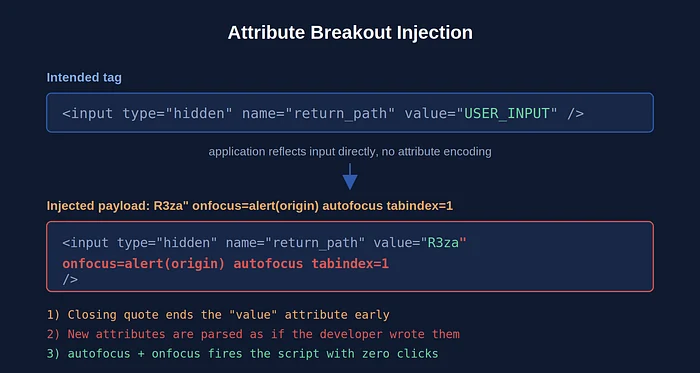
<input type="hidden" name="return_path" value="USER_INPUT_HERE" />
If USER_INPUT_HERE is inserted without HTML-attribute encoding, the only character that matters is the double quote (") that opened the value attribute. Closing it early lets an attacker introduce arbitrary new attributes on the same tag.
A naive first attempt might try:
return_path="><script>alert(document.cookie)</script>
This often gets blocked, because many WAFs and filters specifically look for <script>, <img, <svg and similar tag-opening patterns. Script tags are not the only way to execute JavaScript in HTML, however: event handler attributes are just as effective and far less commonly filtered.
Exploitation
Step 1: build an attribute-injection payload
The working payload was:
return_path=R3za" onfocus=alert(origin) autofocus tabindex=1
Breaking it down:
R3za"closes the originalvalue="..."attribute early.onfocus=alert(origin)adds a new event-handler attribute; whatever JavaScript is assigned here runs when the element receives focus.autofocustells the browser to focus this element automatically the instant the page loads, with no user interaction required.tabindex=1ensures the element is focusable at all; some input types and elements need an explicit tabindex to receive programmatic focus.
The result renders as:
<input type="hidden" name="return_path" value="R3za" onfocus=alert(origin) autofocus tabindex=1 />
There is no <script> tag, no < and no >, just a self-closing attribute injection that the browser parses as three brand-new attributes on the existing tag. The moment the page loads, autofocus triggers onfocus and the JavaScript executes.
Step 2: try GET, and watch it fail
The first natural test is a simple GET request, since that is what a clickable link would use:
https://vulnerable-app.com/account/redirect?return_path=R3za" onfocus=alert(origin) autofocus tabindex=1
This did not work. The browser, and in testing the intercepting proxy, automatically URL-encodes the double quote in a GET query string, turning " into %27. By the time the value reached the server and was reflected back, the payload arrived as a harmless, still-quoted string: no attribute breakout, no execution. The reflection point was intact; the delivery mechanism was neutering the payload before it ever got there.
Step 3: switch to POST
Switching the request to POST changed that. Submitting the same parameter as an HTML form field, as an application/x-www-form-urlencoded body via an actual <form> submission, delivered the raw " character to the endpoint without the same encoding interference, and the attribute breakout worked exactly as expected.
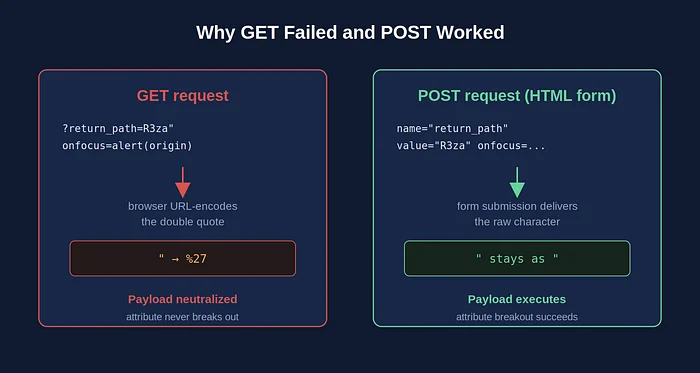
The lesson drawn from this is that a payload which fails on one HTTP method is not necessarily blocked by a filter. It might just be getting mangled in transit, and it is worth re-testing the same injection point across GET, POST and even different content types before ruling it out.
Step 4: deliver it with a self-submitting form
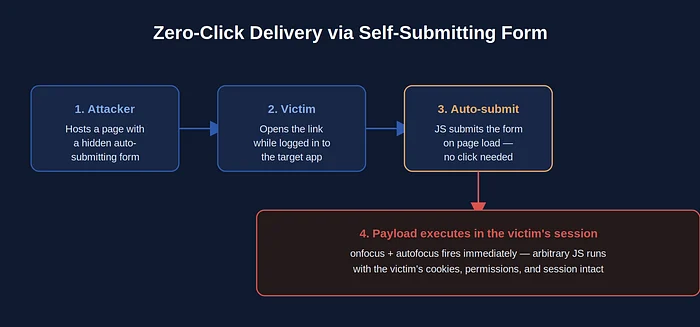
Since the working delivery method required POST, a clickable link alone was not enough for a proof of concept. The standard way around this is a self-submitting HTML form, the same primitive used for CSRF PoCs:
<html> <body> <form action="https://vulnerable-app.com/account/redirect" method="POST"> <input type="hidden" name="return_path" value="R3za" onfocus=alert(origin) autofocus tabindex=1" /> <input type="submit" value="Submit request" /> </form> <script> history.pushState('', '', '/'); document.forms[0].submit(); </script> </body></html>
Host this on any attacker-controlled page, get a victim to open it, and the form auto-submits on load with no click required. history.pushState is a cosmetic touch that cleans up the browser's address bar so the redirect looks less suspicious.
Root cause
The root cause is a single missing step: HTML-attribute encoding on output. The application filtered obvious tag characters, but filtering < and > is not the same as encoding output. A filter that strips or blocks angle brackets stops tag injection but does nothing to stop attribute injection; the double quote is the character that actually matters in this context, and it is frequently overlooked.
Two further properties of the payload explain why the existing defences did not stop it:
- Event handlers are a full substitute for
<script>.onfocus,onerror,onmouseoverand friends all execute arbitrary JavaScript, so any XSS filter that only pattern-matches for script tags orjavascript:URIs will miss this entire class of payload. autofocusremoves the need for user interaction. Combined with an event handler, it turns what looks like a passive hidden field into a zero-click execution trigger the instant the page renders.
Impact
Reflected XSS in this pattern allows an attacker to execute arbitrary JavaScript in the context of the victim's authenticated session on the vulnerable origin. Depending on what the application exposes to client-side JavaScript, that can mean:
- Session token or cookie theft, where cookies are not
HttpOnly - Performing actions as the victim, such as account changes or data submission, via the DOM
- Credential harvesting through injected fake login prompts
- Pivoting into further attacks that appear to originate from a legitimate, authenticated user
Because the request typically needs to be delivered via a self-submitting form (POST) or a crafted link (GET), real-world exploitation usually requires some social engineering to get a victim to open the malicious page, but zero additional interaction is needed once they do. The write-up rates the issue P3 / Medium, per standard VRT classification for reflected XSS.
Fix
The write-up presents the following remediation, rather than describing a change that was made:
- Encode
",<,>,&and'before reflecting any user-controlled value into an HTML attribute ("to"at minimum; ideally use a context-aware auto-escaping template engine rather than manual encoding). - Prefer allow-listing expected values for parameters like "next page", for example validating against a known set of internal paths, rather than reflecting arbitrary user input at all.
- Add a strict Content-Security-Policy that disallows inline event handlers (
script-srcwithout'unsafe-inline') as defence in depth; this alone would have neutralised this exact payload even if the encoding bug still existed.
Variants to test
- Other event handlers. Replace
onfocuswithonerror,onmouseoveror similar on the same injected attribute. A positive result is the handler firing and executing JavaScript without a<script>tag in the payload. - Other attribute contexts. Look for reflected values inside
href,src,actionor data attributes, not just hidden inputs. A positive result is breaking out of the attribute with a double quote and adding a new attribute or ajavascript:URI that executes. - Other HTTP methods and content types. Re-send the same injection point as GET, POST and with different content types. A positive result is a payload that fails on one method but reflects unencoded on another, as happened here with GET versus POST.
- Focus without
autofocus. Whereautofocusis stripped, try elements or attributes that receive focus or fire events on load by other means. A positive result is execution without any user interaction. - Encoding bypasses on the quote. If the double quote is filtered, try HTML entities or alternative quoting contexts. A positive result is the browser still parsing the injected attribute after decoding.
What happened, in plain words
A website had a page that takes a value from the visitor and puts it back into the page. The value was meant to be a "where to go next" address, something like a return ticket. The site's developers had a filter that blocked the obvious dangerous characters used to write scripts, so they believed the field was safe. It was not. By closing a quote early, the researcher added a new instruction to the page that runs JavaScript the moment the page opens, without any script tag and without the visitor clicking anything. The trick only worked when the value was sent one way (POST) rather than another (GET), because the first way quietly changed the quote character before it reached the server. This is a beginner's walkthrough of that whole story, from what the page does to why the fix is a single missing encoding step.
Background: what the feature does
Many websites need to remember where you came from. You click "log in", you sign in, and the site sends you back to the page you were reading. You fill in a form, submit it, and the site shows you a confirmation page. You move through a checkout wizard, step one, step two, step three, and the site keeps track of the next step. To do this, the site carries a value along with each request, something like a sticky note that says "send this person back to /account/settings when done".
That sticky note is often called a return_path, a next, a redirect, or similar. The site reads it from the request and writes it into the page it sends back, usually inside a hidden form field or a link. A hidden form field is an input the visitor cannot see, but the browser still sends it when the form is submitted. It is a way of carrying data from one page to the next without showing it.
The developers' reasoning usually goes like this: the value is not shown as page content, it is only stored in an attribute, so a script tag written into it will not run. That reasoning is wrong, and the rest of this article explains why.
The vulnerable pattern
The write-up describes a page at https://vulnerable-app.com/account/redirect that accepts a parameter called return_path and writes it into a hidden form field. The hostname and parameter names are illustrative, generalised for the disclosure policy, so they are not the real ones.
The page produces HTML roughly like this:
<input type="hidden" name="return_path" value="USER_INPUT_HERE" />
Line by line:
<input ... />is an HTML tag that creates a form field. The/before>is a self-closing marker, meaning the tag ends there and has no separate closing tag.type="hidden"says the field is not displayed to the visitor. It still exists in the page and is still submitted with the form.name="return_path"is the label the field will be sent under. When the form is submitted, the server receives a pair likereturn_path=....value="USER_INPUT_HERE"is the field's content. Here is where the site inserts whatever the visitor sent. The double quotes around it mark where the value starts and ends.
If the site inserts the visitor's text without encoding it, the only character that matters is the double quote (") that opened the value attribute. Closing it early lets an attacker introduce arbitrary new attributes on the same tag. Think of it like a form where a box is labelled "name" and the label is printed on the paper. If you can write a closing quotation mark into the box, you can end the label early and write your own extra labels next to it, and the person reading the form will treat them as real instructions.
First attempt: the obvious script tag
A naive first attempt might try:
return_path="><script>alert(document.cookie)</script>
Line by line:
return_path=is the parameter name the site expects.">is a double quote followed by a greater-than sign. The quote is meant to close thevalueattribute early, and the>is meant to close the whole<input>tag.<script>alert(document.cookie)</script>is a script tag containing JavaScript.alert(...)opens a pop-up box showing whatever is inside the brackets.document.cookieis the browser's way of reading the cookies for the current page, which is why this payload is a classic test: if the pop-up shows cookies, the attacker has proven they can read them.
This often gets blocked, because many WAFs and filters specifically look for <script>, <img, <svg and similar tag-opening patterns. A WAF, or web application firewall, is a piece of software that sits in front of a website and inspects incoming requests, blocking ones that look like known attacks. A filter is similar logic built into the application itself. Both tend to work by matching patterns, and the most famous pattern in XSS is the script tag.
Script tags are not the only way to execute JavaScript in HTML, however. Event handler attributes are just as effective and far less commonly filtered. An event handler is an attribute that tells the browser "when this thing happens to this element, run this code". Examples include onclick (when the element is clicked), onmouseover (when the mouse moves over it), and onfocus (when the element receives focus, meaning it becomes the active element that would receive typing).
Step 1: build an attribute-injection payload
The working payload was:
return_path=R3za" onfocus=alert(origin) autofocus tabindex=1
Breaking it down:
R3za"closes the originalvalue="..."attribute early.R3zais just filler text, a harmless prefix. The important character is the double quote at the end, which ends the attribute value.onfocus=alert(origin)adds a new event-handler attribute. Whatever JavaScript is assigned here runs when the element receives focus.alert(origin)opens a pop-up showing the page's origin, which is the scheme, host and port part of the address, for examplehttps://vulnerable-app.com. alert(origin) opens a pop-up showing the page's origin, the scheme, host and port part of the address.autofocustells the browser to focus this element automatically the instant the page loads, with no user interaction required. Normally a hidden field would never receive focus, because the visitor cannot see or click it.autofocusoverrides that.tabindex=1ensures the element is focusable at all. Some input types and elements need an explicit tabindex to receive programmatic focus.tabindexis an attribute that controls whether an element can be focused and in what order.
The result renders as:
<input type="hidden" name="return_path" value="R3za" onfocus=alert(origin) autofocus tabindex=1 />
Line by line:
<inputstarts the same tag as before.type="hidden"is unchanged, so the field is still invisible.name="return_path"is unchanged.value="R3za"is the original value attribute, now closed early after the filler text.onfocus=alert(origin)is a brand-new attribute the attacker added. The browser treats it as a real instruction: when this element gets focus, runalert(origin).autofocusis another new attribute. The browser treats it as a real instruction: focus this element as soon as the page loads.tabindex=1is a third new attribute, making the element focusable./>closes the tag.
There is no <script> tag, no < and no >, just a self-closing attribute injection that the browser parses as three brand-new attributes on the existing tag. The moment the page loads, autofocus triggers onfocus and the JavaScript executes.
Step 2: try GET, and watch it fail
The first natural test is a simple GET request, since that is what a clickable link would use:
https://vulnerable-app.com/account/redirect?return_path=R3za" onfocus=alert(origin) autofocus tabindex=1
Line by line:
https://vulnerable-app.com/account/redirectis the address of the page.?marks the start of the query string, the part of a URL that carries extra values.return_path=is the parameter name.R3za" onfocus=alert(origin) autofocus tabindex=1is the value, the same payload as before, pasted into the address bar.
GET is one of the HTTP methods, the verbs a browser uses to talk to a server. GET means "give me this page". It is what happens when you type an address or click a link. POST means "here is some data, process it", and it is what happens when you submit a form. The two methods carry data differently, and that difference matters here.
This did not work. The browser, and in testing the intercepting proxy, automatically URL-encodes the double quote in a GET query string, turning " into %27. URL encoding is a way of writing characters that are not allowed or are ambiguous in a URL. A space becomes %20, and a quote becomes a percent code. An intercepting proxy is a tool that sits between the browser and the server and lets the tester see and edit every request and response. In this test it also encoded the quote itself, alongside the browser.
By the time the value reached the server and was reflected back, the payload arrived as a harmless, still-quoted string: no attribute breakout, no execution. The reflection point was intact; the delivery mechanism was neutering the payload before it ever got there. In other words, the page was still vulnerable, but the way the payload travelled changed the quote into something the browser no longer treated as a quote.
Step 3: switch to POST
Switching the request to POST changed that. Submitting the same parameter as an HTML form field, as an application/x-www-form-urlencoded body via an actual <form> submission, delivered the raw " character to the endpoint without the same encoding interference, and the attribute breakout worked exactly as expected.
application/x-www-form-urlencoded is the default format a browser uses when it submits a plain HTML form. The data goes in the request body, not the URL, in a format like name=value&name2=value2. Because the body is not a URL, the browser does not apply the same URL encoding rules to it, so the quote arrives as a quote.
The lesson drawn from this is that a payload which fails on one HTTP method is not necessarily blocked by a filter. It might just be getting mangled in transit, and it is worth re-testing the same injection point across GET, POST and even different content types before ruling it out. Content type is the label on the request body that tells the server what format the data is in, for example form data or JSON.
Step 4: deliver it with a self-submitting form
Since the working delivery method required POST, a clickable link alone was not enough for a proof of concept. A proof of concept, or PoC, is a small demonstration that proves a vulnerability is real and exploitable. The standard way around this is a self-submitting HTML form, the same primitive used for CSRF PoCs. CSRF, or cross-site request forgery, is an attack where a page on one site makes the victim's browser send a request to another site, using the victim's existing login there. The self-submitting form is the classic tool for that, and it works here for the same reason.
<html> <body> <form action="https://vulnerable-app.com/account/redirect" method="POST"> <input type="hidden" name="return_path" value="R3za" onfocus=alert(origin) autofocus tabindex=1" /> <input type="submit" value="Submit request" /> </form> <script> history.pushState('', '', '/'); document.forms[0].submit(); </script> </body></html>
Line by line:
<html>and<body>are the outer structure of any web page.<form action="https://vulnerable-app.com/account/redirect" method="POST">starts a form.actionis the address the form will be sent to, the vulnerable page.method="POST"says to send it as a POST request, which is the method that worked.<input type="hidden" name="return_path" value="R3za" onfocus=alert(origin) autofocus tabindex=1" />is the hidden field carrying the payload. Notice"instead of a literal"."is an HTML entity, a code that the browser turns into a double quote when it reads the page. It is used here because a literal quote inside an HTML attribute would end the attribute early in the attacker's own page. The browser decodes"back to"before sending, so the server receives the raw quote.<input type="submit" value="Submit request" />is a visible submit button. It is a visible submit button; the script submits the form automatically.<script>starts a small script on the attacker's page. This is the attacker's own page, so the script is allowed to run there.history.pushState('', '', '/');changes the address bar to show/without reloading the page. It is a cosmetic touch that cleans up the browser's address bar so the redirect looks less suspicious.document.forms[0].submit();finds the first form on the page and submits it immediately.document.forms[0]means "the first form", and.submit()sends it.</script>,</form>,</body>,</html>close the tags.
Host this on any attacker-controlled page, get a victim to open it, and the form auto-submits on load with no click required. The victim's browser sends the POST to the vulnerable site, and the reflected payload's injected onfocus would run in the context of the vulnerable site.
Root cause
The root cause is a single missing step: HTML-attribute encoding on output. The application filtered obvious tag characters, but filtering < and > is not the same as encoding output. A filter that strips or blocks angle brackets stops tag injection but does nothing to stop attribute injection; the double quote is the character that actually matters in this context, and it is frequently overlooked.
Encoding means turning a character into a safe representation before writing it into the page. If the site had turned " into ", the browser would have shown a quote as text inside the value, not treated it as the end of the attribute. The payload would have stayed a harmless string.
Two further properties of the payload explain why the existing defences did not stop it:
- Event handlers are a full substitute for
<script>.onfocus,onerror,onmouseoverand friends all execute arbitrary JavaScript, so any XSS filter that only pattern-matches for script tags orjavascript:URIs will miss this entire class of payload. Ajavascript:URI is a link whose target is JavaScript code instead of a web address, another classic XSS route that filters often look for. autofocusremoves the need for user interaction. Combined with an event handler, it turns what looks like a passive hidden field into a zero-click execution trigger the instant the page renders.
Impact
Reflected XSS in this pattern allows an attacker to execute arbitrary JavaScript in the context of the victim's authenticated session on the vulnerable origin. Reflected XSS means the malicious value is sent in a request and immediately echoed back in the response, so the script runs in the victim's browser as if the vulnerable site had written it. Authenticated session means the victim is logged in, and the script runs with the victim's logged-in identity. Origin means the scheme, host and port, the site's identity as far as the browser is concerned.
Depending on what the application exposes to client-side JavaScript, that can mean:
- Session token or cookie theft, where cookies are not
HttpOnly. A cookie is a small piece of data the browser stores for a site, often used to remember that you are logged in. A session token is the value inside that cookie that identifies your session.HttpOnlyis a flag that tells the browser to hide the cookie from JavaScript, so a script cannot read it. - Performing actions as the victim, such as account changes or data submission, via the DOM. The DOM, or Document Object Model, is the browser's in-memory model of the page, which JavaScript can read and change. If the script can change the page, it can click buttons and submit forms as the victim.
- Credential harvesting through injected fake login prompts. The script can draw a fake login box on the real page, and the victim, trusting the site, types their password into it.
- Pivoting into further attacks that appear to originate from a legitimate, authenticated user. Pivoting means using one foothold to reach further.
Because the request typically needs to be delivered via a self-submitting form (POST) or a crafted link (GET), real-world exploitation usually requires some social engineering to get a victim to open the malicious page, but zero additional interaction is needed once they do. Social engineering means tricking a person into doing something, for example sending them a link and asking them to open it. The write-up rates the issue P3 / Medium, per standard VRT classification for reflected XSS. VRT is a common severity taxonomy used by bug bounty programmes, and P3 is its middle tier.
Fix
The write-up presents the following remediation, rather than describing a change that was made:
- Encode
",<,>,&and'before reflecting any user-controlled value into an HTML attribute ("to"at minimum; ideally use a context-aware auto-escaping template engine rather than manual encoding). A template engine is the part of the site that builds the page from data; context-aware means it knows whether the value is going into an attribute, a tag body or a script, and encodes accordingly. - Prefer allow-listing expected values for parameters like "next page", for example validating against a known set of internal paths, rather than reflecting arbitrary user input at all. Allow-listing means accepting only values on an approved list, the opposite of blocking known-bad patterns.
- Add a strict Content-Security-Policy that disallows inline event handlers (
script-srcwithout'unsafe-inline') as defence in depth; this alone would have neutralised this exact payload even if the encoding bug still existed. Content-Security-Policy is a header the site sends to tell the browser which sources of script are allowed. Defence in depth means layering protections so one failure does not mean total compromise.
Variants to test
- Other event handlers. Replace
onfocuswithonerror,onmouseoveror similar on the same injected attribute. A positive result is the handler firing and executing JavaScript without a<script>tag in the payload. - Other attribute contexts. Look for reflected values inside
href,src,actionor data attributes, not just hidden inputs. A positive result is breaking out of the attribute with a double quote and adding a new attribute or ajavascript:URI that executes. - Other HTTP methods and content types. Re-send the same injection point as GET, POST and with different content types. A positive result is a payload that fails on one method but reflects unencoded on another, as happened here with GET versus POST.
- Focus without
autofocus. Whereautofocusis stripped, try elements or attributes that receive focus or fire events on load by other means. A positive result is execution without any user interaction. - Encoding bypasses on the quote. If the double quote is filtered, try HTML entities or alternative quoting contexts. A positive result is the browser still parsing the injected attribute after decoding.
Closing thoughts
"We don't allow <script> tags" is a common but incomplete mental model for XSS prevention. Attribute-context injection is one of the most frequently underestimated XSS variants precisely because it doesn't look like a script injection at first glance: there's no <script>, no javascript: URI, nothing that trips up a naive blacklist. Testing every reflected parameter in every context it appears in (attribute, tag body, JS string, URL), not just assuming a filter that blocks tags is sufficient, is what catches bugs like this one before an attacker does.
Glossary
- API: a defined way for one piece of software to talk to another, like a menu of requests a service accepts.
- Attribute: a setting written inside an HTML tag, such as
value="..."oronfocus=.... - Attribute injection: breaking out of an existing attribute with a quote and adding new attributes to the same tag.
- autofocus: an HTML attribute that makes the browser focus an element automatically when the page loads.
- Bug bounty programme: a scheme where organisations pay researchers for reporting vulnerabilities responsibly.
- Content-Security-Policy: a response header that tells the browser which scripts and resources are allowed to run.
- Cookie: a small piece of data a site stores in the browser, often used to keep you logged in.
- CSRF: cross-site request forgery, an attack where another site makes your browser send a request to a site you are logged into.
- DOM: the browser's in-memory model of the page, which JavaScript can read and modify.
- Encoding: converting characters into a safe representation before writing them into a page or URL.
- Event handler: an attribute such as
onfocusoronclickthat runs JavaScript when something happens to an element. - GET: the HTTP method used to request a page, typically when you click a link or type an address.
- HTML entity: a code such as
"that the browser turns into a character such as a double quote. - HttpOnly: a cookie flag that hides the cookie from JavaScript.
- Intercepting proxy: a tool that sits between browser and server to view and edit requests and responses.
- javascript: URI: a link whose target is JavaScript code rather than a web address.
- Origin: the scheme, host and port of a page, the browser's notion of which site it is.
- Parameter: a named value sent with a request, such as
return_path. - POST: the HTTP method used to send data, typically when you submit a form.
- Proof of concept (PoC): a small demonstration that proves a vulnerability is real.
- Query string: the part of a URL after
?that carries parameters. - Reflected XSS: cross-site scripting where the malicious value is sent in a request and echoed straight back in the response.
- Session token: the value that identifies a logged-in session, usually stored in a cookie.
- Social engineering: tricking a person into doing something, such as opening a link.
- tabindex: an HTML attribute that controls whether an element can be focused and in what order.
- URL encoding: writing characters that are not allowed in a URL as percent codes, such as
%20for a space. - VRT: a common severity taxonomy used by bug bounty programmes.
- WAF: web application firewall, software that inspects incoming requests and blocks ones that look like attacks.
- XSS: cross-site scripting, a class of vulnerability where attacker-controlled JavaScript runs in another user's browser on a site's origin.




