Bypassing An Industry-Leading WAF and Exploiting SQLi
A SQL injection vulnerability was found in a parameter that the UI presented as a pre-defined drop-down value, and the attacker bypassed the site's WAF using alternative operators, non-standard whitespace, and comment obfuscation to achieve blind SQL injection. The attacker could infer database information through time-based delays.
 Published on blog.stratumsecurity.com
During a recent engagement, I was tasked with assessing the security of a customer's web application. After looking around the application and getting a feel for it I found a few issues.
The full write-up lives on its author's site
It belongs to its author, so we link to it rather than copy it. The other two tabs are our own rewrites, checked against it.
Context
During a customer engagement, Adeeb Shah was assessing the security of a web application. After an initial look around he found a few issues, then went back through his Burp logs and started playing with parameters. The application sat behind an industry-leading WAF, and the customer believed it had been turned off for the assessment. It had not, so the work turned into a manual WAF bypass exercise on top of a SQL injection finding.
The final payload is not published: the report was written while disclosure was still in progress. What follows is the methodology.
Setup
The tooling described is Burp, used to review request logs and replay parameters. No versions, accounts or roles are given. The precondition that matters is the one the researcher asks for on every engagement: the customer should disable the WAF during an application security assessment. Here the customer believed they had, but it did not happen, so every payload had to pass through the WAF.
Finding it
The first step was the old trick of adding ' to many parameters and endpoints and watching how the application responded. One response stood out. The parameter in question was not free text in the UI: it was called from a drop-down option, so the researcher expected the developers might not have protected it.
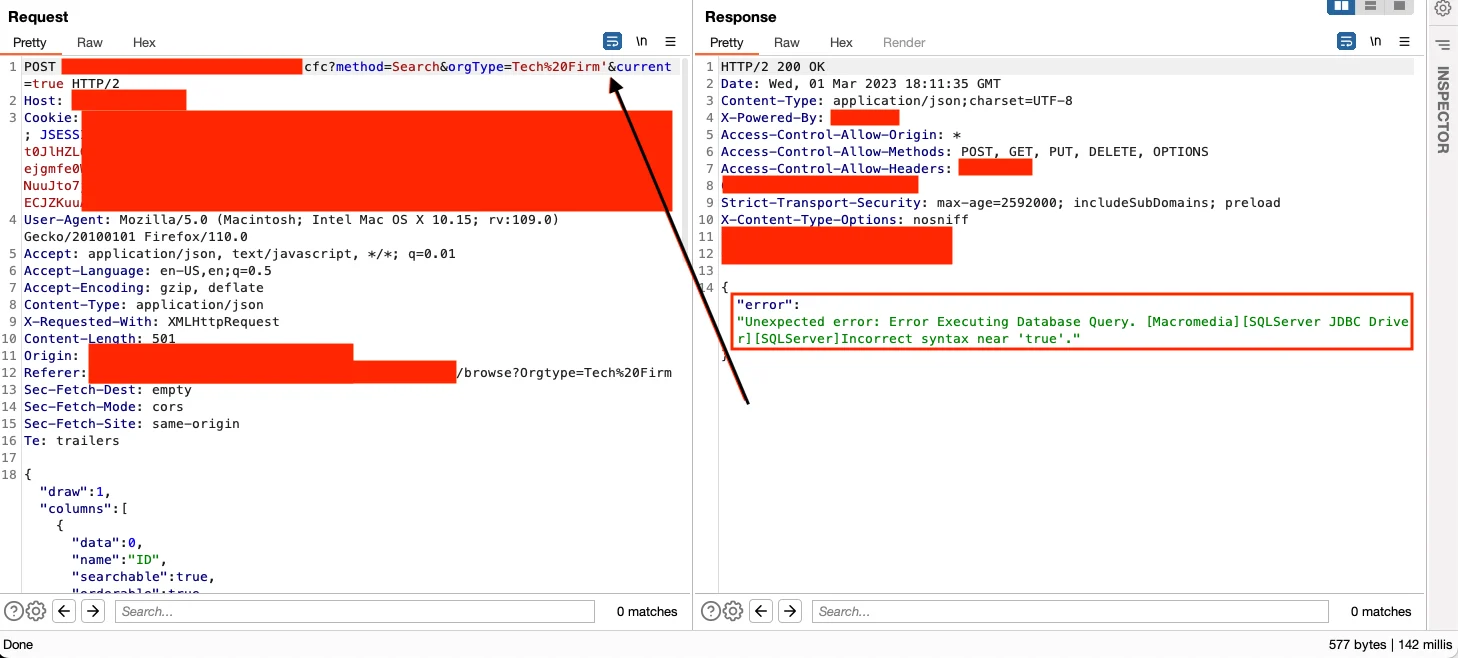
The screenshot shows the response that caught his eye. The general lesson he draws is that parameters passed in requests where the UI presents a pre-defined set of values are often left unprotected by the developer.
Exploitation
Step 1: confirm the injection
Adding a second ' closed the query and returned a 200 response. He then tried a classic tautology in the vulnerable parameter:
' OR '1'='1-- -
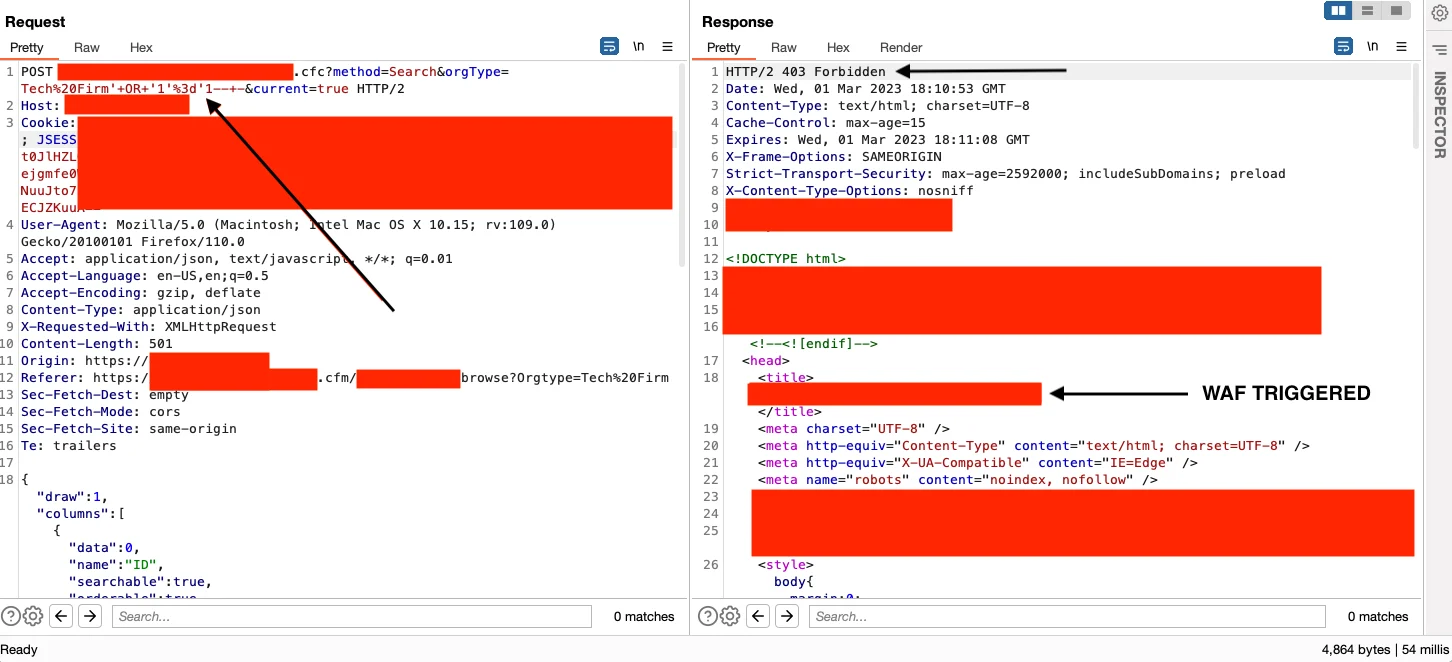

The response took him aback. He decided to push on. If he could bypass the WAF he could demonstrate both the vulnerability and the importance of not relying on a WAF for protection, which he describes as two big wins for the client.
Step 2: work backwards from the comment
He started from the end of the payload, the comment. It was triggering the WAF, so he tried known evasions such as double and triple URL encoding, which did not work. He then removed the comment portion (dash dash):
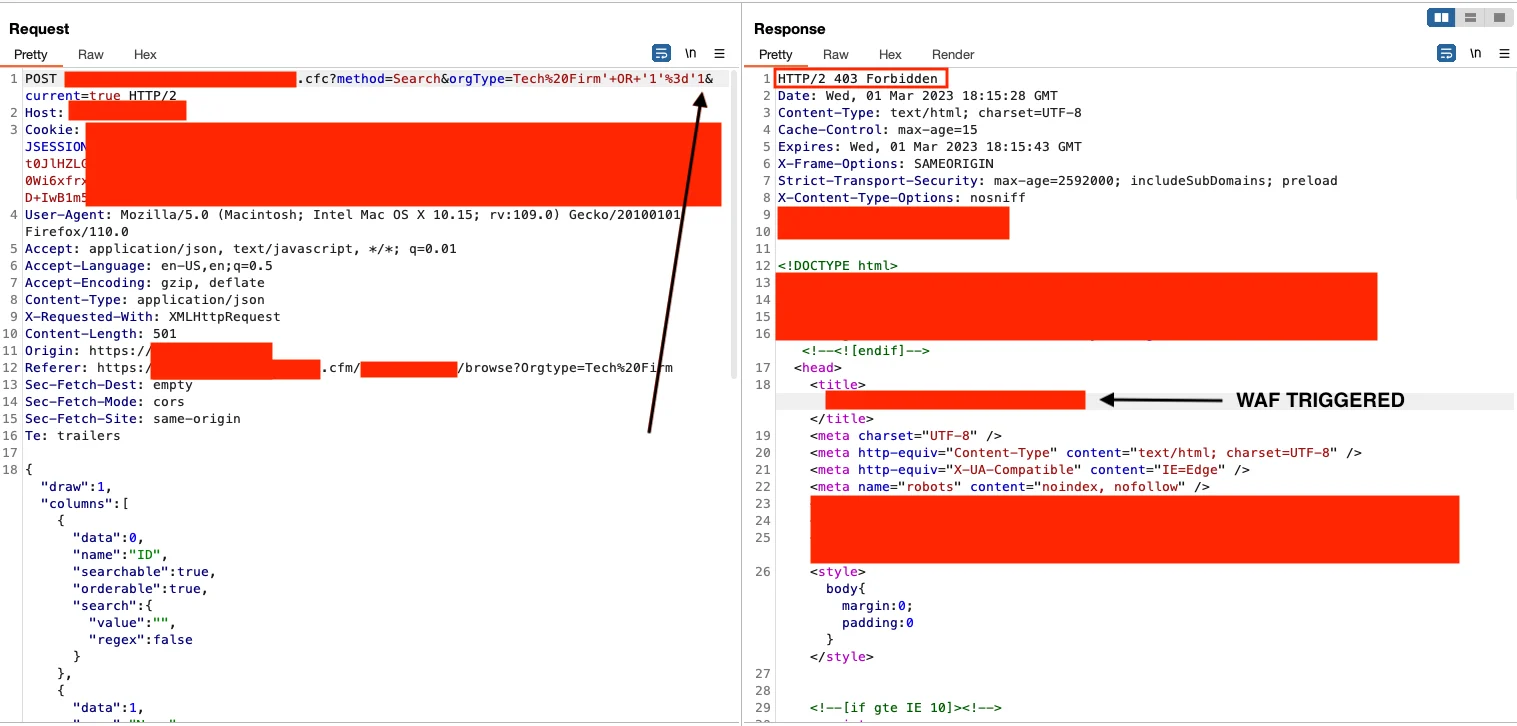
That did not work either. His next hypothesis was that the WAF was also detecting 1=1, so he tried just 1=:
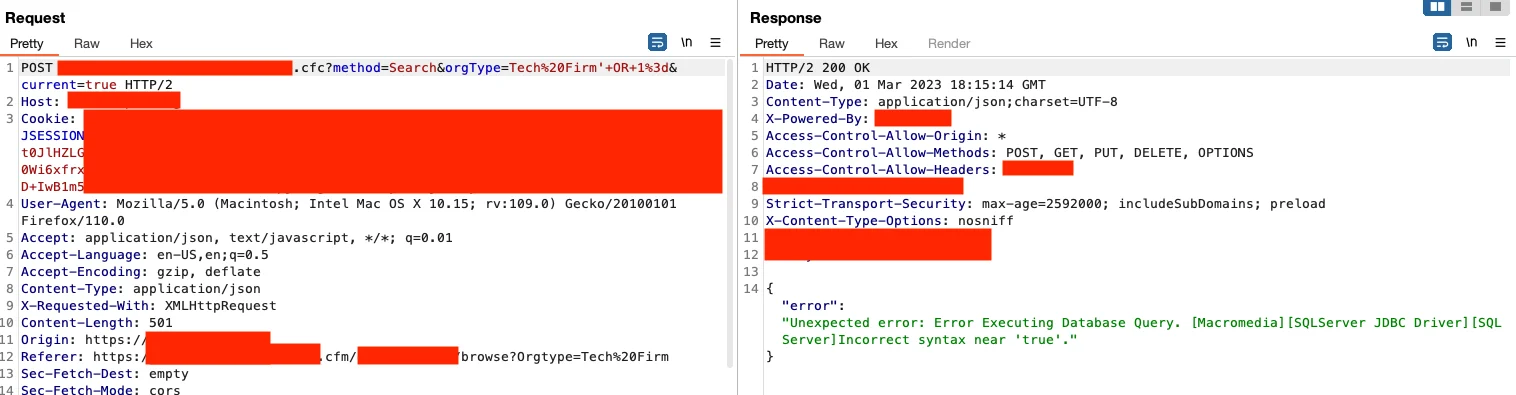
This bypassed the WAF. He then tried 1=2:
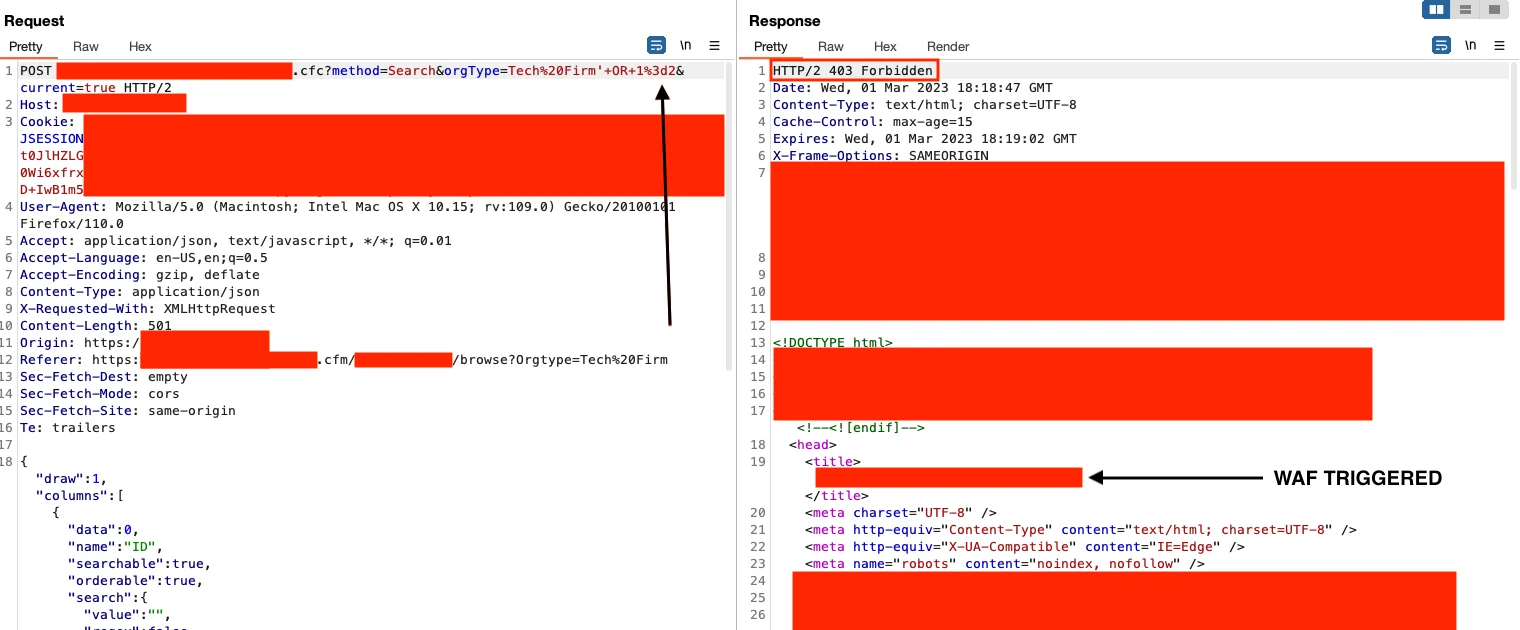
That did not work, and the screenshot shows he also tried removing the '. Much of the signature detection revolves around the = character, so he moved to the less commonly used != comparison operator:
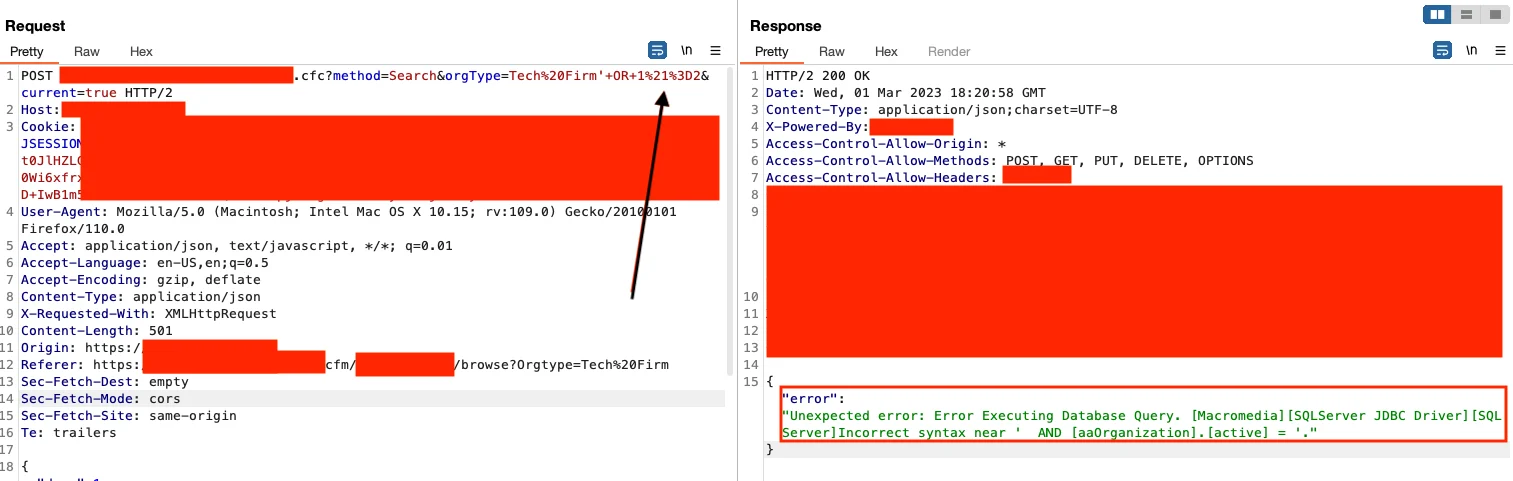

It worked. The state of knowledge at this point:
=does not pass,!=does.- The query cannot be commented out with two
-characters or with;#, because both trigger the WAF. - The SQL Server database still executes the query, and because this is error-based, it attempts to execute and return verbose information.
After a few hours of research on the well-known WAF, he concluded it relies heavily on signature-based detection, and the logs suggest the signatures are updated pretty regularly. The strategy that follows from that is to combine as many different obfuscation methods as possible.

Step 3: switch to blind
After hours of trial and error he threw it all out and changed approach. In his experience blind payloads can have a higher level of success, and if there is error-based SQLi there should also be a way to infer data. Alongside further obfuscation, such as /**/ instead of + or %20 for spaces, he introduced a blind payload. With a WAF in place, NULL and commonly used words such as ORDER BY are likely to be detected.
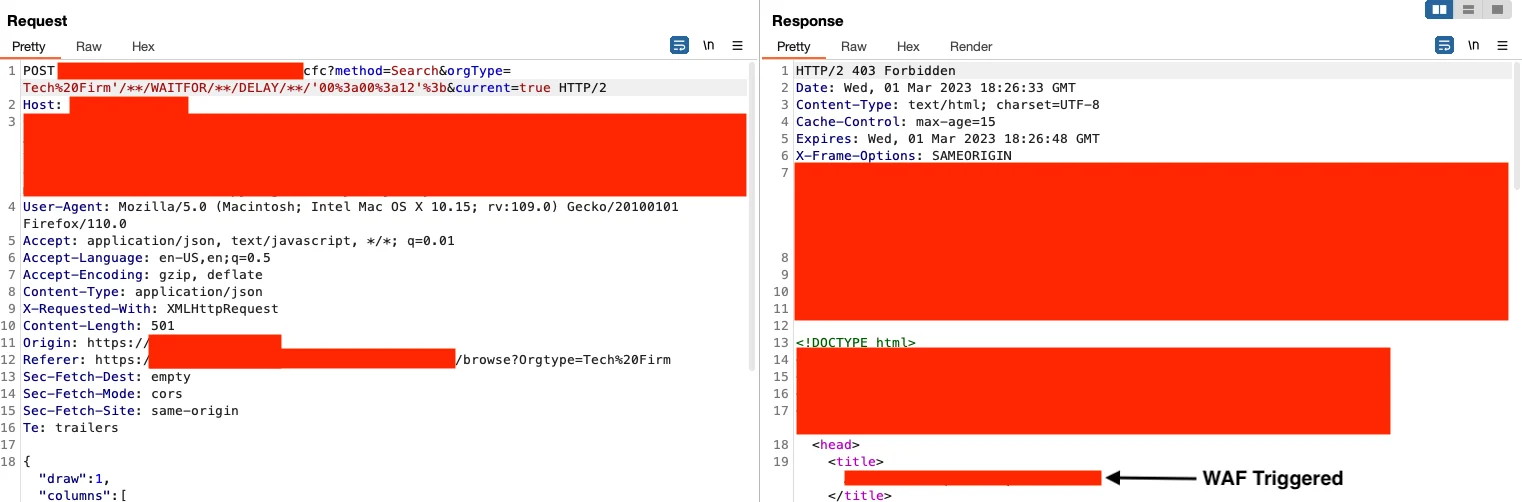
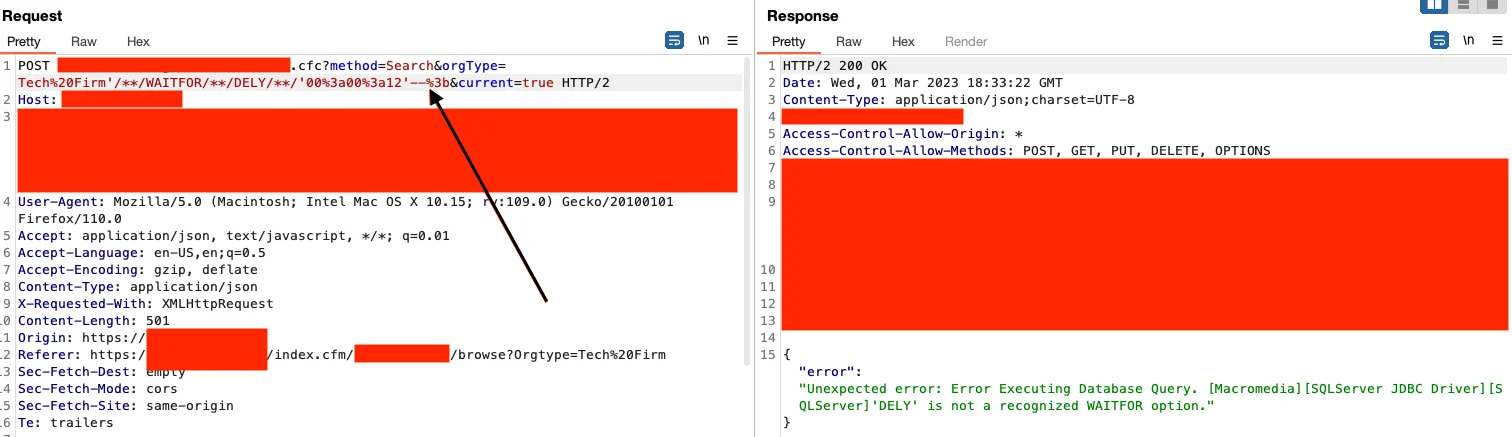
A regular blind payload did not work, so he worked backwards again, this time deleting the "A" in DELAY:
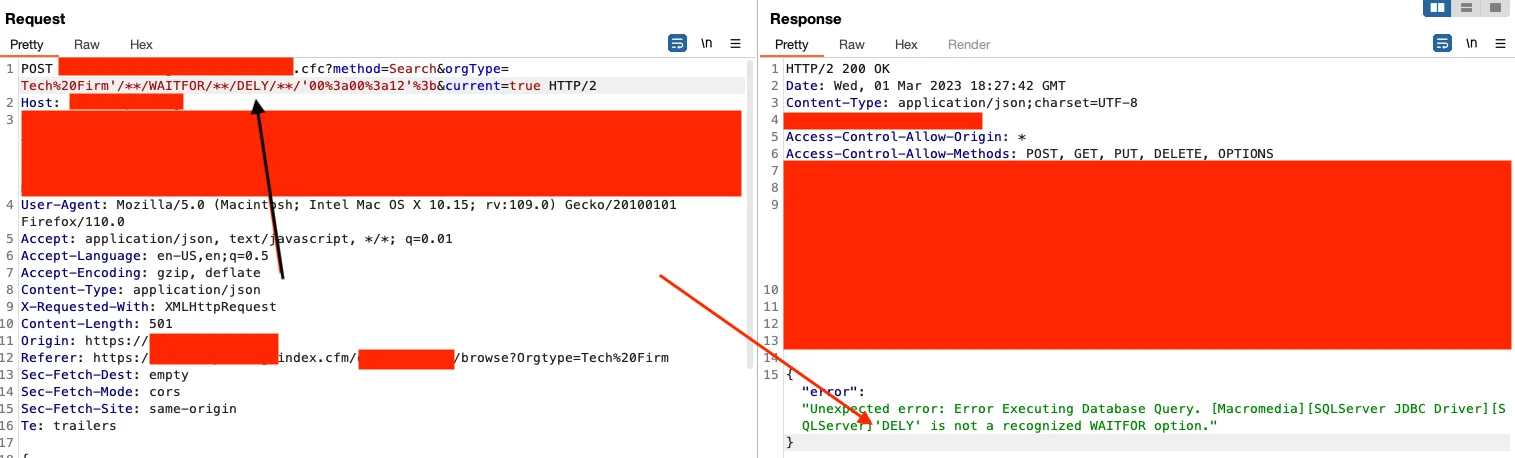
Removing the A from the blind payload produced an error, which put him back into error-based SQLi, sort of: between the two modes, but he would take whatever worked. The useful conclusion was that WAITFOR is not filtered, everything in the payload works, but DELAY is being picked up.
Step 4: the comment works again
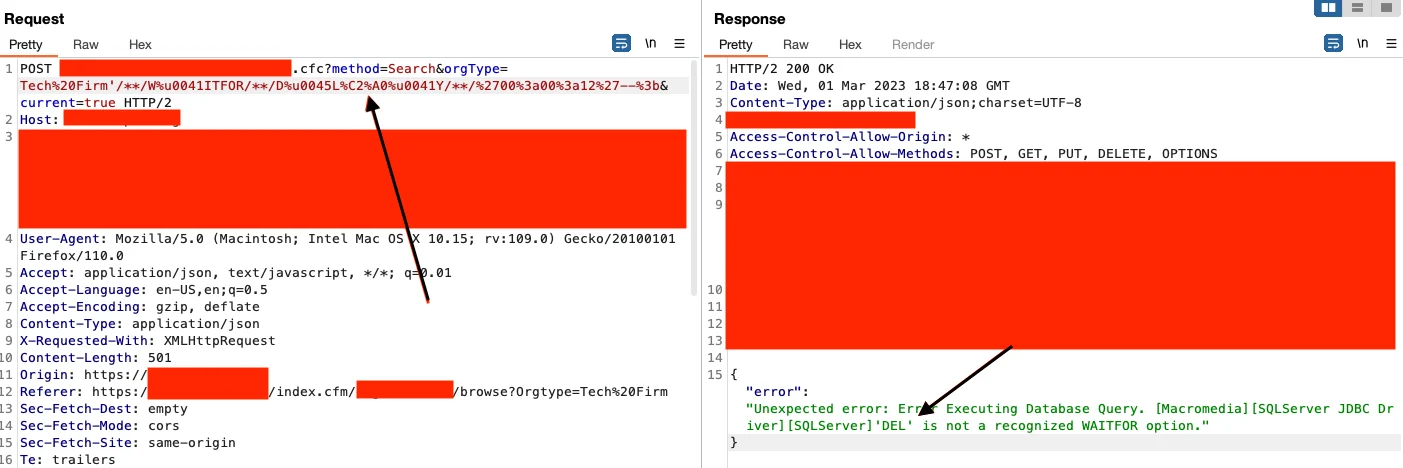
After a few more hours he wanted to see whether the query could be ended the way it was before, so he added the dash dash at the end again, this time in this payload:
It worked. He notes he was not sure whether it would be useful. He also tried unicode characters in place of regular characters, on the theory that SQL Server sometimes translates them on the back end, and tried BENCHMARK, breaking up null bytes, and payloads using CONCAT and HEX to obfuscate. All of these kept getting caught.
Step 5: non-standard whitespace
Hours of research later he found a blog on advanced MSSQL injection tricks:
https://swarm.ptsecurity.com/advanced-mssql-injection-tricks/
Way down towards the bottom of that page there is a short note on non-standard whitespace characters. The excerpt he quotes is shown here:

He tried it with %C2%A0:
This sort of worked. The whitespace character was another evasive technique that avoided signature detection, but it broke up the query in a way he did not want. So he moved the whitespace character elsewhere, before the D in DELAY:
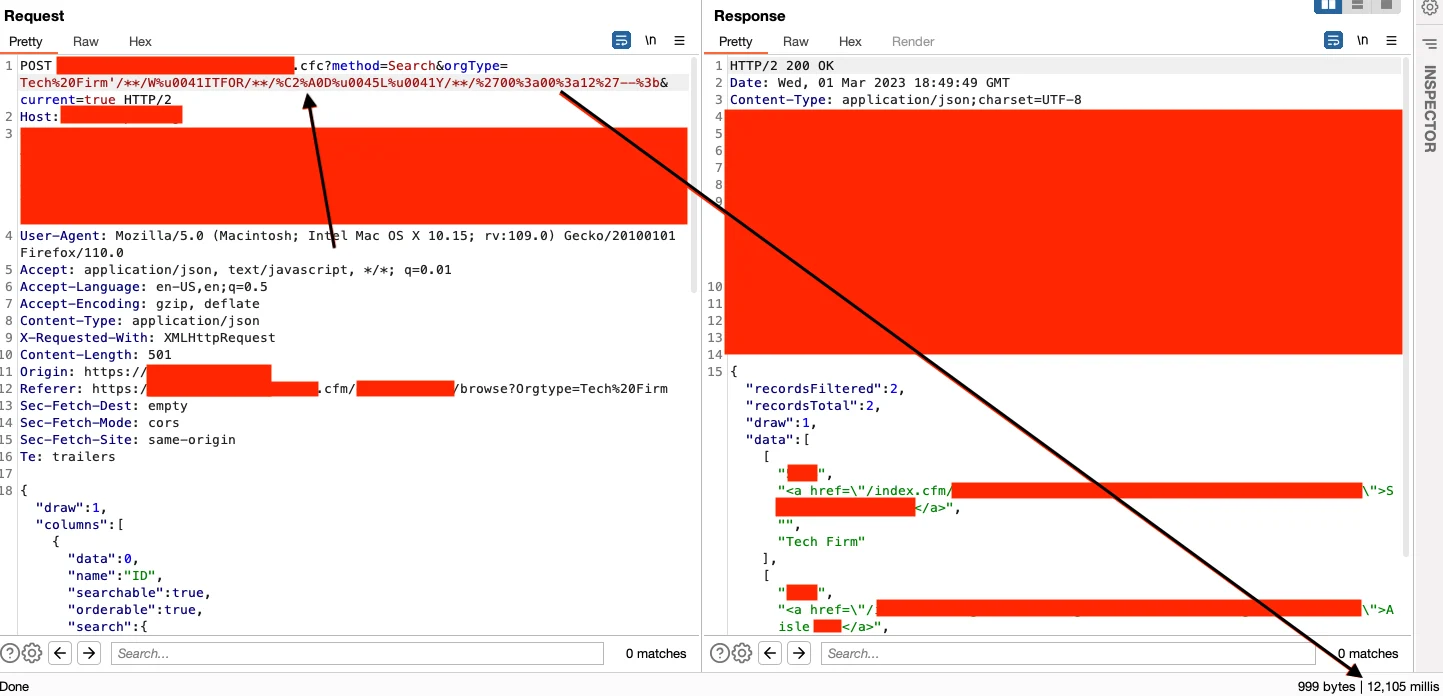
It worked. Blind SQLi was now confirmed against this WAF. The payload contains a WAITFOR DELAY of 12 seconds and the response took 12,105 milliseconds. He also pulled LEN(DB_NAME()) = 4, which worked: the database name is 4 characters long, confirmed with a 4 second delay.
Step 6: trying to pull metadata
To show the client why this matters he tried to pull other metadata. Traditional methods such as @@version, and functions such as ASCII and SUBSTRING, did not pass the WAF. He even tried encoding random parts of the word SUBSTRING, which did not work:
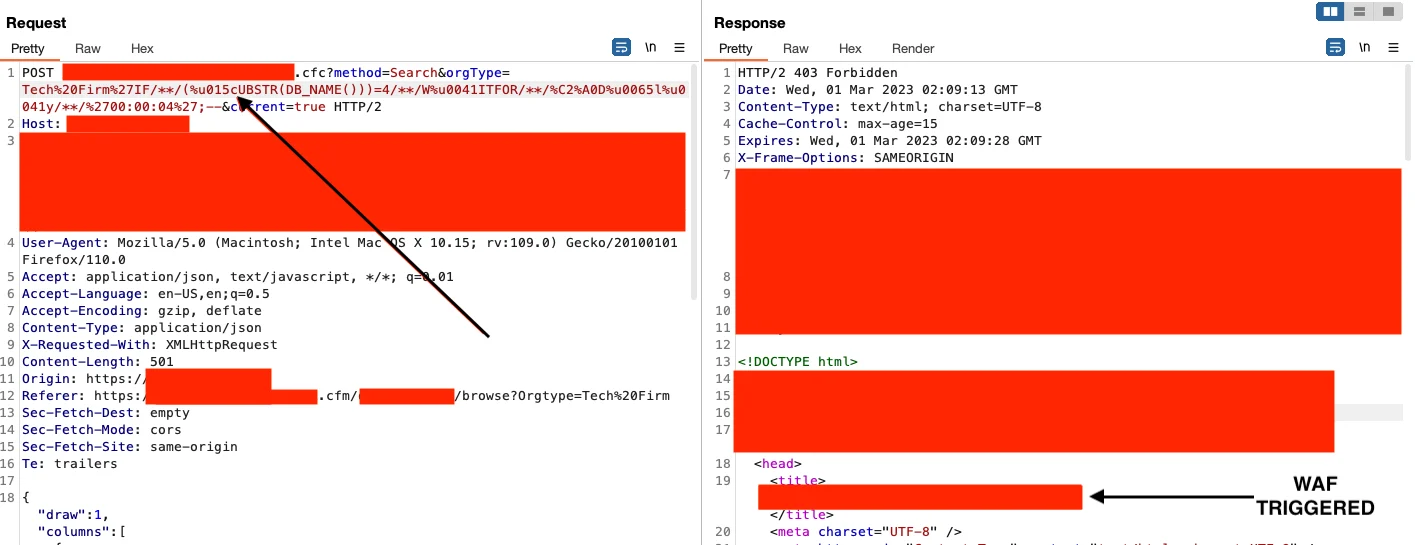
At that point he could at least prove SQLi to some degree by extracting the LEN value of specific metadata. He judged that insufficient and pushed on.
Step 7: comments as obfuscation
His next idea was to add whitespace using /**/ to obfuscate and break up the payload:
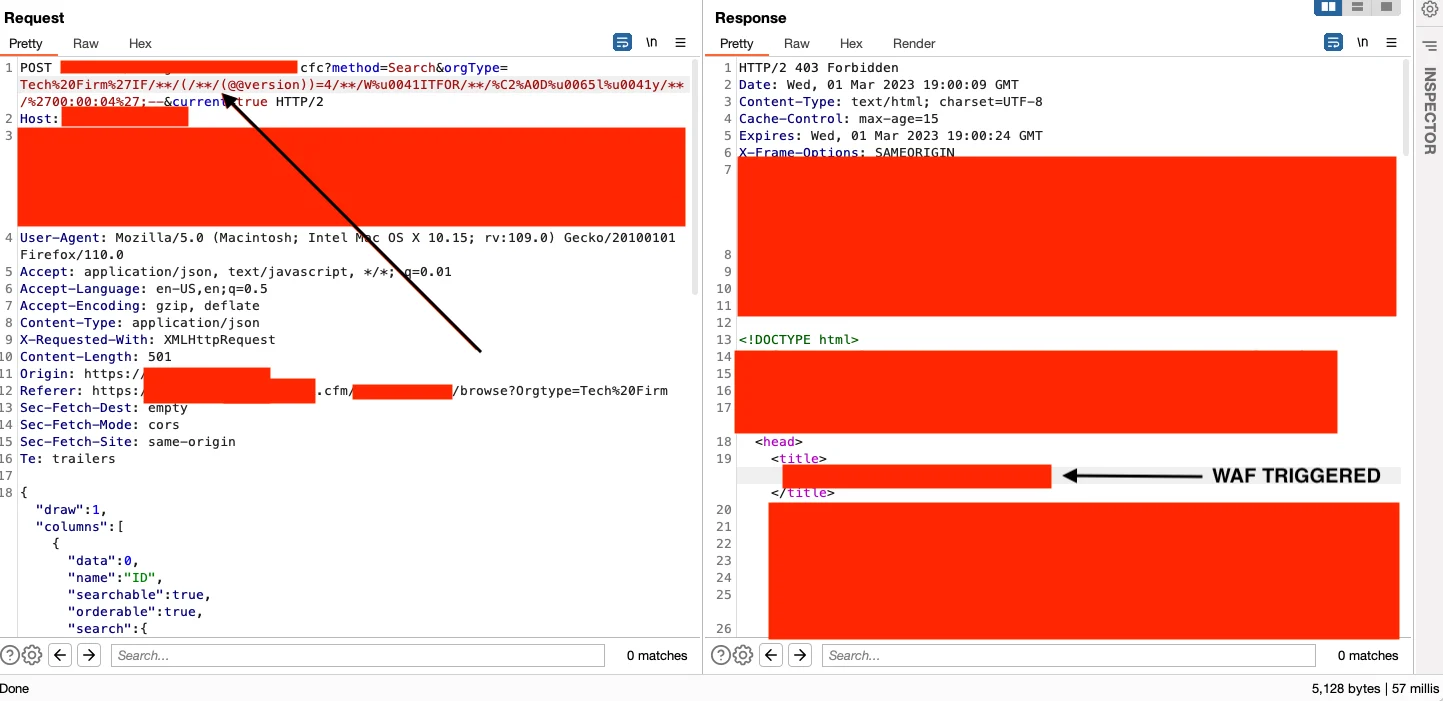
That did not work. He then tried adding junk between /* */ so that it would look like a comment:
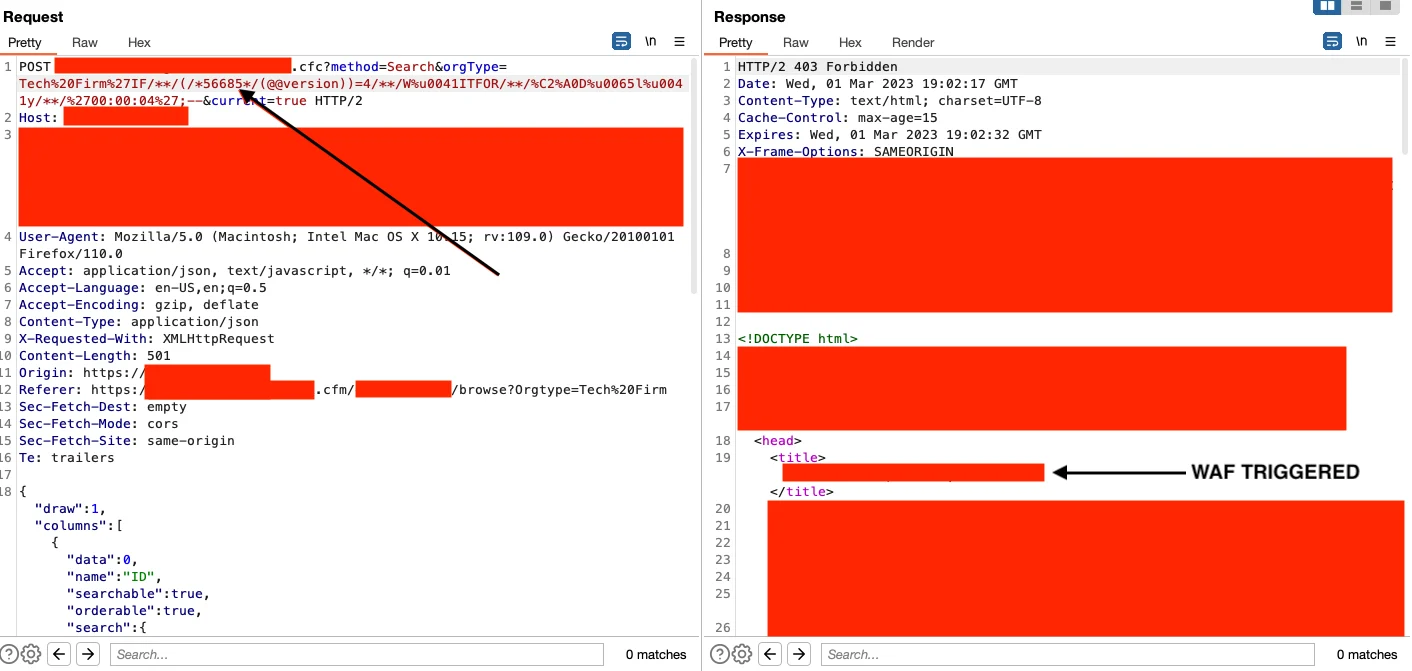
That did not work either. Hours later he tried adding other characters of a unique nature as well:
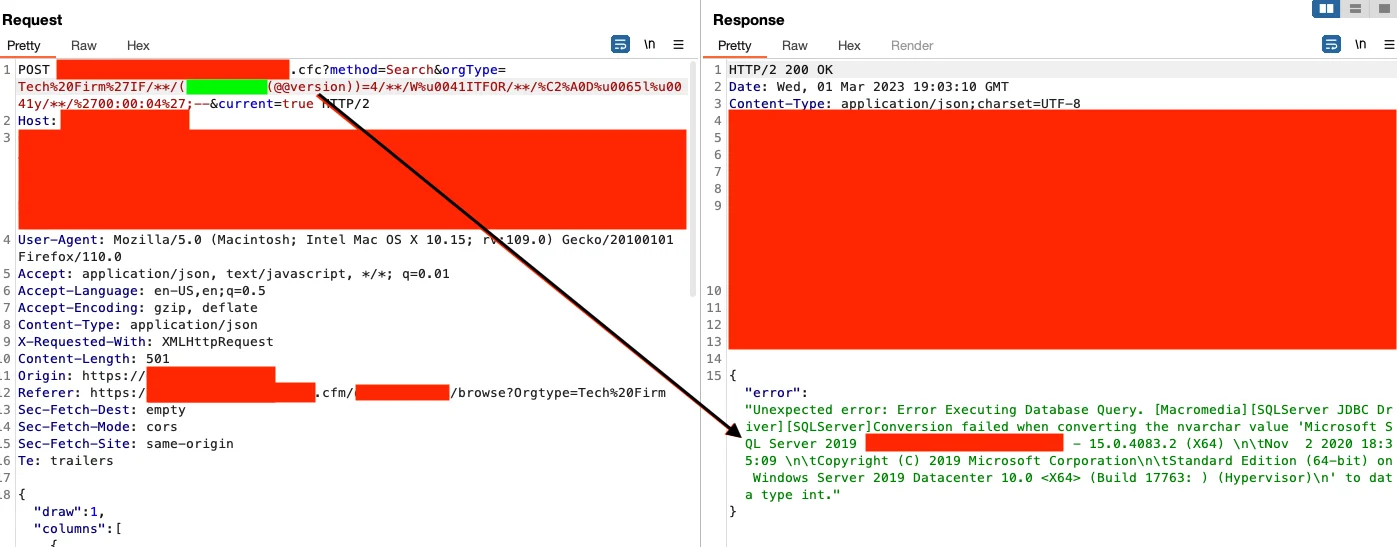
The final payload cannot be shared while disclosure is in progress. The image below is how he felt at that point:

Root cause
The parameter is one the UI presents as a drop-down value, and the researcher suspected the developer had left it unprotected, a pattern he calls out as common. The WAF in front of it relies heavily on signature-based detection, with signatures updated regularly, and it blocked the obvious payloads: the comment sequences, =, ORDER BY, NULL, DELAY, @@version, ASCII and SUBSTRING. It did not stop the query from executing once the payload was reshaped. The customer's intent to disable the WAF for the assessment was not carried out.
Impact
Under the conditions described, an attacker who can reach the parameter can inject SQL and infer data through blind techniques, demonstrated by a 12 second WAITFOR DELAY and by confirming the database name length with LEN(DB_NAME()) = 4. He decided that bypassing the WAF would let him demonstrate both the vulnerability and the importance of not relying on WAFs. The report does not describe extraction of actual data values, and the final payload is withheld.
Fix
The report does not describe a fix or a change made by the customer. What it argues for is not relying on a WAF for protection, and, from the finding itself, protecting parameters that the UI presents as pre-defined values rather than treating them as trusted.
Variants to test
- Add
'to every parameter, including those the UI renders as drop-downs, radio buttons or hidden fields, and compare responses. A positive result is a different response or status for the quoted value. - Close the quote with a second
'and look for a 200 with changed content. A positive result is a query that executes rather than errors out. - Send
' OR '1'='1-- -and note whether it is blocked. A block confirms a WAF and tells you which part of the payload it dislikes. - Remove parts of the payload one at a time from the end: the comment, then the comparison. A positive result is any shortened form that still changes the response, as
1=did here. - Swap
=for!=. A positive result is a payload that passes where=was blocked. - Replace spaces with
/**/,+or%20, and try%C2%A0before a keyword such as theDinDELAY. A positive result is aWAITFOR DELAYthat returns after the expected number of seconds, here 12 seconds and 12,105 milliseconds. - Delete a character from a blocked keyword, as with the "A" in DELAY, and watch for an error. A positive result is an error-based response where the full keyword was blocked.
- Re-add the dash dash comment after changing the rest of the payload. A positive result is a comment that now passes, as happened here.
- Try
LEN(DB_NAME()) = 4style predicates with a delay. A positive result is a delay that confirms the inferred length. - Try
@@version,ASCII,SUBSTRING,BENCHMARK,CONCAT,HEX, null byte splitting and unicode substitutions. A positive result is any of them passing the WAF; here they were all caught.
What happened, in plain words
A security researcher was hired to test how safe a company's website was. The website sat behind a WAF (web application firewall), a piece of software that sits in front of a site and inspects every request that arrives, blocking anything that looks like an attack. The customer believed the WAF had been switched off for the test. It had not. So the researcher had to do two jobs at once: find a weakness in the website, and find a way to sneak his test traffic past the WAF so the weakness could actually be shown.
The weakness he found was SQL injection. Websites usually store their information in a database, which you can picture as a very large set of spreadsheets. When you use a site, the site asks the database questions on your behalf, in a small language called SQL. If the site pastes what you typed straight into that question without cleaning it, you can type extra SQL of your own and change the question. That is SQL injection.
The researcher found a parameter (one of the named values a browser sends to a site, like a form field) that the site did not clean. The WAF blocked his first obvious attempts, so he spent hours reshaping the attack, one small piece at a time, until it slipped through. He proved the weakness by making the database pause for 12 seconds on command, and by confirming the length of the database's name. The exact final attack text is not published, because the report was written while the disclosure process was still running.
Background you need first
A few ideas come up constantly below, so here they are from zero.
Requests and parameters. When you click something on a website, your browser sends a request to the server. A request is like an envelope with a label on the front: the address (the URL) and a set of named values, the parameters. A URL like shop.example/item?colour=red&size=large carries two parameters, colour with the value red and size with the value large. The server reads those values and decides what to send back.
Status codes. Every response carries a three-digit number. 200 means "here is the page, all fine". 500 means "something broke on the server". A 200 where you expected an error is often the first hint that your input changed how the server behaves.
SQL and queries. A database query is a sentence in SQL, for example SELECT * FROM users WHERE id = '5'. The site builds that sentence, sends it to the database, and shows you the result. If your input is dropped into the sentence without care, you can add your own words to it.
Error-based versus blind SQL injection. With error-based injection, the database's complaint (an error message) comes back to you and leaks information. With blind injection, nothing useful is shown, so you ask the database yes/no questions and watch for side effects, such as the page taking longer to answer. It is like asking a locked room "is the light on?" and waiting to hear a knock.
WAF and signatures. A WAF is a filter. Most WAFs work from signatures: lists of known-bad patterns, such as the characters ' or the word DELAY. It is like a bouncer with a list of banned phrases. Change the phrase slightly and the bouncer may wave you through, even though the meaning is the same.
Burp. Burp is a tool that sits between your browser and the website, records every request and response, and lets you edit a request and send it again. The researcher used it to review his logs and replay parameters.
URL encoding. Some characters cannot travel in a URL as themselves, so they are written as a percent sign and two hex digits. A space becomes %20, for example. Double and triple encoding means encoding the encoded form again, which some filters fail to decode fully.
Setup
The tooling described is Burp, used to review request logs and replay parameters. No versions, accounts or roles are given. The precondition that matters is the one the researcher asks for on every engagement: the customer should disable the WAF during an application security assessment. Here the customer believed they had, but it did not happen, so every payload had to pass through the WAF.
Finding it
The first step was the old trick of adding ' to many parameters and endpoints and watching how the application responded. One response stood out. The parameter in question was not free text in the UI: it was called from a drop-down option, so the researcher expected the developers might not have protected it.
The screenshot shows the response that caught his eye. The general lesson he draws is that parameters passed in requests where the UI presents a pre-defined set of values are often left unprotected by the developer. The reasoning is simple: if the only way a normal visitor can set a value is by picking from a list, a developer may assume the value can only ever be one of those choices, and forget that anyone can craft a request by hand and send something else entirely.
Exploitation
Step 1: confirm the injection
Adding a second ' closed the query and returned a 200 response. He then tried a classic tautology in the vulnerable parameter:
' OR '1'='1-- -
Line by line, in plain words:
- The leading
'closes the quote the site opened around the value it expected. OR '1'='1adds a condition that is always true, so the database returns rows regardless of what the original condition was.-- -starts a comment in SQL, so everything the site appends after your input is ignored. The trailing space after the two dashes matters in some databases.
The response took him aback. He decided to push on. If he could bypass the WAF he could demonstrate both the vulnerability and the importance of not relying on a WAF for protection, which he describes as two big wins for the client.
Step 2: work backwards from the comment
He started from the end of the payload, the comment. It was triggering the WAF, so he tried known evasions such as double and triple URL encoding, which did not work. He then removed the comment portion (dash dash):
That did not work either. His next hypothesis was that the WAF was also detecting 1=1, so he tried just 1=:
This bypassed the WAF. He then tried 1=2:
That did not work, and the screenshot shows he also tried removing the '. Much of the signature detection revolves around the = character, so he moved to the less commonly used != comparison operator:
It worked. The state of knowledge at this point:
=does not pass,!=does.- The query cannot be commented out with two
-characters or with;#, because both trigger the WAF. - The SQL Server database still executes the query, and because this is error-based, it attempts to execute and return verbose information.
After a few hours of research on the well-known WAF, he concluded it relies heavily on signature-based detection, and the logs suggest the signatures are updated pretty regularly. The strategy that follows from that is to combine as many different obfuscation methods as possible.
Step 3: switch to blind
After hours of trial and error he threw it all out and changed approach. In his experience blind payloads can have a higher level of success, and if there is error-based SQLi there should also be a way to infer data. Alongside further obfuscation, such as /**/ instead of + or %20 for spaces, he introduced a blind payload. With a WAF in place, NULL and commonly used words such as ORDER BY are likely to be detected.
A regular blind payload did not work, so he worked backwards again, this time deleting the "A" in DELAY:
Removing the A from the blind payload produced an error, which put him back into error-based SQLi, sort of: between the two modes, but he would take whatever worked. The useful conclusion was that WAITFOR is not filtered, everything in the payload works, but DELAY is being picked up.
Step 4: the comment works again
After a few more hours he wanted to see whether the query could be ended the way it was before, so he added the dash dash at the end again, this time in this payload:
It worked. He notes he was not sure whether it would be useful. He also tried unicode characters in place of regular characters, on the theory that SQL Server sometimes translates them on the back end, and tried BENCHMARK, breaking up null bytes, and payloads using CONCAT and HEX to obfuscate. All of these kept getting caught.
Step 5: non-standard whitespace
Hours of research later he found a blog on advanced MSSQL injection tricks:
https://swarm.ptsecurity.com/advanced-mssql-injection-tricks/
Way down towards the bottom of that page there is a short note on non-standard whitespace characters. The excerpt he quotes is shown here:
He tried it with %C2%A0:
This sort of worked. The whitespace character was another evasive technique that avoided signature detection, but it broke up the query in a way he did not want. So he moved the whitespace character elsewhere, before the D in DELAY:
It worked. Blind SQLi was now confirmed against this WAF. The payload contains a WAITFOR DELAY of 12 seconds and the response took 12,105 milliseconds. He also pulled LEN(DB_NAME()) = 4, which worked: the database name is 4 characters long, confirmed with a 4 second delay.
Step 6: trying to pull metadata
To show the client why this matters he tried to pull other metadata. Traditional methods such as @@version, and functions such as ASCII and SUBSTRING, did not pass the WAF. He even tried encoding random parts of the word SUBSTRING, which did not work:
At that point he could at least prove SQLi to some degree by extracting the LEN value of specific metadata. He judged that insufficient and pushed on.
Step 7: comments as obfuscation
His next idea was to add whitespace using /**/ to obfuscate and break up the payload:
That did not work. He then tried adding junk between /* */ so that it would look like a comment:
That did not work either. Hours later he tried adding other characters of a unique nature as well:
The final payload cannot be shared while disclosure is in progress. The image below is how he felt at that point:
Root cause
The parameter is one the UI presents as a drop-down value, and the researcher suspected the developer had left it unprotected, a pattern he calls out as common. The WAF in front of it relies heavily on signature-based detection, with signatures updated regularly, and it blocked the obvious payloads: the comment sequences, =, ORDER BY, NULL, DELAY, @@version, ASCII and SUBSTRING. It did not stop the query from executing once the payload was reshaped. The customer's intent to disable the WAF for the assessment was not carried out.
Impact
Under the conditions described, an attacker who can reach the parameter can inject SQL and infer data through blind techniques, demonstrated by a 12 second WAITFOR DELAY and by confirming the database name length with LEN(DB_NAME()) = 4. He decided that bypassing the WAF would let him demonstrate both the vulnerability and the importance of not relying on WAFs. The report does not describe extraction of actual data values, and the final payload is withheld.
Fix
The report does not describe a fix or a change made by the customer. What it argues for is not relying on a WAF for protection, and, from the finding itself, protecting parameters that the UI presents as pre-defined values rather than treating them as trusted.
Variants to test
- Add
'to every parameter, including those the UI renders as drop-downs, radio buttons or hidden fields, and compare responses. A positive result is a different response or status for the quoted value. - Close the quote with a second
'and look for a 200 with changed content. A positive result is a query that executes rather than errors out. - Send
' OR '1'='1-- -and note whether it is blocked. A block confirms a WAF and tells you which part of the payload it dislikes. - Remove parts of the payload one at a time from the end: the comment, then the comparison. A positive result is any shortened form that still changes the response, as
1=did here. - Swap
=for!=. A positive result is a payload that passes where=was blocked. - Replace spaces with
/**/,+or%20, and try%C2%A0before a keyword such as theDinDELAY. A positive result is aWAITFOR DELAYthat returns after the expected number of seconds, here 12 seconds and 12,105 milliseconds. - Delete a character from a blocked keyword, as with the "A" in DELAY, and watch for an error. A positive result is an error-based response where the full keyword was blocked.
- Re-add the dash dash comment after changing the rest of the payload. A positive result is a comment that now passes, as happened here.
- Try
LEN(DB_NAME()) = 4style predicates with a delay. A positive result is a delay that confirms the inferred length. - Try
@@version,ASCII,SUBSTRING,BENCHMARK,CONCAT,HEX, null byte splitting and unicode substitutions. A positive result is any of them passing the WAF; here they were all caught.
Glossary
- API: a way for one piece of software to ask another for data or actions, using agreed names and formats.
- Blind SQL injection: an injection where no data or error is shown, so you infer answers from side effects such as response time.
- Burp: a tool that records, edits and replays the requests between your browser and a website.
- Comment (SQL): text the database ignores, written as
--or/* ... */; attackers use it to cut off the rest of a query. - Database: organised storage for a website's information, queried with SQL.
- Error-based SQL injection: an injection where the database's error message comes back and leaks information.
- Metadata: information about the database itself, such as its name or version, rather than the data inside it.
- Parameter: a named value sent with a request, such as
colour=redin a URL or a form field. - Payload: the crafted input an attacker sends to try to trigger a weakness.
- Query: a sentence in SQL asking the database for something or telling it to do something.
- Signature: a known-bad pattern a filter such as a WAF looks for.
- SQL: the language used to talk to a database.
- SQL injection: putting extra SQL into a site's input so the database runs a different question than intended.
- Status code: the three-digit number in a response, such as 200 for success or 500 for a server error.
- Tautology: a condition that is always true, such as
'1'='1, used to make a query return everything. - URL encoding: writing characters as
%plus two hex digits so they can travel in a URL. - WAF: web application firewall, a filter in front of a site that blocks requests matching known attack patterns.
- Whitespace: characters that create space in text, such as a normal space, a tab, or unusual ones like
%C2%A0.




