Bypassing default visibility for newly-added email in Facebook(Part II - Trusted Contacts)
A newly added email address on Facebook was visible to others despite the default privacy setting that should hide it. An attacker could use the account recovery flow with trusted contacts to add an email and then view its visibility from another account.

medium.com
Published on medium.com
The full write-up lives on its author's site
It belongs to its author, so we link to it rather than copy it. The other two tabs are our own rewrites, checked against it.
Context
This is the second write-up in a series about the same class of issue in Facebook: the default visibility of a newly-added email address. The first part, linked from this post, covered a route through submitting an I.D. This part covers a different route, through Trusted Contacts, the account-recovery feature that lets a user nominate people who can help them get back into an account.
The behaviour under test is the visibility setting applied to an email address when it is added to an account. Facebook is expected to apply a default visibility to a newly-added email, and the researcher found a path where that default was bypassed. The author describes the earlier report as being called a Visibility Setting Bug on the Facebook Bug Bounty page.

The screenshot above is captioned Meta BBP and sits at the top of the post, before the reproduction steps.
Setup
The only precondition the report states is a Facebook account with the recovery feature configured:
- Three trusted contacts set up under Settings > Password and Security > Setting up extra security.
- Access to those three contacts, because their recovery codes are needed partway through the flow.
- A valid email address to supply during the recovery flow.
- A second account (or the same account) to check the visibility of the email afterwards.
No tools, versions or specific browser details are given.
Finding it
The researcher had already reported a bypass of the default visibility for newly-added email through one route (Part I, submitting an I.D.). This follow-up shows the same outcome reached through the trusted contacts recovery flow instead. The report shows the same outcome reached through the trusted contacts recovery flow instead.
Exploitation
The report gives five reproduction steps.
Step 1: Configure trusted contacts
Go to Facebook Settings > Password and Security > Setting up extra security and choose 3 trusted contacts.
This sets up three trusted contacts on the account.
Step 2: Start account identification
Go to facebook.com/login/identify and find your Facebook account.
This is the page where the account is found.
Step 3: Choose the no-access path
Click "No longer have access to these?" and provide valid email address.
A valid email address is supplied at this point.
Step 4: Complete recovery with the trusted contacts' codes
Get all recovery code from your 3 trusted contacts and follow the instruction provided to create a successful recovery.
All recovery codes are collected from the three trusted contacts and the instructions followed to complete recovery.
Step 5: Check the visibility of the new email
Check the visibility of new added email using own account or other account.
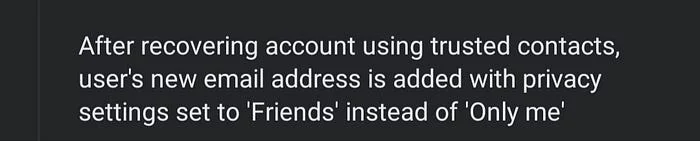
The image above sits directly after this step.
Root cause
The report does not describe the underlying code or design fault. What it establishes is that an email added to the account through the trusted contacts recovery flow does not receive the default visibility that applies when an email is added through the normal settings path. The report does not say which component was at fault.
Impact
The impact is the same class as Part I: the default visibility for a newly-added email address can be bypassed. The author describes this as bypassing the default visibility again.
Fix
The timeline records that the issue was fixed on 24 February 2022 and a bounty of $xxx was awarded.
Timeline
| Date | Event |
|---|---|
| 21 January 2022 | Initial report |
| 25 January 2022 | Provided some details |
| 26 January 2022 | Triage |
| 24 February 2022 | Fixed and awarded $xxx |
Variants to test
- Other recovery flows. A positive result is an email added through that flow that is visible more widely than the account's visibility setting allows.
- Other account attributes with defaults. A positive result is an attribute added through a non-standard flow that ignores the default applied on the settings page.
- Cross-check from a second account.
What happened, in plain words
Facebook lets you attach an email address to your account. When you add one through the normal settings pages, Facebook is supposed to apply a default visibility setting to it, meaning it decides who can see that address. The researcher in this post found a way to add an email to an account through a different route, the account-recovery feature called Trusted Contacts, and in that route the default visibility was not applied. So the default visibility was bypassed.
This is the second time the same researcher reported this kind of problem. The first report, called Part I, used a route where the user submits an identity document (an I.D.). This post, Part II, uses the Trusted Contacts recovery flow instead. The author says the earlier report was described on the Facebook Bug Bounty page as a Visibility Setting Bug.
A few ideas to have in mind before the steps:
- Visibility setting: a privacy control that decides who can see a piece of information on your profile, for example only you, your friends, or everyone. Think of it like the "who can see this" dropdown you get when you post something.
- Account recovery: the process you go through when you cannot log in, for example because you forgot your password. Facebook offers several ways to prove the account is yours.
- Trusted Contacts: a recovery feature where you nominate a few people you trust. If you get locked out, Facebook can send each of them a code, and together those codes help you prove the account is yours and get back in. It is a bit like asking three friends to each hold one piece of a spare key: no single friend can open the door, but together they can help you.
- Bug bounty: a programme where companies pay researchers for finding and reporting security problems responsibly, instead of exploiting them.
The screenshot below is captioned Meta BBP and appears at the top of the post, before the reproduction steps.
What you need before you start
The report does not list preconditions beyond the steps themselves. In practice that means:
- Three trusted contacts configured under Settings > Password and Security > Setting up extra security.
- Access to those three contacts, to get the recovery codes from them.
- A valid email address to supply during the recovery flow.
- Your own account or another account, to check the visibility of the email afterwards.
No tools, software versions or browser details are mentioned.
Why this route was worth trying
The researcher already knew that one route (submitting an I.D. covered in Part I) could add an email without the default visibility being applied. That is the kind of gap this report is about.
The steps, one at a time
The report gives five reproduction steps. Here they are exactly as written, followed by an explanation of what each one does and why it is there.
Step 1: Set up trusted contacts
Go to Facebook Settings > Password and Security > Setting up extra security and choose 3 trusted contacts.
This sets up three trusted contacts on the account. Without this step, the recovery route you are testing would not have anyone to send codes to, and you could not complete it.
Step 2: Start the account identification page
This is the page where the account is found. The point of starting here, rather than at the normal login page, is that this is the path that leads into recovery, which is the path under test.
Step 3: Choose the no-access option
Click "No longer have access to these?" and provide valid email address.
A valid email address is supplied at this point. The reason for this step is that the whole question is what happens to an email added this way: does it get the default visibility or not?
Step 4: Complete the recovery with the contacts' codes
Get all recovery code from your 3 trusted contacts and follow the instruction provided to create a successful recovery.
You collect all recovery codes from the three trusted contacts and follow the instructions to complete recovery. The recovery is completed successfully.
Step 5: Check who can see the new email
Check the visibility of new added email using own account or other account.
This is the observation step. You look at the newly added email and see who can see it.
The image above sits directly after this step.
What was actually wrong
The report does not describe the underlying code or design fault. What it establishes is the outcome: an email added through the trusted contacts recovery flow does not receive the default visibility that applies when an email is added through the normal settings path. The report does not say which component was at fault.
What the impact was
The impact is the same class as Part I: the default visibility for a newly-added email address can be bypassed. The author describes this as bypassing the default visibility again.
How it was fixed
The timeline records that the issue was fixed on 24 February 2022 and a bounty of $xxx was awarded.
Timeline
| Date | Event |
|---|---|
| 21 January 2022 | Initial report |
| 25 January 2022 | Provided some details |
| 26 January 2022 | Triage |
| 24 February 2022 | Fixed and awarded $xxx |
Other places to look
- Other recovery flows. A positive result is an email added through that flow that is visible more widely than the account's visibility setting allows.
- Other account attributes with defaults. A positive result is an attribute added through a non-standard flow that ignores the default applied on the settings page.
- Cross-check from a second account.
Glossary
- Visibility setting: a privacy control that decides who can see a piece of information, such as only you, your friends, or everyone.
- Default visibility: the visibility setting Facebook applies automatically when something new, like an email address, is added, unless the user changes it.
- Bypass: getting around a protection so that it no longer applies, even though it is still in place elsewhere.
- Account recovery: the process of proving an account is yours and getting back in when you cannot log in normally.
- Trusted Contacts: a Facebook recovery feature where you nominate people who each receive a code that helps you recover your account.
- Recovery code: a one-time code sent to a trusted contact, used as part of proving the account is yours.
- Bug bounty: a programme where companies pay researchers for responsibly reporting security problems.
- Meta BBP: the name shown in the screenshot caption at the top of the post, referring to Meta's bug bounty programme.
- Triage: the stage where the company reviews a report, confirms it is a real issue and decides how to handle it.
- Code path: the particular sequence of code in a program that runs when a feature is used; different features can reach the same data through different code paths.
- Part I / Part II: the two write-ups in this series; Part I used submitting an I.D. Part II uses Trusted Contacts.
- $xxx: the bounty amount as written in the report, with the figure withheld.



