Bypassing Email Verification with Simple Parameter Tampering
The account verification flow trusted an email address supplied by the client instead of looking up the logged-in user's registered email. An attacker could register an account with a victim's email, swap in their own address to receive the OTP, and have the victim's-email account marked as verified.
 Published on medium.com
Idor
The full write-up lives on its author's site
It belongs to its author, so we link to it rather than copy it. The other two tabs are our own rewrites, checked against it.
Context
During a security assessment of a major travel booking platform, the researcher looked at the account registration and identity verification flows. On this platform a user could sign up through a traditional password-based flow. The account was created immediately but flagged as "unverified" until the user clicked a "Verify" button, which triggered a One-Time Password (OTP) to be sent to their email. Email verification is meant to prove that a user actually owns the address they signed up with, so the whole trust model of the account rests on that step.
Setup
The only tool used was an interception proxy, Burp Suite, to watch and modify the traffic between the browser and the server. No special accounts or privileges were needed beyond the ability to register a new account. The precondition for the attack was simply that the platform let a user register with any email address, including one the user does not own, and that the verification flow could be intercepted before it left the browser.
Finding it
While mapping the standard account creation process, the researcher monitored the background traffic in Burp Suite and clicked the "Verify" button, then examined the resulting HTTP request. The request explicitly included the user's email address as a parameter.
That raised the obvious question: why is the browser telling the server where to send the OTP? Since the user is already logged into their account, the server should look up the registered email in its own database. What happens if that email parameter is changed to something else?
Exploitation
Step 1: The Setup
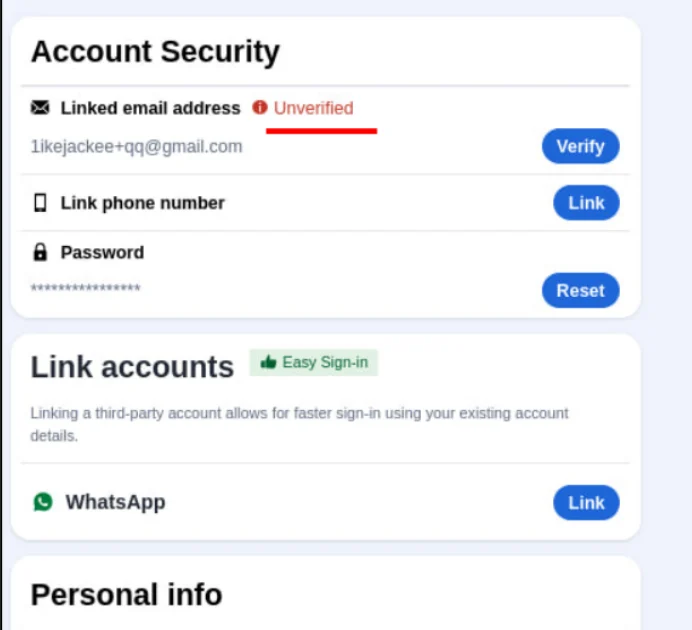
The researcher went to the registration page and created a new account using an email address they did not own (the victim's email). The account was successfully created but sat in an "unverified" state.
Step 2: Trigger the Challenge
While logged into this unverified account, the researcher clicked the "Verify" button to initiate the email confirmation process.
Step 3: The Swap
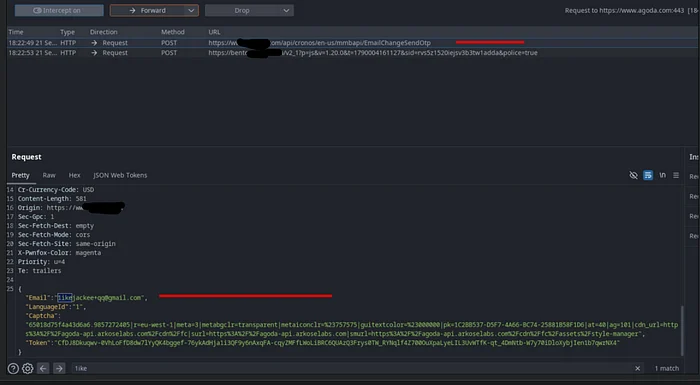
Before the request could leave the computer, it was intercepted using Burp Suite. In the request body, the email parameter pointed to the victim's email address. The researcher deleted it and typed in their own attacker-controlled email address.
Step 4: The Intercept
The modified request was forwarded. Because the server trusted the input, it generated the OTP and emailed it directly to the attacker inbox, completely bypassing the victim.
Step 5: The Confirmation
The researcher retrieved the 6-digit OTP from their inbox and entered it into the verification form on the website.
Step 6: The Second Swap
The final submission request was intercepted. Just like before, the email parameter was changed to the attacker email so it would perfectly match the OTP the server had just generated.

Step 7: The Result
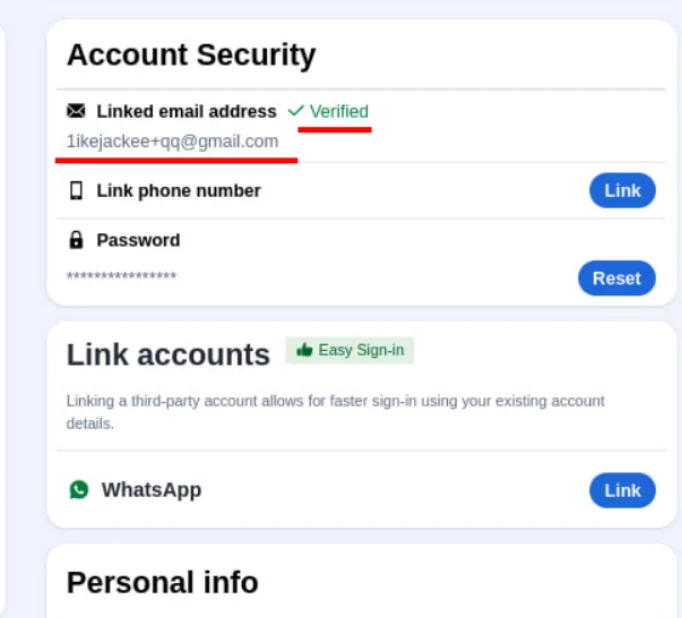
The final request was forwarded. The server validated the OTP, saw that it matched the email in the request, and returned a success message. The account, which was registered under the victim's email, was now officially marked as "Verified" in the system, even though the victim's inbox was never touched.
Root cause
This is a textbook example of parameter tampering caused by a missing server-side binding. In a secure architecture the verification process should be strictly tied to the account's existing state on the backend: when a user requests an OTP, the server should know who is logged in and send the code to the email saved in their profile.
Instead, the backend blindly trusted the client. It sent an OTP to whatever email address was typed into the request, and if the correct OTP for that specific email was provided, it marked the current account as verified. The system completely failed to bind the verification challenge to the original email identity. The same weakness applied at the confirmation step, where the email parameter was again taken from the request and the OTP was checked against it.
Impact
By bypassing this core verification mechanism, an attacker can hijack the perceived identity of anyone on the platform. They can register accounts using the email addresses of high-profile targets, corporate executives, or rival businesses, and gain a "Verified" badge. This can lead to severe reputational damage, facilitate highly convincing phishing campaigns originating from "trusted" internal platform accounts, and completely undermine the integrity of the platform's user database.
Fix
The report does not describe any fix that was applied. The design change it points to is to stop trusting the client for the destination address: the server should look up the logged-in account's registered email from its own database when generating the OTP, and it should validate the submitted OTP against that same stored email rather than against an email supplied in the request. The email parameter should not be accepted from the client at all in either the send or the confirm step.
Variants to test
- OTP send endpoint with a client-supplied email. Intercept the request that triggers the OTP and change the email to one you control. A positive result is an OTP arriving in your inbox for an account registered under a different address.
- OTP confirm endpoint with a client-supplied email. Intercept the final submission and change the email to match the address that received the OTP. A positive result is a success response and the account being marked verified.
- Other identity fields in the same flow. Try changing a user ID, account ID or username parameter in the verification request. A positive result is the challenge being issued for, or accepted against, an identity other than the logged-in one.
- Password reset and email change flows. Apply the same swap to any flow that emails a code or link. A positive result is a reset or change token delivered to an address you control while the target account remains the one being modified.
What happened, in plain words
A security researcher was testing a large travel booking website. Like most websites, it lets people create an account with an email address and a password. Before the account is fully trusted, the site asks the user to prove they really own that email address. It does this by sending a short code, called a One-Time Password (OTP), to the email address. The user reads the code from their inbox and types it back into the website. If the code matches, the account is marked as "verified".
The whole point of this step is trust: it proves the person signing up controls the inbox. The researcher found that the website was asking the browser which email address to send the code to, instead of looking it up itself. By changing that email address in the request before it left the browser, the researcher could make the site send the code to their own inbox while the account stayed registered under someone else's email address. The researcher then typed the code back in, and the account was marked as verified even though the real owner of that email address never saw anything.
This is a beginner-friendly walkthrough of how that was found and abused, and why it matters.
Some background first
Before the steps make sense, here are a few ideas explained from scratch.
What the product is. The target was a major travel booking platform: a website where people create accounts to book travel. To book anything, a person first creates an account. Accounts are tied to an email address, which the platform uses for verification.
What an account registration flow is. When you sign up, you fill in a form (email, password, maybe a name) and press a button. Your browser then sends that information to the website's server. The server is the computer that stores all the accounts and decides what is allowed. The series of pages and requests involved in signing up is called the registration flow.
What email verification is. Anyone can type any email address into a signup form. Verification is the step that checks the person actually controls that inbox. The site sends a secret code to the address, and only someone who can open that inbox can read the code and type it back. If they can, the site marks the account as verified. Think of it like a hotel asking you to confirm a booking by replying from the phone number you gave: it proves the number is really yours.
What an OTP is. A One-Time Password is a short code, here six digits, that is valid for one use. It is sent to your email (or phone) and typed back into the site. Because it is short-lived and single-use, it is a common way to prove you control the destination.
What a request is. Every time you click a button or load a page, your browser sends a message to the server asking it to do something. That message is an HTTP request. It has a method (like GET or POST), a URL (the address of the thing being asked for), sometimes a body (extra data, such as form fields), and headers (extra information about the request). The server replies with a response, which might be a web page, a confirmation message, or an error.
What a parameter is. A parameter is a named piece of data sent with a request. In a form, each field has a name and a value. For example, a login form might send email=[redacted] and password=.... The server reads these names and values to decide what to do. Think of a parameter as a labelled box on a form: the label is the name, the contents are the value.
What an interception proxy is. Normally your browser talks directly to the server. An interception proxy is a program that sits in the middle, like a postal worker who opens every letter, reads it, and can even rewrite it before passing it on. Burp Suite is a well-known tool for this. It lets a tester pause a request, look at exactly what the browser is sending, change it, and then let it continue to the server. This is how the researcher saw and altered the email parameter.
What parameter tampering is. Parameter tampering means changing the values in a request before they reach the server, hoping the server trusts whatever it is given. If the server should have decided something itself (like which email belongs to the logged-in user) but instead believes the value in the request, that is a trust problem. The fancy name for the underlying mistake here is a missing server-side binding: the server failed to tie the verification step to the account's real, stored email address.
What "logged in" means. When you log in, the server gives your browser a small piece of data, often called a session cookie or token, which it sends with every later request. That is how the server recognises you on each page. The researcher was logged into the unverified account the whole time, so the server knew who they were. The problem was that the server did not use that knowledge when choosing where to send the OTP.
The reconnaissance / observation
The researcher started by mapping out the normal account creation process: sign up with a password, get an unverified account, click "Verify", receive an OTP by email, type it in. While monitoring the background traffic in Burp Suite, the researcher clicked the "Verify" button and closely examined the HTTP request that the browser sent.
The request explicitly included the user's email address as a parameter. That is the key observation. The browser was telling the server where to send the OTP.
This raised an obvious question: why is the browser telling the server where to send the code? The user is already logged in, so the server already knows which account is making the request. It should look up the registered email in its own database. What happens if that email parameter is changed to something else?
That question is the heart of the whole finding. Whenever a request contains a value that the server could work out for itself, it is worth asking what happens if you change it. If the server believes your version, you may be able to make it act on someone else's account.
The vulnerability
This is a textbook example of parameter tampering caused by a missing server-side binding.
In a secure design, the verification process should be strictly tied to the account's existing state on the backend. When a user requests an OTP, the server should say to itself: "I know who is logged in, so I will send the code to the email saved in their profile." The email address should come from the database, not from the request.
Instead, this platform's backend blindly trusted the client. It effectively said: "I will send an OTP to whatever email address you type in this request, and if you provide the correct OTP for that specific email, I will mark your current account as verified." The system completely failed to bind the verification challenge to the original email identity. The same weakness appeared at the confirmation step, where the email parameter was again taken from the request and the OTP checked against it.
The exploitation
Exploiting this was simple and required no advanced tools other than an interception proxy. Here is exactly how the researcher carried out the attack, step by step, with the reasoning behind each one.
Step 1: The setup
The researcher went to the registration page and created a new account using an email address they did not own (the victim's email). The account was successfully created but sat in an "unverified" state.
Why this step: the goal is to end up with an account that is registered under someone else's email address. The site allowed signup with an address the researcher did not own, so the account existed but was not yet trusted. The "unverified" flag is the thing the attack is trying to flip.
Step 2: Trigger the challenge
While logged into this unverified account, the researcher clicked the "Verify" button to start the email confirmation process.
Why this step: clicking the button is what makes the browser send the request that contains the email parameter. The researcher wanted to see that request and then change it.
Step 3: The swap
Before the request could leave the computer, it was intercepted using Burp Suite. In the request body, the email parameter pointed to the victim's email address. The researcher deleted it and typed in their own attacker-controlled email address.
The image relates to the intercepted request where the email parameter pointed to the victim's address before being changed.
Why this step: this is the core of the attack. The server is about to decide where to send the OTP. If it uses the value in the request, the code will go to the researcher's inbox instead of the victim's. The researcher is not breaking any encryption or guessing a password; they are simply editing a field the server should not have trusted.
Step 4: The intercept
The modified request was forwarded. Because the server trusted the input, it generated the OTP and emailed it directly to the attacker inbox, completely bypassing the victim.
Why this step: forwarding the request lets the server act on the tampered value. The result confirms the theory: the code arrived in the researcher's inbox, not the victim's. That is the proof that the server is using the client-supplied email.
Step 5: The confirmation
The researcher retrieved the 6-digit OTP from their inbox and entered it into the verification form on the website.
Why this step: the site expects the user to type the code back. Since the code was sent to the researcher's own inbox, the researcher can read it and supply it. The victim never sees anything.
Step 6: The second swap
The final submission request was intercepted. Just like before, the email parameter was changed to the attacker email so it would perfectly match the OTP the server had just generated.
Why this step: the confirmation request also carries an email parameter. If the server checks the submitted OTP against the email in this request, the two must match. By setting the email to the same address that received the code, the researcher makes the check pass. This shows the same weakness exists at both the send step and the confirm step.
Step 7: The result
The final request was forwarded. The server validated the OTP, saw that it matched the email in the request, and returned a success message. The account, which was registered under the victim's email, was now officially marked as "Verified" in the system, even though the victim's inbox was never touched.
Why this matters: the account now carries a "Verified" badge while belonging to an address the researcher does not control. The trust that the badge is supposed to represent has been broken.
The impact
By bypassing this core verification mechanism, an attacker can hijack the perceived identity of anyone on the platform. They can register accounts using the email addresses of high-profile targets, corporate executives, or rival businesses, and gain a "Verified" badge. This can lead to severe reputational damage, facilitate highly convincing phishing campaigns originating from "trusted" internal platform accounts, and completely undermine the integrity of the platform's user database.
In plain terms: a verified badge tells other users and the platform itself that this account really belongs to that email address. If that can be faked, then messages, bookings or offers coming from the account look more trustworthy than they are. Phishing is the practice of tricking people into handing over information by pretending to be someone they trust; an account with a verified badge is a much better disguise.
The fix
The report does not describe any fix that was applied. The design change it points to is to stop trusting the client for the destination address. The server should look up the logged-in account's registered email from its own database when generating the OTP, and it should validate the submitted OTP against that same stored email rather than against an email supplied in the request. The email parameter should not be accepted from the client at all, in either the send or the confirm step.
In everyday terms: the hotel should check its own booking records to find your phone number, not ask you to write it on a form and then trust whatever you wrote.
Variants to test
If you are learning to look for this kind of flaw, here are related places to check. Each one follows the same idea: find a value the server should know itself, change it, and see whether the server believes you.
- OTP send endpoint with a client-supplied email. Intercept the request that triggers the OTP and change the email to one you control. A positive result is an OTP arriving in your inbox for an account registered under a different address.
- OTP confirm endpoint with a client-supplied email. Intercept the final submission and change the email to match the address that received the OTP. A positive result is a success response and the account being marked verified.
- Other identity fields in the same flow. Try changing a user ID, account ID or username parameter in the verification request. A positive result is the challenge being issued for, or accepted against, an identity other than the logged-in one.
- Password reset and email change flows. Apply the same swap to any flow that emails a code or link. A positive result is a reset or change token delivered to an address you control while the target account remains the one being modified.
Glossary
- Account registration flow: the series of pages and requests a user goes through to create an account on a website.
- Backend: the server-side part of a website, where accounts are stored and decisions are made; users do not see it directly.
- Burp Suite: a tool that sits between the browser and the server so a tester can watch, pause and modify requests.
- Client: the user's side, typically the browser, as opposed to the server.
- Cookie / session token: a small piece of data the server gives the browser after login so it can recognise the user on later requests.
- Email verification: the step that proves a user controls the email address they signed up with, usually by sending a code to that address.
- HTTP request: the message a browser sends to a server asking it to do something, containing a method, a URL, headers and sometimes a body.
- Impact: the harm that could result if a vulnerability is abused.
- Interception proxy: a program placed between browser and server that can read and alter traffic; Burp Suite is one.
- Missing server-side binding: a flaw where the server fails to tie a request to the correct stored record, such as the logged-in user's real email address.
- OTP (One-Time Password): a short code, valid for a single use, sent to an email address or phone to prove control of it.
- Parameter: a named value sent with a request, such as
email=...in a form. - Parameter tampering: changing the values in a request before they reach the server, in the hope the server trusts them.
- Phishing: tricking people into giving away information or clicking something by pretending to be a trusted party.
- Request body: the part of an HTTP request that carries data such as form fields.
- Response: the server's reply to a request, such as a web page, a confirmation or an error.
- Root cause: the underlying design or coding mistake that makes a vulnerability possible.
- Server: the computer that stores data and decides what each request is allowed to do.
- Session: the period during which a server recognises a logged-in user, usually via a cookie or token.
- Verified badge: a marker on an account showing the platform believes the user controls the associated email address.
- Victim: the person whose email address or account is being misused in the attack.




