Bypassing WhatsApp Web’s Single-Session Restriction Using an Internal Fallback Endpoint
 Published on medium.com
Ethical Hacking
The full write-up lives on its author's site
It belongs to its author, so we link to it rather than copy it. The other two tabs are our own rewrites, checked against it.
Context
WhatsApp Web is the browser client for WhatsApp, normally served from https://web.whatsapp.com/. When you open a second tab or window of WhatsApp Web inside the same browser profile, the platform does not give you a second independent session. Instead it shows a prompt: WhatsApp is open in another window. Click "Use here" to use WhatsApp in this window. Clicking Use here transfers the active session to the new window and terminates the previous one. The prompt is the visible enforcement of a single-session restriction per browser profile.
This write-up documents a behaviour observed on an internal fallback endpoint, https://web-fallback.whatsapp.com, which does not appear to enforce that restriction. After several months of exchanges, the team replied on Thursday, 30 July 2026 and concluded that the behaviour did not constitute a security vulnerability and did not meet the criteria of the bug bounty programme. The article is published as documentation of the finding.
Setup
The testing required nothing beyond a normal browser profile and two WhatsApp accounts:
- A browser profile in which WhatsApp Web was already linked to one account.
- A second WhatsApp account on a phone, used to scan a QR code through Linked Devices > Link a device.
- The two endpoints under comparison:
https://web.whatsapp.com/andhttps://web-fallback.whatsapp.com/.
No special tooling, proxy interception or modified client is described. The whole test is performed through the ordinary web interface and the ordinary mobile app menu.
Finding it
The starting observation is the baseline behaviour of the primary platform. Opening a second WhatsApp Web session in the same browser profile produces the Use here prompt, shown here:
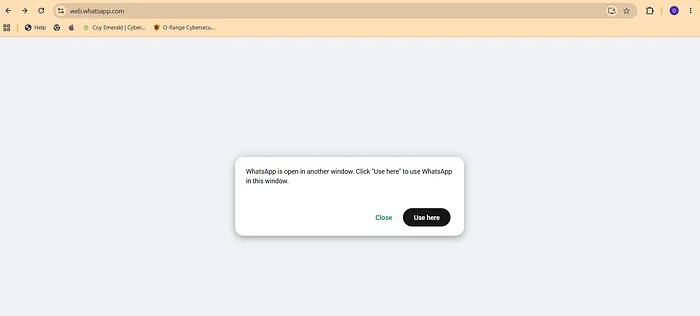
The prompt exists to stop multiple WhatsApp Web sessions from operating simultaneously within one browser profile. Incognito or guest mode, or a separate browser profile, can be used to reach different accounts, but within a single profile a second login attempt through web.whatsapp.com triggers the same prompt, and choosing Use here moves the session to the new window while killing the previous one.
While testing the internal endpoint https://web-fallback.whatsapp.com, the researcher found that it behaved differently from https://web.whatsapp.com/: it presented a QR code instead of the Use here prompt.
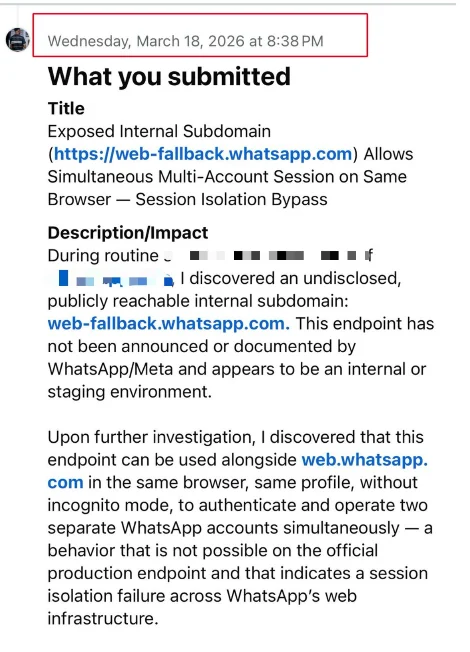
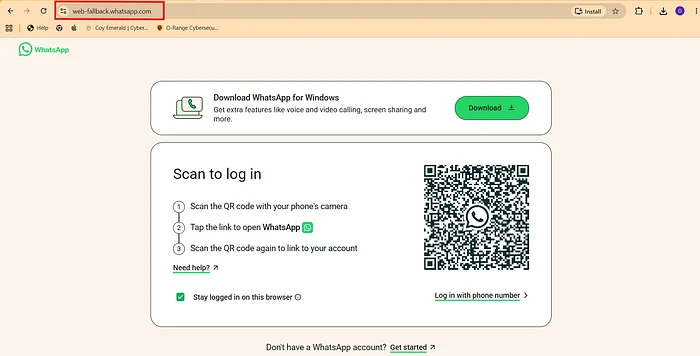
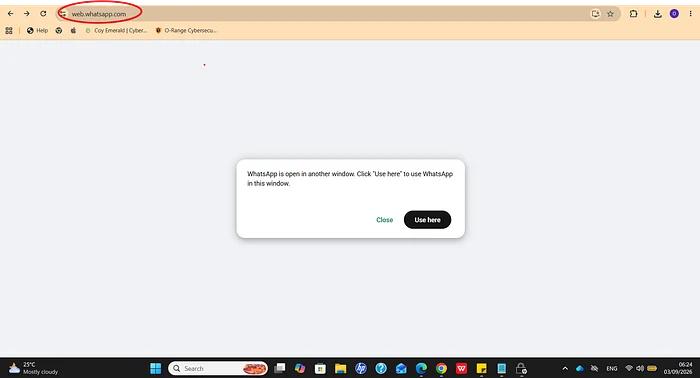
That difference is what made the endpoint worth pursuing. A QR code with no session-transfer warning, and no invalidation of the existing session, suggested that the fallback path did not share the session-management logic of the primary one.
Exploitation
Step 1: Establish a session on the primary endpoint
In one tab of a browser profile, the researcher linked a WhatsApp account through https://web.whatsapp.com/. This tab is the "existing session" whose fate the test measures.
Step 2: Open the fallback endpoint in the same profile
In another tab of the same browser profile, the researcher opened:
https://web-fallback.whatsapp.com
Instead of the Use here prompt, the page displayed a QR code. No pop-up or prompt triggered the usual session-transfer warning, and the existing session was not invalidated.
Step 3: Link a device by scanning the QR code
On the phone, the researcher opened WhatsApp, went to Linked Devices, chose Link a device, and scanned the QR code shown on https://web-fallback.whatsapp.com. The login to the same account succeeded.
Step 4: Repeat with a second account
The researcher logged out and repeated the process with a second WhatsApp account. The login succeeded again.
Step 5: Check the original session
The tab that already had the first account linked through https://web.whatsapp.com/ remained active. Everything in it continued to work, and the existing session was not logged out.
The result is two separate WhatsApp accounts authenticated and operating at the same time inside one browser profile, with no session invalidation and no Use here warning.
Root cause
The report does not describe the server-side implementation, so the cause can only be inferred. The report does not describe the server-side implementation, so the cause is not established. The fallback path produced a working session while the session held by web.whatsapp.com stayed active.
What the report does establish is the inconsistency itself: the restriction and the user experience implemented on https://web.whatsapp.com are not mirrored on https://web-fallback.whatsapp.com. Meta's assessment was that this does not amount to a security vulnerability.
Impact
Under the conditions tested, a user with two WhatsApp accounts can authenticate and operate both simultaneously within a single browser profile by using the fallback endpoint for the second one, instead of having the first session terminated. The researcher's position is that the single-session restriction on WhatsApp Web can be bypassed through this endpoint.
The researcher's position is that the QR-code authentication process on the fallback endpoint bypasses the session restriction enforced on the primary platform. Meta's position, after review, is that the behaviour does not constitute a security vulnerability and does not meet the criteria of the bug bounty programme. No account takeover, cross-user access or other impact beyond the session-management inconsistency is claimed in the report.
Fix
Variants to test
- Other fallback or alternate hostnames for the same product. Enumerate hosts that serve the same client (for example, hosts named after fallback, legacy, beta or regional roles) and open them in a profile that already holds a session on the primary host. A positive result is a QR code or a working login where the primary host would show a session-transfer prompt.
- Alternate authentication paths on the primary host. Look for query parameters, paths or flows that reach the QR linking step without the session check. A positive result is a successful link while the existing session stays active.
- Session survival after linking through the alternate path. After linking through the candidate endpoint, reload and interact with the original tab. A positive result is the original session continuing to work rather than being logged out.
- Multiple accounts in one profile. Repeat the link with a second account through the candidate endpoint while the first session is live. A positive result is both accounts operating concurrently in the same profile.
- Same test on other products with a single-session prompt. Any web client that warns about an active session elsewhere and offers a transfer action is a candidate. A positive result is an alternate endpoint that authenticates without triggering the warning or invalidating the first session.
What happened, in plain words
Imagine you have a single key to your flat, and the building manager has a rule: only one door can be unlocked at a time. If you try to open a second door, the manager appears and says "your flat is already open somewhere else, click here to move it to this door", and the first door locks behind you. That is roughly how WhatsApp Web normally behaves in a browser.
WhatsApp Web is the version of WhatsApp you use in a web browser on a computer, instead of on your phone. It is normally served from https://web.whatsapp.com/. When you open a second tab or window of WhatsApp Web inside the same browser profile, the site does not give you a second independent session. A session here means the state of being logged in: the browser holds something that proves to WhatsApp "this tab is the phone's linked companion right now". Instead of a second session, you get a prompt:
WhatsApp is open in another window. Click "Use here" to use WhatsApp in this window.
Clicking Use here moves the active session to the new window and ends the previous one. The prompt is the visible enforcement of a single-session restriction per browser profile. A browser profile is the set of saved logins, cookies and settings that a browser keeps for one user; two tabs in the same profile share it, while a different profile or a private window keeps its own separate set.
This write-up documents a behaviour observed on an internal fallback endpoint, https://web-fallback.whatsapp.com, which does not appear to enforce that restriction. An endpoint is simply a specific address on a server that a browser talks to; a fallback endpoint is a spare or alternate address used when the main one is unavailable or for some internal purpose. After several months of exchanges, the team replied on Thursday, 30 July 2026 and concluded that the behaviour did not constitute a security vulnerability and did not meet the criteria of the bug bounty programme. A bug bounty programme is a scheme where a company pays people for reporting security problems in its products. The article is published as documentation of the finding.
Setup
The testing required nothing beyond a normal browser profile and two WhatsApp accounts:
- A browser profile in which WhatsApp Web was already linked to one account.
- A second WhatsApp account on a phone, used to scan a QR code through Linked Devices > Link a device.
- The two endpoints under comparison:
https://web.whatsapp.com/andhttps://web-fallback.whatsapp.com/.
No special tooling, proxy interception or modified client is described. A proxy is a program that sits between your browser and the internet and can read or change the traffic; interception means capturing that traffic to inspect it. None of that was needed here. The whole test is performed through the ordinary web interface and the ordinary mobile app menu.
A QR code is that square barcode made of black and white squares. In WhatsApp's case it encodes a one-time link request: the phone reads it with its camera, and if you are logged in on the phone, the phone approves the browser as a linked device. Linked Devices is the menu in the phone app that lists the computers and browsers currently allowed to use your account, and Link a device is the button inside it that opens the phone's camera to scan such a code.
Finding it
The starting observation is the baseline behaviour of the primary platform. Opening a second WhatsApp Web session in the same browser profile produces the Use here prompt, shown here:
The screenshot shows the Use here prompt.
The prompt exists to stop multiple WhatsApp Web sessions from operating simultaneously within one browser profile. Incognito or guest mode, or a separate browser profile, can be used to reach different accounts, but within a single profile a second login attempt through web.whatsapp.com triggers the same prompt, and choosing Use here moves the session to the new window while killing the previous one.
While testing the internal endpoint https://web-fallback.whatsapp.com, the researcher found that it behaved differently from https://web.whatsapp.com/: it presented a QR code instead of the Use here prompt.
The images show the fallback endpoint presenting a QR code.
That difference is what made the endpoint worth pursuing. A QR code with no session-transfer warning, and no invalidation of the existing session, suggested that the fallback path did not share the session-management logic of the primary one. Session management is the set of rules a site uses to decide who is logged in, in which tab, and when a login should be ended.
Exploitation
Step 1: Establish a session on the primary endpoint
In one tab of a browser profile, the researcher linked a WhatsApp account through https://web.whatsapp.com/. This tab is the "existing session" whose fate the test measures. The point of this step is to create the situation the restriction is supposed to protect: one live login in the profile, which a second login attempt should either replace or be blocked by.
Step 2: Open the fallback endpoint in the same profile
In another tab of the same browser profile, the researcher opened:
https://web-fallback.whatsapp.com
This is just the address typed into the address bar of a second tab. Nothing else is added: no parameters, no special headers. A parameter is the extra piece of information sometimes attached to a web address after a question mark, such as ?page=2; a header is a small line of extra information the browser sends along with every request, such as which language you prefer. The step was taken to see whether the fallback address would react to the already-live session the same way the main address does.
Instead of the Use here prompt, the page displayed a QR code. No pop-up or prompt triggered the usual session-transfer warning, and the existing session was not invalidated. That is the first sign of the inconsistency: the same browser profile, the same live login, but a different reaction depending on which address was opened.
Step 3: Link a device by scanning the QR code
On the phone, the researcher opened WhatsApp, went to Linked Devices, chose Link a device, and scanned the QR code shown on https://web-fallback.whatsapp.com. The login to the same account succeeded. This step matters because a QR code on screen proves nothing by itself; it only becomes a real login once the phone approves it. Scanning it is what turns the page into an authenticated session.
Step 4: Repeat with a second account
The researcher logged out and repeated the process with a second WhatsApp account. The login succeeded again. Repeating with a different account checks whether the result was a one-off or a general property of the fallback endpoint.
Step 5: Check the original session
The tab that already had the first account linked through https://web.whatsapp.com/ remained active. Everything in it continued to work, and the existing session was not logged out. This is the key measurement: normally the second login would have ended the first, and here it did not.
The result is two separate WhatsApp accounts authenticated and operating at the same time inside one browser profile, with no session invalidation and no Use here warning.
Root cause
The report does not describe the server-side implementation, so the cause can only be inferred. The report does not describe the server-side implementation, so the cause is not established. The fallback path produced a working session while the session held by web.whatsapp.com stayed active.
In everyday terms: the rule about one open door at a time is being checked by the front desk, but the side entrance has its own key machine that never phones the front desk. Both doors end up open because nobody told the other desk.
What the report does establish is the inconsistency itself: the restriction and the user experience implemented on https://web.whatsapp.com are not mirrored on https://web-fallback.whatsapp.com. Meta's assessment was that this does not amount to a security vulnerability.
Impact
Under the conditions tested, a user with two WhatsApp accounts can authenticate and operate both simultaneously within a single browser profile by using the fallback endpoint for the second one, instead of having the first session terminated. The researcher's position is that the single-session restriction on WhatsApp Web can be bypassed through this endpoint. A bypass means getting around a control without breaking it: the rule still exists, you just found a route that does not apply it.
The researcher's position is that the QR-code authentication process on the fallback endpoint bypasses the session restriction enforced on the primary platform. Meta's position, after review, is that the behaviour does not constitute a security vulnerability and does not meet the criteria of the bug bounty programme. No account takeover, cross-user access or other impact beyond the session-management inconsistency is claimed in the report. Account takeover would mean someone else gaining control of your account; cross-user access would mean one person seeing another person's data. Neither is claimed here.
Fix
Meta concluded that the behaviour did not constitute a security vulnerability and stated that it would not take down the subdomain.
Variants to test
These are the follow-up checks the write-up suggests for anyone who wants to look for the same pattern elsewhere. Each one is a way of asking the same question in a different place: does every route into the product apply the same session rule?
- Other fallback or alternate hostnames for the same product. Enumerate hosts that serve the same client (for example, hosts named after fallback, legacy, beta or regional roles) and open them in a profile that already holds a session on the primary host. A hostname is the part of the address that names the server, like
web.whatsapp.com; enumerating them means making a list of the ones that exist. A positive result is a QR code or a working login where the primary host would show a session-transfer prompt. - Alternate authentication paths on the primary host. Look for query parameters, paths or flows that reach the QR linking step without the session check. A path is the part of the address after the hostname, such as
/login. A positive result is a successful link while the existing session stays active. - Session survival after linking through the alternate path. After linking through the candidate endpoint, reload and interact with the original tab. A positive result is the original session continuing to work rather than being logged out.
- Multiple accounts in one profile. Repeat the link with a second account through the candidate endpoint while the first session is live. A positive result is both accounts operating concurrently in the same profile.
- Same test on other products with a single-session prompt. Any web client that warns about an active session elsewhere and offers a transfer action is a candidate. A positive result is an alternate endpoint that authenticates without triggering the warning or invalidating the first session.
Glossary
- Account takeover: a situation where someone else gains control of your account.
- Authentication: the process of proving who you are, usually by logging in.
- Baseline behaviour: how a system normally acts, used as the comparison point for anything unusual.
- Browser profile: the collection of saved logins, cookies and settings a browser keeps for one user; tabs in the same profile share it.
- Bug bounty programme: a scheme where a company pays people for reporting security problems in its products.
- Bypass: getting around a security control without breaking it, by finding a route that does not apply it.
- Cookie: a small piece of data a site stores in your browser so it can recognise you on later requests.
- Cross-user access: one person being able to see or use another person's data.
- Endpoint: a specific address on a server that a browser talks to.
- Enumerate: to make a list of things that exist, such as hostnames or paths.
- Fallback endpoint: a spare or alternate address used when the main one is unavailable or for internal purposes.
- Header: a small line of extra information sent along with a web request, such as the preferred language.
- Hostname: the part of a web address that names the server, for example
web.whatsapp.com. - Incognito or guest mode: a private browser window that does not share the normal profile's saved logins and cookies.
- Interception: capturing network traffic so it can be inspected or changed.
- Invalidate a session: to end a login so that it no longer works.
- Linked Devices: the menu in the WhatsApp phone app that lists the computers and browsers allowed to use your account.
- Link a device: the button in that menu that opens the phone camera to scan a QR code and approve a browser.
- Parameter: extra information attached to a web address after a question mark, such as
?page=2. - Path: the part of a web address after the hostname, such as
/login. - Primary endpoint: the main address a product is normally used through, here
https://web.whatsapp.com/. - Proxy: a program that sits between your browser and the internet and can read or change the traffic.
- QR code: a square barcode that a camera can read, used here to approve a browser login.
- Session: the state of being logged in, backed by data the browser holds that proves it to the site.
- Session management: the rules a site uses to decide who is logged in, in which tab, and when a login ends.
- Single-session restriction: a rule allowing only one active login at a time within one browser profile.
- Subdomain: a named part of a larger domain, such as
web-fallbackinsidewhatsapp.com. - Vulnerability: a weakness in a system that can be used to cause harm or break a security rule.
- WhatsApp Web: the browser version of WhatsApp, normally served from
https://web.whatsapp.com/.




