Cache Poisoning at Scale
The article describes multiple cache poisoning vulnerabilities across various bug bounty programs, including GitHub, GitLab, Shopify, and HackerOne. Attackers could poison caches to cause denial of service, stored XSS, or redirects, depending on the configuration.

Identifying and exploiting over 70 cache poisoning vulnerabilities across major bug bounty programs, including GitHub, GitLab, Shopify and HackerOne.
The full write-up lives on its author's site
It belongs to its author, so we link to it rather than copy it. The other two tabs are our own rewrites, checked against it.
Context
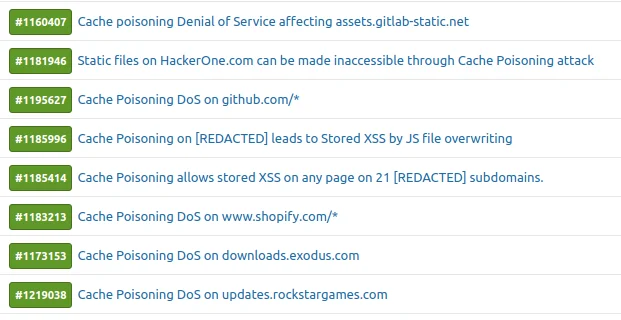
This is a research write-up by Iustin Ladunca (@iustinBB), published on 23 December 2021, describing a campaign in which he identified and reported over 70 web cache poisoning vulnerabilities across major bug bounty programs, including GitHub, GitLab, Shopify and HackerOne. The asset named in the platform metadata is youst.in, the researcher's own site where the write-up lives; the vulnerable systems are the third-party programs described in the text.
The subject is web cache poisoning: the class of attacks where an attacker causes a shared cache (a CDN or reverse proxy) to store a response that was generated for a crafted request, so that later users requesting the same cache key receive the poisoned response. The write-up assumes the reader already understands the basics and points to albinowax's Practical Web Cache Poisoning for background.
The paper is organised around several distinct techniques rather than a single target: incorrect handling of the URL fragment in Apache Traffic Server, cache poisoning denial of service against GitHub and GitLab, the x-forwarded-scheme behaviour in Rack middleware, Cloudflare caching of 403 responses for storage buckets, Fastly host header injection, injection of keyed parameters, user-agent blocking rules, and illegal header fields. Each is a variation on the same theme: a difference between how the cache builds its key and how the origin interprets the request.
Setup
The researcher does not describe accounts, roles or specific product versions. The tools and preconditions that the text does mention are:
- A custom tool written by the researcher that brute-forces unkeyed headers and detects cache poisoning, used to scan bug bounty targets at scale.
- Burp Suite, mentioned as the place where the GitHub attack worked even though it could not be reproduced in a browser.
- Google BigQuery, used to query the HTTP Archive for values seen in the
Varyresponse header, in order to expand the list of headers worth testing. - A merged header wordlist combining the headers found through BigQuery with Param-Miner's header list, published as a gist (2917 lines).
- For one program, the Varnish Configuration file, which the program agreed to share after multiple cache poisoning reports so that the researcher could more easily identify other inconsistencies.
The general precondition for every technique is a target whose responses are cached by a shared cache, and a request attribute that the cache ignores when computing the key but the origin server uses when generating the response.
Finding it
The starting point is described in the backstory. On 19 December 2020 the researcher published a short write-up on a Varnish edge case where sending a capitalised host header could poison the cache. That required a particular custom Varnish configuration, and scanning for it produced no other results. Shortly afterwards he realised Cloudflare was also vulnerable to the same capitalised host header attack, this time with no custom configuration: Cloudflare lowercased the host header before putting it into the cache key, but always forwarded it as sent by the client. Any backend behind Cloudflare that responded differently to a capitalised host header would therefore allow the cache to be poisoned. Both Fastly and Cloudflare have since fixed that behaviour. Because this subtle inconsistency affected a good subset of bug bounty targets, he decided to look for other common patterns that could be exploited at scale.
The rest of the paper is the result of that search. Each section follows the same shape: a behaviour of a cache or origin stack that looks inconsistent, a request that demonstrates it, and the impact that follows.
Exploitation
Step 1: URL fragment handling in Apache Traffic Server (CVE-2021-27577)
Apache Traffic Server (ATS) is a caching HTTP proxy used widely by Yahoo and Apple. When a request sent to ATS contains a URL fragment, ATS forwards it without stripping the fragment. According to RFC7230 the forwarded request is invalid, because the origin-form should only be composed of the absolute-path and query.

ATS also generates cache keys by extracting the host, path and query, ignoring the URL fragment. Both requests shown below therefore share the same cache key:


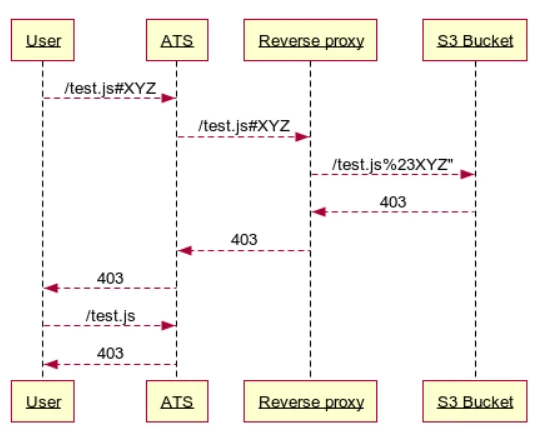
Ignoring the fragment when generating the key while still forwarding it creates a large opportunity. When the proxies behind ATS are configured to encode # to %23, an attacker can cache a completely different path under any cache key. The researcher used this to poison static files:
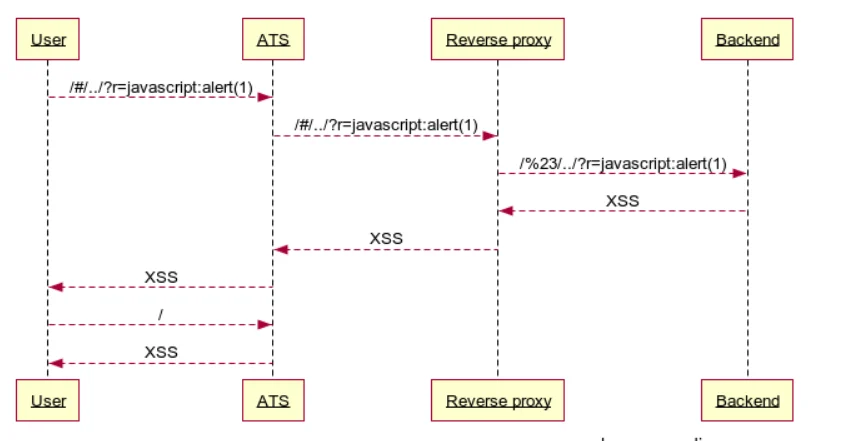
If the backend also normalised /../, an attacker could redirect users to any path, which would make escalation to XSS and open redirects easy:
Step 2: GitHub cache poisoning DoS
Because a large part of cache poisoning vulnerabilities are caused by unkeyed headers, the researcher wrote a tool to brute-force unkeyed headers and detect cache poisoning, then scanned bug bounty targets at scale. Many programs include GitHub repositories in scope, so a few repository URLs made it into the target list. In the scan results, all GitHub repositories were marked as vulnerable when the content-type header contained an invalid value.
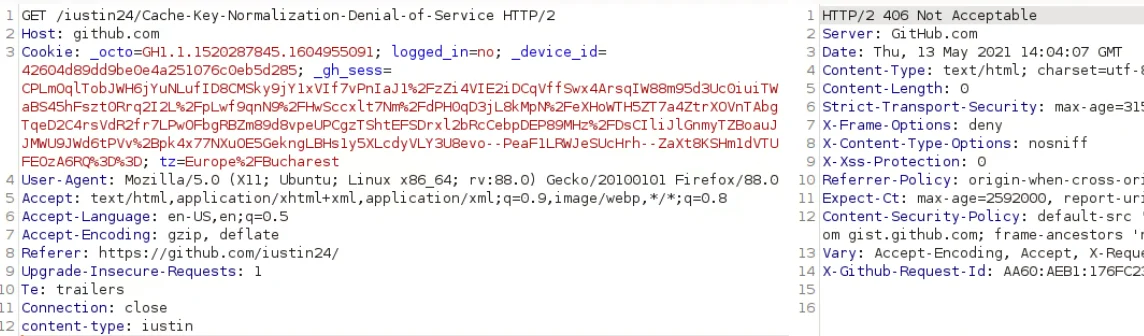
The scan flagged the repositories and the attack worked in Burp Suite, but it could not be reproduced in a browser. It became apparent that GitHub was including the authentication cookie inside the cache key. Poisoning repositories for authenticated users was therefore not possible, but repositories could be taken down for all unauthenticated users visiting them, since those users shared the same cache key. This was awarded $7500, the highest paid cache poisoning report in the paper.
Step 3: GitLab cache poisoning DoS
GitLab uses Google Cloud Platform and Fastly to host static files on https://assets.gitlab-static.net/*. Google Cloud Buckets support the x-http-method-override header by default, which allows the HTTP method to be overridden. Appending the header x-http-method-override: POST returned a 405 status code, which Fastly does not cache by default. It was however possible to send the header x-http-method-override: HEAD and poison the cache into returning an empty response body.
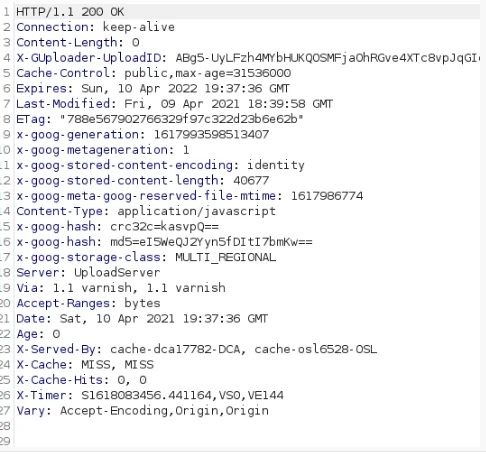
The PURGE method was also enabled, which drastically lowered the complexity of an attack. This was awarded a top-tier $4,850 bounty. The same technique worked on a multitude of other bounty targets besides GitLab.
Step 4: x-forwarded-scheme in Rack middleware
Ruby on Rails applications are often deployed alongside the Rack middleware. The Rack code below takes the value of x-forwarded-scheme and uses it as the scheme of the request.

Sending the header x-forwarded-scheme: http resulted in a 301 redirect to the same location. If the response was cached by a CDN, it caused a redirect loop, denying access to the file. This was exploited on a good number of bounty targets.
HackerOne static files
HackerOne's cache configuration only caches static files, so cache poisoning attacks were restricted to static files.
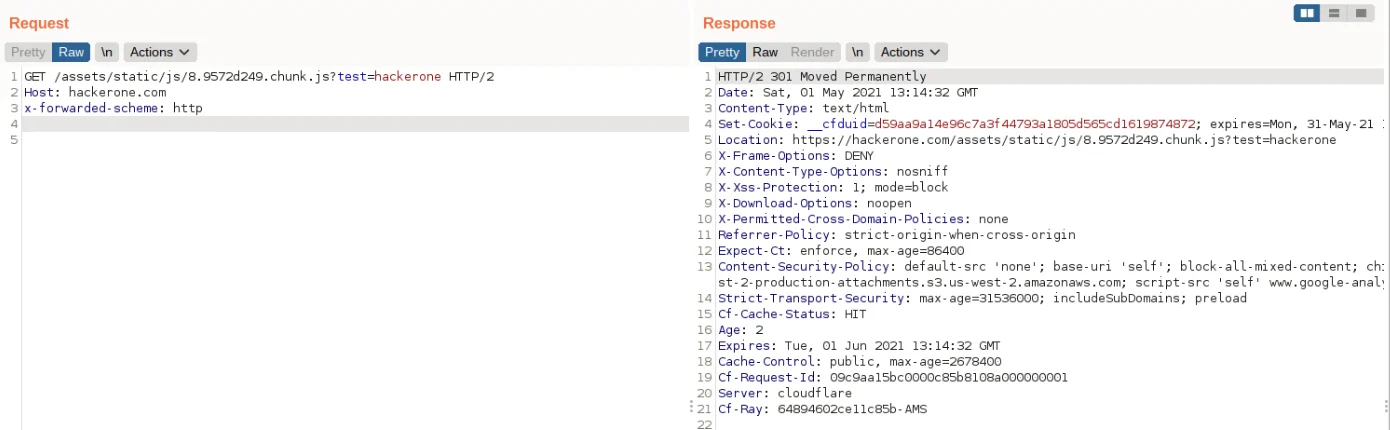
At the time of reporting, DoS vulnerabilities were out of scope, but this was still awarded a $2500 bounty.
Single request DoS of www.shopify.com
The same technique affected www.shopify.com, but Shopify's cache configuration increased the impact. The server was not configured to cache HTML pages, but 301 requests were cached by default, so it took only one untimed request to trigger the cache poisoning DoS.

This was initially awarded $1300. After further investigation it was found to also affect other localised subdomains and hosts such as apps.shopify.com. Because the vulnerability affected a number of Shopify hosts and only one request was required to poison the cache, the bounty was increased to $6300.
Stored XSS on 21 subdomains
While testing a private program, the researcher noticed that the same vulnerability found on HackerOne affected all of the program's subdomains. This time the server also trusted the X-forwarded-host header on 301 redirects, which allowed an attacker to redirect JS files to attacker-controlled JavaScript.

Because this could have led to stored XSS on the target's main website and over 21 other subdomains, it was triaged as Critical and rewarded the maximum bounty of $3000.
Step 5: Cloudflare and storage buckets
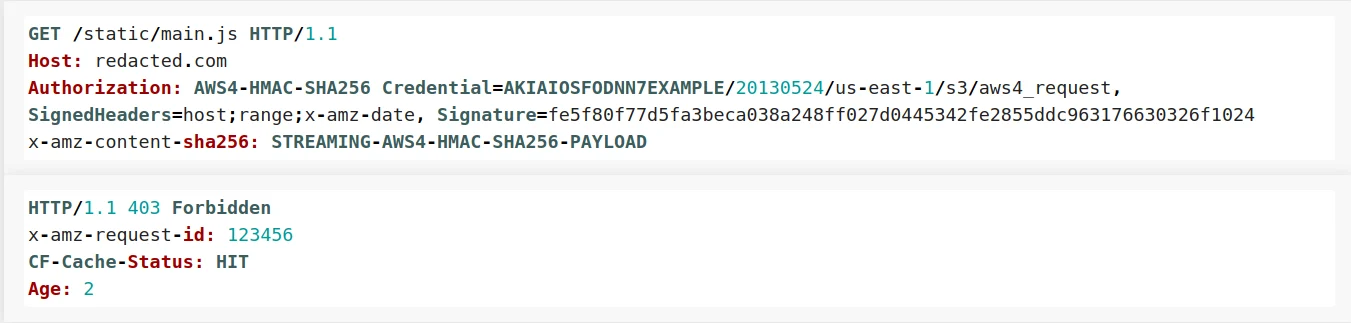
Cloudflare is the most widely used content delivery network, and storage buckets such as S3 are often behind it. This setup used to be vulnerable to cache poisoning by default. Up until 3 August 2021, Cloudflare cached 403 status codes even when there was no Cache-control directive. This made it possible to poison any file hosted on an S3 bucket and proxied through Cloudflare: sending invalid Authorization headers caused a cacheable 403 error.
S3 bucket
Azure Storage
Exodus uses the subdomain downloads.exodus.com to serve downloads such as the Exodus wallet installer. The files were stored on an Azure Storage Blob, and it was possible to cause a cacheable 403 error with a crafted Authorization header. The Exodus team fixed the issue a few hours after receiving the report and awarded a $2500 bounty.
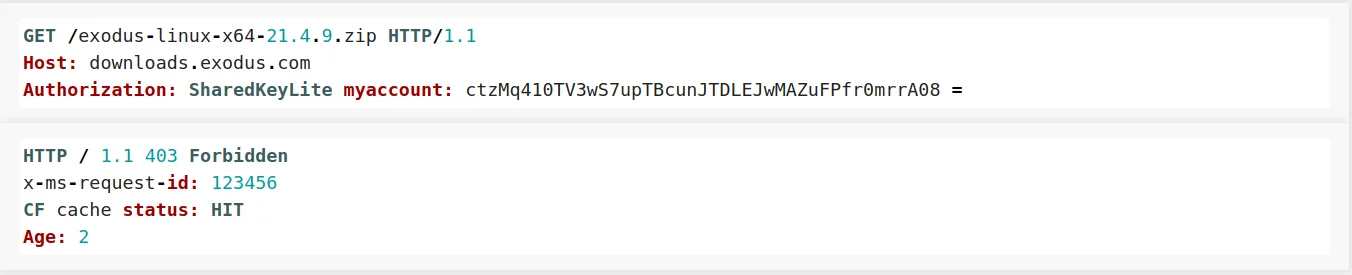
Cloudflare also changed its default configuration and no longer caches 403 responses by default.
Step 6: Fastly host header injection
After multiple cache poisoning reports to the same program, the program agreed to share its Varnish Configuration file so the researcher could more easily identify other inconsistencies. Skimming the file, he found a snippet similar to the one below:

The snippet was used for a subdomain hosting map images. Requesting an image looked something like this:

The image requested above therefore had the cache key /4/151/16.
That alone was not enough, because Fastly rejects any host header that is not whitelisted.

The mechanism was completely bypassed by appending the Fastly-host header to the request. If the fastly-host header contained the whitelisted value, the host header could be changed to anything:

Host header injection was enough for cache poisoning DoS, but the researcher wanted more, so he dug deeper. Looking at other Fastly hosts on the same program, he found an HTML file on redacted-cdn.com vulnerable to DOM XSS. Because it was under the redacted-cdn.com origin, the XSS by itself had no impact. He escalated it using the fastly-host header, after discovering that the host header was being forwarded while the fastly-host was used to generate the cache key. The following request therefore matched the cache key of https://assets.redacted.com/test.html:

Both hosts were behind the same load balancer, so files hosted on redacted-cdn.com could be cached under assets.redacted.com. This moved the vulnerable HTML file onto a different domain and achieved XSS under a different origin.
Step 7: Injecting keyed parameters
Caches are often configured to include only specific GET parameters in the cache key, which is especially common in CDNs hosting images that use parameters to modify size or format. While testing a target using Fastly to cache images, the researcher noticed that the size parameter was included in the cache key but all others were ignored. If two size parameters were added, both were included in the cache key, but the backend server used the value from the last parameter. Fastly (Varnish) does no URL normalisation before generating the cache key, which allowed the following DoS method:

URL-encoding the second size parameter caused it to be ignored by the cache but used by the backend. Giving the parameter a value of 0 resulted in a cacheable 400 Bad Request.
Step 8: User agent rules
Because of the volume of traffic generated by tools such as FFUF or Nuclei, some developers decided to block requests matching their user-agents. These tweaks can introduce unwanted cache poisoning DoS opportunities.

This worked on multiple targets, with user-agents from different tools and scanners.
Step 9: Illegal header fields
The header name format is defined in RFC7230 as follows:

In theory, a header name containing characters other than those listed in tchar should be rejected with a 400 Bad Request. In practice servers do not always respect the RFC. The easiest way to exploit this was to target Akamai, which does not reject invalid headers but forwards them and caches any 400 error as long as the cache-control header is not present.

Sending a header containing an illegal character, \, caused a cacheable 400 Bad Request error. This was one of the most commonly identified patterns throughout the testing.
Step 10: Finding new headers
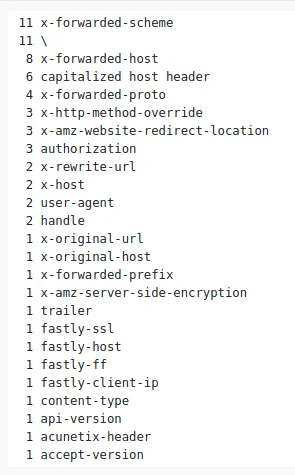
Besides a few novel cases where attributes of the request line could be used to poison the cache, the majority of the vulnerabilities detected were caused by unkeyed headers. To expand the list of headers, the researcher used Google's BigQuery to query the HTTP Archive for values used in the Vary response header. The Vary header contains header names that should be keyed by the cache server, so this surfaced a few extra vulnerable instances that would not otherwise have been detected. The resulting list, merged with Param-Miner's header list, is published as a gist (2917 lines).
The list below shows all the headers used to exploit over 70 caching servers:
Root cause
The common thread is a mismatch between the cache key and the request attributes that influence the origin's response. In each case the cache and the origin disagree about which parts of the request matter:
- ATS builds the key from host, path and query but forwards the fragment, and downstream proxies may encode
#to%23, so a different path can be cached under an existing key. - GitHub keyed on the authentication cookie, which limited the attack to unauthenticated users rather than preventing it.
- Google Cloud Buckets honour
x-http-method-override, so a method override changes the response while the cache still treats the request as a normal GET. - Rack middleware trusts
x-forwarded-scheme(and, on the private program,X-forwarded-host) when building redirects, so an unkeyed header changes the Location of a cacheable 301. - Cloudflare cached 403 responses without a
Cache-controldirective, so an invalid Authorization header produced a cacheable error. - Fastly's Varnish configuration generated a cache key from extracted coordinates only, and the
fastly-hostheader was used for the key while the host header was forwarded, so the two could be decoupled. - Fastly does no URL normalisation before generating the key, so a URL-encoded duplicate parameter is ignored by the cache but used by the backend.
- Blocking scanner user-agents creates a response that depends on an unkeyed header.
- Akamai forwards invalid header names and caches 400 errors when no cache-control header is present.
Existing defences did not stop these because the caches were behaving as configured: the problem was the configuration and the assumptions behind it, not a missing generic protection. The write-up notes that Cloudflare and Fastly have since fixed the capitalised host header behaviour, and that Cloudflare no longer caches 403 responses by default.
Impact
The reported impacts vary by technique and are hedged in the original:
- Cache poisoning DoS: GitHub repositories could be taken down for all unauthenticated users; GitLab static files could be made to return an empty body; HackerOne static files and Shopify hosts could be made to redirect in a loop, with Shopify requiring only one untimed request.
- Stored XSS: on the private program, redirecting JS files to attacker-controlled JavaScript could have led to stored XSS on the main website and over 21 other subdomains, triaged as Critical.
- File poisoning: any file on an S3 bucket proxied through Cloudflare, and downloads on
downloads.exodus.comserved from Azure Storage, could be poisoned with a cacheable 403. - Cross-origin XSS: on the Fastly target, a DOM XSS file on
redacted-cdn.comcould be cached underassets.redacted.com, achieving XSS under a different origin. - Redirects and open redirects: the ATS fragment technique could redirect users to any path if the backend normalised
/../, easing escalation to XSS and open redirects.
Bounties mentioned in the text are $7500 (GitHub), $4850 (GitLab), $2500 (HackerOne), $1300 rising to $6300 (Shopify), $3000 (private program, maximum), and $2500 (Exodus). The platform metadata records a total of $40000.00 USD.
Fix
The write-up describes the following changes as made by Cloudflare, Fastly and Exodus:
- Cloudflare and Fastly fixed the capitalised host header behaviour described in the backstory.
- Cloudflare changed its default configuration and no longer caches 403 responses by default (previously it cached them until 3 August 2021 even without a
Cache-controldirective). - The Exodus team fixed the Azure Storage issue a few hours after receiving the report.
The text does not state what GitHub, GitLab, HackerOne, Shopify or the private program changed. The implied fixes, consistent with the root causes, are to include every request attribute that influences the response in the cache key, to normalise URLs before keying, to strip or reject fragments and illegal header names at the edge, and to avoid caching error responses unless explicitly intended.
Variants to test
- Fragment handling: send a request with a URL fragment to a cache in front of a proxy that may encode
#to%23. A positive result is two requests with different fragments sharing a cache key while the origin sees different paths. - Method override headers: try
x-http-method-override: HEADandx-http-method-override: POSTagainst static file hosts backed by cloud buckets. A positive result is a cacheable empty body or a cached 405. - Scheme and host forwarding headers: send
x-forwarded-scheme: httpandX-forwarded-hostto Rails/Rack applications behind a CDN. A positive result is a cached 301 whose Location points elsewhere or loops. - Error caching: send invalid Authorization headers to files behind Cloudflare or similar. A positive result is a cached 403 for other users.
- Host header decoupling: where a CDN offers a header that selects the cache key separately from the forwarded host (the write-up shows
fastly-host), try mismatching the two. A positive result is content from one host served under another host's key. - Duplicate keyed parameters: add a second, URL-encoded copy of a keyed parameter such as
sizewith a value of 0. A positive result is a cacheable 400 while the backend uses the encoded value. - Scanner user-agent blocking: send user-agents from FFUF, Nuclei and similar tools. A positive result is a cacheable block response served to normal users.
- Illegal header names: send a header name containing a character outside tchar, such as
\, to Akamai-fronted hosts. A positive result is a cacheable 400 Bad Request. - Vary mining: query the HTTP Archive through BigQuery for header names seen in
Varyand merge them with Param-Miner's list, then brute-force those headers as unkeyed inputs. A positive result is a response that changes with the header while the cache key stays the same.
What happened, in plain words
Imagine a busy coffee shop with one barista who remembers the last order for each customer so they do not have to ask again. That memory is useful, but it is also a weakness: if someone can trick the barista into remembering the wrong order for a customer, everyone who asks for that same order afterwards gets the wrong drink. Web caches work the same way. A cache is a computer that sits between you and the real website and keeps copies of pages so it can answer faster next time. If an attacker can make the cache store a bad copy, every visitor who asks for that page gets the bad copy. This is called web cache poisoning.
This write-up is by a researcher called Iustin Ladunca (@iustinBB), published on 23 December 2021. He found and reported over 70 cache poisoning problems across large bug bounty programs, including GitHub, GitLab, Shopify and HackerOne. A bug bounty program is a scheme where a company pays independent researchers for finding and reporting security problems. The write-up lives on the researcher's own site, youst.in; the vulnerable systems are the third-party companies described in the text.
The paper is not about one target. It is a tour of several different tricks, each one a small mismatch between how a cache decides which copy to store and how the real website behind it reads the request. The researcher assumes you already know the basics and points readers to a paper called Practical Web Cache Poisoning by albinowax for background.
The tools and the starting point
The text does not describe accounts, roles or specific product versions. It does mention these tools and preconditions:
- A custom tool the researcher wrote himself. It tries many different request headers automatically (a brute force) and checks whether the cache can be poisoned. He used it to scan many bug bounty targets at once.
- Burp Suite, a tool for intercepting and editing web traffic. The text mentions it as the place where the GitHub attack worked, even though it could not be reproduced in a normal browser.
- Google BigQuery, a service for running queries over very large datasets. He used it to search the HTTP Archive, a public dataset of how websites behave, for header names that appear in a response header called
Vary. - A merged list of header names, combining what he found through BigQuery with a list from a tool called Param-Miner. It is published as a gist (a small public code snippet on GitHub) with 2917 lines.
- For one program, the Varnish Configuration file. Varnish is a popular caching server; its configuration file is the set of rules that tells it what to cache and how. The program agreed to share it after several reports so the researcher could spot other inconsistencies more easily.
The general precondition for every technique is the same: a target whose responses are cached by a shared cache, and some part of the request that the cache ignores when deciding which copy to store, but that the real website does use when building the response.
How he found the problems
The story starts in the backstory. On 19 December 2020 the researcher published a short write-up about a Varnish edge case: sending the host header with a capital letter could poison the cache. The host header is the part of a web request that says which website you want, for example Host: example.com. That first finding needed a particular custom Varnish configuration, and scanning for it found nothing else.
Shortly afterwards he realised Cloudflare was also vulnerable to the same capitalised host header attack, but this time with no custom configuration at all. Cloudflare is a large content delivery network, a service that sits in front of websites and caches their content. What happened was this: Cloudflare lowercased the host header before putting it into the cache key, but always forwarded it to the website exactly as the client sent it. The cache key is the label the cache uses to decide which stored copy belongs to which request. If the website behind Cloudflare responded differently to a capitalised host header, the cache would store that different response under the normal key, and other visitors would get it. Both Fastly and Cloudflare have since fixed that behaviour. Because this subtle inconsistency affected a good number of bug bounty targets, he decided to look for other common patterns he could exploit at scale.
The rest of the paper is the result of that search. Each section has the same shape: a behaviour of a cache or website stack that looks inconsistent, a request that demonstrates it, and the impact that follows.
The techniques, one by one
Step 1: URL fragments in Apache Traffic Server (CVE-2021-27577)
Apache Traffic Server (ATS) is a caching HTTP proxy used widely by Yahoo and Apple. A proxy is a server that passes requests along to another server, often caching the answers. A URL fragment is the part of a web address after the # symbol. In a browser, the fragment is normally never sent to the server at all; it is used only by the browser, for example to jump to a section of a page.
When a request sent to ATS contains a URL fragment, ATS forwards it without stripping the fragment. According to RFC7230, the document that defines how HTTP requests should look, the forwarded request is invalid, because the origin-form (the part of the request line that names the resource) should only be composed of the absolute-path and query.
ATS also builds its cache keys by extracting the host, path and query, and ignoring the URL fragment. That means both requests shown below share the same cache key:
Ignoring the fragment when building the key, while still forwarding it, opens a large opportunity. When the proxies behind ATS are configured to encode # to %23, an attacker can cache a completely different path under any cache key. The researcher used this to poison static files:
If the backend also normalised /../, an attacker could redirect users to any path, which would make escalation to XSS and open redirects easy:
Why this matters: the cache thinks two requests are the same because it ignores the fragment, but the server behind it sees two different paths. The cache stores one answer under a label that other visitors will also use, and those visitors get the attacker's answer.
Step 2: GitHub cache poisoning denial of service
A large part of cache poisoning problems come from unkeyed headers: request headers that the cache does not include in its key, but that the website does use when building the response. Because of that, the researcher wrote a tool to brute-force unkeyed headers and detect cache poisoning, then scanned bug bounty targets at scale.
Many programs include GitHub repositories in scope, so a few repository URLs made it into the target list. In the scan results, all GitHub repositories were marked as vulnerable when the content-type header contained an invalid value.
The scan flagged the repositories and the attack worked in Burp Suite, but it could not be reproduced in a browser. It became clear that GitHub was including the authentication cookie inside the cache key. A cookie is a small piece of data a website asks your browser to store and send back with every request; an authentication cookie is the one that proves who you are. Because that cookie was part of the key, poisoning repositories for logged-in users was not possible. But repositories could be taken down for all logged-out users visiting them, since those users all shared the same cache key. This was awarded $7500, the highest paid cache poisoning report in the paper.
Why this matters: the cache key included something that differs per user (the cookie), which limited the attack. It did not prevent it, because everyone without a cookie shares one key.
Step 3: GitLab cache poisoning denial of service
GitLab uses Google Cloud Platform and Fastly to host static files on https://assets.gitlab-static.net/*. Static files are things like images, stylesheets and scripts that do not change per visitor. Google Cloud Buckets support the x-http-method-override header by default, which allows the HTTP method to be overridden. The HTTP method is the verb at the start of a request, such as GET (fetch something) or POST (send something).
Appending the header x-http-method-override: POST returned a 405 status code, which Fastly does not cache by default. A status code is the three-digit number a server sends back to say what happened; 405 means the method is not allowed. It was however possible to send the header x-http-method-override: HEAD and poison the cache into returning an empty response body.
The PURGE method was also enabled, which drastically lowered the complexity of an attack. PURGE is a method that tells a cache to throw away a stored copy. This was awarded a top-tier $4,850 bounty. The same technique worked on many other bounty targets besides GitLab.
Why this matters: the cache treated the request as a normal GET, but the bucket behind it obeyed the override header and returned something different. The cache stored that different answer under the normal key.
Step 4: x-forwarded-scheme in Rack middleware
Ruby on Rails applications are often deployed alongside the Rack middleware. Ruby on Rails is a popular framework for building websites; middleware is a layer of code that sits between the incoming request and the application and can inspect or change it. The Rack code below takes the value of x-forwarded-scheme and uses it as the scheme of the request. The scheme is the http or https part of a web address.
Sending the header x-forwarded-scheme: http resulted in a 301 redirect to the same location. A 301 redirect is a response that tells the browser to go to a different address instead. If the response was cached by a CDN, it caused a redirect loop, denying access to the file. This was exploited on a good number of bounty targets.
Why this matters: the header is not part of the cache key, but it changes the response. The cache stores a redirect that points back to itself, so visitors get stuck in a loop.
HackerOne static files
HackerOne's cache configuration only caches static files, so cache poisoning attacks were restricted to static files.
At the time of reporting, denial of service vulnerabilities were out of scope, but this was still awarded a $2500 bounty. Out of scope means the program had said it would not pay for that kind of finding, but it paid anyway.
Single request denial of service of www.shopify.com
The same technique affected www.shopify.com, but Shopify's cache configuration increased the impact. The server was not configured to cache HTML pages, but 301 requests were cached by default, so it took only one untimed request to trigger the cache poisoning denial of service.
This was initially awarded $1300. After further investigation it was found to also affect other localised subdomains and hosts such as apps.shopify.com. Because the vulnerability affected a number of Shopify hosts and only one request was required to poison the cache, the bounty was increased to $6300.
Why this matters: "one untimed request" means the attacker did not need to keep sending requests; a single request was enough to poison the cache, which made the impact much worse.
Stored XSS on 21 subdomains
While testing a private program, the researcher noticed that the same vulnerability found on HackerOne affected all of the program's subdomains. A subdomain is a prefix on a domain, such as shop.example.com. This time the server also trusted the X-forwarded-host header on 301 redirects, which allowed an attacker to redirect JS files to attacker-controlled JavaScript. XSS (cross-site scripting) is when an attacker gets their own code to run in someone else's browser as if it came from the trusted website.
Because this could have led to stored XSS on the target's main website and over 21 other subdomains, it was triaged as Critical and rewarded the maximum bounty of $3000. Stored XSS means the malicious code is saved on the server and served to every visitor, rather than being a one-off trick.
Why this matters: redirecting a JavaScript file to a file the attacker controls means the trusted site loads the attacker's code. That is a serious escalation from a simple redirect.
Step 5: Cloudflare and storage buckets
Cloudflare is the most widely used content delivery network, and storage buckets such as S3 are often behind it. A storage bucket is a cloud service for storing files, such as Amazon S3 or Azure Storage. This setup used to be vulnerable to cache poisoning by default. Up until 3 August 2021, Cloudflare cached 403 status codes even when there was no Cache-control directive. A 403 means forbidden; a Cache-control header is how a server tells caches whether and how long to store a response.
This made it possible to poison any file hosted on an S3 bucket and proxied through Cloudflare: sending invalid Authorization headers caused a cacheable 403 error. The Authorization header is where a request carries credentials.
S3 bucket
Azure Storage
Exodus uses the subdomain downloads.exodus.com to serve downloads such as the Exodus wallet installer. The files were stored on an Azure Storage Blob, and it was possible to cause a cacheable 403 error with a crafted Authorization header. The Exodus team fixed the issue a few hours after receiving the report and awarded a $2500 bounty.
Cloudflare also changed its default configuration and no longer caches 403 responses by default.
Why this matters: an error page is still a response, and if the cache stores it, every visitor gets the error instead of the file. The attacker only needs to make one bad request to poison the file for everyone.
Step 6: Fastly host header injection
After multiple cache poisoning reports to the same program, the program agreed to share its Varnish Configuration file so the researcher could more easily identify other inconsistencies. Skimming the file, he found a snippet similar to the one below:
The snippet was used for a subdomain hosting map images. Requesting an image looked something like this:
A regex (regular expression) is a pattern used to match text. The image requested above therefore had the cache key /4/151/16.
That alone was not enough, because Fastly rejects any host header that is not whitelisted. Whitelisted means explicitly allowed.
The mechanism was completely bypassed by appending the Fastly-host header to the request. If the fastly-host header contained the whitelisted value, the host header could be changed to anything:
Host header injection was enough for cache poisoning denial of service, but the researcher wanted more, so he dug deeper. Looking at other Fastly hosts on the same program, he found an HTML file on redacted-cdn.com vulnerable to DOM XSS. DOM XSS is XSS that happens because of how the browser's page model (the DOM) is built by the page's own scripts. Because it was under the redacted-cdn.com origin, the XSS by itself had no impact. An origin is the combination of scheme, host and port that browsers treat as one security boundary.
He escalated it using the fastly-host header, after discovering that the host header was being forwarded while the fastly-host was used to build the cache key. The following request therefore matched the cache key of https://assets.redacted.com/test.html:
Both hosts were behind the same load balancer, so files hosted on redacted-cdn.com could be cached under assets.redacted.com. A load balancer is a server that spreads traffic across several servers. This moved the vulnerable HTML file onto a different domain and achieved XSS under a different origin.
Why this matters: the cache key and the forwarded host were two separate things, and the attacker could make them disagree. That let content from one domain be served as if it belonged to another, which turns a harmless XSS into a serious one.
Step 7: Injecting keyed parameters
Caches are often configured to include only specific GET parameters in the cache key, which is especially common in CDNs hosting images that use parameters to change size or format. A GET parameter is a name and value added to the end of a URL after a ?, such as ?size=large.
While testing a target using Fastly to cache images, the researcher noticed that the size parameter was included in the cache key but all others were ignored. If two size parameters were added, both were included in the cache key, but the backend server used the value from the last parameter. Fastly (Varnish) does no URL normalisation before building the cache key, which allowed the following denial of service method:
URL-encoding the second size parameter caused it to be ignored by the cache but used by the backend. URL encoding replaces special characters with a % followed by a code, so that they can travel safely in a URL. Giving the parameter a value of 0 resulted in a cacheable 400 Bad Request. A 400 means the server could not understand the request.
Why this matters: the cache and the backend read the same URL differently. The cache sees one parameter, the backend sees another, and the attacker gets a bad response stored for everyone.
Step 8: User agent rules
Because of the volume of traffic generated by tools such as FFUF or Nuclei, some developers decided to block requests matching their user-agents. The user-agent is a header where the browser or tool says what it is. These tweaks can introduce unwanted cache poisoning denial of service opportunities.
This worked on multiple targets, with user-agents from different tools and scanners.
Why this matters: if the block response depends on the user-agent but the cache does not include the user-agent in its key, the block can be stored and served to normal visitors.
Step 9: Illegal header fields
The header name format is defined in RFC7230 as follows:
In theory, a header name containing characters other than those listed in tchar should be rejected with a 400 Bad Request. tchar is the set of characters RFC7230 allows in a header name. In practice servers do not always respect the RFC. The easiest way to exploit this was to target Akamai, which does not reject invalid headers but forwards them and caches any 400 error as long as the cache-control header is not present.
Sending a header containing an illegal character, \, caused a cacheable 400 Bad Request error. This was one of the most commonly identified patterns throughout the testing.
Why this matters: a malformed header should be rejected at the edge. When it is forwarded instead, the backend produces an error, and the cache stores that error for everyone.
Step 10: Finding new headers
Besides a few novel cases where attributes of the request line could be used to poison the cache, the majority of the vulnerabilities detected were caused by unkeyed headers. To expand the list of headers, the researcher used Google's BigQuery to query the HTTP Archive for values used in the Vary response header. The Vary header lists header names that a cache should include in its key, so it is a good hint about which headers a site thinks matter. This surfaced a few extra vulnerable instances that would not otherwise have been detected. The resulting list, merged with Param-Miner's header list, is published as a gist (2917 lines).
The list below shows all the headers used to exploit over 70 caching servers:
Why it worked
The common thread is a mismatch between the cache key and the parts of the request that influence the website's response. In each case the cache and the website disagree about which parts of the request matter:
- ATS builds the key from host, path and query but forwards the fragment, and downstream proxies may encode
#to%23, so a different path can be cached under an existing key. - GitHub keyed on the authentication cookie, which limited the attack to logged-out users rather than preventing it.
- Google Cloud Buckets honour
x-http-method-override, so a method override changes the response while the cache still treats the request as a normal GET. - Rack middleware trusts
x-forwarded-scheme(and, on the private program,X-forwarded-host) when building redirects, so an unkeyed header changes the Location of a cacheable 301. - Cloudflare cached 403 responses without a
Cache-controldirective, so an invalid Authorization header produced a cacheable error. - Fastly's Varnish configuration built a cache key from extracted coordinates only, and the
fastly-hostheader was used for the key while the host header was forwarded, so the two could be decoupled. - Fastly does no URL normalisation before building the key, so a URL-encoded duplicate parameter is ignored by the cache but used by the backend.
- Blocking scanner user-agents creates a response that depends on an unkeyed header.
- Akamai forwards invalid header names and caches 400 errors when no cache-control header is present.
Existing defences did not stop these because the caches were behaving as configured: the problem was the configuration and the assumptions behind it, not a missing generic protection. The write-up notes that Cloudflare and Fastly have since fixed the capitalised host header behaviour, and that Cloudflare no longer caches 403 responses by default.
What the impact was
The reported impacts vary by technique and are hedged in the original:
- Cache poisoning denial of service: GitHub repositories could be taken down for all logged-out users; GitLab static files could be made to return an empty body; HackerOne static files and Shopify hosts could be made to redirect in a loop, with Shopify requiring only one untimed request.
- Stored XSS: on the private program, redirecting JS files to attacker-controlled JavaScript could have led to stored XSS on the main website and over 21 other subdomains, triaged as Critical.
- File poisoning: any file on an S3 bucket proxied through Cloudflare, and downloads on
downloads.exodus.comserved from Azure Storage, could be poisoned with a cacheable 403. - Cross-origin XSS: on the Fastly target, a DOM XSS file on
redacted-cdn.comcould be cached underassets.redacted.com, achieving XSS under a different origin. - Redirects and open redirects: the ATS fragment technique could redirect users to any path if the backend normalised
/../, easing escalation to XSS and open redirects. An open redirect is a redirect that lets an attacker choose where the user is sent.
Bounties mentioned in the text are $7500 (GitHub), $4850 (GitLab), $2500 (HackerOne), $1300 rising to $6300 (Shopify), $3000 (private program, maximum), and $2500 (Exodus). The platform metadata records a total of $40000.00 USD.
What was fixed
The write-up describes the following changes as made by Cloudflare, Fastly and Exodus:
- Cloudflare and Fastly fixed the capitalised host header behaviour described in the backstory.
- Cloudflare changed its default configuration and no longer caches 403 responses by default (previously it cached them until 3 August 2021 even without a
Cache-controldirective). - The Exodus team fixed the Azure Storage issue a few hours after receiving the report.
The text does not state what GitHub, GitLab, HackerOne, Shopify or the private program changed. The implied fixes, consistent with the root causes, are to include every request attribute that influences the response in the cache key, to normalise URLs before keying, to strip or reject fragments and illegal header names at the edge, and to avoid caching error responses unless explicitly intended.
Things worth trying if you test this yourself
- Fragment handling: send a request with a URL fragment to a cache in front of a proxy that may encode
#to%23. A positive result is two requests with different fragments sharing a cache key while the website sees different paths. - Method override headers: try
x-http-method-override: HEADandx-http-method-override: POSTagainst static file hosts backed by cloud buckets. A positive result is a cacheable empty body or a cached 405. - Scheme and host forwarding headers: send
x-forwarded-scheme: httpandX-forwarded-hostto Rails/Rack applications behind a CDN. A positive result is a cached 301 whose Location points elsewhere or loops. - Error caching: send invalid Authorization headers to files behind Cloudflare or similar. A positive result is a cached 403 for other users.
- Host header decoupling: where a CDN offers a header that selects the cache key separately from the forwarded host (the write-up shows
fastly-host), try mismatching the two. A positive result is content from one host served under another host's key. - Duplicate keyed parameters: add a second, URL-encoded copy of a keyed parameter such as
sizewith a value of 0. A positive result is a cacheable 400 while the backend uses the encoded value. - Scanner user-agent blocking: send user-agents from FFUF, Nuclei and similar tools. A positive result is a cacheable block response served to normal users.
- Illegal header names: send a header name containing a character outside tchar, such as
\, to Akamai-fronted hosts. A positive result is a cacheable 400 Bad Request. - Vary mining: query the HTTP Archive through BigQuery for header names seen in
Varyand merge them with Param-Miner's list, then brute-force those headers as unkeyed inputs. A positive result is a response that changes with the header while the cache key stays the same.
Glossary
- API: a defined way for one piece of software to talk to another, like a menu of requests a service accepts.
- ATS (Apache Traffic Server): a caching HTTP proxy used widely by Yahoo and Apple.
- Authentication cookie: a cookie that proves who you are to a website.
- Authorization header: the request header that carries credentials.
- Azure Storage Blob: Microsoft's cloud file storage service.
- BigQuery: Google's service for running queries over very large datasets.
- Brute force: trying many possibilities automatically until one works.
- Bug bounty program: a scheme where a company pays researchers for finding and reporting security problems.
- Cache: a server that stores copies of responses so later requests can be answered faster.
- Cache key: the label a cache uses to decide which stored copy belongs to which request.
- Cache poisoning: tricking a shared cache into storing a bad response that other users then receive.
- Cache-control: a response header that tells caches whether and how long to store a response.
- CDN (content delivery network): a service that sits in front of websites and caches their content close to users.
- Cookie: a small piece of data a website asks your browser to store and send back with every request.
- CVE: a public identifier for a known security vulnerability.
- Denial of service (DoS): making a service unavailable to its normal users.
- DOM XSS: XSS that happens because of how the browser's page model is built by the page's own scripts.
- Fastly: a content delivery network and caching provider.
- FFUF: a tool that sends many requests quickly, often used to discover files and parameters.
- GET parameter: a name and value added to the end of a URL after a
?. - Gist: a small public code snippet hosted on GitHub.
- Host header: the part of a request that says which website you want.
- HTTP method: the verb at the start of a request, such as GET or POST.
- HTTP Archive: a public dataset of how websites behave.
- Load balancer: a server that spreads traffic across several servers.
- Middleware: a layer of code between the incoming request and the application that can inspect or change it.
- Nuclei: a tool that sends many requests quickly, often used for scanning.
- Open redirect: a redirect that lets an attacker choose where the user is sent.
- Origin: the combination of scheme, host and port that browsers treat as one security boundary.
- Out of scope: a finding type the program had said it would not pay for.
- Param-Miner: a tool that produces lists of parameter names.
- Proxy: a server that passes requests along to another server, often caching the answers.
- PURGE: an HTTP method that tells a cache to throw away a stored copy.
- Rack: a middleware layer commonly used with Ruby on Rails applications.
- Regex (regular expression): a pattern used to match text.
- RFC7230: the document that defines how HTTP requests and responses should look.
- Ruby on Rails: a popular framework for building websites.
- S3: Amazon's cloud file storage service.
- Scheme: the
httporhttpspart of a web address. - Static files: files like images, stylesheets and scripts that do not change per visitor.
- Status code: the three-digit number a server sends back to say what happened (for example 400, 403, 405).
- Stored XSS: XSS where the malicious code is saved on the server and served to every visitor.
- Subdomain: a prefix on a domain, such as
shop.example.com. - tchar: the set of characters RFC7230 allows in a header name.
- Unkeyed header: a request header the cache does not include in its key but the website does use.
- URL encoding: replacing special characters with a
%followed by a code so they can travel safely in a URL. - URL fragment: the part of a web address after the
#symbol, normally used only by the browser. - User-agent: a header where the browser or tool says what it is.
- Varnish: a popular caching server.
- Vary: a response header that lists header names a cache should include in its key.
- Whitelisted: explicitly allowed.
- XSS (cross-site scripting): getting attacker code to run in someone else's browser as if it came from the trusted website.