Card Declined? So Was Your Subdomain | Featurebase as an Undercovered Subdomain Takeover Vector
Featurebase lets customers serve its pages on their own subdomain via a CNAME but never verifies domain ownership, so when a customer removes the domain from Featurebase and leaves the CNAME in place, anyone can register that hostname in their own Featurebase account and serve their own content on the victim's subdomain. The author confirmed this in a controlled test with a throwaway domain, showing arbitrary page hosting on the orphaned subdomain.

Cybersecurity
The full write-up lives on its author's site
It belongs to its author, so we link to it rather than copy it. The other two tabs are our own rewrites, checked against it.
Context
Featurebase is a SaaS product that companies use to handle customer support and to let users submit feedback. Among its settings, developers can serve Featurebase pages on their own domain, either on the default feedback.[domain].com or on a differently named subdomain, provided they are on a paid Growth plan or higher, or on a free Growth trial. The trial requires no credit card and lasts 10 days.
Featurebase logo and website | Source
A normal deployment on a custom domain works like this:
- The customer adds a CNAME record in their DNS pointing their subdomain at
customdomains.featurebase.app. - Traffic to that subdomain resolves via the CNAME to Featurebase's infrastructure on the Cloudflare edge.
- During the TLS handshake the browser sends an SNI extension declaring the hostname, and Cloudflare uses it to select the correct certificate for that domain.
- Featurebase provisions that certificate automatically via Cloudflare when the domain is registered under Settings → Custom Domains.
- Once TLS is established, the HTTP request reaches Featurebase's origin. Featurebase reads the
Hostheader and looks up which organization has registered that domain. - If a registration exists, Featurebase serves that organization's content.
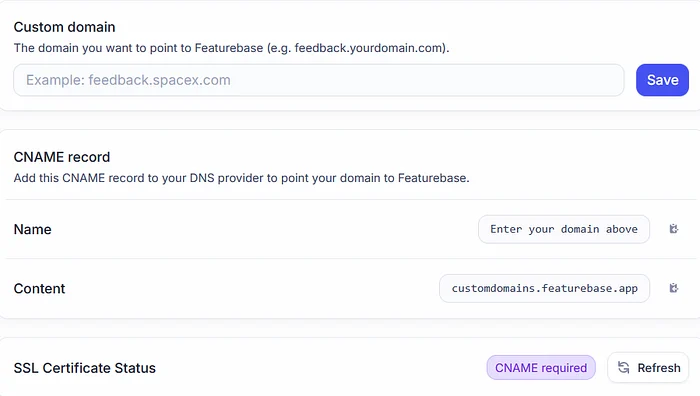
Featurebase -> Settings -> Custom Domains
The interesting part comes after this flow: Featurebase makes no attempt to verify domain ownership at all, for example through a TXT record challenge of the kind Google Search Console and similar services require. Everything therefore depends on the customer keeping the CNAME record in place.
Setup
The researcher tested this in a controlled environment with a developer who registered a CNAME on a throwaway domain pointing at customdomains.featurebase.app, then deliberately orphaned it. Exploitability was then confirmed with arbitrary page hosting. No specific tooling or versions are given; the report suggests dig and curl commands for confirmation.
The preconditions for a takeover are:
- Register on Featurebase and create a paid Growth plan or higher.
- Point the custom domain via CNAME.
- Later delete the account or manually remove the domain in Settings without removing the CNAME record, or lose ownership in some other way.
Finding it
When the organization's ownership of the subdomain is removed from Featurebase's database, Featurebase leaves a fingerprint behind. The custom domain page keeps loading, and in DevTools the SPA can be seen polling /api/v1/organization repeatedly to resolve which organization owns the domain.

Loading page for custom domains feature | Fingerprint no1.
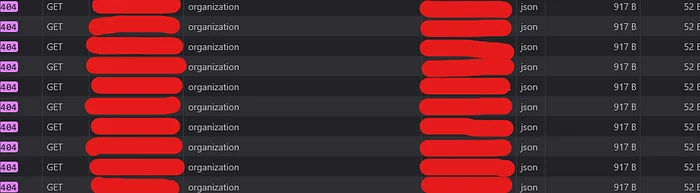
Featurebase organization API requests | Fingerprint no2.
Finding no registered organization, each request returns the following body with a 404, and the SPA loops indefinitely:
{"message": "Organization not found", "success": false}
That combination, a dangling CNAME plus this 404 response, is the signal that the subdomain is orphaned and available to be claimed.
Exploitation
Step 1: Create a Featurebase account on a qualifying plan
The attacker creates a Featurebase account, either paying for a Growth plan or higher or opting for the free trial, which needs no credit card.
Step 2: Point a custom domain at the victim's dangling CNAME
The attacker points custom domains at the victim's dangling CNAME record on their subdomain.
Step 3: Let Featurebase confirm the CNAME
Featurebase faithfully confirms that a CNAME exists, without verifying ownership, and begins serving the attacker's content.
Confirming the takeover
Besides the fingerprints above, a report for a Featurebase subdomain takeover should show proof that the CNAME record exists:
dig CNAME [featurebase_subdomain].[target].com | grep customdomains.featurebase.app
and proof of the 404 organization API return:
curl -s https://feedback.yourdomain.com/api/v1/organization
If it is in scope, the report should also include a successful takeover with innocent content. Researchers and bug hunters can use Featurebase's free Growth plan trial, at no cost, to prove a takeover for programs and clients where the scope allows it.
Root cause
The design flaw is the absence of any ownership verification: Featurebase never asks the customer to prove control of the domain through a TXT record challenge or a comparable mechanism. The only thing tying a domain to an organization is the CNAME pointing at customdomains.featurebase.app, and once the organization is removed from Featurebase's database the record is left dangling while the platform will happily register the same hostname for whoever points a CNAME at it next. Certificates are provisioned automatically via Cloudflare when a domain is registered in Settings.
Impact
Subdomain takeover as a category is more significant than CVSS scores and many write-ups make it out to be. An attacker with a controlled subdomain on a live host can:
- Bypass Cloudflare and WAF protections
- Launch and exploit XSS
- Launch extremely convincing phishing campaigns under domain legitimacy
- Launch cookie injection attacks
- Intercept OAuth and SSO flows
- Exploit CORS misconfigurations
The victim is any Featurebase customer who removed their domain from Settings or deleted their account without cleaning up the CNAME. The attacker needs only a Featurebase account on a Growth plan or higher, or the no-card trial.
Fix
No fix is described in the report. What it recommends is operational: if you deploy Featurebase, monitor your DNS records, and if you ever remove your domain from Featurebase Settings or delete your account, clean up your CNAME record immediately, because an orphaned CNAME is all an attacker needs. Audit your dependencies, limit subdomain exposure to strictly necessary groups, and wipe unused subdomains and their CNAMEs.
On the platform side, the report notes that Featurebase has not been submitted to the industry standard can-I-take-over-xyz, and that the repository appears abandoned, with its last contribution a year ago.
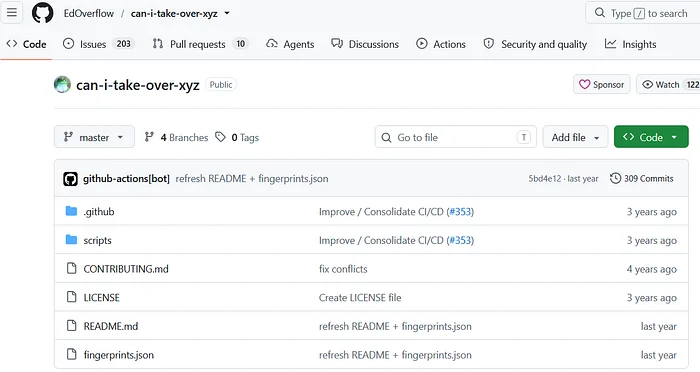
203 Unaddressed Issues and No Updates, 8/20/2026
Variants to test
- Other SaaS custom-domain features without TXT verification. Register a domain, point a CNAME at the provider, then remove the domain from the account without touching DNS. A positive result is the provider still resolving the hostname and serving a loading or error page tied to the missing organization.
- Polling endpoints as fingerprints. Watch DevTools for an SPA that repeatedly calls an organization lookup endpoint. A positive result is a stable 404 body such as
{"message": "Organization not found", "success": false}on a hostname whose CNAME still points at the provider. - Automatic certificate provisioning. Check whether the provider issues a certificate for a hostname as soon as it is registered. A positive result is valid TLS for the claimed hostname without any prior ownership proof.
- Free trials as a takeover path. Where a paid plan is required for custom domains, check whether a no-card trial unlocks the feature. A positive result is the custom domain setting being usable during the trial.
- DNS record hygiene on your own estate. Run the
digcheck against your own subdomains to find CNAMEs still pointing at providers you no longer use. A positive result is a CNAME to a provider hostname with no corresponding registration in that provider's dashboard.
What happened, in plain words
Imagine you rent a shop on a busy street. You put a sign on the door that says "this shop belongs to my company", and the landlord (the company whose software you use) trusts the sign completely. One day you move out and forget to take the sign down. Someone else walks past, sees the sign, and can now put their own goods in the window and pretend to be you. Customers walking down the street have no way of knowing the shop changed hands.
That is roughly what this article is about. A company called Featurebase offers a service that lets other companies put their pages on a web address of their own choosing, for example feedback.yourcompany.com. To make that work, the customer adds a small instruction to their domain's address book (called DNS) that points that address at Featurebase's servers. The problem: Featurebase never checks that the person claiming the address actually owns it. If the customer later removes the address from their Featurebase account but forgets to remove the DNS instruction, the address is left pointing at Featurebase with nobody claiming it. Anyone who signs up for Featurebase can then claim that same address and start serving their own content on the victim's domain.
This kind of bug is called a subdomain takeover. The article explains how it works, how to spot it, and how to confirm it. The article is written for other security researchers, but the idea is simple enough to follow with nothing more than a browser.
Featurebase logo and website | Source
The product and the feature
Featurebase is a SaaS product. SaaS stands for "software as a service": instead of installing a program on your own computer, you use someone else's software over the internet, usually by paying a subscription. Featurebase helps companies handle customer support and lets their users provide feedback.
Among its settings, Featurebase offers a feature called Custom Domains. Normally, a company using Featurebase would get a page at something like feedback.[domain].com, where [domain] is the company's own domain name. With Custom Domains, the company can serve those Featurebase pages on a differently named subdomain of their own.
To use this feature, the customer needs a paid Growth plan or higher, or a free Growth trial. The trial does not require a credit card and lasts for 10 days. That detail matters later: it means anyone can try the feature for free, without proving they are a paying customer.
Featurebase -> Settings -> Custom Domains
How a normal setup works, step by step
Before you can understand the bug, you need to understand how the feature is supposed to work. Here is the normal flow, as the article describes it:
- The customer adds a CNAME record in their DNS pointing their subdomain at
customdomains.featurebase.app. - Traffic to that subdomain resolves via the CNAME to Featurebase's infrastructure on the Cloudflare edge.
- During the TLS handshake the browser sends an SNI extension declaring the hostname, and Cloudflare uses it to select the correct certificate for that domain.
- Featurebase provisions that certificate automatically via Cloudflare when the domain is registered under Settings → Custom Domains.
- Once TLS is established, the HTTP request reaches Featurebase's origin. Featurebase reads the
Hostheader and looks up which organization has registered that domain. - If a registration exists, Featurebase serves that organization's content.
That is a lot of jargon in six lines, so let us unpack each piece.
DNS (Domain Name System) is the internet's address book. Humans type names like example.com; computers need numbers (IP addresses). DNS translates one into the other. A CNAME record (Canonical Name record) is a specific kind of entry in that address book that says "this name is really just another name for that other name". It is like a mail forwarding note: letters addressed to your old flat get redirected to your new one. Here, the customer's subdomain is told to forward to customdomains.featurebase.app, which is Featurebase's own address.
Cloudflare is a large company that sits between websites and their visitors, providing security and speed services. Its edge is the network of servers closest to visitors around the world. When someone visits a site protected by Cloudflare, they actually talk to Cloudflare first, and Cloudflare passes the request on to the real server behind it.
TLS (Transport Layer Security) is the technology that puts the padlock in your browser's address bar and encrypts the conversation between your browser and the website. The TLS handshake is the opening exchange where browser and server agree on how to encrypt and prove who they are. During that handshake, the browser sends an SNI extension (Server Name Indication): essentially the browser saying "I am trying to reach this particular hostname". This lets one server host many websites and still pick the right certificate for each one. A certificate is a digital document that proves a website is who it claims to be; it is what makes the padlock appear.
An HTTP request is the message your browser sends when you visit a page: "please give me this page". The Host header is a line inside that request that says which website the browser is asking for. Because many websites can live on the same server, the server reads this header to know which site to serve. Featurebase uses it to look up which organization registered that domain.
So the whole chain is: the customer's DNS points at Featurebase, Cloudflare picks the right certificate, and Featurebase reads the requested hostname and serves the matching organization's pages.
The flaw: nobody checks who owns the domain
The interesting part comes after this flow. Featurebase makes no attempt to verify domain ownership at all, for example through a TXT record challenge of the kind Google Search Console and similar services require.
A TXT record is another kind of DNS entry that can hold arbitrary text. Services like Google Search Console use it as a proof of ownership: they give you a random string, you put it in your DNS as a TXT record, and they check that the string is there. Only someone who controls the domain's DNS can add that record, so if the string is present, the service knows you own the domain. It is like a landlord asking you to leave a specific note in the letterbox before handing over the keys.
Featurebase skips that step entirely. It simply trusts that if a CNAME points at customdomains.featurebase.app, the person registering the domain must be its owner. Everything therefore depends on the customer keeping the CNAME record in place.
How the researcher tested it
The researcher tested this in a controlled environment with a developer they know. The developer registered a CNAME on a throwaway domain (a domain bought just for testing, with nothing important on it) pointing at customdomains.featurebase.app, then deliberately orphaned it: removed the domain from Featurebase without removing the DNS record. Exploitability was then confirmed with arbitrary page hosting, meaning the researcher was able to serve their own pages on that hostname.
The article does not name any specific tooling or versions; it suggests dig and curl commands for confirmation. DevTools are the built-in inspection tools in browsers like Chrome or Firefox, opened with F12; they let you see every request a page makes. dig is a command-line tool for querying DNS. curl is a command-line tool for fetching a web address and showing the response.
The preconditions for a takeover are:
- Register on Featurebase and create a paid Growth plan or higher.
- Point the custom domain via CNAME.
- Later delete the account or manually remove the domain in Settings without removing the CNAME record, or lose ownership in some other way.
In plain words: the victim has to have used the feature at some point and then walked away without tidying up their DNS. That is a very common kind of mistake, because the DNS record lives in a different place (the domain registrar or DNS provider) from the Featurebase account, so it is easy to forget.
Finding it: the fingerprints
When the organization's ownership of the subdomain is removed from Featurebase's database, Featurebase leaves a fingerprint behind. A fingerprint here means a distinctive, repeatable sign that tells you the hostname is orphaned. The custom domain page keeps loading, and in DevTools you can see the SPA polling /api/v1/organization repeatedly to work out which organization owns the domain.
An SPA (single-page application) is a website built so that the browser loads one page and then updates it dynamically with JavaScript instead of loading fresh pages from the server each time. An API (Application Programming Interface) is a way for one piece of software to talk to another. In web terms, it is usually a URL that returns data rather than a pretty page. Here, /api/v1/organization is an API address that the page asks "which organization owns this domain?". Polling means asking the same question over and over on a timer, waiting for an answer to change.
Loading page for custom domains feature | Fingerprint no1.
Featurebase organization API requests | Fingerprint no2.
Finding no registered organization, each request returns the following body with a 404, and the SPA loops indefinitely:
{"message": "Organization not found", "success": false}
Let us read that response line by line. It is written in JSON (JavaScript Object Notation), a common text format for structured data, made of keys and values inside curly braces.
"message": "Organization not found"is a human-readable explanation: the server is saying it does not know of any organization linked to this domain."success": falseis a machine-readable flag saying the request did not succeed.
A 404 is the HTTP status code for "not found". You have probably seen it as a "page not found" screen. Here it is returned by the API rather than by a normal page. Because the SPA keeps asking and keeps getting the same "not found" answer, it never stops loading: it loops indefinitely.
That combination, a dangling CNAME (a DNS record pointing at a service that no longer has a matching registration) plus this 404 response, is the signal that the subdomain is orphaned and available to be claimed.
Exploitation: how an attacker would take it over
Step 1: Create a Featurebase account on a qualifying plan
The attacker creates a Featurebase account, either paying for a Growth plan or higher or opting for the free trial, which needs no credit card. The free trial is what makes this cheap and easy: no payment details, no barrier.
Step 2: Point a custom domain at the victim's dangling CNAME
The attacker points custom domains at the victim's dangling CNAME record on their subdomain. In other words, the attacker tells Featurebase "I want to use feedback.victim.com", and because the victim's DNS still forwards that name to Featurebase, Featurebase sees a valid-looking setup.
Step 3: Let Featurebase confirm the CNAME
Featurebase faithfully confirms that a CNAME exists, without verifying ownership, and begins serving the attacker's content. From that moment, anyone visiting the victim's subdomain sees whatever the attacker put there, under the victim's own domain name.
Confirming the takeover
Besides the fingerprints above, a report for a Featurebase subdomain takeover should show proof that the CNAME record exists:
dig CNAME [featurebase_subdomain].[target].com | grep customdomains.featurebase.app
Line by line:
dig CNAME [featurebase_subdomain].[target].comasks the DNS system: "what does the CNAME record for this hostname point to?". The square brackets are placeholders: you replace[featurebase_subdomain]with the subdomain in question and[target]with the victim's domain.- The vertical bar
|takes the output of the first command and passes it to the next one. grep customdomains.featurebase.appfilters that output, showing only lines containingcustomdomains.featurebase.app. If you see a line, the CNAME points at Featurebase; if you see nothing, it does not.
And proof of the 404 organization API return:
curl -s https://feedback.yourdomain.com/api/v1/organization
Line by line:
curlis the tool that fetches a URL from the command line.-smeans "silent": hide the progress meter so the output is just the response body.https://feedback.yourdomain.com/api/v1/organizationis the API address being requested.yourdomain.comis a placeholder for the domain you are testing.
The expected result is the same JSON body with a 404 that the SPA was receiving: {"message": "Organization not found", "success": false}.
If it is in scope, the report should also include a successful takeover with innocent content, meaning harmless pages such as a simple "this domain was taken over as part of a security test" notice, rather than anything that could harm real users. Scope is the set of targets and actions a bug bounty program explicitly allows; staying inside it is what keeps testing legal and welcome.
Researchers and bug hunters can use Featurebase's free Growth plan trial, at no cost, to prove a takeover for programs and clients where the scope allows it.
Root cause
The design flaw is the absence of any ownership verification: Featurebase never asks the customer to prove control of the domain through a TXT record challenge or a comparable mechanism. The only thing tying a domain to an organization is the CNAME pointing at customdomains.featurebase.app. Once the organization is removed from Featurebase's database, the record is left dangling while the platform will happily register the same hostname for whoever points a CNAME at it next. Certificates are provisioned automatically via Cloudflare when a domain is registered in Settings.
Impact: why this matters more than it sounds
Subdomain takeover as a category is more significant than CVSS scores and many write-ups make it out to be. CVSS is a standard scoring system for rating the severity of vulnerabilities; the point here is that a number on a scale can undersell what a taken-over subdomain actually enables. An attacker with a controlled subdomain on a live host can:
- Bypass Cloudflare and WAF protections. A WAF (Web Application Firewall) filters malicious traffic; if the attacker's content is served from the victim's own trusted domain, it may sail past defences that would block a lookalike domain.
- Launch and exploit XSS. XSS (cross-site scripting) is when an attacker gets their own code to run inside a page that victims trust.
- Launch extremely convincing phishing campaigns under domain legitimacy. Phishing is tricking people into handing over passwords or payment details; a link to the real company's own subdomain is far more believable than a strange one.
- Launch cookie injection attacks. Cookies are small pieces of data a website stores in your browser, often to keep you logged in; if an attacker controls a subdomain, they may be able to plant cookies that affect the main site.
- Intercept OAuth and SSO flows. OAuth and SSO (single sign-on) are the "log in with Google" style mechanisms that pass you between sites; a trusted subdomain in the middle of that flow can be abused to capture credentials or tokens.
- Exploit CORS misconfigurations. CORS (Cross-Origin Resource Sharing) is the browser rule that controls which sites may read responses from which other sites; a subdomain the site already trusts can slip through those rules.
The victim is any Featurebase customer who removed their domain from Settings or deleted their account without cleaning up the CNAME. The attacker needs only a Featurebase account on a Growth plan or higher, or the no-card trial.
Fix
No fix is described in the report. What it recommends is operational: if you deploy Featurebase, monitor your DNS records, and if you ever remove your domain from Featurebase Settings or delete your account, clean up your CNAME record immediately, because an orphaned CNAME is all an attacker needs. Audit your dependencies, limit subdomain exposure to strictly necessary groups, and wipe unused subdomains and their CNAMEs.
On the platform side, the report notes that Featurebase has not been submitted to the industry standard can-I-take-over-xyz, a public list that documents which services are known to be vulnerable to this kind of takeover. The report adds that the repository appears abandoned, with its last contribution a year ago.
203 Unaddressed Issues and No Updates, 8/20/2026
Variants to test
- Other SaaS custom-domain features without TXT verification. Register a domain, point a CNAME at the provider, then remove the domain from the account without touching DNS. A positive result is the provider still resolving the hostname and serving a loading or error page tied to the missing organization.
- Polling endpoints as fingerprints. Watch DevTools for an SPA that repeatedly calls an organization lookup endpoint. A positive result is a stable 404 body such as
{"message": "Organization not found", "success": false}on a hostname whose CNAME still points at the provider. - Automatic certificate provisioning. Check whether the provider issues a certificate for a hostname as soon as it is registered. A positive result is valid TLS for the claimed hostname without any prior ownership proof.
- Free trials as a takeover path. Where a paid plan is required for custom domains, check whether a no-card trial unlocks the feature. A positive result is the custom domain setting being usable during the trial.
- DNS record hygiene on your own estate. Run the
digcheck against your own subdomains to find CNAMEs still pointing at providers you no longer use. A positive result is a CNAME to a provider hostname with no corresponding registration in that provider's dashboard.
Glossary
- API: a way for one piece of software to talk to another; on the web, usually a URL that returns data rather than a page.
- Bug bounty program: a scheme where organisations reward researchers for finding and reporting security problems within agreed rules.
- can-I-take-over-xyz: a public list documenting which services are known to be vulnerable to subdomain takeover.
- Certificate: a digital document proving a website's identity and enabling the padlock in the browser.
- Cloudflare: a company whose network sits between websites and visitors, providing security and speed services.
- CNAME record: a DNS entry saying one name is an alias for another name, like mail forwarding.
- Cookie: a small piece of data a website stores in your browser, often used to keep you logged in.
- CORS: the browser rule controlling which sites may read responses from which other sites.
- CVSS: a standard scoring system for rating the severity of vulnerabilities.
- Dangling CNAME: a DNS record pointing at a service that no longer has a matching registration, leaving the name unclaimed.
- DevTools: the inspection tools built into browsers, showing every request a page makes.
- dig: a command-line tool for querying DNS records.
- DNS: the internet's address book, translating names into addresses and holding records such as CNAME and TXT.
- Edge: the network of servers closest to visitors, used by services like Cloudflare.
- Fingerprint: a distinctive, repeatable sign that identifies a particular situation, here an orphaned hostname.
- Growth plan / Growth trial: Featurebase's paid tier that unlocks custom domains, and its 10-day, no-credit-card trial.
- Host header: the line in an HTTP request naming which website the browser is asking for.
- HTTP request: the message a browser sends to ask a server for a page or data.
- JSON: a common text format for structured data, made of keys and values in curly braces.
- OAuth / SSO: mechanisms for logging in via another service, such as "log in with Google".
- Orphaned domain: a hostname left pointing at a service after its registration there was removed.
- Phishing: tricking people into handing over credentials or payment details.
- Polling: asking the same question repeatedly on a timer.
- SaaS: software you use over the internet by subscription instead of installing it yourself.
- Scope: the set of targets and actions a bug bounty program explicitly allows.
- SNI extension: the part of the TLS handshake where the browser declares which hostname it wants.
- SPA: a single-page application, a site that loads once and updates itself with JavaScript.
- Subdomain: a name in front of a domain, such as
feedbackinfeedback.example.com. - Subdomain takeover: claiming a subdomain whose DNS still points at a service where nobody has registered it.
- TLS / TLS handshake: the encryption and identity-proving exchange that puts the padlock in the address bar.
- TXT record: a DNS entry holding arbitrary text, often used to prove domain ownership.
- WAF: a Web Application Firewall that filters malicious traffic.
- XSS: cross-site scripting, getting attacker code to run inside a page victims trust.
- 404: the HTTP status code for "not found".
- curl: a command-line tool for fetching a URL and showing the response.



