Case Study: How a Simple Directory Misconfiguration Exposed Internal Database Files
An administrative directory on a public web server had directory listing enabled, so anyone could browse it without logging in. The listing exposed internal logs, backup archives and a database configuration file containing credentials and table schemas.
 Published on medium.com
Penetration Testing
The full write-up lives on its author's site
It belongs to its author, so we link to it rather than copy it. The other two tabs are our own rewrites, checked against it.
Context
This case study comes from an authorised security audit of a public web asset, described as a VAPT engagement. The target hostname is redacted throughout, shown in the report as https://[REDACTED-GOV-TARGET]/ and https://[REDACTED-TARGET]/. The feature at the centre of the finding is an administrative directory, /admin/, served from the public web root.
Normally an administrative path like /admin/ should either redirect to a login portal, return a 403 Forbidden, or serve an index file such as index.php or index.html. In this case it did none of those things: the web server had directory indexing enabled, so a request to the directory returned a browsable listing of its contents. The author classifies the issue as CWE-548: Information Exposure Through Directory Listing, a security misconfiguration rather than a logic flaw in application code.
The report frames this as a reminder that high-impact exposures often come from operational oversights rather than complex exploit chains. The directory index exposed internal application architecture and gave direct access to database-related files sitting inside the public web root.
Setup
The report does not describe any accounts, roles, tooling versions or special preconditions. The work was performed as an authorised assessment, and the only tooling shown is curl. The activity began with initial reconnaissance and endpoint enumeration against the target application, which is how the /admin/ path was reached.
Finding it
During reconnaissance and endpoint enumeration, the researcher observed that the web server had directory indexing explicitly enabled on /admin/, with no access controls and no index fallback file. Requesting the endpoint directly in a browser returned a full directory listing.
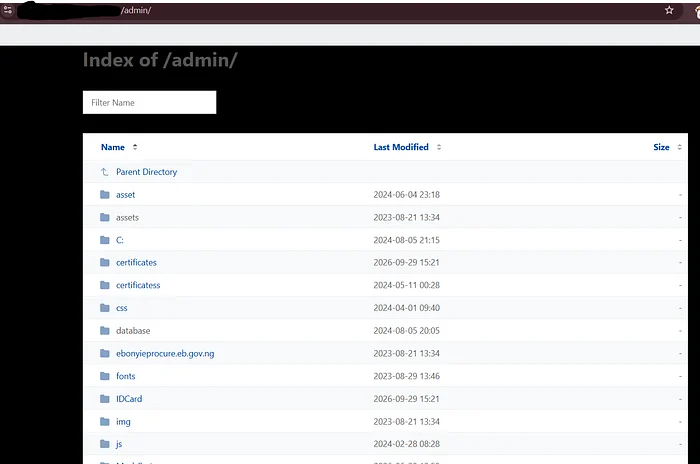
The screenshot shows the directory listing returned for /admin/. From the listing, the researcher recorded three observations:
- Unrestricted directory traversal: anyone on the internet could browse internal application folders without authentication.
- Exposed archives and logs: internal system logs and compressed backup archives were publicly fetchable.
- Database reference exposure: a raw database configuration or backup file was directly downloadable, exposing active database credentials and internal table schemas.
The reason this looked wrong is straightforward: an administrative directory that renders its contents to an unauthenticated visitor is behaving as a file server rather than as a protected application route. The presence of logs, archives and a database configuration file inside that directory made the exposure more serious than a bare listing.
Exploitation
Step 1: Request the administrative endpoint
The researcher navigated to the unauthenticated administrative path and confirmed the behaviour with curl:
curl -i -s "https://[REDACTED-TARGET]/admin/"
The -i flag includes the response headers, -s silences the progress meter, and the URL targets the /admin/ directory. The server responded with an HTTP 200 OK status and rendered an HTML page containing directory nodes, instead of redirecting to a login portal or returning 403 Forbidden. That response is the proof that indexing is on and that no access control sits in front of the directory.
Step 2: Fetch the exposed database file
With the listing in hand, the researcher requested the database configuration file directly:
curl -s "https://[REDACTED-TARGET]/admin/db_config.php"
Accessing the file this way yielded configuration headers from the database configuration file.
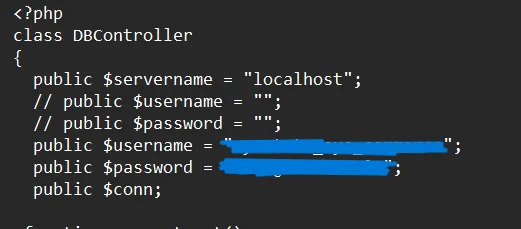
The screenshot shows the output returned when fetching the exposed database file. All sensitive database strings and hostnames were redacted immediately upon discovery, in line with responsible disclosure. The report does not reproduce the credentials, hostnames or schema contents themselves.
Root cause
The mistake is a web server configuration one: directory indexing was enabled on /admin/ and no index fallback file was present, so the server generated a listing of the directory contents for any requester. Because sensitive files, including logs, compressed backup archives and a database configuration file, were stored inside the public web root, the listing turned into a map of downloadable assets.
Existing defences did not stop it. The report states that the directory had no proper access controls and no index fallback, and that the administrative route was reachable without authentication. There is no mention of any authentication layer, IP restriction or other control in front of /admin/ that would have limited the exposure.
Impact
The report explains why CWE-548 is high impact when database files are present:
- Zero-exploit credential theft: an attacker does not need SQL injection or an authentication bypass. A single
GETrequest downloads the raw configuration file. - Full database compromise: if the exposed database credentials (host, username, password, port) are externally reachable or shared across local services, an adversary can gain complete read/write access to sensitive records. The report hedges this on reachability and credential reuse.
- Attack surface expansion: publicly visible source files allow offline code review, which can reveal second-order issues such as unauthenticated file uploads, IDORs or hardcoded API keys.
The directory could be browsed by anyone on the internet, since no authentication was required.
Fix
The report sets out a defence-in-depth strategy.
1. Disable directory indexing at the web server level
For Apache (.htaccess or httpd.conf):
Options -Indexes
For Nginx (nginx.conf):
autoindex off;
2. Move sensitive files outside the public web root
Never place .env files, database backups, .git repositories or configuration files inside /public_html or /var/www/html. Store them one level above the public web root:
/var/www/├── config/│ └── database.php <└── public_html/ └── index.php <
3. Immediate incident response actions
If database files or credentials have been exposed publicly:
- Rotate credentials: change database passwords immediately across all environments.
- Access control: restrict administrative routes using IP whitelisting or robust Single Sign-On (SSO) authentication.
- Audit logs: inspect web server access logs (
access.log) to determine whether unauthorised third parties previously downloaded the exposed database files.
The report does not state which of these changes were actually applied to the target; it presents them as the remediation and response strategy.
Variants to test
- A positive result is a browsable index listing files you were not meant to see.
- A positive result is a
200 OKwith file contents rather than a blank page or error. - If the bare directory lists contents while the index file loads normally, indexing is enabled.
- A positive result is a downloadable archive or log file containing internal paths, hostnames or request history.
- A positive result is a directory request that no longer returns a listing.
What happened, in plain words
A security researcher tested a public website, with permission, as part of an authorised security audit (the report calls this a VAPT engagement, short for Vulnerability Assessment and Penetration Testing). While looking around the site, the researcher found that a folder meant for administrators, called /admin/, could be opened by anyone on the internet. Instead of asking for a password, the website simply showed a list of every file inside that folder, like opening a drawer in someone's kitchen and finding all the labels facing up.
That list included system logs, compressed backup archives and, most importantly, a database configuration file. A configuration file is the small text file an application uses to remember how to connect to its database: the address of the database server, the username, the password and the port. Because the file sat inside the folder that the public web server hands out, anyone could download it with a single request.
The researcher classifies the problem as CWE-548: Information Exposure Through Directory Listing. CWE stands for Common Weakness Enumeration, a public catalogue of known kinds of software weakness, each with a number. This particular entry means: the server reveals what is inside a folder by listing its contents. It is a configuration mistake, not a clever bug in the application's own code.
The report's point is that the most serious exposures often come from simple operational oversights rather than from complex attack chains. The rest of this article walks through how the researcher found it, what the requests looked like, why each one mattered, and how to fix it.
The setup
The report does not describe any accounts, roles, tool versions or special preconditions. The work was done as an authorised assessment, and the only tool shown is curl, a command-line program that sends web requests and prints the responses. If you have never used a terminal, think of curl as a browser that prints what it receives as text instead of drawing a page.
The activity started with reconnaissance and endpoint enumeration. Reconnaissance means looking around a target before attacking anything: reading pages, guessing common folder names, checking what the server answers. Endpoint enumeration means trying a list of likely paths (like /admin/, /backup/, /login/) to see which ones exist. That is how the /admin/ path was reached.
Finding it
During that reconnaissance, the researcher noticed that the web server had directory indexing turned on for /admin/, with no access control and no index fallback file. Directory indexing is a web server feature that, when a visitor asks for a folder rather than a specific file, builds a web page listing everything in that folder. An index fallback file is the file the server is supposed to serve instead, usually index.php or index.html, which is what a normal application route would use to show a login form.
Normally an administrative path like /admin/ should do one of three things: redirect to a login page, return 403 Forbidden (the HTTP status code meaning "you are not allowed to see this"), or serve an index file. Here it did none of them. Requesting the folder in a browser returned a full, browsable listing of its contents.
The screenshot shows the directory listing returned for /admin/. From that listing the researcher recorded three observations:
- Unrestricted directory traversal: anyone on the internet could browse internal application folders without logging in. "Traversal" here means moving around inside the folder structure, not the separate attack known as path traversal.
- Exposed archives and logs: internal system logs and compressed backup archives could be downloaded by anyone. A log is a running record of what happened on the server; an archive is a compressed bundle of files, often a backup.
- Database reference exposure: a raw database configuration or backup file could be downloaded directly, exposing active database credentials and internal table schemas. Credentials are the username and password used to log in to the database. A schema is the description of the tables and columns the database holds.
Why did this look wrong? Because an administrative folder that renders its contents to a visitor who has not logged in is behaving like a public file server, not like a protected part of an application. The presence of logs, archives and a database configuration file inside that folder made the exposure more serious than a bare listing: the listing was a map of downloadable files.
Exploitation
Step 1: Request the administrative endpoint
The researcher opened the unauthenticated administrative path and confirmed the behaviour with curl:
curl -i -s "https://[REDACTED-TARGET]/admin/"
Line by line:
curlis the program being run.-itells it to include the response headers in the output. Headers are the small block of metadata a server sends before the page body: the status code, the content type, the server software and so on. Seeing them is how you learn whether the server answered200 OKor403 Forbidden.-ssilences the progress meter, so the output is only the response itself.- The URL in quotes targets the
/admin/folder on the redacted target host. The trailing slash matters: it tells the server you are asking for a folder, not a file.
The server responded with an HTTP 200 OK status and rendered an HTML page containing directory nodes, instead of redirecting to a login portal or returning 403 Forbidden. Directory nodes are the clickable links to files and subfolders that the server generates in that listing page. That response is the proof that indexing is on and that no access control sits in front of the folder. If the folder had been protected, the answer would have been a redirect to a login page or a 403.
Step 2: Fetch the exposed database file
With the listing in hand, the researcher requested the database configuration file directly:
curl -s "https://[REDACTED-TARGET]/admin/db_config.php"
Line by line:
curlagain sends the request.-skeeps the output clean, as before.- The URL points at
db_config.php, a file the listing had revealed inside/admin/. The.phpextension means it is a PHP script. Accessing it directly yielded configuration headers from the database configuration file.
Accessing the file this way yielded configuration headers from the database configuration file.
The screenshot shows the output returned when fetching the exposed database file. All sensitive database strings and hostnames were redacted immediately upon discovery, in line with responsible disclosure. Responsible disclosure means telling the owner privately and giving them time to fix the problem before publishing details. The report does not reproduce the credentials, hostnames or schema contents themselves.
Root cause
The mistake is a web server configuration one. Directory indexing was enabled on /admin/ and no index fallback file was present, so the server generated a listing of the folder contents for any requester. Because sensitive files, including logs, compressed backup archives and a database configuration file, were stored inside the public web root, the listing turned into a map of downloadable assets.
The public web root is the folder the web server is allowed to serve from, typically /var/www/html or /public_html. Anything inside it can be requested by URL; anything outside it cannot. Existing defences did not stop the exposure: the report states that the folder had no proper access controls and no index fallback, and that the administrative route was reachable without authentication. There is no mention of any authentication layer, IP restriction or other control in front of /admin/ that would have limited the exposure.
Impact
The report explains why CWE-548 is high impact when database files are present:
- Zero-exploit credential theft: an attacker does not need SQL injection or an authentication bypass. SQL injection is a separate attack where crafted input tricks the database into running unintended queries; an authentication bypass is any trick that skips the login. Here neither is needed: a single
GETrequest downloads the raw configuration file.GETis the ordinary HTTP method a browser uses when you open a page or click a link. - Full database compromise: if the exposed database credentials (host, username, password, port) are externally reachable or shared across local services, an adversary can gain complete read/write access to sensitive records. The report hedges this on reachability and credential reuse: the credentials only help if the database can be reached from outside or if the same password is used elsewhere.
- Attack surface expansion: publicly visible source files allow offline code review, which can reveal second-order issues such as unauthenticated file uploads, IDORs or hardcoded API keys. Attack surface means everything an attacker can touch. Offline code review means reading the code at leisure, without touching the live system. An IDOR (Insecure Direct Object Reference) is a bug where changing an ID in a URL lets you see someone else's data. A hardcoded API key is a secret written directly into source code instead of being stored safely.
The folder could be browsed by anyone on the internet, since no authentication was required.
Fix
The report sets out a defence-in-depth strategy. Defence in depth means layering several independent protections so that one mistake does not expose everything.
1. Disable directory indexing at the web server level
For Apache (.htaccess or httpd.conf):
Options -Indexes
Line by line: Options is the Apache directive that controls which server features are allowed in a folder. -Indexes means "remove the Indexes feature", and Indexes is the feature that generates a listing page. So this line tells Apache: never build a folder listing here.
For Nginx (nginx.conf):
autoindex off;
Line by line: autoindex is the Nginx directive that turns folder listings on or off. off disables it. The semicolon ends the directive, as Nginx requires.
2. Move sensitive files outside the public web root
Never place .env files, database backups, .git repositories or configuration files inside /public_html or /var/www/html. A .env file is a plain text file holding environment settings and secrets. A .git folder is the version-control history of the code, which can contain old secrets. Store sensitive files one level above the public web root:
/var/www/├── config/│ └── database.php <└── public_html/ └── index.php <
Line by line: /var/www/ is the parent folder. Inside it, config/ holds database.php, the configuration file, and public_html/ holds index.php, the only file the web server is allowed to serve. The < marks show which side is private and which is public: the configuration lives outside the served folder, so no URL can reach it even if indexing is accidentally left on.
3. Immediate incident response actions
If database files or credentials have been exposed publicly:
- Rotate credentials: change database passwords immediately across all environments. Rotating means replacing a secret with a new one and retiring the old one, so any copy an attacker already has stops working.
- Access control: restrict administrative routes using IP whitelisting or robust Single Sign-On (SSO) authentication. IP whitelisting means only requests from approved network addresses are allowed. SSO means a central login service handles authentication for many applications.
- Audit logs: inspect web server access logs (
access.log) to determine whether unauthorised third parties previously downloaded the exposed database files. An access log records every request the server received, so it can show whether someone else fetched the file before it was fixed.
The report does not state which of these changes were actually applied to the target; it presents them as the remediation and response strategy.
Variants to test
- A positive result is a browsable index listing files you were not meant to see.
- A positive result is a
200 OKwith file contents rather than a blank page or error. - If the bare folder lists contents while the index file loads normally, indexing is enabled.
- A positive result is a downloadable archive or log file containing internal paths, hostnames or request history.
- A positive result is a folder request that no longer returns a listing.
Glossary
- Access control: the rules that decide who is allowed to see or do what on a system.
- Access log: a file where a web server records every request it received.
- API key: a secret string used by software to identify itself to another service.
- Archive: a single file bundling several files together, often compressed, such as a backup.
- Attack surface: everything an attacker can reach and try to interact with.
- Authentication: proving who you are, usually with a username and password.
- Authentication bypass: any trick that lets someone in without going through the normal login.
- autoindex: the Nginx setting that controls whether folder listings are generated.
- Backup: a copy of data kept so it can be restored if the original is lost or damaged.
- Configuration file: a text file holding settings an application needs, often including database addresses and passwords.
- Credentials: the username and password (or similar secrets) used to log in to a system.
- curl: a command-line program that sends web requests and prints the responses.
- CWE: Common Weakness Enumeration, a public catalogue of known kinds of software weakness, each with a number.
- CWE-548: the catalogue entry for Information Exposure Through Directory Listing.
- Defence in depth: layering several independent protections so one mistake does not expose everything.
- Directory indexing: a web server feature that builds a web page listing the contents of a folder when a visitor asks for the folder itself.
- Directory listing: the page produced by directory indexing, showing files and subfolders as clickable links.
- Directory nodes: the clickable links to files and subfolders inside a directory listing.
- Endpoint: a specific URL path on a web application, such as
/admin/or/login/. - Endpoint enumeration: trying a list of likely paths to discover which ones exist.
- Environment: a separate copy of a system, such as development, staging or production.
.envfile: a plain text file holding environment settings and secrets.403 Forbidden: the HTTP status code meaning the server understood the request but refuses to allow it.200 OK: the HTTP status code meaning the request succeeded and the response follows.GET: the ordinary HTTP method a browser uses to fetch a page or resource..gitrepository: the folder holding a project's version-control history, which can contain old secrets.- Hardcoded: written directly into source code instead of being stored safely elsewhere.
- Headers: the metadata block a server sends before the page body, including the status code and content type.
- HTML: the language web pages are written in.
- HTTP: the protocol browsers and servers use to exchange requests and responses.
- IDOR: Insecure Direct Object Reference, a bug where changing an ID in a URL lets you see someone else's data.
- Index fallback file: the file a server serves when a folder is requested, usually
index.phporindex.html. - IP whitelisting: allowing requests only from approved network addresses.
- Log: a running record of what happened on a system.
- Nginx: a popular web server.
- Apache: a popular web server.
Options -Indexes: the Apache directive that disables folder listings.- Penetration testing: authorised testing of a system to find security weaknesses before attackers do.
- PHP: a programming language commonly used for web applications.
- Port: a numbered channel on a server that a service listens on, such as the database port.
- Public web root: the folder a web server is allowed to serve files from.
- Reconnaissance: looking around a target before attacking, to learn what exists.
- Responsible disclosure: telling the owner privately and giving them time to fix the problem before publishing details.
- Rotate credentials: replace a secret with a new one and retire the old one.
- Schema: the description of the tables and columns a database holds.
- Security misconfiguration: a weakness caused by settings left wrong, rather than by a bug in the code.
- Severity: how serious a finding is, usually based on impact and likelihood.
- SQL injection: an attack where crafted input tricks the database into running unintended queries.
- SSO: Single Sign-On, a central login service that handles authentication for many applications.
- Status code: the three-digit number in an HTTP response saying how the request went, such as
200or403. - VAPT: Vulnerability Assessment and Penetration Testing, an authorised security audit.
- Web root: see public web root.
- Web server: the program that receives HTTP requests and sends back pages and files.



