Chaining Discount Coupons to Get a Product for Free — Intigriti October Challenge 1026
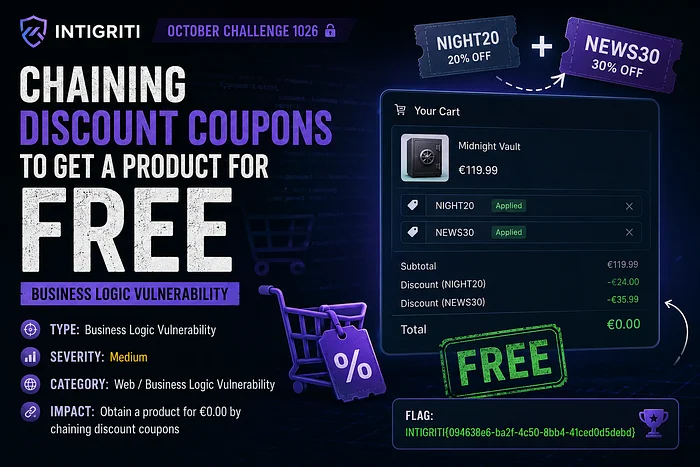
The checkout system allowed a product to be reduced to €0.00 by applying a sequence of discount coupons, including reusing a coupon after another was applied. An attacker could obtain products for free or abuse promotions beyond intended limits.
 Published on medium.com
Bug Bounty
The full write-up lives on its author's site
It belongs to its author, so we link to it rather than copy it. The other two tabs are our own rewrites, checked against it.
Context
The target was the Intigriti October Challenge 1026, a deliberately vulnerable e-commerce application hosted at https://challenge-1026.challenges.intigriti.io. The application provides a product page, a shopping cart and a checkout flow that supports promotional discount codes. The researcher classified the issue as a business logic vulnerability and rated its severity as Medium.
The feature under test is coupon application at checkout. The client-side function sends the submitted code to the API and replaces the local cart state with the cart returned by the server. The question the researcher set out to answer was whether the application correctly enforced its coupon eligibility rules, and in particular what happens when more than one coupon is used on the same product.
Two coupons were identified during testing:
NIGHT20, a product discount coupon.NEWS30, a coupon obtained by subscribing to the newsletter.
Setup
The report describes no special tooling, accounts or roles; the steps use the challenge site and newsletter sign-up with email addresses. The preconditions for the test are:
- Access to the challenge application.
- The ability to subscribe to the newsletter, which issues the
NEWS30coupon. - A second email address, used later to obtain another newsletter coupon.
The researcher also examined the client-side coupon application function.
Finding it
The researcher examined the client-side code that handles coupon submission. The relevant JavaScript was:
async function applyCoupon(button) { const input = document.querySelector("#couponInput");
const payload = await api("/api/cart/coupon", { method: "POST", body: JSON.stringify({ code: input.value.trim() }), }); state.cart = payload.cart;}
The function reads the value from the #couponInput field, trims it, and sends it as the code property to /api/cart/coupon via a POST request. It then replaces the local cart state with the cart object returned by the API.
The researcher notes that this client-side code alone does not prove that server-side validation is missing. The finding came instead from observing how the application handled a particular coupon sequence and how the checkout total changed as a result. The key security question was whether the application consistently enforced its intended discount rules when multiple coupons were applied.
Exploitation
Step 1: Subscribe to the newsletter
Navigate to:
https://challenge-1026.challenges.intigriti.io/challenge
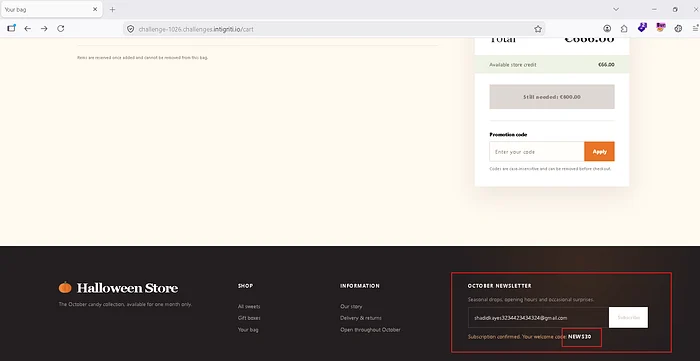
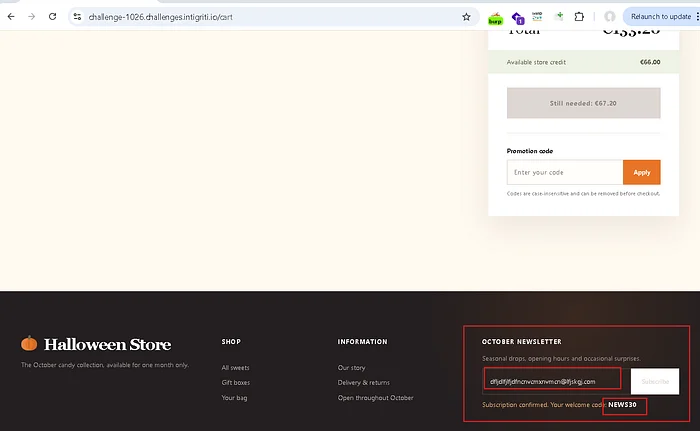
Subscribe to the newsletter and obtain the NEWS30 coupon code.
Step 2: Open the product page
Visit the following URL:
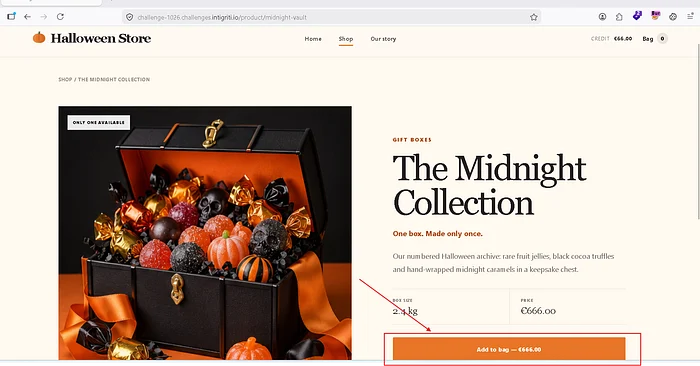
https://challenge-1026.challenges.intigriti.io/product/midnight-vault
Step 3: Add the product to the cart
Add the Midnight Vault product to the shopping cart and proceed to checkout.
Step 4: Apply the first coupon
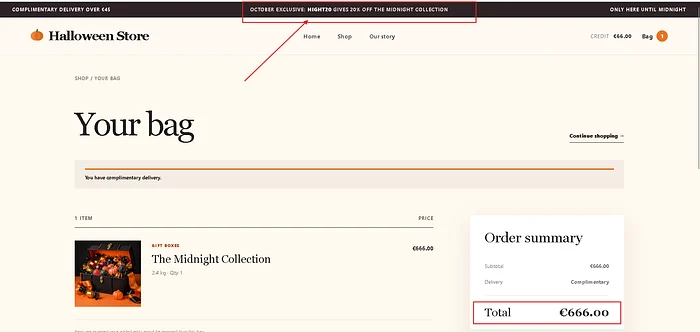
Enter NIGHT20 in the coupon field and apply the discount.
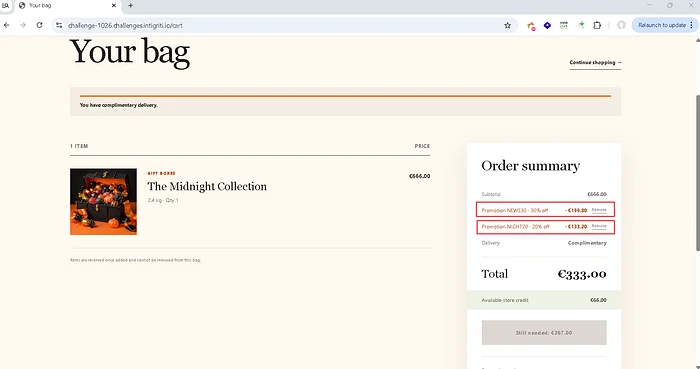
Step 5: Get another coupon using a second email
Subscribe to the newsletter using a second email address to obtain another coupon, then apply the NEWS30 coupon to the same shopping cart.
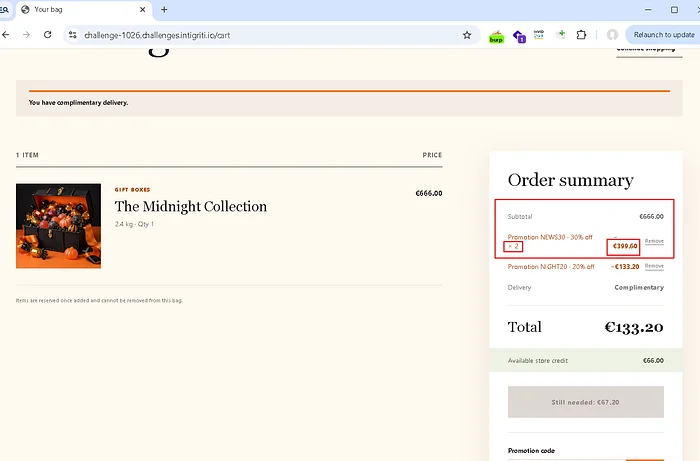
Step 6: Apply the NIGHT20 coupon again
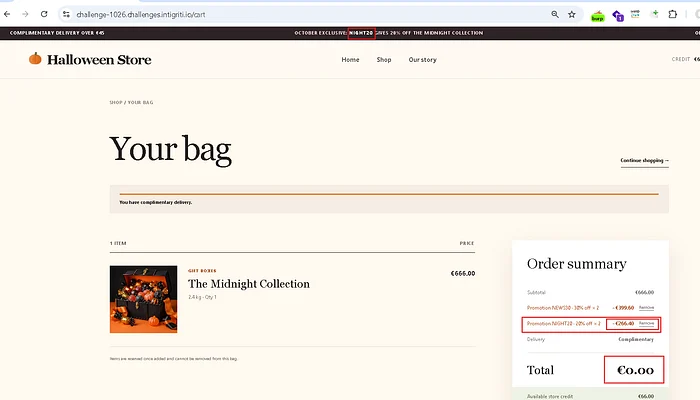
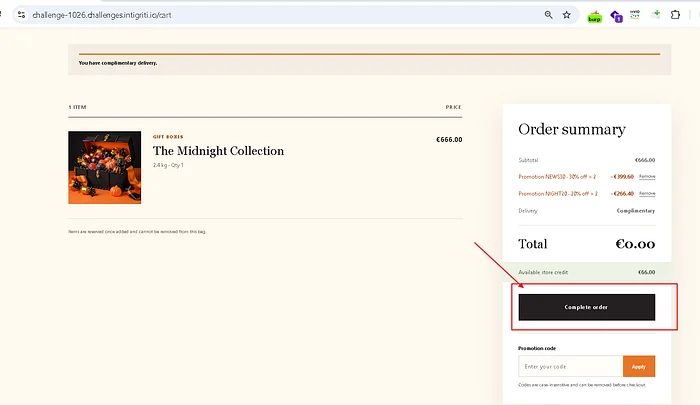
After applying NEWS30, apply the NIGHT20 coupon again to the same cart. After applying the coupon, the researcher observed that the product price dropped to €0.00.
Step 7: Observe the result
The checkout displayed a final product price of €0.00 after this coupon application sequence. In the researcher's assessment this suggests that the application does not properly enforce the intended discount restrictions.
Step 8: Retrieve the challenge flag
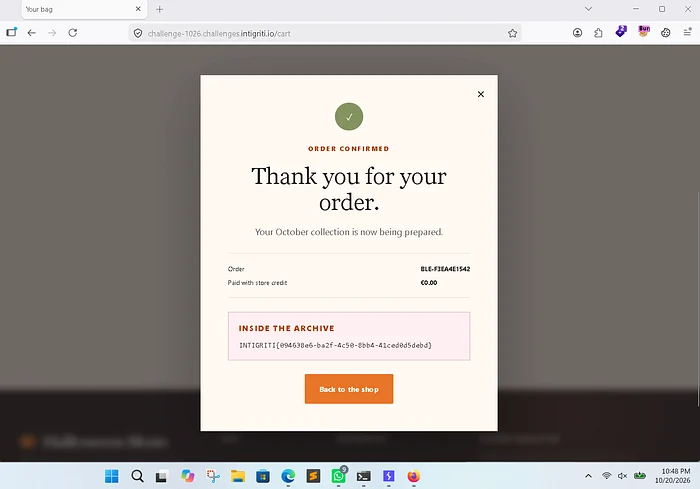
Complete the challenge flow and capture a screenshot of the flag as evidence of successfully solving the challenge.
Root cause
The observed behaviour suggests insufficient enforcement of coupon combination and discount calculation rules. The researcher lists potential causes, explicitly framing them as possibilities rather than confirmed implementation details, since establishing the exact root cause would require access to the relevant server-side logic:
- Missing or inconsistent validation of coupon stacking restrictions.
- Failure to prevent prohibited repeated coupon applications.
- Incorrect calculation of discounts against an already discounted total.
- Insufficient validation of the final payable amount before order completion.
The tested coupon combination and repeated application sequence reduced the displayed product price to €0.00. The expected behaviour is that the application enforces coupon eligibility and stacking restrictions, prevents prohibited repeated applications, and calculates the final order total using trusted server-side pricing logic. The actual behaviour is that the tested sequence allows the displayed checkout price to reach €0.00 and enables the challenge flow to reveal the flag.
Impact
In a real-world e-commerce application, a similar vulnerability could have the following consequences:
- Financial loss: products may be purchased below their intended price or potentially for free.
- Promotion abuse: customers may combine discounts beyond the limits established by the business.
- Revenue impact: repeated exploitation could result in cumulative losses.
- Pricing integrity issues: the final checkout amount may not reflect the intended promotional rules.
The actual impact depends on whether the same behaviour affects real orders, payment processing and order fulfilment.
Fix
The researcher proposes the following controls for developers:
- Enforce coupon rules server-side: validate coupon eligibility, expiration, stacking restrictions and usage limits for every request.
- Prevent prohibited reuse: track applied coupons and reject duplicate applications when the promotion rules disallow them.
- Use trusted pricing calculations: calculate discounts from authoritative server-side order data rather than trusting client-side totals.
- Validate the final amount: recalculate and verify the payable amount before payment authorisation and order fulfilment.
- Add automated tests: test repeated coupon submissions, conflicting promotions, discount boundaries and unexpected combinations.
Variants to test
- Repeated application of a single coupon. Submit the same code several times in a row. A positive result is the discount being applied more than once to the same cart.
- Stacking two different coupons. Apply one coupon, then a second one that the promotion rules should exclude. A positive result is both discounts being reflected in the total.
- Reordering the sequence. Apply the same two coupons in the opposite order, or interleave them with cart changes. A positive result is a total that differs from the intended calculation for any ordering.
- Multiple newsletter coupons from separate email addresses. Obtain several
NEWS30-style codes and apply them to one cart. A positive result is more than one newsletter discount being accepted. - Discount applied to an already discounted total. Check whether the second discount is computed on the reduced price rather than the original. A positive result is a total lower than the business rules allow.
- A positive result is an order completing at a price the server did not calculate.
Key takeaways
An application may correctly recognise individual coupon codes while still failing to enforce the rules governing their combined use. The lesson is to test not only whether a feature works as intended, but also whether combinations of valid actions can produce an unintended result: valid individual operations do not necessarily guarantee valid business outcomes.
What happened, in plain words
A security researcher took part in a public challenge run by Intigriti, a company that runs bug bounty programmes. The challenge was a pretend online shop, built on purpose with a flaw in it, and the goal was to find that flaw and use it to reveal a hidden "flag" (a piece of text that proves you solved the challenge).
The shop sold a product called Midnight Vault and offered discount coupons. A coupon is a short code you type at checkout to pay less, like a paper voucher you hand to a cashier. The shop had two coupons: NIGHT20 and NEWS30. The researcher found that by applying these coupons in a particular order, and applying one of them twice, the price of the product dropped to €0.00. The challenge flow then revealed the flag.
This kind of problem is called a business logic vulnerability. "Logic" here means the rules a business runs on: for example, "one coupon per order" or "this coupon cannot be combined with that one". The software accepted the codes and the price changed, which suggests the rules about how the codes may be used together were not properly enforced. Nothing crashed and no password was stolen. The shop simply did the arithmetic it was told to do, and the arithmetic was wrong from the business's point of view.
A useful everyday comparison: a coffee shop says "one loyalty stamp per visit". The stamp machine works perfectly. But if the cashier lets you stamp your card twice in one visit, the machine is not broken, the rule is. That is a logic flaw.
The target and the feature being tested
The target was the Intigriti October Challenge 1026, a deliberately vulnerable e-commerce application hosted at https://challenge-1026.challenges.intigriti.io. "Deliberately vulnerable" means the organisers built it with a known weakness so that people can practise finding it. It is not a real shop and no real money is involved.
The application provides three things:
- A product page, a page describing one item for sale.
- A shopping cart, the basket that holds items you intend to buy.
- A checkout flow, the series of pages where you confirm the order and pay.
The checkout flow supports promotional discount codes, which is the feature under test. The client-side function sends the submitted code to the API and replaces the local cart state with the cart returned by the server. The question the researcher set out to answer was whether the application correctly enforced its coupon eligibility rules, and in particular what happens when more than one coupon is used on the same product.
Two coupons were identified during testing:
NIGHT20, a product discount coupon.NEWS30, a coupon obtained by subscribing to the newsletter.
A newsletter is a mailing list a shop uses to send news and offers. Shops often give you a discount code as a reward for signing up, because it gives you a reason to hand over your email address. That is how NEWS30 is obtained.
The researcher classified the issue as a business logic vulnerability and rated its severity as Medium. Severity is a rough label for how much damage a flaw could do if it were real: low, medium, high or critical.
What you need before starting
The report describes no special tooling, accounts or roles; the steps use the challenge site and newsletter sign-up with email addresses. In plain terms, you need:
- Access to the challenge application, which means a normal web browser pointed at the challenge address.
- The ability to subscribe to the newsletter, which issues the
NEWS30coupon. - A second email address, used later to obtain another newsletter coupon.
Why a second email address? Because the newsletter sign-up issues a coupon, and a second address may yield another. If you can sign up twice with two addresses, you can hold two newsletter coupons at once. That is the first hint that the shop's rules might be looser than intended.
The researcher also examined the client-side coupon application function. Client-side means code that runs inside your own browser, on your computer. Server-side means code that runs on the shop's computer, which you cannot see or change. This distinction matters throughout the article: your browser can be made to display anything, so only what the server decides can be trusted.
Finding it: reading the code your browser runs
Every web page you visit sends your browser a bundle of files, including JavaScript. JavaScript is the programming language of web pages; it is what makes buttons respond, carts update and pages change without reloading. Because those files arrive on your own machine, you can read them. In most browsers you can press F12 or right-click and choose "Inspect" to open the developer tools, which include a viewer for the page's code.
The researcher examined the client-side code that handles coupon submission. The relevant JavaScript was:
async function applyCoupon(button) { const input = document.querySelector("#couponInput");
const payload = await api("/api/cart/coupon", { method: "POST", body: JSON.stringify({ code: input.value.trim() }), }); state.cart = payload.cart;}
Line by line, in plain words:
async function applyCoupon(button) {starts the definition of a function calledapplyCoupon. A function is a named block of instructions that runs when something calls it. The wordasyncmeans the function may have to wait for something slow, such as a network reply, and will pause politely while it waits instead of freezing the page. Thebuttonin brackets is an input the function receives.const input = document.querySelector("#couponInput");finds the text box where you type the coupon.document.querySelectoris a browser instruction meaning "find the element matching this description".#couponInputis a selector: the#means "the element whose id is couponInput". The result is stored in a constant calledinput, so the code can read what you typed.const payload = await api("/api/cart/coupon", {calls a helper namedapi, which sends a request to the shop's server. The first argument,/api/cart/coupon, is the address of the server feature being called. The wordawaitmeans "wait here until the server answers, then carry on". The answer is stored inpayload.method: "POST",says which kind of request this is. A POST request is the kind used to send data to a server, as opposed to simply asking for a page. Think of it as filling in a form and handing it over, rather than just reading a noticeboard.body: JSON.stringify({ code: input.value.trim() }),builds the data being sent.input.valueis whatever is currently in the coupon box..trim()removes spaces at the start and end, so a stray space does not break the code.JSON.stringifyturns that value into JSON, a simple text format for structured data that both browsers and servers understand.state.cart = payload.cart;takes the cart that the server sent back and stores it as the page's current cart.stateis just the page's memory of what is going on. This line is why the price on screen changes after you apply a coupon: the server recalculates the cart and the page redraws it.- The closing
}ends the function.
So the function reads the value from the #couponInput field, trims it, and sends it as the code property in a JSON body to /api/cart/coupon via a POST request. It then replaces the local cart state with the cart object returned by the API.
An API (Application Programming Interface) is the set of addresses a website's own pages use to talk to its server behind the scenes. When you click "apply coupon", your browser does not reload the whole page; it quietly sends a small message to an API address and gets a small answer back. You can watch these messages in the developer tools, on the Network tab.
The researcher notes that this client-side code alone does not prove that server-side validation is missing. That is an important habit: seeing how your browser asks for something tells you what is possible to ask, not what the server will agree to. The finding came instead from observing how the application handled a particular coupon sequence and how the checkout total changed as a result. The key security question was whether the application consistently enforced its intended discount rules when multiple coupons were applied.
Exploitation: the steps, and why each one was taken
Step 1: Subscribe to the newsletter
Navigate to:
https://challenge-1026.challenges.intigriti.io/challenge
Subscribe to the newsletter and obtain the NEWS30 coupon code.
Why: this is the only described way to get the NEWS30 coupon. You cannot test a coupon you do not have. The address is the challenge page.
Step 2: Open the product page
Visit the following URL:
https://challenge-1026.challenges.intigriti.io/product/midnight-vault
Why: you need a product in the cart before a discount means anything. This address points at the page for the Midnight Vault product.
Step 3: Add the product to the cart
Add the Midnight Vault product to the shopping cart and proceed to checkout.
Adding the item first gives the shop something to discount.
Step 4: Apply the first coupon
Enter NIGHT20 in the coupon field and apply the discount.
Why: this establishes a baseline. You see the normal behaviour of one coupon on one product, and you see how the price changes. Later steps compare against this.
Step 5: Get another coupon using a second email
Subscribe to the newsletter using a second email address to obtain another coupon, then apply the NEWS30 coupon to the same shopping cart.
Why: using a second address tests whether another newsletter coupon can be obtained. Using a second address tests whether the shop ties a coupon to a person or just hands them out. Applying NEWS30 on top of an already discounted cart tests whether the two coupons may be combined at all.
Step 6: Apply the NIGHT20 coupon again
After applying NEWS30, apply the NIGHT20 coupon again to the same cart. After applying the coupon, the researcher observed that the product price dropped to €0.00.
Why: this is the heart of the test. NIGHT20 was already used once in step 4. Applying it a second time asks a simple question: does the shop remember which coupons have already been used on this cart? If it does not, the same discount can be counted more than once. The order of operations matters too: NIGHT20, then NEWS30, then NIGHT20 again. The researcher found that this particular sequence produced the zero price.
Step 7: Observe the result
The checkout displayed a final product price of €0.00 after this coupon application sequence. In the researcher's assessment this suggests that the application does not properly enforce the intended discount restrictions.
Why this matters: a price of zero is not a rounding error. It means the total the shop is willing to charge no longer reflects its own promotional rules. Note the careful wording: the observation is about the displayed checkout price. Whether a real payment system would have accepted it is a separate question.
Step 8: Retrieve the challenge flag
Complete the challenge flow and capture a screenshot of the flag as evidence of successfully solving the challenge.
Why: in a challenge, the flag is the proof. In a real bug bounty report, the equivalent proof would be a screenshot or a recording showing the order completing at the wrong price, because a report without evidence is hard for a company to act on.
Why it worked: the suspected root cause
The observed behaviour suggests insufficient enforcement of coupon combination and discount calculation rules. The researcher lists potential causes, explicitly framing them as possibilities rather than confirmed implementation details, since establishing the exact root cause would require access to the relevant server-side logic:
- Missing or inconsistent validation of coupon stacking restrictions. Stacking means using more than one discount on the same purchase. Many shops forbid it, or allow only certain pairs.
- Failure to prevent prohibited repeated coupon applications. In other words, the shop may not keep a reliable list of which codes have already been used on this cart.
- Incorrect calculation of discounts against an already discounted total. If the second discount is worked out from the reduced price rather than the original price, the maths drifts away from what the business intended.
- Insufficient validation of the final payable amount before order completion. Nobody checks the final number against the rules before the order is accepted.
The tested coupon combination and repeated application sequence reduced the displayed product price to €0.00. The expected behaviour is that the application enforces coupon eligibility and stacking restrictions, prevents prohibited repeated applications, and calculates the final order total using trusted server-side pricing logic. The actual behaviour is that the tested sequence allows the displayed checkout price to reach €0.00 and enables the challenge flow to reveal the flag.
A comparison that may help: a supermarket till that scans the same voucher twice because the cashier does not check. The scanner is fine, the voucher is genuine, and the total is added up correctly from what was scanned. The mistake is that a rule about vouchers was never applied.
What it would mean in a real shop
In a real-world e-commerce application, a similar vulnerability could have the following consequences:
- Financial loss: products may be purchased below their intended price or potentially for free.
- Promotion abuse: customers may combine discounts beyond the limits established by the business.
- Revenue impact: repeated exploitation could result in cumulative losses.
- Pricing integrity issues: the final checkout amount may not reflect the intended promotional rules.
The actual impact depends on whether the same behaviour affects real orders, payment processing and order fulfilment. That last point is the honest limit of any test like this: a wrong number on a checkout page is a bug, but a wrong number that is actually charged and shipped is a business problem.
How to fix it
The researcher proposes the following controls for developers:
- Enforce coupon rules server-side: validate coupon eligibility, expiration, stacking restrictions and usage limits for every request. The server, not the browser, must be the judge, because anything in the browser can be changed by the person using it.
- Prevent prohibited reuse: track applied coupons and reject duplicate applications when the promotion rules disallow them. The shop needs a memory of what has already been used on this cart.
- Use trusted pricing calculations: calculate discounts from authoritative server-side order data rather than trusting client-side totals. Never let the browser tell the shop what the price is.
- Validate the final amount: recalculate and verify the payable amount before payment authorisation and order fulfilment. A final check catches mistakes that slipped through earlier.
- Add automated tests: test repeated coupon submissions, conflicting promotions, discount boundaries and unexpected combinations. Automated tests are scripts that run the same checks every time the code changes, so a rule that quietly stops working is noticed.
Other things worth trying on a shop like this
These are variations on the same idea, useful when you meet a similar feature elsewhere:
- Repeated application of a single coupon. Submit the same code several times in a row. A positive result is the discount being applied more than once to the same cart.
- Stacking two different coupons. Apply one coupon, then a second one that the promotion rules should exclude. A positive result is both discounts being reflected in the total.
- Reordering the sequence. Apply the same two coupons in the opposite order, or interleave them with cart changes. A positive result is a total that differs from the intended calculation for any ordering.
- Multiple newsletter coupons from separate email addresses. Obtain several
NEWS30-style codes and apply them to one cart. A positive result is more than one newsletter discount being accepted. - Discount applied to an already discounted total. Check whether the second discount is computed on the reduced price rather than the original. A positive result is a total lower than the business rules allow.
- A positive result is an order completing at a price the server did not calculate.
What to take away
An application may correctly recognise individual coupon codes while still failing to enforce the rules governing their combined use. The lesson is to test not only whether a feature works as intended, but also whether combinations of valid actions can produce an unintended result: valid individual operations do not necessarily guarantee valid business outcomes.
.
Glossary
- API: the set of addresses a website's own pages use to talk to its server behind the scenes, so the page can send and receive small pieces of data without reloading.
- Business logic vulnerability: a flaw in the rules a business runs on, where the software does exactly what it is told but the rules themselves are not enforced.
- Cart (shopping cart): the basket of items a shopper intends to buy before paying.
- Checkout flow: the series of pages where an order is confirmed and paid for.
- Client-side: code that runs in your own browser, on your own computer, and which you can read and change.
- Coupon: a short code entered at checkout that reduces the price, like a paper voucher.
- Developer tools: the built-in panel in most browsers, opened with F12 or "Inspect", that lets you view a page's code and the network messages it sends.
- E-commerce application: a website that sells products or services online.
- Flag: in a security challenge, a piece of text that proves you completed the task.
- Function: a named block of instructions in code that runs when something calls it.
- JSON: a simple text format for structured data, understood by both browsers and servers.
- JavaScript: the programming language that runs in web pages and makes them interactive.
- Newsletter: a mailing list a shop uses to send news and offers, often rewarded with a discount code for signing up.
- POST request: a request that sends data to a server, as opposed to simply asking for a page.
- Product page: a page describing a single item for sale.
- Promotional discount code: a code issued as part of a marketing offer that reduces the price when applied.
- Root cause: the underlying reason a flaw exists, as opposed to its visible symptom.
- Selector: a short pattern used in code to find a particular element on a page, such as
#couponInputfor the element with that id. - Server-side: code that runs on the shop's own computer, which visitors cannot see or change, and which should therefore be the source of trust.
- Severity: a rough label for how much damage a flaw could do if it were real, such as low, medium, high or critical.
- Stacking: using more than one discount on the same purchase.
- State: the page's memory of what is currently going on, such as which items are in the cart.
- Validation: checking that data meets the rules before acting on it.
async/await: JavaScript keywords meaning a function may wait for something slow, such as a server reply, without freezing the page..trim(): a JavaScript instruction that removes spaces from the start and end of a piece of text.JSON.stringify: a JavaScript instruction that turns a value into JSON text so it can be sent over the network.




