Chess.com Business Logic Bypass Vuln!
The game analysis WebSocket endpoint did not properly validate the session server-side, so a user who had hit their analysis limit could still submit a modified request. The attacker could also switch the analysis engine to the premium-only Deep Scan option.

medium.com
Published on medium.com
Cybersecurity
The full write-up lives on its author's site
It belongs to its author, so we link to it rather than copy it. The other two tabs are our own rewrites, checked against it.
Context
Chess.com offers a game analysis feature that becomes available after a game is finished. The author describes it as one of the features heavily marketed to premium users, and the deeper engine mode, Deep Scan, is presented as a premium-only option. Deep Scan is described as a much deeper chess engine analysis similar to Stockfish.
The target of the research is the WebSocket endpoint that serves game analysis. The write-up does not name the endpoint, the host, or the message format beyond the field discussed below.
Setup
- A normal chess.com account, logged in.
- Burp Suite connected to chess.com so that the WebSocket traffic from the game analysis endpoint could be captured.
- A precondition on the account: the analysis limit for the current session had already been reached before the modified request was sent.
No versions, headers, cookies or tool configuration are given in the write-up.
Finding it
The starting point was simply that the analysis feature is gated: it is sold as a premium feature and the account had hit its analysis limit for the session. That made the request a natural candidate for a business logic check, because the client is allowed to ask for analysis and the server is expected to decide whether this particular session is still entitled to it.
Exploitation
Step 1: capture the request
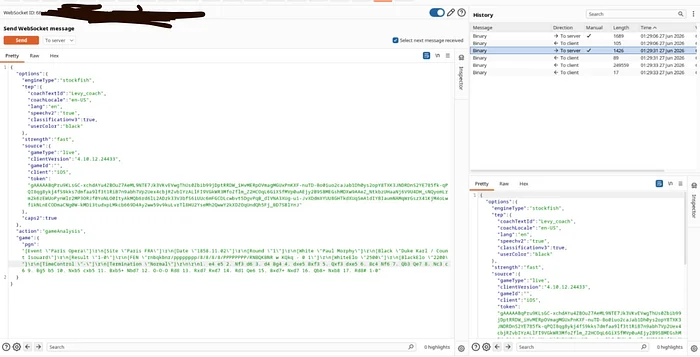
The author logged into the account, confirmed that the WebSocket request from the game analysis endpoint could be captured, and made sure the analysis limit for the current session had already been hit. The captured request is shown in the write-up:
Step 2: replace the PGN
The game.pgn field in the request body was replaced with any valid PGN. The author used the Opera Game by Paul Morphy as the example game.
Step 3: match the expected body
A few payloads had to be adjusted to match the request body chess.com expected. The author notes being confused at first; the write-up does not show the intermediate payloads or the exact final body.
Step 4: send and read the response
The modified request was sent, and the WebSocket response was checked. The result was that there was no proper server-side validation for the current session, and the request still went through.
Step 5: change the engine
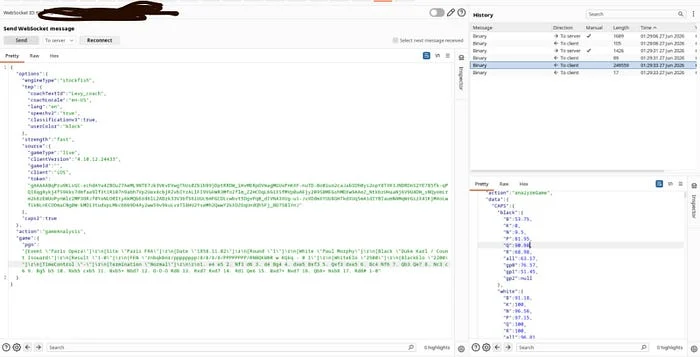
The analysis engine could also be changed to Deep Scan, the deeper engine mode that is normally only available as a premium feature.
Root cause
The write-up attributes the behaviour to missing server-side validation of the current session: the server accepted an analysis request after the session's analysis limit had been reached. The author also found the engine could be changed to Deep Scan. In other words, the session check the product relies on was not enforced on the WebSocket message that performs the analysis.
Impact
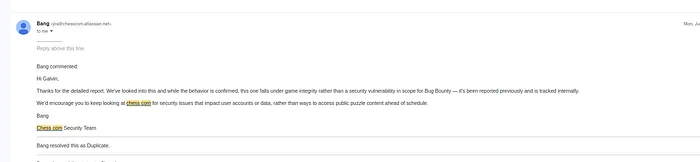
Under the conditions described, an authenticated user whose session had exhausted its analysis allowance could still obtain game analysis, and could select the premium Deep Scan engine. The write-up does not quantify the cost of the analysis, describe any rate limiting, or say whether other accounts or data were affected. The report was eventually marked as a duplicate.
Fix
The check that the description implies is server-side enforcement, on the analysis WebSocket message itself, of the session's remaining analysis allowance before any analysis is run.
Variants to test
- Quota fields in the message. Send an analysis request after the limit is reached and watch whether the server rejects it or silently processes it. A positive result is a normal analysis response after the limit was hit.
- Engine selection. Change the engine field to the premium mode on a non-premium account. A positive result is a response produced by the premium engine.
- Content substitution. Replace the game content field with a different valid game, as was done here with the Opera Game. A positive result is analysis of the substituted game rather than an error.
- Other premium-gated WebSocket actions. Apply the same pattern to any feature where the client chooses a tier or a mode. A positive result is the premium behaviour being served to an account that should not receive it.
What happened, in plain words
Chess.com is a website where people play chess against each other or against a computer. Besides playing, it offers a feature called game analysis: after a game is finished, the site can look back over the moves and tell you where you went wrong, which moves were strong, and so on. This is a paid feature, sold to premium users (people who pay a subscription). There is also a stronger version of the analysis called Deep Scan, which the author describes as a much deeper chess engine analysis similar to Stockfish. Stockfish is a well-known chess program that plays and analyses chess at a very high level. Deep Scan is normally only available to premium users.
Every account also has a limit on how much analysis it can use in a session. Once you have used up your allowance, the site is supposed to stop giving you more analysis until the limit resets.
The author found that this limit was not properly checked on the server. By capturing the message the browser sends when it asks for analysis, changing one field in it, and sending it again, the author could still get analysis after the limit had been reached, and could even switch on the premium Deep Scan engine. The report was eventually marked as a duplicate, meaning someone else had already reported the same issue, but the author was still pleased to have found a real bug on a large platform.
To understand the rest, you need a few ideas from how websites work:
- A server is the computer that belongs to the website and holds the real data and rules. Your browser is the client. When you click something, your browser sends a request to the server, and the server decides what to send back.
- An API is the agreed way for the client and the server to talk to each other. Think of it as a menu in a restaurant: it lists what you can ask for and in what form. The client asks using that menu, and the server answers.
- A WebSocket is a special kind of connection between browser and server that stays open, so both sides can keep sending messages back and forth without starting a new conversation each time. It is useful for things that update live, like a chess game in progress or an analysis that arrives piece by piece. A normal web request is like sending a letter and waiting for a reply; a WebSocket is like a phone call that stays connected.
- A session is the server's way of remembering who you are across many requests. When you log in, the server gives your browser a small piece of data (often called a cookie or a token) that the browser sends back with every request. The server looks at it and says, in effect, "this is the account of user X, and this is what they are allowed to do right now." The session is also where things like "how much analysis has this person used" can be tracked.
- Business logic means the rules of the product itself, as opposed to technical rules like passwords or encryption. "Only premium users get Deep Scan" and "each session gets a limited amount of analysis" are business logic. A business logic bypass is when someone finds a way to make the server act as if those rules did not apply, usually by sending a request the product did not expect.
- Server-side validation means the server checks the rules itself before doing the work. If the server trusts the client to check the rules, anyone can skip the check by changing what the client sends. The everyday comparison: a nightclub with a bouncer at the door (server-side check) versus a sign on the door saying "members only" and trusting people to obey it (client-side check).
- Burp Suite is a tool used by security testers. It sits between your browser and the website and lets you see, pause and change the requests your browser sends. The author connected Burp Suite to chess.com so the WebSocket traffic from the game analysis endpoint could be captured. An endpoint is a specific address or channel on the server that handles one kind of request, in this case the one that serves game analysis.
- PGN stands for Portable Game Notation. It is a plain-text format for writing down a chess game: the moves, the players, the result and so on. It is how chess software exchanges games.
- A payload here means the content of the message you send, the actual data inside the request.
Setting up
The author started from an ordinary position:
- A normal chess.com account, logged in.
- Burp Suite connected to chess.com, so that the WebSocket traffic from the game analysis endpoint could be captured.
- A precondition on the account: the analysis limit for the current session had already been reached before the modified request was sent.
That third point matters. The whole test only makes sense if the account is not supposed to get more analysis. If you still had allowance left, the server would be right to answer, and you would learn nothing. By using up the allowance first, the author created a situation where any successful analysis would be proof that the rule was not being enforced.
Finding it
The starting point was simply that the analysis feature is gated: it is sold as a premium feature, and the account had hit its analysis limit for the session. That made the request a natural candidate for a business logic check, because the client is allowed to ask for analysis and the server is expected to decide whether this particular session is still entitled to it.
In other words, the author was not looking for a broken password or a leaked file. The author was looking at a place where the product makes a decision about permission and quantity, and asking a simple question: does the server really make that decision, or does it just believe whatever the browser says?
Exploitation
Step 1: capture the request
The author logged into the account, confirmed that the WebSocket request from the game analysis endpoint could be captured, and made sure the analysis limit for the current session had already been hit. The captured request is shown in the write-up:
The image shows the captured WebSocket request from the game analysis endpoint, taken after the analysis limit for the session had been reached. Capturing it first is the essential move: you cannot change a message you have not seen. Burp Suite is what makes the message visible and editable, instead of it disappearing the moment the browser sends it.
Step 2: replace the PGN
The game.pgn field in the request body was replaced with any valid PGN. The author used the Opera Game by Paul Morphy as the example game.
The field name game.pgn tells you that the message carries the game itself, written in PGN, inside a larger structure. The author swapped the game that was there for a different, valid one. The reason to use a real, well-formed game rather than random text is that the server will try to read the PGN; a valid game keeps the request realistic and lets you see whether the server processes it. The Opera Game is a famous historical game, so it is easy to obtain in PGN form and easy to recognise in the response.
Step 3: match the expected body
A few payloads had to be adjusted to match the request body chess.com expected. The author notes being confused at first; the write-up does not show the intermediate payloads or the exact final body.
This is the fiddly part of this kind of testing. A WebSocket message is usually a structured body, not just one value, and the server may reject anything that does not look exactly right. So the author tried a few versions of the payload until the shape matched what chess.com expected. The lesson for a beginner is that a rejected request does not mean the bug is not there; it may just mean your message was malformed.
Step 4: send and read the response
The modified request was sent, and the WebSocket response was checked. The result was that there was no proper server-side validation for the current session, and the request still went through.
This is the moment of proof. The account had no analysis allowance left, yet the server answered with analysis. The server had not checked the session's remaining allowance before doing the work. The client asked, and the server complied.
Step 5: change the engine
The analysis engine could also be changed to Deep Scan, the deeper engine mode that is normally only available as a premium feature.
The image accompanies the note that the analysis engine could be changed to Deep Scan, the mode normally reserved for premium users. This is a second rule the author got around: not just "has this session used up its allowance" but also "is this account entitled to this engine".
Root cause
The write-up attributes the behaviour to missing server-side validation of the current session: the server accepted an analysis request after the session's analysis limit had been reached, and accepted a request for the premium Deep Scan engine. In other words, the entitlement and quota checks that the product relies on were not enforced on the WebSocket message that performs the analysis, so the client's request was trusted. The write-up does not show the server code, so the precise location of the missing check is not stated.
Two words are worth separating here. A quota is a quantity limit: how much analysis this session may still use. An entitlement is a permission: whether this account is allowed to use this engine at all. The bug is that the session's allowance was not checked at the point where the analysis actually runs.
Impact
Under the conditions described, an authenticated user whose session had exhausted its analysis allowance could still obtain game analysis, and could select the premium Deep Scan engine. The write-up does not quantify the cost of the analysis, describe any rate limiting, or say whether other accounts or data were affected. The report was eventually marked as a duplicate.
The image accompanies the closing note that the bug was marked as a duplicate. A duplicate means the platform had already received a report of the same issue, so it is closed as a repeat rather than as a new finding.
Fix
The check that the description implies is server-side enforcement, on the analysis WebSocket message itself, of the session's remaining analysis allowance before any analysis is run.
In plain terms: when the analysis message arrives, the server should first look up the session, confirm there is allowance left, and only then start the work. The browser's opinion about what it is allowed to do should never be the deciding factor.
Variants to test
These are the same ideas applied more widely, for anyone who wants to try the pattern on their own account and their own permitted testing:
- Quota fields in the message. Send an analysis request after the limit is reached and watch whether the server rejects it or silently processes it. A positive result is a normal analysis response after the limit was hit.
- Engine selection. Change the engine field to the premium mode on a non-premium account. A positive result is a response produced by the premium engine.
- Content substitution. Replace the game content field with a different valid game, as was done here with the Opera Game. A positive result is analysis of the substituted game rather than an error.
- Other premium-gated WebSocket actions. Apply the same pattern to any feature where the client chooses a tier or a mode. A positive result is the premium behaviour being served to an account that should not receive it.
Glossary
- Server: the computer that runs the website and holds the real data and rules; it answers requests from browsers.
- Client: the program on your side, usually your browser, that sends requests and displays the answers.
- API: the agreed set of requests a service accepts and the format of the answers, like a menu of what you can ask for.
- WebSocket: a connection between browser and server that stays open so both sides can keep exchanging messages, rather than one request and one reply.
- Endpoint: a specific address or channel on the server that handles one kind of request, here the one that serves game analysis.
- Session: the server's record of who you are and what state you are in across many requests, usually tied to a cookie or token your browser sends back.
- Cookie / token: a small piece of data your browser stores after you log in and sends with later requests so the server can recognise you.
- Business logic: the product's own rules, such as who may use which feature and how much of it, as opposed to technical security like passwords or encryption.
- Business logic bypass: making the server act as if those product rules did not apply, usually by sending a request the product did not expect.
- Server-side validation: the server checking the rules itself before doing the work, instead of trusting the client to have checked them.
- Premium: a paid subscription tier that unlocks extra features.
- Game analysis: the feature that reviews a finished game and comments on the moves.
- Deep Scan: the deeper analysis engine mode described in the report, similar to Stockfish, normally limited to premium users.
- Stockfish: a well-known strong chess engine used for playing and analysing chess.
- Quota: a quantity limit, here how much analysis a session may still use.
- Entitlement: a permission, here whether an account is allowed to use a particular engine.
- Burp Suite: a tool that sits between browser and website so you can see, pause and change the requests being sent.
- PGN: Portable Game Notation, a plain-text format for writing down a chess game.
- Payload: the content of the message you send, the actual data inside the request.
- Duplicate: a bug report closed because the same issue had already been reported.
- Rate limiting: a server-side cap on how often something may be done in a period of time.




