Citrix NetScaler Zero-Day Exploitation: How Attackers Weaponized CVE-2026–88771 and CVE-2026–88772 Before Patches Existed
Two zero-day vulnerabilities in Citrix NetScaler ADC and Gateway allowed unauthenticated remote code execution, with one requiring only default configuration and the other needing DTLS enabled. Attackers exploited them in the wild to gain root access, deploy web shells and tunnelling tools, and maintain persistence on internet-facing appliances.
GraySentinel- Cyber Defence Lab Follow
 Published on medium.com
Cybersecurity
The full write-up lives on its author's site
It belongs to its author, so we link to it rather than copy it. The other two tabs are our own rewrites, checked against it.
Context
Citrix NetScaler ADC and NetScaler Gateway sit at the network perimeter. They accept VPN connections and handle authentication for the systems behind them, which makes them a chokepoint: compromise one appliance and you have a direct route into the internal network. The September 2026 campaign described here targeted those appliances through two zero-days, CVE-2026-88771 and CVE-2026-88772, both rated CVSS 9.5 and both enabling remote code execution or, for the second, denial of service. Both had already been used in the wild before Citrix published anything about them.
The two flaws differ in their preconditions. CVE-2026-88771 is an improper input validation flaw that lets a completely unauthenticated attacker run arbitrary commands on an affected appliance. It needs no special configuration: every default installation of NetScaler ADC and Gateway running an affected build is susceptible, which makes it the more serious of the two. CVE-2026-88772 is a memory overflow that can lead to remote code execution or denial of service, but it requires DTLS to be enabled on the target. DTLS is enabled by default on VPN virtual servers, so most Gateway deployments used for remote access VPN termination meet that prerequisite without an administrator doing anything. Exploiting memory corruption over DTLS means working over UDP, which typically demands more attacker skill than abusing a simple input validation error. That may explain why fewer instances of CVE-2026-88772 were seen being exploited despite the identical severity score.
Customer-managed ADC and Gateway deployments are affected. Citrix patched its own managed cloud services, and Secure Private Access Hybrid deployments that use NetScaler instances also need upgrading.
The range of affected versions includes builds 14.1-73.32 and 13.1-63.21. Those are the same versions that had previously fixed the authentication bypass CVE-2026-19490 in August 2026, so organisations that promptly patched that earlier flaw were still exposed to these new zero-days and needed a separate update.
Setup
There is no lab setup in this account. The activity was observed in the wild against internet-facing NetScaler Gateway appliances, and the analysis came from GreyNoise, the Google Threat Intelligence Group, Mandiant, the Shadowserver Foundation and CISA. The relevant preconditions for a target are simply an affected build reachable from the internet, plus, for CVE-2026-88772, DTLS enabled on the appliance, which is the default on VPN virtual servers.
Finding it
On 24 September 2026, GreyNoise came across something unusual: an actor was trying to exploit a NetScaler Gateway appliance, but no CVE described the exploit. No public advisory had been issued and no patch was available. GreyNoise classified the activity as malicious purely on behavioural analysis.
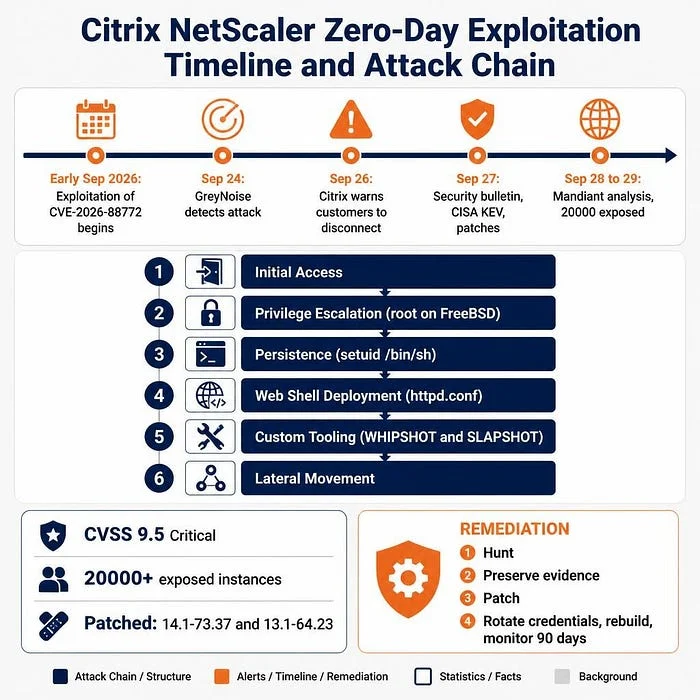
Three days later Citrix issued its official security advisory revealing the two zero-days. The gap matters: at the moment of detection there were no detection signatures specific to these CVEs, because the CVEs did not yet exist.
Exploitation
Step 1: Initial access from a single address
On 24 September, GreyNoise observed an exploitation attempt against a NetScaler Gateway originating from the IP address [redacted]. The researchers treated it as malicious on behaviour alone, with no signature to match against.
Step 2: Weeks of prior activity
The Google Threat Intelligence Group and Mandiant later established that exploitation of CVE-2026-88772 had been under way since at least early September, meaning the attackers were active weeks before public disclosure. The campaign probably began as a targeted effort against specific organisations before widening.
Step 3: Defenders told to disconnect
On 26 September, Citrix NetScaler customers began receiving urgent messages asking them to disconnect their servers because of suspected exploitation. Some organisations were told by their security teams to switch the affected devices off entirely rather than wait for patches.
Step 4: Disclosure and the federal deadline
On 27 September Citrix published its security bulletin listing eight vulnerabilities in total, including the two zero-days. CISA released its advisory the same day and added CVE-2026-88771 and CVE-2026-88772 to its Known Exploited Vulnerabilities catalogue with a remediation deadline of 30 September 2026 for federal agencies. That three-day window shows the urgency CISA attached to the flaws.
Step 5: Root access and setuid persistence
Exploitation gave code execution at root level. To make the privileged access survive the first compromise, the attackers moved quickly. GreyNoise saw an attempt to modify /bin/sh by setting its setuid bit, so that commands run through the shell in future would also execute as root. It is a simple and effective persistence method: it survives reboots and needs no external command-and-control infrastructure.
Step 6: A hidden PHP web shell
GreyNoise observed an attempt to install a password-protected web shell at:
/var/netscaler/logon/LogonPoint/custom/.ctxs.receiver
To make the shell reachable through the web server, the attackers edited /etc/httpd.conf, adding Alias or AliasMatch entries that redirected requests for things that looked like static files, such as CSS files, to the hidden PHP script. A request for receiver.min.css, for example, would execute the web shell instead of returning a stylesheet.
Step 7: Handler directives for non-PHP extensions
Google's analysis found a more advanced version of the same technique. The attackers added handler directives to httpd.conf so that non-PHP extensions such as .deb, .sig, .html, .rpm and .tgz would be treated as PHP scripts. They then placed files with those extensions in web-accessible directories and set up alias rules redirecting public paths such as /vpn/media/, /vpn/theme/ and /vpn/images/ to the directories holding the hidden shells.
Step 8: WHIPSHOT, a header-driven web shell
Mandiant identified two previously unseen tools built to keep access to compromised appliances. WHIPSHOT is a PHP web shell designed for stealth. It does not read commands from the request body or URL parameters; it takes them from within the HTTP headers, Base64-encoded. After decoding, it sends the commands over a local loopback connection to another process or service on the appliance. Whatever the real result, it always returns an HTTP 404 Not Found, which makes log inspection and response monitoring much less useful for spotting it.
Step 9: SLAPSHOT, the tunnelling bridge
SLAPSHOT is a Python-based TCP tunnelling tool that acts as a bridge inside the network. It takes its instructions from WHIPSHOT and forwards arbitrary TCP streams to internal hosts, letting attackers pivot from the compromised appliance into the victim's internal network.
It speaks a binary protocol with its proxy: each message is a 4-byte big-endian length prefix followed by a JSON payload. The supported command actions open an outbound TCP socket to target hosts, write data to open sessions, poll and read data from session sockets, exchange command-and-control data, terminate sessions and perform health checks.
The tool binds to a temporary port on the loopback interface and records the port number in a file such as:
/tmp/.uxdport
It uses file locking to ensure only one instance runs at a time. It watches connection activity and closes individual session sockets automatically after 15 minutes of inactivity. When no active sessions or commands have arrived within 10 minutes, the daemon deletes its port and lock files and exits, reducing memory use and the risk of detection.
That level of operational security points to a well-resourced adversary with a continuing interest in holding access rather than collecting data and leaving.
Root cause
CVE-2026-88771 is an input validation failure that allows unauthenticated command execution with no configuration prerequisite. CVE-2026-88772 is a memory overflow reachable over DTLS, leading to code execution or denial of service. The report does not go into the vulnerable code paths.
Why the existing defences did not stop the campaign is clearer. The appliances sit outside endpoint detection and response coverage, so the post-exploitation toolkit had little to run into. Before disclosure there were no signatures, no patches and no public information, so detection depended on behaviour. And the persistence mechanisms were placed before patching, which means firmware updates alone do not remove them.
Impact
Shadowserver reported more than 20,000 NetScaler instances visible on the internet and therefore potentially vulnerable. Mandiant confirmed successful compromises at dozens of organisations in North America and Europe, across government, financial services, education, telecommunications, and legal and professional services. No attribution has been made public, and researchers found no clear pattern by industry or size. NetScaler vulnerabilities have historically been exploited by both state-sponsored groups and ransomware operators.
Because the appliance terminates VPN access and authenticates users for everything behind it, a compromise gives a direct path into the internal network. With root access, setuid persistence, hidden web shells and a tunnelling tool, an attacker can keep that path open after the patch is applied.
Fix
Citrix shipped fixes in the 27 September bulletin. The fixed versions are 14.1-73.37 or later on the 14.1 branch, 13.1-64.23 or later on the 13.1 branch, and the corresponding FIPS and NDcPP versions. FIPS builds must go to 14.1-73.37 FIPS or 13.1-37.279 NDcPP or later. Versions 12.1 and 13.0 are not on the patched list and will get no fix; organisations still running them should treat migration to a supported branch as an emergency action.
Both Citrix and CISA warned organisations to look for signs of compromise before applying updates, because a web shell, modified configuration files or a tunnelling tool created before the patch will survive it. CISA's advisory notes that updating can destroy forensic visibility and advises preserving evidence first: memory dumps, configuration exports, session and authentication logs, and support bundles, captured before rebooting or rebuilding.
The recommended order is investigation first, then patching:
- Hunt for indicators. Before updating, check
/etc/httpd.conffor unauthorised MIME types, script handler directives or web path aliasing. AnyAddHandlerorAddTypeentry that makes non-PHP extensions execute as PHP, or anyAliasMatchredirecting public web paths to the appliance's script directories, is a clear sign of compromise. Check native client plug-in paths such as/var/netscaler/gui/vpn/scripts/linux/,/var/netscaler/gui/vpns/scripts/vista/and/var/netscaler/gui/vpns/scripts/mac/: valid files there are compiled binaries or archives, so anything identified as ASCII text or containing PHP markers is abnormal. Search all web-accessible directories for PHP markers such as<?php,eval(,base64_decode(andshell_exec(. Check permissions on/bin/sh, look for the.ctxs.receiverfile and any matchingAliasorAliasMatchentries, and review web server access and error logs for syntax, parsing or execution errors that reference disguised extensions. - Preserve evidence. Before rebooting, rebuilding or updating, capture forensic artifacts: configuration exports, session and authentication logs, memory dumps where possible, and support bundles. Also check external log sources such as firewall, DNS and authentication systems for signs of lateral movement from the appliance.
- Patch. Upgrade to the versions listed in Citrix's bulletin, as above.
- Rotate and rebuild if compromised. Rotate every credential, API key, token and certificate associated with the appliance, check connected authentication systems and management servers for lateral movement, and consider a full rebuild from trusted software and known-good configurations. Monitor for at least 90 days after remediation.
Citrix released an indicator-of-compromise scanner and a file integrity monitor, but the company acknowledged that its published indicators may not catch real compromises. Independent researchers observed that web shell artifacts appear unique to each compromised device, which makes signature-based scanning across a fleet difficult, and the generic IoC checks in NetScaler Console may miss sophisticated attacks.
Variants to test
- Handler directives for non-PHP extensions. On a NetScaler you are authorised to test, inspect
/etc/httpd.confforAddHandlerorAddTypelines mapping.deb,.sig,.html,.rpmor.tgzto PHP. A positive result is any such mapping, or a file with one of those extensions in a web-accessible directory that contains PHP markers. - Alias redirection to script directories. Look for
AliasorAliasMatchentries pointing public paths such as/vpn/media/,/vpn/theme/or/vpn/images/at directories holding scripts. A positive result is a request to a static-looking path that executes code rather than returning a file. - Disguised shell under the logon point. Check
/var/netscaler/logon/LogonPoint/custom/for hidden files such as.ctxs.receiverand for alias entries that map a stylesheet name likereceiver.min.cssto it. A positive result is a request for the stylesheet that runs the script. - Setuid on the shell. Check the permission bits on
/bin/sh. A setuid bit set on the shell is a positive result and indicates root persistence. - Unexpected files in plug-in directories. Inspect
/var/netscaler/gui/vpn/scripts/linux/,/var/netscaler/gui/vpns/scripts/vista/and/var/netscaler/gui/vpns/scripts/mac/for ASCII text or PHP markers where only compiled binaries or archives belong. - Loopback listener and port file. Look for a process bound to a temporary loopback port and for a file such as
/tmp/.uxdportrecording it. A positive result is an unexplained listener plus that file, consistent with SLAPSHOT. - Header-carried commands with 404 responses. Watch for requests whose HTTP headers carry Base64-encoded commands and whose responses are always 404 regardless of outcome. A positive result is a pattern of 404s from the same client against paths that should not exist, especially where the appliance shows local loopback activity at the same time.
What happened, in plain words
Imagine a large office building with a single front door where a security guard checks everyone's badge before letting them in. That front door is what Citrix NetScaler ADC and NetScaler Gateway do for computer networks. They sit at the edge of a company's network, accept connections from employees working remotely (a VPN, or virtual private network), and check who is allowed in. Everything behind that door trusts them.
In September 2026, attackers found two ways to get past that guard without showing a badge at all. These were brand-new weaknesses in the software, called zero-days, meaning the software maker did not know about them yet and had no fix ready. Both weaknesses were rated 9.5 out of 10 for severity, and both could lead to remote code execution, which is about as bad as it gets. The attackers had already been using them for weeks before anyone published a warning.
This article walks through what happened, in the order it happened, and explains every technical idea from scratch along the way. You only need to know how to use a browser and a computer to follow it.
The two weaknesses
A vulnerability is simply a mistake in software that someone can abuse to make the software do something it was never meant to do. Think of a vending machine that accepts a coin of any size because nobody checked the slot properly: the mistake is small, but it lets people get free snacks.
This campaign involved two separate mistakes, both rated CVSS 9.5. CVSS is a standard scoring system for how serious a vulnerability is; 9.5 out of 10 is near the top of the scale. Both mistakes allowed remote code execution, which means an attacker somewhere else on the internet could make the appliance run commands of their choosing.
CVE-2026-88771 is a flaw in how the software checks the input it receives. Input validation means checking that what a user sends looks like what was expected, the way a form that asks for a phone number should reject letters. Because this check was missing or wrong, a completely unauthenticated attacker, meaning someone with no account, no password and no badge at all, could run arbitrary commands on the appliance. It needed no special settings turned on: every default installation running an affected version was exposed. That made it the more serious of the two.
CVE-2026-88772 is a memory overflow. Computer programs keep data in memory, a bit like a row of numbered boxes. A memory overflow happens when a program writes more data into a box than the box can hold, and the extra data spills into neighbouring boxes, corrupting whatever was stored there. Depending on what gets overwritten, this can let an attacker run their own code or simply crash the appliance (a denial of service, meaning the service stops working for legitimate users).
This second flaw had a catch for the attacker: it only worked if a feature called DTLS was switched on. DTLS is a version of the encryption protocol used for secure web traffic (TLS), adapted to work over UDP, a faster but less reliable way of sending data across networks. On VPN virtual servers, DTLS is on by default, so most Gateway setups used for remote-access VPN already met the condition without an administrator doing anything. But exploiting a memory problem over DTLS means working over UDP, which generally takes more skill than abusing a simple input-checking mistake. That may be why fewer instances of CVE-2026-88772 were seen being exploited, even though both flaws scored the same.
Customer-managed ADC and Gateway installations were affected. Citrix fixed its own managed cloud services itself, and Secure Private Access Hybrid deployments that use NetScaler instances also needed upgrading.
The range of affected versions includes builds 14.1-73.32 and 13.1-63.21. Here is the twist: those are exactly the versions that had already fixed an earlier authentication bypass, CVE-2026-19490, in August 2026. An authentication bypass is a flaw that lets someone skip the login check entirely. So organisations that had done the right thing and patched quickly in August were still exposed to these two new flaws and needed a separate update.
How it was found
On 24 September 2026, a threat intelligence company called GreyNoise noticed something odd. Threat intelligence means collecting and analysing information about attackers and their activity. Someone was trying to exploit a NetScaler Gateway appliance, but there was no CVE for it. A CVE, or Common Vulnerabilities and Exposures identifier, is a public catalogue number given to a known vulnerability so everyone can refer to the same thing. No public advisory had been issued and no patch existed. GreyNoise decided the activity was malicious purely by watching how it behaved, because there was no known signature to compare it against.
A signature, in security, is a known pattern used to recognise something bad, like a fingerprint. Behavioural analysis means judging by what something does rather than by whether it matches a known fingerprint. It is the difference between a guard who checks a list of banned faces and a guard who notices someone trying every door handle in the building.
Three days later, Citrix published its official security advisory revealing the two zero-days. The gap matters: at the moment of detection there were no detection signatures for these CVEs, because the CVEs did not exist yet.
How the attack unfolded
Step 1: First sighting from one address
On 24 September, GreyNoise saw an exploitation attempt against a NetScaler Gateway coming from a single IP address. An IP address is the number that identifies a device on the internet, a bit like a postal address for a computer. The researchers treated the activity as malicious on behaviour alone, with no signature to match against.
Step 2: Weeks of activity before anyone noticed
The Google Threat Intelligence Group and Mandiant, a security firm, later worked out that exploitation of CVE-2026-88772 had been going on since at least early September. In other words, the attackers were active weeks before the public disclosure. The campaign probably started as a targeted effort against specific organisations before widening.
Step 3: Customers told to pull the plug
On 26 September, Citrix NetScaler customers began receiving urgent messages asking them to disconnect their servers because of suspected exploitation. Some organisations were told by their security teams to switch the affected devices off entirely rather than wait for patches. That is a drastic step: it is like closing the front door of the building and telling everyone to work from home, because you cannot yet tell who is inside.
Step 4: Disclosure and a three-day federal deadline
On 27 September, Citrix published its security bulletin listing eight vulnerabilities in total, including the two zero-days. A security bulletin is the official notice a software maker publishes describing flaws and their fixes. CISA, the US Cybersecurity and Infrastructure Security Agency, released its advisory the same day and added CVE-2026-88771 and CVE-2026-88772 to its Known Exploited Vulnerabilities catalogue. That catalogue is a list of flaws that are known to be actively used by attackers, and being on it obliges US federal agencies to fix them. The deadline was 30 September 2026, just three days later, which shows how urgently CISA viewed the flaws.
Step 5: Root access and a trick to keep it
Exploiting the flaws gave the attackers code execution at root level. Root is the all-powerful administrator account on Linux and similar systems; root can do anything, including things the normal owner of the machine cannot. To make that privileged access survive the first compromise, the attackers moved quickly.
GreyNoise saw an attempt to modify /bin/sh by setting its setuid bit. /bin/sh is the shell, the program that reads and runs typed commands. A setuid bit is a special permission flag on a file that says: whoever runs this program, run it with the permissions of the file's owner. If the owner is root, then anyone who runs the shell gets root powers. It is a simple and effective persistence method: persistence means keeping access after the initial break-in, and this trick survives reboots and needs no external command-and-control infrastructure. Command-and-control (C2) is the channel attackers use to send instructions to compromised machines; avoiding it means there is less traffic to spot.
Step 6: A hidden web shell behind a fake stylesheet
GreyNoise observed an attempt to install a password-protected web shell at this path:
/var/netscaler/logon/LogonPoint/custom/.ctxs.receiver
A web shell is a small program placed on a web server that lets an attacker run commands on it through ordinary web requests, as if the server had become a remote control. A path is the location of a file on the machine, like a folder address. The leading dot in .ctxs.receiver hides the file from a normal directory listing, the same way a file starting with a dot is hidden on many systems.
To make the shell reachable through the web server, the attackers edited /etc/httpd.conf. That file is the configuration file for the web server, the program that answers browser requests. They added Alias or AliasMatch entries, which are rules that tell the web server to serve a request from a different location than the one asked for. The rules redirected requests for things that looked like static files, such as CSS files, to the hidden PHP script. CSS is the language that styles web pages, and a stylesheet is a file of styling rules; nobody expects a stylesheet to run code. A request for receiver.min.css, for example, would execute the web shell instead of returning a stylesheet. The .min part is a common naming convention for a compressed stylesheet, so the name looked completely ordinary.
Step 7: Making innocent-looking file types run as code
Google's analysis found a more advanced version of the same technique. The attackers added handler directives to httpd.conf. A handler directive is a line in the configuration that tells the web server which program should process a given type of file. They made non-PHP extensions such as .deb, .sig, .html, .rpm and .tgz be treated as PHP scripts. PHP is a programming language commonly used for web pages, and an extension is the part of a filename after the dot that hints at its type, like .jpg for a photo. .deb and .rpm are package files used to install software on Linux, .tgz is a compressed archive, .sig is a signature file and .html is a web page. None of these should ever run as code.
The attackers then placed files with those extensions in web-accessible directories, meaning folders the web server will serve to anyone who asks, and set up alias rules redirecting public paths such as /vpn/media/, /vpn/theme/ and /vpn/images/ to the directories holding the hidden shells. To a casual observer, a request to /vpn/images/ looks like a picture being loaded.
Step 8: WHIPSHOT, a shell that hides its commands in headers
Mandiant identified two previously unseen tools built to keep access to compromised appliances. WHIPSHOT is a PHP web shell designed for stealth. It does not read commands from the request body or URL parameters. The request body is the part of a web request that carries data, such as what you type into a form; URL parameters are the bits after a question mark in a web address that pass small pieces of information. Instead, WHIPSHOT takes its commands from within the HTTP headers, Base64-encoded. HTTP headers are the extra lines of information sent alongside every web request, things like what browser you use and what type of content you accept. Base64 is a way of turning any data into plain letters and digits so it can travel safely through systems that only expect text; it is encoding, not encryption, so anyone can decode it.
After decoding, WHIPSHOT sends the commands over a local loopback connection to another process or service on the appliance. Loopback is the network address a computer uses to talk to itself, like an internal intercom rather than a phone call outside the building. Whatever the real result, WHIPSHOT always returns an HTTP 404 Not Found. HTTP 404 is the standard response meaning the requested page does not exist. Always answering 404 makes log inspection and response monitoring much less useful for spotting it: a defender scanning logs sees only a stream of harmless-looking missing pages.
Step 9: SLAPSHOT, the tunnel into the network
SLAPSHOT is a Python-based TCP tunnelling tool that acts as a bridge inside the network. Python is a popular programming language, and TCP is the standard way computers send reliable streams of data to each other. A tunnelling tool wraps one kind of traffic inside another so it can pass through places it otherwise could not, like running a hose through a wall. SLAPSHOT takes its instructions from WHIPSHOT and forwards arbitrary TCP streams to internal hosts, letting attackers pivot from the compromised appliance into the victim's internal network. To pivot means to use one compromised machine as a stepping stone to reach others.
It speaks a binary protocol with its proxy. A protocol is an agreed set of rules for how two programs talk; binary means the data is in raw bytes rather than readable text. Each message is a 4-byte big-endian length prefix followed by a JSON payload. A byte is a unit of data, roughly one character's worth. Big-endian is a way of writing a number where the most significant part comes first, like writing a date as year-month-day. A length prefix is a number at the start of a message saying how long the rest is, so the receiver knows where the message ends. JSON is a simple text format for structured data, using curly brackets and colons, that both humans and programs can read.
The supported command actions open an outbound TCP socket to target hosts, write data to open sessions, poll and read data from session sockets, exchange command-and-control data, terminate sessions and perform health checks. A socket is one end of a network connection, the thing a program uses to send and receive data. Polling means checking repeatedly whether there is anything new to read.
The tool binds to a temporary port on the loopback interface and records the port number in a file such as:
/tmp/.uxdport
A port is a numbered channel on a computer, so several programs can use the network at once without mixing up their traffic, like apartment numbers in a building. Binding means claiming that port so the program can listen on it. /tmp is a folder for temporary files, and the dot again hides the file.
It uses file locking to ensure only one instance runs at a time. File locking is a mechanism where a program marks a file as in use so a second copy knows to stay away. It watches connection activity and closes individual session sockets automatically after 15 minutes of inactivity. When no active sessions or commands have arrived within 10 minutes, the daemon deletes its port and lock files and exits, reducing memory use and the risk of detection. A daemon is a program that runs quietly in the background without anyone watching it.
That level of operational security points to a well-resourced adversary with a continuing interest in holding access rather than collecting data and leaving. Operational security, or opsec, is the care an attacker takes to avoid being noticed.
Why the usual defences did not stop it
CVE-2026-88771 is an input validation failure that allows unauthenticated command execution with no configuration prerequisite. CVE-2026-88772 is a memory overflow reachable over DTLS, leading to code execution or denial of service. The report does not go into the vulnerable code paths.
Why the existing defences did not stop the campaign is clearer. The appliances sit outside endpoint detection and response coverage. Endpoint detection and response (EDR) is security software installed on individual computers, such as laptops and servers, that watches for suspicious behaviour. A network appliance is a specialised device, not a general-purpose computer, so EDR often cannot be installed on it, and the attackers' toolkit had little to run into. Before disclosure there were no signatures, no patches and no public information, so detection depended on behaviour. And the persistence mechanisms were placed before patching, which means firmware updates alone do not remove them. Firmware is the software built into a device that makes it work.
How bad it was
Shadowserver, a non-profit that scans the internet for exposed devices, reported more than 20,000 NetScaler instances visible on the internet and therefore potentially vulnerable. Mandiant confirmed successful compromises at dozens of organisations in North America and Europe, across government, financial services, education, telecommunications, and legal and professional services. No attribution has been made public, meaning nobody has officially said which group or country was behind it, and researchers found no clear pattern by industry or size. NetScaler vulnerabilities have historically been exploited by both state-sponsored groups and ransomware operators. Ransomware is malicious software that locks up data and demands payment to unlock it.
Because the appliance terminates VPN access and authenticates users for everything behind it, a compromise gives a direct path into the internal network. With root access, setuid persistence, hidden web shells and a tunnelling tool, an attacker can keep that path open after the patch is applied.
The fix
Citrix shipped fixes in the 27 September bulletin. The fixed versions are 14.1-73.37 or later on the 14.1 branch, 13.1-64.23 or later on the 13.1 branch, and the corresponding FIPS and NDcPP versions. A branch here means a line of software releases that receive updates. FIPS is a US government standard for cryptographic modules, and NDcPP is a common security certification for network devices; builds certified to those standards are separate downloads. FIPS builds must go to 14.1-73.37 FIPS or 13.1-37.279 NDcPP or later. Versions 12.1 and 13.0 are not on the patched list and will get no fix; organisations still running them should treat migration to a supported branch as an emergency action.
Both Citrix and CISA warned organisations to look for signs of compromise before applying updates, because a web shell, modified configuration files or a tunnelling tool created before the patch will survive it. CISA's advisory notes that updating can destroy forensic visibility and advises preserving evidence first: memory dumps, configuration exports, session and authentication logs, and support bundles, captured before rebooting or rebuilding. Forensic visibility means the ability to investigate what happened; a memory dump is a copy of what was in the computer's memory at a moment in time, and a support bundle is a package of diagnostic files collected for troubleshooting.
The recommended order is investigation first, then patching:
- Hunt for indicators. Before updating, check
/etc/httpd.conffor unauthorised MIME types, script handler directives or web path aliasing. A MIME type is a label that says what kind of content something is, such as text or an image. AnyAddHandlerorAddTypeentry that makes non-PHP extensions execute as PHP, or anyAliasMatchredirecting public web paths to the appliance's script directories, is a clear sign of compromise. Check native client plug-in paths such as/var/netscaler/gui/vpn/scripts/linux/,/var/netscaler/gui/vpns/scripts/vista/and/var/netscaler/gui/vpns/scripts/mac/: valid files there are compiled binaries or archives, so anything identified as ASCII text or containing PHP markers is abnormal. A compiled binary is a program already translated into machine code, and ASCII text is ordinary readable characters. Search all web-accessible directories for PHP markers such as<?php,eval(,base64_decode(andshell_exec(. These are snippets of PHP code:<?phpopens a PHP block,eval(runs a string as code,base64_decode(turns Base64 text back into data, andshell_exec(runs a system command. Check permissions on/bin/sh, look for the.ctxs.receiverfile and any matchingAliasorAliasMatchentries, and review web server access and error logs for syntax, parsing or execution errors that reference disguised extensions. - Preserve evidence. Before rebooting, rebuilding or updating, capture forensic artifacts: configuration exports, session and authentication logs, memory dumps where possible, and support bundles. Also check external log sources such as firewall, DNS and authentication systems for signs of lateral movement from the appliance. Lateral movement is an attacker moving from one machine to another inside a network. DNS is the system that turns website names into IP addresses.
- Patch. Upgrade to the versions listed in Citrix's bulletin, as above.
- Rotate and rebuild if compromised. Rotate every credential, API key, token and certificate associated with the appliance. Rotating means replacing them with new ones, because the old ones may be in an attacker's hands. A credential is a username and password pair; an API key is a secret string that lets one program talk to another; a token is a temporary pass issued after login; a certificate is a digital document that proves a server's identity. Check connected authentication systems and management servers for lateral movement, and consider a full rebuild from trusted software and known-good configurations. Monitor for at least 90 days after remediation.
Citrix released an indicator-of-compromise scanner and a file integrity monitor, but the company acknowledged that its published indicators may not catch real compromises. An indicator of compromise (IoC) is a clue that a system has been broken into, such as a strange file or an unusual connection. A file integrity monitor is a tool that checks whether files have changed unexpectedly. Independent researchers observed that web shell artifacts appear unique to each compromised device, which makes signature-based scanning across a fleet difficult, and the generic IoC checks in NetScaler Console may miss sophisticated attacks.
Things to check on your own systems
If you look after a NetScaler you are authorised to test, these are the patterns worth checking for:
- Handler directives for non-PHP extensions. Inspect
/etc/httpd.confforAddHandlerorAddTypelines mapping.deb,.sig,.html,.rpmor.tgzto PHP. A positive result is any such mapping, or a file with one of those extensions in a web-accessible directory that contains PHP markers. - Alias redirection to script directories. Look for
AliasorAliasMatchentries pointing public paths such as/vpn/media/,/vpn/theme/or/vpn/images/at directories holding scripts. A positive result is a request to a static-looking path that executes code rather than returning a file. - Disguised shell under the logon point. Check
/var/netscaler/logon/LogonPoint/custom/for hidden files such as.ctxs.receiverand for alias entries that map a stylesheet name likereceiver.min.cssto it. A positive result is a request for the stylesheet that runs the script. - Setuid on the shell. Check the permission bits on
/bin/sh. A setuid bit set on the shell is a positive result and indicates root persistence. - Unexpected files in plug-in directories. Inspect
/var/netscaler/gui/vpn/scripts/linux/,/var/netscaler/gui/vpns/scripts/vista/and/var/netscaler/gui/vpns/scripts/mac/for ASCII text or PHP markers where only compiled binaries or archives belong. - Loopback listener and port file. Look for a process bound to a temporary loopback port and for a file such as
/tmp/.uxdportrecording it. A positive result is an unexplained listener plus that file, consistent with SLAPSHOT. - Header-carried commands with 404 responses. Watch for requests whose HTTP headers carry Base64-encoded commands and whose responses are always 404 regardless of outcome. A positive result is a pattern of 404s from the same client against paths that should not exist, especially where the appliance shows local loopback activity at the same time.
Glossary
- ADC (Application Delivery Controller): a device that sits in front of servers and spreads incoming traffic across them, often also handling encryption and authentication.
- Advisory: an official public notice about a security problem, usually from the software maker or a government agency.
- Alias / AliasMatch: web server configuration rules that serve a request from a different file or folder than the one in the address.
- API key: a secret string that lets one program authenticate to another.
- ASCII text: ordinary readable characters, as opposed to compiled program code.
- Authentication bypass: a flaw that lets someone skip a login check entirely.
- Base64: an encoding that turns any data into plain letters and digits so it can travel through text-only systems; not encryption.
- Big-endian: a way of writing numbers where the most significant part comes first.
- Binary: data in raw bytes rather than readable text.
- Binding (a port): claiming a numbered network channel so a program can listen on it.
- Branch: a line of software releases that receive updates.
- Byte: a unit of data, roughly one character's worth.
- C2 (command-and-control): the channel attackers use to send instructions to compromised machines.
- Certificate: a digital document that proves a server's identity.
- CISA: the US Cybersecurity and Infrastructure Security Agency.
- Command execution: making a computer run a command of your choosing.
- Compiled binary: a program already translated into machine code.
- Credential: a username and password pair, or similar proof of identity.
- CSS: the language that styles web pages.
- CVE: a public catalogue number given to a known vulnerability.
- CVSS: a standard scoring system for how serious a vulnerability is, out of 10.
- Daemon: a program that runs quietly in the background.
- Denial of service: making a service stop working for legitimate users.
- DTLS: a version of the TLS encryption protocol adapted to work over UDP.
- EDR (endpoint detection and response): security software on individual computers that watches for suspicious behaviour.
- Extension: the part of a filename after the dot that hints at its type.
- FIPS: a US government standard for cryptographic modules.
- Firmware: the software built into a device that makes it work.
- Forensic visibility: the ability to investigate what happened on a system after an incident.
- Handler directive: a web server configuration line saying which program processes which type of file.
- HTTP 404: the standard web response meaning the requested page does not exist.
- HTTP headers: extra lines of information sent alongside every web request.
- Input validation: checking that data a user sends looks like what was expected.
- IoC (indicator of compromise): a clue that a system has been broken into.
- IP address: the number that identifies a device on the internet.
- JSON: a simple text format for structured data.
- Lateral movement: an attacker moving from one machine to another inside a network.
- Length prefix: a number at the start of a message saying how long the rest is.
- Loopback: the network address a computer uses to talk to itself.
- Memory dump: a copy of what was in a computer's memory at a moment in time.
- Memory overflow: a program writing more data into a memory location than it can hold, corrupting what is nearby.
- MIME type: a label saying what kind of content something is.
- NDcPP: a common security certification for network devices.
- NetScaler ADC / Gateway: Citrix products that sit at the network edge, accept VPN connections and handle authentication.
- Opsec (operational security): the care an attacker takes to avoid being noticed.
- Path: the location of a file on a machine, like a folder address.
- Persistence: keeping access after the initial break-in.
- PHP: a programming language commonly used for web pages.
- Pivot: to use one compromised machine as a stepping stone to reach others.
- Polling: checking repeatedly whether there is anything new to read.
- Port: a numbered channel on a computer so several programs can use the network at once.
- Protocol: an agreed set of rules for how two programs talk.
- Ransomware: malicious software that locks up data and demands payment to unlock it.
- Remote code execution: running your own commands on a machine somewhere else on the network.
- Request body: the part of a web request that carries data, such as form input.
- Root: the all-powerful administrator account on Linux and similar systems.
- Rotate: replace credentials, keys or certificates with new ones.
- Security bulletin: the official notice a software maker publishes describing flaws and their fixes.
- Setuid bit: a permission flag that makes a program run with the permissions of its owner.
- Shell: the program that reads and runs typed commands.
- Signature: a known pattern used to recognise something bad.
- Socket: one end of a network connection.
- Support bundle: a package of diagnostic files collected for troubleshooting.
- TCP: the standard way computers send reliable streams of data to each other.
- Threat intelligence: collecting and analysing information about attackers and their activity.
- Token: a temporary pass issued after login.
- Tunnelling tool: software that wraps one kind of traffic inside another so it can pass through places it otherwise could not.
- UDP: a faster but less reliable way of sending data across networks.
- URL parameters: the bits after a question mark in a web address that pass small pieces of information.
- Virtual server: a software-defined server inside an appliance that handles a particular service, such as VPN connections.
- VPN (virtual private network): a secure connection that lets a remote user join a private network.
- Vulnerability: a mistake in software that someone can abuse to make it do something it was never meant to do.
- Web shell: a small program on a web server that lets an attacker run commands through ordinary web requests.
- Zero-day: a vulnerability the software maker does not know about yet, so no fix exists.


