Combining DOM and reflected XSS to bypass input sanitation in Checkpoint.com
A reflected XSS vulnerability in a search parameter was partially sanitised, blocking common payloads. The researcher bypassed the filter by using a DOM-based technique that read the payload from the URL fragment, allowing JavaScript execution.

medium.com
Published on medium.com
I was looking around checkpoint.com to see if I could find any low hanging fruits. Checkpoint does not have a bug bounty program, but as a company that does a great job exposing vulnerabilities in others applications, it made me want to check if the camel sees its own hump.
The full write-up lives on its author's site
It belongs to its author, so we link to it rather than copy it. The other two tabs are our own rewrites, checked against it.
Context
Check Point is a security vendor, and the researcher's starting point was a simple question: does the company's own public web estate hold up to the kind of testing it sells to everyone else? The researcher was looking around checkpoint.com and found an old-looking page at appwiki.checkpoint.com, served from the path /appwikisdb/. The entry point was the public page:
https://appwiki.checkpoint.com/appwikisdb/public.htm
The page presents a search bar, and a submitted string was reflected in the HTML of the response. That reflection is the feature under test: a search interface that renders the submitted term back to the user.
Setup
The report describes no accounts, roles or special access. The work was done against the public site, using Google dorking to find candidate endpoints and Burp Suite to intercept requests. No versions of the application or of Burp are given. The only precondition worth noting is that the researcher was looking for old-fashioned pages, on the reasoning that legacy interfaces are a good indication of an unsecured web application.
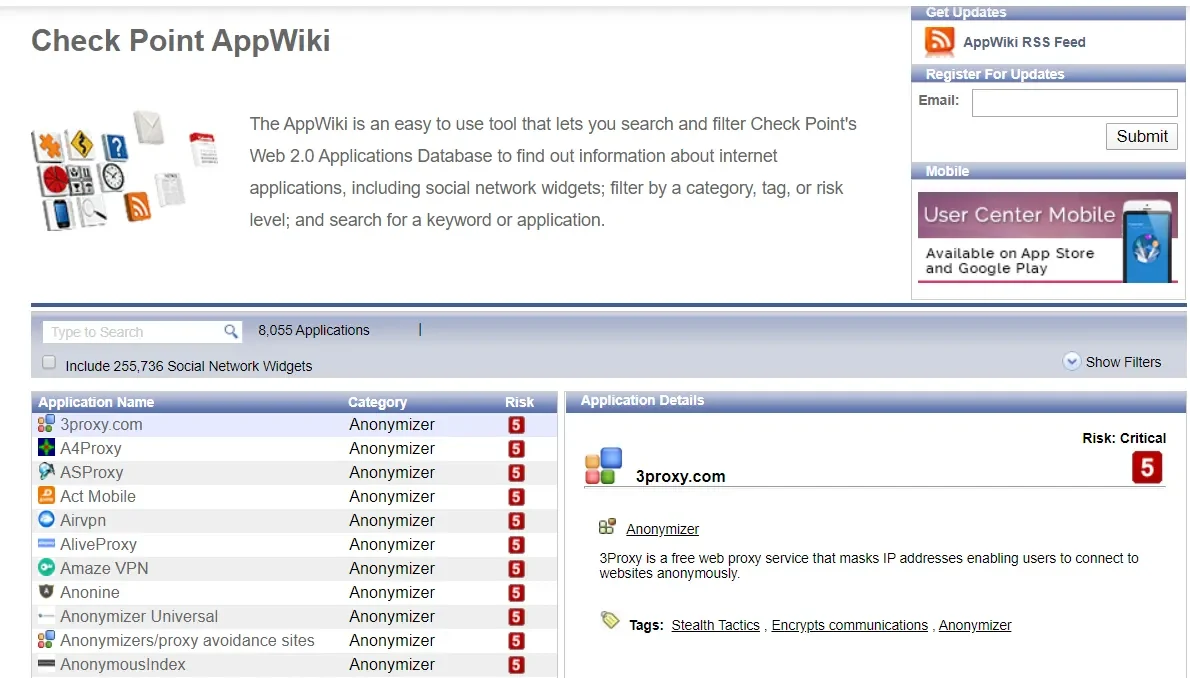
The screenshot shows the old-fashioned public page that the dorking turned up, the starting point for the whole exercise.
Finding it
The search bar was the obvious place to look. Intercepting the search request in Burp and submitting a random string showed that the string was reflected inside the value attribute of an input tag. A reflection inside an attribute is a different problem from a reflection in element body: to run script you first have to break out of the attribute context.
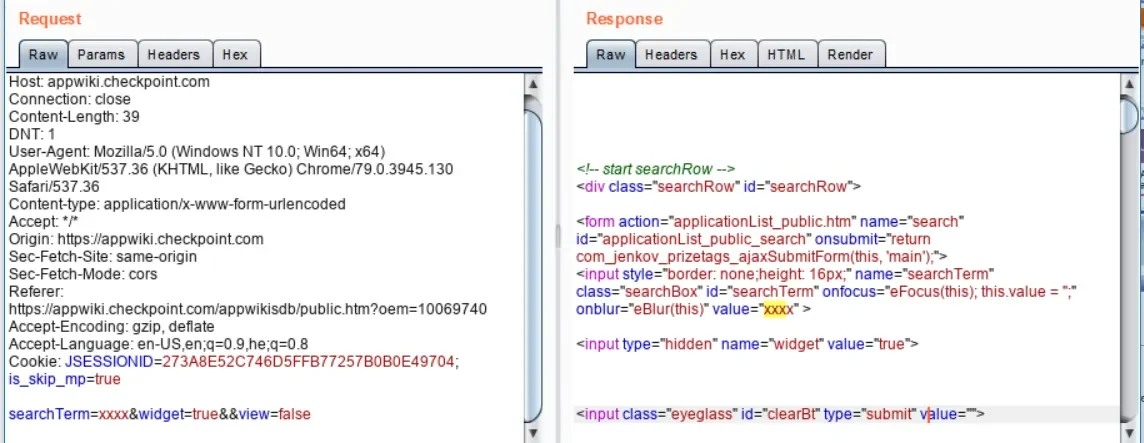
The intercepted request and its response show the random string landing in the value attribute of the input element.
Exploitation
Step 1: try to break out of the attribute
The first attempt was the straightforward one: close the value attribute with a double quote, add a JavaScript event handler and pop an alert. The researcher added double quotes closing off the value attribute and added onload=alert(). Nothing happened: the payload was not reflected in the response. Removing the parenthesis and sending it again brought the payload back, which showed that some input validation was in play.
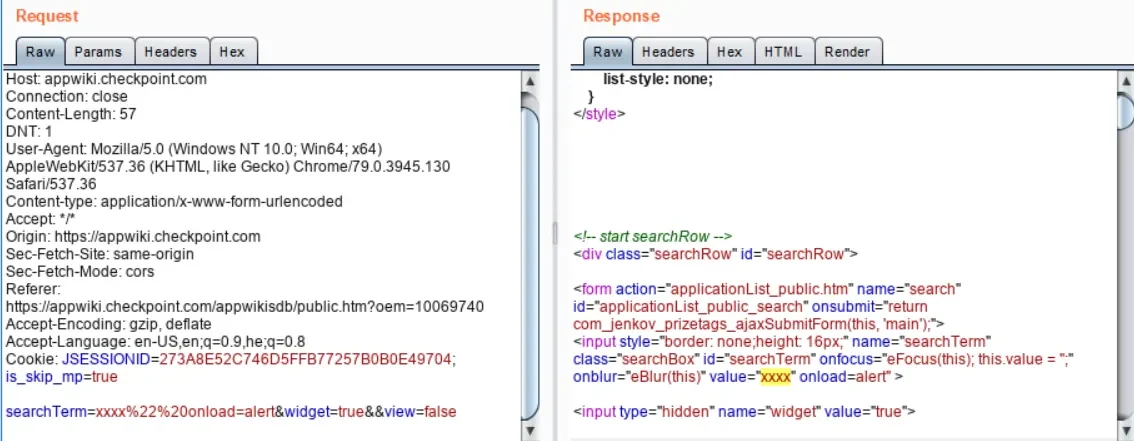
The response with the parenthesis removed shows the payload reappearing, the signal that a filter was stripping or blocking certain characters.
Step 2: map the filter
Playing with the input established which characters and strings were sanitised:
| Blocked or sanitised |
|---|
( and ) |
' (single quote) |
; (semicolon) |
` (backtick) |
< and > |
the word script |
Different payloads were tried without success. One self-inflicted mistake is worth recording: the researcher had been using the onload event inside the input tag from the start. onload only fires on an input if the tag has a type=image attribute with a valid src, so some payloads that might have worked were never given a chance. The detour led to a better payload in the end.
Step 3: inventory what is left
With the blocked set known, the researcher listed the characters still available: square brackets [], the plus sign +, the dot . and the equals sign =. That is enough to build expressions and to index into strings, but not enough to write a function call, because the parentheses are gone.
Step 4: build the string from other objects
A fellow researcher, Gal Goldshtein, suggested using the window.location object and constructing the javascript:alert() string from other JavaScript objects by accessing their string indexes. The event handler was switched from onload to onmouseover, which does work on an input tag, and the following payload was tested:
onmouseover=window.location=navigator.userAgent[0]
It worked: because the User-agent began with Mozilla, the browser was forwarded to /appwikisdb/M, the first character of the User-agent string. That confirmed that indexing into a string and assigning to window.location executes in this context.

The result of the navigator.userAgent[0] test, with the browser sent to /appwikisdb/M.
Step 5: move the payload into the URL hash
Rather than hunting for each character of the final payload inside different JavaScript objects, the researcher used the URL hash, read through window.location.hash. The hash is never sent to the server, so the payload can live there and still be read from the reflected response. In the researcher's words, this is basically injecting a DOM XSS vulnerability using a reflected XSS.
There was one snag. window.location.hash returns the string including the leading #. Assigning window.location=window.location.hash with #javascript:alert(/xss/) in the hash would render as window.location=#javascript:alert(/xss/), which breaks the script. The substring() method was unavailable because of the parenthesis filter, so every character of the hash except the first had to be concatenated by hand.
Step 6: the final payload
The result was this URL:
https://appwiki.checkpoint.com/appwikisdb/applicationList_public.htm?searchTerm=yyyyy”%20onmouseover=”window.location=window.location.hash[1]+window.location.hash[2]+window.location.hash[3]+window.location.hash[4]+window.location.hash[5]+window.location.hash[6]+window.location.hash[7]+window.location.hash[8]+window.location.hash[9]+window.location.hash[10]+window.location.hash[11]+window.location.hash[12]+window.location.hash[13]+window.location.hash[14]+window.location.hash[15]+window.location.hash[16]+window.location.hash[17]+window.location.hash[18]+window.location.hash[19]+window.location.hash[20]+window.location.hash[21]+window.location.hash[22]+window.location.hash[23]&widget=true&=&view=false#javascript:alert(/xss/)
How the pieces fit together:
searchTerm=yyyyy”%20onmouseover=”...closes thevalueattribute with the encoded double quote, adds a space and anonmouseoverhandler, then opens a new attribute with the second quote so the rest of the tag stays syntactically valid.- The handler body is
window.location=window.location.hash[1]+...up to index23, which rebuilds the hash string without its leading#. - The hash itself,
#javascript:alert(/xss/), is never sent to the server, so the server-side filter never sees the dangerous string. widget=trueandview=falseare the other parameters present in the URL.
And the alert fired.
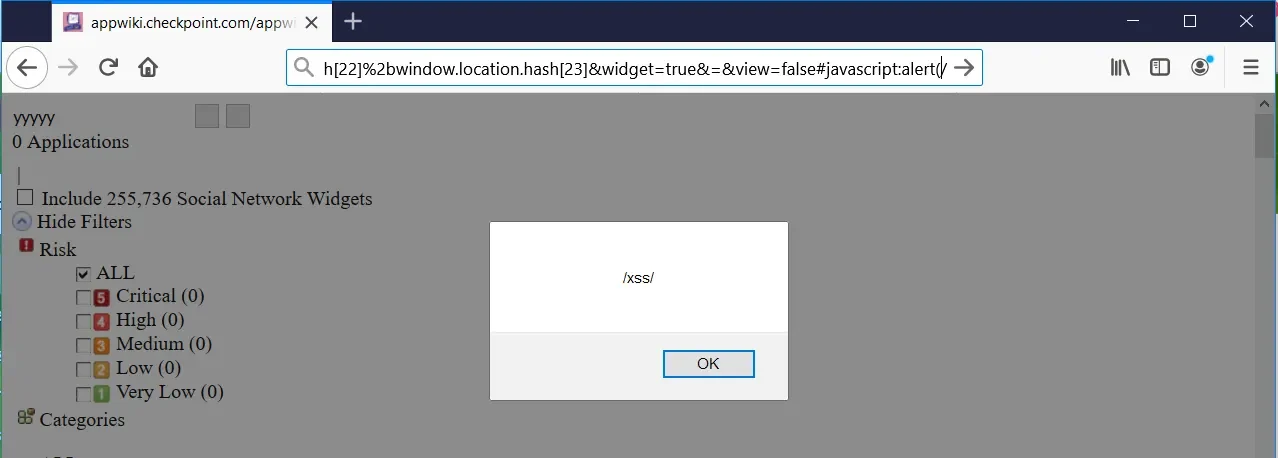
The final URL and the resulting alert box.
Root cause
The application reflects the searchTerm parameter into the value attribute of an input tag without adequate output encoding, so an attacker can break out of the attribute and add an event handler. The input filter blocks a set of characters and the word script, but it leaves enough characters available to index strings and assign to window.location. and it leaves [], +, . and = available, which is enough to index strings and assign to window.location. Because the fragment is never sent to the server, moving the executable part of the payload into the URL hash sidesteps the filter entirely: the fragment is never transmitted, but the reflected page still reads it through window.location.hash. The combination is a reflected XSS that bootstraps a DOM XSS. Whether the filter was the only defence in place is not stated in the report.
Impact
The report does not spell out a threat model beyond the working proof of concept. What the payload demonstrates is that the crafted URL causes the browser to run the injected JavaScript and show an alert. The attack requires the victim to follow a link containing the payload, and the payload depends on the hash being present in the URL, since the handler reads it from window.location.hash. The report gives no information about what data or sessions the application holds, so the practical reach of the vulnerability beyond the alert is not described.
Fix
The report states that the vulnerability was reported and patched by Check Point's Security team within 3 hours. It does not describe what the patch changed. The general remedy for this class of bug is context-aware output encoding of the reflected value for the HTML attribute context, so that a double quote in the input cannot terminate the attribute, combined with a whitelist rather than a blacklist approach to input validation.
Variants to test
- Attribute reflections with a permissive blacklist. Submit a random string to any search or filter parameter and look for it inside a
value,hrefor other attribute. If a double quote survives the filter, try closing the attribute and adding an event handler that works on that element, such asonmouseoveron an input. A positive result is the handler appearing intact in the response. - Filter mapping by character. Send each of
(,),',;,`,<,>and the wordscriptand note which are stripped or blocked. A positive result is a set of surviving characters rich enough to build expressions, for example[],+,.and=. - String indexing instead of function calls. Where parentheses are blocked, test whether
navigator.userAgent[0]or similar indexing expressions are reflected and evaluated. A positive result is a redirect or other observable effect driven by a single character of a built-in string. - Hash-based payload delivery. Put the dangerous string in the URL fragment and have the reflected handler read it via
window.location.hash. A positive result is the fragment content executing even though the server never received it. - Hash prefix handling. When the handler assigns
window.location.hashdirectly, check whether the leading#breaks execution, and whether concatenating individual indexes from[1]onwards restores a workingjavascript:URL. A positive result is the alert firing from the reconstructed string.
What happened, in plain words
A security researcher was poking around the public website of Check Point, a company that sells security products and publishes research about other people's vulnerabilities. The researcher's question was simple: does this company's own website stand up to the kind of testing it sells? Check Point does not run a bug bounty programme, so there was no reward on offer, but the researcher looked anyway.
The search turned up an old-looking application wiki at appwiki.checkpoint.com, served from the path /appwikisdb/. Old-fashioned pages are interesting to a tester because they are often built long before modern safety habits became standard. The page had a search bar, and whatever you typed into it came back in the page that was returned. That echo, called a reflection, is the feature that turned out to be unsafe.
By feeding the search box carefully chosen text, the researcher could make the page run JavaScript of their choosing in the browser that opened the crafted link. Along the way a filter blocked several characters, and the researcher worked around it by hiding part of the attack in a piece of the URL that browsers never send to the server. Check Point's security team fixed the problem within 3 hours of the report.
The starting point
Check Point is a security vendor. The researcher's starting point was a simple question: does the company's own public web estate hold up to the kind of testing it sells to everyone else? The target was checkpoint.com, and the specific asset that turned up was an old-looking application at appwiki.checkpoint.com, a public application wiki served from the path /appwikisdb/. The entry point was the public page:
https://appwiki.checkpoint.com/appwikisdb/public.htm
Reading that URL from left to right: https:// means the page is fetched over an encrypted connection; appwiki.checkpoint.com is the name of the server; /appwikisdb/ is a folder on that server; and public.htm is the particular page file inside it. The word public in the file name suggests the page is meant to be open to anyone.
The page presents a search bar, and the search term is echoed back into the HTML of the response. That reflection is the feature under test: a search interface that renders the submitted term back to the user. Think of a cloakroom that hands you back a ticket with your name written on it: whatever name you gave at the desk is what appears on the ticket. If the attendant copies your name without checking it, you can write something unexpected on the ticket.
Setup
The report describes no accounts, roles or special access. The work was done against the public site, using Google dorking to find candidate endpoints and Burp Suite to intercept requests. No versions of the application or of Burp are given. The only precondition worth noting is that the researcher was looking for old-fashioned pages, on the reasoning that legacy interfaces are a good indication of an unsecured web application.
Two tools need explaining. Google dorking means using advanced search operators in Google to find pages that ordinary browsing would not surface, for example pages with particular words in the title or particular file types. It is like using the index at the back of a library rather than walking every shelf. Burp Suite is a program that sits between your browser and a website and lets you pause, read, change and resend the requests your browser makes. It is a proxy in the everyday sense: a middleman you control. An endpoint is simply a specific address on a server that accepts requests, such as a particular page or a particular search function.
The screenshot shows the old-fashioned public page that the dorking turned up, the starting point for the whole exercise.
Finding it
The search bar was the obvious place to look. Intercepting the search request in Burp and submitting a random string showed that the string was reflected inside the value attribute of an input tag. A reflection inside an attribute is a different problem from a reflection in element body: to run script you first have to break out of the attribute context.
Some background on the HTML involved. A web page is written in HTML, a language of tags. An input tag creates a box on the page, such as a text field. Tags carry settings called attributes, written as name="value". For example, <input value="hello"> creates a text box pre-filled with the word hello. The double quotes mark where the attribute's value starts and ends. If a website pastes your search term into that spot without cleaning it, and your term contains a double quote, the quote can end the attribute early and let you add settings of your own. That is what breaking out of the attribute context means: escaping the place the developer intended your text to stay.
The intercepted request and its response show the random string landing in the value attribute of the input element.
Exploitation
Step 1: try to break out of the attribute
The first attempt was the straightforward one: close the value attribute with a double quote, add a JavaScript event handler and pop an alert. The researcher added double quotes closing off the value attribute and added onload=alert(). Nothing happened: the payload was not reflected in the response. Removing the parenthesis and sending it again brought the payload back, which showed that some input validation was in play.
A payload is the piece of text an attacker sends to try to trigger a behaviour. JavaScript is the programming language browsers run, and an event handler is a snippet of JavaScript attached to an HTML element that runs when something happens to that element, such as the mouse passing over it. alert() is a built-in JavaScript function that shows a small pop-up box; testers use it because a pop-up appearing is unmistakable proof that their code ran. Input validation, or sanitisation, is the website checking what you sent and removing or blocking parts it does not like, like a bouncer at a door refusing certain items.
The parenthesis is the ( and ) pair around the word alert. When the researcher removed it, the rest of the text came back in the page, which told them the filter was reacting to specific characters rather than rejecting the whole input.
The response with the parenthesis removed shows the payload reappearing, the signal that a filter was stripping or blocking certain characters.
Step 2: map the filter
Playing with the input established which characters and strings were sanitised:
| Blocked or sanitised |
|---|
( and ) |
' (single quote) |
; (semicolon) |
` (backtick) |
< and > |
the word script |
Different payloads were tried without success. One self-inflicted mistake is worth recording: the researcher had been using the onload event inside the input tag from the start. onload only fires on an input if the tag has a type=image attribute with a valid src, so some payloads that might have worked were never given a chance. The detour led to a better payload in the end.
Mapping the filter means testing one character at a time and noting which ones survive. It is like working out which keys still open a door after the locks have been changed. The blocked list matters because each character has a job in JavaScript: parentheses are needed to call a function, quotes are needed to write text, semicolons separate statements, angle brackets are needed to create new HTML tags, and the word script is the name of the tag that loads JavaScript. Blocking all of those removes the obvious routes.
The onload mistake is a good lesson. onload means run this when the element finishes loading, but on an input element it only fires under a specific configuration, so the handler was attached to the element and simply never triggered. The researcher had been testing a handler that could not fire in that position.
Step 3: inventory what is left
With the blocked set known, the researcher listed the characters still available: square brackets [], the plus sign +, the dot . and the equals sign =. That is enough to build expressions and to index into strings, but not enough to write a function call, because the parentheses are gone.
Square brackets in JavaScript pick a single character out of a piece of text: if word is cat, then word[0] is c, word[1] is a, and so on, counting from zero. The plus sign joins pieces of text together, the dot reaches into an object to get one of its parts, and the equals sign assigns a value. So the surviving characters allow the researcher to read characters from existing strings and glue them together, but not to call a function directly.
Step 4: build the string from other objects
A fellow researcher, Gal Goldshtein, suggested using the window.location object and constructing the javascript:alert() string from other JavaScript objects by accessing their string indexes. The event handler was switched from onload to onmouseover, which does work on an input tag, and the following payload was tested:
onmouseover=window.location=navigator.userAgent[0]
It worked: because the User-agent began with Mozilla, the browser was forwarded to /appwikisdb/M, the first character of the User-agent string. That confirmed that indexing into a string and assigning to window.location executes in this context.
Line by line, in plain words:
onmouseover=attaches a handler that runs when the mouse pointer moves over the input box.window.location=sets the address the browser is currently on, so assigning to it makes the browser navigate somewhere.navigator.userAgentis a string the browser supplies describing itself, for example starting withMozilla.[0]takes the first character of that string, counting from zero, which isM.
So the whole payload means: when the mouse passes over the box, send the browser to the first character of its own User-agent string. The browser went to /appwikisdb/M, which proved two things at once: the handler fired, and the browser would follow an address built out of pieces of text. The User-agent is the label a browser sends with every request saying what kind of browser it is; here it was used as a convenient source of characters.
The result of the navigator.userAgent[0] test, with the browser sent to /appwikisdb/M.
Step 5: move the payload into the URL hash
Rather than hunting for each character of the final payload inside different JavaScript objects, the researcher used the URL hash, read through window.location.hash. The hash is never sent to the server, so the payload can live there and still be read from the reflected response. In the researcher's words, this is basically injecting a DOM XSS vulnerability using a reflected XSS.
A URL can have a fragment at the end, the part after a # symbol. It usually points to a section of a page, and crucially the browser keeps it to itself: it is not included in the request sent to the server. The DOM is the browser's in-memory model of the page, the tree of elements the browser builds from the HTML. DOM XSS means the dangerous code is assembled and run by the browser itself from that model, rather than arriving ready-made from the server. Reflected XSS means the server echoes your input back into the page. Here the server echoed a harmless-looking handler, and the browser then read the dangerous part from the fragment and ran it. The two combine: the reflection is the delivery mechanism, and the DOM read is the trigger.
There was one snag. window.location.hash returns the string including the leading #. Assigning window.location=window.location.hash with #javascript:alert(/xss/) in the hash would render as window.location=#javascript:alert(/xss/), which breaks the script. The substring() method was unavailable because of the parenthesis filter, so every character of the hash except the first had to be concatenated by hand.
substring() is a built-in way to cut a piece out of a string, but calling it needs parentheses, which the filter blocked. So the researcher did the cutting manually, taking characters one at a time from position 1 onwards and gluing them with +. Position 0 is the #, which is exactly the character that had to be dropped.
Step 6: the final payload
The result was this URL:
https://appwiki.checkpoint.com/appwikisdb/applicationList_public.htm?searchTerm=yyyyy”%20onmouseover=”window.location=window.location.hash[1]+window.location.hash[2]+window.location.hash[3]+window.location.hash[4]+window.location.hash[5]+window.location.hash[6]+window.location.hash[7]+window.location.hash[8]+window.location.hash[9]+window.location.hash[10]+window.location.hash[11]+window.location.hash[12]+window.location.hash[13]+window.location.hash[14]+window.location.hash[15]+window.location.hash[16]+window.location.hash[17]+window.location.hash[18]+window.location.hash[19]+window.location.hash[20]+window.location.hash[21]+window.location.hash[22]+window.location.hash[23]&widget=true&=&view=false#javascript:alert(/xss/)
How the pieces fit together:
searchTerm=yyyyy”%20onmouseover=”...closes thevalueattribute with the encoded double quote, adds a space and anonmouseoverhandler, then opens a new attribute with the second quote so the rest of the tag stays syntactically valid.- The handler body is
window.location=window.location.hash[1]+...up to index23, which rebuilds the hash string without its leading#. - The hash itself,
#javascript:alert(/xss/), is never sent to the server, so the server-side filter never sees the dangerous string. widget=trueandview=falseare the other parameters present in the URL.
And the alert fired.
A few pieces of the URL deserve a slower look. The ? marks the start of the query string, the list of name and value pairs sent to the server; searchTerm is the name of the search parameter and everything after the first = is its value. %20 is how a space is written in a URL, because spaces are not allowed there literally. The ” characters are curly double quotes, which is what the researcher's payload used to close the attribute. & separates one parameter from the next, which is why widget=true and view=false follow. Finally the #javascript:alert(/xss/) at the very end is the fragment, the part the browser keeps and the server never sees. javascript: is a URL scheme that tells the browser to run the text after it as JavaScript instead of loading a page, and alert(/xss/) shows a pop-up containing the text xss.
Put together: the server receives a search term that closes the input's attribute and attaches a mouse-over handler, but the handler only contains references to pieces of the fragment. The server's filter inspects that text, finds nothing it blocks, and echoes it back. The browser then reads the fragment, glues its characters together into javascript:alert(/xss/), and navigates to it, which runs the code.
The final URL and the resulting alert box.
Root cause
The application reflects the searchTerm parameter into the value attribute of an input tag without adequate output encoding, so an attacker can break out of the attribute and add an event handler. The input filter blocks a set of characters and the word script, but it leaves enough characters available to index strings and assign to window.location. and it leaves [], +, . and = available, which is enough to index strings and assign to window.location. Because the fragment is never sent to the server, moving the executable part of the payload into the URL hash sidesteps the filter entirely: the fragment is never transmitted, but the reflected page still reads it through window.location.hash. The combination is a reflected XSS that bootstraps a DOM XSS. Whether the filter was the only defence in place is not stated in the report.
Output encoding means converting characters that have a special meaning in HTML into safe stand-ins before placing them in the page, so a double quote from a user becomes something that displays as a quote but cannot end an attribute. A blacklist names things to block; a whitelist names things to allow. Blacklists are fragile because the attacker only needs one route the list forgot, and here the forgotten route was the fragment.
Impact
The report does not spell out a threat model beyond the working proof of concept. What the payload demonstrates is that the crafted URL causes the browser to run the injected JavaScript and show an alert. The attack requires the victim to follow a link containing the payload, and the payload depends on the hash being present in the URL, since the handler reads it from window.location.hash. The report gives no information about what data or sessions the application holds, so the practical reach of the vulnerability beyond the alert is not described.
An origin is the combination of scheme, host and port that browsers use as a security boundary, roughly https://appwiki.checkpoint.com. Script running in an origin can read and act on things that origin is allowed to see, which is why XSS is taken seriously: the code runs with the website's own privileges, as if it were part of the site.
Fix
The report states that the vulnerability was reported and patched by Check Point's Security team within 3 hours. It does not describe what the patch changed. The general remedy for this class of bug is context-aware output encoding of the reflected value for the HTML attribute context, so that a double quote in the input cannot terminate the attribute, combined with a whitelist rather than a blacklist approach to input validation.
Context-aware means the encoding is chosen for the exact place the value lands: text inside an attribute needs different treatment from text between tags. A whitelist approach says what is allowed and rejects the rest, which is far harder to slip past than a list of known-bad characters.
Variants to test
- Attribute reflections with a permissive blacklist. Submit a random string to any search or filter parameter and look for it inside a
value,hrefor other attribute. If a double quote survives the filter, try closing the attribute and adding an event handler that works on that element, such asonmouseoveron an input. A positive result is the handler appearing intact in the response. - Filter mapping by character. Send each of
(,),',;,`,<,>and the wordscriptand note which are stripped or blocked. A positive result is a set of surviving characters rich enough to build expressions, for example[],+,.and=. - String indexing instead of function calls. Where parentheses are blocked, test whether
navigator.userAgent[0]or similar indexing expressions are reflected and evaluated. A positive result is a redirect or other observable effect driven by a single character of a built-in string. - Hash-based payload delivery. Put the dangerous string in the URL fragment and have the reflected handler read it via
window.location.hash. A positive result is the fragment content executing even though the server never received it. - Hash prefix handling. When the handler assigns
window.location.hashdirectly, check whether the leading#breaks execution, and whether concatenating individual indexes from[1]onwards restores a workingjavascript:URL. A positive result is the alert firing from the reconstructed string.
Glossary
- API: a defined way for one piece of software to ask another for something, like a service counter with set request forms.
- Attribute: a setting written inside an HTML tag, such as
value="hello", with quotes marking where its value begins and ends. - Blacklist: a list of things that are forbidden; anything not on the list is allowed through.
- Burp Suite: a tool that sits between a browser and a website so requests can be paused, read, changed and resent.
- Context-aware encoding: converting characters to safe stand-ins chosen for the exact place the text will appear, such as inside an attribute versus between tags.
- DOM: the browser's in-memory tree of elements built from a page's HTML.
- DOM XSS: script assembled and run by the browser from its own model of the page, rather than arriving ready-made from the server.
- Endpoint: a specific address on a server that accepts requests, such as a page or a search function.
- Event handler: a snippet of JavaScript attached to an element that runs when something happens to it, such as a mouse passing over it.
- Fragment (URL hash): the part of a URL after
#, kept by the browser and not sent to the server. - Google dorking: using advanced Google search operators to find pages ordinary browsing would not surface.
- HTML: the language web pages are written in, made of tags and attributes.
- Input validation (sanitisation): checking submitted text and removing or blocking parts the site does not accept.
- JavaScript: the programming language browsers run to make pages interactive.
javascript:scheme: a URL form that tells the browser to run the text after it as JavaScript instead of loading a page.- Origin: the combination of scheme, host and port that browsers use as a security boundary, roughly
https://appwiki.checkpoint.com. - Output encoding: converting characters with special meaning in HTML into safe stand-ins before placing them in a page.
- Parameter: a name and value pair sent with a request, such as
searchTerm=...in the query string. - Payload: the text an attacker sends to try to trigger a behaviour.
- Phishing lure: persuading a victim to open a crafted link or file.
- Proxy: a middleman that sits between two parties and can inspect or change what passes between them.
- Query string: the part of a URL after
?, holding name and value pairs sent to the server. - Reflected XSS: a vulnerability where the server echoes user input back into the page, letting an attacker's text run as code.
- Reflection: the appearance of submitted text in the page the server returns.
- String indexing: picking a single character out of a piece of text by position, counting from zero, as in
word[0]. substring(): a built-in JavaScript method that cuts a piece out of a string; calling it needs parentheses.- User-agent: the label a browser sends with each request describing what kind of browser it is.
- Whitelist: a list of things that are allowed; everything else is rejected.
- XSS (cross-site scripting): a class of vulnerability where an attacker gets their own JavaScript to run in another user's browser in the context of a website.



