Cookie Cutter: Sensitive Data Stored in a Base64-Encoded Cookie
The application stored the user's full account state, including a debug field with the flag, in a Base64-encoded cookie. Anyone who could read the cookie could decode it to obtain sensitive data, and potentially modify it if the server trusted it.

medium.com
Published on medium.com
Cybersecurity
The full write-up lives on its author's site
It belongs to its author, so we link to it rather than copy it. The other two tabs are our own rewrites, checked against it.
Context
Northbrew Coffee Co. is an indie roaster with eleven cafes that launched a loyalty rewards site. To make the experience feel instant, the engineering team stored the user's entire account state inside a single browser cookie. The cookie was encoded, not encrypted, which made it trivial to read.
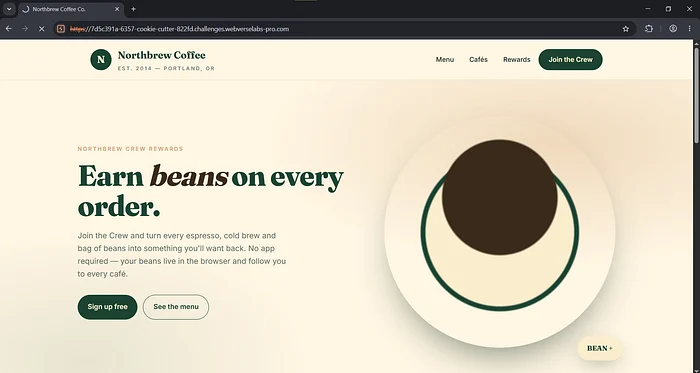
The target here is the Cookie Cutter challenge on WebVerse Labs, a learning site. The feature under test is the loyalty rewards page: branding, a hero section and a "Join the Crew" call to action. Nothing on the page itself suggested a problem.
Setup
The only tooling the researcher needed was Burp Suite's Proxy intercept, with the browser DevTools Application tab noted as an equally good alternative for reviewing cookies. The researcher loaded the loyalty rewards page and inspected the cookies the application set.
Finding it
With the proxy intercepting, the researcher reviewed the cookies set by the application. Among the usual analytics and Cloudflare cookies, one stood out: nb_session.
Two things marked it as worth inspecting:
- The value began with
eyJ, which is the Base64 encoding of{", a strong signal that JSON is encoded underneath. - The character set and
=padding are classic Base64 markers.
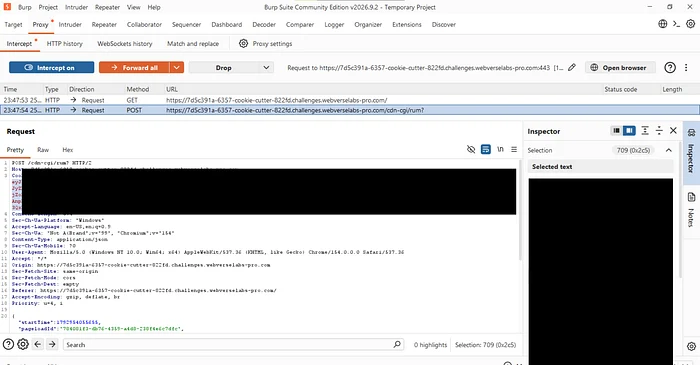
Burp intercept showing the nb_session cookie. The cookie value and the cf_clearance cookie must be redacted.
Exploitation
Step 1: Copy the cookie value
The researcher copied the nb_session value and ran it through CyberChef.
Step 2: Decode it with CyberChef
The value was run through CyberChef using the From Base64 recipe. The decoded output was a readable JSON object containing the user's loyalty tier, bean balance, next perk, join date, and, inside a nested debug object, an internal_ref field holding the flag directly.
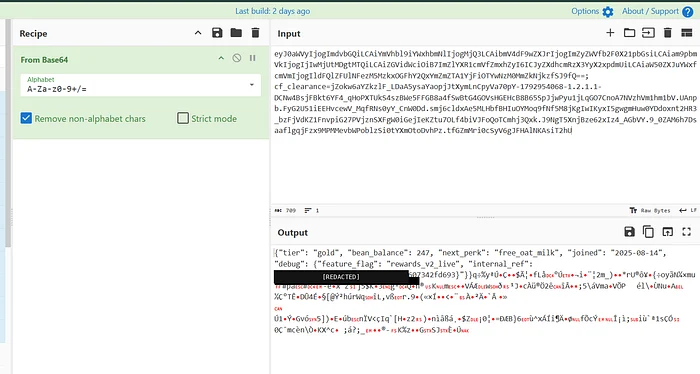
CyberChef output. The flag value must be redacted.
Step 3: Read the flag
The flag was present in plaintext once the cookie was decoded. No exploitation beyond passive decoding was required.
WEBVERSE{....}
Root cause
Base64 is an encoding scheme, not an encryption scheme. It has no key and no secret, so anyone who can read the cookie can reverse it in seconds with a browser DevTools panel or a tool like CyberChef. The application encoded its full session state into a single client-side cookie and mistook Base64 encoding for a security control. No signing or encryption was applied, and no server-side validation of the cookie's contents was in place.
Storing account state or sensitive values inside a client-side cookie, regardless of how it is encoded, means that data is entirely in the user's hands. The same property makes the data editable: a user could modify the decoded JSON (for example, the tier or bean_balance fields), re-encode it to Base64 and send it back as their cookie. If the server trusts this cookie without verifying it, that opens the door to tampering and privilege escalation, a more serious extension of the same root issue. The report presents that tampering path as a possibility rather than something it demonstrated.
Impact
Storing sensitive state in an unauthenticated, unencrypted cookie can expose:
- Account tier, balances and internal identifiers
- Debug flags and feature flag states
- Internal references not meant for client visibility
- A tamperable value that the server may trust without verification
In this challenge the exposure was direct: the flag sat in the decoded JSON, so reading it required nothing more than decoding a cookie the browser already held.
Fix
- Keep sensitive account state server-side; store only an opaque, random session identifier in the cookie.
- If client-side storage of structured data is required, protect it with proper encryption (AES-GCM) or a signed token (HMAC/JWT with signature verification) so tampering is detectable.
- Never treat encoding (Base64, URL encoding, hex) as a substitute for encryption or integrity protection.
- Remove debug fields from any data structure before it reaches a production response or cookie.
Variants to test
- Look for
eyJprefixes on any cookie. A value starting witheyJis Base64 for{"and a strong signal of an encoded JSON payload. A positive result is a decoded object containing account state, identifiers or flags. - Check every cookie, not just the session one. Analytics and preference cookies sometimes carry structured state too. A positive result is any cookie whose decoded content describes the user rather than an opaque handle.
- Test whether the server trusts the decoded content. Change a field such as
tierorbean_balance, re-encode to Base64 and resend it. A positive result is the server acting on the modified value, which would suggest the tampering path is real. - Look for debug objects in client-side data. The decoded cookie contained a nested
debugobject with aninternal_reffield holding the flag. A positive result is aninternal_ref-style field or feature flag state that was never meant for the client. - Try other encodings. Hex and URL encoding are equally reversible; a value that looks scrambled but decodes cleanly to JSON is the same finding.
Classification
- OWASP Top 10 (2021): A02, Cryptographic Failures
- Weakness: CWE-312, Cleartext Storage of Sensitive Information
- Related: CWE-565, Reliance on Cookies without Validation and Integrity Checking
- Subtype: Sensitive data exposure via client-side cookie encoding
What happened, in plain words
A small coffee company, Northbrew Coffee Co. runs eleven cafes and built a loyalty rewards website. The site tracks a loyalty tier and a bean balance for the user. To make the site feel fast, the developers put the customer's whole account state into a single cookie in the browser. They encoded that cookie in Base64, which is not the same as encrypting it. Anyone who knows the scrambling method can unscramble it, and the method used here is public and built into every browser. When the researcher unscrambled the cookie, the site's secret flag was sitting inside it in plain text.
This was a practice exercise on WebVerse Labs, a learning site, in a challenge called Cookie Cutter. The application is a challenge on a learning site. The lesson is the same one that applies to real sites: if data is only encoded and not encrypted, it is not protected.
The product and the feature
Northbrew Coffee Co. is described as an indie roaster with eleven cafes. Its loyalty rewards site is the feature under test. The page shows branding, a hero section and a "Join the Crew" call to action. That is all a visitor sees. Nothing on the page hints that anything is wrong, which is the point: the problem is not visible on the page, it is in what the browser quietly stores behind it.
Background ideas you need first
Before walking through the steps, here are the few ideas the whole report rests on.
What a cookie is. A cookie is a small piece of text that a website asks your browser to keep and to send back on every later request to that site. Think of it like a coat check ticket: the venue gives you a small ticket, you show it again later, and the venue looks up what it means. Cookies are how most sites remember who you are between page loads.
What a session is. A session is the site's memory of your visit. Normally the cookie holds only a meaningless random ID, and the server keeps the real details on its own side, looking them up by that ID. That is the safe pattern.
What encoding is. Encoding is a way of rewriting data into a different alphabet so it can travel safely through systems that only accept certain characters. It is like putting a letter into a standard envelope: the envelope changes how the letter looks in transit, but anyone can open it. Base64 is one such scheme. It turns arbitrary bytes into letters, digits, +, / and = padding. It has no key and no password.
What encryption is. Encryption also scrambles data, but with a secret key. Without the key, the output is useless. Encoding is an envelope; encryption is a locked safe. The report's whole finding is that the developers used an envelope and believed they had a safe.
What JSON is. JSON is a common text format for structured data, built from curly braces, names and values. A decoded cookie in this report is a JSON object: a list of named fields with values.
What a flag is. In a training challenge, a flag is a secret string that proves you solved it. Here it has the form WEBVERSE{....}.
What Burp Suite is. Burp Suite is a tool that sits between your browser and a website and lets you watch and edit the traffic. Its Proxy intercept feature pauses each request so you can read it. The report notes that the browser's own DevTools, on the Application tab, is an equally good way to look at cookies, so no special software is strictly required.
What CyberChef is. CyberChef is a free web page for transforming data, with a long list of "recipes" such as decoding Base64. You paste data in, pick a recipe, and read the output.
Step by step
Step 1: Load the page and look at the cookies
The researcher opened the loyalty rewards page and reviewed the cookies the application set. The tool used was Burp Suite's Proxy intercept, with the browser DevTools Application tab noted as an equally good alternative. No accounts, roles or special preconditions are described beyond loading the page and inspecting the cookies.
Why this step: cookies are where a site stores its memory of you, so they are the first place to look when you want to know what a site is keeping in your browser. Among the usual analytics and Cloudflare cookies, one stood out: nb_session.
Burp intercept showing the nb_session cookie. The cookie value and the cf_clearance cookie must be redacted.
Step 2: Notice the telltale signs
Two things marked the cookie as worth inspecting:
- The value began with
eyJ, which is the Base64 encoding of{", a strong signal that JSON is encoded underneath. - The character set and
=padding are classic Base64 markers.
Why this matters: Base64 has a fingerprint. The characters { and " are the opening of a JSON object, and when those two characters are Base64-encoded they always come out as eyJ. So a cookie starting with eyJ is almost certainly a JSON object that has been wrapped in Base64. The = signs at the end are padding, added because Base64 works in blocks and pads the last one. Seeing them tells you the value is encoded text, not a random session ID.
Step 3: Copy the cookie value
The researcher copied the nb_session value and ran it through CyberChef.
Why this step: to decode something you need the exact text. Copying it unchanged means the result reflects what the site really stored, not something altered along the way.
Step 4: Decode it with CyberChef
The value was run through CyberChef using the From Base64 recipe. The decoded output was a readable JSON object containing the user's loyalty tier, bean balance, next perk, join date, and, inside a nested debug object, an internal_ref field holding the flag directly.
CyberChef output. The flag value must be redacted.
Why this step: decoding is the reverse of encoding. If the site only wrapped the data in Base64, then anyone holding the cookie can unwrap it with a free tool, no key required. The output being readable JSON confirms the data was never encrypted. The nested debug object held an internal_ref field with the flag.
Step 5: Read the flag
The flag was present in plaintext once the cookie was decoded. No exploitation beyond passive decoding was required.
WEBVERSE{....}
This block is the flag itself, the secret string that proves the challenge was solved. It was not guessed, extracted with an attack tool, or obtained by breaking any protection. It was simply read out of data the browser was already carrying, after one decoding step.
Why this works
Base64 is an encoding scheme, not an encryption scheme. It has no key and no secret, so anyone who can read the cookie can reverse it in seconds with a browser DevTools panel or a tool like CyberChef. The application encoded its full session state into a single client-side cookie and mistook Base64 encoding for a security control. No signing or encryption was applied, and no server-side validation of the cookie's contents was in place.
Storing account state or sensitive values inside a client-side cookie, regardless of how it is encoded, means that data is entirely in the user's hands. The same property makes the data editable: a user could modify the decoded JSON, for example the tier or bean_balance fields, re-encode it to Base64 and send it back as their cookie. If the server trusts this cookie without verifying it, that opens the door to tampering and privilege escalation, a more serious extension of the same root issue. The report presents that tampering path as a possibility rather than something it demonstrated.
Impact
Storing sensitive state in an unauthenticated, unencrypted cookie can expose:
- Account tier, balances and internal identifiers
- Debug flags and feature flag states
- Internal references not meant for client visibility
- A tamperable value that the server may trust without verification
In this challenge the exposure was direct: the flag sat in the decoded JSON, so reading it required nothing more than decoding a cookie the browser already held.
How to fix it
- Keep sensitive account state server-side; store only an opaque, random session identifier in the cookie.
- If client-side storage of structured data is required, protect it with proper encryption (AES-GCM) or a signed token (HMAC/JWT with signature verification) so tampering is detectable.
- Never treat encoding (Base64, URL encoding, hex) as a substitute for encryption or integrity protection.
- Remove debug fields from any data structure before it reaches a production response or cookie.
In plain words: the cookie should be a coat check ticket with a meaningless number on it, and the venue should keep the coat. If structured data really must live in the browser, it should be locked with a key (encryption) or stamped with a tamper-evident seal (a signature), so the server can tell whether it has been changed.
Variants to test
- Look for
eyJprefixes on any cookie. A value starting witheyJis Base64 for{"and a strong signal of an encoded JSON payload. A positive result is a decoded object containing account state, identifiers or flags. - Check every cookie, not just the session one. Analytics and preference cookies sometimes carry structured state too. A positive result is any cookie whose decoded content describes the user rather than an opaque handle.
- Test whether the server trusts the decoded content. Change a field such as
tierorbean_balance, re-encode to Base64 and resend it. A positive result is the server acting on the modified value, which would suggest the tampering path is real. - Look for debug objects in client-side data. The decoded cookie contained a nested
debugobject with aninternal_reffield holding the flag. A positive result is aninternal_ref-style field or feature flag state that was never meant for the client. - Try other encodings. Hex and URL encoding are equally reversible; a value that looks scrambled but decodes cleanly to JSON is the same finding.
Classification
- OWASP Top 10 (2021): A02, Cryptographic Failures
- Weakness: CWE-312, Cleartext Storage of Sensitive Information
- Related: CWE-565, Reliance on Cookies without Validation and Integrity Checking
- Subtype: Sensitive data exposure via client-side cookie encoding
These labels are standard ways of naming the problem. OWASP Top 10 is a widely used list of the most common web security failure categories, and A02 covers failures around protecting data with proper cryptography. CWE is a catalogue of specific weakness types; CWE-312 means sensitive information is stored without protection, and CWE-565 means the application relies on a cookie without checking that it is genuine.
Glossary
- Base64: an encoding scheme that rewrites data using letters, digits,
+,/and=padding. It has no key and is reversible by anyone. - Bean balance: the loyalty points a customer has collected on the Northbrew rewards site.
- Burp Suite: a tool that sits between browser and website so you can watch and edit traffic; its Proxy intercept pauses requests for inspection.
- Client-side: happening in the user's browser rather than on the server.
- Cloudflare cookies: cookies set by the Cloudflare service that sites use in front of their servers; the report mentions them only as the ordinary cookies surrounding the interesting one.
- Cookie: a small piece of text a site asks the browser to store and send back on later requests.
- CWE-312: a catalogue entry for storing sensitive information without protection.
- CWE-565: a catalogue entry for relying on a cookie without validating it or checking its integrity.
- CyberChef: a free web tool for transforming data, with recipes such as From Base64.
- Debug object: a leftover section of development information inside data sent to the browser.
- DevTools Application tab: the part of a browser's built-in developer tools that lists cookies and other stored data.
- Encoding: rewriting data into another alphabet so it can travel safely; not a security control.
- Encryption: scrambling data with a secret key so that only key holders can read it.
- Flag: the secret string in a training challenge that proves it was solved; here
WEBVERSE{....}. - HMAC: a way of stamping data with a key so tampering can be detected.
- Integrity: the property that data has not been changed.
internal_ref: the field inside the decoded cookie that held the flag.- JSON: a text format for structured data made of names and values in curly braces.
- JWT: a token format that can carry a signature so the server can verify it was not altered.
- Loyalty tier: the customer's level in the rewards programme.
nb_session: the cookie that held the encoded account state.- Opaque identifier: a random value with no meaning in itself, used only to look something up on the server.
- OWASP Top 10: a widely used list of common web security failure categories; A02 is Cryptographic Failures.
- Padding: extra characters, such as
=, added to fill out the last block of an encoded value. - Privilege escalation: gaining more access or a higher status than you are entitled to.
- Session: a site's memory of your visit, usually tied to a cookie.
- Tampering: changing data you are not supposed to change.
- WebVerse Labs: the learning site hosting the Cookie Cutter challenge.
- AES-GCM: an encryption method that also detects tampering.



