Cracking the 2FA
The 2FA recovery-code flow returned a session token in the response only when the code was correct, and the server did not invalidate that token when the response was dropped. An attacker could log in with a wrong recovery code, swap in a previously captured successful response, and gain access to the victim's account.
 Published on medium.com
Testing a 2FA system is so much fun because we are breaching the stuff that was meant for additional security. And breaking them is so fun.
The full write-up lives on its author's site
It belongs to its author, so we link to it rather than copy it. The other two tabs are our own rewrites, checked against it.
Context
This is a write-up about bypassing two-factor authentication on a private bug bounty program, referred to throughout as example.com. The target had 2FA protecting accounts, and the author notes it was well implemented: no brute-force or other obvious weaknesses in the code entry itself. The feature that mattered was the Use Recovery Code option, the backup codes offered when you do not have access to your authenticator application or have lost the device.
The technique is response manipulation: instead of tampering with the request going to the server, you tamper with the response coming back from it. The author frames this as a beginner's first write-up and asks for tolerance of errors.
Setup
- Two accounts: an attacker account and a victim account.
- 2FA enabled on both. The attacker account used Google Authenticator, the victim account used Microsoft Authenticator, deliberately keeping no ties between them.
- Burp Suite as the intercepting proxy, using its ability to intercept responses rather than only requests.
- No versions, endpoints or parameter names beyond the session cookie name
_example_sessionare given.
Finding it
The author had read that Burp Suite can manipulate not only requests going to the browser but also the incoming responses, and decided to try it against the recovery code flow. The reasoning was that the recovery code check returns a session token on success and only an error string on failure, so the question was whether the server would accept a success response replayed onto a failed attempt.
Exploitation
Step 1: Enable 2FA on both accounts
2FA was enabled on the attacker and victim accounts, using Google Authenticator and Microsoft Authenticator respectively.
Step 2: Reach the recovery code prompt
Log in to the attacker's account. The application shows "Please enter your 2FA code" and, just below it, the Use Recovery Code option.
Step 3: Capture a successful recovery response
Select Use Recovery Code, enter a correct backup code for the attacker's account, intercept the request and read the response. The response contains a session token, _example_session=somenos, and a string message indicating the code was correct.
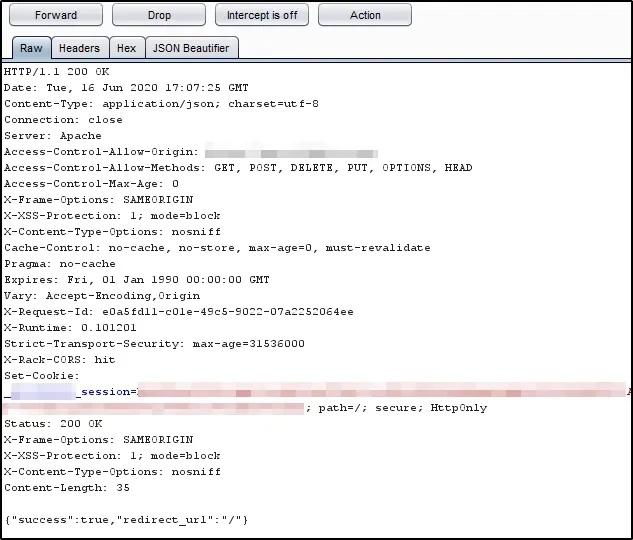
The response you get on entering a correct recovery code.
Copy this response and keep it in a notepad.
Step 4: Drop the response
This is where the criticality of the bug lies. Drop the response. Dropping it stops the _example_session token from reaching the web application, and the application does not invalidate that token.
Step 5: Capture a failed recovery response on the victim account
Go to the victim's account and repeat steps 1 and 2. At step 3, enter a wrong recovery code, any number you want. Capture the request and read its response. No session token is provided in the error response, which means a session token is needed, and there is an error string.
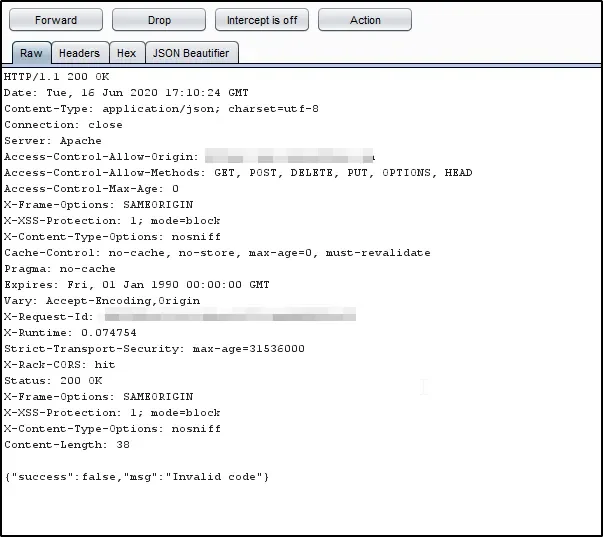
The response you get on entering the wrong recovery code.
Step 6: Replace the failed response with the successful one
Take the attacker's account response from the server and replace the victim's error response with it.

Root cause
The author identifies two problems:
- The session token
_example_session=is not invalidated on the server side when it is issued to someone and never comes back. - Security is left entirely to a string error message in the response. There was a security measure, but because tokens were not invalidated, it could be bypassed.
The server kept a token alive that had been issued but never delivered, and security rested on a string error message in the response.
Impact
The author replaces the victim's error response with the attacker's success response, and the write-up ends there without stating the outcome. The author does not state which accounts or how many were affected, and the program is private, so no bounty or severity is given.
Fix
The conclusion is to make sure session tokens are properly validated, and that when a response is sent back it carries identity tokens attached to it. In practice this means invalidating a token server-side when it is issued but not returned, and not relying on a response string alone to decide whether authentication succeeded.
Variants to test
- Recovery code flows on other applications. Try the same drop-and-replace sequence: capture a success response on your own account, drop it, then replace a failed response on another account.
- Any 2FA step that returns a session token on success. Look for a token in the success response and its absence in the error response.
- Server-side token invalidation checks. After dropping a success response, try to reuse the token later.
What happened, in plain words
A website had a second lock on its front door. After you typed your password, it asked for a six-digit code from a phone app, so that a stolen password alone was not enough to get in. That second lock is called two-factor authentication, or 2FA for short. The word factor just means a separate proof of who you are: something you know (the password) and something you have (the phone).
The site also offered a way in for people who had lost their phone: a list of recovery codes, single-use backup passwords you print out or save somewhere safe. The researcher found that security rested on a string error message in the response, and that a session token issued but never delivered was not invalidated on the server side. The author swapped one server reply for another, and the write-up ends there without stating the outcome.
This was the author's first write-up, and they ask readers to be forgiving of mistakes. The program was private, so the site is called example.com throughout and no bounty or severity rating is given.
The two ideas you need first
What 2FA is
When you log in somewhere, the site normally asks for one thing: your password. 2FA adds a second, different check. Usually it is a code that changes every thirty seconds, generated by an app on your phone such as Google Authenticator or Microsoft Authenticator. The site and the app share a secret when you set 2FA up, and both compute the same six digits from that secret and the current time. If the digits match, the site believes you really hold the phone.
Why bother? Because passwords leak. They get reused, phished, or stolen in a breach. A code that expires in thirty seconds is much harder to steal and use in time. 2FA is the extra lock that still holds when the password is gone.
What response manipulation is
Every time you click something in a browser, the browser sends a request to a server and the server sends back a response. Think of it as posting a form to an office and getting a letter back. A server is the computer somewhere else that holds the website and does the checking. The response is the letter: it contains a status code, some headers (small labels with instructions), and a body (the actual content, often HTML or JSON).
JSON is just a text format for structured data, a bit like a very strict shopping list with labels. A header is a line of metadata at the top of a request or response, for example telling the browser what type of content follows.
Normally, when people test a website, they change the request on its way out: they alter a parameter and see what happens. Response manipulation is the mirror image. You let the request go through untouched, but you catch the reply on its way back and change that instead. The everyday comparison: instead of rewriting the letter you post to the office, you intercept the reply and swap it for a different one before it reaches your desk.
To do this you need a tool that sits between your browser and the server, called a proxy. The author used Burp Suite, a popular proxy for security testing. Burp can pause traffic in both directions. By default it pauses requests; you can tell it to pause responses as well.
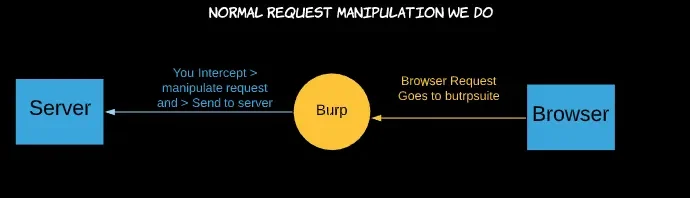
The screenshot above shows the ordinary workflow: you browse, Burp catches each request, and you edit and forward it. That is request tampering, the usual habit.
To switch to the other direction, you click the Action button next to the Intercept button and choose Do Intercept > Response to Request.
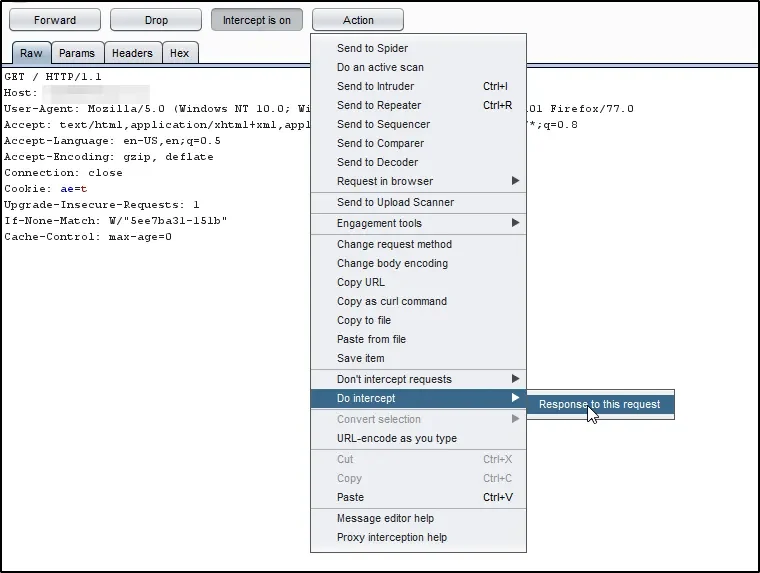
How to get a response to the request
In plain words: Intercept is the on/off switch that makes Burp pause traffic. Action opens a menu of things you can do to the paused item. Do Intercept > Response to Request tells Burp: for the request I am about to forward, also pause the reply that comes back. Once that is on, you can edit the server's answer before your browser ever sees it.
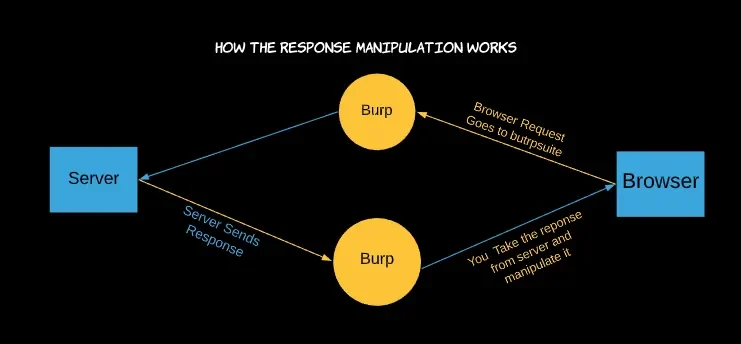
Response Manipulation
So the whole technique is: let the request go, catch the reply, rewrite the reply. The browser then believes whatever you wrote, because from its point of view the reply came from the server.
The bug, step by step
The target is a private program, referred to as example.com. It had 2FA on accounts and, by the author's account, it was well implemented: no brute-force weakness, no obvious way to guess codes. It also had a Use Recovery Code option. Recovery codes are the backup list a site gives you when you enable 2FA, for the day your phone is lost or broken. Each code works once.
The author had read that Burp can tamper with incoming responses, not just outgoing requests, and decided to try that against the recovery code flow. The reasoning: a correct recovery code produces a response containing a session token, while a wrong one produces only an error message. A session token is a short string the server gives your browser after you prove who you are; the browser stores it (usually in a cookie) and sends it with every later request so the server knows it is still you. Think of it as the wristband you get at an event: show it at the door and you are let back in without queuing again. If the server would accept a success response replayed onto a failed attempt, the second lock would fall.
Step 1: Enable 2FA on both accounts
The author set up two accounts: one as the attacker, one as the victim. 2FA was enabled on both. The attacker account used Google Authenticator and the victim account used Microsoft Authenticator, deliberately so that the two had no ties between them. Why does that matter? Because on private programs the triage team will ask questions, and you want to be able to show that the two accounts are genuinely separate and that nothing was shared between them.
Step 2: Reach the recovery code prompt
Log in to the attacker's account. The site shows "Please enter your 2FA code" and, just below it, the Use Recovery Code option. This is the moment the site is asking for the second factor. The recovery option is the alternative path, and alternative paths are where bugs often live, because they are tested less than the main one.
Step 3: Capture a successful recovery response
Select Use Recovery Code, enter a correct backup code for the attacker's account, and intercept the request. Then read the response. It contains a session token, _example_session=somenos, and a string message saying the code was correct.
The response you get on entering a correct recovery code.
What you are looking at: the response body is the server's answer. The part _example_session=somenos is the session token being handed out. The string message is the human-readable confirmation. Both are in the reply, which means both can be edited by anyone sitting between browser and server.
Copy this response and keep it in a notepad. You will need it in step 6.
Step 4: Drop the response
This is where the criticality of the bug lies. Drop the response. Dropping means Burp throws the reply away instead of passing it to the browser. The browser never receives the _example_session token, so the token is issued but never delivered. The application, however, does not invalidate that token on the server side. It stays valid even though nobody received it.
Why does this matter? A token that was issued but never used should be worthless. If the server keeps it alive, then anyone who saw it (for example, in the response you copied) can use it later. The everyday comparison: a hotel prints a key card for a guest who never shows up, and never cancels it. The card still opens the room.
Step 5: Capture a failed recovery response on the victim account
Go to the victim's account and repeat steps 1 and 2. At step 3, enter a wrong recovery code, any number you want. Capture the request and read its response. No session token is provided in the error response, which means a session token is needed to get in, and there is an error string instead.
The response you get on entering the wrong recovery code.
Compare the two replies. The success reply has a token and a success message. The failure reply has neither, just an error. That difference is the whole signal the browser uses to decide whether to let you through. And since the browser is on your side of the proxy, you control what it sees.
Step 6: Replace the failed response with the successful one
Take the attacker's account response from the server and replace the victim's error response with it.
The browser on the victim's side now receives a reply that says the code was correct and carries a session token. The author's write-up ends the sentence there, with the swap itself as the demonstration.
What went wrong
The author identifies two problems:
- The session token
_example_session=is not invalidated on the server side when it is issued to someone and never comes back. A token that was never delivered should be dead; here it stayed alive. - Security is left entirely to a string error message in the response. There was a security measure, but because tokens were not invalidated, it could be bypassed.
In other words, security rested on a string error message in the response, and the server kept a token alive that had been issued but never delivered.
Impact
The author replaces the victim's error response with the attacker's success response, and the write-up ends there without stating the outcome. The author does not state which accounts or how many were affected, and the program is private, so no bounty or severity is given.
Fix
The conclusion is to make sure session tokens are properly validated, and that when a response is sent back it carries identity tokens attached to it. In practice this means invalidating a token server-side when it is issued but not returned, and not relying on a response string alone to decide whether authentication succeeded.
Variants to test
- Recovery code flows on other applications. Try the same drop-and-replace sequence: capture a success response on your own account, drop it, then replace a failed response on another account.
- Any 2FA step that returns a session token on success. Look for a token in the success response and its absence in the error response.
- Server-side token invalidation checks. After dropping a success response, try to reuse the token later.
Glossary
- 2FA (two-factor authentication): a second, separate proof of identity on top of a password, usually a short-lived code from a phone app.
- API: a way for one program to talk to another over the network, sending requests and receiving structured responses.
- Attacker account: in a test, the account you control and use to produce the malicious or manipulated traffic.
- Brute-force: trying many guesses in a row until one works, for example every possible six-digit code.
- Burp Suite: a proxy tool used in security testing that sits between browser and server and can pause, inspect and edit traffic in both directions.
- Cookie: a small piece of data a site asks the browser to store and send back with later requests, often used to carry a session token.
- Drop: in a proxy, to throw a request or response away instead of forwarding it.
- Header: a line of metadata at the top of a request or response describing things like content type or cookies.
- HTML: the text format browsers use to lay out a web page.
- Intercept: the proxy feature that pauses traffic so you can look at and change it before it continues.
- JSON: a plain-text format for structured data, made of labels and values.
- Private program: a bug bounty programme that only invited researchers can see and test, so details are kept confidential.
- Proxy: software that sits between your browser and the server and relays traffic, letting you inspect and modify it.
- Recovery code: a single-use backup password a site gives you when you enable 2FA, for when your phone is lost or unavailable.
- Request: the message your browser sends to a server, for example when you submit a form.
- Response: the message the server sends back, containing a status, headers and a body.
- Response manipulation: changing the server's reply on its way back to the browser, rather than changing the request on its way out.
- Root cause: the underlying reason a bug exists, as opposed to its visible symptom.
- Server: the remote computer that holds the website and performs the checks.
- Session token: a short string issued after you authenticate, stored by the browser and sent with later requests so the server recognises you.
- Severity: a rating of how serious a bug is, often expressed with a score such as CVSS.
- Triage: the process a programme uses to review a report, ask questions and decide whether it is valid.
- Victim account: in a test, the second account you use to represent the person being attacked.
- Vulnerability: a weakness in a system that lets someone make it behave in a way its designers did not intend.

