Critical Business Logic Vulnerability in E-commerce Checkout
The checkout backend accepted an arbitrarily large product quantity without server-side limits, recalculating the order total and passing the transaction to the payment gateway. An attacker could create oversized or invalid orders and skew order and payment calculations.

medium.com
Published on medium.com
Bug Bounty
The full write-up lives on its author's site
It belongs to its author, so we link to it rather than copy it. The other two tabs are our own rewrites, checked against it.
Context
This write-up describes a business logic flaw found during a security assessment of an e-commerce platform. The affected feature is the shopping cart and checkout flow: a shopper adds a product to the cart, the quantity is sent to the backend, the backend recalculates the order total, and the transaction is then handed to a payment gateway.
The researcher is Mehran Kia, also known as cyb3rsem. The report classifies the issue as Business Logic / Improper Input Validation and rates its severity as Critical. The platform itself is not named, and no endpoint, parameter name beyond the quantity field, version or response body is given.
Setup
The report does not describe any accounts, roles, tools or versions. The report describes adding a product to the cart and then modifying the quantity parameter in the request.
Finding it
The researcher was looking at how the server handles the quantity value submitted with a cart item. The test was to send a quantity far beyond anything a normal shopper would order and see whether the server rejected it.
Exploitation
Step 1: add a product to the cart
A product is added to the cart in the normal way, producing a request that carries the quantity parameter.
Step 2: change the quantity to an unusually large value
The quantity parameter in that request is modified to an unusually large value, such as:
quantity=1000000
This sets the requested number of units to one million, far above any plausible order size.
Step 3: observe the server's handling
The backend accepted the value. It recalculated the order total and allowed the transaction to continue to the payment gateway without rejecting the request. The backend accepted the value, recalculated the total and passed the order to the payment gateway.
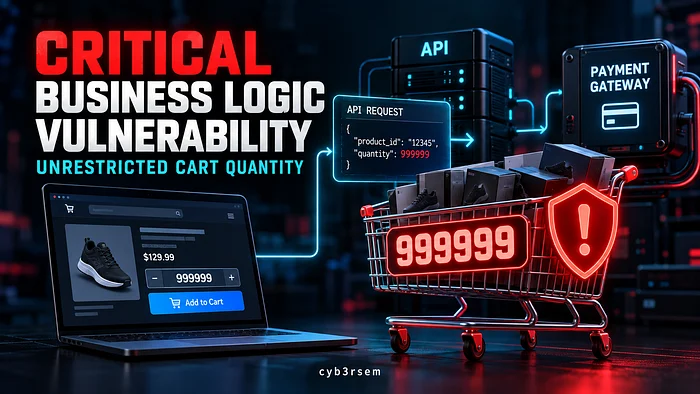
Root cause
According to the report, the root cause is the absence of strict backend controls for:
- maximum quantity;
- stock availability;
- per-user limits;
- final payment validation.
The backend accepted the client-supplied quantity, recalculated the total from it, and passed the order on to payment. Any restriction that existed on the client side did not matter, because the request was modified before it reached the server. The report states plainly that client-side restrictions are not sufficient and that all order-related values must be validated and calculated securely on the server.
Impact
The report lists the following possible consequences of the behaviour:
- creation of invalid or oversized orders;
- incorrect order and payment calculations;
- inventory inconsistencies;
- excessive resource consumption;
- potential financial or operational impact.
These are stated as possibilities that the behaviour could lead to. The report does not quantify any of them, does not show a completed payment, and does not describe a specific financial loss.
Fix
The recommended fix, as given in the report, is to:
- validate every quantity server-side;
- enforce product and order limits;
- compare the requested amount with inventory;
- recalculate the final price immediately before payment.
The report does not say whether any of this was implemented by the platform.
Variants to test
- Negative or zero quantities. Send a quantity of
0or a negative number on the same cart request. A positive result is the server accepting it and producing a zero or negative line total that carries through to checkout. - Fractional quantities. Submit a decimal quantity where whole units are expected. A positive result is the backend accepting it and calculating a total from the fractional value.
- Boundary values around any limit. If a maximum is enforced, try values just above it and just below it. A positive result is inconsistent handling, such as rejection at one value but acceptance at a higher one.
- Quantity versus stock. Request more units than the displayed stock allows. A positive result is the order proceeding to payment despite the stock figure.
- Repeated submissions. Send the same oversized order several times. A positive result is multiple oversized orders being created where a per-user limit should have applied.
- Price recalculation at payment. Change the quantity after the total has been calculated but before payment. A positive result is the payment gateway receiving an amount that does not match the final cart contents.
In each case, the signal to look for is the same as in this report: the server accepts a value it should have rejected and continues the checkout flow with a recalculated total.
What happened, in plain words
Imagine you are shopping online. You add a product to your cart, choose how many you want, and go to pay. In this case, the website did not check properly. The researcher, Mehran Kia (also known as cyb3rsem), found that by changing the quantity in the request to a very large number, the server accepted it, recalculated the total, and sent the order to the payment gateway. This is a business logic vulnerability: the server trusted the user's input without validating it against limits.
The report rates this as Critical severity and classifies it as Business Logic / Improper Input Validation. The platform is not named, and no specific endpoint or parameter name (other than the quantity field) is given.
Background: how online shopping carts work
When you shop online, you interact with a web application. Your browser sends requests to a server, which processes them and sends back responses. The part of the server that handles these requests is often called an API (Application Programming Interface). Think of it as a waiter in a restaurant: you tell the waiter what you want, the waiter tells the kitchen, and the kitchen prepares your food. You don't go into the kitchen yourself.
In a shopping cart, when you add a product, your browser sends a request to the server with details like the product ID and the quantity. The server then calculates the total price and may store this in your session. A session is like a temporary ID card that the server gives you so it can remember who you are across multiple requests. This is often managed with a cookie, which is a small piece of data stored in your browser and sent with each request.
The vulnerability here is that the server did not properly validate the quantity value. It accepted a very large number without checking if it was reasonable, if there was enough stock, or if the user had exceeded any limits. This is a classic business logic flaw: the application's rules can be bypassed by manipulating input.
Finding the vulnerability
The researcher was assessing an e-commerce platform. The test was to see whether the server would reject such an unrealistic quantity. To test this, the researcher added a product to the cart, then modified the quantity parameter in the request to a huge number. Intercepting means using a tool to pause the request between your browser and the server so you can see and change it. The goal was to see if the server would reject such an unrealistic quantity.
Step-by-step exploitation
Step 1: Add a product to the cart
The researcher added a product to the cart in the usual way. This generated a request to the server that included the quantity parameter. A parameter is a piece of data sent in the request, like a form field. Here, the quantity parameter tells the server how many units the user wants.
Step 2: Modify the quantity to an unusually large value
The researcher changed the quantity parameter in that request to an unusually large value, such as:
quantity=1000000
This line sets the quantity to one million. In a normal request, this might be something like quantity=1. By changing it to 1000000, the researcher is asking for one million units of the product. This is far beyond any normal order and should trigger validation checks.
Step 3: Observe the server's response
The backend accepted the value. It recalculated the order total based on the quantity of one million, and allowed the transaction to continue to the payment gateway without rejecting the request. The payment gateway is the service that handles the actual payment (like a credit card processor). The server did not stop the order at this stage.
Why this is a problem
The report lists several possible consequences of this behaviour:
- Creation of invalid or oversized orders;
- Incorrect order and payment calculations;
- Inventory inconsistencies;
- Excessive resource consumption;
- Potential financial or operational impact.
These are potential outcomes. The report does not quantify them or show a completed payment, but they indicate the risk.
Root cause
According to the report, the root cause is the absence of strict backend controls for:
- maximum quantity;
- stock availability;
- per-user limits;
- final payment validation.
The backend accepted the quantity supplied by the client, recalculated the total from it, and passed the order to payment. Any restrictions that existed on the client side (in the browser) did not matter because the request was modified before it reached the server. The report states plainly that client-side restrictions are not sufficient and that all order-related values must be validated and calculated securely on the server.
Recommended fix
The recommended fix, as given in the report, is to:
- validate every quantity server-side;
- enforce product and order limits;
- compare the requested amount with inventory;
- recalculate the final price immediately before payment.
The report does not say whether any of this was implemented by the platform.
Variants to test
If you are testing a similar system, here are other things to try, based on the same idea:
- Negative or zero quantities. Send a quantity of
0or a negative number on the same cart request. A positive result is the server accepting it and producing a zero or negative line total that carries through to checkout. - Fractional quantities. Submit a decimal quantity where whole units are expected. A positive result is the backend accepting it and calculating a total from the fractional value.
- Boundary values around any limit. If a maximum is enforced, try values just above it and just below it. A positive result is inconsistent handling, such as rejection at one value but acceptance at a higher one.
- Quantity versus stock. Request more units than the displayed stock allows. A positive result is the order proceeding to payment despite the stock figure.
- Repeated submissions. Send the same oversized order several times. A positive result is multiple oversized orders being created where a per-user limit should have applied.
- Price recalculation at payment. Change the quantity after the total has been calculated but before payment. A positive result is the payment gateway receiving an amount that does not match the final cart contents.
In each case, the signal to look for is the same as in this report: the server accepts a value it should have rejected and continues the checkout flow with a recalculated total.
Glossary
- API: Application Programming Interface; a set of rules that allows different software to communicate. In web applications, it often refers to the endpoints that handle requests from the browser.
- Business logic vulnerability: A flaw in the application's logic that allows an attacker to bypass intended rules or workflows, often by manipulating input.
- Cookie: A small piece of data stored in the user's browser and sent with requests to the server, often used to maintain session state.
- Endpoint: A specific URL or URI where an API or web service can be accessed.
- Payment gateway: A service that processes credit card payments for online businesses.
- Parameter: A piece of data sent in a request, such as a form field or query string value.
- Request: A message sent from a client (like a browser) to a server, asking for a resource or action.
- Server-side validation: Checking input on the server, as opposed to the client, to ensure it meets rules and is safe.
- Session: A period of interaction between a user and a system, often tracked with a session ID stored in a cookie.
- Stock availability: The quantity of a product that is currently in inventory and available for purchase.




