Critical Exposure Of Algolia Key That Led to Production, Staging,
A client-side configuration file exposed an Algolia API key that was not restricted to public search, allowing an unauthenticated attacker to enumerate indices and query production, staging and draft datasets. The attacker could automate extraction of indexed records without any account.
 Published on medium.com
Bug Bounty
The full write-up lives on its author's site
It belongs to its author, so we link to it rather than copy it. The other two tabs are our own rewrites, checked against it.
Context
While testing a public bug bounty program, Adham Mohamed found a JSON file served from the target's web root. The file looked like an ordinary client-side configuration file, but it carried an Algolia Application ID and API key. Algolia is a hosted search service: applications push records into indices, and browsers query those indices directly using a search-only API key. Exposing such a key is therefore normal by design, and the report is careful to say so. The question that drove the research was not whether the key was public, but what the key was permitted to reach.
Setup
The report does not describe the program, the target's identity, the researcher's account or role, or any tooling beyond curl. The only precondition is access to the publicly served file:
https://www.example.com/FILE.json
The hostname and filename are placeholders in the write-up. The Algolia application ID and key are redacted as REDACTED and <KEY> in the commands, and the index names were partly altered to avoid disclosing target-specific information.
Finding it
The file was found while testing a public bug bounty program. At first glance it looked like a normal client-side configuration file, but it contained an Algolia Application ID and API key. The researcher notes that finding an Algolia key alone is not necessarily a vulnerability, because search applications are expected to expose restricted search credentials to browsers. The decision was therefore to test what the key could actually access, rather than to report the exposure on its own.
Exploitation
Step 1: enumerate the indices
After extracting the credentials, the researcher checked whether the key was restricted to the application's intended search functionality, starting by asking Algolia for the available indices:
curl \ -H "X-Algolia-API-Key: <KEY>" \ -H "X-Algolia-Application-Id: REDACTED" \ "https://REDACTED-dsn.algolia.net/1/indexes/"
The X-Algolia-API-Key and X-Algolia-Application-Id headers carry the credential taken from the JSON file, and the request targets the /1/indexes/ listing endpoint on the application's -dsn.algolia.net host. The response exposed multiple indices, including production and non-production datasets. The response exposed multiple indices, including production and non-production datasets, which was the interesting part.
Step 2: query a production index
The researcher then tested whether the discovered indices were actually readable, for example:
curl -X POST \ "https://REDACTED-dsn.algolia.net/1/indexes/prod_RF_SITE/query" \ -H "X-Algolia-API-Key: <KEY>" \ -H "X-Algolia-Application-Id: REDACTED" \ -H "Content-Type: application/json" \ - data '{"query":"","hitsPerPage":5}'
This posts a query body with an empty search string and a page size of five to the prod_RF_SITE index. The request returned records without authentication to the application. In other words, no account, session or other application-level credential was needed: the Algolia key alone was enough to read production records.
Step 3: confirm the breadth of access
Further testing showed that the same credential could interact with additional indices. The researcher changed parts of the index names to avoid disclosing target-specific information, and lists them as:
prod_records
dev_records
staging
prod_SITE
prod_marketing
The mix of production, development, staging and marketing index names showed that the credential was not limited to the public search functionality. The report does not give the responses for these additional indices, only that the credential could interact with them.
Step 4: map the attack chain
The individual requests add up to a repeatable, fully automated sequence, which the researcher sets out as:
FILE.json → Extract Algolia credentials → Enumerate indices → Identify production/staging/draft datasets → Query indices → Extract records
No account was required at any point in that chain.
Root cause
The mistake was in the permissions attached to the Algolia key, not in the fact that the key was public. Client-side Algolia credentials can legitimately be public, and the report stresses this. The key that shipped in FILE.json was not scoped to search: it could list indices, which exposed internal dataset names, and it could interact with production, staging and development indices alike. The boundary that should have existed between public search functionality and internal or non-public datasets was missing, so the credential crossed it.
What is clear is that the usual assumption, that a key found in client-side code is a search-only key, did not hold here, and nothing else in front of Algolia required authentication to compensate.
Impact
With this credential, an unauthenticated attacker could:
- Enumerate indices
- Discover internal dataset names
- Query production data
- Access staging and development datasets
- Potentially retrieve draft or unpublished content
- Automate extraction of indexed records
The draft and unpublished content point is hedged in the report as a potential, not a confirmed result. The confirmed part is that production records were returned without authentication to the application, and that the same key reached non-production indices. The researcher's conclusion is that the permissions behind the public credential, rather than the exposure itself, turned a seemingly harmless client-side key into a much more serious security issue.
Fix
Final outcome
The issue was reported as an unauthenticated data exposure caused by an overly privileged Algolia credential. Initially the submission was marked Informational/Duplicate, because another researcher had previously reported a related issue. Later, Bugcrowd triage updated the VRT classification to:
Sensitive Data Exposure → Disclosure of Secrets → For Publicly Accessible Asset
The submission was given P1 priority as a duplicate and the researcher was rewarded with 10 points.
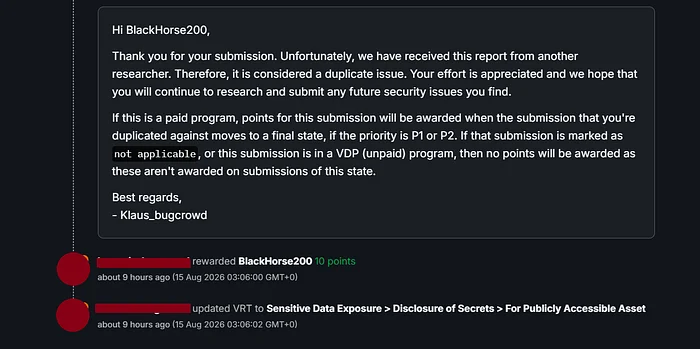
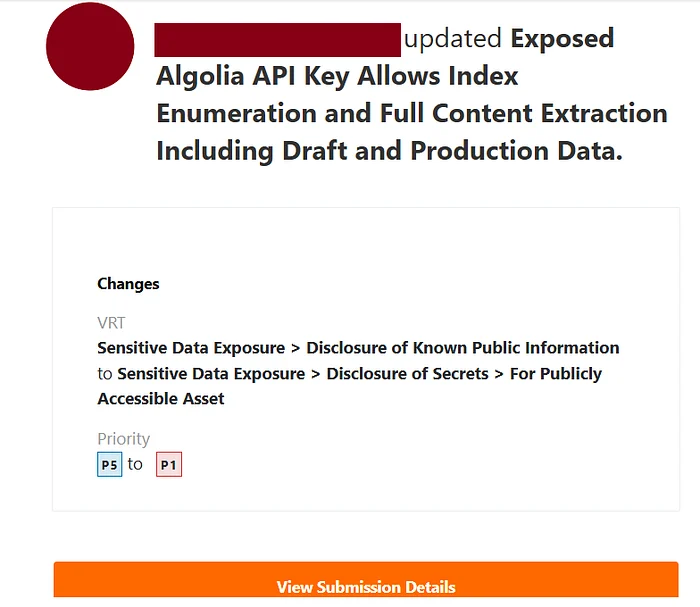
The screenshots accompany the description of the triage update and the points awarded.
Variants to test
- Other client-side configuration files. Grep JavaScript bundles, JSON config files and HTML for search-service credentials (Algolia, Elasticsearch, Meilisearch, Typesense, and similar). A positive result is a key that can list indices or query indices beyond the public one.
- Index listing on any discovered search key. Send the listing request shown above against the application's host. A positive result is a response containing index names rather than an authorisation error.
- Cross-environment queries. For each index name returned, try a query against production, staging, development and marketing indices. A positive result is records returned from an index the public site does not use.
- Draft and unpublished content. Query indices whose names suggest drafts, previews or unpublished records. A positive result is content that is not yet live on the site.
- Automation feasibility. Script the chain from file discovery to record extraction. A positive result is a repeatable pipeline that needs no account at any stage.
The lesson the researcher draws is straightforward: an exposed API key is not automatically a vulnerability, and the real question is what that key is allowed to access. Give a target the time it deserves and do not leave anything untested.
What happened, in plain words
A security researcher was testing a company's website as part of a public bug bounty program. A bug bounty program is an arrangement where a company says: if you find a security problem in our systems and tell us about it responsibly, we will thank you and sometimes pay you. The researcher found a file on the website that anyone could open in a browser. The file looked boring, like a settings file a website uses to configure itself. But inside it were two pieces of text: an Algolia Application ID and an Algolia API key.
Algolia is a hosted search service. Instead of building their own search engine, many websites send their content to Algolia, and Algolia stores it in things called indices. An index is like a big, organised card catalogue: each entry is a record, and the index lets you search through those records very quickly. When you type something into a search box on a website and results appear instantly, there is a good chance Algolia is doing the work behind the scenes.
Here is the important part: for that to work, the website's code running in your browser has to be able to talk to Algolia directly. So the website ships a key to Algolia inside its public files. That is normal and by design. The key is supposed to be a search-only key: it can search one public index and nothing else. Finding such a key is therefore not automatically a security problem, and the researcher says so clearly.
The real question was different: what was this particular key actually allowed to do? The answer turned out to be far more than searching. The key could list multiple indices in the Algolia account, including production and non-production datasets, and it could read records from a production index without anyone logging in to the website. Production means the live data real users see. Staging and development mean test environments that are not supposed to be public. Draft data means content that has not been published yet.
So the story is not "a key was visible". The story is "a visible key had far too much power".
The starting point
The report does not describe the program, the company, the researcher's account or any tools beyond curl. curl is a command-line program that sends web requests, like a browser does, but from a terminal and with full control over exactly what is sent. You do not need it to follow along; think of it as a very precise browser that prints the server's answer as text.
The only precondition was that a certain file was publicly reachable:
https://www.example.com/FILE.json
Line by line: https:// is the secure web protocol. www.example.com is a placeholder hostname, not the real target. /FILE.json is the path of a file on that server. The .json ending means the file is in JSON format, a simple text format for structured data, made of names and values in curly braces. Configuration files are very often written in JSON because both humans and programs can read them easily.
In the commands that follow, the real Algolia application ID and key are replaced with REDACTED and <KEY>, and some index names were partly changed so the target is not identified.
Finding the exposed credential
The file was found while testing a public bug bounty program. At first glance it looked like a normal client-side configuration file. "Client-side" means it runs in your browser rather than on the company's server, so anything in it is downloadable by anyone who visits the site.
Inside were an Algolia Application ID and API key. An API is an interface that lets one program talk to another over the web: you send a request to a specific address, and you get data back. An API key is a secret string that identifies who is calling, like a membership card you show at the door. The Application ID says which Algolia application you are talking to; the key says what you are allowed to do there.
The researcher's reasoning at this point is the heart of the whole report. Finding an Algolia key alone is not necessarily a vulnerability, because search applications are expected to expose restricted search credentials to browsers. A vulnerability is a weakness that lets someone do something they should not be able to do. A public search key that can only search the public catalogue does not let anyone do anything they could not already do by using the website's search box. So instead of reporting the exposure on its own, the researcher decided to test what the key could actually access.
Exploitation
Step 1: ask Algolia which indices exist
After extracting the credentials from the file, the researcher checked whether the key was restricted to the application's intended search functionality. The first question was simple: can this key even see the list of indices? The researcher checked whether the key was restricted to the application's intended search functionality.
curl \ -H "X-Algolia-API-Key: <KEY>" \ -H "X-Algolia-Application-Id: REDACTED" \ "https://REDACTED-dsn.algolia.net/1/indexes/"
Line by line:
curlis the tool sending the request.\at the end of a line means "the command continues on the next line". It is just formatting so a long command stays readable.-Hadds a header. A header is a small piece of extra information attached to a web request, like the label on a parcel.X-Algolia-API-Key: <KEY>carries the key taken from the JSON file, andX-Algolia-Application-Id: REDACTEDcarries the application ID. These two headers are how Algolia knows who is calling and what they may do.- The final part is the address being requested:
https://REDACTED-dsn.algolia.net/1/indexes/. The-dsn.algolia.nethost is the Algolia server for that application, and/1/indexes/is the endpoint that lists indices. An endpoint is a specific address inside an API that performs one job.
The response exposed multiple indices, including production and non-production datasets. That was the interesting part. That was the interesting part.
Step 2: read records from a production index
Next the researcher tested whether the discovered indices were actually readable, not just listable. Listing names is one thing; pulling out the data is another.
curl -X POST \ "https://REDACTED-dsn.algolia.net/1/indexes/prod_RF_SITE/query" \ -H "X-Algolia-API-Key: <KEY>" \ -H "X-Algolia-Application-Id: REDACTED" \ -H "Content-Type: application/json" \ - data '{"query":"","hitsPerPage":5}'
Line by line:
-X POSTsays this is a POST request. A POST request sends data to the server, as opposed to a GET request which just asks for a page. Searching is done with POST because you are sending a search question.- The address ends in
/1/indexes/prod_RF_SITE/query, meaning: run a query against the index namedprod_RF_SITE. Theprodprefix suggests production data. - The two
-Hheaders again carry the key and application ID. Content-Type: application/jsontells the server that the body of the request is JSON, so it knows how to read it.- data '{"query":"","hitsPerPage":5}'is the body."query":""is an empty search term, which in search terms means "match everything"."hitsPerPage":5asks for five results per page. So the request says: give me the first five records in this index, whatever they are.
The request returned records without authentication to the application. In plain words: no account, no login, no session, nothing from the website itself was needed. The Algolia key alone was enough to read production records. A session is what a website gives you after you log in so it remembers you on the next page; here there was no session at all, and the data still came back.
Step 3: check how far the access goes
Further testing showed the same credential could interact with additional indices. The researcher changed parts of the index names to avoid disclosing target-specific information, and lists them as:
prod_records
dev_records
staging
prod_SITE
prod_marketing
Line by line: prod_records looks like production records; dev_records looks like development data; staging is a pre-production test environment; prod_SITE is the production site index; prod_marketing is marketing content. The mix of production, development, staging and marketing index names showed the credential was not limited to the public search functionality. The report does not give the responses for these additional indices, only that the credential could interact with them.
Step 4: put the steps together into one chain
The individual requests add up to a repeatable sequence that could be fully automated, which the researcher sets out as:
FILE.json → Extract Algolia credentials → Enumerate indices → Identify production/staging/draft datasets → Query indices → Extract records
Line by line: open the public file, pull out the two credential values, ask Algolia for the list of indices, pick out the ones whose names suggest production, staging or drafts, query each of them, and collect the records. Every arrow is a step a script could do without a human. No account was required at any point in that chain.
Why this mattered
The important discovery was not simply that an Algolia API key was exposed. Client-side Algolia credentials can legitimately be public, and the report stresses this. The problem was that this credential allowed an unauthenticated attacker, meaning someone with no account at all, to:
- Enumerate indices
- Discover internal dataset names
- Query production data
- Access staging and development datasets
- Potentially retrieve draft or unpublished content
- Automate extraction of indexed records
In other words, the exposed credential crossed the boundary between public search functionality and internal or non-public datasets. A boundary is exactly what it sounds like: a line that should not be crossed. The public search box sits on one side; internal test data and unpublished drafts sit on the other. This key walked straight across.
The bigger issue
An attacker could automate the entire process from the chain above. No account was required. That made the issue significantly more serious than a typical exposed client-side API key, because a typical one can only do what the website's own search box can do.
Root cause
The mistake was in the permissions attached to the Algolia key, not in the fact that the key was public. Permissions are the rules about what a credential may do, like the difference between a key to the front door of a shop and a master key to every room, the till and the safe. The key that shipped in FILE.json was not scoped to search. "Scoped" means limited to a specific purpose. It could list indices, which exposed internal dataset names, and it could interact with production, staging and development indices alike.
What is clear is that the usual assumption, that a key found in client-side code is a search-only key, did not hold here, and nothing else in front of Algolia required authentication to compensate.
Impact
Impact means what an attacker could actually do with the weakness. With this credential, an unauthenticated attacker could carry out the list above: enumerate indices, discover internal dataset names, query production data, access staging and development datasets, potentially retrieve draft or unpublished content, and automate extraction of indexed records.
The draft and unpublished content point is hedged in the report as a potential, not a confirmed result. The confirmed part is that production records were returned without authentication to the application, and that the same key reached non-production indices. The researcher's conclusion is that the permissions behind the public credential, rather than the exposure itself, turned a seemingly harmless client-side key into a much more serious security issue.
Fix
Remediation means the repair the company makes after a report.
Final outcome
The issue was reported as an unauthenticated data exposure caused by an overly privileged Algolia credential. Initially the submission was marked Informational/Duplicate, because another researcher had previously reported a related issue. A duplicate means someone got there first; informational means the platform did not treat it as a security problem at that point.
Later, Bugcrowd triage updated the VRT classification to:
Sensitive Data Exposure → Disclosure of Secrets → For Publicly Accessible Asset
Line by line: Bugcrowd is the bug bounty platform handling the report, and triage is the team that sorts and rates submissions. VRT is the Vulnerability Rating Taxonomy, a shared catalogue of vulnerability types. The line reads as a path through that catalogue: the broad category is sensitive data exposure, the specific type is disclosure of secrets, and the context is an asset that is publicly accessible. In other words, the platform agreed this was a real secret exposed on a public asset.
The submission was given P1 priority as a duplicate and the researcher was rewarded with 10 points.
The screenshots accompany the description of the triage update and the points awarded.
Variants to test
If you want to look for the same kind of problem yourself, these are the directions the report points to:
- Other client-side configuration files. Search JavaScript bundles, JSON config files and HTML for search-service credentials (Algolia, Elasticsearch, Meilisearch, Typesense, and similar). A positive result is a key that can list indices or query indices beyond the public one.
- Index listing on any discovered search key. Send the listing request shown above against the application's host. A positive result is a response containing index names rather than an authorisation error.
- Cross-environment queries. For each index name returned, try a query against production, staging, development and marketing indices. A positive result is records returned from an index the public site does not use.
- Draft and unpublished content. Query indices whose names suggest drafts, previews or unpublished records. A positive result is content that is not yet live on the site.
- Automation feasibility. Script the chain from file discovery to record extraction. A positive result is a repeatable pipeline that needs no account at any stage.
The lesson the researcher draws is straightforward: an exposed API key is not automatically a vulnerability, and the real question is what that key is allowed to access. Give a target the time it deserves and do not leave anything untested.
Glossary
- API: an interface that lets one program talk to another over the web by sending requests to specific addresses and receiving data back.
- API key: a secret string that identifies the caller of an API and defines what that caller is allowed to do.
- Algolia: a hosted search service that stores records in indices and answers search queries.
- Application ID: the identifier for a specific Algolia application, sent alongside the key so the service knows which application is being addressed.
- Bug bounty program: an arrangement where a company invites researchers to find and report security problems, often with a reward.
- Bugcrowd: the bug bounty platform that handled this report and its triage.
- Client-side: running in the user's browser rather than on the company's server, so downloadable by anyone who visits the site.
- Configuration file: a file that holds settings a program reads at startup, often in JSON.
- Credential: a value such as a key or password that proves identity or grants access.
- curl: a command-line tool that sends web requests and prints the server's response.
- Duplicate: a report describing an issue that another researcher already reported.
- Endpoint: a specific address inside an API that performs one job, such as listing indices or running a query.
- Enumerate: to list items one by one, here the names of all indices.
- Header: a small piece of extra information attached to a web request, such as a key or a content type.
- Index: an organised collection of records in a search service that can be searched quickly.
- Informational: a rating meaning the platform did not treat the submission as a security problem.
- JSON: a simple text format for structured data made of names and values, often used for configuration files.
- P1: the highest priority level on the bug bounty platform.
- Permissions: the rules defining what a credential is allowed to do.
- Production: the live environment and data that real users see.
- Record: a single entry stored in an index.
- Remediation: the repair a company makes after a security report.
- Scope (scoped): the limit of what a credential or test is allowed to touch.
- Search-only key: an Algolia key restricted to searching one public index, with no ability to list or read other indices.
- Session: what a website gives you after you log in so it remembers you on later pages.
- Staging: a pre-production test environment that mirrors production but is not public.
- Triage: the team or process that sorts and rates incoming bug bounty submissions.
- Unauthenticated: done without any account, login or session.
- VRT (Vulnerability Rating Taxonomy): a shared catalogue of vulnerability types used to classify reports.
- Vulnerability: a weakness that lets someone do something they should not be able to do.



