Critical XSS in chrome extension
A Chrome extension's content script added a postMessage listener without origin checks, allowing any website to send messages that reached an internal method calling window.open with attacker-controlled content. This enabled XSS in docs.google.com when the extension was installed.

Chrome extensions have a feature to inject content scripts containing JavaScript code in a web page. By using the standard Document Object Model (DOM), they are able to read details of the web pages the browser visits, make changes to them, and pass information to their parent extension.
The full write-up lives on its author's site
It belongs to its author, so we link to it rather than copy it. The other two tabs are our own rewrites, checked against it.
Context
Chrome extensions can inject content scripts, JavaScript code that runs inside a web page. Through the standard Document Object Model (DOM) these scripts can read details of the pages the browser visits, change them, and pass information back to their parent extension.
Injected script code lives in an isolated world: a private execution environment that is not accessible to the page or to other extensions. A practical consequence of this isolation is that JavaScript variables in an extension's content scripts are not visible to the host page or to other extensions' content scripts.
Because content scripts run in the context of a web page and not the extension, they often need a way to communicate with the rest of the extension or with the background extension document. An RSS reader extension, for example, might use a content script to detect an RSS feed on a page and then notify the background page so that a page action icon is displayed.
The extension in this report was used to inject content into Google Slides. Its content scripts were only injected into specific domains, defined in manifest.json: the extension's own domain and docs.google.com.
Setup
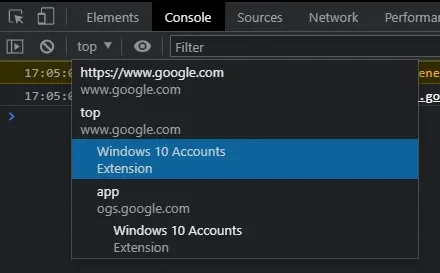
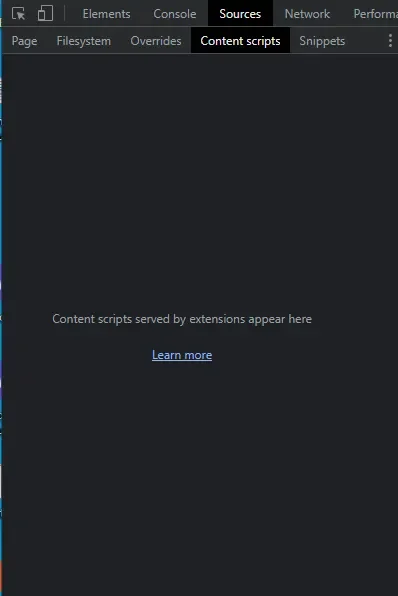
Extension scripts and their context can be inspected in Chrome developer tools. In the console tab there is an option in the upper left to select the context; opening it shows a dropdown with the word extension if any extension is loaded. In the sources tab there is another menu to check content script code.
Which pages an extension injects into is defined by regex patterns in the manifest.json file in the extension installation folder, at C:\Users\[login_name]\AppData\Local\Google\Chrome\User Data\Default\Extensions\[extension_id]\manifest.json. The structure looks like this:
{ "name": "My extension", ... "content_scripts": [ { "matches": ["https://*.nytimes.com/*"], "css": ["my-styles.css"], "js": ["content-script.js"] } ], ...}
The code being injected also lives in the extension installation folder, so once the matching URLs are known the next step is to read the content scripts themselves.
Finding it
Since the extension needed to communicate with its background document to perform different actions, it had to set up a communication channel between the isolated world and the background document. To do this, one of the content scripts injected a postMessage listener into the main document, which handled messages and passed them to the background document.
Due to the nature of postMessage, a listener receives messages from any website if no checks are defined when the listener function is written. In this case any website could communicate with the listener and reach the extension's internal API, because no checks were in place. One of the internal methods parsed the content of the message and used its value as the argument of window.open({message_content}).
Calling window.open() with a javascript: URL is the same as typing it into the URL address bar: the code is executed in the context of the current domain.
Exploitation
Step 1: Open a tab on the target domain and send the crafted message
The exploit scenario was that having the extension installed automatically made the browser vulnerable to XSS in docs.google.com, because any website could open a new tab at https://docs.google.com, send the crafted message, reach the internal method and call window.open() with arbitrary content. The following code was used as the PoC for the report:
nw = window.open('https://docs.google.com/;nw.postMessage({url:"javascript:alert(1)"},'*')
The following code was used as the PoC for the report: The report's scenario is that any website could open a tab at https://docs.google.com, send the crafted message, reach the internal method and call window.open() with arbitrary content.
Root cause
The postMessage listener was written without any checks on the sender, so it accepted messages from any website. The internal method that handled the message used the message content as the argument to window.open(). A javascript: URL passed to window.open() executes in the context of the current domain, which here is docs.google.com.
The isolated world protects content script variables from the page, but it does not protect a listener that deliberately accepts messages from the page. The missing checks in the listener are what allowed the page to reach the internal API.
Impact
Any website could open a new tab at https://docs.google.com, send the crafted message, access the internal method and call window.open() with arbitrary content, resulting in XSS in docs.google.com. The attack required the victim to have the extension installed.
The severity is raised because of the changed scope in the CVSS calculator: the affected component is the Chrome extension, but the impacted component is docs.google.com, which is external to the extension owner. When the scope is changed, the other vectors are usually set to high, because it would be required to determine the impact of the attack in an asset not owned by the affected company.
Fix
The report does not describe a fix. The report does not describe a fix.
Variants to test
- When an XSS is found in a domain related to the extension, check in
manifest.jsonwhether the extension allows external connection or messaging. This increases the attack surface and opens more ways to get scope to changed when setting CVSS metrics, easily increasing severity to high or critical.
What happened, in plain words
A browser extension is a small program you install into your browser to add a feature. This report is about a Chrome extension that added a feature to Google Slides, the online presentation tool. The extension was built so that it could talk to the web pages you visit, and the way it listened for those messages was too trusting. Because of that, any website you happened to visit could send it a message, and the extension would act on that message inside docs.google.com. The result was a cross-site scripting (XSS) bug: an attacker's page could get code to run as if it belonged to Google Docs.
To follow the rest of this article you only need to know how to use a browser. Every technical word is explained where it first appears, and there is a glossary at the end.
Background: what a Chrome extension is and how it touches pages
A Chrome extension is a bundle of files installed into Chrome. Some extensions add a button to the toolbar, some change how pages look, and some, like the one in this report, add features to a specific website.
One of the most powerful things an extension can do is inject a content script. A content script is JavaScript code that the extension drops into a web page you are viewing. JavaScript is the programming language that web pages use to be interactive. When a content script runs inside a page, it can read details of that page, change what is shown, and send information back to the rest of the extension.
The report refers to the Document Object Model (DOM). The DOM is the browser's in-memory model of a page: a tree of elements such as headings, buttons and text boxes. JavaScript reads and changes the page through this tree. So when we say a content script can read and change a page, we mean it can walk that tree.
A useful comparison: think of a web page as a printed form, and the DOM as the editable version of that form held in the browser. A content script is like a helper the extension has slipped into the room where the form is being filled in. The helper can read the form and write on it.
The isolated world
Injected script code lives in an isolated world. This is a private execution environment that is not accessible to the page or to other extensions. A practical consequence of this isolation is that JavaScript variables in an extension's content scripts are not visible to the host page or to other extensions' content scripts.
In plain terms: the helper in the room has its own notebook that nobody else in the room can read. The page's own JavaScript cannot peek at the content script's variables, and other extensions cannot either. This is a security feature, and it is worth remembering later, because it protects variables but not everything.
Why content scripts need to talk to the extension
Because content scripts run in the context of a web page and not the extension, they often need a way to communicate with the rest of the extension or with the background extension document. The background document is the part of the extension that keeps running behind the scenes, outside any particular tab. It is where the extension's real logic usually lives.
An RSS reader extension, for example, might use a content script to detect an RSS feed on a page and then notify the background page so that a page action icon is displayed. RSS is a format websites use to publish lists of new articles; an RSS reader extension watches pages for that format and shows a small icon when it finds one. The content script spots the feed, the background document decides to show the icon. Two parts of the same program, in two different places, needing to exchange a note.
Which pages get the script
The extension in this report was used to inject content into Google Slides. Its content scripts were only injected into specific domains, defined in manifest.json: the extension's own domain and docs.google.com.
A domain is the part of a web address that names the site, such as docs.google.com. The * is a wildcard meaning "anything here". So the first line matches any subdomain of the extension owner's own site, and the second line matches Google Docs. The name of the owner's domain has been redacted in this report.
manifest.json is the extension's settings file. It is written in JSON, a simple text format for structured data: curly braces, names in quotes, values after colons. The manifest tells Chrome the extension's name, what it is allowed to do, and, in a content_scripts section, which pages it injects into and which files it injects.
Setup: looking inside an extension
Extension scripts and their context can be inspected in Chrome developer tools. Developer tools are the built-in inspection panel in Chrome, usually opened with F12 or with the menu. They are meant for developers, but anyone can open them.
In the console tab there is an option in the upper left to select the context; opening it shows a dropdown with the word extension if any extension is loaded. The console is the panel where you can type JavaScript and see messages. The context selector decides which JavaScript environment your commands run in: the page's, or an extension's. If you see extension in that dropdown, an extension is running code in the current tab.
In the sources tab there is another menu to check content script code. The sources tab lists the files the browser has loaded for the page, including the scripts an extension injected.
Which pages an extension injects into is defined by regex patterns in the manifest.json file in the extension installation folder, at C:\Users\[login_name]\AppData\Local\Google\Chrome\User Data\Default\Extensions\[extension_id]\manifest.json. The structure looks like this:
{ "name": "My extension", ... "content_scripts": [ { "matches": ["https://*.nytimes.com/*"], "css": ["my-styles.css"], "js": ["content-script.js"] } ], ...}
Line by line:
{ "name": "My extension", ...starts the JSON object and gives the extension a name. The...stands for other settings that are not relevant here."content_scripts": [ {opens the list of content scripts. Each entry in the list describes one injected script."matches": ["https://*.nytimes.com/*"]says which pages this script is injected into. Here it is any page on any subdomain ofnytimes.com. A regex pattern is a pattern for matching text; here it is used to match web addresses."css": ["my-styles.css"]lists a stylesheet to inject. CSS is the language that controls how a page looks."js": ["content-script.js"]lists the JavaScript file to inject. This is the code that will run inside the page.- The closing brackets and braces end the entry, the list and the object.
The path in the report is the standard place Chrome keeps installed extensions on Windows. [login_name] is your Windows user name and [extension_id] is a long identifier Chrome assigns to each extension. The point of showing this path is practical: the extension's files, including the code it injects, sit on your own disk, so you can read them.
The code being injected also lives in the extension installation folder, so once the matching URLs are known the next step is to read the content scripts themselves. That is the method being followed here: first find out which pages the extension touches, then read the code it puts into those pages.
Finding it: the message listener with no checks
Since the extension needed to communicate with its background document to perform different actions, it had to set up a communication channel between the isolated world and the background document. To do this, one of the content scripts injected a postMessage listener into the main document, which handled messages and passed them to the background document.
Two concepts to unpack here.
postMessage is a browser feature for sending a message from one window or frame to another. Think of it as passing a note through a slot in a door: the sender does not need direct access to the receiver's code, it just posts a message. The receiving side registers a listener, a function that is called whenever a message arrives. The listener receives the message and can decide what to do with it.
The extension's internal API is the set of actions the extension offers to its own parts. An API (application programming interface) is a defined list of things one piece of software lets another piece of software ask it to do, like a menu of services with fixed names. The content script can ask the background document to perform these actions; the page is not supposed to be able to.
Due to the nature of postMessage, a listener receives messages from any website if no checks are defined when the listener function is written. This is the crucial sentence. postMessage does not know who is allowed to talk to whom; the listener has to check. If the listener does not check, it will happily process a note from any page in the browser.
In this case any website could communicate with the listener and reach the extension's internal API, because no checks were in place. One of the internal methods parsed the content of the message and used its value as the argument of window.open({message_content}).
window.open() is the browser function that opens a new window or tab at a given address. Here the extension took whatever address arrived in the message and passed it straight to window.open(). The message content was not validated in any way.
Calling window.open() with a javascript: URL is the same as typing it into the URL address bar: the code is executed in the context of the current domain. A javascript: URL is a special kind of address that contains code instead of a page location. If you type javascript: followed by code into the address bar and press Enter, the browser runs that code on the page you are currently viewing. So an address that looks like a link can actually be a small program.
Put together: any website could send a note to the extension, the extension read the address out of the note, and it opened that address. If the address was a javascript: URL, code ran on whatever page the extension was working with, which here was docs.google.com.
Exploitation: the proof of concept
Step 1: Open a tab on the target domain and send the crafted message
The exploit scenario was that having the extension installed automatically made the browser vulnerable to XSS in docs.google.com, because any website could open a new tab at https://docs.google.com, send the crafted message, reach the internal method and call window.open() with arbitrary content. The following code was used as the PoC for the report:
nw = window.open('https://docs.google.com/;nw.postMessage({url:"javascript:alert(1)"},'*')
A PoC, proof of concept, is the smallest piece of code that demonstrates a bug really works. This one is a single line, and it is worth reading slowly.
nw = window.open('https://docs.google.com/;opens a new window or tab athttps://docs.google.comand stores a handle to it in a variable callednw. The handle is how the attacker's page can later talk to that new tab.nw.postMessage(sends a message to the newly opened tab, using the handle.{url:"javascript:alert(1)"}is the message itself: a small object with one property calledurl, whose value is the textjavascript:alert(1).alert(1)is the classic harmless demonstration in JavaScript: it shows a pop-up box containing the number 1. If that pop-up appears, code ran.,'*')is the second argument topostMessage, the target origin. The'*'means "I do not care which site receives this, send it to whatever is at the other end".
So the PoC opens a new window at https://docs.google.com and posts a message to it with a url property whose value is javascript:alert(1), using '*' as the target origin. The extension's listener receives the message from the attacker's page, the internal method takes the message content and passes it to window.open(), and the javascript: URL executes in the context of docs.google.com.
Why does this matter? Because the code runs as Google Docs. The attacker's page never needed access to Google Docs; it only needed the victim's browser to have the extension installed.
Root cause: two missing checks
The postMessage listener was written without any checks on the sender, so it accepted messages from any website. The internal method that handled the message used the message content as the argument to window.open(). A scheme is the first part of a web address, the bit before the colon, such as https or javascript. Checking the scheme means refusing anything that is not a normal web address. A javascript: URL passed to window.open() executes in the context of the current domain, which here is docs.google.com.
The isolated world protects content script variables from the page, but it does not protect a listener that deliberately accepts messages from the page. This is the subtle part. The isolated world is like a private notebook, but a listener is a door the extension chose to open into the page. If the door has no lock, the notebook's privacy does not help. The missing checks in the listener are what allowed the page to reach the internal API.
An origin is the combination of scheme, host and port that identifies where a page came from, for example https://example.com. Checking the origin in a listener means comparing the sender's origin against a list of trusted ones and ignoring everything else. The report does not show the exact check that should have been written; it only says that no checks were in place.
Impact: what an attacker could do
Any website could open a new tab at https://docs.google.com, send the crafted message, access the internal method and call window.open() with arbitrary content, resulting in XSS in docs.google.com. The attack required the victim to have the extension installed.
XSS, cross-site scripting, is a class of bug where an attacker gets their own code to run inside a page belonging to someone else, as if the site itself had served that code. The name comes from the idea of scripting across site boundaries. Here the code ran in Google Docs, a site the attacker does not control, which is why the bug is serious.
The severity is raised because of the changed scope in the CVSS calculator: the affected component is the Chrome extension, but the impacted component is docs.google.com, which is external to the extension owner. When the scope is changed, the other vectors are usually set to high, because it would be required to determine the impact of the attack in an asset not owned by the affected company.
CVSS is a standard scoring system for security bugs. It asks a series of questions, called vectors, about a bug and produces a number. One of those questions is scope: did the bug stay inside the component where it was found, or did it affect something else? Here the bug was found in the extension, but the harm landed on Google Docs, a different owner's system. That is a changed scope, and it pushes the score up. An asset is simply a thing worth protecting, such as a website or a service.
Fix
The report does not describe a fix.
In everyday terms: put a lock on the door, and check what is being carried through it. Only accept notes from pages you trust, and refuse to open any address that is not a normal web address.
Variants to test
If you want to look for similar bugs yourself, these are the checks the report suggests, in order.
event.origin is the sender's origin, and event.source is a reference to the window that sent the message; a careful listener checks both.
A sink is a place where data is used in a way that can execute code or change the page. location is the current address, eval runs a string as code, and DOM insertion means putting content into the page's tree.
A broad pattern means the script runs on many sites, so many sites can reach the listener.
4. When an XSS is found in a domain related to the extension, check in manifest.json whether the extension allows external connection or messaging. This increases the attack surface and opens more ways to get scope to changed when setting CVSS metrics, easily increasing severity to high or critical. Attack surface is the total set of ways an attacker can try to get in; every extra door adds to it.
Glossary
- API: a defined list of actions one piece of software lets another ask it to perform, like a menu of services with fixed names.
- Asset: a thing worth protecting, such as a website, a service or a piece of data.
- Attack surface: the total set of ways an attacker can try to reach and abuse a system.
- Background document: the part of an extension that runs behind the scenes, outside any particular tab, and usually holds the extension's main logic.
- Bounty: a payment made to a researcher who reports a valid security bug.
- Chrome extension: a small program installed into the Chrome browser that adds a feature.
- Content script: JavaScript code that an extension injects into a web page, able to read and change that page and talk to the rest of the extension.
- CSS: the language that controls how a web page looks.
- CVSS: a standard scoring system that asks a series of questions about a security bug and produces a severity number.
- Developer tools: the built-in inspection panel in a browser, used to view and run code on a page.
- DOM (Document Object Model): the browser's in-memory tree of a page's elements, which JavaScript reads and changes.
- Domain: the part of a web address that names the site, such as
docs.google.com. - Handle: a reference to a window or tab that lets one script send it messages or control it.
- Isolated world: a private execution environment for an extension's content scripts, not accessible to the page or to other extensions.
- JavaScript: the programming language that web pages use to be interactive.
javascript:URL: a special address that contains code instead of a page location; opening it runs the code on the current page.- JSON: a simple text format for structured data, using curly braces, quoted names and values.
- Listener: a function that is called whenever a particular event, such as an incoming message, happens.
- Manifest (
manifest.json): the extension's settings file, which declares its name, permissions and which pages it injects into. - Origin: the combination of scheme, host and port that identifies where a page came from, for example
https://example.com. postMessage: a browser feature for sending a message from one window or frame to another.- PoC (proof of concept): the smallest piece of code that demonstrates a bug really works.
- Regex pattern: a pattern for matching text, used in the manifest to match web addresses.
- RSS: a format websites use to publish lists of new articles, which reader extensions watch for.
- Scheme: the first part of a web address, before the colon, such as
httpsorjavascript. - Scope (in CVSS): whether a bug stays inside the component where it was found or affects a different component or owner.
- Sink: a place in code where data is used in a way that can execute code or change the page.
- Target origin: the second argument to
postMessage, saying which site is allowed to receive the message;'*'means any site. - Wildcard: a
*character that stands for "anything here" in a pattern. - XSS (cross-site scripting): a bug where an attacker gets their own code to run inside a page belonging to someone else.


