CVE-2024–55354 in Lucee: Patching the April 2025 Vulnerability and Preventing Recurrence
Lucee's sandbox could be bypassed by an attacker who can write files to the server, by saving pre-compiled bytecode with a .cfm or .cfc extension, which Lucee then executes without applying the sandbox restrictions. This allows running code that should have been blocked and accessing resources that should have been protected, primarily affecting multi-tenant shared hosting.
 Published on medium.com
Coldfusion Development
The full write-up lives on its author's site
It belongs to its author, so we link to it rather than copy it. The other two tabs are our own rewrites, checked against it.
Context
CVE-2024-55354 is a protection-mechanism failure in Lucee, the open-source CFML engine. Lucee compiles CFML source files (.cfm and .cfc) into Java bytecode before running them, and it applies security sandboxing, typically through web-context restrictions, to limit what that code can do. In shared hosting that sandbox is the boundary between tenants.
The flaw, disclosed in Lucee's April 2025 security advisory, lets an attacker run code that should have been blocked and reach resources that should have been protected. The mechanism is narrow: an attacker who can already write files to the server can copy pre-compiled bytecode files and save them with a .cfm or .cfc extension. Lucee then executes that bytecode without applying the sandbox restrictions it would apply to source code, so restricted code runs and protected resources become reachable.
In Lucee's own words, quoted from the advisory, the issue is one "that can let an attacker run code that would be expected to be blocked and access resources that would be expected to be protected." Public vulnerability databases track it as leading to unauthorised code execution and data access, and third-party CVE trackers report a CVSS score of 8.8 (High).
Setup
The precondition is file-write access to the server. That can come from an upload feature, from a separate file-write vulnerability, or from legitimate write access being abused. This is not a remote, unauthenticated, zero-interaction RCE against an arbitrary Lucee server: the attacker must be able to place files first.
The primary target is multi-tenant or shared-hosting environments that use Lucee's sandboxing, via web-context restrictions, to isolate tenants. There the sandbox is the security boundary between customers, and this bug lets one tenant escape it. Single-tenant applications where you already fully control everything that runs on the server face lower relative risk from the sandbox-bypass angle specifically, but every Lucee operator should patch anyway: relying on "we don't use sandboxing" is a fragile defence, and any path that gives an attacker file-write access becomes far more dangerous while this bug is present.
To check the running version, use the Lucee Administrator or read it from code:
<cfoutput>#server.lucee.version#</cfoutput>
Finding it
The notable part is the mechanism rather than a request or response. Lucee compiles CFML source into Java bytecode to run it, and it applies security sandboxing, typically web-context restrictions used to isolate tenants in shared environments. The flaw is that bytecode arriving as a .cfm or .cfc file is executed without the sandbox restrictions that would apply to source code. An attacker who can write files can therefore copy pre-compiled bytecode onto the server under one of those extensions, and the restricted code runs. In short, it is a sandbox bypass via pre-compiled bytecode, and it undermines exactly the isolation that multi-tenant hosting depends on.
Exploitation
Step 1: Patch by upgrading to a fixed version
The primary remediation is upgrading to a Lucee build that includes the fix. Per the April 2025 advisory, the fixed versions are:
- Lucee [redacted] LTS, released 8 April 2025 (the 5.x LTS patch).
- Lucee [redacted] and later (the mitigation has been available since this build).
- Lucee 6.2.0.321 and later.
- Lucee 6.2.1 release candidates.
- Lucee [redacted], where the protection is enabled by default.
Identify the running version and upgrade to at least the corresponding fixed build on your branch: on 5.x move to [redacted] LTS or later, on 6.x to the patched 6.1.x or 6.2.x build. Upgrade the way you deploy Lucee: swap the lucee.jar or engine on a traditional install, or bump the image tag if you run Lucee in CommandBox or Docker (for example, pull a current ortussolutions/commandbox:lucee6 image), then restart.
Step 2: Enable the bytecode-blocking protection
Whether or not you can upgrade immediately, Lucee provides an explicit setting that blocks the exploit by preventing pre-compiled bytecode from executing as .cfm or .cfc files, while leaving normal source-code compilation working. Enable it in one of two ways.
As a Java system property, in your JVM arguments or .CFConfig JVM settings:
-Dlucee.compiler.block_bytecode=true
Or as an environment variable:
LUCEE_COMPILER_BLOCK_BYTECODE=true
Then restart Lucee for it to take effect. In a Docker or docker-compose Lucee setup, set it as an environment variable:
services: lucee: image: ortussolutions/commandbox:lucee6 environment: LUCEE_COMPILER_BLOCK_BYTECODE: "true"
On a traditional install, add the system property to your Lucee JVM configuration and restart the service. Per the advisory, these settings prevent pre-compiled bytecode from executing as .cfm or .cfc files while preserving normal source code compilation, so the application keeps working but the bytecode-substitution path is closed. On Lucee [redacted] and later the protection is already on by default; on the patched 5.x and 6.x builds it is available and should be enabled, particularly in shared and multi-tenant environments.
Step 3: Verify the fix
After patching and/or enabling the setting, confirm the state:
- Confirm the version.
server.lucee.version, or the Administrator, should show a patched build. - Confirm the setting is active where you set it: the JVM property appears in your startup arguments, or the environment variable is present in the running container or process.
- Scan with a Lucee security scanner. Tools such as Foundeo's Hack My CF, which now covers Lucee, check a running server for known Lucee security issues including CVE-level findings; use one to confirm the server no longer reports this vulnerability.
- Restart and smoke-test the application to confirm normal source compilation still works. It should, because the setting only blocks bytecode-as-CFM.
Root cause
The mistake is in how Lucee treats pre-compiled bytecode that arrives with a .cfm or .cfc extension. Source files go through compilation and then the sandbox restrictions; bytecode files are executed without those restrictions being applied. The advisory describes this as a protection-mechanism failure, and the practical consequence is that the sandbox can be bypassed by anyone who can write files. The sandbox restrictions applied to source code were not applied to bytecode arriving as .cfm or .cfc.
Impact
An attacker with file-write access can run code that should have been blocked and access resources that should have been protected. In multi-tenant or shared hosting that relies on web-context sandboxing, this means one tenant can escape the sandbox that separates it from the others. The precondition is file-write access, so the bug is not a remote, unauthenticated, zero-interaction RCE on its own. Third-party trackers report a CVSS score of 8.8 (High). Single-tenant deployments where you already control everything that runs face lower relative risk from the sandbox-bypass angle, but any file-write path becomes far more dangerous while the bug is present.
Fix
The fix is twofold.
- Upgrade to a patched build: Lucee [redacted] LTS (8 April 2025), [redacted]+, 6.2.0.321+, 6.2.1 RCs, or [redacted], where the protection is on by default.
- And/or enable the bytecode-blocking setting with
-Dlucee.compiler.block_bytecode=trueorLUCEE_COMPILER_BLOCK_BYTECODE=true, then restart and verify. The setting closes the exploit while keeping normal source compilation intact.
Beyond the immediate patch, a patch-hygiene programme helps:
- Track Lucee security advisories on
dev.lucee.organd the release channels, and assign someone, or a rotation, to own that monitoring. - Stay on a supported, patched branch. Lucee 5.4 reached end of life on 31 December 2025, so 5.x users should plan the move to a current LTS (6.2 LTS) or 7.x; end-of-life versions get no security patches. Keep current on the patch level of your branch: the difference between vulnerable and safe here was a point release, for example [redacted] to 5.4.7.3.
- Harden multi-tenant environments. Enable
lucee.compiler.block_bytecode=trueas standard configuration, not just as a CVE response. Restrict file-write access: lock down upload directories, validate and sanitise uploads, disallow executable extensions in writable paths, and apply least-privilege filesystem permissions so a tenant cannot drop files where they get executed. Isolate tenants at the OS or container level with separate containers or instances rather than relying solely on in-process sandboxing, so a sandbox bypass does not equal a full cross-tenant compromise. - Scan regularly and gate deployments. Run a Lucee security scanner such as Hack My CF on a schedule and after every upgrade, and include a version or patch-level check in your deployment pipeline so you cannot ship or run an out-of-date engine.
- Have an incident path ready. Know your upgrade procedure cold, and keep the mitigation setting handy so you can apply
block_bytecode=trueand restart as a fast interim control when you cannot upgrade immediately.
Variants to test
- Bytecode substitution on a sandboxed Lucee tenant. With file-write access inside a web context, place a pre-compiled bytecode file with a
.cfmor.cfcextension and request it. A positive result is that the code runs despite the context's restrictions, or that a resource the sandbox should protect becomes readable. - The same test after enabling
lucee.compiler.block_bytecode=true. A positive result for the fix is that the bytecode no longer executes while ordinary.cfmsource files still compile and run. - Version check across branches. Read
server.lucee.versionon 5.x and 6.x hosts and compare against [redacted] LTS, [redacted], 6.2.0.321 and 7.0.0.178. A positive result is any build below the fixed level for its branch. - Upload paths in shared hosting. Try to write files into directories that are served or executed by Lucee, and check whether executable extensions are accepted. A positive result is a writable location from which a
.cfmor.cfcfile is executed. - Scanner confirmation. Run Hack My CF or a similar Lucee security scanner against a patched and an unpatched instance. A positive result is that the unpatched instance reports the CVE-level finding and the patched one does not.
What happened, in plain words
Imagine a shared office building. Each company rents its own room, and the building manager keeps a master key that is supposed to stop one company from wandering into another company's room. That master key is the security boundary. CVE-2024-55354 is a flaw in a piece of software called Lucee that lets someone who can already slip a file into the building get around that master key.
Lucee is a free, open-source engine for running websites and web applications written in a language called CFML. You write your pages in CFML, and Lucee turns them into something the computer can actually run. Many hosting companies put several customers on one Lucee server and use Lucee's built-in restrictions, called a sandbox, to keep each customer's code away from the others. The sandbox is the wall between tenants.
The flaw, published in Lucee's April 2025 security advisory, is that Lucee treats one kind of file differently from another. Normal CFML source files are checked against the sandbox before they run. But a file that is already in the computer's own pre-chewed format, called bytecode, and that arrives with a .cfm or .cfc extension, gets run without those checks. So an attacker who can write a file onto the server can drop in pre-chewed code and have it run with none of the restrictions that should apply.
In Lucee's own words, quoted from the advisory, the issue is one "that can let an attacker run code that would be expected to be blocked and access resources that would be expected to be protected." Public vulnerability databases track it as leading to unauthorised code execution and data access, and third-party CVE trackers report a CVSS score of 8.8 (High).
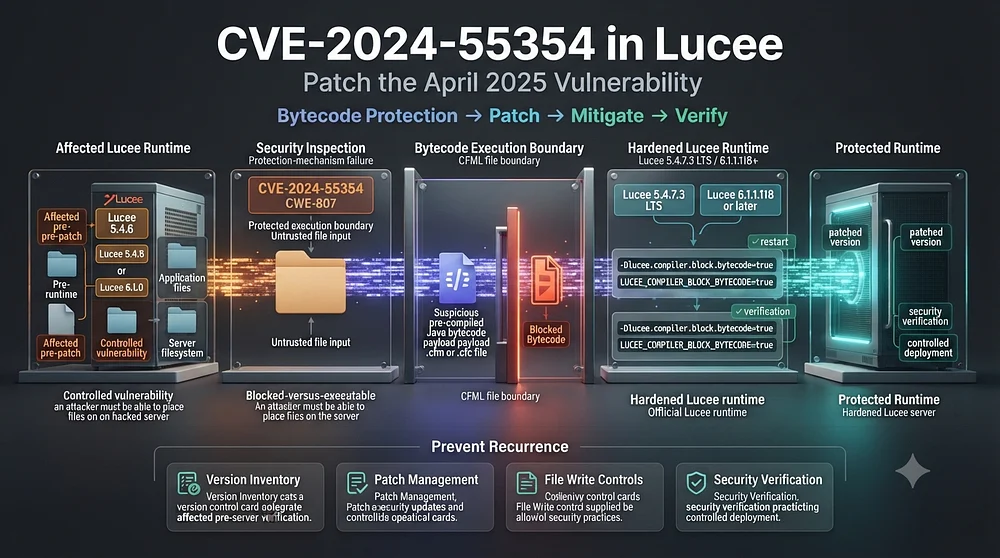
The image is the article's title card: "CVE-2024-55354 in Lucee: Patching the April 2025 Vulnerability and Preventing Recurrence", credited to Lucid Outsourcing Solutions.
A few words before we go further, because they come up constantly:
- CVE stands for Common Vulnerabilities and Exposures. It is a public catalogue number for a known security bug, like a licence plate that lets everyone refer to the same problem. CVE-2024-55354 is simply the catalogue entry for this Lucee bug.
- CVSS is a scoring system that rates how serious a vulnerability is, from 0 to 10. A score of 8.8 is labelled High. It is a rough guide, not a verdict on your particular server.
- Bytecode is the half-way format a program is converted into before the computer runs it. Think of a recipe that has already been chopped and measured into a ready meal: faster to cook, but you can no longer see the original ingredients.
- Sandbox is a set of restrictions that stops code from doing things it is not supposed to do, such as reading another customer's files.
- Multi-tenant means one server is shared by several separate customers, each a tenant.
Setup
Before any of this matters, the attacker needs one thing: the ability to write files onto the server. That can come from an upload feature on the website, from a separate bug that lets someone write files, or from legitimate write access being abused. This is not a remote, unauthenticated, zero-interaction RCE against an arbitrary Lucee server. In plain terms: the attacker cannot just point a browser at any Lucee server on the internet and take it over. They must first be able to place files on it.
RCE stands for remote code execution, meaning an attacker runs their own code on someone else's machine from a distance. "Unauthenticated" means without logging in, and "zero-interaction" means without the victim doing anything. This bug is none of those on its own; it needs the file-write step first.
The primary target is multi-tenant or shared-hosting environments that use Lucee's sandboxing, via web-context restrictions, to isolate tenants. A web context is Lucee's way of giving each application or customer its own separate little world inside the engine, with its own settings and restrictions. In shared hosting that sandbox is the security boundary between customers, and this bug lets one tenant escape it.
Single-tenant applications, where you already fully control everything that runs on the server, face lower relative risk from the sandbox-bypass angle specifically. But every Lucee operator should patch anyway. Relying on "we don't use sandboxing" is a fragile defence, and any path that gives an attacker file-write access becomes far more dangerous while this bug is present.
To check which version is running, use the Lucee Administrator, a web-based control panel for the engine, or read it from code:
<cfoutput>#server.lucee.version#</cfoutput>
Line by line:
<cfoutput>is a CFML tag that tells Lucee "start printing things out to the page here".#server.lucee.version#is a variable reference. The hash marks tell Lucee to evaluate it rather than print it literally.serveris a built-in scope holding information about the server,luceenarrows it to the Lucee engine, andversionis the version string.</cfoutput>closes the tag.
Why this step: you cannot know whether you are exposed until you know which build you are running. The version number is the single most useful fact for deciding what to do next.
Finding it
The notable part here is the mechanism rather than a request or response. There is no clever URL to paste; the problem is in how the engine handles files.
Lucee compiles CFML source into Java bytecode to run it. Java is the programming language and runtime that Lucee itself is built on. Compiling means translating human-readable source into that pre-chewed bytecode. Lucee also applies security sandboxing, typically web-context restrictions used to isolate tenants in shared environments.
The flaw is that bytecode arriving as a .cfm or .cfc file is executed without the sandbox restrictions that would apply to source code. .cfm is the extension for a CFML page, and .cfc is the extension for a CFML component, which is a reusable block of code rather like a small library. An attacker who can write files can therefore copy pre-compiled bytecode onto the server under one of those extensions, and the restricted code runs.
In short, it is a sandbox bypass via pre-compiled bytecode, and it undermines exactly the isolation that multi-tenant hosting depends on. A useful comparison: a nightclub checks IDs at the door, but if someone climbs in through the kitchen with a staff badge, the check at the front door never happens. The check exists, it is just applied at the wrong entrance.
Exploitation
Step 1: Patch by upgrading to a fixed version
The primary remediation is upgrading to a Lucee build that includes the fix. Remediation just means the fix. Per the April 2025 advisory, the fixed versions are:
- Lucee [redacted] LTS, released 8 April 2025 (the 5.x LTS patch).
- Lucee [redacted] and later (the mitigation has been available since this build).
- Lucee 6.2.0.321 and later.
- Lucee 6.2.1 release candidates.
- Lucee [redacted], where the protection is enabled by default.
LTS means Long Term Support: a version the makers promise to keep patching for a long period. A release candidate is a near-final test build. "Enabled by default" means the protection is already switched on without you doing anything.
Identify the running version and upgrade to at least the corresponding fixed build on your branch. A branch here means a major version line, such as 5.x or 6.x. On 5.x, move to [redacted] LTS or later; on 6.x, to the patched 6.1.x or 6.2.x build.
Upgrade the way you deploy Lucee. On a traditional install, swap the lucee.jar or engine. A .jar file is a packaged Java program, and the engine is the core of Lucee. If you run Lucee in CommandBox or Docker, bump the image tag instead. Docker is a tool for packaging software into ready-to-run boxes called images, and a tag is the label that picks which version of the image you get. For example, pull a current ortussolutions/commandbox:lucee6 image, then restart.
Why this step: the upgrade removes the flaw itself. Everything else in this article is either a workaround or a check.
Step 2: Enable the bytecode-blocking protection
Whether or not you can upgrade immediately, Lucee provides an explicit setting that blocks the exploit by preventing pre-compiled bytecode from executing as .cfm or .cfc files, while leaving normal source-code compilation working. Enable it in one of two ways.
As a Java system property, in your JVM arguments or .CFConfig JVM settings:
-Dlucee.compiler.block_bytecode=true
Line by line:
- The leading
-Dis how Java is told "here comes a system property". A system property is a named setting passed to the Java program when it starts. lucee.compiler.block_bytecodeis the name of the setting. It reads as "Lucee's compiler should block bytecode".=trueswitches it on.
JVM stands for Java Virtual Machine, the program that actually runs Java software, including Lucee. JVM arguments are the options you give it at startup. .CFConfig is a configuration file format used to manage CFML engine settings.
Or as an environment variable:
LUCEE_COMPILER_BLOCK_BYTECODE=true
Line by line:
LUCEE_COMPILER_BLOCK_BYTECODEis the same setting expressed as an environment variable. An environment variable is a named value that the operating system hands to a program when it starts, like a note taped to the program's desk.=trueswitches it on.
Then restart Lucee for it to take effect. Settings like this are read at startup, so a running engine will not notice the change until it is restarted.
In a Docker or docker-compose Lucee setup, set it as an environment variable:
services: lucee: image: ortussolutions/commandbox:lucee6 environment: LUCEE_COMPILER_BLOCK_BYTECODE: "true"
Line by line:
services:starts the list of containers in adocker-composefile. Docker Compose is a tool that describes several containers in one file so they can be started together.lucee:is the name of this service.image: ortussolutions/commandbox:lucee6says which pre-built image to run: the CommandBox image from Ortus Solutions, tagged for Lucee 6.environment:begins the list of environment variables to hand to that container.LUCEE_COMPILER_BLOCK_BYTECODE: "true"sets our setting to true inside the container.
On a traditional install, add the system property to your Lucee JVM configuration and restart the service.
Per the advisory, these settings prevent pre-compiled bytecode from executing as .cfm or .cfc files while preserving normal source code compilation, so the application keeps working but the bytecode-substitution path is closed. On Lucee [redacted] and later the protection is already on by default; on the patched 5.x and 6.x builds it is available and should be enabled, particularly in shared and multi-tenant environments.
Why this step: it is the fast interim control. If you cannot upgrade today, flipping this setting and restarting closes the attack path without changing how your normal pages behave.
Step 3: Verify the fix
After patching and/or enabling the setting, confirm the state:
- Confirm the version.
server.lucee.version, or the Administrator, should show a patched build. - Confirm the setting is active where you set it: the JVM property appears in your startup arguments, or the environment variable is present in the running container or process.
- Scan with a Lucee security scanner. Tools such as Foundeo's Hack My CF, which now covers Lucee, check a running server for known Lucee security issues including CVE-level findings; use one to confirm the server no longer reports this vulnerability.
- Restart and smoke-test the application to confirm normal source compilation still works. It should, because the setting only blocks bytecode-as-CFM.
A smoke test is a quick, shallow check that the main things still work after a change, the way you turn the key and listen to the engine before driving off. A security scanner is a program that inspects a server and reports known weaknesses, like a building inspector walking the corridors with a checklist.
Why this step: a fix you have not verified is a hope, not a fix. Each check above answers a different question: is the new version really running, is the setting really applied, does an independent tool agree, and does the site still work.
Root cause
The mistake is in how Lucee treats pre-compiled bytecode that arrives with a .cfm or .cfc extension. Source files go through compilation and then the sandbox restrictions; bytecode files are executed without those restrictions being applied. The advisory describes this as a protection-mechanism failure, and the practical consequence is that the sandbox can be bypassed by anyone who can write files.
The sandbox restrictions applied to source code were not applied to bytecode arriving as .cfm or .cfc. Returning to the nightclub comparison, the ID check was real and working, but it was only ever placed at the front door, and there was a second entrance nobody had thought about.
Impact
An attacker with file-write access can run code that should have been blocked and access resources that should have been protected. In multi-tenant or shared hosting that relies on web-context sandboxing, this means one tenant can escape the sandbox that separates it from the others.
The precondition is file-write access, so the bug is not a remote, unauthenticated, zero-interaction RCE on its own. Third-party trackers report a CVSS score of 8.8 (High). Single-tenant deployments where you already control everything that runs face lower relative risk from the sandbox-bypass angle, but any file-write path becomes far more dangerous while the bug is present.
Fix
The fix is twofold.
- Upgrade to a patched build: Lucee [redacted] LTS (8 April 2025), [redacted]+, 6.2.0.321+, 6.2.1 RCs, or [redacted], where the protection is on by default.
- And/or enable the bytecode-blocking setting with
-Dlucee.compiler.block_bytecode=trueorLUCEE_COMPILER_BLOCK_BYTECODE=true, then restart and verify. The setting closes the exploit while keeping normal source compilation intact.
Beyond the immediate patch, a patch-hygiene programme helps. Patch hygiene means the everyday habit of keeping software up to date, the way brushing your teeth is cheaper than dental surgery.
- Track Lucee security advisories on
dev.lucee.organd the release channels, and assign someone, or a rotation, to own that monitoring. A rotation means taking turns, so the job does not depend on one person being on holiday. - Stay on a supported, patched branch. Lucee 5.4 reached end of life on 31 December 2025, so 5.x users should plan the move to a current LTS (6.2 LTS) or 7.x; end-of-life versions get no security patches. Keep current on the patch level of your branch: the difference between vulnerable and safe here was a point release, for example [redacted] to 5.4.7.3. A point release is a small version bump, often just the last number changing.
- Harden multi-tenant environments. Enable
lucee.compiler.block_bytecode=trueas standard configuration, not just as a CVE response. Restrict file-write access: lock down upload directories, validate and sanitise uploads, disallow executable extensions in writable paths, and apply least-privilege filesystem permissions so a tenant cannot drop files where they get executed. Least privilege means giving each person or program only the access it genuinely needs, nothing more. Isolate tenants at the OS or container level with separate containers or instances rather than relying solely on in-process sandboxing, so a sandbox bypass does not equal a full cross-tenant compromise. - Scan regularly and gate deployments. Run a Lucee security scanner such as Hack My CF on a schedule and after every upgrade, and include a version or patch-level check in your deployment pipeline so you cannot ship or run an out-of-date engine. A deployment pipeline is the automated sequence that takes code from a developer's machine to a live server.
- Have an incident path ready. Know your upgrade procedure cold, and keep the mitigation setting handy so you can apply
block_bytecode=trueand restart as a fast interim control when you cannot upgrade immediately.
Variants to test
These are the checks to run if you want to confirm exposure or confirm the fix on your own systems. Each one states what a positive result looks like, so you know what you are looking for before you start.
- Bytecode substitution on a sandboxed Lucee tenant. With file-write access inside a web context, place a pre-compiled bytecode file with a
.cfmor.cfcextension and request it. A positive result is that the code runs despite the context's restrictions, or that a resource the sandbox should protect becomes readable. - The same test after enabling
lucee.compiler.block_bytecode=true. A positive result for the fix is that the bytecode no longer executes while ordinary.cfmsource files still compile and run. - Version check across branches. Read
server.lucee.versionon 5.x and 6.x hosts and compare against [redacted] LTS, [redacted], 6.2.0.321 and 7.0.0.178. A positive result is any build below the fixed level for its branch. - Upload paths in shared hosting. Try to write files into directories that are served or executed by Lucee, and check whether executable extensions are accepted. A positive result is a writable location from which a
.cfmor.cfcfile is executed. - Scanner confirmation. Run Hack My CF or a similar Lucee security scanner against a patched and an unpatched instance. A positive result is that the unpatched instance reports the CVE-level finding and the patched one does not.
Glossary
- Bytecode: the half-way, pre-chewed format a program is converted into before the computer runs it.
- CFML: the programming language used to write pages and components that Lucee runs.
.cfm: the file extension for a CFML page..cfc: the file extension for a CFML component, a reusable block of code.- CommandBox: a tool for running and managing CFML engines such as Lucee.
- Compile: translate human-readable source code into bytecode the engine can run.
- Container: a packaged, isolated runtime for software, commonly managed with Docker.
- CVE: Common Vulnerabilities and Exposures, a public catalogue number for a known security bug.
- CVSS: a scoring system rating vulnerability severity from 0 to 10; 8.8 is High.
- Deployment pipeline: the automated sequence that moves code from development to a live server.
- Docker: a tool for packaging software into ready-to-run images.
- Docker Compose: a tool that describes several containers in one file so they start together.
- End of life (EOL): the point after which a version no longer receives security patches.
- Environment variable: a named value the operating system hands to a program at startup.
- Hack My CF: Foundeo's security scanner, which checks a running server for known issues including CVE-level findings.
- Image tag: the label that selects which version of a Docker image you run.
- Java: the programming language and runtime that Lucee is built on.
.jar: a packaged Java program file.- JVM: Java Virtual Machine, the program that runs Java software, including Lucee.
- JVM arguments: the options passed to the JVM at startup.
- Least privilege: giving each person or program only the access it genuinely needs.
- LTS: Long Term Support, a version the makers promise to keep patching for a long period.
- Multi-tenant: one server shared by several separate customers, each a tenant.
- Patch hygiene: the ongoing habit of tracking, applying and verifying software updates.
- Point release: a small version bump, often just the last number changing.
- Protection-mechanism failure: a flaw in which a protection exists but fails to do its job.
- RCE: remote code execution, running your own code on someone else's machine from a distance.
- Release candidate (RC): a near-final test build.
- Remediation: the fix for a vulnerability.
- Sandbox: restrictions that stop code from doing things it is not supposed to do.
- Scanner: a program that inspects a server and reports known weaknesses.
- Smoke test: a quick check that the main things still work after a change.
- System property: a named setting passed to a Java program at startup, prefixed with
-D. - Tenant: one customer sharing a server with others.
- Web context: Lucee's separate little world for an application or customer, with its own settings and restrictions.


