**CVE-2026-9082: Testing Drupal’s Critical PostgreSQL SQL Injection**
A user-controlled array key in Drupal Core's PostgreSQL Entity Query condition handler could become part of a named SQL placeholder, allowing an anonymous attacker to alter query logic and read database contents such as administrator records. The author confirmed this in a lab by comparing boolean-based true and false responses and then recovering administrator data.
 Published on osintteam.blog
Cybersecurity
The full write-up lives on its author's site
It belongs to its author, so we link to it rather than copy it. The other two tabs are our own rewrites, checked against it.
Context
CVE-2026-9082 is a SQL injection in Drupal Core that only applies to sites backed by PostgreSQL. Drupal uses a database abstraction layer so the same application code can run against different database engines, and that layer normally keeps user input away from raw SQL syntax. The flaw described here sits in the PostgreSQL-specific Entity Query condition handler: a user-controlled PHP array key can become part of a named SQL placeholder. The distinction matters because a prepared statement can bind a value safely, but it cannot protect query structure that was already built from untrusted input.
Drupal disclosed the issue on May 20, 2026. The GitHub Advisory Database scores it at 9.8, and CISA later added it to the Known Exploited Vulnerabilities catalogue. The author, an information security consultant and bug bounty hunter, tested it in a controlled Drupal lab.

Setup
The testing was done only against an environment the author had permission to use. For lab validation he referred to the public PoC published by 7h30th3r0n3, which demonstrates the JSON:API-to-PostgreSQL path and credits michaelmaturi with discovering the original vulnerability. The report does not list PHP versions or tooling beyond the PoC repository.
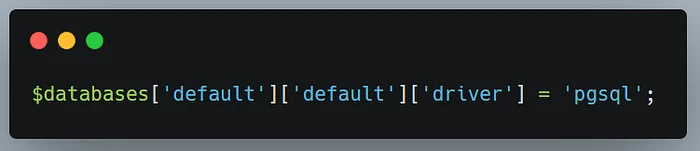
The preconditions are narrow and worth stating plainly: the site must use PostgreSQL. If it does not, this particular injection path does not apply. A PostgreSQL-backed Drupal configuration normally uses the pgsql driver.
Finding it
What caught the author's attention was that this is not the usual SQL injection caused by a developer directly joining user input into a query. The problem sits deeper, inside Drupal Core's PostgreSQL query handling. An anonymous request can influence the way a placeholder name is built, and that small implementation detail can open the door to database access.
The easiest way to understand the bug, in his words, was to follow the input from the HTTP request to the final query.
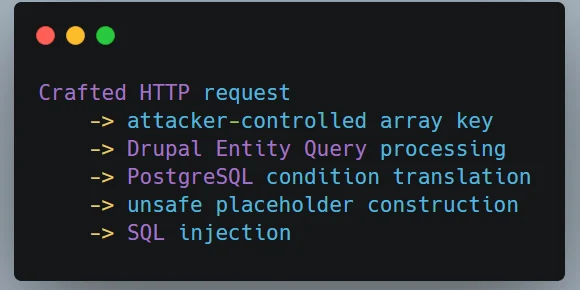
The takeaway: prepared statements are not magic. Values may be bound safely while a placeholder name, identifier, or another structural part of the query is still unsafe.
Exploitation
Step 1: boolean-based check
The first test was a boolean-based check comparing the true and false responses. One condition returned five records; the other returned none. The request was not simply producing an error, it was changing the query logic. That moved the issue from "possibly vulnerable" to confirmed in the lab.
Step 2: recover administrator data
The next controlled test showed the real impact: data belonging to Drupal's administrator account could be recovered from the database. The author blurred the target, endpoint inventory, username, email address and password hash in the screenshots, noting that even test data can reveal more than expected once an image is published.
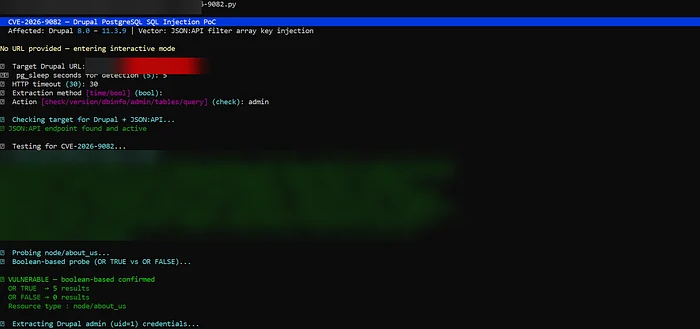
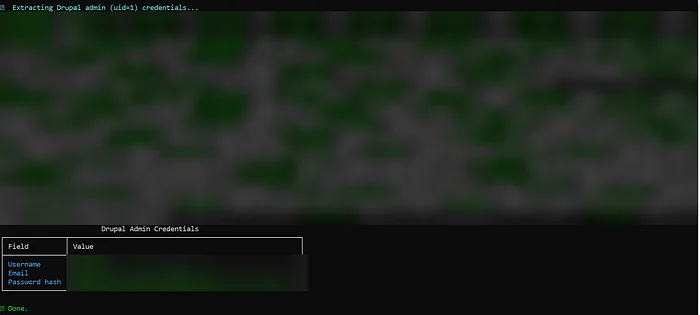
The report does not reproduce the exact request or payload used in either step; it describes the request flow through the PoC repository instead.
Root cause
Drupal's database abstraction layer is meant to keep user input away from raw SQL syntax. In the PostgreSQL-specific Entity Query condition handler, a user-controlled PHP array key can become part of a named SQL placeholder. Because the placeholder name is part of the query structure rather than a bound value, the prepared statement offers no protection: the structure was already built from untrusted input before binding happened.
This is why the usual defence did not stop it. Prepared statements protect values when the query structure stays fixed. They do not automatically protect table names, column names, operators, sorting instructions, query fragments, or placeholder names. The report names the PostgreSQL-specific Entity Query condition handler but does not show the faulty function itself.
Impact
The author lists the following reasons for treating the bug as dangerous:
- Anonymous attack surface: a malicious user may not need a Drupal account.
- Remote reachability: exploitation can be attempted over HTTP against an exposed site.
- No victim interaction: no document opening or approval prompt is required.
- Sensitive database access: user records, password hashes, configuration data, private content and business information may be exposed.
- Escalation potential: database write access can enable account takeover or persistent application changes; some configurations may permit broader compromise.
- Confirmed operational risk: CISA added the CVE to its Known Exploited Vulnerabilities catalogue.
All of this is conditional on the site using PostgreSQL and remaining unpatched.
Affected versions
The official Drupal advisory identifies the vulnerable ranges, and the SQL injection path specifically affects sites using PostgreSQL.
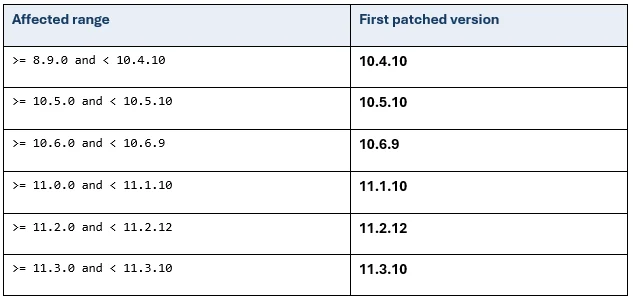
Drupal 8, Drupal 9 and several listed branches are end-of-life. Emergency patches can reduce immediate exposure, but organisations should migrate to a supported release rather than treating an exceptional patch as a long-term solution.
Checking your environment
Check two basics first: the Drupal Core version and the database driver. If the site is not using PostgreSQL, this injection path does not apply. If it is, compare the installed release with the patched-version table.
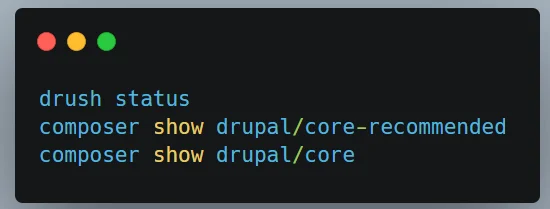
Do not paste the complete settings.php file into a ticket or public forum, because it may contain credentials and secrets.
Fix
The correct fix is to update Drupal Core. A WAF rule should not be treated as the permanent answer. For many Composer-managed sites the update looks like the command shown in the report, although the package list must match the project's composer.json:
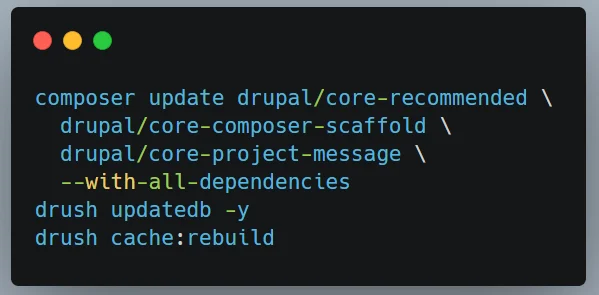
Take a verified backup and test the change in staging, but do not leave this patch waiting for the next monthly cycle. After deployment, confirm the version again and rebuild Drupal's cache.
A WAF may buy some time by blocking familiar payload patterns, but it is temporary risk reduction, not remediation. Different encodings and request-normalisation behaviour can make a signature easy to miss.
Patch, then investigate
Patching does not tell you whether somebody already exploited the site. If a vulnerable instance was reachable from the internet, review:
- Requests to JSON and JSON:API endpoints containing unusual nested filter structures.
- PostgreSQL errors, timing anomalies and unexpected query patterns.
- New or modified administrator accounts, roles and permissions.
- Unexpected changes to Drupal modules, themes, PHP files and scheduled tasks.
- Outbound connections from web and database servers.
- Unexpected access to configuration files, credential stores and sensitive tables.
Preserve relevant web-server, Drupal, WAF, database, authentication and operating-system logs. If compromise is suspected, rotate database credentials, privileged passwords, API tokens and other secrets accessible to the application, and follow the organisation's incident-response process.
Defensive hardening
- Grant the Drupal database account only the permissions the application needs.
- Do not expose PostgreSQL directly to the public internet.
- Centralise application, proxy, database and authentication logs.
- Alert on abnormal JSON:API activity and repeated database errors.
- Remove unused modules and disable unnecessary public endpoints.
- Keep Drupal Core and Composer dependencies on supported branches.
- Maintain tested backups and a documented incident-response playbook.
- Nested filter structures on JSON:API endpoints. Send requests to JSON and JSON:API endpoints with unusual nested filter structures and compare true and false conditions. A positive result is a measurable difference in the number of records returned, as in the five-versus-none signal here, rather than a generic error.
- Array keys that reach placeholder construction. On other frameworks with a database abstraction layer, look for places where a user-controlled array key becomes part of a placeholder name or identifier. A positive result is a query whose structure changes with the key while values remain bound.
- Structural injection points beyond values. Test table names, column names, operators, sorting instructions and query fragments for user influence. A positive result is any of these changing query behaviour without a bound value being involved.
- Driver-specific code paths. Where an application supports several database engines, test the engine-specific handlers separately. A positive result is a behaviour that appears only on one driver, as this bug does on PostgreSQL.
- WAF bypass by encoding. If a WAF is the only control in front of a known-vulnerable instance, try different encodings and request-normalisation variations. A positive result is a payload that reaches the application despite the rule set, which confirms the WAF is not remediation.
What happened, in plain words
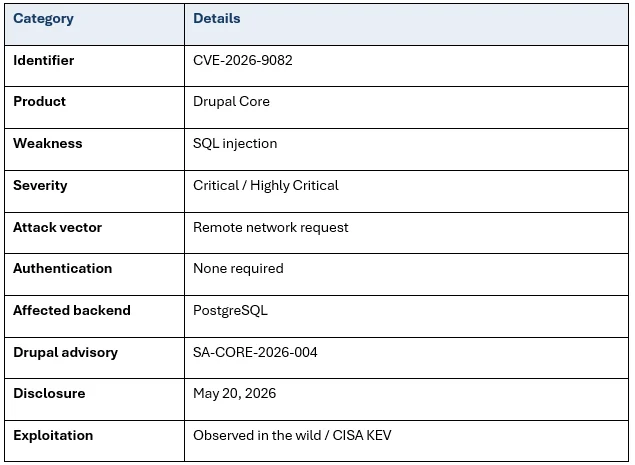
A serious security flaw was found in Drupal, a popular system for building websites. The flaw is tracked under the name CVE-2026-9082. A CVE is simply a public catalogue number given to a known security problem so that everyone can refer to the same thing. This particular flaw lets an attacker who has no account on the website send a specially crafted request and make the website's database reveal information it should keep private, such as user records and password hashes.
This particular attack path only affects Drupal sites that store their data in PostgreSQL, a particular brand of database. A database is the part of a website that keeps the actual information: user accounts, articles, settings and so on. If a site uses a different database, this specific attack path does not work.
Drupal told the world about the problem on May 20, 2026. The GitHub Advisory Database, a public catalogue of software vulnerabilities, scores it at 9.8. Scores run from 0 to 10, and 9.8 is near the top of the scale, meaning it is treated as critical. CISA, the United States government's cybersecurity agency, later added it to a list called the Known Exploited Vulnerabilities catalogue. That list exists to flag vulnerabilities known to be exploited in the real world, so do not wait.
The author of the write-up is an information security consultant and bug bounty hunter. A bug bounty hunter is someone who looks for security flaws, often for reward programmes run by companies. He tested the flaw in a controlled Drupal lab, meaning a test installation he was allowed to attack.
CVE-2026-9082: Key Details
Where the vulnerability lives
To follow this story you need three ideas: what Drupal is, what a database abstraction layer is, and what SQL injection means.
Drupal is a content management system. Think of it as a ready-made engine for a website: it handles pages, user accounts, permissions and the forms that let people log in or post content. Many organisations run their public sites on it.
A database is where that engine keeps its information. The website asks the database questions, and the database answers. The language those questions are written in is called SQL, short for Structured Query Language. A question like "give me the user whose name is Alice" is written in SQL.
SQL injection is the classic attack against that arrangement. It happens when a website builds a database question by gluing together fixed text and whatever the visitor typed, so that the visitor's text is read as part of the question rather than as an answer. A simple comparison: imagine a form that says "write your name" and a clerk who reads the reply out loud to a colleague as an instruction. If you write "Alice, and also open the safe", the clerk may do both. SQL injection is the database equivalent.
Drupal tries to avoid that by using a database abstraction layer. This is a piece of software that sits between Drupal's own code and the database, so the same Drupal code can work with different database brands. One of its jobs is to keep visitor input away from raw SQL syntax. Instead of gluing text together, Drupal sends the database a fixed question with blank slots, called placeholders, and then fills the slots with the visitor's values separately. The database treats the filled-in values as data, never as instructions. This technique is called a prepared statement, and it is one of the main defences against SQL injection.
Here, the problem appears in the PostgreSQL-specific Entity Query condition handler. In plain terms: Drupal has a feature that lets code ask for records matching certain conditions, and because PostgreSQL is one of the supported databases, there is a PostgreSQL-specific piece of code that translates those conditions into PostgreSQL questions. That piece of code is where the flaw sits. A PHP array key controlled by the user can become part of a named SQL placeholder. PHP is the programming language Drupal is written in, and an array is a list of labelled items; the label is called the key. So a visitor can influence the label of a blank slot in the database question.
That distinction matters. A prepared statement can safely bind a value, but it cannot protect query structure that was already built from untrusted input. In the clerk comparison: prepared statements make sure the words you write on the form are read as a name, not as an instruction. But if you can also change the label printed on the form itself, the clerk may still be confused about what is being asked.
Following the input to the query
The author found the easiest way to understand the bug was to follow the input from the HTTP request to the final query. HTTP is the protocol browsers and servers use to exchange requests and responses; every time you load a page or submit a form, your browser sends an HTTP request. Following the input means tracing the journey: the visitor sends a request, Drupal receives it, some part of it becomes an array key, that key becomes part of a placeholder name, and the placeholder name becomes part of the SQL question sent to PostgreSQL.
That was the important takeaway: prepared statements are not magic. Values may be bound safely while a placeholder name, identifier, or another structural part of the query is still unsafe. An identifier is simply a name used inside a database question, such as the name of a table or a column.
Why this bug is dangerous
The author lists the reasons for treating it as serious:
- Anonymous attack surface: a malicious user may not need a Drupal account. In other words, the attacker does not have to log in first.
- Remote reachability: exploitation can be attempted over HTTP against an exposed site. The attacker does not need physical access to the server; the internet connection is enough.
- No victim interaction: no document opening or approval prompt is required. Nobody has to click anything for the attack to work.
- Sensitive database access: user records, password hashes, configuration data, private content and business information may be exposed. A password hash is a scrambled form of a password; it is not the password itself, but it can still be valuable to an attacker.
- Escalation potential: database write access can enable account takeover or persistent application changes; some configurations may permit broader compromise. Account takeover means logging in as somebody else, and persistent means the change survives a restart.
- Confirmed operational risk: CISA added the CVE to its Known Exploited Vulnerabilities catalogue.
All of this depends on the site using PostgreSQL and remaining unpatched.
Affected and fixed Drupal versions
The official Drupal advisory identifies the vulnerable ranges. An advisory is the official notice a software maker publishes about a security problem. The SQL injection path specifically affects sites using PostgreSQL.
Drupal 8, Drupal 9 and several listed branches are end-of-life. End-of-life means the maker no longer produces normal updates for that version, including security fixes. Emergency patches can reduce immediate exposure, but organisations should migrate to a supported release rather than treating an exceptional patch as a long-term solution. Migrate here means moving the site to a newer, still-supported version.
Lab validation: from a small signal to real impact
For lab validation, the author referred to the public PoC published by 7h30th3r0n3. A PoC, or proof of concept, is a small piece of code or a set of instructions that demonstrates the flaw actually works. Public means anyone can read it. The repository demonstrates the JSON:API-to-PostgreSQL path and credits michaelmaturi with discovering the original vulnerability.
JSON:API is a feature of Drupal that lets other software talk to the site over HTTP and exchange data in a format called JSON, which is a way of writing structured information as text. Think of JSON:API as a service counter: instead of a human clicking through pages, a program asks the counter for records and gets them back in a predictable format. Because it is designed for programs, it is reachable over HTTP and is a natural place to look for input that reaches the database.
The author recommends reading the source before running any security tool; it makes the request flow much easier to understand. Reading the source means reading the PoC's code rather than just executing it.
The turning point: the response changed
He tested only against an environment where he had permission. This is the ethical and legal baseline: attacking a system you do not own or have written permission to test is a crime in many countries.
First, he used the boolean-based check and compared the true and false responses. Boolean means true or false. The idea is to send two requests that differ only in a condition that should evaluate to true in one and false in the other, then compare what comes back. If the site is vulnerable, the two answers differ in a way that reveals the database is answering the condition. One condition returned five records; the other returned none. That was the small signal he was looking for. The request was not simply producing an error; it was changing the query logic.
At that stage, the issue moved from "possibly vulnerable" to confirmed in his lab. The next controlled test showed the real impact: data belonging to Drupal's administrator account could be recovered from the database. Recovered means read out of the database and returned in the response.
He blurred the target, endpoint inventory, username, email address and password hash in the screenshots. An endpoint is a specific address on a website that accepts requests, like a particular counter in a building. He noted that even test data can reveal more than expected once an image is published.
The report does not reproduce the exact request or payload used in either step; it describes the request flow through the PoC repository instead. A payload is the part of a request that carries the attack.
How to check your environment
Before doing anything complicated, check two basics: the Drupal Core version and the database driver. Drupal Core is the main body of Drupal, as opposed to add-on modules. A database driver is the small piece of software that lets Drupal talk to a particular database brand; for PostgreSQL it is normally called pgsql.
If the site is not using PostgreSQL, this particular injection path does not apply. If it is using PostgreSQL, compare the installed release with the patched-version table above.
A PostgreSQL-backed Drupal configuration normally uses the pgsql driver. Do not paste the complete settings.php file into a ticket or public forum because it may contain credentials and secrets. settings.php is Drupal's main configuration file; credentials are the username and password used to reach the database, and secrets is the general word for anything that must stay private.
Remediation
The correct fix is to update Drupal Core. Remediation means actually removing the weakness, not just hiding it. Do not depend on a WAF rule as the permanent answer. A WAF, or web application firewall, is a filter placed in front of a website that inspects incoming requests and blocks ones that look malicious. It is like a security guard at the door: useful, but not the same as repairing the lock.
For many Composer-managed sites, the update looks like the command shown in the report, although the package list must match the project's composer.json. Composer is a tool that downloads and updates the libraries a PHP project depends on, and composer.json is the file that lists them.
Take a verified backup and test the change in staging, but do not leave this patch waiting for the next monthly cycle. A backup is a copy of the site and its data kept in case something goes wrong; verified means somebody checked the copy can actually be restored. Staging is a separate copy of the site used for testing changes before they reach the real visitors. After deployment, confirm the version again and rebuild Drupal's cache. A cache is a store of pre-computed answers kept to make the site faster; rebuilding it forces Drupal to use the new code rather than old stored answers.
A WAF may buy some time by blocking familiar payload patterns, but it is temporary risk reduction, not remediation. Different encodings and request-normalisation behaviour can make a signature easy to miss. Encoding is the many ways the same character can be written in a request, and normalisation is how a server tidies those variations up before reading them; a signature is the pattern a WAF looks for.
Patch, then investigate
Patching does not tell you whether somebody already exploited the site. If a vulnerable instance was reachable from the internet, review:
- Requests to JSON and JSON:API endpoints containing unusual nested filter structures. A filter is a condition attached to a request, and nested means filters inside filters.
- PostgreSQL errors, timing anomalies and unexpected query patterns. Timing anomalies means requests that take unusually long or short, which can hint that a database is being asked extra questions.
- New or modified administrator accounts, roles and permissions.
- Unexpected changes to Drupal modules, themes, PHP files and scheduled tasks.
- Outbound connections from web and database servers. Outbound means connections the server makes to somewhere else.
- Unexpected access to configuration files, credential stores and sensitive tables.
Preserve relevant web-server, Drupal, WAF, database, authentication and operating-system logs. Logs are the records servers keep of what happened. If compromise is suspected, rotate database credentials, privileged passwords, API tokens and other secrets accessible to the application, and follow the organisation's incident-response process. Rotate means replace with new ones; an API token is a secret string a program uses instead of a password to prove who it is.
Defensive hardening
Hardening means making a system harder to attack in the first place.
- Grant the Drupal database account only the permissions the application needs. Permissions are the specific actions an account is allowed to perform.
- Do not expose PostgreSQL directly to the public internet.
- Centralise application, proxy, database and authentication logs. A proxy is an intermediary server that forwards requests.
- Alert on abnormal JSON:API activity and repeated database errors.
- Remove unused modules and disable unnecessary public endpoints.
- Keep Drupal Core and Composer dependencies on supported branches.
- Maintain tested backups and a documented incident-response playbook.
What developers should learn
The bug is a useful reminder that saying "we use prepared statements" is not the end of a SQL-injection review. Prepared statements protect values when the query structure stays fixed. They do not automatically protect table names, column names, operators, sorting instructions, query fragments or placeholder names. An operator is a symbol such as equals or greater-than inside a query; a query fragment is a piece of a query assembled separately.
If user input can affect one of those structural pieces, use a strict allowlist or map it to a fixed internal value. An allowlist is a list of permitted values; anything not on the list is refused. This matters even more in shared framework code: one unsafe query-building helper can quietly expose many endpoints.
Final thoughts
CVE-2026-9082 is serious because the attacker can be anonymous, the vulnerable path is reachable over the network, and the impact reaches the database. Public PoCs and confirmed exploitation make the patching window even smaller.
If you manage Drupal with PostgreSQL, check the version today, apply the official update, and look through the logs instead of assuming the patch is the end of the story.
The author hopes this practical breakdown helps you understand the issue and validate your own authorised lab. If you found it useful, feel free to share it with another Drupal administrator or security researcher.
References
- Drupal Security Advisory SA-CORE-2026-004
- GitHub Advisory Database: GHSA-ghwc-95x2-682j
- CISA Known Exploited Vulnerabilities Catalogue
- PoC repository by 7h30th3r0n3
- Technical analysis by Searchlight Cyber
- Canadian Centre for Cyber Security advisory
Glossary
- Advisory: an official notice published by a software maker about a security problem and how to fix it.
- Allowlist: a list of values that are explicitly permitted; anything else is refused.
- API: a way for one piece of software to talk to another, usually over HTTP, without a human clicking through pages.
- API token: a secret string a program uses instead of a password to prove who it is.
- Array: a list of labelled items in a programming language; each label is called a key.
- Authentication: the process of proving who you are, usually by logging in.
- Backup: a copy of a site and its data kept so it can be restored if something goes wrong.
- Boolean: a value that is either true or false.
- Bug bounty hunter: someone who looks for security flaws, often for reward programmes run by companies.
- Cache: a store of pre-computed answers kept to make a site faster.
- CISA: the United States government's cybersecurity agency.
- Composer: a tool that downloads and updates the libraries a PHP project depends on.
composer.json: the file that lists a PHP project's dependencies for Composer.- Content management system: software that provides a ready-made engine for running a website, including pages, accounts and permissions.
- Credentials: a username and password, or similar pair, used to reach a system.
- CVE: a public catalogue number given to a known security vulnerability.
- Database: the part of a website that stores its actual information, such as accounts, articles and settings.
- Database abstraction layer: software between an application and a database that lets the same code work with different database brands and helps keep input away from raw SQL.
- Database driver: the small piece of software that lets an application talk to a particular database brand; for PostgreSQL it is normally
pgsql. - Deployment: putting a change live on the real site.
- Drupal: a popular content management system for building websites.
- Drupal Core: the main body of Drupal, as opposed to add-on modules.
- Encoding: the many ways the same character can be written in a request.
- Endpoint: a specific address on a website that accepts requests.
- End-of-life: a version the maker no longer produces normal updates for, including security fixes.
- Entity Query condition handler: the Drupal code that turns record-matching conditions into database questions; the PostgreSQL-specific version is where this flaw sits.
- Escalation: gaining more access or power than originally intended.
- Filter: a condition attached to a request that narrows which records are returned.
- Hardening: making a system harder to attack in the first place.
- HTTP: the protocol browsers and servers use to exchange requests and responses.
- Identifier: a name used inside a database question, such as a table or column name.
- Incident response: the documented process an organisation follows after a suspected security breach.
- JSON: a way of writing structured information as text.
- JSON:API: a Drupal feature that lets other software exchange data with the site over HTTP in JSON format.
- Key: the label of an item in an array.
- Known Exploited Vulnerabilities catalogue: a CISA list of vulnerabilities known to be used by attackers in the real world.
- Logs: the records servers keep of what happened.
- Migration: moving a site to a newer, still-supported version.
- Module: an add-on that extends Drupal's features.
- Normalisation: how a server tidies up variations in a request before reading it.
- Operator: a symbol such as equals or greater-than inside a query.
- Outbound: a connection a server makes to somewhere else.
- Password hash: a scrambled form of a password; not the password itself, but still valuable to an attacker.
- Payload: the part of a request that carries the attack.
- Permissions: the specific actions an account is allowed to perform.
- PHP: the programming language Drupal is written in.
- Placeholder: a blank slot in a database question that is filled with a value separately.
- PoC (proof of concept): a small piece of code or set of instructions demonstrating that a flaw actually works.
- PostgreSQL: a particular brand of database.
- Prepared statement: a technique where a database question is fixed first and values are filled in separately, so values are treated as data, never as instructions.
- Proxy: an intermediary server that forwards requests.
- Query: a question sent to a database.
- Query fragment: a piece of a query assembled separately.
- Remediation: actually removing a weakness, not just hiding it.
- Rotate: replace a secret such as a password or token with a new one.
settings.php: Drupal's main configuration file, which may contain credentials and secrets.- Signature: the pattern a WAF looks for in incoming requests.
- SQL: Structured Query Language, the language used to ask a database questions.
- SQL injection: an attack where a website builds a database question by gluing together fixed text and visitor input, so the input is read as part of the question.
- Staging: a separate copy of a site used for testing changes before they reach real visitors.
- Table: a structured collection of records inside a database.
- Timing anomaly: a request that takes unusually long or short, which can hint at extra database questions.
- WAF (web application firewall): a filter placed in front of a website that inspects incoming requests and blocks ones that look malicious.




