CVE-2026–69194: Cross-Site Scripting in FileRise
FileRise up to version 3.20.0 contained a cross-site scripting weakness where untrusted input reached a web page without adequate neutralisation. An attacker could have their content interpreted by a victim's browser in the application's security context, though the author does not publish a working payload or exact reproduction.

medium.com
Published on medium.com
Hacking
The full write-up lives on its author's site
It belongs to its author, so we link to it rather than copy it. The other two tabs are our own rewrites, checked against it.
Context
FileRise is the affected software in this report, and the vulnerability class is Cross-Site Scripting (XSS), classified as CWE-79: Improper Neutralization of Input During Web Page Generation. The researcher, publishing as BRabbit (Md Fahim Al Shihab), found the issue during a security-focused source-code review and it was assigned CVE-2026-69194.
The report does not describe FileRise's feature set or the specific feature in which the vulnerable input is handled. What it does say is that the weakness sits in input handling: data that is user-controlled or externally influenced flows into web responses and reaches the application's web interface without adequate neutralisation before rendering.
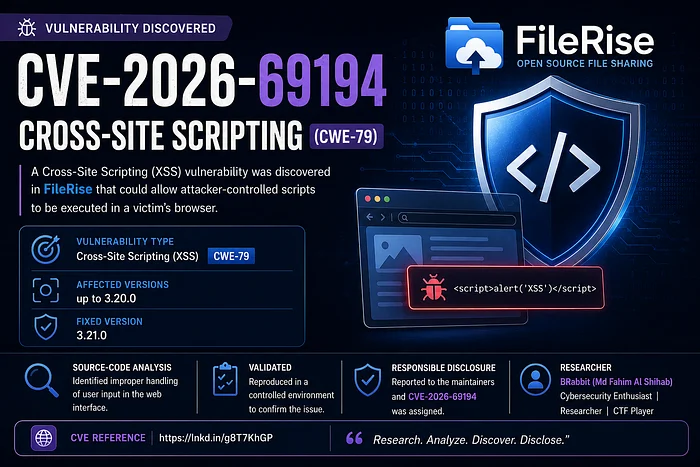
The image is the article header for the write-up, titled "CVE-2026-69194: Cross-Site Scripting in FileRise" and credited to Md Fahim Al Shihab, dated Sep 10, 2026.
Setup
The research combined source-code analysis, identification of the vulnerable behaviour, validation in a controlled environment, and responsible disclosure. Validation was performed against the affected software version to establish that the finding was reproducible and security-relevant.
The report does not name any accounts, roles, tools, or additional preconditions beyond running an affected version of FileRise in a controlled testing environment.
Finding it
The starting point was a security-focused source-code review of FileRise. The researcher examined areas where user-controlled or externally influenced data could flow into web responses, and focused on how that data was subsequently processed before being rendered.
The investigation traced the relevant input flow and checked whether appropriate safeguards were present before the data reached the application's web interface. That analysis led to the identification of an input-handling weakness consistent with Cross-Site Scripting.
In other words, the suspicion was not raised by a single odd response but by following data from its entry point to its rendering context and finding no adequate neutralisation on the way.
Exploitation
The report deliberately does not publish a working payload or a weaponised reproduction. The researcher states that this is intentional, to keep the article focused on the security research rather than providing material that could be directly misused. Consequently there are no requests, responses, endpoints, parameters or code blocks to reproduce here.
Step 1: Reproduce in a controlled environment
After identifying the potential vulnerability, the researcher reproduced the behaviour in a controlled testing environment. The objective was to confirm that attacker-controlled input could reach the relevant rendering context without adequate neutralisation.
Step 2: Confirm against the affected version
Validation was performed against the affected software version, establishing that the finding was reproducible and security-relevant.
Root cause
Untrusted input is incorporated into web content without sufficient validation or output encoding. The report frames this generally: depending on where the vulnerable input is processed and rendered, attacker-controlled content can be interpreted by a victim's browser in the security context of the affected application.
The report does not identify the specific function, template or file involved, so the exact mistake in the code is not described. What it does establish is that the input flow reached the rendering context without adequate neutralisation, which is the condition CWE-79 describes.
Impact
XSS can have different security implications depending on the application's functionality, the affected context, and the privileges of the victim. The report lists these potential consequences:
- Execution of attacker-controlled JavaScript in a victim's browser
- Unauthorized actions performed within the victim's authenticated session
- Exposure of application data accessible to the victim
- Manipulation of application content
- Phishing or social-engineering opportunities
The actual impact depends heavily on the application's architecture and the location of the vulnerable input. The report does not assign a severity or CVSS score, and does not describe a specific attack scenario against a particular role.
Affected and fixed versions
| Item | Value |
|---|---|
| CVE | CVE-2026-69194 |
| CWE | CWE-79 |
| Affected software | FileRise |
| Affected versions | Up to and including 3.20.0 |
| Fixed version | 3.21.0 |
According to the published vulnerability information, FileRise versions up to 3.20.0 are affected, while version 3.21.0 is listed as the fixed version. Users running affected versions should review their deployments and upgrade to the fixed release.
Fix
It states only that 3.21.0 is the fixed version and recommends upgrading to it.
The security lessons it draws are general: validate data received from untrusted sources, encode output appropriately for the context in which it is rendered, consider security controls throughout the development lifecycle, and use source-code review and security testing to find dangerous input paths that normal application testing may not make obvious.
Responsible disclosure
After confirming the vulnerability, the researcher followed a responsible disclosure process and reported the finding to the appropriate parties. The vulnerability was subsequently assigned CVE-2026-69194. The report stresses that the point of disclosure is not simply to demonstrate that a vulnerability exists, but to give the affected project an opportunity to understand and address it.
Variants to test
These are general directions for similar source-review work; the report itself does not list them.
- Trace every externally influenced value to its render point. Follow data from request parameters, headers, uploaded file metadata and stored records into templates and client-side rendering. A positive result is a path where the value reaches the page without context-appropriate encoding.
- Check stored as well as reflected flows. Values that persist and are later displayed to other users widen the set of victims. A positive result is a stored value that renders as markup or script when another user views it.
- Look at rendering contexts other than HTML body text. Attribute values, URLs and inline script blocks each need their own encoding. A positive result is a value that escapes its intended context rather than merely appearing in the page.
- Confirm in a controlled instance of the affected version. Reproduce against the version you believe is affected, as the researcher did, so the finding is demonstrably reproducible and security-relevant before disclosure.
What happened, in plain words
A security researcher who publishes under the name BRabbit (Md Fahim Al Shihab) found a security flaw in a piece of software called FileRise. The flaw is a type of bug called Cross-Site Scripting, usually shortened to XSS. The flaw was given an official identifier, CVE-2026-69194, and sorted into a category called CWE-79, which is the catalogue entry for "Improper Neutralization of Input During Web Page Generation (Cross-site Scripting)".
In everyday terms: FileRise takes in some information from outside, and somewhere along the way it puts that information onto a web page without cleaning it up first. If the information is crafted by an attacker, a victim's browser can end up treating it as part of the page itself, including as a small program (JavaScript) that runs in the victim's browser. That is what XSS means.
The researcher found this by reading the program's source code rather than by poking at a live website. That is a legitimate and common way to find bugs: the code is the recipe, and reading the recipe can reveal a step where something is added without being checked. The researcher then reproduced the problem in a controlled test environment and reported it to the appropriate parties. Version 3.21.0 is listed as the fixed version. Versions up to and including 3.20.0 are affected.
The report deliberately does not include a working attack. The researcher says this is on purpose, so the article stays focused on the research rather than handing out something that could be misused. That means there are no requests, no URLs, no parameters and no code samples to walk through here. What follows explains the concepts, the order of the work, and what the report does and does not say.
The image above is the header of the article, titled "CVE-2026-69194: Cross-Site Scripting in FileRise" and credited to Md Fahim Al Shihab, dated Sep 10, 2026.
The pieces you need to know first
Before the steps make sense, a few ideas need to be clear. None of them require any security background.
A web application. A web application is a program you use through a browser. You type an address, the browser asks a server for a page, and the server sends back text that the browser turns into what you see. When you click something, the browser sends another request and gets another page or a piece of data back. FileRise is such an application: it is the software in which the flaw was found.
The server and the browser. The server is the computer that holds the application and its data. The browser is the program on your own computer that displays the result. They talk over the internet using requests and responses: the browser asks, the server answers.
Input. Input is anything that comes into the application from outside. It can be something you type into a form, a value carried in the address of a page, a file you upload, or information stored earlier and shown again later. Input is the raw material of this bug.
Output and rendering. Output is what the server sends back to the browser. Rendering is the browser's job of turning that output into a visible page: text, links, buttons, images. The browser follows rules written in a language called HTML. Some parts of HTML are not just text: they are instructions. A chunk of HTML that starts with a particular tag tells the browser "run this small program". That is JavaScript, the programming language that browsers understand.
Why mixing input and output is dangerous. If the application takes input and drops it into the page without cleaning it, the browser cannot tell the difference between text the application meant to show and text an attacker supplied. If the attacker's text looks like an instruction, the browser obeys it. A simple comparison: imagine a form where you write your name, and the application prints "Hello, [your name]". If you write your name as a sentence that includes a command, and the application prints it verbatim, the reader of the page sees a command where a name should be. The browser is that reader, and it acts on commands.
Cross-Site Scripting (XSS). XSS is the name for this whole family of mistakes: untrusted input ends up in a web page without enough checking or encoding, so the browser can be made to run content the application's authors never intended. "Cross-site" refers to the fact that the injected script runs in the context of the vulnerable site, so it can act as that site towards the user. "Scripting" refers to the JavaScript that ends up running.
CWE-79. CWE is a public catalogue of weakness types, each with a number. CWE-79 is the entry for XSS. It is a label for the kind of mistake, not a score of how bad a particular instance is.
CVE-2026-69194. CVE is a public register of specific, individual vulnerabilities, each with a unique identifier. A CVE entry says "this particular flaw in this particular product has been recorded". The number is how people refer to it unambiguously.
Source code. Source code is the human-written text that makes up a program. Reading it is called source-code review. It lets you see exactly how data moves through the program, which is often clearer than guessing from the outside.
Neutralisation and encoding. Neutralisation means making input harmless before it is used. Encoding is one way to do it: turning characters that would otherwise be treated as instructions into plain text that the browser displays literally. If a value is encoded for the place it appears, the browser shows it as text and never as a command.
Security context. When a page runs JavaScript, that script runs with the same permissions as the page itself: it can read what the page can read and do what the page can do, including acting as the logged-in user. This is what "in the security context of the affected application" means.
The setup
The work had four parts, in this order:
- Source-code analysis: reading the code to look for places where outside data flows into what gets shown to users.
- Identifying the vulnerable behaviour: pinpointing the spot where the checking is missing.
- Validation in a controlled environment: running an affected copy of FileRise in a test setup and confirming the problem really happens.
- Responsible disclosure: telling the maintainers, so they can fix it.
The report does not name any accounts, roles, tools or extra conditions beyond running an affected version of FileRise in a controlled testing environment. Validation was performed against the affected software version, to show the finding was reproducible and security-relevant.
Why this order? Reading the code first narrows the search enormously. Instead of trying random things against a live site, you follow the data. Then you confirm in a test copy, so you know you are not mistaken before you tell anyone. Then you report it privately, so the maintainers have time to fix it before the details are public.
Finding it
The starting point was a security-focused source-code review of FileRise. The researcher looked at areas where user-controlled or externally influenced data could flow into web responses, and focused on how that data was processed before being rendered.
The investigation traced the relevant input flow and checked whether appropriate safeguards were present before the data reached the application's web interface. That analysis led to the identification of an input-handling weakness consistent with Cross-Site Scripting.
In plain words: the suspicion did not come from one strange response seen in a browser. It came from following a value from where it enters the application to where it is shown on a page, and finding that nothing adequate cleaned it on the way. Think of it like tracing a parcel through a delivery chain: you start at the sender, follow each handover, and notice that at one point the parcel is put into a box labelled "open me" without anyone checking what is inside.
Exploitation
The report deliberately does not publish a working payload or a weaponised reproduction. The researcher states this is intentional, to keep the article focused on the security research rather than providing material that could be directly misused. As a result there are no requests, responses, endpoints, parameters or code blocks to reproduce here.
Step 1: Reproduce in a controlled environment
After identifying the potential vulnerability, the researcher reproduced the behaviour in a controlled testing environment. The objective was to confirm that attacker-controlled input could reach the relevant rendering context without adequate neutralisation.
Why a controlled environment? Because you want to see the bug happen without touching anyone else's system. A controlled environment is a copy you run yourself, for testing only. It is the difference between testing a lock on your own door and trying the neighbours' doors.
Step 2: Confirm against the affected version
Validation was performed against the affected software version, establishing that the finding was reproducible and security-relevant. The report does not state which version was used for the test beyond the affected range given below.
Why confirm against the affected version? Because a bug report is only useful if it can be reproduced on the software people actually run. If you test a different version, the maintainers may not be able to see the same thing, and the report loses its value.
Root cause
Untrusted input is incorporated into web content without sufficient validation or output encoding. The report frames this generally: depending on where the vulnerable input is processed and rendered, attacker-controlled content can be interpreted by a victim's browser in the security context of the affected application.
The report does not identify the specific function, template or file involved, so the exact mistake in the code is not described. What it does establish is that the input flow reached the rendering context without adequate neutralisation, which is the condition CWE-79 describes.
In everyday terms: the application accepted something from outside and passed it along to the page without cleaning it. The browser then had no way to know it should treat that something as plain text rather than as an instruction.
Impact
XSS can have different security implications depending on the application's functionality, the affected context, and the privileges of the victim. The report lists these potential consequences:
- Execution of attacker-controlled JavaScript in a victim's browser
- Unauthorized actions performed within the victim's authenticated session
- Exposure of application data accessible to the victim
- Manipulation of application content
- Phishing or social-engineering opportunities
The actual impact depends heavily on the application's architecture and the location of the vulnerable input. The report does not assign a severity or CVSS score, and does not describe a specific attack scenario against a particular role.
A few of those terms need unpacking. "Authenticated session" means the period during which you are logged in. When you log in, the application gives your browser a small piece of data, often called a cookie or a token, which it sends back with each request so the server knows who you are. If JavaScript runs in your session, it can act as you, because it is inside the same page and can use the same credentials. "Phishing" means tricking someone into trusting something that looks legitimate. "Social engineering" is the broader term for manipulating people rather than machines.
Affected and fixed versions
| Item | Value |
|---|---|
| CVE | CVE-2026-69194 |
| CWE | CWE-79 |
| Affected software | FileRise |
| Affected versions | Up to and including 3.20.0 |
| Fixed version | 3.21.0 |
According to the published vulnerability information, FileRise versions up to 3.20.0 are affected, while version 3.21.0 is listed as the fixed version. Users running affected versions should review their deployments and upgrade to the fixed release.
"Up to and including 3.20.0" means every release numbered 3.20.0 or lower. "Fixed version 3.21.0" means the release listed as containing the fix. If you run FileRise, check which version you have and move to 3.21.0.
Fix
It states only that 3.21.0 is the fixed version and recommends upgrading to it.
The security lessons it draws are general:
- Validate data received from untrusted sources.
- Encode output appropriately for the context in which it is rendered.
- Consider security controls throughout the development lifecycle.
- Use source-code review and security testing to find dangerous input paths that normal application testing may not make obvious.
Each of these is worth a sentence. Validating input means checking that what arrives is what you expect: the right kind of value, the right shape, the right length. Encoding output means making the value safe for the exact place it will appear, because a value that is safe in ordinary page text may not be safe inside a link or inside a script block. Considering security throughout the lifecycle means not treating it as a final checkbox but as part of design, coding and testing. And source-code review plus security testing catches paths that ordinary clicking around may never reach.
Responsible disclosure
After confirming the vulnerability, the researcher followed a responsible disclosure process and reported the finding to the appropriate parties. The vulnerability was subsequently assigned CVE-2026-69194. The report stresses that the point of disclosure is not simply to demonstrate that a vulnerability exists, but to give the affected project an opportunity to understand and address it.
Responsible disclosure, in plain terms: you find a problem, you tell the people who can fix it, you give them room to fix it, and only then do you talk about it publicly. It is the difference between finding a broken lock in a building and quietly telling the building manager, versus announcing it to everyone in the street.
Variants to test
These are general directions for similar source-review work; the report itself does not list them.
- Trace every externally influenced value to its render point. Follow data from request parameters, headers, uploaded file metadata and stored records into templates and client-side rendering. A positive result is a path where the value reaches the page without context-appropriate encoding.
- Check stored as well as reflected flows. Values that persist and are later displayed to other users widen the set of victims. A positive result is a stored value that renders as markup or script when another user views it.
- Look at rendering contexts other than HTML body text. Attribute values, URLs and inline script blocks each need their own encoding. A positive result is a value that escapes its intended context rather than merely appearing in the page.
- Confirm in a controlled instance of the affected version. Reproduce against the version you believe is affected, as the researcher did, so the finding is demonstrably reproducible and security-relevant before disclosure.
Some of those words need explaining. A "request parameter" is a value carried in the address of a page or in a form submission. A "header" is extra information the browser sends alongside a request, such as what kind of content it accepts. "Stored" means the value is saved by the application and shown later, possibly to a different person; "reflected" means the value comes back in the same response, shown only to the person who sent it. "Markup" means the tags that structure a page. "Escapes its intended context" means the value stops being treated as data and starts being treated as structure or code.
Glossary
- Affected version: a release of the software that contains the flaw. Here, FileRise up to and including 3.20.0.
- API: a defined way for one program to talk to another. Not described in this report, but a common place where input enters an application.
- Authenticated session: the period during which you are logged in, during which the application recognises your requests as yours.
- Browser: the program on your computer that requests and displays web pages.
- Controlled environment: a test copy of software that you run yourself, so you can try things without affecting anyone else.
- Cookie: a small piece of data a website stores in your browser and receives back with later requests, often used to remember that you are logged in.
- Cross-Site Scripting (XSS): a flaw where untrusted input ends up in a web page without enough checking or encoding, so the browser can be made to run content the authors did not intend.
- CVE: a public register of individual vulnerabilities, each with a unique identifier such as CVE-2026-69194.
- CVSS: a scoring system for the severity of a vulnerability. The report does not assign a score.
- CWE: a public catalogue of weakness types. CWE-79 is the entry for XSS.
- Encoding: converting characters so they are treated as plain text rather than as instructions in the place they appear.
- Endpoint: a specific address in an application that accepts requests.
- FileRise: the software in which the flaw was found.
- Fixed version: a release where the flaw has been addressed. Here, 3.21.0.
- Header: extra information sent alongside a web request or response, such as content type.
- HTML: the language browsers use to structure a page.
- Input: anything that enters an application from outside, such as typed text, address values, uploaded files or stored records.
- JavaScript: the programming language browsers run inside pages.
- Markup: the tags that give a page its structure.
- Neutralisation: making input harmless before it is used, for example by encoding it.
- Output: what a server sends back to the browser.
- Parameter: a named value carried in a request, for example in a page address or a form.
- Payload: the crafted input an attacker uses. The report deliberately does not publish one.
- Phishing: tricking someone into trusting something that looks legitimate.
- Rendering: the browser's job of turning received output into a visible page.
- Rendering context: the specific place in a page where a value appears, such as body text, an attribute, a link or a script block. Each needs its own encoding.
- Request: a message from the browser asking the server for something.
- Response: the server's answer to a request.
- Responsible disclosure: reporting a flaw privately to the people who can fix it, giving them time to fix it before public discussion.
- Security context: the permissions under which a page and its scripts run. Script running in a page's context can do what the page can do.
- Server: the computer that holds and serves the application.
- Social engineering: manipulating people rather than machines to achieve a goal.
- Source code: the human-written text that makes up a program.
- Source-code review: reading source code to understand how it works and to look for mistakes.
- Stored XSS: a variant where the malicious value is saved by the application and shown later, possibly to other users.
- Reflected XSS: a variant where the value comes back in the same response, shown only to the person who sent it.
- Token: a piece of data used to prove identity or authorise a request, often stored in the browser.
- Validation: checking that incoming data is what the application expects.
- Vulnerability: a weakness in software that can be used to cause harm.
- Weaponised reproduction: a ready-to-use attack built from a finding. The report deliberately does not include one.




