Debugging Endpoints Nobody Bothers to Test Leads to Some Crits
A locale path segment on a cookie policy page was read as user input and concatenated into an iframe src attribute inside an HTML string rendered via raw innerHTML, bypassing Angular's sanitiser. An attacker could inject script that executes on the application's origin and act as the logged-in user against backend workflows.

infosecwriteups.com
Published on infosecwriteups.com
Bug Bounty
The full write-up lives on its author's site
It belongs to its author, so we link to it rather than copy it. The other two tabs are our own rewrites, checked against it.
Context
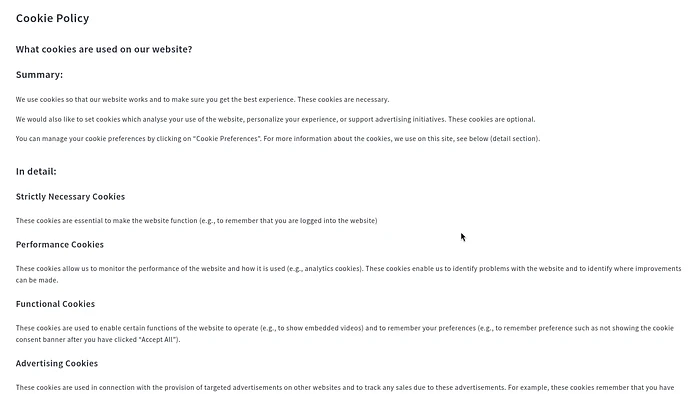
The target was a web application reachable at app.example.com, and the feature in question was a cookie policy page. The URL carried a locale segment in the path:
https://app.example.com/cookie-policy/es/es
On the surface this is the least interesting kind of page on any target: it exists only to display legal text about cookies. The author's point is that pages like this get skipped on the way to the login flow, the file upload and the payment endpoint, and that is exactly why they are worth a second look.

Setup
The write-up describes no accounts, roles, proxy configuration or tool versions. The only tooling involved was the browser itself: the page was loaded, DevTools was opened, and the researcher stepped through the JavaScript with the debugger, setting a breakpoint early in the component and walking forward one line at a time. No payload was prepared in advance.
Finding it
The starting assumption was that /cookie-policy/es/es was a static route: en selects the English page, es selects the Spanish one, the server returns the matching template, and there is nothing to attack. That is what the URL looks like it means.
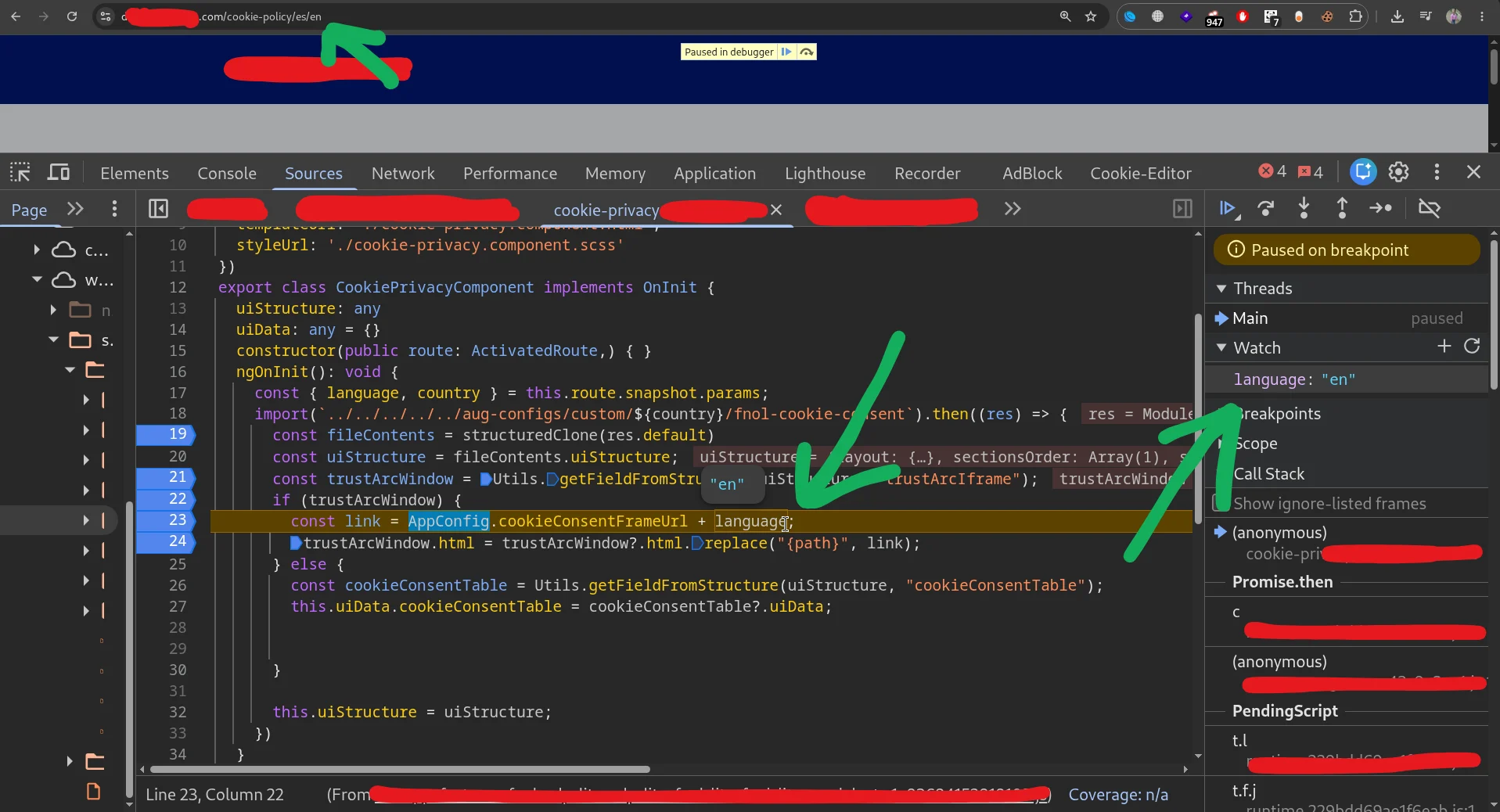
Stepping through the code broke that assumption a few frames in. The locale segment was not selecting a page. It was being read out of the route as a value:
const { language } = this.route.snapshot.params;
That changes the nature of the page. A static locale route has no attack surface; a page that lifts a path segment into a variable has as much attack surface as whatever it does with that variable next. Nothing had checked whether the string was a real locale on the way in.
Exploitation
Step 1: follow the input to the sink
The researcher kept stepping, not hunting for a payload but following the typed string through the code until it landed somewhere. Two frames later:
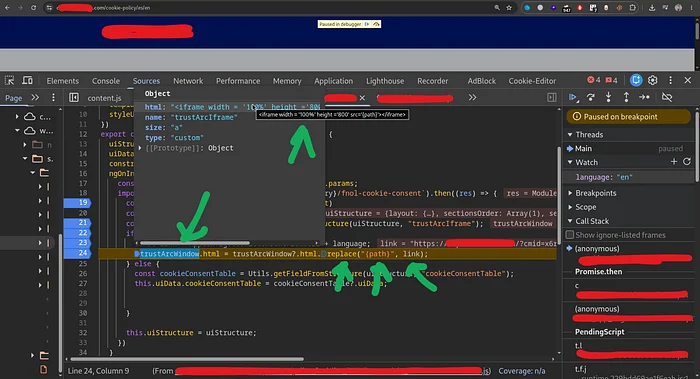
const link = AppConfig.cookieConsentFrameUrl + language;trustArcWindow.html = trustArcWindow.html.replace("{path}", link);
Reading these lines in order:
languagecomes straight from the URL, with no validation, no allow-list and no check that it is a real locale.- It is concatenated onto a configuration URL with
+. NoencodeURIComponent, no URL object, just string concatenation. - The result is substituted into an HTML template by replacing a
{path}placeholder.
The template it lands in is an iframe:
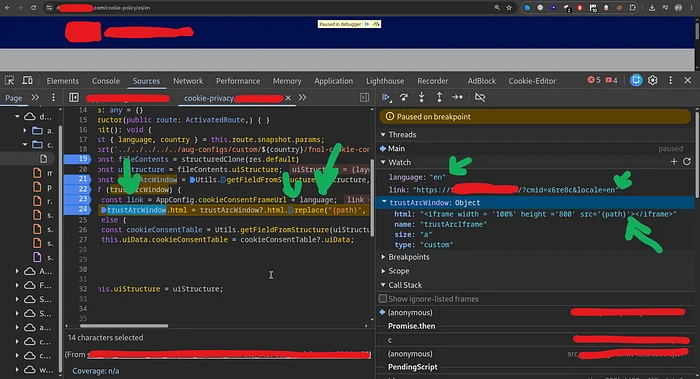
<iframe width='100%' height='800' src='{path}'></iframe>
So the input ends up inside an HTML attribute, inside an HTML string, that is about to be rendered. One more frame showed how it is rendered:
addHtml(u){ this.htmlContainer.nativeElement.innerHTML = u }
Raw innerHTML written directly onto the DOM node.
Step 2: build the payload
Because the value lands inside src='...', the payload only has to close what is already open:
- A
'closes the attribute. >closes the iframe's opening tag.</iframe>matters specifically: iframe children parse as raw text, so anything injected inside the element is inert. The element has to be closed first to get back into parseable HTML.- After that, anything can be added as a sibling element.
A payload along these lines would work:
'></iframe><svg onload=...>
Loaded in a clean tab, the script would execute on the application's own origin.
Step 3: what execution on that origin means
Same origin means the injected script sits inside the application's security boundary. It can read the application's own endpoints, touch whatever the logged-in user is in the middle of doing, and act as that user against the backend. On this target that meant a workflow handling people's personal submissions and document uploads. The page was boring; the origin it ran on was not.
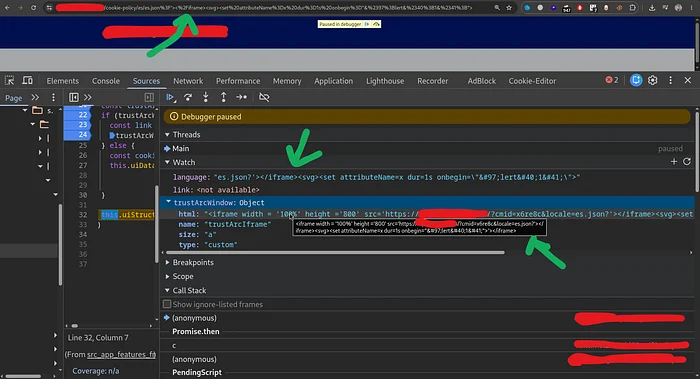


Root cause
This is an Angular application, and Angular has a sanitizer. The [innerHTML] binding exists precisely to sanitise content before it reaches the DOM. The code bypassed that by writing to nativeElement directly, which turns the framework's built-in protection off. Source and sink sit four lines apart with nothing in between: an unvalidated route parameter, string concatenation into a URL, a .replace() into an HTML template, and a raw innerHTML assignment.
The broader pattern the author draws out is that rendering localized content is a solved problem. Every framework has a way to do it, and the boring version has no user input in the output at all:
@app.get("/{lang}") → return templates[lang]
When the same solved problem is implemented in a custom way, building URLs with +, patching HTML together with .replace(), or writing to innerHTML where the framework offers a sanitised binding, that is a red flag. Not because custom code is bad, but because custom code means someone decided the safe path did not fit their case and stepped off it. Framework defaults are safe by design; hand-rolled code around them was written by someone thinking about making the feature work, not about what happens when a hostile string arrives. Custom implementations of solved problems are where the bugs are.
Impact
The injected script runs on the application's own origin, so it operates inside the app's security boundary. In practice that means it can read the application's own endpoints, interact with whatever the logged-in user is doing, and act as that user against the backend. On this target the reachable functionality included a workflow handling people's personal submissions and document uploads. The report does not state which users or roles were affected, how many, or what bounty or severity was assigned.
Fix
The report does not describe a fix that was applied.
Variants to test
-
Locale and language segments in paths (
/cookie-policy/es/es,/legal/{lang},/help/{lang}). A positive result is the segment appearing as a variable in the debugger and reaching a DOM sink without validation. -
Any route parameter concatenated onto a config URL with
+and then substituted into a template with.replace(). A positive result is the placeholder replacement carrying your string into an attribute. -
Iframe templates with a
src='{path}'placeholder. A positive result is that'></iframe>breaks out and a sibling element such as<svg onload=...>executes. -
Breakpoint-driven review of any page whose URL looks static. A positive result is a route parameter that the code treats as data rather than as a route selector.
What happened, in plain words
A security researcher was looking at a website and found a page that almost everyone would skip: the cookie policy page. That is the page that shows the legal text about cookies, the small files websites store in your browser. It does nothing useful. It just displays words.
The address of that page looked like this:
https://app.example.com/cookie-policy/es/es
To a normal visitor, the es/es at the end looks like a language setting. es is the code for Spanish, just as en is the code for English. You would assume the website reads that part of the address, picks the Spanish version of the page, and shows it. Nothing more.
But when the researcher opened the browser's developer tools and stepped through the page's code line by line, they found something different. The website was not using es to pick a page. It was taking the text es out of the address and treating it as a piece of data, a value the program would use later. Nothing checked whether that text was a real language code. It could be anything.
That text was then glued onto another address, dropped into a piece of HTML (the language web pages are written in), and inserted into the page in a way that lets HTML run. Because the researcher controlled that text, they could put their own HTML in it, including a small script. A script is a piece of code that the browser runs. When the page loaded, the script ran as if the website itself had written it.
That is called cross-site scripting, or XSS. It means an attacker can make their own code run inside a trusted website, in the browser of anyone who visits the page. On this particular site, the page sat on the same origin as a workflow for people's personal submissions and document uploads. Origin is the combination of scheme, host and port that the browser uses to decide what a page is allowed to touch. So the injected script could reach that workflow and act as the logged-in user.
The rest of this article walks through exactly how the researcher found it, one step at a time, and explains every term along the way.
The setup: a browser and a debugger
The researcher did not use any special attack tools. There were no accounts, no proxy, no scripts prepared in advance. The only tool was the browser itself.
Here is what those tools are, for anyone who has never opened them:
- Developer tools (DevTools): a panel built into every modern browser. You open it with a key such as F12 or by right-clicking a page and choosing Inspect. It lets you see the page's HTML, the files it loaded, and the code it is running.
- The debugger: one tab inside DevTools. It lets you pause a running program and look at what it is doing. You can tell the browser "stop here" at a chosen line, which is called a breakpoint, and then move forward one line at a time. This is called stepping.
- JavaScript: the programming language that web pages run in your browser. When a page does something interactive, JavaScript is usually behind it.
The researcher loaded the cookie policy page, opened DevTools, set a breakpoint early in the page's code, and walked forward one line at a time. They had no payload ready. A payload is the malicious input an attacker sends to trigger a bug. They were simply watching what the code did.
Why start here at all? Because pages like this are ignored. When people look for bugs, they head for the login form, the file upload, the payment page, anywhere that actually does something. A page whose only job is to show legal text about cookies is the least interesting thing on any website. The researcher opened the debugger on it anyway, mostly out of stubbornness. That is the whole point of the article: the boring page is where the bug was still sitting.
Finding it: the address was not what it looked like
The researcher started with an assumption. The address /cookie-policy/es/es looked like a static route. A route is the part of a website that decides which page to show for a given address. "Static" means the page is fixed: the server has a Spanish version and an English version, it reads the language code, and it returns the matching one. If that were true, there would be nothing to attack, because the language code would only ever be used to choose between two fixed pages.
Stepping through the code broke that assumption a few frames in. A frame here means one level of the program's call stack: when one function calls another, the debugger shows each call as a frame, so you can see how the code got where it is.
The locale segment was not selecting a page. It was being read out of the route as a value:
const { language } = this.route.snapshot.params;
Line by line, in plain words:
this.route.snapshot.paramsis the part of the program that holds the values taken from the address.paramsmeans parameters, the pieces of the address that the program treats as data.const { language }takes the value namedlanguageout of those parameters and stores it in a variable calledlanguage. A variable is a named box in a program that holds a value so the program can use it later.- So after this line, the text the visitor typed in the address bar is sitting inside the program as a variable. Nothing has checked whether it is a real language code.
This changes everything about the page. A static route has no attack surface. Attack surface means all the places where an outsider can send input into a system. A page that lifts a piece of the address into a variable has exactly as much attack surface as whatever it does with that variable next.
So the researcher kept stepping. Not hunting for a payload, just following their own string through the code, one line at a time, until they could see where it landed. This is the key habit: follow the input. Do not guess what the code does. Watch it.
Following the input to the sink
Two frames later, the string arrived somewhere interesting:
const link = AppConfig.cookieConsentFrameUrl + language;trustArcWindow.html = trustArcWindow.html.replace("{path}", link);
This is two statements written on one line. Taking them in order:
const link = AppConfig.cookieConsentFrameUrl + language;creates a variable calledlink. Its value is a configuration address (AppConfig.cookieConsentFrameUrl) with thelanguagevalue glued onto the end using+. In JavaScript,+between two pieces of text joins them together. This is called string concatenation. There is no encoding here. Encoding means converting special characters into a safe form so they cannot be mistaken for part of the surrounding structure. There is no URL object either, which is a built-in tool that would normally handle this safely. Just text glued to text.trustArcWindow.html = trustArcWindow.html.replace("{path}", link);takes a piece of HTML stored intrustArcWindow.htmland replaces the placeholder text{path}with the value oflink. A placeholder is a marker in a template that gets swapped for a real value later..replace()is a JavaScript function that does exactly that swap.
The template the value lands in is an iframe:
<iframe width='100%' height='800' src='{path}'></iframe>
An iframe is a box inside a web page that loads another page inside it. The src attribute is the address of the page to load. Attributes are the settings written inside an HTML tag, and their values are usually wrapped in quotes.
So the visitor's input ends up inside an HTML attribute, inside an HTML string, that is about to be rendered. Rendering means turning HTML text into the actual page you see on screen.
One more frame showed how it gets rendered:
addHtml(u){ this.htmlContainer.nativeElement.innerHTML = u }
Line by line:
addHtml(u)defines a function calledaddHtmlthat takes one input, namedu.this.htmlContainer.nativeElementpoints at a real element on the page, the container where the HTML will go.nativeElementmeans the browser's own element object, the raw thing the browser draws, rather than the framework's safe wrapper around it..innerHTML = usets the inside of that element to the text inu.innerHTMLis a browser property that takes a piece of HTML text and turns it into real page content. Crucially, it does not check the HTML for dangerous parts. Whatever is in the string becomes part of the page.
This is the moment the researcher stopped reading. They had found the source and the sink. The source is where untrusted input enters the program, here the language value from the address. The sink is where that input is used in a way that can cause harm, here innerHTML. Source and sink sat four lines apart with nothing in between: no validation, no encoding, no check.
Why the framework did not save them
This is an Angular application. Angular is a popular framework for building web apps. A framework is a collection of ready-made code that handles common jobs so developers do not have to write everything from scratch.
Angular has a sanitizer. A sanitizer is a filter that inspects HTML and removes anything dangerous before it reaches the page. Angular's normal way of inserting HTML, the [innerHTML] binding, runs content through that sanitizer automatically. A binding is the framework's way of connecting a value in the code to a place on the page.
Someone reached past that protection and wrote to nativeElement directly. That turns the framework's built-in safety off. It is like a building with a security door that everyone is supposed to use, and someone propping the fire exit open because it is quicker.
Building the payload
Once you can see the sink, the payload is not creative work. You are just closing what is already open. The value lands inside src='...', so the researcher worked out what each character would do:
- A
'closes the attribute. The quote that opened thesrcvalue is matched by this one, so the browser thinks the attribute has ended. >closes the iframe's opening tag. The browser now thinks the tag is finished.</iframe>matters specifically. Anything written inside an iframe element is treated as raw text, not as HTML, so it does nothing. You have to close the iframe first to get back into normal, parseable HTML. Parsing is the browser reading HTML text and working out the structure of the page.- After that, you can add anything you want as a sibling element, meaning an element next to the iframe rather than inside it.
A payload along these lines would work:
'></iframe><svg onload=...>
Line by line:
'closes thesrcattribute.>closes the iframe tag.</iframe>closes the iframe element itself.<svg onload=...>starts a new element.svgis a way to draw graphics in HTML.onloadis an event attribute: it tells the browser to run some code when the element finishes loading. The...stands for the script to run.
Loaded in a clean tab, the script would execute on the application's own origin.
What running on that origin means
Origin is the combination of scheme (such as https), host (the domain name) and port that the browser uses to decide what a page is allowed to access. Pages from the same origin can read each other's data and act on each other's behalf. Pages from different origins are kept apart.
Because the injected script ran on the application's own origin, it sat inside the application's security boundary. In practice that means it could:
- read the application's own endpoints. An endpoint is a specific address on a server that the app talks to, for example to fetch or save data. An API is the set of these addresses and the rules for using them.
- touch whatever the logged-in user was in the middle of doing.
- act as that user against the backend. The backend is the server side of the application, the part that stores and processes data.
On this target, that meant a workflow handling people's personal submissions and document uploads. A workflow here is a sequence of steps a user goes through, such as filling in a form and uploading a file. The page was boring. The origin it ran on was not.
The actual lesson
Here is the pattern worth taking away, because it is the reusable part.
Rendering localized content is a solved problem. Localized means adapted to a particular language or region. Every framework has a way to do it. The boring version looks like this:
@app.get("/{lang}") → return templates[lang]
Line by line:
@app.get("/{lang}")tells the application to handle requests to an address that contains a language code. The{lang}part is a placeholder for whatever the visitor typed.return templates[lang]looks up the template for that language and returns it. A template is a pre-written page with blanks to fill in.
The important part is that the language code is only used to look something up. It never appears in the output. There is no user input in the page that gets sent back.
When you find someone doing that same solved problem in a custom way, building addresses with +, patching HTML together with .replace(), or writing to innerHTML when the framework offers a sanitised binding, that is a red flag every single time.
Not because custom code is bad. Because custom code means somebody decided the safe path did not fit their case and stepped off it. Framework defaults are safe by design. Anything hand-rolled around them was written by a person thinking about making the feature work, not about what happens when a hostile string arrives.
Custom implementations of solved problems are where the bugs are. And you only see them by putting a breakpoint in and reading, line by line, until you are looking at where your input actually ends up. It is slow, it is not glamorous, and it is why the finding was still sitting there on a page everybody else scrolled past.
What the report does not say
The report does not describe a fix that was applied, which users or roles were affected, how many people were affected, or what bounty or severity was assigned.
Variants to test
If you want to look for the same kind of bug yourself, these are the places to start. Each one is a variation on the same idea: a value from the address that the code treats as data.
-
Language and locale segments in paths, such as
/cookie-policy/es/es,/legal/{lang}or/help/{lang}. A positive result is the segment appearing as a variable in the debugger and reaching a place where it is inserted into the page without validation. -
Any route parameter glued onto a configuration address with
+and then swapped into a template with.replace(). A positive result is the placeholder replacement carrying your string into an attribute. -
Iframe templates with a
src='{path}'placeholder. A positive result is that'></iframe>breaks out and a sibling element such as<svg onload=...>runs. -
Breakpoint-driven review of any page whose address looks static. A positive result is a route parameter that the code treats as data rather than as a way to choose a page.
Glossary
- API: the set of addresses and rules a program uses to talk to a server and exchange data.
- Attack surface: all the places where an outsider can send input into a system.
- Attribute: a setting written inside an HTML tag, usually with a value in quotes, such as
src='...'. - Backend: the server side of an application, where data is stored and processed.
- Binding: a framework's way of connecting a value in code to a place on the page.
- Breakpoint: a marker that tells the debugger to pause the program at a chosen line.
- Concatenation: joining two pieces of text end to end, in JavaScript with
+. - Cookie: a small piece of data a website stores in your browser, often to remember who you are.
- Cross-site scripting (XSS): a bug where an attacker's code runs inside a trusted website, in another visitor's browser.
- Debugger: a tool that lets you pause a running program and inspect it line by line.
- Developer tools (DevTools): the inspection panel built into modern browsers.
- DOM: the browser's live model of the page, the structure it draws and lets code change.
- Encoding: converting special characters into a safe form so they cannot be mistaken for part of the surrounding structure.
- Endpoint: a specific address on a server that an application talks to.
- Frame: one level of a program's call stack, shown in the debugger as the chain of calls that led to the current line.
- Framework: a collection of ready-made code that handles common jobs so developers do not start from scratch.
- HTML: the language web pages are written in.
- Iframe: a box inside a page that loads another page inside it.
- innerHTML: a browser property that turns a piece of HTML text into real page content, without checking it for dangerous parts.
- JavaScript: the programming language web pages run in the browser.
- Localized: adapted to a particular language or region.
- Origin: the combination of scheme, host and port that the browser uses to decide what a page may access.
- Parsing: the browser reading HTML text and working out the structure of the page.
- Payload: the malicious input an attacker sends to trigger a bug.
- Placeholder: a marker in a template that gets swapped for a real value later.
- Rendering: turning HTML text into the page you see on screen.
- Route: the part of a website that decides which page to show for a given address.
- Sanitizer: a filter that removes dangerous parts from HTML before it reaches the page.
- Sink: the place in a program where untrusted input is used in a way that can cause harm.
- Source: the place in a program where untrusted input enters.
- Static route: a route that always returns a fixed page, with no user input in the output.
- Stepping: moving through a paused program one line at a time in the debugger.
- String: a piece of text in a program.
- Template: a pre-written page with blanks to fill in.
- Variable: a named box in a program that holds a value for later use.
- Workflow: a sequence of steps a user goes through, such as filling in a form and uploading a file.



