Delete Is a Promise: A Security Researcher’s Look at AI Conversation Privacy
Deleting a shared ChatGPT conversation removed the share page but the Open Graph preview image on a separate hostname continued to be served without authentication, still containing an excerpt of the deleted conversation. Anyone who already held the image URL could keep viewing that excerpt after deletion.
 Published on pub.towardsai.net
Bug Bounty
The full write-up lives on its author's site
It belongs to its author, so we link to it rather than copy it. The other two tabs are our own rewrites, checked against it.
Context
ChatGPT lets a user share a conversation by creating a link. The share page lives at https://chatgpt.com/share/<id>, and chat apps and social networks fetch that page's Open Graph metadata to build a link preview. For a live share, the metadata describes the conversation, and the preview image is served from a different hostname:
https://ogimg.chatgpt.com/conversation/<id>/response_multicolor_v1.png
The same conversation ID appears in both URLs. The PNG contains an excerpt of the response text on a coloured background. The image request carries no cookies and needs no login, which is expected for a resource that crawlers fetch.
So one user action, sharing, produces two public surfaces. The question the researcher set out to answer was whether the opposite action, deleting, reaches both of them. OpenAI's documentation states that deleting a conversation removes its shared link, so a user reading that would not expect a second URL to keep the content reachable.
Setup
All testing was done against the researcher's own account and their own conversations. No other user's data was accessed. The work was reported through OpenAI's Bugcrowd program. The tools used were curl, md5sum, head and grep, all shown in the commands below. Conversation IDs are omitted from the write-up, and the ID is treated as a placeholder throughout.
Finding it
The starting observation is structural: sharing a conversation creates a page URL and an image URL that share the same conversation ID but live on different hosts. The image endpoint is deliberately unauthenticated because crawlers fetch it. That raised the question of whether the deletion path knows about the derived asset at all, or only about the share page.
Exploitation
The test sequence was:
- Start a new conversation and create a share link with Share, then Create link.
- Fetch the share page and confirm its metadata reflects the conversation.
- Fetch the preview image URL and confirm the PNG contains conversation text. Record its checksum.
- Delete the conversation from the ChatGPT UI.
- Re-fetch the share page. Re-fetch the preview image, including with a cache-busting query parameter to rule out the researcher's own client cache.
- Compare checksums and response headers.
Step 1: capture the pre-deletion state
The checks were run with the ID as a placeholder:
ID="<conversation-id>"IMG="https://ogimg.chatgpt.com/conversation/$ID/response_multicolor_v1.png"curl -s -D before.headers -o before.png "$IMG"md5sum before.pngcurl -s "https://chatgpt.com/share/$ID" | grep -i 'og:'curl -s -D after.headers -o after.png "$IMG?cb=$RANDOM"md5sum after.pnghead -n 1 after.headersgrep -i -E '^(cache-control|age|access-control-allow-origin):' after.headerscurl -s "https://chatgpt.com/share/$ID" | grep -i 'og:'
The first curl saves the image body to before.png and the response headers to before.headers, and md5sum records the checksum of the pre-deletion image. The second curl fetches the share page and filters for og: metadata lines, confirming the page describes the conversation. The later commands repeat the image fetch with a random cb query parameter, save the result to after.png, print the status line from the headers, and extract cache-control, age and access-control-allow-origin.
Step 2: delete and re-fetch
After deleting the conversation from the ChatGPT UI, the share page stopped exposing conversation-specific metadata and fell back to generic defaults. The preview image, however, still returned HTTP 200 with no authentication.
The MD5 of the image was identical before and after deletion:
[redacted]
Same bytes, not a regenerated lookalike. The same hash came back about 5 minutes and about 26 minutes after deletion, including on a request with a cache-busting query parameter. The response headers were:
cache-control: public, max-age=86400, stale-while-revalidate=3600
access-control-allow-origin: *
On September 5, more than 48 hours after deletion, the same URL still returned the same conversation-derived image.
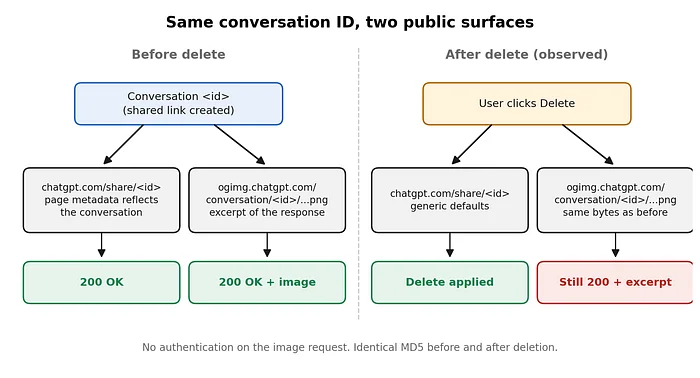
Figure 1 shows the deletion applied to the share page while the preview image kept returning the same bytes.
Root cause
The externally observable behaviour is that a public, unauthenticated URL kept returning content derived from a deleted conversation for longer than the response headers would explain. The report is careful about what the evidence does and does not support.
The response advertised max-age=86400 and stale-while-revalidate=3600. A cache that follows those headers can serve an entry as fresh for 24 hours after it was stored, then serve it stale for at most one more hour while it revalidates in the background. If the origin had stopped serving the image at deletion time, the longest a compliant shared cache could keep returning it is roughly 25 hours. The image was still being served at 48 hours or more. That does not prove anything about OpenAI's internals, since tiered caches and misconfigured caches exist, but it moves ordinary TTL expiry down the list of likely explanations.
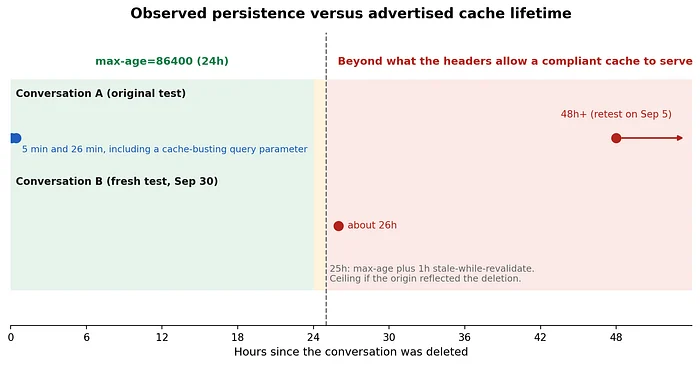
Figure 2 plots the observations against the lifetime the response headers advertised.
The cache-busting result narrows things further. Identical bytes on a request with a new query string means one of the following:
- The cache key ignores the query string, so the parameter hit the same entry.
- The generated image is stored in a backing store keyed by conversation ID, and the image service serves it without checking whether the source conversation or share still exists.
- A cache layer is configured to serve stale content when the origin returns an error. If the origin answered with an error for a deleted conversation instead of a clean 404 or a placeholder, the cache could hide the deletion for much longer than the TTL suggests.
From the outside these cannot be told apart, and the report said so. One possible explanation is that the deletion path did not fan out to every public object generated from the conversation, but the report says the alternatives cannot be told apart from outside.
Impact
The triage team rated this P4, and the researcher considers that reasonable. The limits are real:
- You need the conversation ID, which is long and not guessable. Enumeration was not tested and there is no reason to think it works.
- The image shows an excerpt, not the full conversation.
- It only applies to conversations the owner had already chosen to share.
Who can still use it? Anyone who already held the link: the people it was sent to, anyone who saw it in a chat history, browser history or log, and anything that stored the URL. Those are exactly the people a user is trying to cut off when they delete a shared conversation after changing their mind or sharing with the wrong person.
There is also a layer OpenAI does not control. Messaging and social platforms that generate link previews often keep their own copy of the image, and deletion cannot reach those. That makes the origin and CDN the only layers where the vendor can actually enforce a delete, which is a good reason to get those right.
The behaviour also conflicts with what the product says: the documentation states that deleting a conversation removes its shared link, and a user reading that does not expect a second URL to keep the content reachable.
Fix
Later, the preview URL from the original test started returning a generic ChatGPT image, which looked like a remediation. On September 30 the researcher ran the whole sequence again with a brand new conversation. About 26 hours after deleting it, its preview image was still returning conversation-derived content. The researcher's reading, and it is only a reading, is that the first fix touched that specific asset rather than the deletion path. The report was moved back to Unresolved on October 4 and marked Resolved on October 6. What changed behind the scenes is not known.
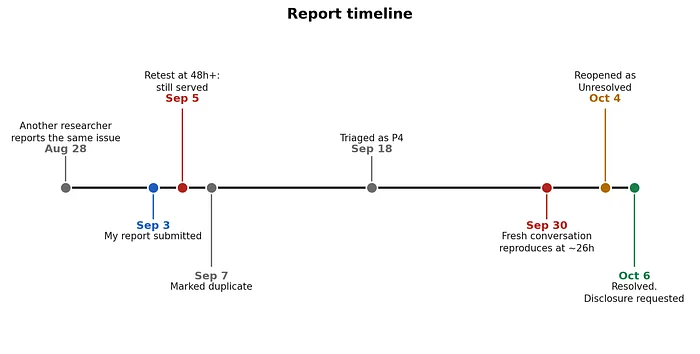
Figure 3 shows the report timeline.
The report also sets out a design sketch, based on what could be observed rather than a description of OpenAI's system:
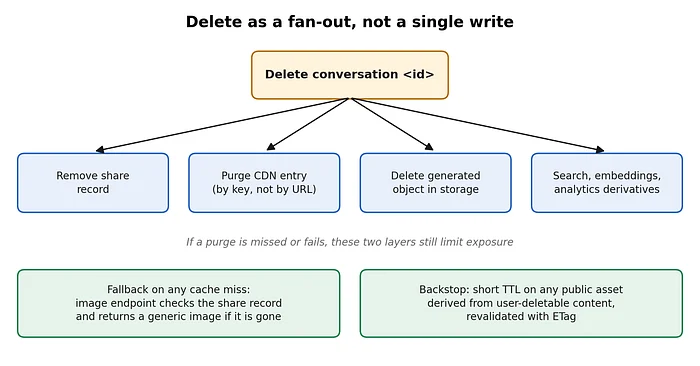
Figure 4 depicts deletion as a fan-out, with two backstops if a purge fails.
- Treat delete as a fan-out. When a feature creates a derived public asset, the same change should add a deletion hook for it. A list of derived assets per object type, reviewed when features ship, catches most of these.
- Purge by key, not by URL. Tag cached objects with the conversation ID so one purge covers every variant and every query string.
- Make the image endpoint check on a miss. If the share record is gone, return a generic placeholder or a 404. Do not rely on the generation step having been the last time anyone looked.
- Keep TTLs short for assets derived from deletable content. A max-age of one day is a deletion SLA of one day at best. ETag revalidation keeps the origin cost low.
- Do not fail open. Serving stale on origin errors is useful for availability and wrong for content a user has deleted.
Variants to test
Checking that the main database row is gone is not enough. The report's lifecycle test generalises to other products:
- Create the object and share it.
- Collect every URL derived from it: the page,
og:image,twitter:image, oEmbed endpoints, feeds, sitemaps, thumbnails. - Fetch each one and store the hash and the headers.
- Delete the object.
- Re-fetch each URL with and without a changed query string at 5 minutes, 1 hour, just past your longest TTL, and 48 hours.
- Fail the test if any hash still matches the pre-delete content.
Step 5 with the changed query string is what separates a cache that is merely slow from a store that never got the delete.
Disclosure note
All testing was done against the researcher's own account and own conversations. No other user's data was accessed. The issue was reported through OpenAI's Bugcrowd program, marked Resolved and Duplicate, and the post was coordinated through Bugcrowd's disclosure process. Conversation IDs are omitted.
Bugcrowd marked the report as a duplicate of one submitted on August 28, six days before this one. There was no bounty, which is how duplicates work, and the researcher does not mind. The second reproduction after the first apparent fix is probably the most useful thing the report added.
What happened, in plain words
ChatGPT lets you share a conversation with someone by creating a link. When you do that, two public web addresses are created, not one. The first is the share page itself, the page a person opens in a browser. The second is a small preview picture that chat apps and social networks show when the link is pasted somewhere. That picture is served from a different web address than the page.
When the owner later deletes the conversation, the share page stops working as expected: it no longer shows anything specific to the conversation. But the preview picture kept being served, without any login, and it still contained a piece of the deleted conversation's text. The researcher who found this reported it to OpenAI through Bugcrowd, a platform companies use to receive security reports. It turned out to be a duplicate of an earlier report, and it has since been marked resolved.
This article walks through the test step by step, explains every tool and term along the way, and then looks at what the evidence can and cannot tell us.
Background: one share, two public URLs
To follow this, you need three ideas.
A URL is a web address, the thing you type into a browser's address bar. https://chatgpt.com/share/<id> is a URL. The <id> part is a placeholder for a long string of characters that identifies one particular conversation. The researcher left the real IDs out of the write-up, so everywhere you see <id> or <conversation-id>, imagine a long random-looking code.
Open Graph metadata is a small block of information embedded in a web page that tells other websites what the page is about. When you paste a link into a chat app and a little card appears with a title, a description and a picture, that card is built from the page's Open Graph metadata. The picture in the card is called the preview image, and the metadata points to it with a tag named og:image.
A cookie is a small piece of data a website stores in your browser so it can recognise you on the next request. When you are logged in to a site, your browser sends a cookie with each request, and the server uses it to know who you are. A request that carries no cookie is called unauthenticated: the server has no idea who is asking, and it answers as it would to a stranger.
With those in place, here is the setup. Creating a share link gives you a page at:
https://chatgpt.com/share/<id>
Chat apps and social networks fetch that page's Open Graph metadata to build a link preview. For a live share, that metadata describes the conversation, and the preview image comes from a different host. A host (or hostname) is the part of a URL that names the server, here chatgpt.com versus ogimg.chatgpt.com. They are different machines or different services, even though they belong to the same company.
https://ogimg.chatgpt.com/conversation/<id>/response_multicolor_v1.png
The same conversation ID appears in both URLs. The PNG (a common image file format) contains an excerpt of the response text on a coloured background. The image request carries no cookies and needs no login, which makes sense for a resource that crawlers fetch. A crawler is an automated program that visits pages and downloads resources to build previews, search indexes and similar things. Crawlers do not log in, so anything they need must be reachable without a login.
So a single user action, sharing, produces two public surfaces. The question the researcher wanted to answer was whether a single user action in the other direction, deleting, reaches both of them. OpenAI's documentation states that deleting a conversation removes its shared link, so a user reading that would not expect a second URL to keep the content reachable.
Figure 1 shows the deletion applied to the share page while the preview image kept returning the same bytes. "Bytes" here means the raw contents of the file: if the image were regenerated or replaced, its bytes would differ.
The test
All testing was done against the researcher's own account and their own conversations. No other user's data was accessed. The work was reported through OpenAI's Bugcrowd program. The tools used were curl, md5sum, head and grep, all shown in the commands below. Conversation IDs are omitted from the write-up, and the ID is treated as a placeholder throughout.
Before the steps, a word on the tools, because they are all command-line programs, meaning you type them into a text window rather than clicking buttons.
curlis a program that fetches a URL and prints or saves what comes back. It is like a browser without a window: it makes the request and gives you the raw answer.md5sumreads a file and prints a short code, called a checksum or hash, calculated from its contents. Two files with identical contents produce the identical code; change one byte and the code changes. It is a quick way to ask "is this exactly the same file as before?"headprints the first few lines of a file.grepsearches text for lines matching a pattern and prints only those lines.
The test sequence was:
- Start a new conversation and create a share link with Share, then Create link.
- Fetch the share page and confirm its metadata reflects the conversation.
- Fetch the preview image URL and confirm the PNG contains conversation text. Record its checksum.
- Delete the conversation from the ChatGPT UI.
- Re-fetch the share page. Re-fetch the preview image, including with a cache-busting query parameter to rule out the researcher's own client cache.
- Compare checksums and response headers.
Two terms in that list need unpacking.
A cache is a copy of something kept closer to the person asking, so it can be handed out faster next time. Your browser keeps a cache, your internet provider may keep one, and the website itself usually keeps one. The risk with caches is that they can keep serving an old copy after the original has changed or been deleted.
A cache-busting query parameter is a trick to defeat a cache. A query parameter is the part of a URL after a question mark, like ?cb=12345. If you add a different value each time, a well-behaved cache treats it as a request for something new and goes back to the original server instead of handing you its stored copy. If the answer is still the old content even with a fresh parameter, the old copy is not merely sitting in a cache that respects the URL.
A response header is extra information the server sends alongside the content, in the form of name and value pairs. Headers say things like what type the content is, how long it may be cached, and whether any browser is allowed to read it. They are not shown on the page; they travel with the response.
Step 1: capture the pre-deletion state
The checks were run with the ID as a placeholder:
ID="<conversation-id>"IMG="https://ogimg.chatgpt.com/conversation/$ID/response_multicolor_v1.png"curl -s -D before.headers -o before.png "$IMG"md5sum before.pngcurl -s "https://chatgpt.com/share/$ID" | grep -i 'og:'curl -s -D after.headers -o after.png "$IMG?cb=$RANDOM"md5sum after.pnghead -n 1 after.headersgrep -i -E '^(cache-control|age|access-control-allow-origin):' after.headerscurl -s "https://chatgpt.com/share/$ID" | grep -i 'og:'
Line by line, in plain words:
ID="<conversation-id>"stores the conversation ID in a variable namedID. A variable is a named box that holds a value so you can reuse it without retyping it. The angle brackets are a placeholder, not literal characters.IMG="https://ogimg.chatgpt.com/conversation/$ID/response_multicolor_v1.png"builds the image URL and stores it in a variable namedIMG. The$IDpart means "put the contents of theIDbox here".curl -s -D before.headers -o before.png "$IMG"fetches the image.-smeans quiet, so curl does not print progress chatter.-D before.headerssaves the response headers into a file calledbefore.headers.-o before.pngsaves the image itself into a file calledbefore.png. This is the "before" snapshot, taken while the conversation still exists.md5sum before.pngprints the checksum of the saved image. This is the fingerprint to compare against later.curl -s "https://chatgpt.com/share/$ID" | grep -i 'og:'fetches the share page and pipes the result intogrep. The vertical bar|means "send the output of the left command into the right command".grep -i 'og:'prints only the lines containingog:, ignoring upper or lower case because of-i. This confirms the page's metadata describes the conversation.curl -s -D after.headers -o after.png "$IMG?cb=$RANDOM"fetches the image again, this time with a cache-busting parameter.$RANDOMis a shell feature that produces a different random number each time, so the URL looks new to any cache. The headers go toafter.headersand the image toafter.png.md5sum after.pngprints the checksum of the second image. If it matches the first, the bytes are identical.head -n 1 after.headersprints the first line of the saved headers, which is the status line: the server's short summary of how the request went, such as whether it succeeded.grep -i -E '^(cache-control|age|access-control-allow-origin):' after.headersprints only the header lines whose names arecache-control,ageoraccess-control-allow-origin. The-Eswitch allows the pattern to use alternatives in parentheses, and^means "at the start of the line". These three headers matter:cache-controlsays how long the response may be cached,agesays how many seconds have passed since the cached copy was created, andaccess-control-allow-originsays which websites are allowed to read the response in a browser.- The final
curlfetches the share page again and filters forog:lines, the same check as in line 5, now after deletion.
Why this order? The point is to record the "before" state properly, so that any later difference can be attributed to the deletion rather than to guesswork. The checksum is the anchor: it turns "the picture looks the same" into "the file is byte-for-byte identical".
Step 2: delete and re-fetch
After deleting the conversation from the ChatGPT UI, the share page stopped exposing conversation-specific metadata and fell back to generic defaults. In other words, the page no longer described the conversation; it showed the kind of generic information a page shows when there is nothing specific to show.
The preview image, however, still returned HTTP 200 with no authentication. HTTP is the language browsers and servers use to talk. HTTP 200 is the status code meaning "OK, here is the content". A status code is a three-digit number in the response that summarises the outcome; 200 means success, and 404, mentioned later, means "not found".
The MD5 of the image was identical before and after deletion:
[redacted]
Same bytes, not a regenerated lookalike. A regenerated image might look similar but would almost certainly differ in at least one byte, and the checksum would change. The same hash came back about 5 minutes and about 26 minutes after deletion, including on a request with a cache-busting query parameter. The response headers were:
cache-control: public, max-age=86400, stale-while-revalidate=3600
access-control-allow-origin: *
What those two lines mean:
cache-control: public, max-age=86400, stale-while-revalidate=3600tells every cache along the way that it may store this response (public), that it stays fresh for 86,400 seconds, which is 24 hours (max-age), and that after that it may still be handed out for up to 3,600 more seconds, one hour, while the cache quietly checks for a newer version (stale-while-revalidate).access-control-allow-origin: *says any website may read this response from a browser. The asterisk means "everyone".
On September 5, more than 48 hours after deletion, the same URL still returned the same conversation-derived image.
Root cause
"Root cause" means the underlying reason the problem happens, as opposed to the symptom you see. The externally observable behaviour is that a public, unauthenticated URL kept returning content derived from a deleted conversation for longer than the response headers would explain. The report is careful about what the evidence does and does not support.
The response advertised max-age=86400 and stale-while-revalidate=3600. A cache that follows those headers can serve an entry as fresh for 24 hours after it was stored, then serve it stale for at most one more hour while it revalidates in the background. Revalidating means asking the original server whether the stored copy is still current. If the origin had stopped serving the image at deletion time, the longest a compliant shared cache could keep returning it is roughly 25 hours. The image was still being served at 48 hours or more. That does not prove anything about OpenAI's internals, since tiered caches and misconfigured caches exist, but it moves ordinary TTL expiry down the list of likely explanations. TTL stands for time to live: the period a cached copy is allowed to be used before it must be refreshed.
Figure 2 plots the observations against the lifetime the response headers advertised, so you can see the gap between what the headers promised and what actually happened.
The cache-busting result narrows things further. Identical bytes on a request with a new query string means one of the following:
- The cache key ignores the query string, so the parameter hit the same entry. A cache key is the label a cache uses to decide which stored copy answers a request. If the label is built only from the path and not the query string, two different-looking URLs can land on the same stored copy.
- The generated image is stored in a backing store keyed by conversation ID, and the image service serves it without checking whether the source conversation or share still exists. A backing store is the place where the real data lives, behind whatever fast layer serves requests.
- A cache layer is configured to serve stale content when the origin returns an error. If the origin answered with an error for a deleted conversation instead of a clean 404 or a placeholder, the cache could hide the deletion for much longer than the TTL suggests. The origin is the original server that holds the real content, as opposed to the caches that copy it. Serving stale means handing out an old copy even though it should have been refreshed. Failing open is the general pattern: when something goes wrong, the system keeps working in the permissive direction instead of stopping.
From the outside these cannot be told apart, and the report said so. One possible explanation is that the deletion path did not fan out to every public object generated from the conversation, but the report says the alternatives cannot be told apart from outside. Fan-out here means one action, delete, being carried out across every place the deleted thing appears.
Impact
Impact means the practical harm: who can do what, and how bad it is. The triage team rated this P4, and the researcher considers that reasonable. Triage is the first pass a security team does on a report: confirming it, judging how serious it is, and deciding what to do next. P4 is a low severity rating on Bugcrowd's priority scale, where P1 is the most serious and P4 the least.
The limits are real:
- You need the conversation ID, which is long and not guessable. Enumeration means trying many possible values in the hope of finding a valid one. It was not tested and there is no reason to think it works.
- The image shows an excerpt, not the full conversation.
- It only applies to conversations the owner had already chosen to share.
Who can still use it? Anyone who already held the link: the people it was sent to, anyone who saw it in a chat history, browser history or log, and anything that stored the URL. Those are exactly the people a user is trying to cut off when they delete a shared conversation after changing their mind or sharing with the wrong person.
There is also a layer OpenAI does not control. Messaging and social platforms that generate link previews often keep their own copy of the image, and deletion cannot reach those. A CDN, or content delivery network, is a network of servers spread around the world that keep copies of content close to users; it is one of the layers a company does control. That makes the origin and CDN the only layers where the vendor can actually enforce a delete, which is a good reason to get those right.
The behaviour also conflicts with what the product says: the documentation states that deleting a conversation removes its shared link, and a user reading that does not expect a second URL to keep the content reachable.
Fix
Later, the preview URL from the original test started returning a generic ChatGPT image, which looked like a remediation. Remediation means the fix applied to close the problem. On September 30 the researcher ran the whole sequence again with a brand new conversation. About 26 hours after deleting it, its preview image was still returning conversation-derived content. The researcher's reading, and it is only a reading, is that the first fix touched that specific asset rather than the deletion path. The report was moved back to Unresolved on October 4 and marked Resolved on October 6. What changed behind the scenes is not known.
Figure 3 shows the report timeline, including when it was moved back to Unresolved and when it was marked Resolved.
The report also sets out a design sketch, based on what could be observed rather than a description of OpenAI's system:
Figure 4 depicts deletion as a fan-out, with two backstops if a purge fails. A backstop is a safety measure that catches a problem if the main measure does not work, and a purge is deliberately removing something from a cache.
- Treat delete as a fan-out. When a feature creates a derived public asset, the same change should add a deletion hook for it. A derived asset is something produced from the original, like the preview image produced from the conversation. A deletion hook is code that runs automatically when a delete happens. A list of derived assets per object type, reviewed when features ship, catches most of these.
- Purge by key, not by URL. Tag cached objects with the conversation ID so one purge covers every variant and every query string.
- Make the image endpoint check on a miss. If the share record is gone, return a generic placeholder or a 404. An endpoint is a specific address on a server that answers a particular kind of request. A miss is when the fast layer does not have the item and has to ask the origin. Do not rely on the generation step having been the last time anyone looked.
- Keep TTLs short for assets derived from deletable content. A max-age of one day is a deletion SLA of one day at best. SLA means service level agreement, a stated promise about how quickly something will happen. ETag revalidation is a way of checking with the origin cheaply: the cache sends a short identifier for the copy it holds, and the origin says whether it is still current, which keeps the origin cost low.
- Do not fail open. Serving stale on origin errors is useful for availability and wrong for content a user has deleted.
Variants to test
Checking that the main database row is gone is not enough. A database row is one record in a structured store of data; deleting the record does not automatically delete copies made from it elsewhere. The report's lifecycle test generalises to other products:
- Create the object and share it.
- Collect every URL derived from it: the page,
og:image,twitter:image, oEmbed endpoints, feeds, sitemaps, thumbnails.twitter:imageis the equivalent preview tag used by some social platforms, and oEmbed is a standard way for one site to ask another for an embeddable version of a link. Feeds and sitemaps are machine-readable lists of content. - Fetch each one and store the hash and the headers.
- Delete the object.
- Re-fetch each URL with and without a changed query string at 5 minutes, 1 hour, just past your longest TTL, and 48 hours.
- Fail the test if any hash still matches the pre-delete content.
Step 5 with the changed query string is what separates a cache that is merely slow from a store that never got the delete.
Disclosure note
Disclosure is the process of telling the public about a security problem, usually after the company has had time to fix it. All testing was done against the researcher's own account and own conversations. No other user's data was accessed. The issue was reported through OpenAI's Bugcrowd program, marked Resolved and Duplicate, and the post was coordinated through Bugcrowd's disclosure process. Conversation IDs are omitted.
Bugcrowd marked the report as a duplicate of one submitted on August 28, six days before this one. A duplicate is a report of a problem someone else already reported. There was no bounty, which is how duplicates work, and the researcher does not mind. A bounty is a payment some companies make for valid security reports. The second reproduction after the first apparent fix is probably the most useful thing the report added.
Glossary
- API: a defined way for one piece of software to ask another for something, like a service counter with set request forms.
- Backing store: the place where the real data lives, behind whatever fast layer serves requests.
- Backstop: a safety measure that catches a problem if the main measure does not work.
- Bounty: a payment some companies make for valid security reports.
- Cache: a copy of something kept closer to the person asking, so it can be handed out faster next time.
- Cache key: the label a cache uses to decide which stored copy answers a request.
- Cache-busting query parameter: an extra value added to a URL so caches treat the request as new and go back to the original server.
- CDN (content delivery network): a network of servers spread around the world that keep copies of content close to users.
- Checksum (hash): a short code calculated from a file's contents; identical contents give an identical code.
- Cookie: a small piece of data a website stores in your browser so it can recognise you on the next request.
- Crawler: an automated program that visits pages and downloads resources to build previews, search indexes and similar things.
- curl: a command-line program that fetches a URL and prints or saves the response.
- Database row: one record in a structured store of data.
- Deletion hook: code that runs automatically when a delete happens.
- Derived asset: something produced from an original object, such as a preview image produced from a conversation.
- Disclosure: the process of telling the public about a security problem, usually after the company has had time to fix it.
- Duplicate: a report of a problem someone else already reported.
- Endpoint: a specific address on a server that answers a particular kind of request.
- Enumeration: trying many possible values in the hope of finding a valid one.
- ETag revalidation: a cheap way for a cache to ask the origin whether the copy it holds is still current, using a short identifier.
- Fail open: when something goes wrong, the system keeps working in the permissive direction instead of stopping.
- Fan-out: one action being carried out across every place the affected thing appears.
- Feed: a machine-readable list of content, often updated over time.
- grep: a command-line program that prints only the lines of text matching a pattern.
- Hash: see checksum.
- head: a command-line program that prints the first few lines of a file.
- Host (hostname): the part of a URL that names the server.
- HTTP: the language browsers and servers use to talk to each other.
- HTTP 200: the status code meaning the request succeeded and the content follows.
- Impact: the practical harm of a problem: who can do what, and how bad it is.
- md5sum: a command-line program that prints the checksum of a file.
- Miss: when a fast layer does not have an item and has to ask the origin.
- oEmbed: a standard way for one site to ask another for an embeddable version of a link.
- Open Graph metadata: a block of information in a web page that tells other sites what the page is about, used to build link previews.
- Origin: the original server that holds the real content, as opposed to the caches that copy it.
- P4: a low severity rating on Bugcrowd's priority scale, where P1 is the most serious and P4 the least.
- PNG: a common image file format.
- Purge: deliberately removing something from a cache.
- Query parameter: the part of a URL after a question mark, carrying extra values.
- Remediation: the fix applied to close a problem.
- Response header: extra name and value information a server sends alongside the content.
- Revalidating: asking the original server whether a stored copy is still current.
- Root cause: the underlying reason a problem happens, as opposed to the symptom you see.
- Serving stale: handing out an old copy even though it should have been refreshed.
- Sitemap: a machine-readable list of a site's pages, used by crawlers.
- SLA (service level agreement): a stated promise about how quickly something will happen.
- Status code: a three-digit number in a response that summarises the outcome, such as 200 for success or 404 for not found.
- TTL (time to live): the period a cached copy is allowed to be used before it must be refreshed.
- Triage: the first pass a security team does on a report: confirming it, judging how serious it is, and deciding what to do next.
- Unauthenticated: a request that carries no proof of who is asking, such as no cookie.
- URL: a web address.
- Variable: a named box that holds a value so you can reuse it without retyping it.




