Denial of Service(DoS) By Regex
A JSON parameter was validated against a regular expression with no limit on input length, and the value was echoed back in error responses. By sending very long values, and then many of them at once, an authenticated user could make the server take tens of seconds per request and eventually take the application down.

This is a small write-up on how I recently came across Regex DoS (a.k.a ReDoS) in a web application and how I exploited it.
The full write-up lives on its author's site
It belongs to its author, so we link to it rather than copy it. The other two tabs are our own rewrites, checked against it.
Context
The target was a web application being tested for Cross-Site Scripting. The feature in question accepts a JSON body in a POST request to create an item or object, with fields such as version, metadata.name, metadata.type and metadata.repo. The name field is validated on the server against a regular expression, and the value of the parameter is reflected back in the response body. The report does not name the application or the endpoint; the pentest data is described as confidential, so no actual screenshots or data are shared.
Setup
The testing was carried out by an authenticated user. The report does not describe the account, role or tool versions. The researcher fuzzed JSON POST bodies, and later considered Curl, a bash script, Burp Intruder and the Burp Turbo Intruder plugin as ways to send the large request repeatedly. Curl and the bash script could not handle the size of the request, and Burp Intruder was too slow because of the request size, so the attack was ultimately carried out either with Turbo Intruder or by invoking similar requests manually and simultaneously.
Finding it
The starting point was a search for server-side validation and encoding: whether the server accepts special characters in the items being created, and whether it encodes them. The application did run a regex evaluation in the back end. Alphanumeric characters were allowed; special characters were Unicode encoded in the response, and the rest of the string was evaluated by the regex. Every bypass attempt returned 400 Bad request or 422 Unprocessable Entity.
The parameters being fuzzed sat in a JSON body of a POST request, shaped like this:
{ version: “3.111”, metadata: { name: “test+0”, type: “pipe”, repo: “sample” } }
Appending +0 to the value of name produced a 422 Unprocessable Entity, and the response body disclosed the validation message, including the regex itself:
Status: Failure; <some_exception_here> test+0 should consist of lower case alphanumeric characters, ‘-’ or ‘.’, and must start and end with an alphanumeric character (e.g. ‘example.com’, regex used for validation is ‘[a-z0–9]([-a-z0–9]*[a-z0–9])?(.[a-z0–9]([-a-z0–9]*[a-z0–9])?)*’),field:metadata.name}]},code:422}
Two things followed from this: a regex is used to sanitise the input, and the parameter value is reflected in the response as it is. The next check was whether the length or size of the parameter value was validated. It was not.
Exploitation
Step 1: a legitimate but long value
A legitimate but lengthy value was generated and submitted. The server took longer than usual, around 3200ms (about 3 seconds), to respond.
Step 2: ten times the length
The length was increased tenfold. The server responded in 7320ms, about 7 seconds. This confirmed that regardless of the size of the value, the server checks it against the regex and sends the value back in the response.
Step 3: a very large value
The value was increased further, to a character length of 2689780. The server took around 15 to 20 seconds to respond.
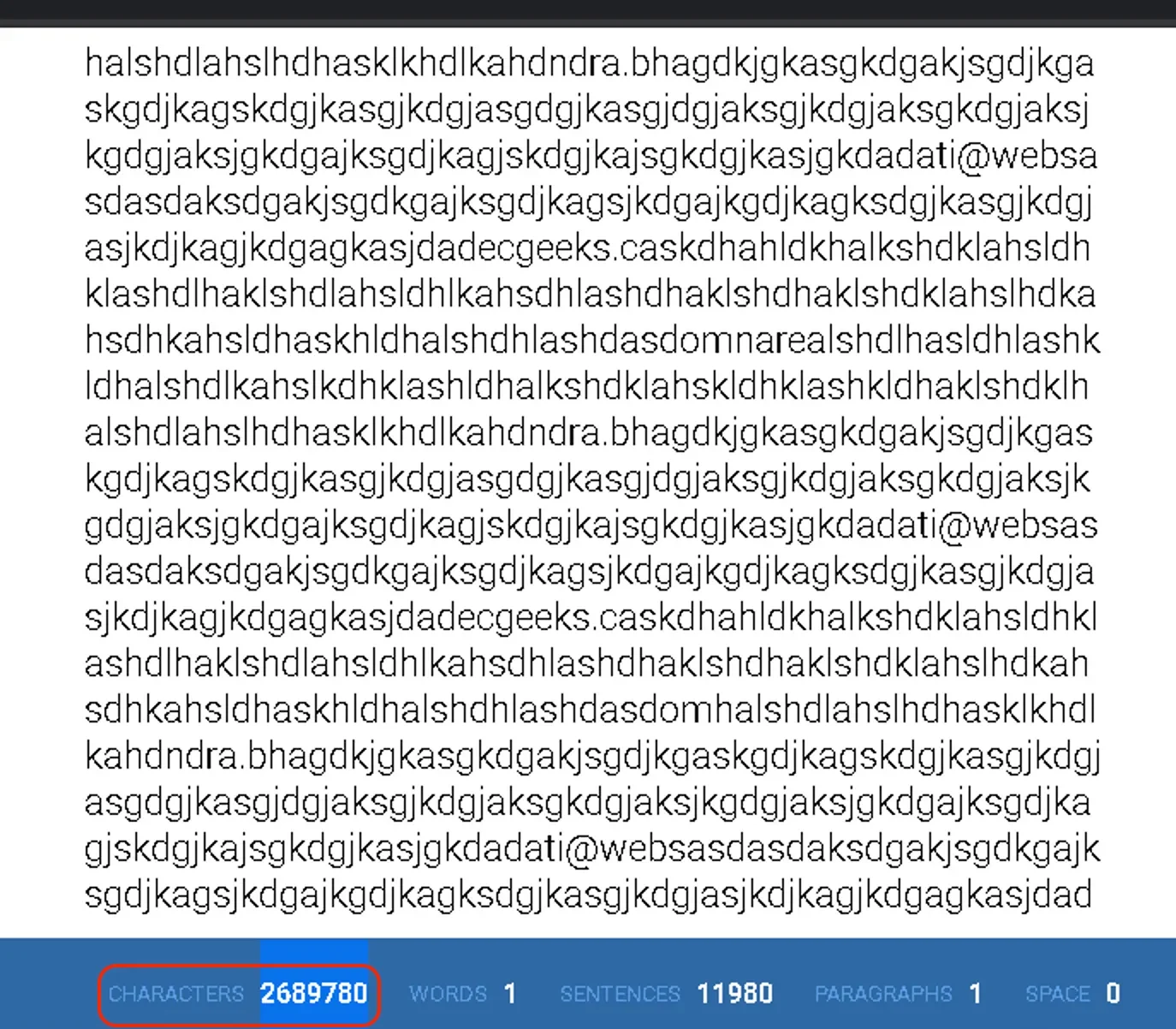
The screenshot shows the character count of the huge value used.
Step 4: many large requests at once
The huge request was sent 30 to 40 times simultaneously. The observations right after were:
- The response time increased to 30, 60 and 90 seconds.
- The server started responding with
500 Internal Server Error, with some private IP disclosed in the body. - The application finally went down.
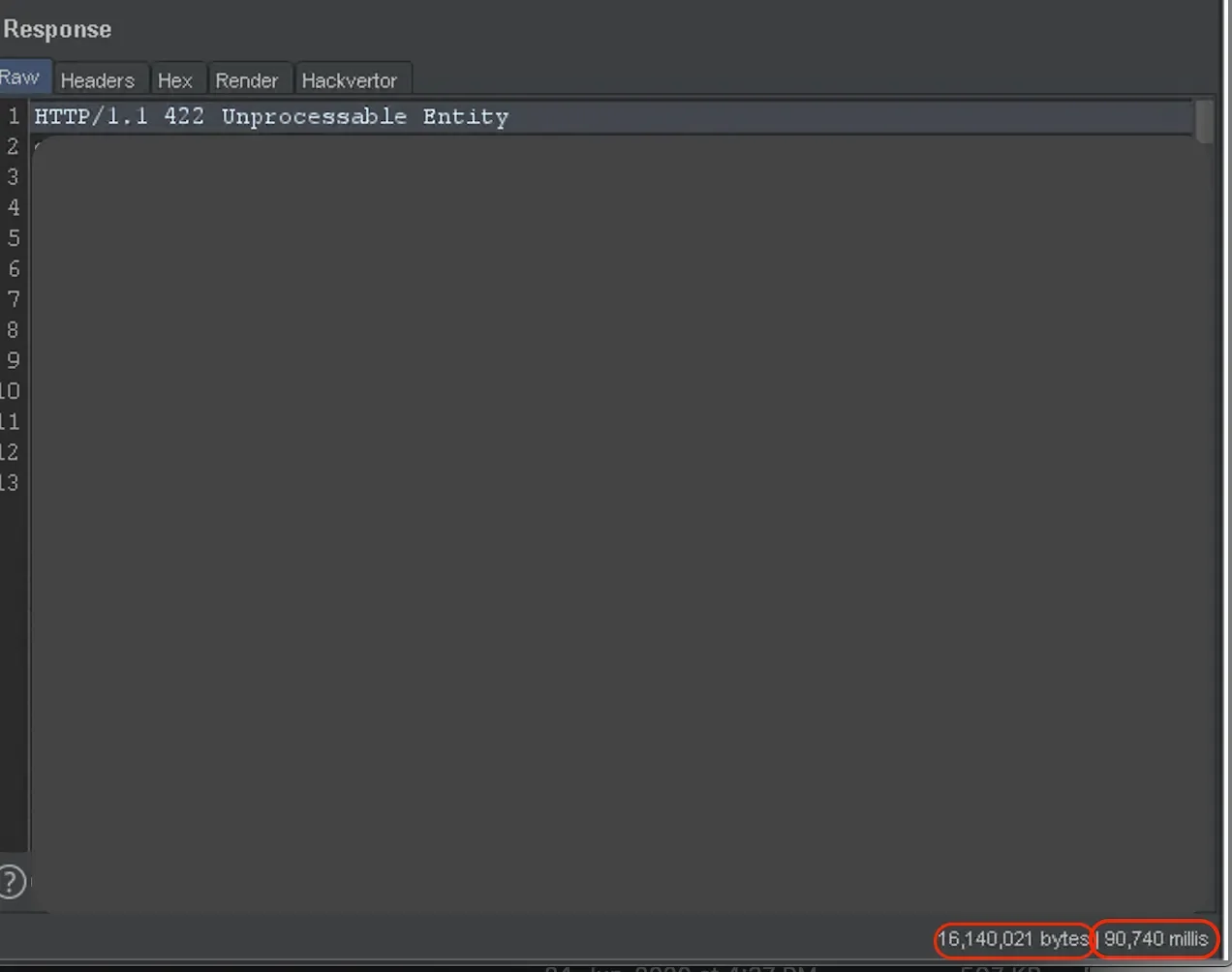
The screenshot shows the server responding after 60 to 90 seconds when multiple such requests were hit simultaneously.

The screenshot shows the server down, indicating a successful DoS attack.
Root cause
The application validates the name value with a regular expression on the server and reflects the value back in the response. There is no validation of the length or size of the parameter value, so an arbitrarily large string is passed to the regex evaluation and then echoed back. The report frames the issue as Regex DoS (ReDoS), and the response time rose with the size of the value in the researcher's tests.
Impact
An authenticated user could take the application down by sending the large request many times at once. The report notes that the issue was rated High severity even though the attack was carried out by an authenticated user, because the DoS was persistent. During the attack the server returned 500 Internal Server Error responses that disclosed private IP addresses in the body.
Fix
Variants to test
- Submit a long but valid-looking value to any field that is regex-validated and reflected, and measure the response time. A positive result is a response time that grows with the length of the value.
- Submit a value containing special characters to trigger the validation error, and check whether the error message discloses the regex. A positive result is a message containing the pattern used for validation.
- Send the large request many times simultaneously and watch for increasing response times,
500responses and private IP disclosure. A positive result is the application becoming unavailable.
What happened, in plain words
A security researcher was testing a website to see whether it could be tricked into running malicious code in a visitor's browser. That kind of attack is called Cross-Site Scripting, and it is not what this story ends up being about. While poking at a form that creates items in the application, the researcher noticed that the server checked the text typed into one field using a pattern-matching rule called a regular expression. The server also had no limit on how long that text could be, and it sent the text straight back in its reply. By sending a very long piece of text, the researcher made the server work harder and harder. By sending many of those long requests at the same time, the researcher made the application stop responding altogether. That is a Denial of Service attack: the service is still there, but nobody can use it.
The report does not name the application or the exact address of the feature. The researcher says the testing data is confidential, so no real screenshots or data are shared.
Some words you will meet
Before the steps, a few everyday comparisons for the terms used below.
- A web application is a program you use through your browser, like an online shop or a project tracker. The heavy work happens on a computer somewhere else, called the server.
- An API is the part of that application that accepts requests in a structured format rather than through a page you click. Think of it as a service counter: you hand over a form with fields filled in, and the counter hands back a result.
- A request is the message your browser (or a tool) sends to the server. A response is the message the server sends back. A POST request is a request that carries data to the server, usually to create or change something.
- JSON is a common way of writing that data as labelled fields, a bit like a very strict shopping list: a name, then a value, then a comma, then the next name.
- A parameter (or field) is one of those labelled values, for example the
nameof the item being created. - A regular expression (regex) is a pattern used to check text, like a template that says which characters are allowed and in what order. A bouncer at a door checking that your name badge has only letters and dots is doing the same job.
- Validation means checking input before using it. Server-side validation means the check happens on the server, not in your browser, so you cannot switch it off.
- Encoding means replacing characters with a safe representation, for example turning a special character into a code so it cannot be mistaken for part of the page.
- Reflecting a value means putting it back into the response, unchanged, so the person who sent it sees it again.
- A proxy is a tool that sits between your browser and the server, letting you look at and change requests before they are sent. Burp is a well-known proxy suite, and Burp Intruder is its component for sending many requests automatically.
- Curl is a command-line tool for sending requests. A bash script is a small program written for the command line.
- Fuzzing means sending lots of varied inputs to see how the application reacts.
- A status code is the three-digit number in a response that says roughly what happened.
400 Bad requestmeans the server did not like the request.422 Unprocessable Entitymeans the request was understood but the data inside failed a check.500 Internal Server Errormeans something broke on the server side. - DoS stands for Denial of Service: making a service unavailable to its normal users. ReDoS is a specific kind, where a regular expression is the thing that gets overwhelmed.
- An authenticated user is someone who has logged in. A persistent problem is one that keeps going rather than clearing up by itself.
The starting point: looking for Cross-Site Scripting
The researcher began by looking for Cross-Site Scripting. The idea behind that search is simple: if a site takes text you typed and puts it into a page without cleaning it, an attacker might get their own instructions into someone else's browser. So the first questions were whether the server accepts special characters in the items being created, and whether it encodes them before using them.
What the researcher found was that the application did run a regex check in the back end. Alphanumeric characters (letters and digits) were allowed. Special characters were Unicode encoded in the response, and the rest of the string was evaluated by the regex. Every attempt to get past the check ended in a disappointing 400 Bad request or 422 Unprocessable Entity.
That is a normal, healthy result for the XSS hunt: the door was shut. But the error messages themselves became interesting.
Finding the weakness
The fields being tested sat in a JSON body of a POST request. The report shows the shape of that body like this:
{ version: “3.111”, metadata: { name: “test+0”, type: “pipe”, repo: “sample” } }
Line by line, in plain words:
- The outer braces hold one object, which is just a bundle of labelled values.
versionis a field holding the text3.111, presumably the version of whatever is being created.metadatais a bundle inside the bundle, holding more fields.nameis the name of the item, heretest+0.typeis set topipeandrepotosample.
When the researcher appended +0 to the value of name, the server answered with 422 Unprocessable Entity. That status code means: I understood your request, but the data failed a check. The surprise was in the body of the response, which revealed the validation message, including the regex itself:
Status: Failure; <some_exception_here> test+0 should consist of lower case alphanumeric characters, ‘-’ or ‘.’, and must start and end with an alphanumeric character (e.g. ‘example.com’, regex used for validation is ‘[a-z0–9]([-a-z0–9]*[a-z0–9])?(.[a-z0–9]([-a-z0–9]*[a-z0–9])?)*’),field:metadata.name}]},code:422}
What this message tells us, piece by piece:
Status: Failuresays the check failed.<some_exception_here>is a placeholder in the report for an internal error detail that the researcher did not reproduce.test+0is the value that was sent, echoed back.- The sentence after it explains the rule: lower case letters and digits, plus
-or., starting and ending with a letter or digit. The example given isexample.com. - The part in brackets is the actual regex used for the check, shown to the outside world.
field:metadata.namesays which field failed, andcode:422repeats the status code.
Two things became clear from this. First, a regex is used to sanitise the input. Second, the value sent is reflected in the response as it is. The server was not only checking the text, it was handing it back.
Why does that matter? Because a reflected value is a value the server has to handle and copy. If there is no limit on its size, the server can be made to do a lot of work for one request. So the next question was whether the length or size of the parameter value was validated. It was not.
Making the server work harder
Step 1: a legitimate but long value
A legitimate but lengthy value was generated and submitted. Legitimate here means it was a valid value rather than a bypass attempt. The server took longer than usual, around 3200ms, which is about 3 seconds, to respond.
Three seconds is not dramatic on its own, but it is a signal. A normal request to a normal form comes back in a fraction of a second. Something in the server was spending time in proportion to the text.
Step 2: ten times the length
The length was increased tenfold. The server responded in 7320ms, about 7 seconds. This confirmed that regardless of the size of the value, the server checks it against the regex and sends the value back in the response.
Think of it like a security guard who reads every letter of every name badge out loud before letting anyone in. A longer badge means a longer wait, and nobody has told the guard to stop at a sensible length.
Step 3: a very large value
The value was increased further, to a character length of 2689780. The server took around 15 to 20 seconds to respond.
The screenshot shows the character count of the huge value used.
At this point one request, from one logged-in user, occupies the server for the better part of twenty seconds. That is the raw material for a Denial of Service: if a handful of these arrive together, the server has no time left for anyone else.
Step 4: many large requests at once
The researcher then needed to send the huge request many times, at the same moment. The report is candid about the practical problems:
- Curl could not handle such a huge request, so a bash script to attack did not work out.
- Burp Intruder was slow, again because of the huge request, and did not work out either.
The remaining options were the Burp Turbo Intruder plugin, which is built for sending requests at high speed, or manually invoking the same or similar requests simultaneously. Either way, the huge request was sent 30 to 40 times at once.
The observations right after were:
- The response time increased to 30, 60 and 90 seconds.
- The server started responding with
500 Internal Server Error, with some private IP disclosed in the body. - The application finally went down.
The screenshot shows the server responding after 60 to 90 seconds when multiple such requests were hit simultaneously.
The screenshot shows the server down, indicating a successful DoS attack.
A 500 Internal Server Error is the server admitting that something broke on its side. The private IP address in the body is an internal address, the kind used inside a private network rather than on the public internet, and it should not be shown to outsiders. It is a small extra leak that came along with the outage.
Why it worked
The application validates the name value with a regular expression on the server and reflects the value back in the response. There is no validation of the length or size of the parameter value, so an arbitrarily large string is passed to the regex evaluation and then echoed back. The report frames the issue as Regex DoS (ReDoS), and the response time rose with the size of the value in the researcher's tests. The report does not show the back-end code.
In everyday terms: the guard reads the badge, and the longer the badge, the more ways there are to read it, so the reading time grows faster than the badge does. Add the copying of the badge back to the visitor, and one request becomes expensive.
What it means in practice
An authenticated user could take the application down by sending the large request many times at once. The report notes that the issue was rated High severity even though the attack was carried out by an authenticated user, because the DoS was persistent. During the attack the server returned 500 Internal Server Error responses that disclosed private IP addresses in the body.
That last point is worth pausing on for a beginner. Many people assume that an attack from a logged-in account is less serious, because the attacker had to get in first. Here the rating was High anyway, because the effect did not clear up on its own: the service stayed down.
What should have been done
Each of those is a small, ordinary engineering habit: cap the size of what you accept, keep patterns simple, and do not repeat user input or internal details back to the sender.
Things to try yourself
- Submit a long but valid-looking value to any field that is regex-validated and reflected, and measure the response time. A positive result is a response time that grows with the length of the value.
- Submit a value containing special characters to trigger the validation error, and check whether the error message discloses the regex. A positive result is a message containing the pattern used for validation.
- Send the large request many times simultaneously and watch for increasing response times,
500responses and private IP disclosure. A positive result is the application becoming unavailable.
Only do this on systems you own or have explicit permission to test. The researcher here kept the details confidential.
Glossary
- API: the part of a web application that accepts structured requests, usually in a format like JSON, rather than through pages you click.
- Authenticated user: someone who has logged in and is recognised by the application.
- Bash script: a small program written for the command line.
- Burp: a suite of tools used to inspect and modify web traffic, commonly used in security testing.
- Burp Intruder: the part of Burp that sends many requests automatically.
- Burp Turbo Intruder: a Burp plugin built for sending requests at high speed.
- Cross-Site Scripting (XSS): an attack where an attacker gets their own instructions into another user's browser through a website that does not clean input properly.
- Curl: a command-line tool for sending requests to servers.
- Denial of Service (DoS): making a service unavailable to its normal users.
- Encoding: replacing characters with a safe representation so they cannot be misread.
- Fuzzing: sending many varied inputs to see how an application reacts.
- JSON: a text format for labelled data, made of names and values in braces.
- Nested quantifier: a part of a regex that repeats inside another repeating part, which can make matching very expensive.
- Parameter: a named field in a request, such as
name. - Persistent: a problem that keeps going rather than clearing up by itself.
- POST request: a request that carries data to the server, usually to create or change something.
- Private IP address: an internal network address, not meant to be reachable from the public internet.
- Proxy: a tool that sits between your browser and a server so you can inspect and change requests.
- Reflection: putting a value sent by the user back into the response unchanged.
- Regex (regular expression): a pattern used to check whether text has the right characters in the right order.
- ReDoS (Regex DoS): a Denial of Service caused by a regular expression becoming very expensive to evaluate.
- Request: the message sent to a server.
- Response: the message a server sends back.
- Server: the computer that runs the application and answers requests.
- Server-side validation: checking input on the server rather than in the browser, so it cannot be switched off by the user.
- Status code: the three-digit number in a response saying roughly what happened, such as
400,422or500. - Unicode: a standard way of representing characters from all writing systems, used when encoding special characters.
- Validation: checking input before using it.
- Web application: a program you use through your browser, with the work done on a server.


